> ## Documentation Index
> Fetch the complete documentation index at: https://docs.deribit.com/llms.txt
> Use this file to discover all available pages before exploring further.
# Security Keys
> Some methods may require additional authorization using Security Keys (depending on the user's account configuration).
Certain API operations require additional security confirmation using **Security Keys**. This applies to sensitive operations such as **withdrawals**, **API key management**, and other security-related account actions. When your account has **Two-Factor Authentication (2FA)** enabled, you must provide a **TOTP (Time-based One-Time Password)** code to complete these operations via the API.
Learn how to set up Two-Factor Authentication (2FA) and Security Keys in your Deribit account through the web interface.
## Overview
When you call an API method that requires **security key authorization**, the server will respond with a special response indicating that additional authorization is needed. Instead of executing the operation immediately, the server returns a response with `security_key_authorization_required` set to `true`, along with a **`challenge`** that must be included in your retry request.
## Process Flow
The security key authorization process follows these steps:
Send your API request as normal. The server will detect if security key authorization is required.
The server responds with security\_key\_authorization\_required: true and provides a challenge that must be used in the retry request.
Generate a TOTP code from your 2FA secret using a TOTP library. The code is valid for 30 seconds.
Resend the original request with authorization\_data (the TOTP code) and the challenge from step 2. The challenge expires after 1 minute.
The server either processes your request or returns an error if the code is invalid. If an error occurs, you must start over from step 1.
## Step-by-Step Example
### Step 1: Initial Request
Send your API request as you normally would:
```json theme={null}
{
"method": "private/list_api_keys",
"params": {}
}
```
### Step 2: Authorization Required Response
The server responds with a **non-error response** indicating that **security key authorization** is required:
```json theme={null}
{
"jsonrpc": "2.0",
"result": {
"security_keys": [
{
"type": "tfa",
"name": "tfa"
}
],
"security_key_authorization_required": true,
"rp_id": "test.deribit.com",
"challenge": "+Di4SKN9VykrSoHlZO2KF3LEyEZF4ih9CZXVuudQiKQ="
}
}
```
**Response Fields:**
* **`security_key_authorization_required`** - Set to `true` when additional authorization is needed
* **`security_keys`** - A list of available security key types. Each object contains:
* **`type`** - The type of security key: `"tfa"` for **TOTP Two-Factor Authentication**
* **`name`** - The name of the security key
* **`rp_id`** - **Relying party identifier** (used with WebAuthn for hardware keys)
* **`challenge`** - A unique challenge string that must be included in your retry request. **Valid for 1 minute only.**
### Step 3: Generate TOTP Code
Generate a **TOTP code** from your **2FA secret**. See the [TOTP Code Generation](#totp-code-generation) section below for code examples in various programming languages.
### Step 4: Retry Request with Authorization
Resend your original request, adding the **`authorization_data`** (your **TOTP code**) and the **`challenge`** from the previous response:
```json theme={null}
{
"id": 88,
"method": "private/list_api_keys",
"params": {
"authorization_data": "602051",
"challenge": "+Di4SKN9VykrSoHlZO2KF3LEyEZF4ih9CZXVuudQiKQ="
}
}
```
**Important Notes:**
* The **`challenge`** must be the **exact value** received in step 2
* The **`authorization_data`** must be the **current TOTP code** (typically **6 digits**)
* The challenge **expires after 1 minute** - if it expires, you must start over from step 1
## TOTP Code Generation
To generate **TOTP codes** programmatically, you need:
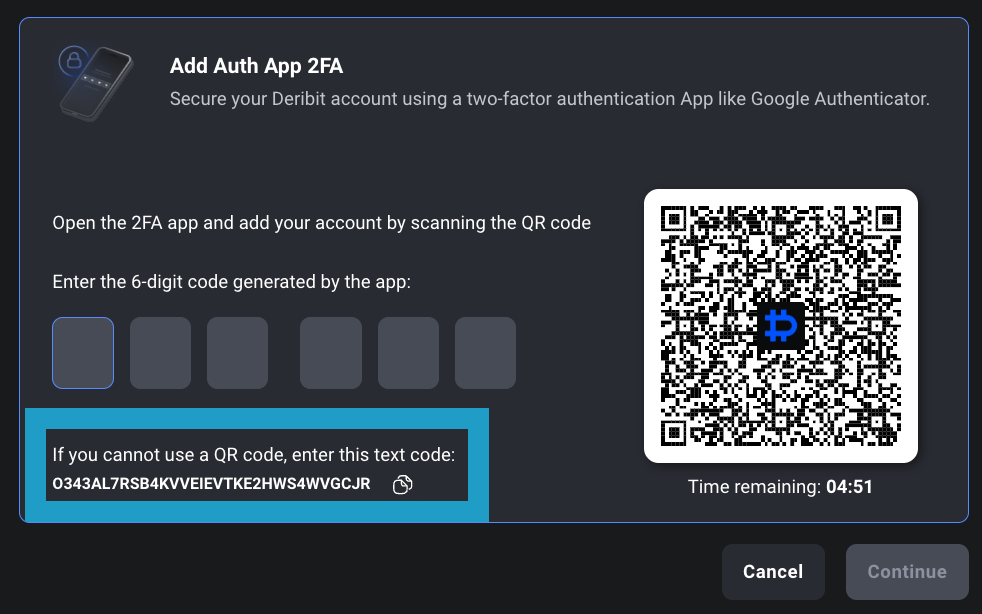
1. Your **2FA secret** (the **base32-encoded secret key** you received when setting up 2FA)
 2. A **TOTP library** for your programming language
The **TOTP algorithm** generates a **6-digit code** that changes every **30 seconds** based on the current time and your secret key.
**Security**: Before implementing TOTP code generation in production, please review the [Security Best Practices for TOTP Implementation](#security-best-practices-for-totp-implementation) section to ensure proper handling of your 2FA secret and secure implementation.
```python theme={null}
import pyotp
import time
# Your 2FA secret (base32 encoded string)
# This is the secret you received when setting up 2FA in your Deribit account
secret = "JBSWY3DPEHPK3PXP" # Replace with your actual secret
# Create TOTP object
totp = pyotp.TOTP(secret)
# Generate current TOTP code
current_code = totp.now()
print(f"Current TOTP code: {current_code}")
# Example: Use in API request
import requests
# First request
response = requests.post("https://test.deribit.com/api/v2/private/list_api_keys",
json={"method": "private/list_api_keys", "params": {}})
result = response.json()
if result.get("result", {}).get("security_key_authorization_required"):
challenge = result["result"]["challenge"]
totp_code = totp.now()
# Retry with authorization
retry_response = requests.post("https://test.deribit.com/api/v2/private/list_api_keys",
json={
"method": "private/list_api_keys",
"params": {
"authorization_data": totp_code,
"challenge": challenge
}
})
```
**Installation:** `pip install pyotp`
```javascript theme={null}
const speakeasy = require('speakeasy');
// Your 2FA secret (base32 encoded string)
// This is the secret you received when setting up 2FA in your Deribit account
const secret = 'JBSWY3DPEHPK3PXP'; // Replace with your actual secret
// Generate current TOTP code
const token = speakeasy.totp({
secret: secret,
encoding: 'base32'
});
console.log(`Current TOTP code: ${token}`);
// Example: Use in API request
const axios = require('axios');
async function makeAuthenticatedRequest() {
// First request
const response = await axios.post('https://test.deribit.com/api/v2/private/list_api_keys', {
method: 'private/list_api_keys',
params: {}
});
if (response.data.result?.security_key_authorization_required) {
const challenge = response.data.result.challenge;
const totpCode = speakeasy.totp({
secret: secret,
encoding: 'base32'
});
// Retry with authorization
const retryResponse = await axios.post('https://test.deribit.com/api/v2/private/list_api_keys', {
method: 'private/list_api_keys',
params: {
authorization_data: totpCode,
challenge: challenge
}
});
return retryResponse.data;
}
return response.data;
}
```
**Installation:** `npm install speakeasy axios`
```cpp theme={null}
#include
#include
#include
#include
#include
#include
#include
// Base32 decoding (simplified - you may want to use a library)
// TOTP generation function
std::string generateTOTP(const std::string& secret, int timeStep = 30) {
// Get current time in seconds
time_t currentTime = time(nullptr);
long counter = currentTime / timeStep;
// Convert counter to 8-byte big-endian
unsigned char counterBytes[8];
for (int i = 7; i >= 0; i--) {
counterBytes[i] = counter & 0xff;
counter >>= 8;
}
// HMAC-SHA1 (you'll need to base32 decode the secret first)
unsigned char hmac[20];
unsigned int hmacLen;
HMAC(EVP_sha1(), secret.c_str(), secret.length(),
counterBytes, 8, hmac, &hmacLen);
// Dynamic truncation
int offset = hmac[19] & 0x0f;
int binary = ((hmac[offset] & 0x7f) << 24) |
((hmac[offset + 1] & 0xff) << 16) |
((hmac[offset + 2] & 0xff) << 8) |
(hmac[offset + 3] & 0xff);
int otp = binary % 1000000;
// Format as 6-digit string
std::ostringstream oss;
oss << std::setfill('0') << std::setw(6) << otp;
return oss.str();
}
int main() {
std::string secret = "JBSWY3DPEHPK3PXP"; // Replace with your actual secret
std::string totpCode = generateTOTP(secret);
std::cout << "Current TOTP code: " << totpCode << std::endl;
return 0;
}
```
**Note:** This is a simplified example. For production use, consider using a library like `liboath` or implementing proper base32 decoding.
## Security Best Practices for TOTP Implementation
**Critical**: When implementing TOTP in production, you must follow security best practices to protect your 2FA secret and prevent unauthorized access.
### Getting Your 2FA Secret
When you set up **2FA** in your Deribit account, you receive a **secret key** (displayed as a **QR code** and as a **text string**). This secret is what you use to generate **TOTP codes**.
**Important Security Notes:**
* The secret is **base32-encoded**
* Store your **2FA secret securely** (e.g., in **environment variables** or a **secure key management system**)
* **Never commit** your 2FA secret to **version control**
- **Never hardcode** your 2FA secret in source code
- Use **environment variables** or **secure configuration files** with restricted permissions
- Consider **dedicated key management systems** (AWS Secrets Manager, HashiCorp Vault, Azure Key Vault, etc.)
- Encrypt secrets at rest if stored in databases or files
- Use **file system permissions** to restrict access (e.g., `chmod 600` on Unix systems)
* Limit access to the 2FA secret to only the processes that need it
* Use **principle of least privilege** - only grant access to necessary services/users
* Implement **audit logging** for access to secrets
* Rotate secrets periodically if your key management system supports it
* Never log or print TOTP codes or secrets in production
* Use **HTTPS/TLS** for all API communications
* Avoid transmitting secrets over unencrypted channels
* Sanitize error messages to prevent secret leakage
* Ensure **accurate system time** using **NTP (Network Time Protocol)**
* TOTP is time-sensitive - clock drift can cause authentication failures
* Monitor and alert on significant time discrepancies
* Consider implementing **time window tolerance** in your code (some libraries support this)
* Implement **rate limiting** on TOTP validation attempts to prevent brute force attacks
* Don't expose detailed error messages that could help attackers
* Log failed authentication attempts for security monitoring
* Implement **account lockout** after multiple failed attempts
* Use **cryptographically secure random number generators** for nonces
* Generate TOTP codes **on-demand** rather than pre-generating and storing them
* Clear sensitive data from memory when no longer needed (where possible)
* Use **secure libraries** that are actively maintained and audited
* Store **encrypted backups** of your 2FA secret in a secure location
* Document your **recovery process** in case of secret loss
* Consider **multiple authorized personnel** for secret management (with proper access controls)
* Test your recovery process regularly
* Monitor for **unusual authentication patterns**
* Set up alerts for **multiple failed TOTP attempts**
* Track and log all security key authorization requests
* Review access logs regularly for suspicious activity
* Use **separate 2FA secrets** for development, staging, and production environments
* Never use production secrets in development or testing
* Implement **environment-specific configuration** management
* Use **secrets management tools** that support environment separation
* Maintain **audit trails** of secret access and TOTP usage
* Follow your organization's **security policies** and compliance requirements
* Regularly review and update your security practices
* Conduct **security audits** of your TOTP implementation
**Example: Secure Secret Loading (Python)**
```python theme={null}
import os
from cryptography.fernet import Fernet
import pyotp
# Option 1: Environment variable (recommended for most cases)
secret = os.getenv('DERIBIT_2FA_SECRET')
if not secret:
raise ValueError("DERIBIT_2FA_SECRET environment variable not set")
# Option 2: Encrypted file with key from environment
# encryption_key = os.getenv('SECRET_ENCRYPTION_KEY')
# cipher = Fernet(encryption_key)
# with open('encrypted_secret.bin', 'rb') as f:
# encrypted_secret = f.read()
# secret = cipher.decrypt(encrypted_secret).decode()
# Create TOTP object
totp = pyotp.TOTP(secret)
# Generate code (only when needed, not stored)
code = totp.now()
# Use code immediately, don't log it
```
## Error Handling
When there is an error related to **Security Key authorization**, the server returns an error response with code **`13668`** and message **`security_key_authorization_error`**. The error includes a **`data.reason`** field indicating the specific issue:
**Possible Error Reasons:**
* **`tfa_code_not_matched`** - The provided **TFA code** was invalid or incorrect
* **`used_tfa_code`** - The provided **TFA code** was already used (**TOTP codes can only be used once**)
* **`challenge_timeout`** - The **challenge has expired** (valid for **1 minute only**)
* **`tfa_code_is_required`** - The **TFA code** was empty or not provided
**Error Response Example:**
```json theme={null}
{
"jsonrpc": "2.0",
"error": {
"message": "security_key_authorization_error",
"data": {
"reason": "tfa_code_not_matched"
},
"code": 13668
}
}
```
When an error occurs, you must **start the process over**:
Send a new **initial request** (without **authorization\_data**)
Receive a new **challenge** from the server
Generate a **fresh TOTP code** (old codes cannot be reused)
Retry with the new **challenge** and **TOTP code**
**Clock Synchronization**: Ensure your server's clock is **synchronized** (**TOTP is time-based**). Use **NTP** if possible.
**Code Reuse**: Each **TOTP code can only be used once**. If a request fails, generate a **new code**.
**Challenge Expiry**: **Challenges expire after 1 minute**. If you're retrying after an error, make sure to get a **fresh challenge**.
Complete reference for all API error codes
2. A **TOTP library** for your programming language
The **TOTP algorithm** generates a **6-digit code** that changes every **30 seconds** based on the current time and your secret key.
**Security**: Before implementing TOTP code generation in production, please review the [Security Best Practices for TOTP Implementation](#security-best-practices-for-totp-implementation) section to ensure proper handling of your 2FA secret and secure implementation.
```python theme={null}
import pyotp
import time
# Your 2FA secret (base32 encoded string)
# This is the secret you received when setting up 2FA in your Deribit account
secret = "JBSWY3DPEHPK3PXP" # Replace with your actual secret
# Create TOTP object
totp = pyotp.TOTP(secret)
# Generate current TOTP code
current_code = totp.now()
print(f"Current TOTP code: {current_code}")
# Example: Use in API request
import requests
# First request
response = requests.post("https://test.deribit.com/api/v2/private/list_api_keys",
json={"method": "private/list_api_keys", "params": {}})
result = response.json()
if result.get("result", {}).get("security_key_authorization_required"):
challenge = result["result"]["challenge"]
totp_code = totp.now()
# Retry with authorization
retry_response = requests.post("https://test.deribit.com/api/v2/private/list_api_keys",
json={
"method": "private/list_api_keys",
"params": {
"authorization_data": totp_code,
"challenge": challenge
}
})
```
**Installation:** `pip install pyotp`
```javascript theme={null}
const speakeasy = require('speakeasy');
// Your 2FA secret (base32 encoded string)
// This is the secret you received when setting up 2FA in your Deribit account
const secret = 'JBSWY3DPEHPK3PXP'; // Replace with your actual secret
// Generate current TOTP code
const token = speakeasy.totp({
secret: secret,
encoding: 'base32'
});
console.log(`Current TOTP code: ${token}`);
// Example: Use in API request
const axios = require('axios');
async function makeAuthenticatedRequest() {
// First request
const response = await axios.post('https://test.deribit.com/api/v2/private/list_api_keys', {
method: 'private/list_api_keys',
params: {}
});
if (response.data.result?.security_key_authorization_required) {
const challenge = response.data.result.challenge;
const totpCode = speakeasy.totp({
secret: secret,
encoding: 'base32'
});
// Retry with authorization
const retryResponse = await axios.post('https://test.deribit.com/api/v2/private/list_api_keys', {
method: 'private/list_api_keys',
params: {
authorization_data: totpCode,
challenge: challenge
}
});
return retryResponse.data;
}
return response.data;
}
```
**Installation:** `npm install speakeasy axios`
```cpp theme={null}
#include
#include
#include
#include
#include
#include
#include
// Base32 decoding (simplified - you may want to use a library)
// TOTP generation function
std::string generateTOTP(const std::string& secret, int timeStep = 30) {
// Get current time in seconds
time_t currentTime = time(nullptr);
long counter = currentTime / timeStep;
// Convert counter to 8-byte big-endian
unsigned char counterBytes[8];
for (int i = 7; i >= 0; i--) {
counterBytes[i] = counter & 0xff;
counter >>= 8;
}
// HMAC-SHA1 (you'll need to base32 decode the secret first)
unsigned char hmac[20];
unsigned int hmacLen;
HMAC(EVP_sha1(), secret.c_str(), secret.length(),
counterBytes, 8, hmac, &hmacLen);
// Dynamic truncation
int offset = hmac[19] & 0x0f;
int binary = ((hmac[offset] & 0x7f) << 24) |
((hmac[offset + 1] & 0xff) << 16) |
((hmac[offset + 2] & 0xff) << 8) |
(hmac[offset + 3] & 0xff);
int otp = binary % 1000000;
// Format as 6-digit string
std::ostringstream oss;
oss << std::setfill('0') << std::setw(6) << otp;
return oss.str();
}
int main() {
std::string secret = "JBSWY3DPEHPK3PXP"; // Replace with your actual secret
std::string totpCode = generateTOTP(secret);
std::cout << "Current TOTP code: " << totpCode << std::endl;
return 0;
}
```
**Note:** This is a simplified example. For production use, consider using a library like `liboath` or implementing proper base32 decoding.
## Security Best Practices for TOTP Implementation
**Critical**: When implementing TOTP in production, you must follow security best practices to protect your 2FA secret and prevent unauthorized access.
### Getting Your 2FA Secret
When you set up **2FA** in your Deribit account, you receive a **secret key** (displayed as a **QR code** and as a **text string**). This secret is what you use to generate **TOTP codes**.
**Important Security Notes:**
* The secret is **base32-encoded**
* Store your **2FA secret securely** (e.g., in **environment variables** or a **secure key management system**)
* **Never commit** your 2FA secret to **version control**
- **Never hardcode** your 2FA secret in source code
- Use **environment variables** or **secure configuration files** with restricted permissions
- Consider **dedicated key management systems** (AWS Secrets Manager, HashiCorp Vault, Azure Key Vault, etc.)
- Encrypt secrets at rest if stored in databases or files
- Use **file system permissions** to restrict access (e.g., `chmod 600` on Unix systems)
* Limit access to the 2FA secret to only the processes that need it
* Use **principle of least privilege** - only grant access to necessary services/users
* Implement **audit logging** for access to secrets
* Rotate secrets periodically if your key management system supports it
* Never log or print TOTP codes or secrets in production
* Use **HTTPS/TLS** for all API communications
* Avoid transmitting secrets over unencrypted channels
* Sanitize error messages to prevent secret leakage
* Ensure **accurate system time** using **NTP (Network Time Protocol)**
* TOTP is time-sensitive - clock drift can cause authentication failures
* Monitor and alert on significant time discrepancies
* Consider implementing **time window tolerance** in your code (some libraries support this)
* Implement **rate limiting** on TOTP validation attempts to prevent brute force attacks
* Don't expose detailed error messages that could help attackers
* Log failed authentication attempts for security monitoring
* Implement **account lockout** after multiple failed attempts
* Use **cryptographically secure random number generators** for nonces
* Generate TOTP codes **on-demand** rather than pre-generating and storing them
* Clear sensitive data from memory when no longer needed (where possible)
* Use **secure libraries** that are actively maintained and audited
* Store **encrypted backups** of your 2FA secret in a secure location
* Document your **recovery process** in case of secret loss
* Consider **multiple authorized personnel** for secret management (with proper access controls)
* Test your recovery process regularly
* Monitor for **unusual authentication patterns**
* Set up alerts for **multiple failed TOTP attempts**
* Track and log all security key authorization requests
* Review access logs regularly for suspicious activity
* Use **separate 2FA secrets** for development, staging, and production environments
* Never use production secrets in development or testing
* Implement **environment-specific configuration** management
* Use **secrets management tools** that support environment separation
* Maintain **audit trails** of secret access and TOTP usage
* Follow your organization's **security policies** and compliance requirements
* Regularly review and update your security practices
* Conduct **security audits** of your TOTP implementation
**Example: Secure Secret Loading (Python)**
```python theme={null}
import os
from cryptography.fernet import Fernet
import pyotp
# Option 1: Environment variable (recommended for most cases)
secret = os.getenv('DERIBIT_2FA_SECRET')
if not secret:
raise ValueError("DERIBIT_2FA_SECRET environment variable not set")
# Option 2: Encrypted file with key from environment
# encryption_key = os.getenv('SECRET_ENCRYPTION_KEY')
# cipher = Fernet(encryption_key)
# with open('encrypted_secret.bin', 'rb') as f:
# encrypted_secret = f.read()
# secret = cipher.decrypt(encrypted_secret).decode()
# Create TOTP object
totp = pyotp.TOTP(secret)
# Generate code (only when needed, not stored)
code = totp.now()
# Use code immediately, don't log it
```
## Error Handling
When there is an error related to **Security Key authorization**, the server returns an error response with code **`13668`** and message **`security_key_authorization_error`**. The error includes a **`data.reason`** field indicating the specific issue:
**Possible Error Reasons:**
* **`tfa_code_not_matched`** - The provided **TFA code** was invalid or incorrect
* **`used_tfa_code`** - The provided **TFA code** was already used (**TOTP codes can only be used once**)
* **`challenge_timeout`** - The **challenge has expired** (valid for **1 minute only**)
* **`tfa_code_is_required`** - The **TFA code** was empty or not provided
**Error Response Example:**
```json theme={null}
{
"jsonrpc": "2.0",
"error": {
"message": "security_key_authorization_error",
"data": {
"reason": "tfa_code_not_matched"
},
"code": 13668
}
}
```
When an error occurs, you must **start the process over**:
Send a new **initial request** (without **authorization\_data**)
Receive a new **challenge** from the server
Generate a **fresh TOTP code** (old codes cannot be reused)
Retry with the new **challenge** and **TOTP code**
**Clock Synchronization**: Ensure your server's clock is **synchronized** (**TOTP is time-based**). Use **NTP** if possible.
**Code Reuse**: Each **TOTP code can only be used once**. If a request fails, generate a **new code**.
**Challenge Expiry**: **Challenges expire after 1 minute**. If you're retrying after an error, make sure to get a **fresh challenge**.
Complete reference for all API error codes