": { "future": [...], "option": [...] } }` with a lowercase currency key (for example `btc`).
- `"grouped"` — the same nested shape for every tradable settlement currency.
If `currency` is omitted, `currency_pair` is used (default: all pairs). When `currency` is set, `currency_pair` is ignored. `kind` defaults to `"any"` (`future` and `option`); `"spot"`, `"future_combo"`, and `"option_combo"` are not useful filters here.
**📖 Related Article:** [Using the currency Parameter](https://docs.deribit.com/articles/currency-parameter)
[Try in API console](https://test.deribit.com/api_console?method=%2Fpublic%2Fget_expirations)
# public/get_funding_chart_data
Source: https://docs.deribit.com/api-reference/market-data/public-get_funding_chart_data
/specifications/deribit_openapi.json get /public/get_funding_chart_data
Retrieves funding rate chart data points for a PERPETUAL instrument within a given time period. The data is formatted for use in charting applications and includes funding rate values at regular intervals.
Use the `length` parameter to specify the time period for which to retrieve chart data. This method is useful for visualizing funding rate trends over time.
[Try in API console](https://test.deribit.com/api_console?method=%2Fpublic%2Fget_funding_chart_data)
# public/get_funding_rate_history
Source: https://docs.deribit.com/api-reference/market-data/public-get_funding_rate_history
/specifications/deribit_openapi.json get /public/get_funding_rate_history
Retrieves hourly historical funding rate (interest rate) data for a PERPETUAL instrument over a specified time period. Funding rates are periodic payments exchanged between long and short positions in perpetual contracts.
The response includes hourly funding rate values, which can be used to analyze funding rate trends and calculate historical funding costs. This method is applicable only for PERPETUAL instruments.
[Try in API console](https://test.deribit.com/api_console?method=%2Fpublic%2Fget_funding_rate_history)
# public/get_funding_rate_value
Source: https://docs.deribit.com/api-reference/market-data/public-get_funding_rate_value
/specifications/deribit_openapi.json get /public/get_funding_rate_value
Retrieves the funding rate (interest rate) value for a perpetual instrument over a specified time period. Funding rates are periodic payments exchanged between long and short positions in perpetual contracts.
This method is applicable only for PERPETUAL instruments. The funding rate is typically expressed as a percentage and is used to keep the perpetual contract price aligned with the underlying index price.
[Try in API console](https://test.deribit.com/api_console?method=%2Fpublic%2Fget_funding_rate_value)
# public/get_historical_volatility
Source: https://docs.deribit.com/api-reference/market-data/public-get_historical_volatility
/specifications/deribit_openapi.json get /public/get_historical_volatility
Provides historical volatility data for a given cryptocurrency. Historical volatility measures the degree of price variation over a past period and is useful for risk assessment and option pricing.
The response includes volatility statistics calculated from historical price movements. This data can be used for portfolio risk analysis and understanding market conditions.
**📖 Related Article:** [Options Data Collection Best Practices](https://docs.deribit.com/articles/options-data-collection-best-practices)
[Try in API console](https://test.deribit.com/api_console?method=%2Fpublic%2Fget_historical_volatility)
# public/get_index_chart_data
Source: https://docs.deribit.com/api-reference/market-data/public-get_index_chart_data
/specifications/deribit_openapi.json get /public/get_index_chart_data
Returns historical price index chart data for the specified index name and time range. The data is formatted for use in charting applications and shows price index values over time.
Use the `range` parameter to specify the time period for which to retrieve chart data. This method is useful for visualizing price index trends and historical movements.
[Try in API console](https://test.deribit.com/api_console?method=%2Fpublic%2Fget_index_chart_data)
# public/get_index_price
Source: https://docs.deribit.com/api-reference/market-data/public-get_index_price
/specifications/deribit_openapi.json get /public/get_index_price
Retrieves the current index price value for a given index name. Index prices are used as reference prices for mark price calculations and settlement.
Use `get_index_price_names` or `get_supported_index_names` to retrieve available index names.
[Try in API console](https://test.deribit.com/api_console?method=%2Fpublic%2Fget_index_price)
# public/get_index_price_names
Source: https://docs.deribit.com/api-reference/market-data/public-get_index_price_names
/specifications/deribit_openapi.json get /public/get_index_price_names
Retrieves the identifiers (names) of all supported price indexes. Price indexes are reference prices used for mark price calculations, settlement, and other market operations.
When the `extended` parameter is set to `true`, the response includes additional information such as whether future combo creation and option combo creation are enabled for each index.
[Try in API console](https://test.deribit.com/api_console?method=%2Fpublic%2Fget_index_price_names)
# public/get_instrument
Source: https://docs.deribit.com/api-reference/market-data/public-get_instrument
/specifications/deribit_openapi.json get /public/get_instrument
Retrieves detailed information about a specific instrument, including instrument specifications, contract details, tick size, settlement currency, expiration date (for futures and options), strike price (for options), underlying type, and other instrument parameters.
Looks up by `instrument_name`, including combo IDs and expired or archivized instruments that `public/get_instruments` no longer lists. Unknown names fail with `instrument not found`. For live combo legs and combo-book state, use `public/get_combo_details` / `public/get_combos` instead of this method.
`is_active` is true while the order book is visible (`open`, `settlement`, `locked`, or `halted`). It is not the same as tradable: only `state` `open` accepts new orders. After delivery the book becomes `delivered` (`is_active` false) and is later archivized.
Spot instruments omit `settlement_currency` and `settlement_period`. Spot routed to Coinbase Exchange also omit block-trade fields and include `is_cbe_routed` / `is_csr` (present only when `true`). Futures include `max_leverage` and `max_non_default_leverage`. Some USDC spot pairs that support margin loans also include `max_leverage`. Perpetuals still have `expiration_timestamp`.
**📖 Related Article:** [Spot Trading: Deribit and Coinbase-Routed Instruments](https://docs.deribit.com/articles/spot-trading-venues)
[Try in API console](https://test.deribit.com/api_console?method=%2Fpublic%2Fget_instrument)
# public/get_instruments
Source: https://docs.deribit.com/api-reference/market-data/public-get_instruments
/specifications/deribit_openapi.json get /public/get_instruments
Retrieves trading instruments, filtered by `currency` and optional `kind`. Responses are cached for about 1 minute and can be stale relative to live book state.
**Note - This method has distinct API rate limiting requirements:** Sustained rate: 1 request/second. To avoid rate limits, we recommend using either the REST requests for server-cached data or the WebSocket subscription to [instrument_state.{kind}.{currency}](https://docs.deribit.com/subscriptions/market-data/instrumentstatekindcurrency) for real-time updates. For more information, see [Rate Limits](https://docs.deribit.com/articles/rate-limits).
With `expired=false` (default) the list is not limited to tradable books. It includes visible instruments (`open`, `settlement`, `locked`, `halted`) plus inactive non-combo instruments. Inactive combos are omitted; combo kinds (`future_combo`, `option_combo`) return only visible books. `is_active` can therefore be `false` on this default list. Only `state` `open` accepts new orders.
With `expired=true` the list is instruments still in the live table with `state` `delivered` — recently expired, not archivized. Older expired or archivized names are looked up with `public/get_instrument`, not this method.
`currency` matches derivatives by settlement currency: inverse (reversed) contracts settle in the base coin (`BTC` for BTC-PERPETUAL), linear contracts typically settle in the quote coin (`USDC` for BTC_USDC-PERPETUAL). `currency=any` returns every settlement currency.
Spot matching is different. A spot's settlement field is the pair symbol (for example `BTC_USDC`), not `BTC` or `USDC`. When `expired=false` and `kind` is omitted/`any` for a specific currency, the response unions (1) derivatives with that settlement currency and (2) spots whose base or quote is that currency. `kind=spot` with a specific currency matches spots on either side of the pair. `expired=true` does not apply that extra spot union, so recently delivered spots are not returned under `currency=BTC`.
Results are sorted with perpetuals first, then by expiration. Each instrument includes `underlying_type`. Spot routed to Coinbase Exchange includes `is_cbe_routed` / `is_csr`. Set `extended=true` for extra commission and (on futures) margin/perpetual fields that `public/get_instrument` does not return.
**📖 Related Articles:**
- [Using the currency Parameter](https://docs.deribit.com/articles/currency-parameter)
- [Spot Trading: Deribit and Coinbase-Routed Instruments](https://docs.deribit.com/articles/spot-trading-venues)
- [Options Data Collection Best Practices](https://docs.deribit.com/articles/options-data-collection-best-practices)
[Try in API console](https://test.deribit.com/api_console?method=%2Fpublic%2Fget_instruments)
# public/get_last_settlements_by_currency
Source: https://docs.deribit.com/api-reference/market-data/public-get_last_settlements_by_currency
/specifications/deribit_openapi.json get /public/get_last_settlements_by_currency
Retrieves historical settlement, delivery, and bankruptcy events from all instruments within a given currency.
**Settlement vs. delivery:** Settlement is a daily event (at 08:00 UTC) for futures and perpetual positions that converts unrealized profit and loss into realized profit and loss. Option positions do not settle. Delivery is a one-time event that occurs when a futures or options contract expires — any remaining open position is closed at the delivery price. Delivery does not apply to perpetual or spot instruments. Both events take place at 08:00 UTC, which is why they are sometimes conflated.
Results can be filtered by settlement type and timestamp. Use pagination parameters (`count` and `continuation`) to retrieve large settlement histories. This data is useful for analyzing historical contract settlements and understanding market events.
**Note on `profit_loss` and `session_profit_loss`:** Because this is a public endpoint, these fields are **platform-wide aggregates**, not per-account values. `profit_loss` is the sum of realized P&L of all position holders at the settlement price. `session_profit_loss` is the sum of each holder's total session P&L (realized + unrealized) across all participants.
[Try in API console](https://test.deribit.com/api_console?method=%2Fpublic%2Fget_last_settlements_by_currency)
# public/get_last_settlements_by_instrument
Source: https://docs.deribit.com/api-reference/market-data/public-get_last_settlements_by_instrument
/specifications/deribit_openapi.json get /public/get_last_settlements_by_instrument
Retrieves historical settlement, delivery, and bankruptcy events for a specific instrument.
**Settlement vs. delivery:** Settlement is a daily event (at 08:00 UTC) for futures and perpetual positions that converts unrealized profit and loss into realized profit and loss. Option positions do not settle. Delivery is a one-time event that occurs when a futures or options contract expires — any remaining open position is closed at the delivery price. Delivery does not apply to perpetual or spot instruments. Both events take place at 08:00 UTC, which is why they are sometimes conflated.
Results can be filtered by settlement type and timestamp. Use pagination parameters (`count` and `continuation`) to retrieve large settlement histories. This method is useful for tracking settlement history for a specific instrument.
**Note on `profit_loss` and `session_profit_loss`:** Because this is a public endpoint, these fields are **platform-wide aggregates**, not per-account values. `profit_loss` is the sum of realized P&L of all position holders at the settlement price. `session_profit_loss` is the sum of each holder's total session P&L (realized + unrealized) across all participants.
[Try in API console](https://test.deribit.com/api_console?method=%2Fpublic%2Fget_last_settlements_by_instrument)
# public/get_last_trades_by_currency
Source: https://docs.deribit.com/api-reference/market-data/public-get_last_trades_by_currency
/specifications/deribit_openapi.json get /public/get_last_trades_by_currency
Retrieves the latest trades that have occurred for instruments in a specific currency. Returns trade details including price, amount, direction, timestamp, and trade ID for all instruments in the currency.
Results can be filtered by instrument kind and trade ID range or timestamp range. Use the `count` parameter to limit the number of trades returned, and `sorting` to control the order (ascending or descending by trade ID).
**Note:** For currencies with spot instruments routed to Coinbase Exchange, this call is not supported when `kind` is `spot` or `any` — and `any` is the default when `kind` is omitted. A currency counts as routed when it is the base or the quote of a routed pair. Other kinds are unaffected. Use [Get product trades](https://docs.cdp.coinbase.com/api-reference/exchange-api/rest-api/products/get-product-trades) directly for full trade history by instrument.
**📖 Related Articles:**
- [Using the currency Parameter](https://docs.deribit.com/articles/currency-parameter)
- [Spot Trading: Deribit and Coinbase-Routed Instruments](https://docs.deribit.com/articles/spot-trading-venues)
[Try in API console](https://test.deribit.com/api_console?method=%2Fpublic%2Fget_last_trades_by_currency)
# public/get_last_trades_by_currency_and_time
Source: https://docs.deribit.com/api-reference/market-data/public-get_last_trades_by_currency_and_time
/specifications/deribit_openapi.json get /public/get_last_trades_by_currency_and_time
Retrieves the latest trades that have occurred for instruments in a specific currency within a specified time range. Returns trade details including price, amount, direction, timestamp, and trade ID.
Results can be filtered by instrument kind. Use the `count` parameter to limit the number of trades returned, and `sorting` to control the order (ascending or descending by trade ID).
**Note:** For currencies with spot instruments routed to Coinbase Exchange, this call is not supported when `kind` is `spot` or `any` — and `any` is the default when `kind` is omitted. A currency counts as routed when it is the base or the quote of a routed pair. Other kinds are unaffected. Use [Get product trades](https://docs.cdp.coinbase.com/api-reference/exchange-api/rest-api/products/get-product-trades) directly for full trade history by instrument.
**📖 Related Articles:**
- [Using the currency Parameter](https://docs.deribit.com/articles/currency-parameter)
- [Spot Trading: Deribit and Coinbase-Routed Instruments](https://docs.deribit.com/articles/spot-trading-venues)
**Scope:** `trade:read`
[Try in API console](https://test.deribit.com/api_console?method=%2Fpublic%2Fget_last_trades_by_currency_and_time)
# public/get_last_trades_by_instrument
Source: https://docs.deribit.com/api-reference/market-data/public-get_last_trades_by_instrument
/specifications/deribit_openapi.json get /public/get_last_trades_by_instrument
Retrieves the latest trades that have occurred for a specific instrument. Returns trade details including price, amount, direction, timestamp, and trade ID.
Results can be filtered by sequence number range or timestamp range. Use the `count` parameter to limit the number of trades returned, and `sorting` to control the order (ascending or descending by trade ID).
**Note:** For spot instruments routed to Coinbase Exchange, this call is not supported. Use [Get product trades](https://docs.cdp.coinbase.com/api-reference/exchange-api/rest-api/products/get-product-trades) directly for full trade history.
**📖 Related Article:** [Spot Trading: Deribit and Coinbase-Routed Instruments](https://docs.deribit.com/articles/spot-trading-venues)
[Try in API console](https://test.deribit.com/api_console?method=%2Fpublic%2Fget_last_trades_by_instrument)
# public/get_last_trades_by_instrument_and_time
Source: https://docs.deribit.com/api-reference/market-data/public-get_last_trades_by_instrument_and_time
/specifications/deribit_openapi.json get /public/get_last_trades_by_instrument_and_time
Retrieves the latest trades that have occurred for a specific instrument within a specified time range. Returns trade details including price, amount, direction, timestamp, and trade ID.
Use the `count` parameter to limit the number of trades returned, and `sorting` to control the order (ascending or descending by trade ID). This method is useful for analyzing trading activity over specific time periods.
**Note:** For spot instruments routed to Coinbase Exchange, this call is not supported. Use [Get product trades](https://docs.cdp.coinbase.com/api-reference/exchange-api/rest-api/products/get-product-trades) directly for full trade history.
**📖 Related Article:** [Spot Trading: Deribit and Coinbase-Routed Instruments](https://docs.deribit.com/articles/spot-trading-venues)
[Try in API console](https://test.deribit.com/api_console?method=%2Fpublic%2Fget_last_trades_by_instrument_and_time)
# public/get_mark_price_history
Source: https://docs.deribit.com/api-reference/market-data/public-get_mark_price_history
/specifications/deribit_openapi.json get /public/get_mark_price_history
Retrieves 5-minute historical mark price data for an instrument. Mark prices are used for margin calculations and position valuations.
**Note:** Currently, mark price history is available only for a subset of options that participate in volatility index calculations. All other instruments, including futures and perpetuals, will return an empty list.
[Try in API console](https://test.deribit.com/api_console?method=%2Fpublic%2Fget_mark_price_history)
# public/get_order_book
Source: https://docs.deribit.com/api-reference/market-data/public-get_order_book
/specifications/deribit_openapi.json get /public/get_order_book
Retrieves the order book (bids and asks) for a given instrument, along with other market values such as best bid/ask prices, last trade price, mark price, and index price.
The order book depth can be controlled using the `depth` parameter, which accepts values from 1 to 10000. The response includes price levels sorted by price (bids descending, asks ascending).
[Try in API console](https://test.deribit.com/api_console?method=%2Fpublic%2Fget_order_book)
# public/get_order_book_by_instrument_id
Source: https://docs.deribit.com/api-reference/market-data/public-get_order_book_by_instrument_id
/specifications/deribit_openapi.json get /public/get_order_book_by_instrument_id
Retrieves the order book (bids and asks) for a given instrument ID, along with other market values such as best bid/ask prices, last trade price, mark price, and index price.
This method is similar to `get_order_book` but uses instrument ID instead of instrument name. The order book depth can be controlled using the `depth` parameter, which accepts values from 1 to 10000.
[Try in API console](https://test.deribit.com/api_console?method=%2Fpublic%2Fget_order_book_by_instrument_id)
# public/get_supported_index_names
Source: https://docs.deribit.com/api-reference/market-data/public-get_supported_index_names
/specifications/deribit_openapi.json get /public/get_supported_index_names
Retrieves the identifiers (names) of all supported price indexes, optionally filtered by index type. Price indexes are reference prices used for mark price calculations, settlement, and other market operations.
Use the `type` parameter to filter indexes by type (e.g., spot, futures, etc.). This method helps discover available indexes for use with other API methods.
[Try in API console](https://test.deribit.com/api_console?method=%2Fpublic%2Fget_supported_index_names)
# public/get_trade_volumes
Source: https://docs.deribit.com/api-reference/market-data/public-get_trade_volumes
/specifications/deribit_openapi.json get /public/get_trade_volumes
Retrieves aggregated 24-hour trade volumes for different instrument types and currencies. The volume statistics include all executed trades across the platform.
**Note:** Position moves are not included in this volume. Block trades and Block RFQ trades are included in the volume calculations.
Use the `extended` parameter to include additional volume statistics and breakdowns.
**Note:** For currencies with spot instruments routed to Coinbase Exchange, `spot_volume` is omitted, as are `spot_volume_7d` and `spot_volume_30d` when `extended` is used. Use [Get all product volume](https://docs.cdp.coinbase.com/api-reference/exchange-api/rest-api/products/get-all-product-volume) for venue spot volume.
**📖 Related Article:** [Spot Trading: Deribit and Coinbase-Routed Instruments](https://docs.deribit.com/articles/spot-trading-venues)
[Try in API console](https://test.deribit.com/api_console?method=%2Fpublic%2Fget_trade_volumes)
# public/get_tradingview_chart_data
Source: https://docs.deribit.com/api-reference/market-data/public-get_tradingview_chart_data
/specifications/deribit_openapi.json get /public/get_tradingview_chart_data
Retrieves publicly available market data formatted for generating TradingView-compatible candle charts. The data includes open, high, low, close (OHLC) prices and volume for specified time intervals.
Use the `chart_resolution` parameter to specify the candle interval (e.g., 1m, 5m, 1h, 1d). This method provides the standard format used by TradingView and other charting platforms.
**Note:** For spot instruments routed to Coinbase Exchange, this call is not supported. Use [Get product candles](https://docs.cdp.coinbase.com/api-reference/exchange-api/rest-api/products/get-product-candles) instead.
**📖 Related Article:** [Spot Trading: Deribit and Coinbase-Routed Instruments](https://docs.deribit.com/articles/spot-trading-venues)
[Try in API console](https://test.deribit.com/api_console?method=%2Fpublic%2Fget_tradingview_chart_data)
# public/get_volatility_index_data
Source: https://docs.deribit.com/api-reference/market-data/public-get_volatility_index_data
/specifications/deribit_openapi.json get /public/get_volatility_index_data
Retrieves volatility index (VIX) chart data formatted as candles. Volatility indexes measure market expectations of future volatility and are useful for risk assessment and trading strategies.
Use the `vix_resolution` parameter to specify the candle interval. The data shows historical volatility index values over time and is formatted for use in charting applications.
**📖 Related Article:** [Options Data Collection Best Practices](https://docs.deribit.com/articles/options-data-collection-best-practices)
[Try in API console](https://test.deribit.com/api_console?method=%2Fpublic%2Fget_volatility_index_data)
# public/ticker
Source: https://docs.deribit.com/api-reference/market-data/public-ticker
/specifications/deribit_openapi.json get /public/ticker
Retrieves the ticker (24-hour statistics) for a specific instrument. The ticker includes the last trade price, best bid/ask prices, 24-hour high/low, 24-hour volume, open interest, mark price, and other market statistics.
This is a lightweight method for getting current market data for a single instrument. For real-time updates, consider using WebSocket subscriptions to ticker channels.
**Note:** For spot instruments routed to Coinbase Exchange, `volume_notional` and `volume_usd` are omitted from `stats`.
**📖 Related Articles:**
- [Spot Trading: Deribit and Coinbase-Routed Instruments](https://docs.deribit.com/articles/spot-trading-venues)
- [Options Data Collection Best Practices](https://docs.deribit.com/articles/options-data-collection-best-practices)
[Try in API console](https://test.deribit.com/api_console?method=%2Fpublic%2Fticker)
# private/disable_cancel_on_disconnect
Source: https://docs.deribit.com/api-reference/session-management/private-disable_cancel_on_disconnect
/specifications/deribit_openapi.json get /private/disable_cancel_on_disconnect
Disable Cancel On Disconnect for the connection.
When change is applied for the account, then every newly opened connection will start with **inactive** Cancel on Disconnect.
**WebSocket Only:** This method is designed exclusively for WebSocket connections. Attempting to use it via REST/HTTP will result in an error response.
**Scope:** `account:read_write`
[Try in API console](https://test.deribit.com/api_console?method=%2Fprivate%2Fdisable_cancel_on_disconnect)
# private/enable_cancel_on_disconnect
Source: https://docs.deribit.com/api-reference/session-management/private-enable_cancel_on_disconnect
/specifications/deribit_openapi.json get /private/enable_cancel_on_disconnect
Enable Cancel On Disconnect for the connection. After enabling, all orders created via this connection will be automatically cancelled when the connection is closed.
Cancel is triggered in the following cases: when the TCP connection is properly terminated, when the connection is closed due to 10 minutes of inactivity, or when a heartbeat detects a disconnection. To reduce the inactivity timeout, consider using [public/set_heartbeat](https://docs.deribit.com/api-reference/session-management/public-set_heartbeat).
**Note:** If the connection is gracefully closed using [private/logout](https://docs.deribit.com/api-reference/authentication/private-logout), cancel-on-disconnect will **not** be triggered.
**Notice:** Cancel-on-Disconnect does not affect orders created by other connections - they will remain active! When change is applied on the `account` scope, then every newly opened connection will start with **active** Cancel on Disconnect.
**WebSocket Only:** This method is designed exclusively for WebSocket connections. Attempting to use it via REST/HTTP will result in an error response.
**Scope:** `account:read_write`
[Try in API console](https://test.deribit.com/api_console?method=%2Fprivate%2Fenable_cancel_on_disconnect)
# private/get_cancel_on_disconnect
Source: https://docs.deribit.com/api-reference/session-management/private-get_cancel_on_disconnect
/specifications/deribit_openapi.json get /private/get_cancel_on_disconnect
Read current Cancel On Disconnect configuration for the account.
**Scope:** `account:read`
[Try in API console](https://test.deribit.com/api_console?method=%2Fprivate%2Fget_cancel_on_disconnect)
# public/disable_heartbeat
Source: https://docs.deribit.com/api-reference/session-management/public-disable_heartbeat
/specifications/deribit_openapi.json get /public/disable_heartbeat
Stop sending heartbeat messages. This method takes no parameters.
**WebSocket Only:** This method is designed exclusively for WebSocket connections. Attempting to use it via REST/HTTP will result in an error response.
[Try in API console](https://test.deribit.com/api_console?method=%2Fpublic%2Fdisable_heartbeat)
# public/set_heartbeat
Source: https://docs.deribit.com/api-reference/session-management/public-set_heartbeat
/specifications/deribit_openapi.json get /public/set_heartbeat
Signals the WebSocket connection to send and request heartbeats. Heartbeats can be used to detect stale connections.
When heartbeats have been set up, the API server will send `heartbeat` messages and `test_request` messages. Your software should respond to `test_request` messages by sending a `/api/v2/public/test` request. If your software fails to do so, the API server will immediately close the connection. If your account is configured to cancel on disconnect, any orders opened over the connection will be cancelled.
**WebSocket Only:** This method is designed exclusively for WebSocket connections. Attempting to use it via REST/HTTP will result in an error response.
[Try in API console](https://test.deribit.com/api_console?method=%2Fpublic%2Fset_heartbeat)
# private/subscribe
Source: https://docs.deribit.com/api-reference/subscription-management/private-subscribe
/specifications/deribit_openapi.json get /private/subscribe
Subscribe to one or more channels. The name of the channel determines what information will be provided, and in what form.
For a complete list of available subscription channels and their notification formats, see [Notifications and Subscriptions](https://docs.deribit.com/articles/notifications).
**Note - This method has distinct API rate limiting requirements:** Sustained rate: ~3.3 requests/second. For more information, see [Rate Limits](https://docs.deribit.com/articles/rate-limits).
**📖 Related Articles:**
- [Market Data Collection Best Practices](https://docs.deribit.com/articles/market-data-collection-best-practices)
- [Options Data Collection Best Practices](https://docs.deribit.com/articles/options-data-collection-best-practices)
[Try in API console](https://test.deribit.com/api_console?method=%2Fprivate%2Fsubscribe)
# private/unsubscribe
Source: https://docs.deribit.com/api-reference/subscription-management/private-unsubscribe
/specifications/deribit_openapi.json get /private/unsubscribe
Unsubscribe from one or more channels. The response contains only the channels that were successfully unsubscribed in this request.
For a complete list of available subscription channels and their notification formats, see [Notifications and Subscriptions](https://docs.deribit.com/articles/notifications).
**Note:** The `result` field in the response contains only the channels that were successfully processed and unsubscribed from this specific request. It does not include all previously subscribed topics. If a channel in the request is invalid, not subscribed, or fails validation, it will not appear in the result.
[Try in API console](https://test.deribit.com/api_console?method=%2Fprivate%2Funsubscribe)
# private/unsubscribe_all
Source: https://docs.deribit.com/api-reference/subscription-management/private-unsubscribe_all
/specifications/deribit_openapi.json get /private/unsubscribe_all
Unsubscribe from all the channels subscribed so far. This method takes no parameters.
[Try in API console](https://test.deribit.com/api_console?method=%2Fprivate%2Funsubscribe_all)
# public/subscribe
Source: https://docs.deribit.com/api-reference/subscription-management/public-subscribe
/specifications/deribit_openapi.json get /public/subscribe
Subscribe to one or more channels. This is the same method as `/private/subscribe`, but it can only be used for 'public' channels.
For a complete list of available subscription channels and their notification formats, see [Notifications and Subscriptions](https://docs.deribit.com/articles/notifications).
**Note - This method has distinct API rate limiting requirements:** Sustained rate: ~3.3 requests/second. For more information, see [Rate Limits](https://docs.deribit.com/articles/rate-limits).
**📖 Related Articles:**
- [Market Data Collection Best Practices](https://docs.deribit.com/articles/market-data-collection-best-practices)
- [Options Data Collection Best Practices](https://docs.deribit.com/articles/options-data-collection-best-practices)
[Try in API console](https://test.deribit.com/api_console?method=%2Fpublic%2Fsubscribe)
# public/unsubscribe
Source: https://docs.deribit.com/api-reference/subscription-management/public-unsubscribe
/specifications/deribit_openapi.json get /public/unsubscribe
Unsubscribe from one or more channels. The response contains only the channels that were successfully unsubscribed in this request.
For a complete list of available subscription channels and their notification formats, see [Notifications and Subscriptions](https://docs.deribit.com/articles/notifications).
**Note:** The `result` field in the response contains only the channels that were successfully processed and unsubscribed from this specific request. It does not include all previously subscribed topics. If a channel in the request is invalid, not subscribed, or fails validation, it will not appear in the result.
[Try in API console](https://test.deribit.com/api_console?method=%2Fpublic%2Funsubscribe)
# public/unsubscribe_all
Source: https://docs.deribit.com/api-reference/subscription-management/public-unsubscribe_all
/specifications/deribit_openapi.json get /public/unsubscribe_all
Unsubscribe from all the channels subscribed so far. This method takes no parameters.
[Try in API console](https://test.deribit.com/api_console?method=%2Fpublic%2Funsubscribe_all)
# public/get_time
Source: https://docs.deribit.com/api-reference/supporting/public-get_time
/specifications/deribit_openapi.json get /public/get_time
Retrieves the current time (in milliseconds). This API endpoint can be used to check the clock skew between your software and Deribit's systems.
[Try in API console](https://test.deribit.com/api_console?method=%2Fpublic%2Fget_time)
# public/hello
Source: https://docs.deribit.com/api-reference/supporting/public-hello
/specifications/deribit_openapi.json get /public/hello
Method used to introduce the client software connected to Deribit platform over websocket. Provided data may have an impact on the maintained connection and will be collected for internal statistical purposes. In response, Deribit will also introduce itself.
[Try in API console](https://test.deribit.com/api_console?method=%2Fpublic%2Fhello)
# public/status
Source: https://docs.deribit.com/api-reference/supporting/public-status
/specifications/deribit_openapi.json get /public/status
Method used to get information about locked currencies
[Try in API console](https://test.deribit.com/api_console?method=%2Fpublic%2Fstatus)
# public/test
Source: https://docs.deribit.com/api-reference/supporting/public-test
/specifications/deribit_openapi.json get /public/test
Tests the connection to the API server, and returns its version. You can use this to make sure the API is reachable, and matches the expected version.
[Try in API console](https://test.deribit.com/api_console?method=%2Fpublic%2Ftest)
# private/buy
Source: https://docs.deribit.com/api-reference/trading/private-buy
/specifications/deribit_openapi.json get /private/buy
Places a buy order for an instrument. Supports various order types including limit, market, stop, and advanced order types (stop-limit, take-profit, take-profit-limit, trailing-stop, etc.).
You can specify order parameters such as price, quantity, time-in-force, post-only, reduce-only, and trigger conditions. Orders can be labeled for easier management and tracking.
**Note:** For spot orders routed to Coinbase Exchange, fills come back asynchronously. It is recommended to receive fills from the `user.trades` channel.
**📖 Related Articles:**
- [Order Management Best Practices](https://docs.deribit.com/articles/order-management-best-practices)
- [Spot Trading: Deribit and Coinbase-Routed Instruments](https://docs.deribit.com/articles/spot-trading-venues)
**Scope:** `trade:read_write`
[Try in API console](https://test.deribit.com/api_console?method=%2Fprivate%2Fbuy)
# private/cancel
Source: https://docs.deribit.com/api-reference/trading/private-cancel
/specifications/deribit_openapi.json get /private/cancel
Cancels a specific order identified by its order ID. The order must be open (not yet filled or cancelled) to be cancelled successfully.
Once cancelled, the order is removed from the order book and cannot be restored. Any unfilled portion of the order will be cancelled.
**Scope:** `trade:read_write`
[Try in API console](https://test.deribit.com/api_console?method=%2Fprivate%2Fcancel)
# private/cancel_all
Source: https://docs.deribit.com/api-reference/trading/private-cancel_all
/specifications/deribit_openapi.json get /private/cancel_all
Cancels all open orders and trigger orders for the authenticated account across all currencies and instrument kinds. This is a bulk cancellation operation useful for quickly clearing all active orders.
Use the `detailed` parameter to receive a list of all cancelled orders. The `freeze_quotes` parameter can be used to freeze quotes instead of cancelling them.
Set `include_starbase_orders` to `true` to also cancel the subaccount's Starbase direct-access open orders; the number cancelled is included in the returned cancelled-order count. This flag cannot be combined with `detailed`, and `freeze_quotes` is not enforced for Starbase orders.
**Note:** This operation cannot be undone. All open orders will be permanently cancelled.
**Scope:** `trade:read_write`
[Try in API console](https://test.deribit.com/api_console?method=%2Fprivate%2Fcancel_all)
# private/cancel_all_by_currency
Source: https://docs.deribit.com/api-reference/trading/private-cancel_all_by_currency
/specifications/deribit_openapi.json get /private/cancel_all_by_currency
Cancels all open orders for a specific currency. This is useful for quickly clearing all orders across multiple instruments in a currency.
Orders can be optionally filtered by instrument kind (future, option, etc.) and/or order type (limit, market, stop, etc.). Use the `detailed` parameter to receive a list of all cancelled orders.
**Scope:** `trade:read_write`
[Try in API console](https://test.deribit.com/api_console?method=%2Fprivate%2Fcancel_all_by_currency)
# private/cancel_all_by_currency_pair
Source: https://docs.deribit.com/api-reference/trading/private-cancel_all_by_currency_pair
/specifications/deribit_openapi.json get /private/cancel_all_by_currency_pair
Cancels all open orders for a specific currency pair. This is useful for quickly clearing all orders across instruments in a currency pair.
Orders can be optionally filtered by instrument kind (future, option, etc.) and/or order type (limit, market, stop, etc.). Use the `detailed` parameter to receive a list of all cancelled orders.
**Scope:** `trade:read_write`
[Try in API console](https://test.deribit.com/api_console?method=%2Fprivate%2Fcancel_all_by_currency_pair)
# private/cancel_all_by_instrument
Source: https://docs.deribit.com/api-reference/trading/private-cancel_all_by_instrument
/specifications/deribit_openapi.json get /private/cancel_all_by_instrument
Cancels all open orders for a specific instrument. This is useful for quickly clearing all orders for a single instrument.
Orders can be optionally filtered by order type (limit, market, stop, etc.). Use the `detailed` parameter to receive a list of all cancelled orders. The `include_combos` parameter can be used to include combo orders in the cancellation.
**Scope:** `trade:read_write`
[Try in API console](https://test.deribit.com/api_console?method=%2Fprivate%2Fcancel_all_by_instrument)
# private/cancel_all_by_kind_or_type
Source: https://docs.deribit.com/api-reference/trading/private-cancel_all_by_kind_or_type
/specifications/deribit_openapi.json get /private/cancel_all_by_kind_or_type
Cancels all open orders in one or more currencies, optionally filtered by instrument kind and/or order type. This provides flexible bulk cancellation across multiple currencies.
Specify one or more currencies, and optionally filter by instrument kind (future, option, etc.) and/or order type (limit, market, stop, etc.). Use the `detailed` parameter to receive a list of all cancelled orders.
`include_starbase_orders` only applies to a full cancel-all (order type `all`); it is ignored when cancelling a specific order type such as `quote`.
**Scope:** `trade:read_write`
[Try in API console](https://test.deribit.com/api_console?method=%2Fprivate%2Fcancel_all_by_kind_or_type)
# private/cancel_by_label
Source: https://docs.deribit.com/api-reference/trading/private-cancel_by_label
/specifications/deribit_openapi.json get /private/cancel_by_label
Cancels all orders (including trigger orders) that have a specific label. This is useful for managing groups of related orders that share the same label.
Orders can be cancelled across all currencies or filtered to a specific currency. When cancelling by currency, the currency queue is used for processing.
**Rate Limits:** When called without the `currency` parameter, this method is subject to `cancel_all` rate limits. Different rate limit values may apply for per-currency cancels versus calls without providing the currency parameter.
**Scope:** `trade:read_write`
[Try in API console](https://test.deribit.com/api_console?method=%2Fprivate%2Fcancel_by_label)
# private/cancel_quotes
Source: https://docs.deribit.com/api-reference/trading/private-cancel_quotes
/specifications/deribit_openapi.json get /private/cancel_quotes
Cancels quotes (mass quote orders) based on various criteria. This method provides flexible options for cancelling quotes:
- `delta`: Cancels quotes within a delta range defined by `min_delta` and `max_delta`
- `quote_set_id`: Cancels quotes by a specific Quote Set identifier
- `instrument`: Cancels all quotes associated with a particular instrument
- `kind`: Cancels all quotes for a certain instrument kind
- `currency`: Cancels all quotes in a specified currency
- `currency_pair`: Cancels all quotes in a specified currency pair
- `all`: Cancels all quotes
Use the `detailed` parameter to receive a list of all cancelled quotes.
**Scope:** `trade:read_write`
[Try in API console](https://test.deribit.com/api_console?method=%2Fprivate%2Fcancel_quotes)
# private/close_position
Source: https://docs.deribit.com/api-reference/trading/private-close_position
/specifications/deribit_openapi.json get /private/close_position
Places a reduce-only order to close an existing position. Reduce-only orders can only reduce or close a position; they cannot open a new position or increase an existing one.
You can specify whether to use a market or limit order. If using a limit order, provide the price. The order will automatically be set to reduce-only to ensure it only closes the position.
**Scope:** `trade:read_write`
[Try in API console](https://test.deribit.com/api_console?method=%2Fprivate%2Fclose_position)
# private/edit
Source: https://docs.deribit.com/api-reference/trading/private-edit
/specifications/deribit_openapi.json get /private/edit
Modifies an existing order by changing its price, amount, and/or other properties such as time-in-force, post-only, reduce-only, trigger conditions, or advanced order type.
The order is identified by its order ID. Only open orders can be edited. Changes take effect immediately and may result in the order being filled if the new price matches the market.
**Note:** For spot orders routed to Coinbase Exchange, fills come back asynchronously. It is recommended to receive fills from the `user.trades` channel.
**📖 Related Articles:**
- [Order Management Best Practices](https://docs.deribit.com/articles/order-management-best-practices)
- [Spot Trading: Deribit and Coinbase-Routed Instruments](https://docs.deribit.com/articles/spot-trading-venues)
**Scope:** `trade:read_write`
[Try in API console](https://test.deribit.com/api_console?method=%2Fprivate%2Fedit)
# private/edit_by_label
Source: https://docs.deribit.com/api-reference/trading/private-edit_by_label
/specifications/deribit_openapi.json get /private/edit_by_label
Modifies an order identified by its label. This method works only when there is exactly one open order with the specified label.
You can change the order's price, amount, and/or other properties such as time-in-force, post-only, reduce-only, trigger conditions, or advanced order type. Changes take effect immediately.
**Note:** For spot orders routed to Coinbase Exchange, fills come back asynchronously. It is recommended to receive fills from the `user.trades` channel.
**📖 Related Articles:**
- [Order Management Best Practices](https://docs.deribit.com/articles/order-management-best-practices)
- [Spot Trading: Deribit and Coinbase-Routed Instruments](https://docs.deribit.com/articles/spot-trading-venues)
**Scope:** `trade:read_write`
[Try in API console](https://test.deribit.com/api_console?method=%2Fprivate%2Fedit_by_label)
# private/get_margins
Source: https://docs.deribit.com/api-reference/trading/private-get_margins
/specifications/deribit_openapi.json get /private/get_margins
Calculates margin requirements for a hypothetical order on a given instrument. Returns initial margin and maintenance margin for the specified instrument, quantity, and price.
This method is useful for estimating margin requirements before placing an order, helping to ensure sufficient funds are available and understanding the margin impact of potential trades.
For spot instruments, `amount_type` selects whether `amount` is a base currency quantity (fees charged on top) or a total quote currency spend (fees included).
**📖 Related Article:** [Using the currency Parameter](https://docs.deribit.com/articles/currency-parameter)
**Scope:** `trade:read`
[Try in API console](https://test.deribit.com/api_console?method=%2Fprivate%2Fget_margins)
# private/get_mmp_config
Source: https://docs.deribit.com/api-reference/trading/private-get_mmp_config
/specifications/deribit_openapi.json get /private/get_mmp_config
Retrieves Market Maker Protection (MMP) configuration for an index. Returns all currently active MMP parameters for the selected index, including the interval, `frozen_time`, quantity/delta/vega limits, and `max_quote_quantity`.
If the `index_name` parameter is not provided, a list of all MMP configurations is returned. An empty list means no MMP configuration exists. This method is useful for verifying your configuration or confirming applied updates.
For Mass Quotes, specify the `mmp_group` parameter to retrieve configuration for a specific MMP group. If no group is provided, returns configuration for regular orders. Set `block_rfq` to `true` to retrieve MMP configuration for Block RFQ (requires `block_rfq:read` scope).
Each entry in the response includes an `id` field (integer) that uniquely identifies the MMP group. This integer ID is the programmatic identifier for the group and can be used to reference it in contexts where the string `mmp_group` name is not accepted. Entries that have no `mmp_group` name in the response correspond to the orders MMP group (the default group).
**📖 Related Article:** [Market Maker Protection API Configuration](https://docs.deribit.com/articles/market-maker-protection)
**Scope:** `trade:read` or `block_rfq:read` (when `block_rfq` = `true`)
[Try in API console](https://test.deribit.com/api_console?method=%2Fprivate%2Fget_mmp_config)
# private/get_mmp_status
Source: https://docs.deribit.com/api-reference/trading/private-get_mmp_status
/specifications/deribit_openapi.json get /private/get_mmp_status
Retrieves Market Maker Protection (MMP) status for a triggered index or MMP group. Returns the live MMP state including whether MMP is enabled or triggered, remaining frozen time (if triggered), whether quoting is currently allowed, and any active freeze conditions.
If the `index_name` parameter is not provided, a list of all triggered MMP statuses is returned. This method lets you track whether protection is active and when quoting will resume.
For Mass Quotes, specify the `mmp_group` parameter to check status for a specific MMP group. Set `block_rfq` to `true` to retrieve MMP status for Block RFQ (requires `block_rfq:read` scope).
**📖 Related Article:** [Market Maker Protection API Configuration](https://docs.deribit.com/articles/market-maker-protection)
**Scope:** `trade:read` or `block_rfq:read` (when `block_rfq` = `true`)
[Try in API console](https://test.deribit.com/api_console?method=%2Fprivate%2Fget_mmp_status)
# private/get_open_orders
Source: https://docs.deribit.com/api-reference/trading/private-get_open_orders
/specifications/deribit_openapi.json get /private/get_open_orders
Retrieves a list of all open orders for the authenticated account across all currencies. Open orders are orders that have been placed but not yet filled or cancelled.
Results can be filtered by instrument kind and order type. This method provides a comprehensive view of all active orders.
**Scope:** `trade:read`
[Try in API console](https://test.deribit.com/api_console?method=%2Fprivate%2Fget_open_orders)
# private/get_open_orders_by_currency
Source: https://docs.deribit.com/api-reference/trading/private-get_open_orders_by_currency
/specifications/deribit_openapi.json get /private/get_open_orders_by_currency
Retrieves a list of all open orders for a specific currency. Open orders are orders that have been placed but not yet filled or cancelled.
Results can be filtered by instrument kind and order type. This method provides a view of all active orders within a currency.
**📖 Related Article:** [Using the currency Parameter](https://docs.deribit.com/articles/currency-parameter)
**Scope:** `trade:read`
[Try in API console](https://test.deribit.com/api_console?method=%2Fprivate%2Fget_open_orders_by_currency)
# private/get_open_orders_by_instrument
Source: https://docs.deribit.com/api-reference/trading/private-get_open_orders_by_instrument
/specifications/deribit_openapi.json get /private/get_open_orders_by_instrument
Retrieves a list of all open orders for a specific instrument. Open orders are orders that have been placed but not yet filled or cancelled.
Results can be filtered by order type. This method is useful for checking active orders for a particular instrument.
**Scope:** `trade:read`
[Try in API console](https://test.deribit.com/api_console?method=%2Fprivate%2Fget_open_orders_by_instrument)
# private/get_open_orders_by_label
Source: https://docs.deribit.com/api-reference/trading/private-get_open_orders_by_label
/specifications/deribit_openapi.json get /private/get_open_orders_by_label
Retrieves a list of all open orders that have a specific label within a given currency. This is useful for tracking and managing groups of related orders that share the same label.
Open orders are orders that have been placed but not yet filled or cancelled. The label helps organize and identify related orders.
**Scope:** `trade:read`
[Try in API console](https://test.deribit.com/api_console?method=%2Fprivate%2Fget_open_orders_by_label)
# private/get_order_history_by_currency
Source: https://docs.deribit.com/api-reference/trading/private-get_order_history_by_currency
/specifications/deribit_openapi.json get /private/get_order_history_by_currency
Retrieves the order history for a specific currency. The history includes orders that have been partially or fully filled, as well as cancelled orders (if `include_unfilled_orders` is set to true).
Results can be filtered by instrument kind and paginated using `offset` and `count` parameters, or using continuation tokens. Use `include_old_orders` to include orders from before a certain date, and `historical` to retrieve historical order data.
**📖 Related Article:** [Accessing Historical Trades and Orders Using API](https://docs.deribit.com/articles/accessing-historical-trades-orders)
**Scope:** `trade:read`
[Try in API console](https://test.deribit.com/api_console?method=%2Fprivate%2Fget_order_history_by_currency)
# private/get_order_history_by_instrument
Source: https://docs.deribit.com/api-reference/trading/private-get_order_history_by_instrument
/specifications/deribit_openapi.json get /private/get_order_history_by_instrument
Retrieves the order history for a specific instrument. The history includes orders that have been partially or fully filled, as well as cancelled orders (if `include_unfilled_orders` is set to true).
Results can be paginated using `offset` and `count` parameters, or using continuation tokens. Use `include_old_orders` to include orders from before a certain date, and `historical` to retrieve historical order data.
**📖 Related Article:** [Accessing Historical Trades and Orders Using API](https://docs.deribit.com/articles/accessing-historical-trades-orders)
**Scope:** `trade:read`
[Try in API console](https://test.deribit.com/api_console?method=%2Fprivate%2Fget_order_history_by_instrument)
# private/get_order_margin_by_ids
Source: https://docs.deribit.com/api-reference/trading/private-get_order_margin_by_ids
/specifications/deribit_openapi.json get /private/get_order_margin_by_ids
Retrieves the initial margin requirements for one or more orders identified by their order IDs. Initial margin is the amount of funds required to open a position with these orders.
This method is useful for calculating margin requirements before placing orders, helping to ensure sufficient funds are available.
**Scope:** `trade:read`
[Try in API console](https://test.deribit.com/api_console?method=%2Fprivate%2Fget_order_margin_by_ids)
# private/get_order_state
Source: https://docs.deribit.com/api-reference/trading/private-get_order_state
/specifications/deribit_openapi.json get /private/get_order_state
Retrieves the current state of an order identified by its order ID. The response includes order details such as status (open, filled, cancelled), filled amount, remaining amount, price, and other order properties.
**Important Note for Mass Quotes:** Quote orders are order-like structures that don't fully translate to normal orders. When checking order state for quotes, the `amount` field represents the remaining amount, not the original order amount.
**Note:** This method does not support the `historical` flag and only returns an order that closed within the last 30 minutes (same recency window as `historical=false`). For orders older than that, use [`private/get_order_history_by_currency`](#private-get_order_history_by_currency) or [`private/get_order_history_by_instrument`](#private-get_order_history_by_instrument) with `historical=true`.
**📖 Related Article:** [Accessing Historical Trades and Orders Using API](https://docs.deribit.com/articles/accessing-historical-trades-orders)
**Scope:** `trade:read`
[Try in API console](https://test.deribit.com/api_console?method=%2Fprivate%2Fget_order_state)
# private/get_order_state_by_label
Source: https://docs.deribit.com/api-reference/trading/private-get_order_state_by_label
/specifications/deribit_openapi.json get /private/get_order_state_by_label
Retrieves the state of recent orders that have a specific label. This is useful for tracking orders that share the same label, which is helpful for managing related orders.
Results are filtered by currency and label. The response includes order details such as status, filled amount, remaining amount, and other order properties for all orders with the specified label.
**Note:** This method does not support the `historical` flag and only returns orders that closed within the last 30 minutes (same recency window as `historical=false`). This also applies to a trigger order and the order it creates upon triggering — once either has been closed for more than 30 minutes, it will no longer appear here, even though the same `label` was carried over between them. For orders older than that, use [`private/get_order_history_by_currency`](#private-get_order_history_by_currency) or [`private/get_order_history_by_instrument`](#private-get_order_history_by_instrument) with `historical=true`.
**📖 Related Article:** [Accessing Historical Trades and Orders Using API](https://docs.deribit.com/articles/accessing-historical-trades-orders)
**Scope:** `trade:read`
[Try in API console](https://test.deribit.com/api_console?method=%2Fprivate%2Fget_order_state_by_label)
# private/get_settlement_history_by_currency
Source: https://docs.deribit.com/api-reference/trading/private-get_settlement_history_by_currency
/specifications/deribit_openapi.json get /private/get_settlement_history_by_currency
Retrieves settlement, delivery, and bankruptcy events that have affected your account for a specific currency.
**Settlement vs. delivery:** Settlement is a daily event (at 08:00 UTC) for futures and perpetual positions that converts unrealized profit and loss into realized profit and loss. Option positions do not settle. Delivery is a one-time event that occurs when a futures or options contract expires — any remaining open position is closed at the delivery price. Delivery does not apply to perpetual or spot instruments. Both events take place at 08:00 UTC, which is why they are sometimes conflated.
Results can be filtered by settlement type and timestamp. Use pagination parameters (`count` and `continuation`) to retrieve large settlement histories. This data is useful for tracking account-affecting settlement events and understanding how contract expirations impact your account.
**Scope:** `trade:read`
[Try in API console](https://test.deribit.com/api_console?method=%2Fprivate%2Fget_settlement_history_by_currency)
# private/get_settlement_history_by_instrument
Source: https://docs.deribit.com/api-reference/trading/private-get_settlement_history_by_instrument
/specifications/deribit_openapi.json get /private/get_settlement_history_by_instrument
Retrieves settlement, delivery, and bankruptcy events for a specific instrument that have affected your account.
**Settlement vs. delivery:** Settlement is a daily event (at 08:00 UTC) for futures and perpetual positions that converts unrealized profit and loss into realized profit and loss. Option positions do not settle. Delivery is a one-time event that occurs when a futures or options contract expires — any remaining open position is closed at the delivery price. Delivery does not apply to perpetual or spot instruments. Both events take place at 08:00 UTC, which is why they are sometimes conflated.
Results can be filtered by settlement type and timestamp. Use pagination parameters (`count` and `continuation`) to retrieve large settlement histories. This method is useful for tracking settlement events for a specific instrument.
**Scope:** `trade:read`
[Try in API console](https://test.deribit.com/api_console?method=%2Fprivate%2Fget_settlement_history_by_instrument)
# private/get_trigger_order_history
Source: https://docs.deribit.com/api-reference/trading/private-get_trigger_order_history
/specifications/deribit_openapi.json get /private/get_trigger_order_history
Retrieves a detailed log of all trigger orders (stop orders, take-profit orders, etc.) for the authenticated account. The log includes trigger order creation, activation, execution, and cancellation events.
Results can be filtered by currency and instrument name. Use pagination parameters (`count` and `continuation`) to retrieve large trigger order histories. This is useful for tracking trigger order activity and debugging trigger order behavior.
**Scope:** `trade:read`
[Try in API console](https://test.deribit.com/api_console?method=%2Fprivate%2Fget_trigger_order_history)
# private/get_user_trades_by_currency
Source: https://docs.deribit.com/api-reference/trading/private-get_user_trades_by_currency
/specifications/deribit_openapi.json get /private/get_user_trades_by_currency
Retrieves the latest user trades that have occurred for instruments in a specific currency. Returns trade details including price, amount, direction, timestamp, trade ID, and order ID for all instruments in the currency.
Results can be filtered by instrument kind, trade ID range, or timestamp range. Use the `count` parameter to limit the number of trades returned, and `sorting` to control the order. To retrieve trades for a specific subaccount, use the `subaccount_id` parameter. Use `historical` to retrieve historical trade data.
**📖 Related Article:** [Accessing Historical Trades and Orders Using API](https://docs.deribit.com/articles/accessing-historical-trades-orders)
**Scope:** `trade:read`
[Try in API console](https://test.deribit.com/api_console?method=%2Fprivate%2Fget_user_trades_by_currency)
# private/get_user_trades_by_currency_and_time
Source: https://docs.deribit.com/api-reference/trading/private-get_user_trades_by_currency_and_time
/specifications/deribit_openapi.json get /private/get_user_trades_by_currency_and_time
Retrieves the latest user trades that have occurred for instruments in a specific currency within a specified time range. Returns trade details including price, amount, direction, timestamp, trade ID, and order ID for all instruments in the currency.
Results can be filtered by instrument kind. Use the `count` parameter to limit the number of trades returned, and `sorting` to control the order. Use `historical` to retrieve historical trade data. This method is useful for analyzing trading activity across a currency over specific time periods.
Main accounts may use the `subaccount_id` parameter to retrieve trade data for a specific subaccount (requires `mainaccount` scope).
**📖 Related Article:** [Accessing Historical Trades and Orders Using API](https://docs.deribit.com/articles/accessing-historical-trades-orders)
**Scope:** `trade:read`
[Try in API console](https://test.deribit.com/api_console?method=%2Fprivate%2Fget_user_trades_by_currency_and_time)
# private/get_user_trades_by_instrument
Source: https://docs.deribit.com/api-reference/trading/private-get_user_trades_by_instrument
/specifications/deribit_openapi.json get /private/get_user_trades_by_instrument
Retrieves the latest user trades that have occurred for a specific instrument. Returns trade details including price, amount, direction, timestamp, trade ID, and order ID.
Results can be filtered by sequence number range or timestamp range. Use the `count` parameter to limit the number of trades returned, and `sorting` to control the order (ascending or descending by trade ID). Use `historical` to retrieve historical trade data.
Main accounts may use the `subaccount_id` parameter to retrieve trade data for a specific subaccount (requires `mainaccount` scope).
**📖 Related Article:** [Accessing Historical Trades and Orders Using API](https://docs.deribit.com/articles/accessing-historical-trades-orders)
**Scope:** `trade:read`
[Try in API console](https://test.deribit.com/api_console?method=%2Fprivate%2Fget_user_trades_by_instrument)
# private/get_user_trades_by_instrument_and_time
Source: https://docs.deribit.com/api-reference/trading/private-get_user_trades_by_instrument_and_time
/specifications/deribit_openapi.json get /private/get_user_trades_by_instrument_and_time
Retrieves the latest user trades that have occurred for a specific instrument within a specified time range. Returns trade details including price, amount, direction, timestamp, trade ID, and order ID.
Use the `count` parameter to limit the number of trades returned, and `sorting` to control the order (ascending or descending by trade ID). Use `historical` to retrieve historical trade data. This method is useful for analyzing trading activity over specific time periods.
Main accounts may use the `subaccount_id` parameter to retrieve trade data for a specific subaccount (requires `mainaccount` scope).
**📖 Related Article:** [Accessing Historical Trades and Orders Using API](https://docs.deribit.com/articles/accessing-historical-trades-orders)
**Scope:** `trade:read`
[Try in API console](https://test.deribit.com/api_console?method=%2Fprivate%2Fget_user_trades_by_instrument_and_time)
# private/get_user_trades_by_order
Source: https://docs.deribit.com/api-reference/trading/private-get_user_trades_by_order
/specifications/deribit_openapi.json get /private/get_user_trades_by_order
Retrieves all trades that were executed from a specific order. When an order is filled, it may result in multiple trades (partial fills). This method returns all trades associated with a given order ID.
Results can be sorted in ascending or descending order by trade ID. Use `historical` to retrieve historical trade data. This is useful for tracking how an order was filled and analyzing execution quality.
Main accounts may use the `subaccount_id` parameter to retrieve trade data for a specific subaccount (requires `mainaccount` scope).
**📖 Related Article:** [Accessing Historical Trades and Orders Using API](https://docs.deribit.com/articles/accessing-historical-trades-orders)
**Scope:** `trade:read`
[Try in API console](https://test.deribit.com/api_console?method=%2Fprivate%2Fget_user_trades_by_order)
# private/mass_quote
Source: https://docs.deribit.com/api-reference/trading/private-mass_quote
/specifications/deribit_openapi.json get /private/mass_quote
Places buy and/or sell orders (quotes) on one or more instruments simultaneously. This method is designed for market makers who need to quote on multiple instruments efficiently.
**Requirements:**
- Cancel-on-Disconnect must be enabled (see [private/enable_cancel_on_disconnect](https://docs.deribit.com/api-reference/session-management/private-enable_cancel_on_disconnect)), otherwise the request will return an error.
- This endpoint can only be used after approval from the administrators.
Each quote can include both bid and ask sides, or just one side. Quotes are identified by `quote_set_id` for targeted cancellation. Use the `wait_for_response` parameter to control whether to wait for all orders to be processed before returning.
Accepted quotes are published to the standard Deribit order book and are visible in the UI and non-Starbase market data feeds.
**📖 Related Article:** [Mass Quotes Specifications](https://docs.deribit.com/articles/mass-quotes-specifications)
**Scope:** `trade:read_write`
[Try in API console](https://test.deribit.com/api_console?method=%2Fprivate%2Fmass_quote)
# private/move_positions
Source: https://docs.deribit.com/api-reference/trading/private-move_positions
/specifications/deribit_openapi.json get /private/move_positions
Moves positions from a source subaccount to a target subaccount. This operation transfers open positions between subaccounts, which is useful for rebalancing or reorganizing trading activities.
Positions can be filtered by currency. The operation creates trades to transfer positions, which may affect P&L and margin calculations.
**Note - This method has distinct API rate limiting requirements:**
- Sustained rate: 6 requests/minute
- Weekly limit: 100 move_position uses per week (168 hours)
For more information, see [Rate Limits](https://docs.deribit.com/articles/rate-limits).
**Important:** In rare cases, the request may return an `internal_server_error`. This does not necessarily mean the operation failed entirely. Part or all of the position transfer might have still been processed successfully. Check the positions in both accounts to verify the transfer status.
**📖 Related Article:** [Moving Positions](https://docs.deribit.com/articles/moving-positions-api)
**Scope:** `trade:read_write`
[Try in API console](https://test.deribit.com/api_console?method=%2Fprivate%2Fmove_positions)
# private/reset_mmp
Source: https://docs.deribit.com/api-reference/trading/private-reset_mmp
/specifications/deribit_openapi.json get /private/reset_mmp
Resets Market Maker Protection (MMP) limits for the specified currency pair or MMP group. If MMP protection has been triggered and quoting is frozen, this method allows you to manually resume quoting.
If the configured `frozen_time` has expired, the system will automatically reset MMP. If `frozen_time` is set to `0` (automatic reset disabled), you must call this method to re-enable quoting. You can also perform a manual reset during the frozen period if you want to resume quoting early.
For regular MMP (`block_rfq = false`), the `index_name` must be a specific currency pair (e.g., "btc_usd", "eth_usd"). For Block RFQ MMP (`block_rfq = true`), you can set `index_name` to `"all"` to reset limits across all currency pairs. Use the `mmp_group` parameter to reset limits for a specific MMP group.
**📖 Related Article:** [Market Maker Protection API Configuration](https://docs.deribit.com/articles/market-maker-protection)
**Scope:** `trade:read_write` or `block_rfq:read_write` (when `block_rfq` = `true`)
[Try in API console](https://test.deribit.com/api_console?method=%2Fprivate%2Freset_mmp)
# private/sell
Source: https://docs.deribit.com/api-reference/trading/private-sell
/specifications/deribit_openapi.json get /private/sell
Places a sell order for an instrument. Supports various order types including limit, market, stop, and advanced order types (stop-limit, take-profit, take-profit-limit, trailing-stop, etc.).
You can specify order parameters such as price, quantity, time-in-force, post-only, reduce-only, and trigger conditions. Orders can be labeled for easier management and tracking. Market Maker Protection (MMP) can be enabled to prevent excessive quoting.
**Note:** For spot orders routed to Coinbase Exchange, fills come back asynchronously. It is recommended to receive fills from the `user.trades` channel.
**📖 Related Articles:**
- [Order Management Best Practices](https://docs.deribit.com/articles/order-management-best-practices)
- [Spot Trading: Deribit and Coinbase-Routed Instruments](https://docs.deribit.com/articles/spot-trading-venues)
**Scope:** `trade:read_write`
[Try in API console](https://test.deribit.com/api_console?method=%2Fprivate%2Fsell)
# private/set_mmp_config
Source: https://docs.deribit.com/api-reference/trading/private-set_mmp_config
/specifications/deribit_openapi.json get /private/set_mmp_config
Configures Market Maker Protection (MMP) for a specific index. This method sets the monitoring window, freeze duration, and exposure limits (quantity, delta, vega, and Maximum Quote Quantity).
At least one limit parameter must be set. Maximum Quote Quantity (MQQ) is a required parameter that limits the total combined size of open MMP orders. MQQ is configured per index but enforced per side, per order book (instrument).
The `interval` parameter defines the monitoring window duration in seconds. The `frozen_time` parameter sets how long MMP remains active after being triggered. Set `frozen_time` to `0` to disable automatic reset (manual reset required).
For Mass Quotes, use the `mmp_group` parameter to configure MMP for a specific group. Set `block_rfq` to `true` to configure MMP for Block RFQ (requires `block_rfq:read_write` scope). Set `interval` to `0` to remove MMP configuration.
**MMP margin reservation (MQQ-based Initial Margin)**
Setting a non-zero `max_quote_quantity` immediately reserves Initial Margin equal to `MQQ × 3%`. This reservation is **unconditional and continuous** — it is held from the moment the config is active regardless of whether you have any open positions or open orders. Multiple MMP groups on the same currency pair each contribute independently. The reserved margin is visible in the **Portfolio Margin** section of the platform.
**To release the reserved margin**, remove the MMP configuration entirely by calling this method with `interval = 0`. Setting `interval` to `0` deletes the configuration entry for the specified `index_name` (and `mmp_group` if provided), which immediately frees all margin reserved by that config entry.
**📖 Related Article:** [Market Maker Protection API Configuration](https://docs.deribit.com/articles/market-maker-protection)
**Scope:** `trade:read_write` or `block_rfq:read_write` (when `block_rfq` = `true`)
[Try in API console](https://test.deribit.com/api_console?method=%2Fprivate%2Fset_mmp_config)
# private/add_to_address_book
Source: https://docs.deribit.com/api-reference/wallet/private-add_to_address_book
/specifications/deribit_openapi.json get /private/add_to_address_book
Adds a new address to the address book. The address book allows you to store addresses for withdrawals, along with beneficiary information for compliance purposes.
**Coinbase wallet type**
For Coinbase wallet type accounts the method supports network selection and CTN (Coinbase Travel Network) counterparties, and behaves differently:
- Required parameters are `type` and `label`, plus one of:
- `address` together with `currency` and `network` (optional `tag`) — an on-chain address on the selected network, or
- `counterparty_id` — a CTN counterparty; `currency` is then omitted and the entry applies to all currencies.
- `type` accepts only `withdrawal` and `transfer`.
- Travel rule data is provided with the fields `name`, `country`, `address`, `financial_institution`, `account`, `account_location`, `entity_type` (`organization` or `individual`), `wallet_type` (`exchange` or `self_hosted`) and `is_self` instead of the legacy `beneficiary_*`, `agreed` and `personal` fields.
- `extra_currencies` is not supported.
- The response contains a Coinbase address book entry object, including the entry `id` which can be used instead of `address` in the other address book methods.
**📖 Related Article:** [Managing Withdrawals](https://docs.deribit.com/articles/managing-withdrawals-api)
**Scope:** `wallet:read_write`
[Try in API console](https://test.deribit.com/api_console?method=%2Fprivate%2Fadd_to_address_book)
# private/cancel_transfer_by_id
Source: https://docs.deribit.com/api-reference/wallet/private-cancel_transfer_by_id
/specifications/deribit_openapi.json get /private/cancel_transfer_by_id
Cancel a pending transfer by its ID. This method allows you to cancel a transfer that has not yet been processed. Once a transfer is processed, it cannot be cancelled.
**📖 Related Article:** [Managing Transfers](https://docs.deribit.com/articles/managing-transfers-api)
**Scope:** `wallet:read_write`
[Try in API console](https://test.deribit.com/api_console?method=%2Fprivate%2Fcancel_transfer_by_id)
# private/cancel_withdrawal
Source: https://docs.deribit.com/api-reference/wallet/private-cancel_withdrawal
/specifications/deribit_openapi.json get /private/cancel_withdrawal
Cancels a pending withdrawal request. This method allows you to cancel a withdrawal that has not yet been processed. Once a withdrawal is processed, it cannot be cancelled.
**📖 Related Article:** [Managing Withdrawals](https://docs.deribit.com/articles/managing-withdrawals-api)
**Scope:** `wallet:read_write`
[Try in API console](https://test.deribit.com/api_console?method=%2Fprivate%2Fcancel_withdrawal)
# private/create_deposit_address
Source: https://docs.deribit.com/api-reference/wallet/private-create_deposit_address
/specifications/deribit_openapi.json get /private/create_deposit_address
Creates a new deposit address for the specified currency. Each currency can have multiple deposit addresses. Use this method to generate a new address for receiving deposits.
**Coinbase wallet type**
For Coinbase wallet type accounts the `network` parameter is required and selects the blockchain network of the deposit address. The networks available for each currency are returned by `public/get_currencies` in the `coinbase_networks` field; a network that is not configured for the currency is rejected. An optional `label` can be provided, defaulting to `"deposit address"`. This method is available to institutional Coinbase accounts only.
**Note:**
For Bitcoin, a new address can be generated every 24 hours.
For ERC20, Solana and XRP only one address can be generated.
**Note:**
If an ERC20 address is generated, this address will be automatically added for every asset that uses ERC20 addresses.
**📖 Related Article:** [Managing Deposits](https://docs.deribit.com/articles/managing-deposits-api)
**Scope:** `wallet:read_write`
[Try in API console](https://test.deribit.com/api_console?method=%2Fprivate%2Fcreate_deposit_address)
# private/delete_address_beneficiary
Source: https://docs.deribit.com/api-reference/wallet/private-delete_address_beneficiary
/specifications/deribit_openapi.json get /private/delete_address_beneficiary
Deletes beneficiary information for a specific address.
**📖 Related Article:** [Managing Withdrawals](https://docs.deribit.com/articles/managing-withdrawals-api)
**Scope:** `wallet:read_write`
[Try in API console](https://test.deribit.com/api_console?method=%2Fprivate%2Fdelete_address_beneficiary)
# private/coinbase/estimate_withdrawal_fee
Source: https://docs.deribit.com/api-reference/wallet/private-estimate_withdrawal_fee
/specifications/deribit_openapi.json get /private/coinbase/estimate_withdrawal_fee
Estimates the network fee for a withdrawal on the given currency and network. **Available to institutional Coinbase wallet type accounts only.**
The `network_name` parameter is not validated against `coinbase_networks`; it is passed through to the custodian. The networks available for each currency are returned by `public/get_currencies` in the `coinbase_networks` field.
**📖 Related Article:** [Managing Withdrawals](https://docs.deribit.com/articles/managing-withdrawals-api)
**Scope:** `wallet:read`
[Try in API console](https://test.deribit.com/api_console?method=%2Fprivate%2Fcoinbase%2Festimate_withdrawal_fee)
# private/get_address_beneficiary
Source: https://docs.deribit.com/api-reference/wallet/private-get_address_beneficiary
/specifications/deribit_openapi.json get /private/get_address_beneficiary
Retrieves beneficiary information for a specific address. Returns the stored beneficiary details including VASP information, personal details, and wallet type classification.
**📖 Related Article:** [Managing Withdrawals](https://docs.deribit.com/articles/managing-withdrawals-api)
**Scope:** `wallet:read`
[Try in API console](https://test.deribit.com/api_console?method=%2Fprivate%2Fget_address_beneficiary)
# private/get_address_book
Source: https://docs.deribit.com/api-reference/wallet/private-get_address_book
/specifications/deribit_openapi.json get /private/get_address_book
Retrieves the address book entries of the given type. Returns all saved addresses that can be used for withdrawals, along with their labels and beneficiary information if available.
**Coinbase wallet type**
For Coinbase wallet type accounts `currency` accepts any portfolio currency or `"all"`, and `type` accepts `withdrawal`, `transfer` or `deposit` (deposit addresses created via `private/create_deposit_address`). The returned entries are Coinbase address book entry objects: they include the entry `id` (usable instead of `address` in the other address book methods), `kind` (`onchain` or `ctn`), `network`, `network_display_name`, `tag` and the Coinbase travel rule fields (`name`, `country`, `financial_institution`, `account`, `account_location`, `entity_type`, `wallet_type`, `is_self`) when set.
**📖 Related Article:** [Managing Withdrawals](https://docs.deribit.com/articles/managing-withdrawals-api)
**Scope:** `wallet:read`
[Try in API console](https://test.deribit.com/api_console?method=%2Fprivate%2Fget_address_book)
# private/get_current_deposit_address
Source: https://docs.deribit.com/api-reference/wallet/private-get_current_deposit_address
/specifications/deribit_openapi.json get /private/get_current_deposit_address
Retrieve the current deposit address for the specified currency. Returns the most recently created or used deposit address for receiving funds.
**Coinbase wallet type**
For Coinbase wallet type accounts the `network` parameter is required and selects the blockchain network of the deposit address. The networks available for each currency are returned by `public/get_currencies` in the `coinbase_networks` field. Returns `null` when no deposit address exists for the given currency and network. This method is available to institutional Coinbase accounts only.
**📖 Related Article:** [Managing Deposits](https://docs.deribit.com/articles/managing-deposits-api)
**Scope:** `wallet:read`
[Try in API console](https://test.deribit.com/api_console?method=%2Fprivate%2Fget_current_deposit_address)
# private/get_deposits
Source: https://docs.deribit.com/api-reference/wallet/private-get_deposits
/specifications/deribit_openapi.json get /private/get_deposits
Retrieve the latest user deposits. Returns a list of deposit transactions with their status, amounts, addresses, confirmations, and other relevant details.
**📖 Related Article:** [Managing Deposits](https://docs.deribit.com/articles/managing-deposits-api)
**Scope:** `wallet:read`
[Try in API console](https://test.deribit.com/api_console?method=%2Fprivate%2Fget_deposits)
# private/get_reward_eligibility
Source: https://docs.deribit.com/api-reference/wallet/private-get_reward_eligibility
/specifications/deribit_openapi.json get /private/get_reward_eligibility
Returns reward eligibility status and APR data for all supported currencies.
This method takes no parameters.
**📖 Related Support Article:** [Yield reward-bearing coins](https://support.deribit.com/hc/en-us/articles/31424939199261-Yield-reward-bearing-coins)
[Try in API console](https://test.deribit.com/api_console?method=%2Fprivate%2Fget_reward_eligibility)
# private/get_transfers
Source: https://docs.deribit.com/api-reference/wallet/private-get_transfers
/specifications/deribit_openapi.json get /private/get_transfers
Retrieve the user's transfers list. Returns a list of internal transfers between accounts, subaccounts, or to other users, including their status, amounts, and other relevant details.
**📖 Related Article:** [Managing Transfers](https://docs.deribit.com/articles/managing-transfers-api)
**Scope:** `wallet:read`
[Try in API console](https://test.deribit.com/api_console?method=%2Fprivate%2Fget_transfers)
# private/get_withdrawals
Source: https://docs.deribit.com/api-reference/wallet/private-get_withdrawals
/specifications/deribit_openapi.json get /private/get_withdrawals
Retrieve the latest user withdrawals. Returns a list of withdrawal requests with their status, amounts, addresses, and other relevant details.
**📖 Related Article:** [Managing Withdrawals](https://docs.deribit.com/articles/managing-withdrawals-api)
**Scope:** `wallet:read`
[Try in API console](https://test.deribit.com/api_console?method=%2Fprivate%2Fget_withdrawals)
# private/list_address_beneficiaries
Source: https://docs.deribit.com/api-reference/wallet/private-list_address_beneficiaries
/specifications/deribit_openapi.json get /private/list_address_beneficiaries
Lists address beneficiaries with optional filtering and pagination. Returns all saved beneficiary information for addresses, with support for filtering by currency, address, wallet type, VASP details, and date ranges.
**📖 Related Article:** [Managing Withdrawals](https://docs.deribit.com/articles/managing-withdrawals-api)
**Scope:** `wallet:read`
[Try in API console](https://test.deribit.com/api_console?method=%2Fprivate%2Flist_address_beneficiaries)
# private/remove_from_address_book
Source: https://docs.deribit.com/api-reference/wallet/private-remove_from_address_book
/specifications/deribit_openapi.json get /private/remove_from_address_book
Removes an entry from the address book. This method allows you to delete a saved address that is no longer needed.
**Coinbase wallet type**
For Coinbase wallet type accounts the required parameters are `currency` (portfolio currencies or `"all"`) and `type`, plus one of `address` or `id` (the entry identifier returned by `private/get_address_book`). Use `network` and `tag` together with `address` to disambiguate entries sharing the same address.
**📖 Related Article:** [Managing Withdrawals](https://docs.deribit.com/articles/managing-withdrawals-api)
**Scope:** `wallet:read_write`
[Try in API console](https://test.deribit.com/api_console?method=%2Fprivate%2Fremove_from_address_book)
# private/save_address_beneficiary
Source: https://docs.deribit.com/api-reference/wallet/private-save_address_beneficiary
/specifications/deribit_openapi.json get /private/save_address_beneficiary
Saves beneficiary information for an address. This method allows you to store beneficiary details required for compliance purposes, including VASP information, personal details, and wallet type classification.
**📖 Related Article:** [Managing Withdrawals](https://docs.deribit.com/articles/managing-withdrawals-api)
**Scope:** `wallet:read_write`
[Try in API console](https://test.deribit.com/api_console?method=%2Fprivate%2Fsave_address_beneficiary)
# private/set_address_requires_security_key
Source: https://docs.deribit.com/api-reference/wallet/private-set_address_requires_security_key
/specifications/deribit_openapi.json get /private/set_address_requires_security_key
Sets whether withdrawals to the given address book address require a security key. Returns the updated address book entry.
**Coinbase wallet type**
For Coinbase wallet type accounts the entry is identified by one of `address` or `id` (the entry identifier returned by `private/get_address_book`) instead of `address` alone. Use `network` and `tag` together with `address` to disambiguate entries sharing the same address. The `mainaccount` scope is not required for Coinbase wallet type accounts.
**📖 Related Article:** [Managing Withdrawals](https://docs.deribit.com/articles/managing-withdrawals-api)
**Scope:** `wallet:read_write` and mainaccount
[Try in API console](https://test.deribit.com/api_console?method=%2Fprivate%2Fset_address_requires_security_key)
# private/set_clearance_originator
Source: https://docs.deribit.com/api-reference/wallet/private-set_clearance_originator
/specifications/deribit_openapi.json get /private/set_clearance_originator
Sets originator of the deposit
**Scope:** `wallet:read_write`
[Try in API console](https://test.deribit.com/api_console?method=%2Fprivate%2Fset_clearance_originator)
# private/set_coinbase_subaccount_withdrawals_allowed
Source: https://docs.deribit.com/api-reference/wallet/private-set_coinbase_subaccount_withdrawals_allowed
/specifications/deribit_openapi.json get /private/set_coinbase_subaccount_withdrawals_allowed
Allows or disallows withdrawals from subaccounts. Can be called only by the main account; subaccounts receive a `forbidden` error. The setting applies to Coinbase wallet type withdrawals — when disabled, `private/withdraw` requests from subaccounts of a Coinbase wallet type account are rejected.
**📖 Related Article:** [Managing Withdrawals](https://docs.deribit.com/articles/managing-withdrawals-api)
**Scope:** `wallet:read_write`
[Try in API console](https://test.deribit.com/api_console?method=%2Fprivate%2Fset_coinbase_subaccount_withdrawals_allowed)
# private/submit_transfer_between_subaccounts
Source: https://docs.deribit.com/api-reference/wallet/private-submit_transfer_between_subaccounts
/specifications/deribit_openapi.json get /private/submit_transfer_between_subaccounts
Transfer funds between two subaccounts or between a subaccount and the main account.
**📖 Related Article:** [Managing Transfers](https://docs.deribit.com/articles/managing-transfers-api)
**Scope:** `wallets:read_write`
[Try in API console](https://test.deribit.com/api_console?method=%2Fprivate%2Fsubmit_transfer_between_subaccounts)
# private/submit_transfer_to_subaccount
Source: https://docs.deribit.com/api-reference/wallet/private-submit_transfer_to_subaccount
/specifications/deribit_openapi.json get /private/submit_transfer_to_subaccount
Transfer funds from the main account to a subaccount.
**📖 Related Article:** [Managing Transfers](https://docs.deribit.com/articles/managing-transfers-api)
**Scope:** `wallets:read_write`
[Try in API console](https://test.deribit.com/api_console?method=%2Fprivate%2Fsubmit_transfer_to_subaccount)
# private/submit_transfer_to_user
Source: https://docs.deribit.com/api-reference/wallet/private-submit_transfer_to_user
/specifications/deribit_openapi.json get /private/submit_transfer_to_user
Transfer funds to another user. This method allows you to send funds from your main account to another Deribit user's account. The transfer is processed internally and does not require blockchain transactions.
**📖 Related Article:** [Managing Transfers](https://docs.deribit.com/articles/managing-transfers-api)
**Scope:** `wallet:read_write` and mainaccount
[Try in API console](https://test.deribit.com/api_console?method=%2Fprivate%2Fsubmit_transfer_to_user)
# private/update_in_address_book
Source: https://docs.deribit.com/api-reference/wallet/private-update_in_address_book
/specifications/deribit_openapi.json get /private/update_in_address_book
Updates beneficiary information for an address in the address book. This method allows you to add or modify beneficiary details required for compliance purposes when making withdrawals to certain addresses.
**Coinbase wallet type**
For Coinbase wallet type accounts the method behaves differently:
- Required parameters are `currency` (portfolio currencies or `"all"`) and `type`, plus one of `address` or `id` (the entry identifier returned by `private/get_address_book`). Use `network` and `tag` together with `address` to disambiguate entries sharing the same address.
- `type` accepts only `withdrawal` and `transfer`.
- `label` is optional.
- Travel rule data is provided with the fields `name`, `country`, `address`, `financial_institution`, `account`, `account_location`, `entity_type` (`organization` or `individual`), `wallet_type` (`exchange` or `self_hosted`) and `is_self` instead of the legacy `beneficiary_*`, `agreed` and `personal` fields.
- The response contains the updated Coinbase address book entry object instead of `"ok"`.
**📖 Related Article:** [Managing Withdrawals](https://docs.deribit.com/articles/managing-withdrawals-api)
**Scope:** `wallet:read_write`
[Try in API console](https://test.deribit.com/api_console?method=%2Fprivate%2Fupdate_in_address_book)
# private/withdraw
Source: https://docs.deribit.com/api-reference/wallet/private-withdraw
/specifications/deribit_openapi.json get /private/withdraw
Creates a new withdrawal request. This method allows you to withdraw funds from your account to an external address. The withdrawal can be configured with priority settings and must use an address from your address book.
**Withdrawal Checks & Balance Updates**
Withdrawal funds are checked twice: when a user requests a withdrawal and again when they confirm it via the email link. If available funds decrease between these steps, the withdrawal may be rejected.
A withdrawal may also be rejected if the on-chain fee increases between the request and confirmation.
The withdrawal amount is deducted only after all checks pass and the transaction is scheduled. The web-interface Withdrawal tab displays all withdrawals regardless of their status (pending, cancelled, rejected, or completed).
**Coinbase wallet type**
For Coinbase wallet type accounts the method supports network selection and CTN (Coinbase Travel Network) counterparties, and behaves differently:
- Required parameters are `currency` (any portfolio currency) and `amount`, plus one of `address` or `id` (the address book entry identifier returned by `private/get_address_book`).
- When `address` is an on-chain address, pass `network` (and `tag` when applicable) to identify the address book entry. For a CTN withdrawal, pass the CTN counterparty identifier of the entry as `address`.
- `priority` and `nonce` are not supported. Use `private/coinbase/estimate_withdrawal_fee` to estimate the network fee.
- Subaccounts can withdraw only when enabled by the main account via `private/set_coinbase_subaccount_withdrawals_allowed`.
- The response is a Coinbase withdrawal object instead of the legacy withdrawal object. Its `state` is one of `prepared`, `awaiting_second_email`, `unconfirmed`, `completed` or `cancelled`; withdrawals to an address that is not trusted start as `prepared` and require email confirmation, in which case `transfer_idem` is absent until the withdrawal is submitted to the custodian. Fields that are not set are omitted from the response.
**📖 Related Article:** [Managing Withdrawals](https://docs.deribit.com/articles/managing-withdrawals-api)
**Scope:** `wallet:read_write` and mainaccount
[Try in API console](https://test.deribit.com/api_console?method=%2Fprivate%2Fwithdraw)
# Notifications
Source: https://docs.deribit.com/articles/notifications
Subscribe to Deribit WebSocket notification channels for real-time order updates, trade fills, market data changes, and account events across sessions.
This means that they will receive JSON-RPC notification-messages from the server when certain events occur, such as changes to the index price, changes to the order book for a certain instrument, or updates to user account information.
## Notification Format
In accordance with the JSON-RPC specification, the format of a notification is that of a request message **without an `id` field**. The value of the `method` field will always be `"subscription"`. The `params` field will always be an object with 2 members: `channel` and `data`.
### Basic Structure
```json theme={null}
{
"jsonrpc": "2.0",
"method": "subscription",
"params": {
"channel": "channel_name",
"data": {
// Channel-specific data
}
}
}
```
### Example Notification
```json theme={null}
{
"jsonrpc": "2.0",
"method": "subscription",
"params": {
"channel": "deribit_price_index.btc_usd",
"data": {
"timestamp": 1535098298227,
"price": 6521.17,
"index_name": "btc_usd"
}
}
}
```
## Setting Up Subscriptions
The API methods [`public/subscribe`](/api-reference/subscription-management/public-subscribe) and [`private/subscribe`](/api-reference/subscription-management/private-subscribe) are used to set up a subscription. Since HTTP does not support the sending of messages from server to client, these methods are **only available when using the WebSocket transport mechanism**.
At the moment of subscription, a "channel" must be specified. The channel determines the type of events that will be received.
Complete reference of all available subscription channels
Best practices for managing WebSocket connections and subscriptions
### Subscription Example
```json theme={null}
{
"jsonrpc": "2.0",
"method": "public/subscribe",
"params": {
"channels": [
"book.BTC-PERPETUAL.100ms",
"ticker.BTC-PERPETUAL.100ms",
"deribit_price_index.btc_usd"
]
},
"id": 1
}
```
## Channel Types
Deribit provides two main categories of channels:
Public channels provide market data and platform information that does not require authentication:
* **[Order Book](/subscriptions/orderbook/bookinstrument_nameinterval)** (`book.{instrument_name}.{interval}`) - Real-time order book updates
* **[Order Book (Grouped)](/subscriptions/orderbook/bookinstrument_namegroupdepthinterval)** (`book.{instrument_name}.{group}.{depth}.{interval}`) - Grouped order book updates with specified depth
* **[Ticker](/subscriptions/market-data/tickerinstrument_nameinterval)** (`ticker.{instrument_name}.{interval}`) - Instrument price and volume information
* **[Incremental Ticker](/subscriptions/market-data/incremental_tickerinstrument_name)** (`incremental_ticker.{instrument_name}`) - Incremental ticker updates
* **[Trades](/subscriptions/trades/tradesinstrument_nameinterval)** (`trades.{instrument_name}.{interval}`) - Public trade information
* **[Trades by Kind](/subscriptions/trades/tradeskindcurrencyinterval)** (`trades.{kind}.{currency}.{interval}`) - Public trades filtered by instrument kind and currency
* **[Index Prices](/subscriptions/market-data/deribit_price_indexindex_name)** (`deribit_price_index.{index_name}`) - Index price updates
* **[Price Ranking](/subscriptions/market-data/deribit_price_rankingindex_name)** (`deribit_price_ranking.{index_name}`) - Price ranking information
* **[Price Statistics](/subscriptions/market-data/deribit_price_statisticsindex_name)** (`deribit_price_statistics.{index_name}`) - Price statistics
* **[Volatility Index](/subscriptions/market-data/deribit_volatility_indexindex_name)** (`deribit_volatility_index.{index_name}`) - Volatility index updates
* **[Estimated Expiration Price](/subscriptions/market-data/estimated_expiration_priceindex_name)** (`estimated_expiration_price.{index_name}`) - Estimated expiration price
* **[Platform State](/subscriptions/platform/platform_state)** (`platform_state`) - Platform status and announcements
* **[Platform State (Public Methods)](/subscriptions/platform/platform_statepublic_methods_state)** (`platform_state.public_methods_state`) - Public methods state
* **[Perpetual Funding](/subscriptions/market-data/perpetualinstrument_nameinterval)** (`perpetual.{instrument_name}.{interval}`) - Funding rate information
* **[Chart Data](/subscriptions/market-data/charttradesinstrument_nameresolution)** (`chart.trades.{instrument_name}.{resolution}`) - TradingView-compatible chart data
* **Chart Data (Simple)** (`chart.trades.{instrument_name}`) - Chart data without resolution specification
* **[Quote](/subscriptions/market-data/quoteinstrument_name)** (`quote.{instrument_name}`) - Quote information
* **[Instrument State](/subscriptions/market-data/instrumentstatekindcurrency)** (`instrument.state.{kind}.{currency}`) - Instrument state updates by kind and currency
* **[Mark Price (Options)](/subscriptions/market-data/markpriceoptionsindex_name)** (`markprice.options.{index_name}`) - Options mark price updates
* **[Block RFQ Trades](/subscriptions/block-rfq/block_rfqtradescurrency)** (`block_rfq.trades.{currency}`) - Block RFQ trade information
* **[Block Trade Confirmations](/subscriptions/block-trade/block_trade_confirmations)** (`block_trade_confirmations`) - Block trade confirmation updates
* **[Block Trade Confirmations (Currency)](/subscriptions/block-trade/block_trade_confirmationscurrency)** (`block_trade_confirmations.{currency}`) - Block trade confirmations filtered by currency
Private channels require authentication and provide user-specific information:
* **[User Orders](/subscriptions/user/userordersinstrument_nameinterval)** (`user.orders.{instrument_name}.{interval}`) - Your order updates
* **[User Trades](/subscriptions/user/usertradesinstrument_nameinterval)** (`user.trades.{instrument_name}.{interval}`) - Your trade executions
* **[User Portfolio](/subscriptions/user/userportfoliocurrency)** (`user.portfolio.{currency}`) - Account balance and position updates
* **[User Changes](/subscriptions/user/userchangesinstrument_nameinterval)** (`user.changes.{instrument_name}.{interval}`) - Order and position changes
* **[MMP Triggers](/subscriptions/user/usermmp_triggerindex_name)** (`user.mmp_trigger.{index_name}`) - Market Maker Protection triggers
* **[Access Log](/subscriptions/user/useraccess_log)** (`user.access_log`) - API access logging
* **[User Locks](/subscriptions/user/userlock)** (`user.lock`) - Account lock status
## Notification Intervals
Many channels support different notification intervals to control the frequency of updates:
* **`raw`** - Immediate notifications for every change (order book only)
* **`100ms`** - Notifications aggregated over 100 milliseconds
* **`agg2`** - Dynamic value; can be changed by the technical team if needed, but by default no more often than 1 second
The `raw` interval requires an authenticated connection. Unauthenticated users cannot subscribe to raw channels.
Using aggregated intervals (like `100ms` or `agg2`) can reduce the number of messages you receive and help manage bandwidth and processing load.
## Order Book Notifications
Order book notifications have special characteristics:
### First Notification (Full Book)
The first notification after subscribing contains the **complete order book** (bid and ask amounts for all price levels):
```json theme={null}
{
"jsonrpc": "2.0",
"method": "subscription",
"params": {
"channel": "book.BTC-PERPETUAL.100ms",
"data": {
"timestamp": 1535098298227,
"instrument_name": "BTC-PERPETUAL",
"change_id": 123456,
"bids": [
["new", 50000.0, 10.5],
["new", 49999.5, 5.2],
// ... more price levels
],
"asks": [
["new", 50001.0, 8.3],
["new", 50001.5, 12.1],
// ... more price levels
]
}
}
}
```
### Subsequent Notifications (Incremental Updates)
After the first notification, you will only receive **incremental updates** for changed price levels:
```json theme={null}
{
"jsonrpc": "2.0",
"method": "subscription",
"params": {
"channel": "book.BTC-PERPETUAL.100ms",
"data": {
"timestamp": 1535098298327,
"instrument_name": "BTC-PERPETUAL",
"prev_change_id": 123456,
"change_id": 123457,
"bids": [
["change", 50000.0, 9.8],
["delete", 49999.5, 0]
],
"asks": [
["new", 50002.0, 3.5]
]
}
}
}
```
### Change ID Tracking
Each order book notification contains a `change_id` field, and each message (except the first) contains a `prev_change_id` field. This allows you to detect if any messages have been missed:
* If `prev_change_id` matches the `change_id` of the previous message, no messages were missed
* If `prev_change_id` does not match, you may have missed some updates and should consider re-subscribing
### Action Types
Order book updates use three action types:
* **`new`** - A new price level has been added
* **`change`** - An existing price level has been updated
* **`delete`** - A price level has been removed (amount is typically 0)
## User-Specific Notifications
### Order Updates
Subscribe to receive real-time updates about your orders:
```json theme={null}
{
"jsonrpc": "2.0",
"method": "subscription",
"params": {
"channel": "user.orders.BTC-PERPETUAL.100ms",
"data": {
"order": {
"order_id": "12345678",
"instrument_name": "BTC-PERPETUAL",
"direction": "buy",
"amount": 10.0,
"price": 50000.0,
"order_state": "open",
// ... more order fields
}
}
}
}
```
### Trade Executions
Receive notifications when your orders are filled:
```json theme={null}
{
"jsonrpc": "2.0",
"method": "subscription",
"params": {
"channel": "user.trades.BTC-PERPETUAL.100ms",
"data": [
{
"trade_id": "87654321",
"order_id": "12345678",
"instrument_name": "BTC-PERPETUAL",
"direction": "buy",
"amount": 5.0,
"price": 50000.0,
"timestamp": 1535098298227,
// ... more trade fields
}
]
}
}
```
### Portfolio Updates
Monitor your account balance and positions:
```json theme={null}
{
"jsonrpc": "2.0",
"method": "subscription",
"params": {
"channel": "user.portfolio.BTC",
"data": {
"currency": "BTC",
"equity": 100.5,
"available_funds": 95.2,
"maintenance_margin": 3.1,
"initial_margin": 5.3,
// ... more portfolio fields
}
}
}
```
## Notification Ordering and Reliability
### Message Ordering
* Notifications are sent in the order they occur on the server
* Different channels may send notifications at different rates
* Notifications from different channels may arrive out of order relative to each other
### Handling Missed Messages
For order book subscriptions, use `change_id` and `prev_change_id` to detect gaps:
```javascript theme={null}
let lastChangeId = null;
ws.on('message', function incoming(data) {
const message = JSON.parse(data);
if (message.method === 'subscription' && message.params.channel.startsWith('book.')) {
const changeId = message.params.data.change_id;
const prevChangeId = message.params.data.prev_change_id;
if (lastChangeId !== null && prevChangeId !== lastChangeId) {
console.warn('Missed order book updates! Re-subscribing...');
// Re-subscribe to get full book snapshot
resubscribe();
}
lastChangeId = changeId;
}
});
```
### Reconnection Handling
When a WebSocket connection is lost and re-established:
1. **Re-authenticate** if using private channels
2. **Re-subscribe** to all channels you were previously subscribed to
3. For order book channels, the first notification will be a full snapshot
4. For other channels, you may miss updates during the disconnection period
Consider implementing a subscription manager that tracks your active subscriptions and automatically re-subscribes after reconnection. See [Connection Management Best Practices](/articles/connection-management-best-practices) for more details.
## Best Practices
### Subscription Management
* **Limit the number of subscriptions** - Each subscription consumes resources. Only subscribe to channels you actually need.
* **Use appropriate intervals** - Use aggregated intervals (`100ms`, `agg2`) when real-time updates aren't critical to reduce message volume.
* **Unsubscribe when done** - Use [`public/unsubscribe`](/api-reference/subscription-management/public-unsubscribe) or [`private/unsubscribe`](/api-reference/subscription-management/private-unsubscribe) to clean up subscriptions you no longer need.
### Processing Notifications
* **Handle notifications asynchronously** - Don't block your message handler with slow processing
* **Validate notification structure** - Always check that the expected fields are present
* **Track change IDs** - For order book subscriptions, monitor `change_id` to detect missed messages
* **Separate concerns** - Use different WebSocket connections for heavy market data subscriptions vs. order management to avoid blocking order execution
### Performance Considerations
* **Separate connections** - Consider using separate WebSocket connections for:
* Heavy market data subscriptions (many instruments, high frequency)
* Order management and user-specific notifications
* This prevents market data floods from delaying order execution
* **Filter subscriptions** - Subscribe only to instruments you're actively trading or monitoring
* **Use aggregated intervals** - For non-critical data, use `agg2` interval instead of `100ms` or `raw`
Subscribing to too many channels or using `raw` intervals for many instruments can overwhelm your connection and cause delays in processing other messages, including order execution confirmations.
# Execution Reports(8) (Production FIX API)
Source: https://docs.deribit.com/fix-api/production/execution-reports
FIX Execution Reports provide order status updates and trade confirmations. Learn how to receive and interpret execution reports for order changes and fills.
### Notification
The report `Execution Reports`(`8`) is similar to New Order Single or
Cancel/Replace responses.
| Tag | Name | Type | Required | Comments |
| - | - | - | - | - |
| 527 | `SecondaryExecID` | String | No | ID of the order change, may be absent in case of status reports |
| 37 | `OrderId` | String | No | Unique identifier for Order as assigned by Deribit |
| 11 | `ClOrdID` | String | No | Deribit replaces this field with its own value assigned by the server (it is not the client id from [`New Order Single`(`D`)](/fix-api/production/new-order-single)) |
| 41 | `OrigClOrdId` | String | No | The original value assigned by the client in the [`New Order Single`(`D`)](/fix-api/production/new-order-single) message |
| 39 | `OrdStatus` | char | Yes | For trade – order status.Possible values:
- `0` = New,
- `1` = Partially filled,
- `2` = Filled,
- `4` = Cancelled
- `8` = Rejected
|
| 54 | `Side` | char | Yes | Side of order.Possible values:
|
| 60 | `TransactTime` | UTCTimestamp | Yes | Time the transaction represented by this Execution Report occurred. Fix timestamp |
| 12 | `Commission` | float | No | Deprecated. Always `0` |
| 151 | `LeavesQty` | Qty | Yes | Order quantity open for further execution (`LeavesQty` = `OrderQty` - `CumQty`) in Contract units corresponding to the ContractMultiplier in SecurityList |
| 14 | `CumQty` | Qty | Yes | Total executed quantity or 0.0 in Contract units corresponding to the ContractMultiplier in SecurityList |
| 38 | `OrderQty` | Qty | Yes | Order quantity in Contract units corresponding to the ContractMultiplier in SecurityList |
| 152 | `CashOrderQty` | Qty | No | Present only for value based orders (where the order size was specified as a USD amount, e.g. BTC & ETH inverse futures and perpetuals). When present, it equals `OrderQty`(`38`) and reflects the USD amount. Absent for quantity based orders |
| 5127 | `ConditionTriggerMethod` | int | No | Trigger for a stop order.Possible values:
- `1` = Mark Price,
- `2` = Last Price,
- `3` = corresponding Index Price
|
| 40 | `OrdType` | char | Yes | Order type. Possible values:
- `1` = Market,
- `2` = Limit,
- `4` = Stop Limit,
- `S` = Stop Market (default: limit)
|
| 44 | `Price` | Price | No | Price, may be absent for Market and Stop Market orders |
| 150 | `ExecType` | char | No | Describes the specific Execution Report. Possible values:
- `I` = equal to (Order Status),
- `7` = (Stopped) for triggered stop orders,
- `8` = Rejected,
- `3` = (Done for day) for GTD orders,
- `C` = (Expired) for the orders expired at delivery
|
| 18 | `ExecInst` | MultipleValueString | No | Currently is used to mark POST ONLY orders and REDUCE ONLY orders.POST ONLY possible values:
- `6` = "Participate don't initiate",
- `A` = "No cross" (only together with 6, "`6A`" -- REJECT POST ONLY when the order is put to the order book unmodified or the request is rejected and order is cancelled),
REDUCE ONLY possible values: - `E` = "Do not increase - DNI"
|
| 99 | `StopPx` | Price | No | Stop price for stop limit orders |
| 103 | `OrdRejReason` | int | Yes | Possible reasons: - `0` = no reject (the request has been accepted)
- `1` = Unknown symbol
- `2` = Exchange closed
- `3` = Order exceeds limit
- `4` = Too late to enter
- `5` = Unknown order
- `6` = Duplicate Order (e.g. dupe `ClOrdID`(`11`))
- `7` = Duplicate of a verbally communicated order
- `8` = Stale order
- `9` = Trade along required
- `10` = Invalid Investor ID
- `11` = Unsupported order characteristic
- `12` = Surveillance Option
- `13` = Incorrect quantity
- `14` = Incorrect allocated quantity
- `15` = Unknown account(s)
- `16` = Price exceeds current price band
- `18` = Invalid price increment
- `99` = Other
**Note: Values 3, 4, and 5 will be used when rejecting an order due to pre-allocation information errors.**
|
| 58 | `Text` | String | No | Free format text string, usually exceptions |
| 207 | `SecurityExchange` | String | No | "Deribit" |
| 55 | `Symbol` | String | Yes | Instrument symbol |
| 854 | `QtyType` | int | No | Type of quantity specified in a quantity. Currently only 1 - `Contracts` |
| 231 | `ContractMultiplier` | float | No | Specifies a multiply factor to convert from contracts to total units |
| 6 | `AvgPx` | float | No | Average execution price or 0.0 if not executed yet or rejected |
| 1138 | `DisplayQty` | Qty | No | The (max) quantity to be displayed in the orderbook. |
| 100012 | `DeribitAdvOrderType` | int | No | If it is present then it denotes advanced order for options. Possible values:
- `0` = Implied Volatility Order (price defines fixed implied volatility in %),
- `1` = USD Order (price defines fixed USD price of the option, advanced USD orders are not supported for linear options)
|
| 1188 | `Volatility` | float | No | Volatility for Implied Volatility Orders (options orders with fixed volatility) |
| 839 | `PeggedPrice` | Price | No | Value of fixed USD price for USD Orders (options orders with fixed USD price) |
| 31 | `LastPx` | Price | No | Price of this last fill |
| 32 | `LastQty` | Qty | No | Quantity bought/sold on this last fill |
| 880 | `TrdMatchID` | String | No | Identifier assigned to a trade by a matching system. It can be present for trade execution reports if Logon `9015=Y` |
| 100010 | `DeribitLabel` | String | No | A custom label for your order, max 64 grapheme clusters. Can be used by [`Order Cancel Request`(`F`)](/fix-api/production/order-cancel-request) to amend the order later on. This tag operates on grapheme clusters. A grapheme cluster is a user-perceived character, which can be represented by several unicode codepoints. Please refer to [Unicode specification](https://unicode.org/reports/tr29/) for more details about the grapheme clusters |
| 9008 | `DeribitMMProtection` | Boolean | No | Order Market Maker Protection (MMP) flag |
| 9019 | `MMPGroup` | String | No | A custom tag of MMP Group. This tag is present only for orders from Mass Quote |
| 302 | QuoteSetID | String | No | identifier for the Quote Set. This tag is present only for orders from Mass Quote. |
| 117 | QuoteID | String | No | identifier for the Quote. This tag is present only for orders from Mass Quote. |
| 299 | QuoteEntryID | String | No | identifier for the Quote Entry. This tag is present only for orders from Mass Quote. |
| | Group `FillsGrp` | | | |
| 1362 | `NoFills` | NumInGroup | No | Number of fill entries for the order |
| =>1363 | `FillExecID` | String | No | Unique identifier of execution, concatenated via '#' symbol and trade sequence number, e.g., BTC-28SEP18#38 |
| =>1364 | `FillPx` | Price | No | Price of this partial fill |
| =>1365 | `FillQty` | Qty | No | Quantity bought/sold on this partial fill |
| =>1443 | `FillLiquidityInd` | int | No | Indicator to identify whether this fill was a result of a liquidity provider providing or liquidity taker taking the liquidity.Possible values:
- `1` = Added Liquidity,
- `2` = Removed Liquidity
|
# Heartbeat(0) (Production FIX API)
Source: https://docs.deribit.com/fix-api/production/heartbeat
Heartbeat(0) message exchanged between counterparties to verify the Deribit production FIX session is alive and detect connection loss during idle periods.
When either end of a FIX connection has not sent or received any data for
`HeartBtInt` seconds (as specified in the [`Logon`(`A`)](/fix-api/production/logon) message), it
will transmit a `Heartbeat`(`0`) message. When either end of a FIX connection
has not received any data for `HeartBtInt` seconds, it will transmit a [`TestRequest`(`1`)](/fix-api/production/test-request) message. If there is still no response, the
session should be considered lost and corrective action should be initiated.
### Arguments
| Tag | Name | Type | Required | Comments |
| - | - | - | - | - |
| 112 | `TestReqId` | String | Varies | The identifier when responding to the [`Test Request`(`1`)](/fix-api/production/test-request) message. When not responding to a `Test Request`(`1`) message, this tag can be left out |
### Response
When the heartbeat has been received successfully, the server will echo back the
request as confirmation.
# Logon(A) (Production FIX API)
Source: https://docs.deribit.com/fix-api/production/logon
Logon(A) authenticates and establishes a session on the Deribit production FIX API, covering credentials, heartbeat interval, and cancel-on-disconnect setup.
`Logon`(`A`) must be the first message sent by the client to initiate a session. If
authentication succeeds, the exchange should echo the message back to the
client. If authentication fails, the exchange will respond with a
[`LogOut`(`5`)](/fix-api/production/logout) message with an appropriate reason.
### Arguments
| Tag | Name | Type | Required | Comments |
| - | - | - | - | - |
| 108 | `HeartBtInt` | int | Yes | Used to declare the timeout interval in seconds for generating heartbeats |
| 95 | `RawDataLength` | Length | No | Number of bytes in raw data field. Not required, as the normal RawData is base64 text here |
| 96 | `RawData` | data | Yes | The timestamp and a Base64 encoded *nonce* (see below) |
| 553 | `Username` | String | Yes | API Client ID. This can be obtained from the API tab on your account settings |
| 554 | `Password` | String | Yes | See below |
| 9002 | `UseWordsafeTags` | Boolean | No | If present and set to `Y`, all of the tag numbers for our custom tags start at 5000 instead of 100000. For example, `Volume24h`(`100087`) would become `5078`. This tag can be used due to the fact that legacy software which implements FIX protocol, doesn't support the extended range for tags, which was defined in later protocol's revisions. This setting stays applied for the remainder of the connection |
| 9001 | `CancelOnDisconnect` | Boolean | No | Boolean, to enable or disable session-level cancel on disconnect. Default - false(`N`) |
| 9004 | `DeribitAppId` | String | No | Registered application Client ID. It is necessary for registered applications only |
| 9005 | `DeribitAppSig` | String | No | Registered application Signature. It is necessary for registered applications only. It is calculated in a similar way to the Password(554) but with Application Secret instead of Client Secret: `base64(sha256(RawData ++ application_secret))`, see below |
| 9007 | `DeribitSequential` | Boolean | No | Custom tag to adapt Deribit internal messaging to sequential FIX messaging. If the tag is present and set to `Y`, all messages, including order changes and notifications, are sent through a single queue. This eliminates the distinction between "request/response" and "notifications" queues, which typically handle messages separately. As a result, messages are sent in a sequential order without direct responses. This configuration may cause slower call-return information delivery compared to configurations that use two separate queues |
| 9009 | `UnsubscribeExecutionReports` | Boolean | No | Custom tag. Default - false (`N`). If the tag is present and set to 'Y' this connection is unsubscribed from notification Execution Reports about order changes. Only responses to order operation requests in this connection will be sent as Execution Reports, but no notifications such as orders from other connections or trades initiated by counterparty |
| 9010 | `ConnectionOnlyExecutionReports` | Boolean | No | Custom tag. Default - false (`N`). If the tag is present and set to 'Y' this connection will receive notification Execution Reports only for orders created in this connection, it won't receive notifications for orders created in other connections even within the same subaccount. This tag can be used to split Execution Reports between several connections to the same subaccount |
| 9015 | `ReportFillsAsExecReports` | Boolean | No | Custom tag, default is false (N). If the tag is present and set to 'Y', then `FillsGrp` is not included into Execution Report, and reported as Execution Reports with `ExecType` = `F`(`TRADE`) |
| 9018 | `DisplayIncrementSteps` | Boolean | No | **Custom tag**, default is false (`N`). If the tag is present and set to 'Y', then symbol entries will include the Price Increment steps of the Symbol (if applicable). See `NoTickRules`(`1205`) below |
The `RawData`(`96`) tag contains a timestamp and a *nonce*, separated by an
ASCII period (`.`). The *timestamp* needs to be a strictly increasing integer.
We recommend using a timestamp in milliseconds. The *nonce* is composed of
base64-encoded randomly chosen bytes. For safety reasons, it is important that
the *nonce* is sufficiently long and sourced from a cryptographically secure
random number generator. We recommend at least 32 bytes, but the *nonce* can be
up to 512 bytes.
The `Password`(`554`) tag contains a base64 encoded SHA256 hash of the
concatenation of the `RawData`(`96`) content and the client secret:
`base64(sha256(RawData ++ access_secret))`, here `++` denotes operation of the
concatenation.
Optional custom tag `DeribitAppSig`(`9005`) contains a base64 encoded SHA256
hash of the concatenation of the `RawData`(`96`) content and the Application
secret: `base64(sha256(RawData ++ application_secret))`, here `++` denotes
operation of the concatenation. This tag is used for registered applications
only.
`CancelOnDisconnect`(`9001`) controls "Close on Disconnect". If this tag is not
provided, the default setting from the account is used.
### Response
When the login is successful, the server will echo back the request.
If the login was not successful, the server will respond with a
[`Logout`(`5`)](/fix-api/production/logout) message, and close the connection.
# Logout(5) (Production FIX API)
Source: https://docs.deribit.com/fix-api/production/logout
Logout(5) terminates a session on the Deribit production FIX API, describing the proper shutdown sequence and Cancel on Disconnect behavior on exit.
`Logout`(`5`) can be sent by either party in order to terminate a session. The
sending party should always wait for the echo of the logout request before they
close the socket. Closing connections in any other way is considered abnormal
behavior. Nonetheless, if `CancelOnDisconnect`(`9001`) was set at Logon, all
orders will be cancelled at Logout.
### Arguments
| Tag | Name | Type | Required | Comments |
| - | - | - | - | - |
| 58 | `text` | String | No | Free format text string specifying the logout reason. This is ignored by the server |
| 9003 | `DontCancelOnDisconnect` | Boolean | No | If `Y` then it disables `CancelOnDisconnect` for this connection even if `CancelOnDisconnect` was enabled in `Logon`(`A`) or account settings. Default - false(`N`), no changes for `CancelOnDisconnect` flag |
# Market Data Incremental Refresh(X) (Production FIX API)
Source: https://docs.deribit.com/fix-api/production/market-data-incremental
MarketDataIncrementalRefresh(X) delivers incremental order book updates and trade events on the Deribit production FIX API after a snapshot subscription.
`Market Data – Incremental Refresh`(`X`) message is used for incremental updates
in case of [`Market Data Request`(`V`)](/fix-api/production/market-data-request) for Snapshot +
Subscribe.
Trade entries (`MDEntryType`(`269`)=`2`) are never present for spot instruments
matched on Coinbase Exchange. See [Spot trading venues](/articles/spot-trading-venues).
### Arguments
| Tag | Name | Type | Required | Comments |
| - | - | - | - | - |
| 55 | `Symbol` | String | Yes | Instrument symbol. See instrument naming convention for more details |
| 262 | `MDReqID` | String | No | ID of the original request, if it is applicable |
| 231 | `ContractMultiplier` | float | No | Specifies a multiply factor to convert from contracts to total units |
| 201 | `PutOrCall` | int | No | Indicates whether an Option is for a put or call. Only for Options.Possible values:
|
| 100087 | `TradeVolume24h` | Qty | No | Defines 24h trade volume for the Symbol in the corresponding contract units |
| 100090 | `MarkPrice` | Price | No | Defines mark price for the Symbol |
| 746 | `OpenInterest` | float | No | Defines open interest for the Symbol |
| | Group `MDIncGrp` | | | |
| 268 | `NoMDEntries` | NumInGroup | Yes | Repeating group. Specifies the number of entries in the group |
| =>279 | `MDUpdateAction` | char | Yes | Type of Market Data update action. Valid values: - `0` = New,
- `1` = Change,
- `2` = Delete
|
| =>269 | `MDEntryType` | int | No | Possible values:- `0` = Bid (Bid side of the order book),
- `1` = Offer (Ask side of the order book),
- `2` = Trade (In case of request for info about recent trades),
- `3` = Index Value (value of Index for INDEX instruments like BTC-DERIBIT-INDEX),
- `6` = Settlement Price (Estimated Delivery Price for INDEX instruments like BTC-DERIBIT-INDEX)
|
| =>270 | `MDEntryPx` | Price | No | Price of an entry |
| =>271 | `MDEntrySize` | Qty | No | Size of an entry in Contract units corresponding to the ContractMultiplier in SecurityList |
| =>272 | `MDEntryDate` | UTCTimestamp | No | The timestamp for trade |
| =>100009 | `DeribitTradeId` | String | No | Id of the trade, in case of the request for trades |
| =>54 | `Side` | char | No | Side of trade.Possible values:
|
| =>37 | `OrderId` | String | No | For trade – order id |
| =>198 | `SecondaryOrderId` | String | No | For trade – matching order id |
| =>39 | `OrdStatus` | char | No | For trade – order status.Possible values:
- `0` = New,
- `1` = Partially filled,
- `2` = Filled,
- `4` = Cancelled
|
| =>100010 | `DeribitLabel` | String | No | User defined max 64 grapheme clusters long, label of the order, in case of the request for trades. This tag operates on grapheme clusters. A grapheme cluster is a user-perceived character, which can be represented by several unicode codepoints. Please refer to [Unicode specification](https://unicode.org/reports/tr29/) for more details about the grapheme clusters |
| =>44 | `Price` | Price | No | For trades, this is the index price at the trade moment (Deribit index) |
| =>58 | `Text` | String | No | The trade sequence number |
| =>100091 | `DeribitLiquidation` | String | No | Optional field (only for trades caused by liquidation): "M" when maker side of trade was under liquidation, "T" when taker side was under liquidation, "MT" when both sides of trade were under liquidation. This field is hidden from the public for the first hour after the trade in order to prevent traders from abusing this information. |
| =>880 | `TrdMatchID` | String | No | Only for trades. Block trade id - when trade was part of block trade. It can be included only if `DeribitShowBlockTradeId`(`9012`) is set to `Y` and `DeribitSkipBlockTrades`(`9011`) is set to `N` |
# Market Data Request(V) (Production FIX API)
Source: https://docs.deribit.com/fix-api/production/market-data-request
FIX Market Data Request subscribes to order book data and market updates. Learn how to request snapshots and incremental updates via FIX.
`Market Data Request`(`V`) can be used to request market data in snapshot or the
incremental form. Deribit uses this message for order book requests and its
change notification.
### Arguments
| Tag | Name | Type | Required | Comments |
| - | - | - | - | - |
| 262 | `MdReqId` | String | Yes | Unique ID assigned to this request |
| 263 | `SubscriptionRequestType` | int | Yes | Subscription Request Type. Valid values: - `0` = Snapshot,
- `1` = Snapshot + Updates (Subscribe),
- `2` = Disable previous Snapshot + Update Request (Unsubscribe)
|
| 264 | `MarketDepth` | int | No | See remark about MDUpdateType below |
| 265 | `MDUpdateType` | int | when `SubscriptionRequestType=1` | The type of update to subscribe to. Valid values:
- `0`= full refresh,
- `1`= incremental refresh
|
| 9011 | `DeribitSkipBlockTrades` | Boolean | No | To skip block trades. If `9011=Y` then block trades will not be reported. Default is `N` |
| 9012 | `DeribitShowBlockTradeId` | Boolean | No | To show block trade id. If `9012=Y` and `9011=N` then block trades will include BlockTrade ID as TrdMatchID (880). Default is `N` |
| 100007 | `DeribitTradeAmount` | int | No | Amount of trades returned in the snapshot response to request for snapshot of recent trades, default 20, maximum 1000 |
| 100008 | `DeribitSinceTimestamp` | int | No | UTC Timestamp in milliseconds (integer number of milliseconds), if specified, the response returns the trades that happened since that timestamp, applicable to the request for recent trades snapshot |
| | Group `MDReqGrp` | | | |
| 267 | `NoMdEntryTypes` | NumInGroup | Yes | Number of entry types in the request |
| =>269 | `MDEntryType` | int | Yes | Valid values:
- `0` = Bid (Bid side of the order book),
- `1` = Offer (Ask side of the order book),
- `2` = Trade (Info about recent trades),
- `3` = Index Value (value of Index for INDEX instruments like BTC-DERIBIT-INDEX),
- `6` = Settlement Price (Estimated Delivery Price for INDEX instruments like BTC-DERIBIT-INDEX)
|
| | Group `InstrmtMDReqGrp` | | | |
| 146 | `NoRelatedSym` | NumInGroup | No | Number of symbols requested. Necessary if more than 1 Symbol requested |
| =>55 | `Symbol` | String | Yes | Instrument symbol. See instrument naming convention for more details |
When requesting a subscription (`SubscriptionRequestType`=1), the only supported
combinations are:
* `MDUpdateType`=1, `MarketDepth`=0. This will result in a [`Market Data - Snapshot`(`W`)](/fix-api/production/market-data-snapshot) with the whole order book, followed by incremental updates (X messages) through the whole order book depth.
* `MDUpdateType`=0, `MarketDepth`=(1,10,20). This results in [`Market Data - Full Refresh`(`W`)](/fix-api/production/market-data-snapshot) messages, containing the entire specified order book depth. Valid values for `MarketDepth` are 1, 10, 20.
If multiple instrument symbols are specified then the system responds with
multiple market data messages corresponding to those instruments.
On spot instruments matched on Coinbase Exchange, `MDEntryType`(`269`)=`2`
(Trade) is rejected because Deribit does not see the full Coinbase trade tape.
`0` (Bid) and `1` (Offer) requested in the same message are still served. See
[Spot trading venues](/articles/spot-trading-venues).
### Response
If the server is unable to supply the requested data, it will respond with a
[`Market Data Request Reject`(`Y`)](/fix-api/production/market-data-request-reject) message.
If the request called for a snapshot (`SubscriptionRequestType`(`263`)=0), the
server will respond with a [`Market Data - Snapshot/Full Refresh`(`W`)](/fix-api/production/market-data-snapshot) message.
If the request called for a snapshot and subscription
(`SubscriptionRequestType`(`263`)=1), the server will start sending [`Market
Data - Incremental Refresh`(`X`)](/fix-api/production/market-data-incremental) messages.
# Market Data Request Reject(Y) (Production FIX API)
Source: https://docs.deribit.com/fix-api/production/market-data-request-reject
MarketDataRequestReject(Y) is the Deribit production FIX API server response when a MarketDataRequest is refused, listing reject reason codes and remediation.
If a [`Market Data Request`(`V`)](/fix-api/production/market-data-request) message is not
accepted, the exchange responds with a `Market Data Request Reject`(`Y`) message.
### Arguments
| Tag | Name | Type | Required | Comments |
| - | - | - | - | - |
| 58 | `Text` | String | No | Free format text string |
| 262 | `MDReqID` | String | Yes | ID of the original request |
| 281 | `MDReqRejReason` | char | Yes | Reason for the rejection of a `Market Data Request`(`V`). Possible reasons:
- `0` = Unknown symbol
- `1` = Duplicate MDReqID(`262`)
- `2` = Insufficient Bandwidth
- `3` = Insufficient Permissions
- `4` = Unsupported SubscriptionRequestType(`263`)
- `5` = Unsupported MarketDepth(`264`)
- `6` = Unsupported MDUpdateType(`265`)
- `7` = Unsupported AggregatedBook (`266`)
- `8` = Unsupported MDEntryType(`269`)
- `9` = Unsupported TradingSessionID(`336`)
- `A` = Unsupported Scope(`546`)
- `B` = Unsupported OpenCloseSettlFlag(`286`)
- `C` = Unsupported MDImplicitDelete(`547`)
- `D` = Insufficient credit
|
# Market Data Snapshot (W) (Production FIX API)
Source: https://docs.deribit.com/fix-api/production/market-data-snapshot
MarketDataSnapshotFullRefresh(W) delivers the initial full order book snapshot on the Deribit production FIX API before incremental updates begin streaming.
`Market Data Snapshot/Full Refresh`(`W`) is used as the response to a
[`Market Data Request`(`V`)](/fix-api/production/market-data-request) message.
Trade entries (`MDEntryType`(`269`)=`2`) are never present for spot instruments
matched on Coinbase Exchange. See [Spot trading venues](/articles/spot-trading-venues).
### Arguments
| Tag | Name | Type | Required | Comments |
| - | - | - | - | - |
| 55 | `Symbol` | String | Yes | Instrument symbol. See instrument naming convention for more details |
| 262 | `MDReqID` | String | No | ID of the original request, if it is applicable |
| 311 | `UnderlyingSymbol` | String | For options | Underlying symbol |
| 810 | `UnderlyingPx` | Price | For options | Price of the underlying instrument. Underlying instrument underlies the primary instrument |
| 231 | `ContractMultiplier` | float | No | Specifies a multiply factor to convert from contracts to total units |
| 201 | `PutOrCall` | int | No | Indicates whether an Option is for a put or call. Only for Options.Possible values:
|
| 100087 | `TradeVolume24h` | Qty | No | Defines 24h trade volume for the Symbol in the corresponding contract units |
| 100090 | `MarkPrice` | Price | No | Defines mark price for the Symbol |
| 746 | `OpenInterest` | float | No | Defines open interest for the Symbol |
| 100092 | `CurrentFunding` | Price | No | Current funding (perpetual only) |
| 100093 | `Funding8h` | Price | No | Funding in last 8h (perpetual only) |
| | Group `MDFullGrp` | | | |
| 268 | `NoMDEntries` | NumInGroup | Yes | Repeating group. Specifies the number of entries in the group |
| =>269 | `MDEntryType` | int | Yes | Possible values:- `0` = Bid (Bid side of the order book),
- `1` = Offer (Ask side of the order book),
- `2` = Trade (in case of request for info about recent trades),
- `3` = Index Value (value of Index for INDEX instruments like BTC-DERIBIT-INDEX),
- `6` = Settlement Price (Estimated Delivery Price for INDEX instruments like BTC-DERIBIT-INDEX)
|
| =>270 | `MDEntryPx` | Price | No | Price of an entry |
| =>271 | `MDEntrySize` | Qty | No | Size of an entry in Contract units corresponding to the ContractMultiplier in SecurityList |
| =>272 | `MDEntryDate` | UTCTimestamp | No | The timestamp for trade |
| =>100009 | `DeribitTradeId` | String | No | Id of the trade, in case of the request for trades |
| =>54 | `Side` | char | No | Side of trade.Possible values:
|
| =>44 | `Price` | Price | No | For trades, this is the index price at the trade moment (Deribit index) |
| =>58 | `Text` | String | No | For trade - the trade sequence number |
| =>37 | `OrderId` | String | No | For trade – taker's matching order id |
| =>198 | `SecondaryOrderId` | String | No | For trade – maker's matching order id |
| =>39 | `OrdStatus` | char | No | For trade – order status.Possible values:
- `0` = New,
- `1` = Partially filled,
- `2` = Filled,
- `4` = Cancelled
|
| =>100010 | `DeribitLabel` | String | No | User defined max 64 grapheme clusters long, label of the order, in case of the request for trades. This tag operates on grapheme clusters. A grapheme cluster is a user-perceived character, which can be represented by several unicode codepoints. Please refer to [Unicode specification](https://unicode.org/reports/tr29/) for more details about the grapheme clusters |
| =>100091 | `DeribitLiquidation` | String | No | Optional field (only for trades caused by liquidation): "M" when maker side of trade was under liquidation, "T" when taker side was under liquidation, "MT" when both sides of trade were under liquidation. This field is hidden from the public for the first hour after the trade in order to prevent traders from abusing this information. |
| =>880 | `TrdMatchID` | String | No | Only for trades. Block trade id - when trade was part of block trade. It can be included only if `DeribitShowBlockTradeId`(`9012`) is set to `Y` and `DeribitSkipBlockTrades`(`9011`) is set to `N` |
CurrentFunding and Funding8h are present only in `W` message, not in `X` message
below.
# Mass Quote(i) (Production FIX API)
Source: https://docs.deribit.com/fix-api/production/mass-quote
MassQuote(i) submits many two-sided quotes in a single message on the Deribit production FIX API, letting market makers reduce quoting latency at scale.
Place buy and/or sell orders on one or more instruments. This endpoint can only be used after approval from the administrators. The repeating group structure follows the standard FIX specification, as follows:
| Tag | Name | Type | Required | Comments |
| - | - | - | - | - |
| 117 | `QuoteID` | String | Yes | Identifier of a mass quote message. Can be used to match trades to requests. We recommend using an incrementing counter. |
| 9019 | `MMPGroup` | String | Yes | Custom tag of the MMP group. An MMP group has to be used and only one quote can exist per instrument per side per MMP group. |
| 62 | `ValidUntilTime` | UTCTimestamp | No | Indicates expiration time of indication for the request, in UTC. |
| 296 | `NoQuoteSets` | NumInGroup | Yes | The number of QuoteSets in the repeating group. |
| => 302 | `QuoteSetID` | String | Yes | Identifier for the QuoteSet. Can be used in `Quote Cancel` (`Z`). |
| => 304 | `TotNoQuoteEntries` | int | No | Total number of quotes for the quote set. IMPORTANT: For now, splitting QuoteSets over several messages is not supported. |
| => 295 | `NoQuoteEntries` | NumInGroup | Yes | Number of quotes in the QuoteSet repeating group. |
| => => 299 | `QuoteEntryID` | String | Yes | Identifier of the quote. It is echoed in the `Mass Quote Acknowledgement` (`b`). |
| => => 55 | `Symbol` | String | Yes | Common, "human understood" representation of the security, e.g., BTC-28JUL17, see instrument naming convention for more details. |
| => => 132 | `BidPx` | Price | No | Bid price. If no price is supplied, only the quantity is amended. |
| => => 133 | `OfferPx` | Price | No | Offer price. If no price is supplied, only the quantity is amended. |
| => => 134 | `BidSize` | Qty | No | Bid quantity in contracts. If no quantity is supplied, only the price is amended. |
| => => 135 | `OfferSize` | Qty | No | Offer quantity in contracts. If no quantity is supplied, only the price is amended. |
| => => 18 | `ExecInst` | MultipleCharValue | No | Supports post-only and post-only-reject, see `NewOrderSingle` (`D`). |
`Mass Quote` (`i`) requires `Cancel On Disconnect` enabled and MMP.
Request example:
```
MassQuote
QuoteID="MyQuote1"
9019="default"
NoQuote_sets=1
QuoteSetID=1
TotNoQuoteEntries=2
NoQuoteEntries=2
QuoteEntry_id=1
Symbol="BTC-PERPETUAL"
BidPx=41000.0
OfferPx=42000.0
BidSize=10.0
OfferSize=10.0
QuoteEntryID=2
Symbol="BTC-29DEC23"
BidPx=41500.0
BidSize=5.0
```
In reply to `Mass Quote` (`i`), the server sends the `Mass Quote Acknowledgement` (`b`) message as well as corresponding `Execution Report`-s (`8`). The reports and acknowledgement are sent asynchronously and via different queues, so the precedence of the acknowledgement message is not guaranteed.
# Mass Quote Acknowledgement(b) (Production FIX API)
Source: https://docs.deribit.com/fix-api/production/mass-quote-acknowledgement
MassQuoteAcknowledgement(b) is the server acknowledgement for a MassQuote submission on Deribit production FIX, with per-quote status and reject reasons.
`Mass Quote Acknowledgement` (`b`) is a reply to a `Mass Quote` (`i`) message. The message contains orders, trades and possible errors resulting from the `Mass Quote` (`i`) message. The `QuoteEntries` are not grouped by `QuoteSets` for performance reasons, only marked with `QuoteSetID`s.
| Tag | Name | Type | Required | Comments |
| - | - | - | - | - |
| 117 | `QuoteID` | String | No | The same QuoteID as supplied in the `Mass Quote` (`i`) message. |
| 297 | `QuoteStatus` | int | Yes | Status of the mass quote as a whole. `0` = `Accepted`, `5` = `Rejected` |
| 300 | `QuoteRejectReason` | int | No | Reason `Mass Quote` (`i`) was rejected. `1` = Unknown symbol (Security), `2` = Exchange (Security) closed, `3` = `Mass Quote` (`i`) size exceeds limit, `4` = Timed out (Too late to enter), `9` = Not allowed to quote security, `99` = Other |
| 295 | `NoQuoteEntries` | NumInGroup | No | Number of quotes in the repeating group. |
| => 299 | `QuoteEntryID` | String | No | Echoed from the `Mass Quote` (`i`) message for orders. For trades, it is the trade ID. |
| => 9020 | `QuoteEntryType` | int | No | `0` = order, `1` = trade, `2` = error |
| => 302 | `QuoteSetID` | String | No | Identifier of the QuoteSet supplied in `Mass Quote` (`i`). Only present for orders. |
| => 1167 | `QuoteEntryStatus` | int | No | Status of individual Quote Entry. `0` = Accepted, `5` = Rejected, `17` = Cancelled, `18` = Cancelled by MMP, `19` = Replaced, `20` = Filled, `21` = Open, `22` = Closed, `23` = Triggered, `24` = Untriggered, `25` = Unknown |
| => 55 | `Symbol` | String | No | Common, "human understood" representation of the security, e.g., `BTC-28JUL17`, see instrument naming convention for more details. |
| => 54 | `Side` | char | No | Side of the entry. |
| => 192 | `OrderQty2` | Qty | No | Size of the trade in contracts, in case of a trade. |
| => 37 | `OrderId` | String | No | Unique identifier of the quote, assigned by the exchange. It follows the format of OrderIDs for regular orders. |
| => 60 | `TransactTime` | UTCTimestamp | No | Timestamp of the transaction. |
| => 132 | `BidPx` | Price | No | Bid price. |
| => 134 | `BidSize` | Qty | No | Bid quantity in contracts. |
| => 133 | `OfferPx` | Price | No | Offer price. |
| => 135 | `OfferSize` | Qty | No | Offer quantity in contracts. |
| => 368 | `QuoteEntryRejectReason` | int | No | RPC error code, in case of an error. |
| => 58 | `Text` | String | No | The error description, in case of an error. |
# MMProtection Limits (MM) (Production FIX API)
Source: https://docs.deribit.com/fix-api/production/mmprotection-limits
MMProtectionLimits(MM) sets market maker protection thresholds such as quantity, delta, and frozen time on the Deribit production FIX API endpoint.
**Important: manual admin action is necessary to activate Market Maker
Protection (MMP) for an account.** The `MMProtection Limits (MM)` message can be
used to set or get the limits for Market Maker Protection (MMP) for a currency pair.
**Max Quote Quantity (MQQ):** The `MaxQuoteQuantity` parameter determines the total combined size of open MMP orders per side, per order book (instrument), that cannot be exceeded (measured in base currency).
**Important Notes:**
* **Order book = instrument, MQQ is per instrument (not sum across instruments):** "Per order book" means per instrument (not per expiry). MQQ is enforced separately for each instrument and applies independently to each instrument. The limit is NOT the sum across all instruments - each instrument has its own separate MQQ limit. When checking open orders, ensure total open MMP order sizes per side, per order book (instrument), do not exceed the MQQ - this is per instrument, not the sum across all instruments.
* **MQQ limits cumulative size, not order count:** For example, with MQQ of 3 BTC, you can place orders totaling 3 BTC per side per instrument
* **MQQ is separate per MMP group:** Each MMP group has its own independent MQQ configuration. MQQ limits are enforced separately for each MMP group.
* **MQQ vs Quantity Limit relationship:** You can set MQQ > `ProtectionQtyLimit`. This allows quotes to be larger than the quantity limit, and enables MMP to trigger on partial fills of quotes. This decouples the MMP reserved margin from the MMP quantity limit.
* **Base currency:** MQQ is specified and enforced in base currency
* **Inverse futures:** Size is calculated as Amount / Price to convert to base currency
* **Inverse future spreads:** Size is calculated as Amount / IndexPrice
* **SM accounts:** MMP orders and quotes on options and option\_combos are not supported for SM accounts
* **Rejections:** MQQ is enforced for **MMP-enabled orders and quotes**.
* Individual quotes above `MaxQuoteQuantity` are rejected.
* **MMP-enabled orders** (e.g., `DeribitMMProtection (9008)=Y`) are rejected if their individual size is above `MaxQuoteQuantity`, or if accepting them would make the total open MMP size per side per instrument exceed `MaxQuoteQuantity`.
* **Non‑MMP orders** are not subject to MQQ and may be larger than `MaxQuoteQuantity`.
* **Precision:** All MMP configuration values support maximum 4 decimal places
* **Margin calculation:** MMP margin reserved = max(MQQ, ProtectionQtyLimit). MQQ is used for Initial Margin calculation (3% of MQQ is taken as Initial Margin for MMP orders and quotes).
* **Latency:** There are no latency benefits from MQQ if you already use mass quotes.
### Arguments
| Tag | Name | Type | Required | Comments |
| - | - | - | - | - |
| 20114 | `ProtectionRequestID` | String | Yes | Unique identifier assigned by the requestor. Will be returned in responses |
| 15 | `Currency` | String | Yes | First currency of the currency pair to set or get MMP for e.g. `BTC`, `ETH` |
| 5544 | `SecondaryCurrency` | String | No | Secondary currency of the currency pair to set or get MMP for. e.g. `USD`, `USDC`, defaults to `USD` if not provided |
| 20110 | `ProtectionQtyLimit` | float | No | Specify the limit of the total size (measured in base currency) per underlying within the exposure time interval when market maker protection is triggered. When this value is met or exceeded the system automatically removes the quotes for the instruments connected to the underlying. Maximum 4 decimal places. |
| 20111 | `ProtectionDeltaLimit` | float | No | The limit of the delta value per underlying within the exposure time interval when market maker protection is triggered. When this value is met or exceeded the system automatically removes the quotes for the instruments connected to the underlying. Maximum 4 decimal places. |
| 20112 | `FrozenLimit` | float | Yes | Time interval in seconds when quotes are rejected after market maker protection has been triggered |
| 20116 | `IntervalLength` | int | Yes | Interval Length in seconds |
| 20118 | `ProtectionVegaLimit` | float | No | The limit of the vega value per underlying within the exposure time interval when market maker protection is triggered. When this value is met or exceeded the system automatically removes the quotes for the instruments connected to the underlying. Maximum 4 decimal places. |
| 20119 | `MaxQuoteQuantity` | float | No | Maximum Quote Quantity (MQQ) in base currency. The total combined size of open MMP orders per side, per order book (instrument), cannot exceed MQQ. MQQ limits cumulative order size, not the number of orders.
**Order book = instrument, MQQ is per instrument (not sum across instruments):** "Per order book" means per instrument (not per expiry). MQQ is enforced separately for each instrument and applies independently to each instrument. The limit is NOT the sum across all instruments - each instrument has its own separate MQQ limit.
**MQQ is separate per MMP group:** Each MMP group has its own independent MQQ configuration.
**MQQ vs Quantity Limit:** You can set MQQ > ProtectionQtyLimit. This allows quotes to be larger than the quantity limit, and enables MMP to trigger on partial fills of quotes.
For inverse futures: size is calculated as Amount / Price. For inverse future spreads: size is calculated as Amount / IndexPrice.
MQQ is enforced for MMP-enabled orders and quotes. Individual quotes above Max Quote Quantity are rejected. MMP-enabled orders (e.g., DeribitMMProtection (9008)=Y) are rejected if their individual size is above MaxQuoteQuantity, or if accepting them would make the total open MMP size per side per instrument exceed MaxQuoteQuantity. Non‑MMP orders are not subject to MQQ and may be larger than MaxQuoteQuantity. Maximum 4 decimal places.
MMP margin reserved = max(MQQ, ProtectionQtyLimit). MQQ is used for Initial Margin calculation (3% of MQQ is taken as Initial Margin for MMP orders and quotes). |
| 9019 | `MMPGroup` | String | No | A custom tag of MMP Group |
* To set `MMProtection Limits`, the message must contain all fields. In reply to this message, the server sends [`MMProtection Limits Result/Reject` (`MR`)](/fix-api/production/mmprotection-limits-result).
* To get current `MMProtection Limits`, the message must contain only `ProtectionRequestID` (`20114`) and `Currency` (`15`) fields (without all limits). In reply to this message, the server sends the `MMProtection Limits (MM)` message with filled limits.
# MMProtection Limits Result (MR) (Production FIX API)
Source: https://docs.deribit.com/fix-api/production/mmprotection-limits-result
MMProtectionLimitsResult(MR) is the server response with current MMP settings or a reject on the Deribit production FIX market maker protection endpoint.
**Important: manual admin action is necessary to activate Market Maker
Protection (MMP) for an account.** This message is sent by the server in reply
to [`MMProtection Limits` (`MM`)](/fix-api/production/mmprotection-limits) or [`MMProtectionReset` (`MZ`)](/fix-api/production/mmprotection-reset).
### Response
| Tag | Name | Type | Required | Comments |
| - | - | - | - | - |
| 20114 | `ProtectionRequestID` | String | Yes | Identifier taken from corresponding [`MM`](/fix-api/production/mmprotection-limits) or [`MZ`](/fix-api/production/mmprotection-reset) message |
| 20117 | `ProtectionRequestResult` | Boolean | Yes | `Y` = applied or succeeded, `N` = rejected |
| 58 | `Text` | String | No | Text describes reject reason or equal to `"success"` |
# MMProtection Reset(MZ) (Production FIX API)
Source: https://docs.deribit.com/fix-api/production/mmprotection-reset
MMProtectionReset(MZ) clears a triggered market maker protection freeze on the Deribit production FIX API so quoting can resume after an MMP event.
**Important: manual admin action is necessary to activate Market Maker
Protection (MMP) for an account.** This message resets Market Maker Protection
(MMP) after triggering.
### Arguments
| Tag | Name | Type | Required | Comments |
| - | - | - | - | - |
| 20114 | `ProtectionRequestID` | String | Yes | Unique identifier assigned by the requestor. Will be returned in responses |
| 15 | `Currency` | String | Yes | First currency of the currency pair to reset MMP for. e.g. `BTC`, `ETH` |
| 5544 | `SecondaryCurrency` | String | No | Secondary currency of the currency pair to reset MMP for. e.g. `USD`, `USDC`, defaults to `USD` if not provided |
| 9019 | `MMPGroup` | String | No | A custom tag of MMP Group |
### Response
The server sends the `MMProtection Result (MR)` message as a response.
# New Order Single(D) (Production FIX API)
Source: https://docs.deribit.com/fix-api/production/new-order-single
NewOrderSingle(D) submits new orders to the Deribit production FIX API, covering order types, parameters, and how to place limit, market, and advanced orders.
The `NEW ORDER SINGLE`(`D`) is used by the client to submit new orders to the
exchange.
Spot instruments matched on Coinbase Exchange accept a narrower set of values
for `OrdType`(`40`), `TimeInForce`(`59`), `ExecInst`(`18`), `DisplayQty`(`1138`)
and `DeribitConditionTriggerMethod`(`5127`). See
[Spot trading venues](/articles/spot-trading-venues).
### Arguments
| Tag | Name | Type | Required | Comments |
| - | - | - | - | - |
| 11 | `ClOrdID` | String | Yes | Unique identifier for the order, assigned by the client, max 64 grapheme clusters. This tag operates on grapheme clusters. A grapheme cluster is a user-perceived character, which can be represented by several unicode codepoints. Please refer to [Unicode specification](https://unicode.org/reports/tr29/) for more details about the grapheme clusters |
| 54 | `Side` | char | Yes | Side of order.Valid values:
|
| 38 | `OrderQty` | Qty | Yes | Order quantity. Depends on `QtyType`. When `QtyType` is set to `Units`, the `OrderQty` is specified in USD for perpetual and inverse futures, in the underlying base currency coin for linear futures, or in the amount of cryptocurrency contracts for options. The system will automatically convert `Units` to `Contracts` when the order is placed. **Please, note that Quantity is by default defined in Contract units corresponding to the ContractMultiplier in SecurityList** |
| 44 | `Price` | Price | Yes | Price |
| 55 | `Symbol` | String | Yes | Instrument symbol, e.g., BTC-1JAN16. See instrument naming convention for more details |
| 62 | `ValidUntilTime` | UTCTimestamp | No | Indicates expiration time of indication message, in UTC |
| 18 | `ExecInst` | MultipleCharValue | No | Currently is used to mark POST ONLY orders and REDUCE ONLY orders.POST ONLY valid values:
- `6` = "Participate don't initiate"
- `A` = "No cross" (only together with 6, "`6A`" -- REJECT POST ONLY when the order is put to the order book unmodified or the request is rejected and order is cancelled),
REDUCE ONLY valid values: - `E` = "Do not increase - DNI"
|
| 40 | `OrdType` | Char | No | Order type. Valid values:
- `1` = Market,
- `2` = Limit (by default),
- `K` = Market With Left Over as Limit (market limit),
- `4` = Stop limit (trailing stop),
- `J` = Market If Touched (stop limit, if `StopPx`(99) is set),
- `S` = Stop Limit on Bid or Offer (stop market, if `StopPx`(99) is set)
|
| 59 | `TimeInForce` | char | No | Specifies how long the order remains in effect. Absence of this field is interpreted as "Good 'Til Cancelled". Valid values:
- `0` = Good 'Til Day(`GTD`),
- `1` = Good 'Til Cancelled(`GTC`),
- `3` = Immediate or Cancel(`IOC`),
- `4` = Fill or Kill(`FOK`)
|
| 99 | `StopPx` | Price | No | Price per unit of quantity |
| 1138 | `DisplayQty` | Qty | No | The (max) quantity to be displayed in the orderbook. Setting the `DisplayQty (1138)` = 0 is interpreted as no hidden volume, i.e. the full order quantity is displayed to the market. Omitting the field gives the same result. |
| 1088 | `RefreshQty` | Qty | No | Defines the quantity used to refresh `DisplayQty`. |
| 854 | `QtyType` | Int | No | Type of quantity. Valid values:- `0` = `Units`,
- `1` = `Contracts`
Default is `Contracts`. When `QtyType` is `Units`, then for perpetual and inverse futures the `OrderQty` is in USD units, and for linear futures it is the underlying base currency coin, and for options it is the amount of corresponding cryptocurrency (e.g., BTC or ETH). The `Units` will be recalculated into the system's `Contracts` on server automatically when the order is placed.
|
| 211 | `PegOffsetValue` | Float | No | Amount (signed) added to the peg for a pegged order in the context of the `PegOffsetType`(836) |
| 1094 | `PegPriceType` | Int | No | Needs to be set for Trailing Stop order. Valid value: |
| 100010 | `DeribitLabel` | String | No | A custom label for your order, max 64 grapheme clusters. Can be used by [`Order Cancel Request`(`F`)](/fix-api/production/order-cancel-request) to amend the order later on |
| 100012 | `DeribitAdvOrderType` | char | No | Used to create advanced order for options. If it is present: - `0` = Implied Volatility Order (price defines fixed implied volatility in %),
- `1` = USD Order (price defines fixed USD price of the option, advanced USD orders are not supported for linear options)
|
| 9008 | `DeribitMMProtection` | Boolean | No | Order Market Maker Protection (MMP) flag, default is `N`. **Important: manual admin action is necessary to activate Market Maker Protection (MMP) for an account** |
| 5127 | `DeribitConditionTriggerMethod` | Int | No | Selects condition trigger method for algo orders. Valid values:- `1` = mark price,
- `2` = trade,
- `3` = index
|
### Response
Upon receiving a new order, the exchange responds with the `Execution
Report`(`8`) message communicating whether the order was accepted or rejected.
| Tag | Name | Type | Required | Comments |
| - | - | - | - | - |
| 527 | `SecondaryExecID` | String | No | ID of the last order change |
| 37 | `OrderId` | String | No | Unique identifier of the order, assigned by Deribit |
| 11 | `ClOrdID` | String | No | Deribit replaces this field with its own value assigned by the server (it is not the `ClOrdID`(`11`) from [`New Order Single`(`D`)](/fix-api/production/new-order-single)) |
| 41 | `OrigClOrdId` | String | No | The original value assigned by the client in the [`New Order Single`(`D`)](/fix-api/production/new-order-single) message |
| 39 | `OrdStatus` | char | Yes | For trade – order status.Possible values:
- `0` = New,
- `1` = Partially filled,
- `2` = Filled,
- `4` = Cancelled
- `8` = Rejected
|
| 54 | `Side` | char | Yes | Side of order.Possible values:
|
| 60 | `TransactTime` | UTCTimestamp | Yes | Timestamp when the transaction represented by this `Execution Report`(`8`) message occurred. Fix timestamp |
| 12 | `Commission` | float | No | Deprecated. Always `0` |
| 151 | `LeavesQty` | Qty | Yes | Order quantity open for further execution (`LeavesQty` = `OrderQty` - `CumQty`) in Contract units corresponding to the ContractMultiplier in SecurityList |
| 14 | `CumQty` | Qty | Yes | Total executed quantity or 0.0 in Contract units corresponding to the ContractMultiplier in SecurityList |
| 38 | `OrderQty` | Qty | Yes | Order quantity in Contract units corresponding to the ContractMultiplier in SecurityList |
| 40 | `OrdType` | Char | No | Order type. Valid values:
- `1` = Market,
- `2` = Limit,
- `K` = Market With Left Over as Limit (market limit),
- `4` = Stop limit (trailing stop),
- `J` = Market If Touched (stop limit, if `StopPx`(99) is set),
- `S` = Stop Limit on Bid or Offer (stop market, if `StopPx`(99) is set)
|
| 44 | `Price` | Price | Yes | Price |
| 150 | `ExecType` | char | No | Describes the specific Execution Report. Possible values:
- `I` = equal to (Order Status),
- `7` = (Stopped) for triggered stop orders,
- `8` = Rejected,
- `3` = (Done for day) for GTD orders,
- `C` = (Expired) for the orders expired at delivery
|
| 18 | `ExecInst` | MultipleValueString | No | Currently is used to mark POST ONLY orders and REDUCE ONLY orders.POST ONLY Possible values:
- `6` = "Participate don't initiate"
- `A` = "No cross" (only together with 6, "`6A`" -- REJECT POST ONLY when the order is put to the order book unmodified or the request is rejected and order is cancelled),
REDUCE ONLY possible values: - `E` = "Do not increase - DNI"
|
| 103 | `OrdRejReason` | int | Yes | Possible reasons: - `0` = no reject (the request has been accepted)
- `1` = Unknown symbol
- `2` = Exchange closed
- `3` = Order exceeds limit
- `4` = Too late to enter
- `5` = Unknown order
- `6` = Duplicate Order (e.g. dupe `ClOrdID`(`11`))
- `7` = Duplicate of a verbally communicated order
- `8` = Stale order
- `9` = Trade along required
- `10` = Invalid Investor ID
- `11` = Unsupported order characteristic
- `12` = Surveillance Option
- `13` = Incorrect quantity
- `14` = Incorrect allocated quantity
- `15` = Unknown account(s)
- `16` = Price exceeds current price band
- `18` = Invalid price increment
- `99` = Other
**Note: Values 3, 4, and 5 will be used when rejecting an order due to pre-allocation information errors.**
|
| 58 | `Text` | String | No | Free format text string, usually exceptions |
| 207 | `SecurityExchange` | String | No | "Deribit" |
| 55 | `Symbol` | String | Yes | Instrument symbol |
| 99 | `StopPx` | Price | No | Price per unit of quantity |
| 854 | `QtyType` | int | No | Type of quantity specified in a quantity. Currently only 1 - `Contracts` |
| 211 | `PegOffsetValue` | Float | No | Amount (signed) added to the peg for a pegged order in the context of the `PegOffsetType`(836) |
| 1094 | `PegPriceType` | Int | No | Needs to be set for Trailing Stop order. Valid value: |
| 231 | `ContractMultiplier` | float | No | Specifies a multiply factor to convert from contracts to total units |
| 6 | `AvgPx` | float | No | Average execution price or 0.0 if not executed yet or rejected |
| 1138 | `DisplayQty` | Qty | No | The (max) quantity to be displayed in the orderbook. |
| 9008 | `DeribitMMProtection` | Boolean | No | Order Market Maker Protection (MMP) flag. **Important: manual admin action is necessary to activate Market Maker Protection (MMP) for an account** |
| 100012 | `DeribitAdvOrderType` | int | No | If it is present then it denotes advanced order for options. Possible values:
- `0` = Implied Volatility Order (price defines fixed implied volatility in %),
- `1` = USD Order (price defines fixed USD price of the option, advanced USD orders are not supported for linear options)
|
| 1188 | `Volatility` | float | No | Volatility for Implied Volatility Orders (options orders with fixed volatility) |
| 839 | `PeggedPrice` | Price | No | Value of fixed USD price for USD Orders (options orders with fixed USD price) |
| 31 | `LastPx` | Price | No | Price of this last fill |
| 32 | `LastQty` | Qty | No | Quantity bought/sold on this last fill |
| 100010 | `DeribitLabel` | String | No | A custom label for your order, max 64 grapheme clusters. Can be used by [`Order Cancel Request`(`F`)](/fix-api/production/order-cancel-request) to amend the order later on |
| 9019 | `MMPGroup` | String | No | A custom tag of MMP Group. This tag is present only for orders from Mass Quote. |
| 9034 | `IsLiquidation` | Boolean | No | A custom tag, `9034=Y` if the order was automatically created during liquidation. |
| 9035 | `IsRebalance` | Boolean | No | A custom tag, `9035=Y` if the order was automatically created during cross-collateral balance restoration. |
| 9036 | `IsRiskReducing` | Boolean | No | A custom tag, `9036=Y` if the order is marked by the platform as a risk reducing order (can apply only to orders placed by PM users). |
| 302 | QuoteSetID | String | No | identifier for the Quote Set. This tag is present only for orders from Mass Quote. |
| 117 | QuoteID | String | No | identifier for the Quote. This tag is present only for orders from Mass Quote. |
| 299 | QuoteEntryID | String | No | identifier for the Quote Entry. This tag is present only for orders from Mass Quote. |
| | Group `FillsGrp` | | | |
| 1362 | `NoFills` | NumInGroup | No | Number of fill entries for the order |
| =>1363 | `FillExecID` | String | No | Unique identifier of execution, concatenated via '#' symbol and trade sequence number, e.g., BTC-28SEP18#38 |
| =>1364 | `FillPx` | Price | No | Price of this partial fill |
| =>1365 | `FillQty` | Qty | No | Quantity bought/sold on this partial fill |
| =>1443 | `FillLiquidityInd` | int | No | Indicator to identify whether this fill was a result of a liquidity provider providing or liquidity taker taking the liquidity.Possible values:
- `1` = Added Liquidity,
- `2` = Removed Liquidity
|
# Order Cancel Reject(9) (Production FIX API)
Source: https://docs.deribit.com/fix-api/production/order-cancel-reject
OrderCancelReject(9) is the server reject for a cancel or cancel/replace request on the Deribit production FIX API, including reason codes for the failure.
`Order Cancel Reject`(`9`) is issued by the exchange upon receipt of
[`Order Cancel Request`(`F`)](/fix-api/production/order-cancel-request) message which cannot be executed.
Alongside tags listed below, `Order Cancel Reject`(`9`) also sends corresponding tag (`ClOrdID`, `OrigClOrdId` or `DeribitLabel`), used by the user to cancel the order in [`Order Cancel Request`(`F`)](/fix-api/production/order-cancel-request) or [`Order Cancel/Replace Request`(`G`)](/fix-api/production/order-cancel-replace).
| Tag | Name | Type | Required | Comments |
| - | - | - | - | - |
| 52 | `SendingTime` | UTCTimestamp | Yes | Time of message transmission expressed in UTC |
| 39 | `OrdStatus` | char | No | Order status. Present only if applicable. Possible values:
- `0` = New,
- `1` = Partially filled,
- `4` = Cancelled,
- `6` = Pending cancel,
- `8` = Rejected
|
| 58 | `Text` | String | No | Text string explaining the reason for rejection |
| 41 | `OrigClOrdId` | String | No | Original order identifier assigned by the user |
| 11 | `ClOrdID` | String | No | Order identifier assigned by Deribit |
| 100010 | `DeribitLabel` | String | No | A custom label for your order |
### Response on success
The following `Execution Report`(`8`) is sent by the exchange upon successfully
processing a cancel request.
| Tag | Name | Type | Required | Comments |
| - | - | - | - | - |
| 52 | `SendingTime` | UTCTimestamp | Yes | Time of message transmission expressed in UTC |
| 11 | `ClOrdID` | String | No | Deribit replaces this field with its own value assigned by the server (it is not the client id from [`New Order Single`(`D`)](/fix-api/production/new-order-single)) |
| 41 | `OrigClOrdId` | String | No | The original value assigned by the client in the [`New Order Single`(`D`)](/fix-api/production/new-order-single) message |
| 150 | `ExecType` | char | No | Describes the specific Execution Report. Possible values:
- `4` = Cancelled,
- `6` = Pending Cancel
|
| 39 | `OrdStatus` | char | Yes | For trade – order status.Possible values:
- `0` = New,
- `1` = Partially filled,
- `4` = Cancelled,
- `6` = Pending cancel,
- `8` = Rejected
|
| 58 | `Text` | String | Yes | Text string describing the result |
This brief Execution Report comes faster and just indicates that the order was
cancelled. Besides this brief report, the server always sends the last state of the
cancelled order as another Execution Report with Text="notification" and all
details about the cancelled order. **MMP orders:** if the Market Maker
Protection (MMP) order was cancelled by user request the `DeribitMMProtection
(9008)` flag is removed from the notification Execution Report. Presence of the
`DeribitMMProtection (9008)` flag in the Execution Report with status "cancelled"
means that the order has been cancelled by Market Maker Protection (MMP).
# Order Cancel/Replace Request(G) (Production FIX API)
Source: https://docs.deribit.com/fix-api/production/order-cancel-replace
OrderCancelReplaceRequest(G) modifies the price or quantity of a working order on the Deribit production FIX API without cancelling and resubmitting it.
To change/edit the parameters of an existing order.
From Release 1.3.10, it is possible to amend an order by `ClOrdID` or
`DeribitLabel`, and `OrigClOrdId` is not required anymore, however amending
orders by `OrigClOrdId` is noticeably faster.
#### IMPORTANT:
* to change the order using `ClOrdID` or `DeribitLabel`, this must be the only existing order with such `ClOrdID` or `DeribitLabel`. Multiple orders with the same `ClOrdID` or `DeribitLabel` won't be amended that way.
* when possible it is recommended to use faster `OrigClOrdId`
On spot instruments matched on Coinbase Exchange, `ExecInst`(`18`) accepts only
`6A` and `DisplayQty`(`1138`) is rejected. See
[Spot trading venues](/articles/spot-trading-venues).
### Arguments
| Tag | Name | Type | Required | Comments |
| - | - | - | - | - |
| 11 | `ClOrdID` | String | Required if `DeribitLabel`, `OrigClOrdId` are absent | Original order identifier assigned by the user, max 64 grapheme clusters. This tag operates on grapheme clusters. A grapheme cluster is a user-perceived character, which can be represented by several unicode codepoints. Please refer to [Unicode specification](https://unicode.org/reports/tr29/) for more details about the grapheme clusters |
| 41 | `OrigClOrdId` | String | Required if `DeribitLabel`, `ClOrdID` are absent | Order identifier assigned by Deribit over the user one |
| 100010 | `DeribitLabel` | String | Required if `OrigClOrdId`, `ClOrdID` are absent | A custom label for your order, max 64 grapheme clusters. Can be used by [`Order Cancel Request`(`F`)](/fix-api/production/order-cancel-request) to amend the order later on |
| 55 | `Symbol` | String | Yes | Instrument symbol, e.g., BTC-1JAN16 |
| 62 | `ValidUntilTime` | UTCTimestamp | No | Indicates expiration time of indication message, in UTC |
| 15 | `Currency` | String | No | To speed up the search of the order by `DeribitLabel` or `ClOrdID` |
| 54 | `Side` | char | Yes | Should match the original order's side.Valid values:
|
| 38 | `OrderQty` | Qty | Yes | Order quantity. Depends on `QtyType`. When `QtyType` is set to `Units`, the `OrderQty` is specified in USD for perpetual and inverse futures, in the underlying base currency coin for linear futures, or in the amount of cryptocurrency contracts for options. The system will automatically convert `Units` to `Contracts` when the order is placed. **Please, note that Quantity is by default defined in Contract units corresponding to the ContractMultiplier in SecurityList** |
| 40 | `OrdType` | char | No | Currently `2` - 'limit' |
| 44 | `Price` | Price | No | Order price (for advanced options orders it could be volatility or USD value if applicable) |
| 18 | `ExecInst` | MultipleCharValue | No | Currently is used to mark POST ONLY orders and REDUCE ONLY orders.POST ONLY valid values:
- `6` = "Participate don't initiate",
- `A` = "No cross" (only together with 6, "`6A`" -- REJECT POST ONLY when the order is put to the order book unmodified or the request is rejected and order is cancelled),
REDUCE ONLY valid values: - `E` = "Do not increase - DNI"
|
| 854 | `QtyType` | Int | No | Type of quantity. Valid values:- `0` = `Units`,
- `1` = `Contracts`
Default is `Contracts`. When `QtyType` is `Units`, then for perpetual and inverse futures the `OrderQty` is in USD units, and for linear futures it is the underlying base currency coin, and for options it is the amount of corresponding cryptocurrency (e.g., BTC or ETH). The `Units` will be recalculated into the system's `Contracts` on server automatically when the order is placed.
|
| 1138 | `DisplayQty` | Qty | No | The (max) quantity to be displayed in the orderbook. |
| 9008 | `DeribitMMProtection` | Boolean | No | Order Market Maker Protection (MMP) flag, if it is absent then the current MMP flag of the order is not changed. `N` removes the flag if it is set. **Important: manual admin action is necessary to activate Market Maker Protection (MMP) for an account** |
### Response
See `New Order Single`(`D`) response.
# Order Cancel Request(F) (Production FIX API)
Source: https://docs.deribit.com/fix-api/production/order-cancel-request
FIX Order Cancel Request cancels existing orders. Learn how to cancel orders by order ID, client order ID, or label using FIX protocol.
This message requests the cancellation of a particular order. If an order has
been partially filled, only the remaining quantity can be cancelled. The request
should be accepted only if an order can successfully be cancelled without
executing further. The server generated identifiers should be used as
`OrigClOrdId`.
From Release 1.3.10, it is possible to cancel orders by `ClOrdID` or
`DeribitLabel`, and `OrigClOrdId` is not required anymore, however cancelling
orders by `OrigClOrdId` is noticeably faster.
#### IMPORTANT:
* to cancel an order by `ClOrdID` or `DeribitLabel`, this must be the only open order (with such `ClOrdID` or `DeribitLabel` respectively). To cancel many orders by `DeribitLabel`, use [`Order MassCancel Request`(`q`)](/fix-api/production/order-mass-cancel-request).
* when possible it is recommended to use faster `OrigClOrdId`
### Arguments
| Tag | Name | Type | Required | Comments |
| - | - | - | - | - |
| 11 | `ClOrdID` | String | Required if `OrigClOrdId`, `DeribitLabel` are absent | Original order identifier assigned by the user. There must be the only open order with such `ClOrdID` |
| 41 | `OrigClOrdId` | String | Required if `DeribitLabel`, `ClOrdID` are absent | Order identifier assigned by Deribit over the user one |
| 100010 | `DeribitLabel` | String | Required if `OrigClOrdId`, `ClOrdID` are absent | A custom label for your order, max 64 grapheme clusters. There must be the only open order with this `DeribitLabel` otherwise use [`Order MassCancel Request`(`q`)](/fix-api/production/order-mass-cancel-request). This tag operates on grapheme clusters. A grapheme cluster is a user-perceived character, which can be represented by several unicode codepoints. Please refer to [Unicode specification](https://unicode.org/reports/tr29/) for more details about the grapheme clusters |
| 55 | `Symbol` | String | Required if `OrigClOrdId` is absent | Instrument symbol, e.g., BTC-1JAN16 |
| 15 | `Currency` | String | No | To speed up the search of the order by `DeribitLabel` or `ClOrdID` |
# Order Mass Cancel Report(r) (Production FIX API)
Source: https://docs.deribit.com/fix-api/production/order-mass-cancel-report
OrderMassCancelReport(r) is the server report confirming or rejecting a mass cancel operation on the Deribit production FIX API, with affected order counts.
| Tag | Name | Type | Required | Comments |
| - | - | - | - | - |
| 11 | `ClOrdID` | String | No | Unique Identifier assigned by the client in the [`Order Mass Cancel Request`(`q`)](/fix-api/production/order-mass-cancel-request) |
| 37 | `OrderID` | String | No | Unique ID assigned by Deribit for this order |
| 530 | `MassCancelRequestType` | int | Yes | Specifies the type of cancellation request. Possible values:
- `7` = all orders,
- `5` = orders by security type,
- `1` = orders by symbol,
- `10` = orders by DeribitLabel
- `11` = quote cancel -- response to `Quote Cancel` (`Z`) request used in mass quoting
|
| 531 | `MassCancelResponse` | int | No | If successful, echoes the `MassCancelRequestType`(`530`) |
| 298 | `QuoteCancelType` | int | No | May be present in case of reply to `Quote Cancel` (`Z`) request. 1 = Cancel for `Symbol`(`55`), 2 = Cancel for `SecurityType` (`167`), 4 = Cancel All Quotes, 5 = for `Currency` (`5`), 6 = for `QuoteSetID` (`302`), 7 = for Delta range |
| 58 | `Text` | String | No | 'success', if deletion was successful |
| 532 | `MassCancelRejectReason` | String | No | Reason why deletion failed.Possible values:
- `1` = Unknown security,
- `5` = Unknown security type
|
| 533 | `TotalAffectedOrders` | int | No | Total number of orders affected by [`Order Mass Cancel Request`(`q`)](/fix-api/production/order-mass-cancel-request) |
| | Group `AffectedOrdGrp` | | | |
| 534 | `NoAffectedOrders` | int | No | Optional field used to indicate the number of order identifiers for orders affected by the [`Order Mass Cancel Request`(`q`)](/fix-api/production/order-mass-cancel-request) |
| =>41 | `OrigClOrdID` | String | No | Required if `NoAffectedOrders`(`534`) > 0. Indicates the client order id of an order affected by the [`Order Mass Cancel Request`(`q`)](/fix-api/production/order-mass-cancel-request) |
# Order Mass Cancel Request(q) (Production FIX API)
Source: https://docs.deribit.com/fix-api/production/order-mass-cancel-request
OrderMassCancelRequest(q) cancels all open orders matching filters like instrument, side, or underlying in one Deribit production FIX API message.
`Order Mass Cancel Request`(`q`) message will trigger cancellation of a group of
orders.
From Release 1.3.10, it is possible to cancel orders by DeribitLabel, and the
option `10` of the `MassCancelRequestType`(`530`) has been added.
### Arguments
| Tag | Name | Type | Required | Comments |
| - | - | - | - | - |
| 11 | `ClOrdID` | String | Yes | Unique ID of `Order Mass Cancel Request`(`q`) as assigned by the client, max 64 grapheme clusters. This tag operates on grapheme clusters. A grapheme cluster is a user-perceived character, which can be represented by several unicode codepoints. Please refer to [Unicode specification](https://unicode.org/reports/tr29/) for more details about the grapheme clusters |
| 530 | `MassCancelRequestType` | int | Yes | Specifies the type of cancellation requested. Valid values:
- `7` = all orders,
- `5` = orders by security type,
- `1` = orders by symbol,
- `10` = orders by DeribitLabel
|
| 100010 | `DeribitLabel` | String | if `MassCancelRequestType`(`530`)=10 | A custom label for your order, max 64 grapheme clusters. Can be used by [`Order Cancel Request`(`F`)](/fix-api/production/order-cancel-request) to amend the order later on. Equivalent of REST/WS `cancel_by_label` |
| 167 | `SecurityType` | String | If `MassCancelRequestType`(`530`)=5 | Describes type of security. Possible values:
- `FUT` for futures,
- `OPT` for options,
- `FUTCO` for future combo,
- `OPTCO` for option combo
|
| 55 | `Symbol` | String | If `MassCancelRequestType`(`530`)=1 | The symbols for which to cancel all orders |
| 15 | `Currency` | String | No | To cancel only certain currency if it is applicable. See [`Security List Request`(`x`)](/fix-api/production/security-list-request) |
| 9031 | `FreezeQuotes` | Boolean | No | Whether or not to reject incoming quotes for 1 second after cancelling |
### Response
After the cancellation, the server responds with
an `Order Mass Cancel Report`(`r`).
# Order Mass Status Request(AF) (Production FIX API)
Source: https://docs.deribit.com/fix-api/production/order-mass-status-request
OrderMassStatusRequest(AF) requests the current status of many open orders in a single call on the Deribit production FIX API for efficient reconciliation.
`Order Mass Status Request`(`AF`) message requests the status of currently open
orders. The exchange should respond with a series of `Execution Reports`(`8`)
messages detailing orders.
### Arguments
| Tag | Name | Type | Required | Comments |
| - | - | - | - | - |
| 584 | `MassStatusReqID` | String | Yes | Client-assigned unique ID of this request |
| 585 | `MassStatusReqType` | String | Yes | Specifies the scope of the mass status request. (see below) |
| 9014 | `MassStatusReqIDType` | int | No | For MassStatusReqType=7, it defines which ID or label represents the MassStatusReqID: 0 = OrigClOrdID, 1 = ClOrdId, 2 = DeribitLabel. Default is 0 |
| 11 | `Currency` | String | Required if `MassStatusReqIDType` is 1 or 2 and `Symbol` is missing | To search the order by DeribitLabel or ClOrdID |
| 55 | `Symbol` | String | Required if `MassStatusReqIDType` is 1 or 2 and `Currency` is missing | If Currency is not specified, to search the order by DeribitLabel or ClOrdID |
This message can be used in two ways: to request status of all your open orders,
or to request the status of a single order (This also applies to closed orders).
To request the status of all orders, choose a random `MassStatusRequestId`, and
set `MassStatusReqType=7`. The server will respond with a series of `Execution Reports`(`8`) messages, where the first message contains `MassStatusReqType=7`.
*To request the status of a specific order*: set `MassStatusReqType=1`, and set
`MassStatusReqId` to the order ID. Please keep in mind this message also applies
to closed orders.
It is allowed to request status for an order (or several orders) by `ClOrdID` or `DeribitLabel` for example when connection is broken and server-side generated ID-s are not received. In that case set `MassStatusReqType=7` and set `MassStatusReqIDType=1` for the search by `ClOrdID` or use `MassStatusReqIDType=2` for the search by `DeribitLabel`. In both cases `Currency` or `Symbol` is required for such a search.
### Response
When the client requests the status of current orders, the exchange should reply
with a series of special `Execution Reports`(`8`), one for every order
requested.
| Tag | Name | Type | Required | Comments |
| - | - | - | - | - |
| 37 | `OrderId` | String | No | Unique identifier for Order as assigned by Deribit |
| 11 | `ClOrdID` | String | No | Deribit replaces this field with its own value assigned by the server (it is not the client id from [`New Order Single`(`D`)](/fix-api/production/new-order-single)) |
| 41 | `OrigClOrdId` | String | No | The original value assigned by the client in the [`New Order Single`(`D`)](/fix-api/production/new-order-single) message |
| 39 | `OrdStatus` | char | Yes | For trade – order status.Possible values:
- `0` = New,
- `1` = Partially filled,
- `2` = Filled,
- `4` = Cancelled
- `8` = Rejected
|
| 54 | `Side` | char | Yes | Side of order.Possible values:
|
| 60 | `TransactTime` | UTCTimestamp | Yes | Timestamp when the transaction represented by this Execution Report occurred. Fix timestamp |
| 12 | `Commission` | float | No | Deprecated. Always `0` |
| 151 | `LeavesQty` | Qty | Yes | Order quantity open for further execution (`LeavesQty` = `OrderQty` - `CumQty`) in Contract units corresponding to the ContractMultiplier in SecurityList |
| 14 | `CumQty` | Qty | Yes | Total executed quantity or 0.0 in Contract units corresponding to the ContractMultiplier in SecurityList |
| 38 | `OrderQty` | Qty | Yes | Order quantity in Contract units corresponding to the ContractMultiplier in SecurityList |
| 40 | `OrdType` | char | Yes | Order type. Possible values:
- `1` = Market,
- `2` = Limit (by default),
- `4` = Stop Limit,
- `S` = Stop Market
|
| 44 | `Price` | Price | Yes | Price |
| 150 | `ExecType` | char | No | Describes the specific Execution Report. Possible values:
- `I` = equal to (Order Status),
- `7` = (Stopped) for triggered stop orders,
- `8` = Rejected,
- `3` = (Done for day) for GTD orders,
- `C` = (Expired) for the orders expired at delivery
|
| 18 | `ExecInst` | MultipleCharValue | No | Currently is used to mark POST ONLY orders and REDUCE ONLY orders.POST ONLY possible values:
- `6` = "Participate don't initiate",
- `A` = "No cross" (only together with 6, "`6A`" -- REJECT POST ONLY when the order is put to the order book unmodified or the request is rejected and order is cancelled),
REDUCE ONLY possible values: - `E` = "Do not increase - DNI"
|
| 103 | `OrdRejReason` | int | Yes | Possible reasons: - `0` = no reject (the request has been accepted)
- `1` = Unknown symbol
- `2` = Exchange closed
- `3` = Order exceeds limit
- `4` = Too late to enter
- `5` = Unknown order
- `6` = Duplicate Order (e.g. dupe `ClOrdID`(`11`))
- `7` = Duplicate of a verbally communicated order
- `8` = Stale order
- `9` = Trade along required
- `10` = Invalid Investor ID
- `11` = Unsupported order characteristic
- `12` = Surveillance Option
- `13` = Incorrect quantity
- `14` = Incorrect allocated quantity
- `15` = Unknown account(s)
- `16` = Price exceeds current price band
- `18` = Invalid price increment
- `99` = Other
**Note: Values 3, 4, and 5 will be used when rejecting an order due to pre-allocation information errors.**
|
| 58 | `Text` | String | No | Free format text string, usually exceptions |
| 207 | `SecurityExchange` | String | No | "Deribit" |
| 55 | `Symbol` | String | Yes | Instrument symbol |
| 854 | `QtyType` | String | No | Type of quantity specified in a quantity. Currently only 1 - `Contracts` |
| 231 | `ContractMultiplier` | float | No | Specifies a multiply factor to convert from contracts to total units |
| 6 | `AvgPx` | float | No | Average execution price or 0.0 if not executed yet or rejected |
| 1138 | `DisplayQty` | Qty | No | The (max) quantity to be displayed in the orderbook. Contract units corresponding to the ContractMultiplier in SecurityList |
| 9008 | `DeribitMMProtection` | Boolean | No | Order Market Maker Protection (MMP) flag. **Important: manual admin action is necessary to activate Market Maker Protection (MMP) for an account** |
| 100012 | `DeribitAdvOrderType` | char | No | If it is present then it denotes advanced order for options. Possible values:
- `0` = Implied Volatility Order (price defines fixed implied volatility in %),
- `1` = USD Order (price defines fixed USD price of the option, advanced USD orders are not supported for linear options)
|
| 1188 | `Volatility` | float | No | Volatility for Implied Volatility Orders (options orders with fixed volatility) |
| 839 | `PeggedPrice` | Price | No | Value of fixed USD price for USD Orders (options orders with fixed USD price) |
| 31 | `LastPx` | Price | No | Price of this last fill |
| 32 | `LastQty` | Qty | No | Quantity bought/sold on this last fill. |
| 100010 | `DeribitLabel` | String | No | A custom label for your order, max 64 grapheme clusters. Can be used by [`Order Cancel Request`(`F`)](/fix-api/production/order-cancel-request) to amend the order later on. This tag operates on grapheme clusters. A grapheme cluster is a user-perceived character, which can be represented by several unicode codepoints. Please refer to [Unicode specification](https://unicode.org/reports/tr29/) for more details about the grapheme clusters |
| 9019 | `MMPGroup` | String | No | A custom tag of MMP Group. This tag is present only for orders from Mass Quote |
| 302 | QuoteSetID | String | No | identifier for the Quote Set. This tag is present only for orders from Mass Quote. |
| 117 | QuoteID | String | No | identifier for the Quote. This tag is present only for orders from Mass Quote. |
| 299 | QuoteEntryID | String | No | identifier for the Quote Entry. This tag is present only for orders from Mass Quote. |
| | Group `FillsGrp` | | | |
| 1362 | `NoFills` | NumInGroup | No | Number of fill entries for the order |
| =>1363 | `FillExecID` | String | No | Unique identifier of execution, concatenated via '#' symbol and trade sequence number, e.g., BTC-28SEP18#38 |
| =>1364 | `FillPx` | Price | No | Price of this partial fill |
| =>1365 | `FillQty` | Qty | No | Quantity bought/sold on this partial fill |
| =>1443 | `FillLiquidityInd` | int | No | Indicator to identify whether this fill was a result of a liquidity provider providing or liquidity taker taking the liquidity.Possible values:
- `1` = Added Liquidity,
- `2` = Removed Liquidity
|
When responding to a `MassStatusReqType`=`7` request, the server precedes the
`Execution Reports`(`8`) messages with a special `Execution Reports`(`8`)
message:
| Tag | Name | Type | Required | Comments |
| - | - | - | - | - |
| 584 | `MassStatusReqID` | String | Yes | The `MassStatusReqID` from the request. (Only for the first message response to a `MassStatusReqType`=`7` request.) |
| 585 | `MassStatusReqType` | int | Yes | The `MassStatusReqType` from the request. (Only for the first message response to a `MassStatusReqType`=`7` request.) |
| 911 | `TotNumReports` | int | Yes | The total number of reports following this initial report |
# Deribit Production FIX API Overview
Source: https://docs.deribit.com/fix-api/production/overview
Overview of the Deribit production FIX 4.4 subset covering endpoints, supported message types, and how the live FIX gateway differs from the upcoming one.
Deribit FIX API is a subset of FIX version 4.4. It also includes some tags from FIX 5.0 and several Deribit custom tags. Deribit uses the standard FIX header and trailer structure for all messages.
## Before you start
Complete these steps before opening a FIX session:
1. Sign in to your account and go to **Account > Security > API**. Enable API access with the checkbox on that page.
2. Create an API key on the same page. The `Client ID` becomes your FIX `Username`(`553`) and the `Client Secret` is used to derive the `Password`(`554`) sent in [`Logon`(`A`)](/fix-api/production/logon).
3. Choose an environment and endpoint from [Connection endpoints](#connection-endpoints) below. Use `fix-test.deribit.com` for integration testing before switching to `fix.deribit.com`.
4. Authenticate by sending a [`Logon`(`A`)](/fix-api/production/logon) message. See that page for how to build `RawData`(`96`) and `Password`(`554`).
Do not share your `Client Secret`. Anyone with the secret can derive a valid `Password`(`554`) and gain full control over your account.
**IMPORTANT ANNOUNCEMENT**
Due to recent technical issues with one of our service providers, we have updated the FIX public endpoint. The FIX endpoint will no longer be accessible over the internet via [www.deribit.com](http://www.deribit.com). Going forward, customers should connect using fix.deribit.com for production and fix-test.deribit.com for the test environment.
## Connection Endpoints
The FIX server can be reached at:
* **Production:**
* `fix.deribit.com:9881` (raw tcp)
* `fix.deribit.com:9883` (ssl)
* **Test Network:**
* `fix-test.deribit.com:9881` (raw tcp)
* `fix-test.deribit.com:9883` (ssl)
## Coinbase-Routed Spot Instruments
Selected spot instruments are matched on Coinbase Exchange rather than on the
Deribit matching engine. They trade over the same session, but order entry
accepts a narrower set of tag values and the public trade tape is not served for
them. See [Spot trading venues](/articles/spot-trading-venues).
## Message Structure
### Request Message Headers
Each request message can include:
| Tag | Name | Type | Required | Comments |
| - | - | - | - | - |
| 8 | `BeginString` | String | Yes | Identifies beginning of new message and protocol version. Must always be first in the message |
| 9 | `BodyLength` | Length | Yes | Message length in bytes, not including fields `BeginString`(`8`), `BodyLength`(`9`) and `CheckSum`(`10`). The length must be calculated by counting the number of octets in the message up to and including the end of field delimiter (Start of Heading) of the field immediately preceding the `CheckSum`(`10`) field. Must always be the second in the message. Please refer to [FIX specification](https://www.fixtrading.org/standards/tagvalue-online/#fix-tagvalue-message-syntax) for more details |
| 35 | `MsgType` | String | Yes | The type of the message. See below for available types |
| 49 | `SenderCompID` | String | Yes | A user defined client name |
| 56 | `TargetCompID` | String | Yes | Constant value: `DERIBITSERVER` |
| 34 | `MsgSeqNum` | SeqNum | Yes | A sequence number for the message, starts with 1, and must be incremented by 1 for every message |
| 52 | `SendingTime` | UTCTimestamp | No | The time the request is sent. This field is ignored by the server |
| 10 | `CheckSum` | String | Yes | The checksum of all preceding messages. In order to calculate checksum, sum up the binary value of each octet up to and including the end of field delimiter (Start of Heading) of the field immediately preceding the `CheckSum`(`10`). Afterwards calculate modulo 256 of that sum. The calculated modulo 256 checksum must then be encoded as an ISO 8859-1 three-octet representation of the decimal value. For example, if the message length sum of character values has been calculated to be 274 then the modulo 256 value is 18 (256 + 18 = 274). This value would be encoded in the CheckSum(10) field as "10=018". CheckSum must always be the last field in the message. Please refer to [FIX specification](https://www.fixtrading.org/standards/tagvalue-online/#fix-tagvalue-message-syntax) Annex A for more details |
### Response Message Headers
Responses sent by the server will at least include:
| Tag | Name | Type | Comments |
| - | - | - | - |
| 8 | `BeginString` | String | Identifies beginning of new message and protocol version. Must always be first in the message |
| 9 | `BodyLength` | Length | Message length in bytes, not including fields `BeginString`(`8`), `BodyLength`(`9`) and `CheckSum`(`10`). Please refer to [FIX specification](https://www.fixtrading.org/standards/tagvalue-online/#fix-tagvalue-message-syntax) for more details |
| 35 | `MsgType` | String | The type of the message. See below for available types |
| 49 | `SenderCompID` | String | Constant value: `DERIBITSERVER` |
| 56 | `TargetCompID` | String | A user defined client name |
| 34 | `MsgSeqNum` | SeqNum | A server-chosen sequence number for the message |
| 52 | `SendingTime` | UTCTimestamp | The time Deribit transmitted this response. For [Execution Reports](/fix-api/production/execution-reports), compare against `TransactTime` (60), which is when the transaction represented by the report occurred on the exchange. The difference is the interval between the exchange event and the report being sent to your session. |
| 10 | `CheckSum` | String | The checksum of all preceding messages. Please refer to [FIX specification](https://www.fixtrading.org/standards/tagvalue-online/#fix-tagvalue-message-syntax) Annex A for more details |
## Message Types
The FIX API supports the following message types organized by category:
### Session Management
* [Logon (A)](/fix-api/production/logon) - Initiate a session
* [Logout (5)](/fix-api/production/logout) - Terminate a session
* [Heartbeat (0)](/fix-api/production/heartbeat) - Keep connection alive
* [Test Request (1)](/fix-api/production/test-request) - Force a heartbeat
* [Resend Request (2)](/fix-api/production/resend-request) - Request message retransmission
* [Reject (3)](/fix-api/production/reject) - Reject invalid messages
* [Sequence Reset (4)](/fix-api/production/sequence-reset) - Recover from sequence loss
### Market Data
* [Security List Request (x)](/fix-api/production/security-list-request) - Request list of instruments
* [Security List (y)](/fix-api/production/security-list) - Response with instrument list
* [Market Data Request (V)](/fix-api/production/market-data-request) - Request market data
* [Market Data Request Reject (Y)](/fix-api/production/market-data-request-reject) - Reject market data request
* [Market Data Snapshot/Full Refresh (W)](/fix-api/production/market-data-snapshot) - Market data snapshot
* [Market Data Incremental Refresh (X)](/fix-api/production/market-data-incremental) - Incremental market data updates
* [Security Status Request (e)](/fix-api/production/security-status-request) - Request security status
* [Security Status (f)](/fix-api/production/security-status) - Security status response
### Order Management
* [New Order Single (D)](/fix-api/production/new-order-single) - Submit new order
* [Order Cancel Request (F)](/fix-api/production/order-cancel-request) - Cancel an order
* [Order Cancel Reject (9)](/fix-api/production/order-cancel-reject) - Reject cancel request
* [Order Cancel/Replace Request (G)](/fix-api/production/order-cancel-replace) - Modify an order
* [Order Mass Cancel Request (q)](/fix-api/production/order-mass-cancel-request) - Cancel multiple orders
* [Order Mass Cancel Report (r)](/fix-api/production/order-mass-cancel-report) - Mass cancel response
* [Order Mass Status Request (AF)](/fix-api/production/order-mass-status-request) - Request order status
* [Execution Reports (8)](/fix-api/production/execution-reports) - Order execution notifications
### Position Management
* [Request For Positions (AN)](/fix-api/production/request-for-positions) - Request position report
* [Position Report (AP)](/fix-api/production/position-report) - Position report response
### User Management
* [User Request (BE)](/fix-api/production/user-request) - Request user account info
* [User Response (BF)](/fix-api/production/user-response) - User account info response
### Market Maker Protection
* [MMProtection Limits (MM)](/fix-api/production/mmprotection-limits) - Set/get MMP limits
* [MMProtection Limits Result/Reject (MR)](/fix-api/production/mmprotection-limits-result) - MMP limits response
* [MMProtection Reset (MZ)](/fix-api/production/mmprotection-reset) - Reset MMP after trigger
### Mass Quoting
* [Mass Quote (i)](/fix-api/production/mass-quote) - Place multiple quotes
* [Mass Quote Acknowledgement (b)](/fix-api/production/mass-quote-acknowledgement) - Mass quote response
* [Quote Cancel (Z)](/fix-api/production/quote-cancel) - Cancel quotes
### Trade Capture
* [TradeCaptureReportRequest (AD)](/fix-api/production/trade-capture-report-request) - Request trade reports
* [TradeCaptureReportRequestAck (AQ)](/fix-api/production/trade-capture-report-request-ack) - Trade request acknowledgment
* [TradeCaptureReport (AE)](/fix-api/production/trade-capture-report) - Trade capture report
### Security Definition
* [Security Definition Request (c)](/fix-api/production/security-definition-request) - Request combo security
* [Security Definition (d)](/fix-api/production/security-definition) - Security definition response
### Changes Log
* [Changes Log](/changelogs/fix) - Release history and changes
# Position Report(AP) (Production FIX API)
Source: https://docs.deribit.com/fix-api/production/position-report
PositionReport(AP) is the server-pushed report of open positions on the Deribit production FIX API, sent in response to a RequestForPositions or trade update.
The `Position Report`(`AP`) message is returned by the holder of a position in
response to a [`Request For Positions`(`AN`)](/fix-api/production/request-for-positions) message.
### Arguments
| Tag | Name | Type | Required | Comments |
| - | - | - | - | - |
| 721 | `PosMaintRptID` | String | Yes | Unique identifier for this position report |
| 710 | `PosReqID` | String | No | Unique identifier for the Request for Positions associated with this report |
| 724 | `PosReqType` | int | No | Used to specify the type of position request being made. `0` = Positions (currently) |
| 728 | `PosReqResult` | int | No | Result of a Request for Position.Possible values:
- `0` = success,
- `1` = unsupported request for positions,
- `99` = other
|
| | Group `PositionQty` | | | |
| 702 | `NoPositions` | NumInGroup | No | Number of position entries following |
| =>703 | `PosType` | String | No | Type of quantity. Possible values:
- `TQ` = Transaction Quantity
|
| =>704 | `LongQty` | Qty | No | Qty for long position (`0` for short position) in Contract units corresponding to the ContractMultiplier in SecurityList |
| =>705 | `ShortQty` | Qty | No | Qty for short position (`0` for long position) in Contract units corresponding to the ContractMultiplier in SecurityList |
| =>55 | `Symbol` | String | No | Instrument symbol |
| =>854 | `QtyType` | int | No | Type of quantity specified in a quantity. Currently only 1 - `Contracts` |
| =>231 | `ContractMultiplier` | float | No | Specifies a multiply factor to convert from contracts to total units |
| =>883 | `UnderlyingEndPrice` | Price | No | Mark price (reference price) |
| =>54 | `Side` | char | No | Side of order.Possible values:
|
| =>730 | `SettlPrice` | Price | No | Average price |
| =>96 | `RawData` | String | No | Additional info, semi-colon separated: maintenance margin;initial margin;floating P/L |
| =>100088 | `DeribitLiquidationPrice` | Price | No | Estimated liquidation price |
| =>100089 | `DeribitSizeInCurrency` | Qty | No | Size in the underlying currency, for example BTC or ETH |
# Quote Cancel(Z) (Production FIX API)
Source: https://docs.deribit.com/fix-api/production/quote-cancel
QuoteCancel(Z) cancels one or many previously submitted mass quotes on the Deribit production FIX API without needing to submit any replacement quotes.
The `Quote Cancel` (`Z`) message is used by an originator of quotes to cancel his quotes and related orders.
The Quote Cancel message supports cancellation of:
* All quotes
* Quotes for a specific symbol
* All quotes for a security kind (like futures, options)
* By QuoteSetID
* By base Currency of the instruments
* By Delta range
The cancelling is accomplished by indicating the type of cancellation in the `QuoteCancelType` (`298`) field and optional additional parameters.
The message is the equivalent of the `private/cancel_quotes` and shares the same semantics, so it is quite different from the other exchanges. The same as the WebSocket "alter-ego" it is acknowledged only via a list (possibly empty) of cancelled orders, namely as the `Order Mass Cancel Report` (`r`) with `ClOrdID` equal to the `QuoteMsgID` of the request, with the affected order IDs and subsequent `Execution Report` (`8`)-s for each individual cancelled order if there are any.
| Tag | Name | Type | Required | Comments |
| - | - | - | - | - |
| 1166 | `QuoteMsgID` | String | No | Optionally used to supply a message identifier for a quote cancel. |
| 298 | `QuoteCancelType` | int | No | Default is 4. Identifies the type of `Quote Cancel` (`Z`) request. 1 = Cancel for `Symbol`(`55`), 2 = Cancel for `SecurityType` (`167`), 4 = Cancel All Quotes, 5 = for `Currency` (`5`), 6 = for `QuoteSetID` (`302`), 7 = for Delta range defined by `MinDelta` and `MaxDelta` see below |
| 55 | `Symbol` | String | Required if `QuoteCancelType` = 1 | Common, "human understood" representation of the security, e.g., `BTC-28JUL17`, see instrument naming convention for more details. |
| 15 | `Currency` | String | if `QuoteCancelType` = 2, 5 or 7 | Currency |
| 9031 | `FreezeQuotes` | Boolean | No | Whether or not to reject incoming quotes for 1 second after cancelling |
| 167 | `SecurityType` | String | If `QuoteCancelType`=2 | Describes type of security. Possible values:
- `FUT` for futures,
- `OPT` for options,
- `FUTCO` for future combo,
- `OPTCO` for option combo
- `SPOT` for spot
|
| 302 | `QuoteSetID` | String | Required if `QuoteCancelType` = 6 | Identifier for the Quote Set |
| 9032 | `MinDelta` | float | Required if `QuoteCancelType` = 7 | Min Delta to cancel by delta range |
| 9033 | `MaxDelta` | float | Required if `QuoteCancelType` = 7 | Max Delta to cancel by delta range |
# Reject(3) (Production FIX API)
Source: https://docs.deribit.com/fix-api/production/reject
Reject(3) is the session-level reject sent by the Deribit production FIX server for malformed messages or protocol violations, with tag-level reason codes.
The `Reject`(`3`) message should be issued when a message is received but cannot
be properly processed due to a session-level or data structure rule violation.
An example of when a reject may be appropriate would be the receipt of a message
with invalid basic data (e.g. missing tags) which successfully passes
decryption.
### Arguments
| Tag | Name | Type | Required | Comments |
| - | - | - | - | - |
| 45 | `RefSeqNum` | SeqNum | Yes | `MsgSeqNum`(`34`) of the rejected message |
| 372 | `RefMsgType` | String | No | The `MsgType`(`35`) of the FIX message being referenced |
| 373 | `SessionRejectReason` | int | No | Code to identify reason for rejection: - `6` = Incorrect data format for value
- `11` = Invalid `MsgType`(`35`)
- `99` = Other
|
| 58 | `Text` | String | No | Text string explaining the reason for rejection |
# Request For Positions(AN) (Production FIX API)
Source: https://docs.deribit.com/fix-api/production/request-for-positions
RequestForPositions(AN) requests a snapshot of open positions from the Deribit production FIX API, returned to the client as PositionReport messages.
`Request For Positions`(`AN`) is used by the owner of a position to request a
Position Report.
### Arguments
| Tag | Name | Type | Required | Comments |
| - | - | - | - | - |
| 710 | `PosReqID` | String | Yes | Unique identifier for the `Request for Positions`(`AN`) as assigned by the submitter |
| 724 | `PosReqType` | int | Yes | `0` = Positions (currently) |
| 263 | `SubscriptionRequestType` | int | No | Subscription Request Type to get notifications about new or terminated instruments. Valid values: - `0` = Snapshot,
- `1` = Snapshot + Updates (Subscribe),
- `2` = Disable previous Snapshot + Update Request (Unsubscribe)
|
| 15 | `Currency` | String | No | To request for certain currency only. If it is missing, all currencies are reported |
### Response
The server will respond with a [`Position Report`(`AP`)](/fix-api/production/position-report)
message.
# Resend Request(2) (Production FIX API)
Source: https://docs.deribit.com/fix-api/production/resend-request
ResendRequest(2) recovers missed FIX messages from the Deribit production sequence gap by asking the counterparty to resend a specified message range.
The `Resend Request`(`2`) message is used by the server to initiate the
retransmission of messages. This function is utilized if a sequence number gap
is detected, if the receiving application lost a message, or as a function of
the initialization process.
### Arguments
| Tag | Name | Type | Required | Comments |
| - | - | - | - | - |
| 7 | `BeginSeqNo` | int | Yes | The first message to repeat |
| 16 | `EndSeqNo` | int | Yes | The last message to repeat |
# Security Definition(d) (Production FIX API)
Source: https://docs.deribit.com/fix-api/production/security-definition
SecurityDefinition(d) is the server response describing an instrument's contract terms and trading parameters on the Deribit production FIX API.
The Security Definition `d` message is used for the following:
* Accept the security defined in a [`Security Definition Request (c)`](/fix-api/production/security-definition-request) message with changes to the definition and/or identity of the security.
* Reject the security requested in a Security Definition Request message.
| Tag | Name | Type | Required | Comments |
| - | - | - | - | - |
| 320 | `SecurityReqID` | String | Yes | Request identifier |
| 322 | `SecurityResponseID` | String | Yes | Equal to the `SecurityReqID` |
| 323 | `SecurityResponseType` | int | Yes | Type of Security Definition response. Valid values:
- `2` = accept security proposal with possible revisions as indicated in the message,
- `5` = reject proposal
|
| 55 | `Symbol` | String | No | Common, "human understood" representation of the security |
| 48 | `SecurityID` | String | No | Takes precedence in identifying security to counterparty. |
| 22 | `SecurityIDSource` | String | No | `101` = Multi-cast identifier, `102` = Combo instrument identifier |
| 225 | `IssueDate` | UTCTimestamp | No | Creation timestamp |
| 873 | `DatedDate` | UTCTimestamp | No | State timestamp |
| 58 | `Text` | String | No | Explanatory text string |
| | Group `UnderlyingInstrument` | | | |
| 711 | `NoUnderlyings` | int | No | Number of underlying items in the group, if applicable. Underlying group is present in reply to [`Security Definition Request (c)`](/fix-api/production/security-definition-request) with `SecurityRequestType(321)` = 3 |
| =>311 | `UnderlyingSymbol` | String | No | Combo-instrument symbols in reply to [`Security Definition Request (c)`](/fix-api/production/security-definition-request) with `SecurityRequestType(321)` = 3 |
| 965 | `SecurityStatus` | String | No | Denotes the current state of the Instrument. Valid values:
- `1` = Active,
- `2` = Inactive,
- `3` = RFQ,
- `4` = Closed,
- `12` = Archivized
|
| | Group `InstrmtLegGrp` | | | |
| 555 | `NoLegs` | int | Yes | Number of legs that make up the Security |
| =>600 | `LegSymbol` | String | No | Non-combo instrument name |
| =>623 | `LegRatioQty` | int | No | Positive or negative adjusted to the strategy definition |
# Security Definition Request(c) (Production FIX API)
Source: https://docs.deribit.com/fix-api/production/security-definition-request
SecurityDefinitionRequest(c) requests detailed contract definitions for one instrument on the Deribit production FIX API before market data subscription.
Request a specific Security to be traded with the second party. The requested
security is defined as a multileg security made up of two or more instrument
legs. Also it can be used to query a list of combo-instrument securities offered
by trading parties. (This method is the FIX equivalent of `private/create_combo`,
`public/get_combo_ids` and `private/get_combo_details` request for WS/HTTPS
end-points depending on `SecurityRequestType (321)` tag value).
### Arguments
| Tag | Name | Type | Required | Comments |
| - | - | - | - | - |
| 320 | `SecurityReqID` | String | Yes | Request identifier |
| 321 | `SecurityRequestType` | int | Yes | Type of `Security Definition Request`(`c`).Valid values:
- `0` = Request Security details, specifications by `SecurityId`,
- `1` = Request Security identity for the specifications provided, the combo-instrument will be created if necessary.
- `3` = Request list of existing combo-instruments
|
| 15 | `Currency` | String | Yes | Required if `SecurityRequestType` = `3`, examples: `BTC`, `ETH` |
| 48 | `SecurityID` | String | No | Required if `SecurityRequestType` = `0`. Identifies combo instrument. |
| | Group `InstrmtLegGrp` | | | |
| 555 | `NoLegs` | int | Yes | Number of legs that make up the Security |
| =>600 | `LegSymbol` | String | No | Non-combo instrument name |
| =>624 | `LegSide` | char | No | Valid values: |
| =>623 | `LegRatioQty` | int | No | Positive integer for the strategy |
### Response
The server sends the [`Security Definition (d)`](/fix-api/production/security-definition) message as
a response, or rejects the request.
# Security List(y) (Production FIX API)
Source: https://docs.deribit.com/fix-api/production/security-list
SecurityList(y) is the server response containing the tradable instrument catalogue for the Deribit production FIX API, returned per SecurityListRequest.
The `SecurityList`(`y`) message is used to return a list of securities that
match the criteria specified in a [`Security List Request`(`x`)](/fix-api/production/security-list-request).
Some of the returned `FXSPOT` instruments are matched on Coinbase Exchange and
behave differently for order entry and market data. See
[Spot trading venues](/articles/spot-trading-venues) for how to
identify them.
### Arguments
| Tag | Name | Type | Required | Comments |
| - | - | - | - | - |
| 320 | `SecurityReqId` | String | Yes | The `SecurityReqId`(`320`) of the request that this is a response for |
| 322 | `SecurityResponseID` | String | Yes | Identifier for the Security `List`(`x`) message |
| 560 | `SecurityRequestResult` | int | Yes | `0` indicates a successful response. This is the only possible value in the Deribit FIX API |
| | Group `SecListGrp` | | | |
| 146 | `NoRelatedSym` | NumInGroup | No | Specifies the number of repeating instruments specified |
| =>55 | `Symbol` | String | No | Common, "human understood" representation of the security, e.g., BTC-28JUL17, see instrument naming convention below for more details |
| =>107 | `SecurityDesc` | String | No | Free form security description: 'future', 'option', 'future\_combo', 'option\_combo' and various indexes |
| =>167 | `SecurityType` | String | No | Describes type of security. Possible values:
- `FXSPOT` for currency exchange spot
- `FUT` for futures,
- `OPT` for options,
- `FUTCO` for future combo,
- `OPTCO` for option combo
- `INDEX` for indexes
|
| =>201 | `PutOrCall` | int | No | Indicates whether an Option is for a put or call. Only for Options.Possible values:
|
| =>202 | `StrikePrice` | Price | No | Strike price |
| =>947 | `StrikeCurrency` | String | No | Strike currency |
| =>15 | `Currency` | String | No | Currency |
| =>1524 | `PriceQuoteCurrency` | String | No | Quoting or counter currency |
| =>2576 | `InstrumentPricePrecision` | int | No | Number of decimal places for instrument prices (usually 4 for options, 2 for futures) |
| =>969 | `MinPriceIncrement` | float | No | Minimum price tick for a given Instrument |
| =>311 | `UnderlyingSymbol` | String | No | Underlying symbol for options |
| =>225 | `IssueDate` | UTCTimestamp | No | Date instrument was issued |
| =>541 | `MaturityDate` | UTCTimestamp | No | Expiration date, `YYYYMMDD` |
| =>1079 | `MaturityTime` | UTCTimestamp | No | Time of instrument's expiration expressed in local time with offset to UTC specified |
| =>562 | `MinTradeVol` | Qty | No | The minimum trading volume for a security |
| =>63 | `SettlType` | String | No | Indicates order settlement period. E.g., `M1` – month, `W1` – week, `W2` – 2 weeks etc |
| =>120 | `SettlCurrency` | Currency | No | Currency code of settlement denomination |
| =>479 | `CommCurrency` | Currency | No | Specifies currency to be used for Commission |
| =>231 | `ContractMultiplier` | float | No | Specifies the ratio or multiply factor to convert from contracts to total units |
| =>454 | `NoSecurityAltID` | NumInGroup | No | Number of alternate security identifiers. It is present only if [`Security List Request`(`x`)](/fix-api/production/security-list-request) has `DisplayMulticastInstrumentID` = `Y`
|
| =>=>455 | `SecurityAltID` | String | No | The security identifier |
| =>=>456 | `SecurityAltIDSource` | String | No | Identifies the class or source of the `SecurityAltID`(`455`) value. Required if SecurityAltID is specified. Possible values:
- `101` = Multicast identifier
- `102` = Combo instrument identifier
|
| =>1205 | `NoTickRules` | NumInGroup | No | Number of price increment steps. It is present only if [`Security List Request`(`x`)](/fix-api/production/security-list-request) has `DisplayIncrementSteps` = `Y`
|
| =>=>1206 | `StartTickPriceRange` | Price | No | Above this price, the `TickIncrement` applies |
| =>=>1208 | `TickIncrement` | Price | No | Valid price increment for prices above the `StartTickPriceRange` |
| =>965 | `SecurityStatus` | String | No | (\*) It is present in notifications about new or terminated instruments. Possible values:
- `1` = open (active trading state; accepts new orders, edits, and cancellations)
- `2` = halted (due to an error condition; settlement is not possible)
- `3` = inactive (for deactivated combo books; no new orders, edits, or cancellations)
- `4` = delivered (post-delivery completion; no new orders, edits, or cancellations)
- `5` = locked (no new orders or edits; cancellations are accepted)
- `12` = settlement (during settlement or delivery processing; no new orders, edits, or cancellations)
|
### Instrument Naming convention
Based on the naming convention, the instrument name consists of base currency, quote
currency (called together a currency pair), contract expiration date (if the
instrument isn't perpetual) and strike price (if the contract is an option).
For example:
ETH\_USD-14SEP22-2000-P resembles an ETH-USD options contract that
expires on 14 September 2022 with PUT strike price at 2000 USD. The BTC\_USD
trading pair is treated as a default trading pair and doesn't have quote currency
provided in its name.
(\*) SecurityStatus is present only in notification messages for subscription by
SecurityListRequest with SubscriptionRequestType=1. The notifications for
delivered, settlement, inactive, halted, or locked status contain only the status and symbol name.
# Security List Request(x) (Production FIX API)
Source: https://docs.deribit.com/fix-api/production/security-list-request
SecurityListRequest(x) requests the full list of tradable instruments from the Deribit production FIX API, filterable by underlying and product kind.
The `SecurityListRequest`(`x`) message is used to return a list of securities
(instruments) from Deribit.
### Arguments
| Tag | Name | Type | Required | Comments |
| - | - | - | - | - |
| 320 | `SecurityReqId` | String | Yes | A user-generated ID for this request. This can be used to match the request to the response |
| 559 | `SecurityListRequestType` | int | Yes | 0 or 4 – in any case list of instruments is returned |
| 263 | `SubscriptionRequestType` | int | No | Subscription Request Type to get notifications about new or terminated instruments. Valid values: - `0` = Snapshot,
- `1` = Snapshot + Updates (Subscribe),
- `2` = Disable previous Snapshot + Update Request (Unsubscribe)
|
| 9013 | `DisplayMulticastInstrumentID` | Boolean | No | **Custom tag**, default is false (`N`). If the tag is present and set to 'Y', then symbol entries will include the Multicast identifier of the Symbol (if applicable). See `NoSecurityAltID`(`454`) below |
| 9018 | `DisplayIncrementSteps` | Boolean | No | **Custom tag**, default is false (`N`). If the tag is present and set to 'Y', then symbol entries will include the Price Increment steps of the Symbol (if applicable). See `NoTickRules`(`1205`) below |
| 15 | `Currency` | String | No | First currency of the currency pair for limiting the resulting list. Required if `SecondaryCurrency`(`5544`) specified. |
| 5544 | `SecondaryCurrency` | String | No | Second currency of the currency pair for limiting the resulting list. Default is USD if `Currency`(`15`) is specified. Current API doesn't support queries by `SecondaryCurrency` only, so `Currency` (`15`) is mandatory if `SecondaryCurrency` is present. In current implementation `SecondaryCurrency` is ignored in subscription when `SubscriptionRequestType` (`263`) = 1 |
| 167 | `SecurityType` | String | No | Optional parameter for limiting output by the `SecurityType`. Describes type of security. Possible values:
- `FXSPOT` for currency exchange spot
- `FUT` for futures,
- `OPT` for options,
- `FUTCO` for future combo,
- `OPTCO` for option combo
- `INDEX` for indexes
|
### Response
The server will respond with a [`Security List`(`y`)](/fix-api/production/security-list) message,
where the `SecurityReq`(`320`) is equal to that of the request.
# Security Status(f) (Production FIX API)
Source: https://docs.deribit.com/fix-api/production/security-status
SecurityStatus(f) is the server-pushed notification of trading status changes such as halt, resume, or settlement for a Deribit production FIX instrument.
The `Security Status` (`f`) message provides for the ability to report changes
in status to a security.
### Response
| Tag | Name | Type | Required | Comments |
| - | - | - | - | - |
| 324 | `SecurityStatusReqID` | String | No | ID of the request |
| 55 | `Symbol` | String | Yes | Instrument symbol |
| 326 | `SecurityTradingStatus` | int | No | Identifies the trading status.Possible values:
- `7` = Ready to trade,
- `8` = Not Available for trading,
- `20` = Unknown or Invalid
|
| 330 | `BuyVolume` | float | No | Volume in buy contracts, absent if there weren't any trades |
| 331 | `SellVolume` | float | No | Volume in sell contracts, absent if there weren't any trades |
| 332 | `HighPx` | Price | No | Price of the 24h highest trade, absent if there weren't any trades |
| 333 | `LowPx` | Price | No | Price of the 24h lowest trade, absent if there weren't any trades |
| 31 | `LastPx` | Price | No | The price of the latest trade, absent if there weren't any trades |
| 58 | `Text` | String | No | Explanatory text string of `SubscriptionRequestType` outcome. Possible values:
- `success` = Snapshot successfully provided,
- `subscribed` = Subscription confirmed,
- `unsubscribed` = Subscription cancelled
|
## `MMProtection Limits (MM)`
**Important: manual admin action is necessary to activate Market Maker
Protection (MMP) for an account.** The `MMProtection Limits (MM)` message can be
used to set or get the limits for Market Maker Protection (MMP) for a currency pair.
**Max Quote Quantity (MQQ):** The `MaxQuoteQuantity` parameter determines the total combined size of open MMP orders per side, per order book (instrument), that cannot be exceeded (measured in base currency).
**Important Notes:**
* **Order book = instrument, MQQ is per instrument (not sum across instruments):** "Per order book" means per instrument (not per expiry). MQQ is enforced separately for each instrument and applies independently to each instrument. The limit is NOT the sum across all instruments - each instrument has its own separate MQQ limit. When checking open orders, ensure total open MMP order sizes per side, per order book (instrument), do not exceed the MQQ - this is per instrument, not the sum across all instruments.
* **MQQ limits cumulative size, not order count:** For example, with MQQ of 3 BTC, you can place orders totaling 3 BTC per side per instrument
* **MQQ is separate per MMP group:** Each MMP group has its own independent MQQ configuration. MQQ limits are enforced separately for each MMP group.
* **MQQ vs Quantity Limit relationship:** You can set MQQ > `ProtectionQtyLimit`. This allows quotes to be larger than the quantity limit, and enables MMP to trigger on partial fills of quotes. This decouples the MMP reserved margin from the MMP quantity limit.
* **Base currency:** MQQ is specified and enforced in base currency
* **Inverse futures:** Size is calculated as Amount / Price to convert to base currency
* **Inverse future spreads:** Size is calculated as Amount / IndexPrice
* **SM accounts:** MMP orders and quotes on options and option\_combos are not supported for SM accounts
* **Rejections:** MQQ is enforced for **MMP-enabled orders and quotes**.
* Individual quotes above `MaxQuoteQuantity` are rejected.
* **MMP-enabled orders** (e.g., `DeribitMMProtection (9008)=Y`) are rejected if their individual size is above `MaxQuoteQuantity`, or if accepting them would make the total open MMP size per side per instrument exceed `MaxQuoteQuantity`.
* **Non‑MMP orders** are not subject to MQQ and may be larger than `MaxQuoteQuantity`.
* **Precision:** All MMP configuration values support maximum 4 decimal places
* **Margin calculation:** MMP margin reserved = max(MQQ, ProtectionQtyLimit). MQQ is used for Initial Margin calculation (3% of MQQ is taken as Initial Margin for MMP orders and quotes).
* **Latency:** There are no latency benefits from MQQ if you already use mass quotes.
### Arguments
| Tag | Name | Type | Required | Comments |
| - | - | - | - | - |
| 20114 | `ProtectionRequestID` | String | Yes | Unique identifier assigned by the requestor. Will be returned in responses |
| 15 | `Currency` | String | Yes | First currency of the currency pair to set or get MMP for e.g. `BTC`, `ETH` |
| 5544 | `SecondaryCurrency` | String | No | Secondary currency of the currency pair to set or get MMP for. e.g. `USD`, `USDC`, defaults to `USD` if not provided |
| 20110 | `ProtectionQtyLimit` | float | No | Specify the limit of the total size (measured in base currency) per underlying within the exposure time interval when market maker protection is triggered. When this value is met or exceeded the system automatically removes the quotes for the instruments connected to the underlying. Maximum 4 decimal places. |
| 20111 | `ProtectionDeltaLimit` | float | No | The limit of the delta value per underlying within the exposure time interval when market maker protection is triggered. When this value is met or exceeded the system automatically removes the quotes for the instruments connected to the underlying. Maximum 4 decimal places. |
| 20112 | `FrozenLimit` | float | Yes | Time interval in seconds when quotes are rejected after market maker protection has been triggered |
| 20116 | `IntervalLength` | int | Yes | Interval Length in seconds |
| 20118 | `ProtectionVegaLimit` | float | No | The limit of the vega value per underlying within the exposure time interval when market maker protection is triggered. When this value is met or exceeded the system automatically removes the quotes for the instruments connected to the underlying. Maximum 4 decimal places. |
| 20119 | `MaxQuoteQuantity` | float | No | Maximum Quote Quantity (MQQ) in base currency. The total combined size of open MMP orders per side, per order book (instrument), cannot exceed MQQ. MQQ limits cumulative order size, not the number of orders.
**Order book = instrument, MQQ is per instrument (not sum across instruments):** "Per order book" means per instrument (not per expiry). MQQ is enforced separately for each instrument and applies independently to each instrument. The limit is NOT the sum across all instruments - each instrument has its own separate MQQ limit.
**MQQ is separate per MMP group:** Each MMP group has its own independent MQQ configuration.
**MQQ vs Quantity Limit:** You can set MQQ > ProtectionQtyLimit. This allows quotes to be larger than the quantity limit, and enables MMP to trigger on partial fills of quotes.
For inverse futures: size is calculated as Amount / Price. For inverse future spreads: size is calculated as Amount / IndexPrice.
MQQ is enforced for MMP-enabled orders and quotes. Individual quotes above Max Quote Quantity are rejected. MMP-enabled orders (e.g., DeribitMMProtection (9008)=Y) are rejected if their individual size is above MaxQuoteQuantity, or if accepting them would make the total open MMP size per side per instrument exceed MaxQuoteQuantity. Non‑MMP orders are not subject to MQQ and may be larger than MaxQuoteQuantity. Maximum 4 decimal places.
MMP margin reserved = max(MQQ, ProtectionQtyLimit). MQQ is used for Initial Margin calculation (3% of MQQ is taken as Initial Margin for MMP orders and quotes). |
| 9019 | `MMPGroup` | String | No | A custom tag of MMP Group |
* To set `MMProtection Limits`, the message must contain all fields. In reply to this message, the server sends [`MMProtection Limits Result/Reject` (`MR`)](/fix-api/production/mmprotection-limits-result).
* To get current `MMProtection Limits`, the message must contain only `ProtectionRequestID` (`20114`) and `Currency` (`15`) fields (without all limits). In reply to this message, the server sends the `MMProtection Limits (MM)` message with filled limits.
# Security Status Request(e) (Production FIX API)
Source: https://docs.deribit.com/fix-api/production/security-status-request
SecurityStatusRequest(e) subscribes to trading status updates for an instrument on the Deribit production FIX API, covering halts, resumes, and settlement.
This message provides for the ability to request the status of a security.
### Arguments
| Tag | Name | Type | Required | Comments |
| - | - | - | - | - |
| 324 | `SecurityStatusReqID` | String | Yes | ID of the request |
| 55 | `Symbol` | String | Yes | Instrument symbol. See instrument naming convention for more details |
| 263 | `SubscriptionRequestType` | char | Yes | `0` = `Snapshot`, `1` = `Snapshot + Updates` (`Subscribe`), `2` = `Unsubscribe` (Please note that our system does not send notifications when currencies are locked. Users are advised to subscribe to the [platform\_state](https://docs.deribit.com/#platform_state) channel to monitor the state of currencies actively.)
|
### Response
The server will respond with a [`Security Status` (`f`)](/fix-api/production/security-status)
message.
# Sequence Reset(4) (Production FIX API)
Source: https://docs.deribit.com/fix-api/production/sequence-reset
SequenceReset(4) repositions FIX sequence numbers on the Deribit production FIX session to recover from gaps or apply a graceful counterparty reset.
The `Sequence Reset`(`4`) is to recover from an out-of-sequence condition, to
reestablish a FIX session after a sequence loss. The `MsgSeqNum`(`34`) in the
header is ignored.
### Arguments
| Tag | Name | Type | Required | Comments |
| - | - | - | - | - |
| 36 | `NewSeqNo` | SeqNum | Yes | New Sequence Number |
### Response
In reply to `Sequence Reset`(`4`), the exchange replies with `Resend
Request`(`2`) with `BeginSeqNo`(`7`) and `EndSeqNo`(`16`) equal to the passed
`NewSeqNo`(`36`) in case of success. In case of wrong arguments, the server
replies with `Resend Request`(`2`) with `BeginSeqNo`(`7`) and `EndSeqNo`(`16`)
equal to the current incoming sequence on the server.
The `Sequence Reset` (`4`) can only increase the sequence number. If a `Sequence
Reset`(`4`) is received attempting to decrease the next expected sequence number
the reply is `Resend Request`(`2`) with `BeginSeqNo`(`7`) and `EndSeqNo`(`16`)
equal to the current incoming sequence on the server.
After sending the correct `Sequence Reset`(`4`), the client should start sending
messages starting from the sequence number equal to the `NewSeqNo`(`36`) passed.
# Test Request(1) (Production FIX API)
Source: https://docs.deribit.com/fix-api/production/test-request
TestRequest(1) solicits a Heartbeat response from the counterparty to verify the Deribit production FIX session is responsive during idle connection periods.
The `Test Request`(`1`) message forces a heartbeat from the opposing
application. The opposing application responds with a
[`Heartbeat`(`0`)](/fix-api/production/heartbeat) containing the `TestReqID`(`112`).
### Arguments
| Tag | Name | Type | Required | Comments |
| - | - | - | - | - |
| 112 | `TestReqId` | String | Yes | Mirrors the original request ID |
# TradeCaptureReport(AE) (Production FIX API)
Source: https://docs.deribit.com/fix-api/production/trade-capture-report
TradeCaptureReport(AE) delivers executed trade details on the Deribit production FIX API in response to a TradeCaptureReportRequest or as unsolicited updates.
Used to report trades between counterparties.
| Tag | Name | Type | Required | Comments |
| - | - | - | - | - |
| 568 | `TradeRequestId` | String | No | Request ID if the Trade Capture Report `AE` is in response to a Trade Capture Report Request `AD` |
| 570 | `PreviouslyReported` | Boolean | Yes | Indicates if the trade capture report was previously reported to the counterparty |
| 55 | `Symbol` | String | Yes | Common, "human understood" representation of the security, e.g., BTC-28JUL17, see instrument naming convention for more details |
| 32 | `LastQty` | Qty | Yes | Trade Quantity |
| 31 | `LastPx` | Price | Yes | Trade Price |
| 1003 | `TradeId` | String | Yes | The unique ID assigned to the trade |
| 1040 | `SecondaryTradeId` | String | No | Block Trade ID or Combo Trade ID |
| 75 | `TradeDate` | LocalMktDate | Yes | Indicates date of trade referenced in this message in YYYYMMDD format. |
| 60 | `TransactTime` | UTCTimestamp | Yes | Time of execution/order creation (expressed in UTC (Universal Time Coordinated, also known as "GMT")) |
| 555 | `NoLegs` | NumInGroup | No | Number of legs. Identifies a Multi-leg Execution if present and non-zero. |
| `600` | `LegSymbol` | String | No | Multileg instrument's individual security's Symbol. |
| `687` | `LegQty` | Qty | Yes | Quantity of the leg |
| `566` | `LegPrice` | Price | Yes | Price for leg of a multileg |
| `624` | `LegSide` | Char | Yes | The side of this individual leg (multileg security).Valid values:
|
| 552 | `NoSides` | NumInGroup | Yes | Number of sides |
| `54` | `Side` | Char | Yes | Side of order.Valid values:
|
| `37` | `OrderId` | String | Yes | Unique identifier for Order as assigned by sell-side |
| `12` | `Commission` | Amt | Yes | Commission deducted from the requesting party |
| `479` | `CommCurrency` | Currency | Yes | Specifies currency to be used for Commission `12` |
# TradeCaptureReportRequest(AD) (Production FIX API)
Source: https://docs.deribit.com/fix-api/production/trade-capture-report-request
TradeCaptureReportRequest(AD) requests historical or streaming trade capture reports on the Deribit production FIX API, filterable by trade criteria.
Request one or more trade capture reports based upon selection criteria provided
on the trade capture report request.
| Tag | Name | Type | Required | Comments |
| - | - | - | - | - |
| 568 | `TradeRequestID` | String | Yes | Identifier for the trade request |
| 569 | `TradeRequestType` | Int | Yes | Describes request type.Valid value:
|
| 55 | `Symbol` | String | Yes | Common, "human understood" representation of the security, e.g., BTC-28JUL17, see instrument naming convention for more details |
| 263 | `SubscriptionRequestType` | char | No | Used to subscribe / unsubscribe for trade capture reports. If the field is absent, the value 1 will be the default (subscription). Valid values:- 1 = Subscribe
- 2 = Unsubscribe
(Note: 0 = Snapshot is not implemented for now) |
# TradeCaptureReportRequestAck(AQ) (Production FIX API)
Source: https://docs.deribit.com/fix-api/production/trade-capture-report-request-ack
TradeCaptureReportRequestAck(AQ) acknowledges a TradeCaptureReportRequest on the Deribit production FIX API and indicates whether reports will follow.
The Trade Capture Request Ack message is used to:
* Provide an acknowledgement to a Trade Capture Report Request `AD` in the case
where the Trade Capture Report Request `AD` is used to specify a subscription.
* The Trade Capture Request was invalid for some business reason, such as the
request is not authorized, invalid or unknown instrument, party, trading
session, etc.
| Tag | Name | Type | Required | Comments |
| - | - | - | - | - |
| 568 | `TradeRequestID` | String | Yes | Identifier for the trade request |
| 569 | `TradeRequestType` | Int | Yes | Describes request type.Valid value:
|
| 571 | `TradeRequestResult` | Int | Yes | Result of Trade Request.Valid values:
- `0` - Successful
- `2` - Invalid type of trade requested
|
| 750 | `TradeRequestStatus` | Int | Yes | Status of Trade Request.Valid values:
- `0` - Accepted
- `2` - Rejected
|
| 55 | `Symbol` | String | Yes | Common, "human understood" representation of the security, e.g., BTC-28JUL17, see instrument naming convention for more details |
# User Request(BE) (Production FIX API)
Source: https://docs.deribit.com/fix-api/production/user-request
UserRequest(BE) requests user status changes such as logging users in or out of the Deribit production FIX API session for account-level control.
This message is used to request a report on a user's status and user account
info.
### Arguments
| Tag | Name | Type | Required | Comments |
| - | - | - | - | - |
| 923 | `UserRequestID` | String | Yes | The request ID |
| 924 | `UserRequestType` | int | Yes | Should be equal to `4` (Request individual user status), only `UserRequestType`=`4` supported for now |
| 553 | `Username` | String | Yes | API authenticated 'Client ID', user can request only own info, should be the same as for `LOGON`(`A`) |
| 15 | `Currency` | String | No | Currency of the report. See [`Security List Request`(`x`)](/fix-api/production/security-list-request). Default is BTC. If `CROSS` is given as currency and user has cross collateral enabled, only the following fields are returned:
- 100001 `DeribitUserEquity`
- 100003 `DeribitUserInitialMargin`
- 100004 `DeribitUserMaintenanceMargin`
- 100013 `DeribitMarginBalance`
|
### Response
The server will respond with a `User Response`(`BF`) message.
# User Response(BF) (Production FIX API)
Source: https://docs.deribit.com/fix-api/production/user-response
UserResponse(BF) is the server response to a UserRequest on the Deribit production FIX API, reporting the current user status after processing.
This message is used to respond to a [`USER REQUEST`(`BE`)](/fix-api/production/user-request)
message, it reports the status of the user and user's account info.
### Response
| Tag | Name | Type | Required | Comments |
| - | - | - | - | - |
| 923 | `UserRequestID` | String | Yes | The request ID |
| 553 | `Username` | String | Yes | User's API 'Client ID' |
| 926 | `UserStatus` | int | No | `1` = logged in, current implementation accepts USER REQUEST-s only from logged in users |
| 15 | `Currency` | String | No | Currency of the report. See [`Security List Request`(`x`)](/fix-api/production/security-list-request). Default is BTC. If `CROSS` is given as currency and user has cross collateral enabled, only the following fields are returned:
- 100001 `DeribitUserEquity`
- 100003 `DeribitUserInitialMargin`
- 100004 `DeribitUserMaintenanceMargin`
- 100013 `DeribitMarginBalance`
|
| 100001 | `DeribitUserEquity` | float | No | Equity of the user |
| 100002 | `DeribitUserBalance` | float | No | Balance of the user |
| 100003 | `DeribitUserInitialMargin` | float | No | Initial margin of the user |
| 100004 | `DeribitUserMaintenanceMargin` | float | No | Maintenance margin of the user |
| 100005 | `DeribitUnrealizedPl` | float | No | Unrealized P/L of the user |
| 100006 | `DeribitRealizedPl` | float | No | Realized P/L of the user |
| 100011 | `DeribitTotalPl` | float | No | Total P/L of the user |
| 100013 | `DeribitMarginBalance` | float | No | Margin Balance |
# announcements
Source: https://docs.deribit.com/subscriptions/announcements/announcements
General announcements concerning the Deribit platform.
Subscribe to receive operational messages such as maintenance notices, incidents, and important platform updates.
# block_rfq.maker.(currency)
Source: https://docs.deribit.com/subscriptions/block-rfq/block_rfqmakercurrency
Real-time notifications for Block RFQs (Request for Quotes) that are available for the subscribed maker to respond to.
This subscription notifies makers when new Block RFQs are created in the specified currency (or all currencies if `any` is used) that they can potentially quote on. Each notification includes:
- **RFQ identification:** Unique Block RFQ ID, creation timestamp, and expiration timestamp
- **RFQ structure:** Multi-leg trade structure with instrument names, directions (buy/sell), and ratios for each leg
- **Trade parameters:** Total amount (multiplied by leg ratios determines trade size), minimum trade amount, and optional combo identifier
- **Hedge information:** Optional hedge leg details including instrument, direction, amount, and price
- **RFQ state:** Current state (open, filled, cancelled, or expired)
- **Counterparty information:** Taker rating, taker alias (if disclosed), and disclosure status
- **Execution details:** For filled RFQs, includes trade information with prices, amounts, directions, and maker aliases
- **Index prices:** List of index prices for underlying instruments at trade execution time (for filled RFQs)
- **Rating information:** Whether the RFQ is included in taker rating calculation (for closed RFQs)
Makers can subscribe to specific currencies (BTC, ETH, USDC, USDT) or use `any` to receive notifications for all supported currencies. This enables makers to monitor incoming RFQ opportunities and respond with competitive quotes in a timely manner.
**Scope required:** `block_rfq:read`
**Trade cross-posting:** When a Block RFQ is filled, the resulting trades are also delivered through the `user.trades.{instrument_name}.{interval}` and `user.trades.{kind}.{currency}.{interval}` channels. Those notifications include `block_rfq_id`, `block_trade_id`, and — for the maker side — `block_rfq_quote_id`.
**📖 Related Article:** [Deribit Block RFQ API walkthrough](https://docs.deribit.com/articles/block-rfq-api-walkthrough)
# block_rfq.maker.quotes.(currency)
Source: https://docs.deribit.com/subscriptions/block-rfq/block_rfqmakerquotescurrency
Get notifications about the state of your Block RFQ quotes. Subscribe to this channel to receive real-time updates when your quotes are added, edited, cancelled, or when quotes are accepted by takers.
**📖 Related Article:** [Deribit Block RFQ API walkthrough](https://docs.deribit.com/articles/block-rfq-api-walkthrough)
# block_rfq.taker.(currency)
Source: https://docs.deribit.com/subscriptions/block-rfq/block_rfqtakercurrency
Get notifications about the state of your Block RFQ. `trades` are only visible if the Block RFQ was filled.
**Note:** After Block RFQ creation, a grace period of 5 seconds begins, during which the taker cannot see quotes or trade the Block RFQ.
**📖 Related Article:** [Deribit Block RFQ API walkthrough](https://docs.deribit.com/articles/block-rfq-api-walkthrough)
# block_rfq.trades.(currency)
Source: https://docs.deribit.com/subscriptions/block-rfq/block_rfqtradescurrency
Get notifications about recent Block RFQ trades. This is a public channel that provides market data about completed Block RFQ trades.
**📖 Related Article:** [Deribit Block RFQ API walkthrough](https://docs.deribit.com/articles/block-rfq-api-walkthrough)
# block_trade_confirmations
Source: https://docs.deribit.com/subscriptions/block-trade/block_trade_confirmations
Provides notifications regarding block trade approval. Subscribe to this channel to receive notifications about pending block trades that require your approval.
**📖 Related Article:** [Block Trading](https://docs.deribit.com/articles/block-trading-api)
# block_trade_confirmations.(currency)
Source: https://docs.deribit.com/subscriptions/block-trade/block_trade_confirmationscurrency
Provides notifications regarding block trade approval. Supports filtering by currency. Subscribe to this channel to receive notifications about pending block trades that require your approval, filtered by a specific currency.
**📖 Related Article:** [Block Trading](https://docs.deribit.com/articles/block-trading-api)
# chart.trades.(instrument_name).(resolution)
Source: https://docs.deribit.com/subscriptions/market-data/charttradesinstrument_nameresolution
Publicly available market data used to generate a TradingView trade candle chart.
During a single resolution period, many events can be sent, each with updated values for the recent period.
**Notice:** When there is no trade during the requested resolution period (e.g. 1 minute), a filling sample is generated which uses data from the last available trade candle (open and close values).
**Note:** For spot instruments routed to Coinbase Exchange, this channel is not supported. Use [Get product candles](https://docs.cdp.coinbase.com/api-reference/exchange-api/rest-api/products/get-product-candles) instead.
**📖 Related Article:** [Spot Trading: Deribit and Coinbase-Routed Instruments](https://docs.deribit.com/articles/spot-trading-venues)
# deribit_price_index.(index_name)
Source: https://docs.deribit.com/subscriptions/market-data/deribit_price_indexindex_name
Deribit index price updates for the given `index_name` (current index value).
Use this channel to track the real-time value of a Deribit index (e.g., `btc_usd`), which is used across pricing, margining, and settlement-related calculations.
# deribit_price_ranking.(index_name)
Source: https://docs.deribit.com/subscriptions/market-data/deribit_price_rankingindex_name
Price ranking updates for the component exchanges used to calculate the Deribit index.
Use this channel to see per-exchange price contributions that feed into the index calculation for the given `index_name`.
# deribit_price_statistics.(index_name)
Source: https://docs.deribit.com/subscriptions/market-data/deribit_price_statisticsindex_name
Basic statistics for the Deribit index.
Provides statistical information related to the given `index_name` (e.g., aggregated stats derived from index updates). Useful for monitoring index behavior over time.
# deribit_volatility_index.(index_name)
Source: https://docs.deribit.com/subscriptions/market-data/deribit_volatility_indexindex_name
Volatility index updates for the given `index_name`.
Use this channel to receive volatility index values (e.g., DVOL-like measures) as they update.
**📖 Related Article:** [Options Data Collection Best Practices](https://docs.deribit.com/articles/options-data-collection-best-practices)
# estimated_expiration_price.(index_name)
Source: https://docs.deribit.com/subscriptions/market-data/estimated_expiration_priceindex_name
Estimated expiration (delivery) price updates for the given `index_name`.
Provides calculated estimates of the ending price used around expirations/settlement. Useful for monitoring expected settlement levels.
**📖 Related Article:** [Options Data Collection Best Practices](https://docs.deribit.com/articles/options-data-collection-best-practices)
# incremental_ticker.(instrument_name)
Source: https://docs.deribit.com/subscriptions/market-data/incremental_tickerinstrument_name
Real-time ticker updates for an instrument, delivered as a snapshot followed by incremental updates.
- The first notification contains the full ticker snapshot.
- Subsequent notifications contain only fields that changed since the previous update.
This event is sent at most once per second.
**📖 Related Article:** [Options Data Collection Best Practices](https://docs.deribit.com/articles/options-data-collection-best-practices)
# instrument.creation.(kind).(currency)
Source: https://docs.deribit.com/subscriptions/market-data/instrumentcreationkindcurrency
Notification published once when an instrument is created, carrying full instrument data in the same format as `public/get_instruments`.
The notification fires exactly once at creation time, regardless of the instrument's initial state.
**Subscription examples:**
| Channel | Description |
|---|---|
| `instrument.creation.any.any` | All instruments |
| `instrument.creation.future.BTC` | BTC futures only |
| `instrument.creation.option.any` | All options |
**📖 Related Article:** [Options Data Collection Best Practices](https://docs.deribit.com/articles/options-data-collection-best-practices)
# instrument.state.(kind).(currency)
Source: https://docs.deribit.com/subscriptions/market-data/instrumentstatekindcurrency
Notifications about new or terminated instruments of a given kind in a given currency.
Use this channel to track instrument lifecycle events (new listings, expirations/terminations) without polling.
**Note:** Our system does not send notifications when currencies are locked. Users are advised to subscribe to the [platform_state](https://docs.deribit.com/subscriptions/platform/platform_state) channel to monitor the state of currencies actively.
**📖 Related Article:** [Options Data Collection Best Practices](https://docs.deribit.com/articles/options-data-collection-best-practices)
# markprice.options.(index_name)
Source: https://docs.deribit.com/subscriptions/market-data/markpriceoptionsindex_name
Options mark price updates for the given `index_name`.
Use this channel to receive mark prices for options under the given index, useful for valuation, risk monitoring, and P&L calculations.
**📖 Related Article:** [Options Data Collection Best Practices](https://docs.deribit.com/articles/options-data-collection-best-practices)
# perpetual.(instrument_name).(interval)
Source: https://docs.deribit.com/subscriptions/market-data/perpetualinstrument_nameinterval
Provide current interest rate - but only for **perpetual** instruments. Other types won't generate any notification.
# quote.(instrument_name)
Source: https://docs.deribit.com/subscriptions/market-data/quoteinstrument_name
Best bid/ask price and size for a specific instrument.
This subscription provides top-of-book updates (best bid and best ask) without the full depth of the order book. Use it when you only need the current spread and top sizes.
# ticker.(instrument_name).(interval)
Source: https://docs.deribit.com/subscriptions/market-data/tickerinstrument_nameinterval
Real-time ticker data providing comprehensive market information for the specified instrument.
This subscription delivers key market metrics including:
- **Price data:** Best bid/ask prices and amounts, last trade price, mark price, index price, settlement price, and estimated delivery price
- **Market statistics:** 24-hour volume (in base currency and USD for futures), high/low prices, price change percentage, and open interest
- **Order book state:** Current state of the instrument (open, settlement, delivered, inactive, locked, halted, or archivized)
- **Price limits:** Minimum and maximum price constraints for order placement
- **Options-specific data:** Implied volatility (bid/ask/mark IV), Greeks (delta, gamma, theta, vega, rho), underlying price, and interest rate
- **Perpetual-specific data:** Current funding rate and 8-hour funding rate
- **Futures-specific data:** Interest value and delivery price
The `interval` parameter controls the frequency of updates: `raw` (finest granularity - events aggregated over a 1 millisecond interval, authorized users only), `100ms` (aggregated every 100 milliseconds), or `agg2` (aggregated every 2 seconds).
This is the recommended method for real-time market data updates, as it provides efficient push-based notifications instead of requiring polling.
**Note:** For spot instruments routed to Coinbase Exchange, `volume_notional` and `volume_usd` are omitted from `stats`.
**📖 Related Articles:**
- [Spot Trading: Deribit and Coinbase-Routed Instruments](https://docs.deribit.com/articles/spot-trading-venues)
- [Options Data Collection Best Practices](https://docs.deribit.com/articles/options-data-collection-best-practices)
# book.(instrument_name).(group).(depth).(interval)
Source: https://docs.deribit.com/subscriptions/orderbook/bookinstrument_namegroupdepthinterval
Aggregated order book updates for a specific instrument.
Notifications are sent once per specified `interval`, with prices grouped (rounded) according to `group`, and the book truncated to the specified `depth` (number of price levels).
The `asks` and `bids` fields are both lists of `[price, amount]` pairs.
- `price`: price level, rounded according to `group` (USD per BTC)
- `amount`: total amount at that price level
For Starbase-routed instruments, the published price levels include accepted mass-quote liquidity.
**Units:** For perpetual and inverse futures the amount is in USD units. For options and linear futures it is in the underlying base currency coin.
**📖 Related Article:** [Options Data Collection Best Practices](https://docs.deribit.com/articles/options-data-collection-best-practices)
# book.(instrument_name).(interval)
Source: https://docs.deribit.com/subscriptions/orderbook/bookinstrument_nameinterval
Real-time order book updates for a specific instrument.
- The first notification contains a full snapshot of the book (bids and asks for **all price levels** — no depth limit).
- Subsequent notifications contain only incremental changes to individual price levels.
- Updates are tuples in the form `[action, price, amount]`, where `action` is one of: `new`, `change`, `delete`.
Each notification includes a `change_id`. Every message except the first also contains `prev_change_id`. If `prev_change_id` equals the `change_id` of the previous message, it indicates that no messages were missed.
For Starbase-routed instruments, the published price levels include accepted mass-quote liquidity.
**Depth:** This channel delivers the complete order book with no depth restriction. If you need a depth-limited, price-grouped snapshot, use `book.{instrument_name}.{group}.{depth}.{interval}` instead.
**Units:** For perpetuals and futures, `amount` is in USD units. For options, `amount` is in the corresponding cryptocurrency contracts (e.g., BTC or ETH).
**📖 Related Article:** [Options Data Collection Best Practices](https://docs.deribit.com/articles/options-data-collection-best-practices)
# platform_state
Source: https://docs.deribit.com/subscriptions/platform/platform_state
Platform state notifications.
Use this channel to monitor whether the Deribit platform is operational and to detect maintenance periods or partial outages that may affect trading, authentication, or market data.
# platform_state.public_methods_state
Source: https://docs.deribit.com/subscriptions/platform/platform_statepublic_methods_state
Notifications indicating whether unauthenticated (public) requests are currently allowed.
This is useful for monitoring service availability for public endpoints (e.g., market data) without authentication.
# trades.(instrument_name).(interval)
Source: https://docs.deribit.com/subscriptions/trades/tradesinstrument_nameinterval
Trade notifications for a specific instrument.
Use this channel to receive executed trades as they happen for the given instrument. The `interval` controls how frequently trade events are aggregated.
**Note:** For spot instruments routed to Coinbase Exchange, this channel is not supported. Use the [`matches` channel](https://docs.cdp.coinbase.com/exchange/websocket-feed/channels) for the full trade tape. For user trades, orders and changes, use the `user` channels.
**📖 Related Article:** [Spot Trading: Deribit and Coinbase-Routed Instruments](https://docs.deribit.com/articles/spot-trading-venues)
# trades.(kind).(currency).(interval)
Source: https://docs.deribit.com/subscriptions/trades/tradeskindcurrencyinterval
Trade notifications across all instruments for a given kind and currency.
Use this channel when you want a consolidated stream of trades across all instruments of a specific `kind` (e.g., futures, options) and `currency`. The `interval` controls aggregation frequency.
**Note:** For spot instruments routed to Coinbase Exchange, this channel is not supported with `kind` = `spot`: the subscription is rejected for any currency that is the base or the quote of a routed pair, and for `currency` = `any` whenever any pair is routed. Other kinds are unaffected. Use the [`matches` channel](https://docs.cdp.coinbase.com/exchange/websocket-feed/channels) for the full trade tape.
**📖 Related Articles:**
- [Using the currency Parameter](https://docs.deribit.com/articles/currency-parameter)
- [Spot Trading: Deribit and Coinbase-Routed Instruments](https://docs.deribit.com/articles/spot-trading-venues)
- [Options Data Collection Best Practices](https://docs.deribit.com/articles/options-data-collection-best-practices)
# user.access_log
Source: https://docs.deribit.com/subscriptions/user/useraccess_log
Security event notifications for the account.
Use this channel to monitor account-related security events (e.g., access log entries) and build alerting around suspicious activity.
# user.changes.(instrument_name).(interval)
Source: https://docs.deribit.com/subscriptions/user/userchangesinstrument_nameinterval
User change stream (orders, trades, and related updates) for a specific instrument.
This channel provides a consolidated private update stream for your account for the given instrument. Use it when you want a single feed instead of subscribing to orders and trades separately.
# user.changes.(kind).(currency).(interval)
Source: https://docs.deribit.com/subscriptions/user/userchangeskindcurrencyinterval
User change stream (orders, trades, and related updates) across all instruments for a given kind and currency.
This channel provides a consolidated private update stream for your account across all matching instruments. Use it when you want a single feed instead of subscribing to orders and trades separately.
# user.combo_trades.(instrument_name).(interval)
Source: https://docs.deribit.com/subscriptions/user/usercombo_tradesinstrument_nameinterval
User trade notifications for a specific combo instrument.
Trades include a `legs` field describing the underlying legs of the combo. The `interval` controls aggregation frequency.
**Block RFQ trades:** Block RFQ does not support combo instruments. RFQ-executed trades do not appear in this channel.
# user.combo_trades.(kind).(currency).(interval)
Source: https://docs.deribit.com/subscriptions/user/usercombo_tradeskindcurrencyinterval
User trade notifications across all combo instruments for a given kind and currency.
Trades include a `legs` field describing the underlying legs. The `interval` controls aggregation frequency.
**Block RFQ trades:** Block RFQ does not support combo instruments. RFQ-executed trades do not appear in this channel.
# user.isolated.liquidation
Source: https://docs.deribit.com/subscriptions/user/userisolatedliquidation
Lets a **main** account observe the liquidation, ADL, and LSP activity of all of its **isolated-margin subaccounts**, without subscribing to each subaccount's own `user.liquidation` channel individually.
Every event on this channel is a fan-out copy of an event also delivered on the affected subaccount's own `user.liquidation` channel — the payload is identical, including `isolated: true` and the subaccount's `user_id`. The main account's *own* liquidation activity is never delivered here; it stays on the main account's regular `user.liquidation` channel.
Requires the `account:read` scope on an API key belonging to the **main account**, and is only available while isolated margin is enabled on the platform.
**📖 Related Article:** [Liquidity Support Program (LSP) API Guide](https://docs.deribit.com/articles/lsp-api-guide)
# user.liquidation
Source: https://docs.deribit.com/subscriptions/user/userliquidation
Notifications about the authenticated account's own liquidation, auto-deleveraging (ADL), and LSP (Liquidity Support Program) activity — both as the account being liquidated/deleveraged and, for ADL, as a counterparty receiving a deleveraged position.
This includes the liquidated account's own transfer events (`lsp_transfer`, `adl_transfer`) as well as `adl_transfer_received` for any account that absorbs a position via ADL. See `user.lsp` for the additional notifications sent to the LSP participant *receiving* an assigned position (enable/disable and configuration changes).
A successful `lsp_transfer` or `adl_transfer` is also delivered on the [Starbase FIX Drop Copy](https://docs.deribit.com/starbase/fix-drop-copy-api) session of the Starbase Member that owns that portfolio, as a TradeCaptureReport (`35=AE`) with TradeType (828) `3`. On that report TransferReason (830) is `LIQUIDATED`. The receiving side's report has TransferReason (830) `ASSIGNED` and LiquidationMechanism (8002) `LSP` or `ADL`. Started/completed states and failed assignment attempts are WebSocket-only. Only a position move whose reason is admin is omitted from Drop Copy.
Every notification includes a `state` field identifying the stage of the process — see the notification schema for the full list of states and which fields accompany each.
**📖 Related Article:** [Liquidity Support Program (LSP) API Guide](https://docs.deribit.com/articles/lsp-api-guide)
# user.lock
Source: https://docs.deribit.com/subscriptions/user/userlock
Notifications when the account is locked or unlocked.
Use this channel to react to account lock events (e.g., pause trading workflows) and to detect when access is restored.
# user.lsp
Source: https://docs.deribit.com/subscriptions/user/userlsp
Notifications for an LSP (Liquidity Support Program) participant subaccount: assignment attempts (successful or failed), enable/disable state changes, and effective configuration changes.
Subscribe to this channel with an API key belonging to the LSP participant subaccount itself. See `user.liquidation` for the notification sent to the liquidated (source) user whose position was transferred.
A **successful** assignment is also delivered on the [Starbase FIX Drop Copy](https://docs.deribit.com/starbase/fix-drop-copy-api) session of the Starbase Member that owns that portfolio: a TradeCaptureReport (`35=AE`) with TradeType (828) `3` (position move), TransferReason (830) `ASSIGNED`, and LiquidationMechanism (8002) `LSP`. TrdMatchID (880) on that report is `starbase_match_id` on the successful `transfer` notification. You do not need this WebSocket channel to receive successful assignments if that Member's Drop Copy session already covers the portfolio.
This channel is still required for what Drop Copy does not send: a failed assignment attempt (`success: false`), and `enabled`, `disabled`, and `configuration_changed`. Only a position move whose reason is admin is omitted from Drop Copy. LSP and ADL assignments are sent.
Every notification includes a `type` field identifying the event kind — see the notification schema for the full list of types and which fields accompany each.
**📖 Related Article:** [Liquidity Support Program (LSP) API Guide](https://docs.deribit.com/articles/lsp-api-guide)
# user.mmp_trigger.(index_name)
Source: https://docs.deribit.com/subscriptions/user/usermmp_triggerindex_name
Real-time notifications for Market Maker Protection (MMP) triggers. This subscription provides feedback when MMP protection is activated for a given index, enabling clients to react promptly when protection is triggered.
Upon MMP being triggered for a given index, the client will receive a trigger notification containing:
- **frozen_until**: Unix timestamp in milliseconds indicating until when the MMP is active (orders remain blocked). If `frozen_until: 0`, it means MMP will remain active until manually reset using the `private/reset_mmp` method.
- **index_name**: Index identifier of derivative instrument on the platform. For Block RFQ MMP, this will be "all" when triggered by trade count limit.
- **mmp_group**: Triggered MMP group (optional, appears only for Mass Quote orders trigger)
- **block_rfq**: If true, indicates that the MMP trigger is for Block RFQ. Block RFQ MMP triggers are completely separate from normal order/quote MMP triggers.
This notification allows the client to track MMP state per index and avoid submitting new orders that would be rejected due to ongoing MMP freeze.
**📖 Related Article:** [Market Maker Protection API Configuration](https://docs.deribit.com/articles/market-maker-protection)
# user.orders.(instrument_name).(interval)
Source: https://docs.deribit.com/subscriptions/user/userordersinstrument_nameinterval
User order updates for a specific instrument (aggregated).
Use this channel to receive private order updates for the given instrument, aggregated according to `interval`.
# user.orders.(instrument_name).raw
Source: https://docs.deribit.com/subscriptions/user/userordersinstrument_nameraw
User order updates for a specific instrument (raw stream).
Use this channel to receive private order updates for the given instrument with the highest granularity (raw). Prefer this for real-time order state tracking.
# user.orders.(kind).(currency).(interval)
Source: https://docs.deribit.com/subscriptions/user/userorderskindcurrencyinterval
User order updates across all instruments for a given kind and currency (aggregated).
Use this channel to receive private order updates across all matching instruments, aggregated according to `interval`.
# user.orders.(kind).(currency).raw
Source: https://docs.deribit.com/subscriptions/user/userorderskindcurrencyraw
User order updates across all instruments for a given kind and currency (raw stream).
Use this channel to receive private order updates across all matching instruments with the highest granularity (raw).
# user.portfolio.(currency)
Source: https://docs.deribit.com/subscriptions/user/userportfoliocurrency
Real-time notifications for user portfolio information. This subscription provides comprehensive account and portfolio data for the specified currency, including balances, margins, profit and loss, and Greeks.
Each notification includes:
- **Account balances:** Current balance, equity, margin balance, available funds, and available withdrawal funds
- **Margin information:** Initial margin, maintenance margin, and projected margins
- **Profit and Loss:** Total P&L, session unrealized P&L (UPL), session realized P&L (RPL), and separate P&L for options and futures
- **Options Greeks:** Delta, gamma, theta, vega, and options value, with per-index mappings
- **Position data:** Delta total, projected delta total, and delta total map per index
- **Account settings:** Portfolio margining status, cross collateral status, and margin model
- **Cross collateral data:** Total equity, margins, and delta in USD (when cross collateral is enabled)
- **Additional reserves:** Fee balance and additional reserve information
When cross collateral is enabled, aggregated values are calculated by converting the sum of each cross collateral currency's value to the given currency, using each cross collateral currency's index.
Subscribe to a specific currency (BTC, ETH, USDC, USDT, etc.) or use `any` to receive portfolio updates for all currencies.
# user.trades.(instrument_name).(interval)
Source: https://docs.deribit.com/subscriptions/user/usertradesinstrument_nameinterval
User trade notifications for a specific instrument.
Receive private trade events for your account for the given instrument. The `interval` controls how frequently events are aggregated.
**Block RFQ trades:** Trades resulting from Block RFQ execution are included in this channel. These trades carry the following additional fields:
- `block_rfq_id` — ID of the Block RFQ.
- `block_trade_id` — ID of the resulting block trade.
- `block_rfq_quote_id` — ID of the accepted quote (present on the **maker** side only).
- `order_id` — always present for direct trade participants (makers and takers).
# user.trades.(kind).(currency).(interval)
Source: https://docs.deribit.com/subscriptions/user/usertradeskindcurrencyinterval
User trade notifications across all instruments for a given kind and currency.
Receive a consolidated stream of your private trades across all instruments matching the specified `kind` and `currency`. The `interval` controls aggregation frequency.
**Block RFQ trades:** Trades resulting from Block RFQ execution are included in this channel. See `user.trades.{instrument_name}.{interval}` for the complete list of Block RFQ-specific fields.
# List Instruments
Source: https://docs.deribit.com/api-reference/market-data/list-instruments
/specifications/starbase_rest_openapi.json get /api/v2/public/get_instruments
Returns the list of tradeable instruments, including `index_id` and `product_group`, optionally filtered by base currency, instrument kind, expiration status, instrument id, product group, and lifecycle state.
This endpoint requires no authentication, but it is served by the Starbase REST gateway and is reachable only through hosted colocation, a cross-connect, or AWS Private Link. The internet-accessible [classic JSON-RPC](https://docs.deribit.com/articles/json-rpc-overview) `public/get_instruments` method also documents `index_id` and `product_group`; backend rollout of those fields may temporarily differ between the two endpoints.
Filter semantics (supplied filters are combined):
- `currency` filters by the **base** currency of the instrument's currency pair (case-insensitive exact match, for example `BTC` or `ETH`). Omit `currency` to return instruments for every base currency. A value that is not a listed base currency, including `any`, matches no instrument: the call succeeds and `result` is an empty array. `any` is compared as a base-currency name.
- `kind` filters by instrument type (case-insensitive match against the `kind` value enum).
- `expired = true` returns only instruments whose `expiration_timestamp` is in the past; `expired = false` returns only non-expired instruments. Omit the parameter to get both.
- `instrument_id` returns the instrument with that numeric id.
- `product_group` filters by Starbase product group (case-insensitive match against `BTC`, `ETH`, `TIER_2`, `TIER_3`).
- `state` filters by instrument lifecycle state (case-insensitive). Values match SBE `InstrumentStatus`: `open`, `inactive`, `settlement`, `delivered`, `locked`, `halted`.
# Get Starbase Risk Limits
Source: https://docs.deribit.com/api-reference/portfolio-management/get-starbase-risk-limits
/specifications/starbase_rest_openapi.json get /api/v2/private/get_starbase_risk_limits
Returns the effective position ("risk") limits for the authenticated portfolio, one entry per underlying (currency pair).
Each numeric field is resolved per field: a portfolio override wins when that field is set, otherwise the currency-pair default is used. A field unset at both levels is omitted. `-1` means the limit is explicitly unlimited (distinct from unset). The call is read-only and does not change limits.
Only underlyings that have a currency-pair default or an override for this portfolio are included. Overrides that belong to other portfolios do not create an entry.
Pass `currency` to select one underlying. The value is the currency-pair name returned in `currency` (for example `BTC_USDC`). Matching is case-insensitive and ignores separators, so `btc-usdc` and `BTCUSDC` resolve to the same pair. An unknown name returns HTTP 400. A known pair with no configured limit for this portfolio returns an empty list.
The portfolio is resolved from the authenticated session. There is no parameter to query another portfolio.
This endpoint is rate-limited to 1 request per minute per portfolio on each REST gateway. The A and B gateways enforce this cap independently. Exceeding the limit returns HTTP 429.
# Lock Portfolio
Source: https://docs.deribit.com/api-reference/portfolio-management/lock-portfolio
/specifications/starbase_rest_openapi.json get /api/v2/private/lock_portfolio
Locks the authenticated portfolio. All currently open `DIRECT_ACCESS` orders and quotes for this portfolio are cancelled immediately. New `DIRECT_ACCESS` orders and quotes are rejected until the portfolio is unlocked.
REST-submitted orders are not affected by the lock state.
# Mass Cancel
Source: https://docs.deribit.com/api-reference/portfolio-management/mass-cancel
/specifications/starbase_rest_openapi.json get /api/v2/private/cancel_all
Cancels all open orders and quotes belonging to the authenticated portfolio. No filter parameters are accepted. The cancel applies to every instrument and every side.
# Unlock Portfolio
Source: https://docs.deribit.com/api-reference/portfolio-management/unlock-portfolio
/specifications/starbase_rest_openapi.json get /api/v2/private/unlock_portfolio
Unlocks the authenticated portfolio, resuming normal acceptance of `DIRECT_ACCESS` orders and quotes.
Unlocking the portfolio does **not** restore any previously cancelled orders.
# Get Open Orders
Source: https://docs.deribit.com/api-reference/trading/get-open-orders
/specifications/starbase_rest_openapi.json get /api/v2/private/get_open_orders
Returns all currently-open orders belonging to the authenticated portfolio. Orders are returned regardless of instrument or order type; filtering by instrument kind and order type is not currently supported.
Each order includes `instrument_id`, `product_group`, and the `post_only`, `reject_post_only`, and `reduce_only` flags. `instrument_id` is the numeric instrument id. `product_group` is the Starbase routing group (`BTC`, `ETH`, `TIER_2`, or `TIER_3`). `post_only` and `reject_post_only` correspond to the SBE `postOnly` and `postOnlyReject` bits and are mutually exclusive. `reduce_only` reflects per-order reduce-only from [classic JSON-RPC](https://docs.deribit.com/articles/json-rpc-overview) or FIX (it cannot be set per order in SBE).
The portfolio is resolved from the authenticated session. There is no parameter to query another portfolio's orders. MMP-flagged orders are visible via this endpoint. Orders placed via Mass Quote (MassQuoteRequest) are included.
This endpoint is rate-limited to 10 requests per minute per portfolio on each REST gateway. The A and B gateways enforce this cap independently. Exceeding the limit returns HTTP 429. Because this limit is heavily restrictive relative to typical order-book activity, this endpoint is best used for periodic reconciliation rather than to maintain live order state. To track open orders in real time, maintain a dedicated [FIX Drop Copy](/starbase/fix-drop-copy-api) session instead of polling this endpoint.
# Access Scope
Source: https://docs.deribit.com/articles/access-scope
OAuth scope controls read and write access for Deribit API tokens, letting you set granular permission levels for account, trade, and wallet actions.
Scopes are required and validated for `private` methods. If you only plan to use `public` methods, you can use the default scope values.
**📖 Related Support Article:** [Connection Management](/articles/connection-management-best-practices)
## Assigning Scopes During API Key Creation
Scopes are assigned when you create an API key, either through the web interface or via the API. The scopes you select during key creation define the **maximum permissions** that can be granted when authenticating with that key. When you authenticate using `public/auth`, you can request specific scopes, but they cannot exceed the scopes assigned to your API key.
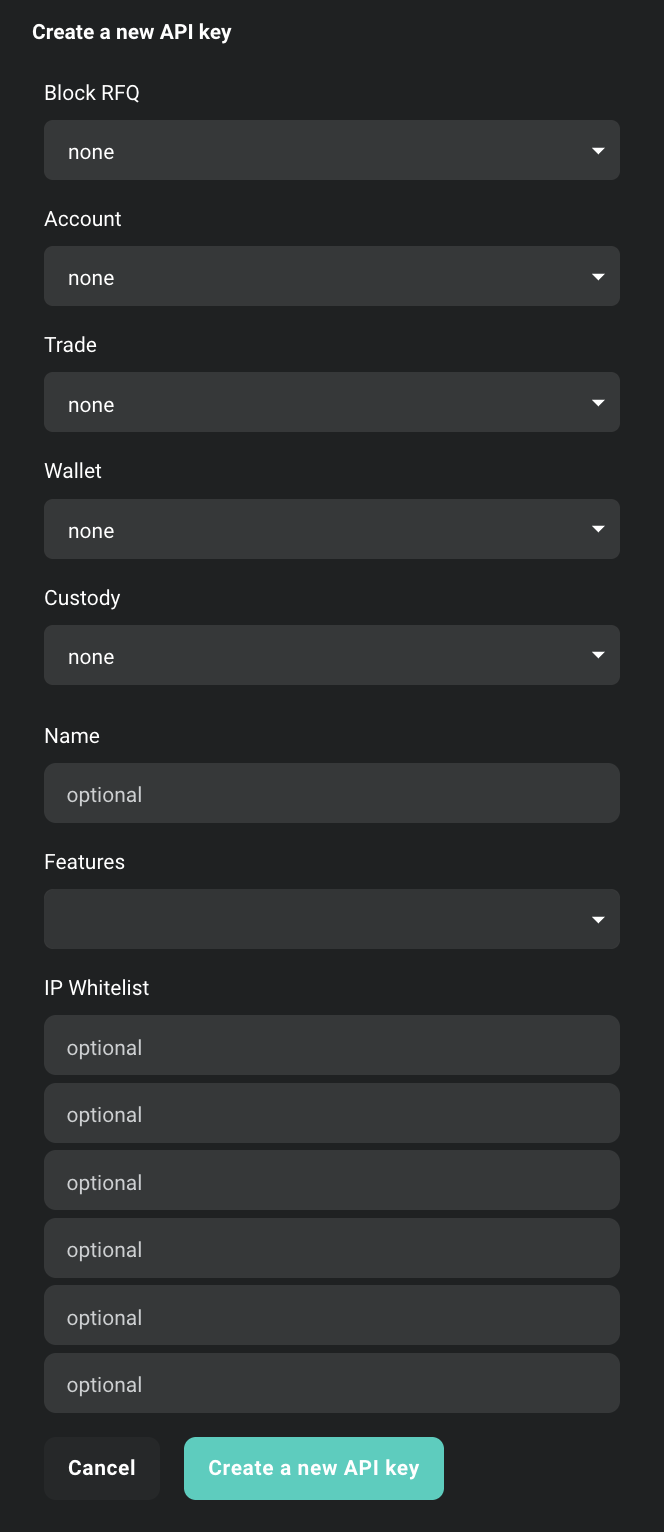
Learn how to create API keys and configure scopes during setup
## Connection and Session Management
These scopes control how tokens are bound to connections and sessions:
| Scope | Description |
| - | - |
| *connection* | Access is granted for the duration of the connection (or until expiration). When the connection closes, users must repeat authentication to get new tokens. Set automatically by the server when neither **connection** nor **session** scope is specified. |
| *session:name* | Creates a new session with the specified *name*, generating tokens bound to the session. Allows reconnection and token reuse within session lifetime. Maximum 16 sessions per user. For **WebSocket**: enables skipping `access_token` in subsequent requests. |
| *mainaccount* | Set **automatically** by the server when the connecting user's credentials belong to the main account, otherwise not included in the final scope. |
## Functional Access Scopes
These scopes define what API functionality your token can access. Each functional area supports both read-only (`:read`) and read-write (`:read_write`) access levels.
### Account Management
| Scope | Description |
| - | - |
| *account:read* | Read-only access to **account** methods and data. |
| *account:read\_write* | Full access to **account** methods - manage settings, add subaccounts, etc. |
### Trading
| Scope | Description |
| - | - |
| *trade:read* | Read-only access to **trading** methods and data. |
| *trade:read\_write* | Full access to **trading** methods - create and modify orders. |
### Wallet Operations
| Scope | Description |
| - | - |
| *wallet:read* | Read-only access to **wallet** methods and data. |
| *wallet:read\_write* | Full access to **wallet** methods - withdraw, generate deposit addresses, etc. |
### Block Trading
| Scope | Description |
| - | - |
| *block\_trade:read* | Read-only access to block trading information. |
| *block\_trade:read\_write* | Full access to create and manage block trades. |
### Block RFQ
| Scope | Description |
| - | - |
| *block\_rfq:read* | Read-only access to Block RFQ information, quotes and available makers. |
| *block\_rfq:read\_write* | Full access to create and quote Block RFQs. |
## Access Denial Scopes
These scopes explicitly deny access to specific functionality, useful for creating restricted API keys:
| Scope | Description |
| - | - |
| *account:none* | Explicitly block access to account management functionality. |
| *trade:none* | Explicitly block access to trading functionality. |
| *wallet:none* | Explicitly block access to wallet operations. |
## Token Configuration Parameters
These parameters configure token behavior and security settings:
| Parameter | Description |
| - | - |
| *expires:NUMBER* | Set token expiration time to `NUMBER` seconds. |
| *ip:ADDR* | Restrict token usage to a specific IPv4 address or CIDR range (e.g. `ip:192.0.2.10` or `ip:192.0.2.0/24`). Use `*` to allow all IP addresses. |
**⚠️ NOTICE:** Depending on choosing an authentication method (`grant type`) some scopes could be narrowed by the server or limited by user API key configured scope, e.g. when `grant_type = client_credentials` and `scope = wallet:read_write` could be modified by the server as `scope = wallet:read`.
**The user shouldn't assume that requested values are blindly accepted and should verify assigned scopes.**
# Accessing Historical Trades and Orders Using API
Source: https://docs.deribit.com/articles/accessing-historical-trades-orders
Use the historical parameter on Deribit API endpoints to retrieve past trades and orders beyond the default lookback window for backfills and audits.
## Overview
While recent records (**30 minutes** for orders and **24 hours** for trades) can be accessed without this parameter, they are only stored temporarily and eventually removed. After this period, the records are only available through the historical parameter.
## Retention Periods
* **Recent orders**: Available for **30 minutes** before removal.
* **Recent trades**: Available for **24 hours** before removal.
* **Historical records**: Persist indefinitely.
## Supported Endpoints
The following API endpoints support historical data retrieval:
* `private/get_order_history_by_instrument`
* `private/get_order_history_by_currency`
* `private/get_user_trades_by_instrument`
* `private/get_user_trades_by_instrument_and_time`
* `private/get_user_trades_by_currency`
* `private/get_user_trades_by_currency_and_time`
* `private/get_user_trades_by_order`
## API Usage
To retrieve historical trades and orders, use the `historical` parameter in your API request to any of the endpoints listed above.
* `historical: false` → Retrieves recent records (available immediately after execution).
* `historical: true` → Retrieves historical records (available after a short delay for indexing).
### Example Request
```json theme={null}
{
"method": "private/get_user_trades_by_currency",
"params": {
"currency": "ETH",
"historical": true
},
"jsonrpc": "2.0",
"id": 2
}
```
### Example Response
```json theme={null}
{
"jsonrpc": "2.0",
"id": 2,
"result": {
"trades": [
{
"timestamp": 1741270338502,
"state": "open",
"price": 1355.9,
"direction": "sell",
"index_price": 2246.9768,
"instrument_name": "ETH_USDC",
"trade_seq": 18009,
"api": false,
"amount": 0.2505,
"mark_price": 2246.9768,
"order_id": "ETH_USDC-109841952",
"matching_id": null,
"tick_direction": 3,
"fee": 0,
"profit_loss": null,
"mmp": false,
"post_only": false,
"self_trade": false,
"contracts": 2505,
"original_order_type": "market",
"trade_id": "ETH_USDC-18820350",
"fee_currency": "USDC",
"order_type": "limit",
"risk_reducing": false,
"liquidity": "M"
},
{
"timestamp": 1741270338460,
"state": "open",
"price": 1355.9,
"direction": "sell",
"index_price": 2246.9768,
"instrument_name": "ETH_USDC",
"trade_seq": 18006,
"api": false,
"amount": 0.2505,
"mark_price": 2246.9768,
"order_id": "ETH_USDC-109841952",
"matching_id": null,
"tick_direction": 3,
"fee": 0,
"profit_loss": null,
"mmp": false,
"post_only": false,
"self_trade": false,
"contracts": 2505,
"original_order_type": "market",
"trade_id": "ETH_USDC-18820345",
"fee_currency": "USDC",
"order_type": "limit",
"risk_reducing": false,
"liquidity": "M"
}
],
"has_more": true
}
}
```
When using `historical: true`, there may be a short delay for indexing before historical records become available. Recent records (with `historical: false`) are available immediately after execution.
# API Usage Policy
Source: https://docs.deribit.com/articles/api-usage-policy
Deribit fair-use API policy outlines acceptable traffic patterns, throttling rules, and consequences of abuse to keep exchange infrastructure healthy.
To maintain the integrity and performance of our system, we are introducing new guidelines for API usage. These guidelines are aimed at ensuring that all users have fair access to the platform without unnecessary strain on resources.
These guidelines sit on top of our rate limit policy. Limits are determined at Deribit's discretion. Deribit will not outright ban or limit API usage based on these policies without notice but such penalties can arise in case of non-cooperation.
## Matching Engine requests
List of matching engine requests can be found here: [Rate Limits](/articles/rate-limits).
To avoid unnecessary congestion of the matching engine Deribit monitors user's Order to Volume ratio. The Order to Volume Ratio (OTV) is a metric used to assess the number of orders placed by a trader relative to the actual volume of trades executed. It helps us identify patterns of excessive order placement that might lead to system strain, market manipulation, or inefficiencies within our trading platform.
OTV is defined as:
**OTV = (# ME Changes / Volume)**
A *ME Change* is any change to an order book. This could be an insert, amend or cancellation. Each cancellation done by a mass cancel counts towards the number of ME changes separately. The same is true for quotes. A mass quote that inserts 100 double-sided quotes adds 200 to the limit. Immediate-or-cancel orders (IOCs) and Fill-or-Kill orders (FOKs) that are cancelled count double towards the ME changes, they are seen as an insert and an instant cancellation. Market-maker protection (MMP) and self-match prevention (SMP) triggers are excluded, but are monitored separately. To calculate volume we only consider trades on which the client was the maker. We monitor these ratios per product group and currency.
A healthy OTV ensures that traders are placing orders that have a reasonable likelihood of execution. Monitoring OTV helps us prevent orders that would put unnecessary stress on the system, maintaining a smooth trading experience for everyone.
Traders who consistently exhibit an unusually high OTV may be subject to rate limits. OTV magnitude is determined at Deribit's discretion. As a general rule of thumb we consider OTV ratios higher than 10,000 BTC (10,000 ME changes per 1 BTC of volume traded) or 1,000 ETH high. We will never outright rate limit users for high OTV ratios without proper communication beforehand.
## Non-Matching Engine requests
To clarify the types of API calls that are subject to monitoring, we are grouping them into specific categories:
### 1. Market Data API Calls
To reduce unnecessary load, we encourage users to switch to WebSocket subscriptions wherever possible. WebSocket connections provide a real-time, efficient stream of market data, reducing the need for repeated polling via API which can result in returning duplicate information multiple times.
These endpoints typically carry market information or user trading information. Some examples include:
* `/public/get_order_book`
* `/public/ticker`
* `/private/get_open_orders`
Full list of our WebSocket subscription coverage can be found here: [Subscription Channels](/articles/notifications).
Please note that we also have a limit of 500 channels per subscription.
Excessive usage of these endpoints can result in stricter rate limits.
### 2. Excessive Errors and Failed Requests
Repeatedly sending incorrect or malformed API requests can negatively impact platform performance. Users who consistently send requests that result in high error rates may be subject to additional monitoring. This includes users who exceed rate limits and persist in making the same call resulting in an error.
Excessive errors can result in IP banning. This includes errors produced by exceeding rate limits.
### 3. Protocol Pings
While pings are a necessary part of keeping connections alive, excessive or unnecessary ping requests can consume system resources. We recommend that users minimize the frequency of protocol pings and confirm heartbeat every 30-60 seconds.
Unnecessary protocol calls may result in stricter rate limits.
### 4. Other
We recognize that users need reliable access to their account and market data, including withdrawals, account information, and contract specifications. However, we ask users to refrain from making excessive or redundant calls and ensure that they only request data as needed.
Unnecessary usage of these endpoints may result in stricter rate limits.
### 5. Unauthenticated Requests
Unauthenticated API requests are used to access public information, such as market data, without requiring a user account. We prefer users making authenticated requests to our platform even for publicly available information. For this reason our policy is more strict on unauthenticated users.
Unauthenticated requests are more likely to result in an IP ban as we cannot contact the client behind them directly.
If you have any questions or need assistance optimizing your API usage, please reach out to our support team.
# Asymmetric API Keys
Source: https://docs.deribit.com/articles/asymmetric-api-keys
Asymmetric API keys use public and private key pairs to sign Deribit requests, offering stronger authentication and reduced credential exposure risk.
**Asymmetric API keys** provide enhanced security compared to traditional symmetric API keys by using a **public-private key pair** instead of a shared secret. With asymmetric keys, you generate both keys locally, keep the **private key** secret on your system, and only share the **public key** with Deribit.
## How Asymmetric Keys Work
**Asymmetric cryptography** uses two mathematically linked keys:
* **Private Key**: Used to **sign requests** and must be kept secret on your local system
* **Public Key**: Used by Deribit to **verify your signatures** and can be safely shared
The **API key (Client ID)** is generated by Deribit when you register your public key, but the **key pair itself** is generated by you. Deribit supports two key types:
* **Ed25519**: Modern, fast, and secure elliptic curve cryptography (recommended)
* **RSA**: Traditional RSA key pairs (2048-bit minimum)
## Security Benefits
**Enhanced Security Model:**
* **Separation of concerns**: Only you can generate signatures with your private key, while Deribit can verify them with your public key
* **Non-repudiation**: Since only you hold the private key, signatures prove the request came from you
* **No shared secrets**: Unlike symmetric keys, Deribit never has access to your private key
**Additional Protection:**
* **Password protection**: You can encrypt your private key with a password, adding an extra layer of security
* **Local-only private key**: Your private key never leaves your system, reducing the risk of compromise
**Important**: Only **Deribit Signature Credentials** authentication (`grant_type: client_signature`) is available for asymmetric API keys. Standard client credentials authentication is not supported.
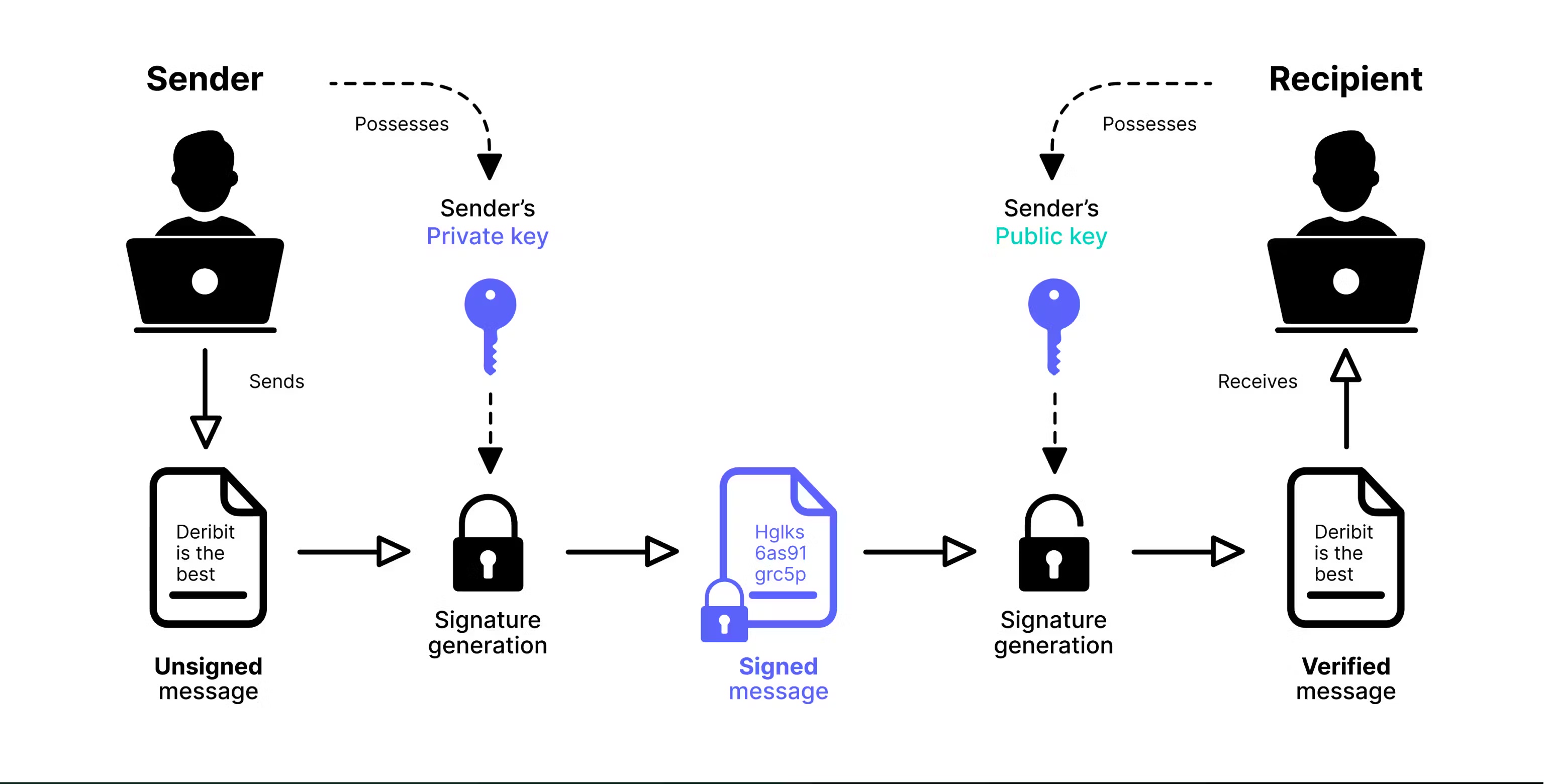
## Setup Overview
Setting up an asymmetric API key involves three main steps:
Create your public and private key pair locally using OpenSSL or Python.
Create a new API key on Deribit using your public key.
Use your private key to sign authentication requests.
Learn about client signature authentication
## Step 1: Generate Key Pair
You can generate your public and private key pair using either **OpenSSL** (command-line tool) or **Python** (with the cryptography library). Both methods are equivalent. Choose the one that fits your workflow.
**What you'll need:**
* **OpenSSL** (command-line tool) or **Python** with the `cryptography` library
* A secure location to store your private key (never share this file)
### Method 1: Using OpenSSL
**OpenSSL** is an open-source toolkit for secure communication, implementing SSL/TLS protocols and cryptographic functions. It's available on most operating systems.
#### Installing OpenSSL
**Windows**
1. **Check if OpenSSL is installed:**
* Open **Command Prompt** or **PowerShell**
* Run: `openssl version`
* If installed, you'll see the version number
2. **Install OpenSSL:**
* Download from [Win32OpenSSL](https://slproweb.com/products/Win32OpenSSL.html)
* Choose **Win32** or **Win64** based on your system
* Run the installer and follow the setup instructions
**macOS**
1. **Check if OpenSSL is installed:**
* Open **Terminal**
* Run: `openssl version`
* If installed, you'll see the version number
2. **Install OpenSSL:**
* Install **Homebrew** if you don't have it: [brew.sh](https://brew.sh/)
* Run: `brew install openssl`
* **Note**: You may need to add OpenSSL to your PATH. Follow Homebrew's post-installation instructions.
**Linux**
1. **Check if OpenSSL is installed:**
* Open **Terminal**
* Run: `openssl version`
* If installed, you'll see the version number
2. **Install OpenSSL:**
* Installation commands vary by distribution:
```bash theme={null}
sudo apt update
sudo apt install openssl
```
```bash theme={null}
sudo dnf install openssl
```
```bash theme={null}
sudo pacman -S openssl
```
#### Generating Ed25519 Keys
**Step 1: Generate Private Key**
```bash theme={null}
openssl genpkey -algorithm ed25519 -out private.pem
```
This creates a file named `private.pem` containing your **private key**. **Keep this file secure and never share it.**
**Step 2: Extract Public Key**
```bash theme={null}
openssl pkey -in private.pem -pubout -out public.pem
```
This creates `public.pem` containing your **public key**. This is the file you'll provide to Deribit when creating your API key.
**What you have now:**
* `private.pem` - Your private key (keep secret, never share)
* `public.pem` - Your public key (safe to share with Deribit)
### Method 2: Using Python
**Prerequisites:**
* Python 3.6 or higher
* Install the cryptography library: `pip install cryptography`
#### Ed25519 Key Generation
```python theme={null}
from cryptography.hazmat.primitives.asymmetric.ed25519 import Ed25519PrivateKey
from cryptography.hazmat.primitives import serialization
# Generate a new Ed25519 private key
private_key = Ed25519PrivateKey.generate()
# Serialize the private key to PEM format
private_pem = private_key.private_bytes(
encoding=serialization.Encoding.PEM,
format=serialization.PrivateFormat.PKCS8,
encryption_algorithm=serialization.NoEncryption()
)
# Save the private key to a file
# IMPORTANT: Keep this file secure and never share it
with open('private.pem', 'wb') as private_pem_file:
private_pem_file.write(private_pem)
# Extract the corresponding public key
public_key = private_key.public_key()
# Serialize the public key to PEM format
public_pem = public_key.public_bytes(
encoding=serialization.Encoding.PEM,
format=serialization.PublicFormat.SubjectPublicKeyInfo
)
# Save the public key to a file
# This is safe to share with Deribit
with open('public.pem', 'wb') as public_pem_file:
public_pem_file.write(public_pem)
print("Key pair generated successfully!")
print("Private key saved to: private.pem (KEEP SECRET)")
print("Public key saved to: public.pem (safe to share)")
```
#### RSA Key Generation
For RSA keys, Deribit requires a **minimum key size of 2048 bits**.
```python theme={null}
from cryptography.hazmat.primitives.asymmetric import rsa
from cryptography.hazmat.primitives import serialization
# Generate RSA private key (2048-bit minimum required by Deribit)
private_key = rsa.generate_private_key(
public_exponent=65537, # Standard RSA public exponent
key_size=2048 # Minimum key size for Deribit
)
# Serialize the private key to PEM format
private_pem = private_key.private_bytes(
encoding=serialization.Encoding.PEM,
format=serialization.PrivateFormat.PKCS8,
encryption_algorithm=serialization.NoEncryption()
)
# Save the private key to a file
# IMPORTANT: Keep this file secure and never share it
with open('private.pem', 'wb') as private_pem_file:
private_pem_file.write(private_pem)
# Extract the corresponding public key
public_key = private_key.public_key()
# Serialize the public key to PEM format
public_pem = public_key.public_bytes(
encoding=serialization.Encoding.PEM,
format=serialization.PublicFormat.SubjectPublicKeyInfo
)
# Save the public key to a file
# This is safe to share with Deribit
with open('public.pem', 'wb') as public_pem_file:
public_pem_file.write(public_pem)
print("RSA key pair generated successfully!")
print("Private key saved to: private.pem (KEEP SECRET)")
print("Public key saved to: public.pem (safe to share)")
```
## Step 2: Register Your Public Key with Deribit
After generating your key pair, you need to register your **public key** with Deribit to create an API key. You can do this either through the **web interface** or via the **API**.
**What you'll need:**
* Your **public key** (the contents of `public.pem` file)
* Access to your Deribit account
### Option 1: Web Interface
1. **Navigate to API Management**
* Go to your Deribit account settings
* Find the **API Keys** section
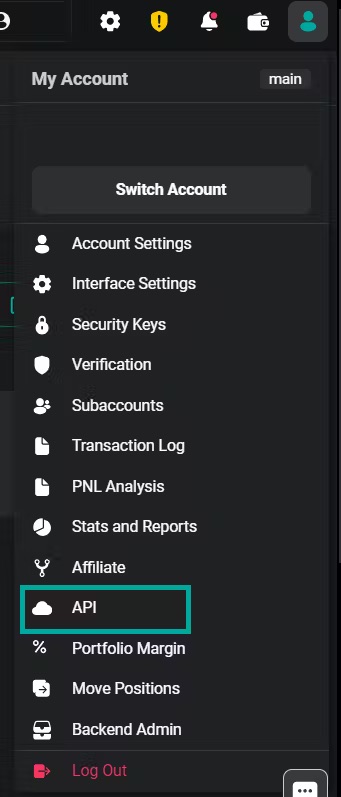
2. **Add New Key**
* Click **"Add new key"** on the right side of the interface
3. **Select Self-Generated Key**
* Choose **"Self-generated"** key type
* Paste your **public key** (the entire contents of your `public.pem` file, including the `-----BEGIN PUBLIC KEY-----` and `-----END PUBLIC KEY-----` lines)
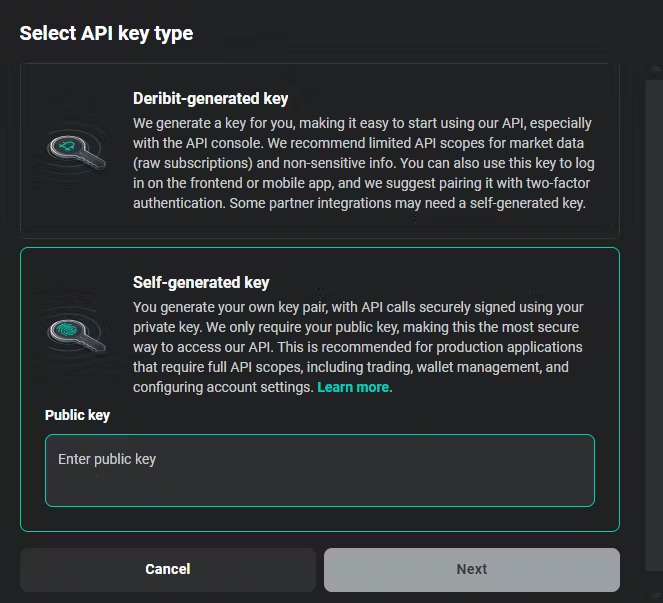
**Important**: Paste the **entire public key file content**, not just the base64 hash. The public key must include the `-----BEGIN PUBLIC KEY-----` header, the base64-encoded key data, and the `-----END PUBLIC KEY-----` footer.
4. **Configure API Key Settings**
* **Scopes**: Define the maximum permissions for this API key. See the [Access Scope documentation](/articles/access-scope) for details on available scopes.
* **Name**: A custom identifier for your key (e.g., "Trading Bot", "Production API")
* **Features**: Optional additional features:
* **Restricted Block Trades**: Limits `block_trade:read` scope to only block trades made with this specific API key. Useful for restricting visibility when sharing API keys with third parties.
* **Block Trade Approval**: Requires additional approval from a different API key before executing block trades. Provides enhanced oversight for partner-managed accounts.
* **IP Whitelisting**: Restrict API access to specific IP addresses for additional security
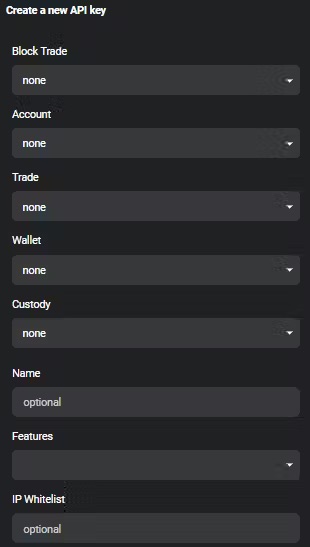
5. **Save and Get Client ID**
* After creating the key, you'll receive a **Client ID**
* **Important**: Save this Client ID. You will need it for authentication.

**Client ID**: The Client ID is a **public identifier** of your API key. It's **not a secret** and can be safely exposed in code, logs, or documentation. It's used to identify which key you're authenticating with, but it cannot be used alone for authentication. You still need your private key to sign requests.
### Option 2: Using the API
You can also create an asymmetric API key programmatically using the [`private/create_api_key`](/api-reference/account-management/private-create_api_key) method. **Note**: You'll need to authenticate with an existing API key to use this method.
**Request Example:**
```json theme={null}
{
"method": "private/create_api_key",
"params": {
"public_key": "-----BEGIN PUBLIC KEY-----\nMCowBQYDK2VwAyEA/pQXmQa6m5NigEfu0UrbjDdzRORWYRluJasNiZau2Lo=\n-----END PUBLIC KEY-----",
"name": "ed25519key",
"max_scope": "account:read trade:read_write wallet:read"
},
"jsonrpc": "2.0",
"id": 1
}
```
**Request Parameters:**
* **`public_key`**: Your public key in PEM format (include the full key with BEGIN/END markers)
* **`name`**: A descriptive name for this API key
* **`max_scope`**: Space-separated list of scopes defining permissions
**Important**: Provide the **entire public key file content**, not just the base64 hash. The public key must include the `-----BEGIN PUBLIC KEY-----` header, the base64-encoded key data, and the `-----END PUBLIC KEY-----` footer.
**Response Example:**
```json theme={null}
{
"jsonrpc": "2.0",
"id": 1,
"result": {
"max_scope": "trade:read_write wallet:read account:read",
"ip_whitelist": [],
"client_secret": "81:c2:76:35:a7:1a:1c:f8:05:71:e1:42:7c:94:2c:4c",
"client_id": "GgUXjYUj",
"enabled_features": [],
"public_key": "-----BEGIN PUBLIC KEY-----\nMCowBQYDK2VwAyEA/pQXmQa6m5NigEfu0UrbjDdzRORWYRluJasNiZau2Lo=\n-----END PUBLIC KEY-----",
"timestamp": 1721816749587,
"name": "ed25519key",
"id": 11,
"enabled": true,
"default": false
}
}
```
**Important Response Fields:**
* **`client_id`**: Save this value. You will need it for authentication.
* **`public_key`**: Confirms the registered public key
* **`max_scope`**: The scopes assigned to this key
* **`enabled`**: Whether the key is currently active
## Step 3: Authenticate with Your Asymmetric API Key
To authenticate with an asymmetric API key, you must use **Deribit Signature Credentials** authentication (`grant_type: client_signature`). This requires signing your authentication request with your **private key**.
**Authentication Process:**
1. Create a signature by signing a message containing `timestamp`, `nonce`, and optional `data`
2. Send the signature along with your `client_id` to the [`public/auth`](/api-reference/authentication/public-auth) endpoint
3. Receive an `access_token` and `refresh_token` for subsequent API calls
**What you'll need:**
* Your **private key** (`private.pem` file)
* Your **Client ID** (received when creating the API key)
* A way to generate signatures (OpenSSL or Python)
### Method 1: Shell Script (OpenSSL)
This example shows how to authenticate using a shell script with OpenSSL for HTTP requests:
```bash theme={null}
# Set your base URL (test or production)
base_url="https://test.deribit.com"
# Generate timestamp (milliseconds since epoch)
timestamp=$( date +%s000 )
# Generate a random nonce (8 characters)
nonce=$( cat /dev/urandom | tr -dc 'a-z0-9' | head -c8 )
# HTTP method and URI
verb=GET
uri='/api/v2/private/get_current_deposit_address?currency=eth'
# Create temporary file for data to sign
datatosign=$(mktemp)
echo -ne "${timestamp}\n${nonce}\n${verb}\n${uri}\n\n" > ${datatosign}
# Your Client ID (received when creating the API key)
client_id="GgUXjYUj"
# Sign the data with your private key and encode for URL
signature=$(openssl pkeyutl -sign -inkey private.pem -rawin -in ${datatosign} | base64 -w 100 | sed 's#+#-#g;s#/#_#g;s#=##g')
rm ${datatosign}
# Make authenticated request
curl -s -X ${verb} \
-H "Authorization: DERI-HMAC-SHA256 id=${client_id},ts=${timestamp},nonce=${nonce},sig=${signature}" \
"${base_url}${uri}" | jq
```
**Note**: This example is for HTTP requests. For WebSocket authentication, see the Python examples below.
### Method 2: Python Script
#### Ed25519 Authentication (WebSocket)
```python theme={null}
import asyncio
from cryptography.hazmat.primitives import serialization
import websockets
import base64
import json
from datetime import datetime
# Your Client ID (received when creating the API key)
client_id = 'GgUXjYUj'
# Load your private key from the PEM file
with open('private.pem', 'rb') as private_pem:
private_key = serialization.load_pem_private_key(
private_pem.read(),
password=None # Set password if your key is encrypted
)
# Generate timestamp (milliseconds since epoch)
timestamp = round(datetime.now().timestamp() * 1000)
# Generate a random nonce (in production, use a secure random generator)
nonce = "abcd" # Replace with secure random value
data = "" # Optional additional data
# Create the message to sign: timestamp\nnonce\ndata
data_to_sign = bytes('{}\n{}\n{}'.format(timestamp, nonce, data), "latin-1")
# Sign with Ed25519 private key and encode as URL-safe base64
signature = base64.urlsafe_b64encode(
private_key.sign(data_to_sign)
).decode('utf-8').rstrip('=')
# Create authentication request
msg = {
"jsonrpc": "2.0",
"id": 1,
"method": "public/auth",
"params": {
"grant_type": "client_signature",
"client_id": client_id,
"timestamp": timestamp,
"signature": signature,
"nonce": nonce,
"data": data
}
}
# Connect and authenticate via WebSocket
async def call_api(msg):
async with websockets.connect('wss://test.deribit.com/ws/api/v2') as websocket:
# Send authentication request
await websocket.send(json.dumps(msg))
# Receive authentication response
response = await websocket.recv()
print("Auth response:", response)
# Parse response to get access_token
auth_result = json.loads(response)
if 'result' in auth_result:
access_token = auth_result['result']['access_token']
print(f"Authenticated! Access token: {access_token[:20]}...")
# Now you can make authenticated API calls
await websocket.send(json.dumps({
"jsonrpc": "2.0",
"id": 2,
"method": "private/get_positions",
"params": {
"currency": "btc"
}
}))
response = await websocket.recv()
print("Positions:", response)
# Run the async function
asyncio.get_event_loop().run_until_complete(call_api(msg))
```
**Installation:** `pip install websockets cryptography`
#### RSA Authentication (WebSocket)
RSA authentication is similar to Ed25519, but uses different padding and hashing:
```python theme={null}
import asyncio
from cryptography.hazmat.primitives import serialization, hashes
from cryptography.hazmat.primitives.asymmetric import padding
import websockets
import base64
import json
from datetime import datetime
# Your Client ID (received when creating the API key)
client_id = 'GgUXjYUj'
# Load the RSA private key from the PEM file
with open('private.pem', 'rb') as private_pem:
private_key = serialization.load_pem_private_key(
private_pem.read(),
password=None # Set password if your key is encrypted
)
# Generate timestamp (milliseconds since epoch)
timestamp = round(datetime.now().timestamp() * 1000)
# Generate a random nonce (in production, use a secure random generator)
nonce = "abcd" # Replace with secure random value
data = "" # Optional additional data
# Prepare the data to sign: timestamp\nnonce\ndata
data_to_sign = bytes('{}\n{}\n{}'.format(timestamp, nonce, data), "latin-1")
# Sign the data using RSA with PKCS1v15 padding and SHA256 hashing
signature = private_key.sign(
data_to_sign,
padding.PKCS1v15(), # RSA padding scheme
hashes.SHA256() # Hashing algorithm
)
# Encode the signature to URL-safe base64
encoded_signature = base64.urlsafe_b64encode(signature).decode('utf-8').rstrip('=')
# Create authentication request
msg = {
"jsonrpc": "2.0",
"id": 1,
"method": "public/auth",
"params": {
"grant_type": "client_signature",
"client_id": client_id,
"timestamp": timestamp,
"signature": encoded_signature,
"nonce": nonce,
"data": data
}
}
# Connect and authenticate via WebSocket
async def call_api(msg):
async with websockets.connect('wss://test.deribit.com/ws/api/v2') as websocket:
# Send authentication request
await websocket.send(json.dumps(msg))
# Receive authentication response
response = await websocket.recv()
print("Auth response:", response)
# Parse response to get access_token
auth_result = json.loads(response)
if 'result' in auth_result:
access_token = auth_result['result']['access_token']
print(f"Authenticated! Access token: {access_token[:20]}...")
# Now you can make authenticated API calls
await websocket.send(json.dumps({
"jsonrpc": "2.0",
"id": 2,
"method": "private/get_positions",
"params": {
"currency": "btc"
}
}))
response = await websocket.recv()
print("Positions:", response)
# Run the async function
asyncio.get_event_loop().run_until_complete(call_api(msg))
```
**Installation:** `pip install websockets cryptography`
**Key Differences from Ed25519:**
* RSA requires **PKCS1v15 padding** and **SHA256 hashing**
* Ed25519 signs directly without additional padding/hashing
## Frequently Asked Questions
### Can I use multiple asymmetric keys?
**Yes.** You can create and manage multiple asymmetric API keys for different applications, environments (test/production), or systems. Each key pair is independent and can have different scopes and permissions.
### What should I do if my private key is compromised?
**Immediately:**
1. **Revoke the API key** in your Deribit account (disable or delete it)
2. **Generate a new key pair** using the steps above
3. **Register the new public key** with Deribit
4. **Update your applications** to use the new key pair
**Prevention:**
* Store private keys securely (encrypted if possible)
* Use strong passwords for encrypted private keys
* Never commit private keys to version control
* Use environment variables or secure key management systems
### Are scopes and permissions still required for asymmetric keys?
**Yes.** Asymmetric keys work the same way as standard API credentials regarding permissions. You must assign specific **scopes** when creating the API key, which define what operations the key can perform. See the [Access Scope documentation](/articles/access-scope) for available scopes.
### Which key type should I use: Ed25519 or RSA?
**Ed25519 is recommended** for most use cases:
* **Faster** signature generation and verification
* **Smaller** key sizes (256 bits vs 2048+ bits for RSA)
* **Modern** cryptography with strong security guarantees
* **Simpler** implementation (no padding/hashing required)
**RSA** may be preferred if:
* You need compatibility with existing RSA infrastructure
* Your organization has specific RSA requirements
### Can I use the same key pair for test and production?
**Technically yes, but not recommended.** Best practice is to:
* Generate **separate key pairs** for test and production environments
* Use **different API keys** with appropriate scopes for each environment
* This provides better security isolation and easier key rotation
### How do I rotate my asymmetric keys?
1. Generate a new key pair
2. Register the new public key with Deribit (creates a new API key)
3. Update your applications to use the new key pair
4. Test thoroughly
5. Revoke the old API key once you've confirmed everything works
# Authentication
Source: https://docs.deribit.com/articles/authentication
OAuth 2.0-style authentication for private Deribit API requests, covering access tokens, refresh tokens, scopes, and signature-based login flows.
This means you must obtain an access token (and accompanying refresh token) using your API key credentials before calling private endpoints. Public API methods (market data, etc.) do not require authentication, but authenticated connections have higher rate limits and more features (raw event feed).
This guide explains how to set up API keys, authenticate with the Deribit API, manage tokens (including fork\_token usage), and handle access scopes for different permission levels.
**Example of a JSON request with token**:
```json theme={null}
{
"id": 5647,
"method": "private/get_subaccounts",
"params": {
"access_token": "1582628593469.1MbQ-J_4.CBP-OqOwm_FBdMYj4cRK2dMXyHPfBtXGpzLxhWg31nHu3H_Q60FpE5_vqUBEQGSiMrIGzw3nC37NMb9d1tpBNqBOM_Ql9pXOmgtV9Yj3Pq1c6BqC6dU6eTxHMFO67x8GpJxqw_QcKP5IepwGBD-gfKSHfAv9AEnLJkNu3JkMJBdLToY1lrBnuedF3dU_uARm"
}
}
```
The API consists of `public` and `private` methods. The public methods do not require authentication. The private methods use OAuth 2.0 authentication. This means that a valid OAuth access token must be included in the request, which can be achieved by calling method [`public/auth`](/api-reference/authentication/public-auth).
When the token was assigned to the user, it should be passed along, with other request parameters, back to the server:
| Connection type | Access token placement |
| - | - |
| **WebSocket** | Inside request JSON parameters, as an `access_token` field |
| **HTTP (REST)** | Header `Authorization: Bearer ` value |
## Creating and Managing API Keys
Before authenticating, create an API key in your Deribit account. You can choose either a Deribit-generated key (for Client ID/Secret credentials authentication) or a self-generated key (for asymmetric signature authentication).
For detailed steps on generating API keys, see the [Creating new API key on Deribit](/articles/creating-api-key) and [Asymmetric API keys](/articles/asymmetric-api-keys) articles.
## Two-Factor Authentication using API
Certain private methods in the Deribit API (for example, withdrawals or security-related account actions) require Two-Factor Authentication (2FA). If your account has 2FA enabled, you must provide the second factor when calling these methods via API.
API requests without the required 2FA confirmation will be rejected with the error `security_key_authorization_error` (code: 13668). Always ensure your application flow supports sending the second factor where required.
See the [Security Keys](/articles/security-keys) section in the API docs for the technical details on confirming operations with 2FA or hardware keys.
For enabling and managing 2FA in your account, follow the steps in [Two-Factor Authentication Article](https://support.deribit.com/hc/en-us/articles/25944633825053-Account-security).
## Authentication Methods
Deribit's primary authentication endpoint is [`public/auth`](/api-reference/authentication/public-auth). Calling this will return a JSON object containing an `access_token` and a `refresh_token`, among other fields.
Use your Client ID and Client Secret directly to get a token (suitable for server-to-server API use). This is the simplest method – you supply `grant_type=client_credentials`, along with your `client_id` and `client_secret`.
Server-to-server applications, simple integrations, quick setup
Use a cryptographic signature instead of sending the secret. You generate an HMAC-SHA256 signature of a string containing a timestamp, a random nonce, and optional data, using your Client Secret as the key. This method (often used with asymmetric API keys) requires `grant_type=client_signature`, and you must provide `client_id`, `timestamp` (current time in ms), `nonce`, `signature`, and (if desired) a `data` field. Deribit verifies the signature instead of requiring the raw secret.
Enhanced security, asymmetric key pairs, avoiding secret transmission
Use a previously obtained `refresh_token` to get a new access token. Set `grant_type=refresh_token` and provide the `refresh_token` value. This returns a fresh `access_token` (and a new refresh token), extending your session without needing the Client Secret again.
Long-lived sessions, token renewal, avoiding re-authentication
## Client Credentials
### Example – Client Credentials Flow
Below is a sample request using client credentials, and the response structure:
```bash theme={null}
GET /api/v2/public/auth?grant_type=client_credentials&client_id=&client_secret=
```
On success, you receive a JSON response like:
```json theme={null}
{
"jsonrpc": "2.0",
"id": 1,
"result": {
"access_token": "1582628593469.1MbQ-J_4.CBP-OqOw...uARm",
"expires_in": 31536000,
"refresh_token": "1582628593469.1GP4rQd0.A9Wa78...A9jM",
"scope": "connection mainaccount",
"token_type": "bearer"
}
}
```
The `access_token` is a long string (truncated above) which is used to authenticate subsequent requests. The `expires_in` field (in seconds) tells you how long the token is valid, and `refresh_token` can be stored to renew your access when needed. The `scope` shows the granted access scope of this token (more on scopes below), and `token_type` will be "bearer".
### Using the token
Once you have an access token, you must include it with any private API request. How to include it depends on the connection type:
| Connection type | Access token placement |
| - | - |
| **WebSocket** | Inside request JSON parameters, as an `access_token` field |
| **HTTP (REST)** | Header `Authorization: Bearer ` value |
If you authenticated a WebSocket connection with a session token (see [Connection Management - Best Practices](/articles/connection-management-best-practices)), the server will remember your token, allowing you to omit the token in subsequent requests on that same WebSocket connection.
Manage your tokens securely: store refresh tokens if you need long-lived access, and treat access tokens like passwords (never expose them publicly).
## Client Signature (WebSocket)
The signature formula shown below is for **WebSocket** connections. For **HTTP REST** requests, use a different formula that includes HTTP method, URI, and request body. See the [Deribit Signature Credentials (HTTP REST)](#deribit-signature-credentials-http-rest) section below for HTTP REST authentication.
### Client Signature Authentication
To perform a client signature authentication for WebSocket connections:
1. **Prepare the components:**
* `grant_type` – Must be `client_signature`
* `client_id` and `client_secret` – Can be found on the API page on the Deribit website after creating the API key
* `timestamp` – Time when the request was generated, given as milliseconds. It is valid for 60 seconds since generation; after that, any request with an old timestamp will be rejected
* `signature` – Value for the signature calculated as described below
* `nonce` – Single-use, user-generated initialization vector for the server token
* `data` – Optional field, which contains any user-specific value
2. **Build the string to sign:**
Deribit's client-signature flow signs a very specific byte sequence. Use HMAC‑SHA256 with your Client Secret as the key and hex‑encode the digest.
**Formula:**
```
StringToSign = Timestamp + "\n" + Nonce + "\n" + Data
Signature = HEX_STRING( HMAC-SHA256( ClientSecret, StringToSign ) )
```
**Important details:**
* Always include the two newline characters shown above.
* If Data is omitted, treat it as an empty string, so the string still ends with `\n` after Nonce.
* Use UTF‑8 for all strings.
* Send the lowercase hex of the HMAC as signature.
* `timestamp` is milliseconds since epoch. `nonce` should be unique per request.
### Shell (OpenSSL) one‑liner
General form, works on Linux and macOS:
```bash theme={null}
ClientId="YOUR_CLIENT_ID"
ClientSecret="YOUR_CLIENT_SECRET"
Timestamp="$(date +%s000)" # ms since epoch; on macOS this is fine
Nonce="$(LC_ALL=C tr -dc 'a-z0-9' 56590594f97921b09b18f166befe0d1319b198bbcdad7ca73382de2f88fe9aa1
```
3. **Send the request:**
Call [`public/auth`](/api-reference/authentication/public-auth) with `grant_type=client_signature` and include:
* `client_id`
* `timestamp`
* `nonce`
* `signature` (the HMAC you calculated)
* `data` (if used in the signature)
Sample JSON-RPC request using values calculated before:
```json theme={null}
{
"jsonrpc": "2.0",
"id": 9929,
"method": "public/auth",
"params": {
"grant_type": "client_signature",
"client_id": "AMANDA",
"timestamp": 1576074319000,
"nonce": "1iqt2wls",
"data": "",
"signature": "56590594f97921b09b18f166befe0d1319b198bbcdad7ca73382de2f88fe9aa1"
}
}
```
### Parameters
When connecting through WebSocket, the user can request authorization using the `client_signature` method, which requires providing the following parameters (as part of the JSON request):
| JSON parameter | Description |
| - | - |
| *grant\_type* | Must be **client\_signature** |
| *client\_id* | Can be found on the [API page on the Deribit website](https://www.deribit.com/account/BTC/api) (the user can configure up to 8 different `IDs` - with different privileges) |
| *timestamp* | Time when the request was generated - given as **milliseconds**. It's valid for **60 seconds** since generation, after that time any request with an old timestamp will be rejected. |
| *signature* | Value for signature calculated as described above |
| *nonce* | Single usage, user generated initialization vector for the server token |
| *data* | **Optional** field, which contains any user specific value |
You can check the signature value using online tools like [codebeautify.org/hmac-generator](https://codebeautify.org/hmac-generator) (remember that you **should use** it only with your **test credentials**).
On success, the server returns an `access_token` and `refresh_token`, the same as with client credentials authentication.
### Python Example
You can also use the following Python code to automatically generate the signature and complete the authentication process on the test environment:
```python theme={null}
import datetime
import random
import string
import hashlib
import hmac
import requests
from datetime import datetime
ClientId = ""
clientSecret = ""
Timestamp = round(datetime.now().timestamp() * 1000)
Nonce = ''.join(random.choice(string.ascii_lowercase + string.digits) for _ in range(8))
data = ""
def calcSignature(method, uri, secret, timestamp, nonce, body):
requestData = f'{method}\n{uri}\n{body}\n'
message = f'{timestamp}\n{nonce}\n{requestData}'
return hmac.new(
bytes(secret, "utf-8"),
msg=bytes(message, "utf-8"),
digestmod=hashlib.sha256
).hexdigest().lower()
Signature = calcSignature("GET", "/api/v2/private/get_account_summary?currency=BTC&extended=true", clientSecret, Timestamp, Nonce, data)
headers = {
'Authorization': f'deri-hmac-sha256 id={ClientId},ts={Timestamp},nonce={Nonce},sig={Signature}',
'Content-Type': 'application/json'
}
response = requests.get(
"https://test.deribit.com/api/v2/private/get_account_summary?currency=BTC&extended=true",
headers=headers
)
print(response.json())
print(ClientId, Timestamp, Nonce, Signature)
```
## Refresh Token
When you authenticate with [`public/auth`](/api-reference/authentication/public-auth) (using client credentials or client signature), the response contains both an `access_token` and a `refresh_token`.
* **access\_token** – used to authorize your API calls (via `Authorization: Bearer ` in HTTP or as `access_token` in WebSocket requests).
* **refresh\_token** – used to obtain a new access token once the current one expires.
### Why use a refresh token?
Access tokens have a limited lifetime (defined in the `expires_in` field). Instead of re-supplying your Client ID and Client Secret each time, you can call [`public/auth`](/api-reference/authentication/public-auth) again with `grant_type=refresh_token` and your stored refresh token. This extends the session securely without exposing your credentials.
### Example
```json theme={null}
{
"method": "public/auth",
"params": {
"grant_type": "refresh_token",
"refresh_token": "<1756301374726.1R2lPbsF.Q_Oqe7J-NpqHhhVV46NHvJuaidr5S1e3pdaO9pAvUoPmJFnSU9faJqxSiTp2Q4I_oT8XsiQo3mMu-0wFoqnY80Epz84XmRH-wQaCZ0jJEMFLUWZI-ILtUPMoPwvL9QFxhAX9sw8J-8559qNHjAJ_X3a_oGk8GTmIpEEF6Zenr00VWiPsMWxY17LmQf6xXd5q4kHk7cLsyoTSv76qrP-260xsshwomb6iJ7SMdTQYlG1D69mBBr1q_ECupVoOm0w9Wp0pxC0KSqyalhuNMLcKGFZveCA-pZQ2GH93WQptzVA-Mh0Gcw>"
}
}
```
Response contains a new `access_token` (and a new `refresh_token`).
### Session behavior
* If your token was issued with a session scope, refreshing keeps the same session active and does not consume extra session slots.
* If you did not request a session scope, each refresh generates a new connection-scoped token and invalidates the previous one.
### Best practices
* Always keep your refresh token secure. It can be used to mint new access tokens.
* Implement automatic refresh shortly before expiry (check the `expires_in` value).
* Persist the latest refresh token if your application restarts.
## Fork and Exchange Tokens
### Fork Token
Session tokens can be "cloned" using the [`public/fork_token`](/api-reference/authentication/public-fork_token) method. This is an advanced feature to help manage multiple sessions. [`public/fork_token`](/api-reference/authentication/public-fork_token) takes a valid refresh token from an existing session-scoped token and generates a new access token for a new session (with a name you specify). In other words, it lets you fork an existing session into another session without re-supplying your client secret. This is only allowed for session-scoped tokens (you cannot fork a connection-only token).
#### When to use fork token?
Suppose you have an application already authenticated on one server and you want to spin up a second client (or a sub-service) using the same account and API key. Instead of storing the Client Secret or asking for credentials again, you can take the refresh token from the first session and call [`public/fork_token`](/api-reference/authentication/public-fork_token) to create a new session token for the second client. The new token will have the same scopes as the original (but tied to a different session name). Both sessions can operate concurrently under the same API key.
### Exchange Token
[`public/exchange_token`](/api-reference/authentication/public-exchange_token) lets you turn a refresh token into a new access token for a different subaccount. A `subject_id` identifies the target subaccount, so this method is the standard way to switch between subaccounts without sending your Client Secret again. The resulting token keeps the same permissions unless you supply a scope override.
#### When to use exchange token?
You are authenticated on one subaccount and need to act on another subaccount with the same API key. Call [`public/exchange_token`](/api-reference/authentication/public-exchange_token) with:
* `refresh_token` from your current session
* `subject_id` of the destination subaccount
* optional `scope` to override scopes and to set a `session:name` if you want a session token created during the exchange. Scopes on the new token cannot exceed the permissions of the caller.
## Alternative Authentication Methods
For convenience, Deribit also supports two alternative methods for HTTP requests: Basic Auth and HMAC Auth (Deribit Signature Credentials). These methods eliminate the need for a prior token request, but are typically used in advanced scenarios or if you prefer not to handle token refresh separately. Most developers find it simplest to use [`public/auth`](/api-reference/authentication/public-auth) to get a bearer token and use that for subsequent calls.
### Basic User Credentials
Every `private` method can be accessed by providing an HTTP `Authorization: Basic XXX` header with user `ClientId` and assigned `ClientSecret` (both values can be found on the [API page on the Deribit website](https://www.deribit.com/account/BTC/api)) encoded with `Base64`:
```
Authorization: Basic BASE64(ClientId + : + ClientSecret)
```
This is the easiest way of authenticating HTTP (REST) requests. If you don't like the fact that you are sending ClientSecret over HTTPS connection, you can consider using one of the authorization methods described below.
### Deribit Signature Credentials (HTTP REST)
The Deribit service provides a dedicated authorization method that uses user-generated signatures to increase security when passing request data. The generated value is passed in the `Authorization` header:
```
Authorization: deri-hmac-sha256 id=ClientId, ts=Timestamp, sig=Signature, nonce=Nonce
```
**Important:** The signature formula for HTTP REST requests is **different** from WebSocket requests. For HTTP REST, you must include the HTTP method, URI, and request body in the signature calculation.
#### Signature Formula for HTTP REST
```bash theme={null}
RequestData = UPPERCASE(HTTP_METHOD()) + "\n" + URI() + "\n" + RequestBody + "\n";
StringToSign = Timestamp + "\n" + Nonce + "\n" + RequestData;
Signature = HEX_STRING( HMAC-SHA256( ClientSecret, StringToSign ) );
```
**Note:** The newline characters in `RequestData` and `StringToSign` variables are important. If `RequestBody` is omitted in `RequestData`, it's treated as an empty string, so these three newline characters must always be present.
#### Example – HTTP REST Signature
```shell theme={null}
ClientId=AMANDA
ClientSecret=AMANDASECRECT
Timestamp=$( date +%s000 )
Nonce=$( cat /dev/urandom | tr -dc 'a-z0-9' | head -c8 )
URI="/api/v2/private/get_account_summary?currency=BTC"
HttpMethod=GET
Body=""
Signature=$( echo -ne "${Timestamp}\n${Nonce}\n${HttpMethod}\n${URI}\n${Body}\n" | openssl sha256 -r -hmac "$ClientSecret" | cut -f1 -d' ' )
echo $Signature
# shell output> 9bfbc51a2bc372d72cc396cf1a213dc78d42eb74cb7dc272351833ad0de276ab
# WARNING: Exact value depends on current timestamp and client credentials
curl -s -X ${HttpMethod} -H "Authorization: deri-hmac-sha256 id=${ClientId},ts=${Timestamp},nonce=${Nonce},sig=${Signature}" "https://www.deribit.com${URI}"
```
#### Parameters
| Deribit credential | Description |
| - | - |
| *ClientId* | Can be found on the [API page on the Deribit website](https://www.deribit.com/account/BTC/api) (the user can configure up to 8 different `IDs` - with different privileges) |
| *Timestamp* | Time when the request was generated - given as **milliseconds**. It's valid for **60 seconds** since generation, after that time any request with an old timestamp will be rejected. |
| *Signature* | Value for signature calculated as described above |
| *Nonce* | Single usage, user generated initialization vector for the server token |
## Logout
Finally, you can log out and invalidate tokens using [`private/logout`](/api-reference/authentication/private-logout) (WebSocket only) if needed, but generally tokens will expire automatically after their `expires_in` duration.
Logging out with [`private/logout`](/api-reference/authentication/private-logout) does not trigger Cancel on Disconnect. Any outstanding orders or quotes will remain active unless explicitly canceled.
# Deribit Block RFQ API Walkthrough
Source: https://docs.deribit.com/articles/block-rfq-api-walkthrough
Step-by-step Block RFQ API walkthrough for requesting quotes on large block trades from Deribit market makers and executing multi-leg strategies.
This walkthrough provides a comprehensive guide to using the Block RFQ API.
## Overview
Block RFQ enables institutional traders to:
* Request quotes for large block trades
* Receive competitive quotes from multiple market makers
* Execute trades at negotiated prices
* Manage allocations across multiple accounts
The Block RFQ system operates with two primary roles:
* **Taker**: The user who creates the RFQ and requests quotes
* **Maker**: The market maker who provides quotes in response to RFQs
## Prerequisites
Before using the Block RFQ API, ensure you have:
1. **API Access**: An API key with appropriate scopes:
* `block_rfq:read` - Read-only access to Block RFQ information, quotes, and available makers
* `block_rfq:read_write` - Full access to create and quote Block RFQs
2. **Account Setup**: Your account must be configured for Block RFQ trading
## Block RFQ Workflow
### 1. Creating a Block RFQ (Taker)
The taker creates a Block RFQ using the [`private/create_block_rfq`](/api-reference/block-rfq/private-create_block_rfq) method. This method allows you to:
* Specify the instruments and quantities for each leg of the trade
* Set optional hedge legs
* Target specific makers or make it available to all makers
* Add a label for identification
* Configure pre-allocation across multiple accounts
**Example Request:**
```json theme={null}
{
"method": "private/create_block_rfq",
"params": {
"legs": [
{
"instrument_name": "BTC-PERPETUAL",
"amount": 100,
"side": "buy"
}
],
"makers": ["maker1", "maker2"],
"label": "My Block RFQ"
}
}
```
**Key Parameters:**
* `legs`: Array of trade legs, each specifying instrument, amount, and side
* `makers`: Optional list of specific maker aliases to target (omit for all makers)
* `label`: Optional user-defined label (max 64 characters)
* `trade_allocations`: Optional pre-allocation across accounts
* `hedge`: Optional hedge leg configuration
* `disclosed`: Whether the RFQ is non-anonymous (taker and maker aliases visible)
### 2. Receiving RFQ Notifications (Maker)
Makers receive notifications about new Block RFQs through WebSocket subscriptions:
* `block_rfq.maker.{currency}` - Notifications when new Block RFQs are created
* `block_rfq.maker.quotes.{currency}` - Notifications about the state of your quotes
**Example Subscription:**
```json theme={null}
{
"method": "public/subscribe",
"params": {
"channels": ["block_rfq.maker.BTC"]
}
}
```
### 3. Adding Quotes (Maker)
Makers respond to Block RFQs by adding quotes using [`private/add_block_rfq_quote`](/api-reference/block-rfq/private-add_block_rfq_quote):
```json theme={null}
{
"method": "private/add_block_rfq_quote",
"params": {
"block_rfq_id": 123,
"amount": 100,
"direction": "sell",
"legs": [
{
"instrument_name": "BTC-15NOV24",
"price": 69600,
"ratio": 1,
"direction": "sell"
}
]
}
}
```
Unlike combo instruments (which are quoted with a single aggregated `price` covering the whole strategy), a Block RFQ quote carries a **price per leg** inside the `legs` array. Each leg is an independently priced instrument, and the leg `direction` must match the direction of the corresponding leg in the Block RFQ. The top-level `price` parameter is only used as the aggregated price for quoting future spreads. For all other structures, populate the per-leg `price` fields instead. To derive per-leg prices from an aggregated strategy price, use [`private/get_leg_prices`](/api-reference/combo-books/private-get_leg_prices).
Makers can:
* Add multiple quotes per RFQ
* Edit existing quotes using [`private/edit_block_rfq_quote`](/api-reference/block-rfq/private-edit_block_rfq_quote)
* Cancel individual quotes using [`private/cancel_block_rfq_quote`](/api-reference/block-rfq/private-cancel_block_rfq_quote)
* Cancel all quotes using [`private/cancel_all_block_rfq_quotes`](/api-reference/block-rfq/private-cancel_all_block_rfq_quotes)
### 4. Viewing RFQ State (Taker)
Takers can monitor their Block RFQs using:
* [`private/get_block_rfqs`](/api-reference/block-rfq/private-get_block_rfqs) - List all Block RFQs (as taker or maker)
* [`private/get_block_rfq_quotes`](/api-reference/block-rfq/private-get_block_rfq_quotes) - View all quotes for a specific Block RFQ
**Note:** After Block RFQ creation, there's a 5-second grace period during which the taker cannot see quotes or trade the Block RFQ.
### 5. Accepting Quotes (Taker)
Once the taker has reviewed the quotes, they can accept a Block RFQ using [`private/accept_block_rfq`](/api-reference/block-rfq/private-accept_block_rfq):
```json theme={null}
{
"method": "private/accept_block_rfq",
"params": {
"block_rfq_id": 123
}
}
```
#### Retrieving the executed trades
The `trades` array returned by [`private/get_block_rfqs`](/api-reference/block-rfq/private-get_block_rfqs) for a filled RFQ does not include trade IDs. To get the individual per-leg trades, including `trade_id`, `order_id`, `fee`, and `block_trade_id`, call [`private/get_block_trades`](/api-reference/block-trade/private-get_block_trades) with the `block_rfq_id`:
```json theme={null}
{
"method": "private/get_block_trades",
"params": {
"block_rfq_id": 123
}
}
```
Each result entry is one block trade. Its `id` is the `block_trade_id`, and its `trades` array lists one trade per leg. If you already have the `block_trade_id`, call [`private/get_block_trade`](/api-reference/block-trade/private-get_block_trade) with `id` instead. Both methods require the `block_trade:read` scope.
### 6. Canceling Block RFQs and Quotes
* **Taker**: Use [`private/cancel_block_rfq`](/api-reference/block-rfq/private-cancel_block_rfq) to cancel their own RFQ
* **Maker**: Can cancel their own quotes using [`private/cancel_block_rfq_quote`](/api-reference/block-rfq/private-cancel_block_rfq_quote) or [`private/cancel_all_block_rfq_quotes`](/api-reference/block-rfq/private-cancel_all_block_rfq_quotes). Quotes are also automatically canceled when the RFQ is filled, expired, or canceled by the taker
### 7. Stopping Block RFQ activity
The API does not provide a dedicated method to switch Block RFQ trading off. To stop Block RFQ activity through the API:
1. Cancel any open activity. As a taker, call [`private/cancel_block_rfq`](/api-reference/block-rfq/private-cancel_block_rfq) for each open RFQ. As a maker, call [`private/cancel_all_block_rfq_quotes`](/api-reference/block-rfq/private-cancel_all_block_rfq_quotes).
2. Remove Block RFQ permissions from your API keys. A key's scopes set the maximum permissions a token can receive, so a key without `block_rfq:read_write` cannot create, accept, or quote Block RFQs. See [Access Scope](/articles/access-scope).
3. If a key should no longer be used at all, disable it with [`private/disable_api_key`](/api-reference/account-management/private-disable_api_key).
## Block RFQ States
Block RFQs can be in one of the following states:
* `open` - The RFQ is active and accepting quotes
* `filled` - The RFQ has been accepted and executed
* `cancelled` - The RFQ was canceled by the taker
* `expired` - The RFQ expired without being filled
## Identifiers
A Block RFQ involves three distinct identifiers. They are not interchangeable. Use each for the purpose it was designed for.
| Field | Represents | Lifetime | Where it appears |
| - | - | - | - |
| `block_rfq_id` | The RFQ **request** (the negotiation) | Exists from the moment the taker creates the RFQ, throughout quoting, viewing, editing, cancelling, and acceptance | RFQ creation, quote add/edit/cancel, quote lookups, taker/maker RFQ subscriptions |
| `block_trade_id` | The **executed block trade** produced when the RFQ is filled | Only exists after the RFQ transitions to `filled` | Trade notifications, trade history endpoints, per-leg trades on `user.trades.{instrument_name}.{interval}` |
| `block_rfq_quote_id` | A single maker quote against an RFQ | Exists from `add_block_rfq_quote` until the quote is cancelled, replaced, or filled | Quote endpoints and, on the **maker side only**, the resulting trade notification |
When a quote is accepted, the multi-leg RFQ generates a **separate trade notification for each leg** on that leg's `user.trades.{instrument_name}.{interval}` channel. Each of those trades carries the same `block_rfq_id` and `block_trade_id`, letting you group all legs of the same execution.
## Taker Rating
Deribit tracks how reliably takers fill the RFQs they create. This **taker rating** is exposed on the `taker_rating` field of a Block RFQ and is visible to makers when they decide whether to quote.
### How the rating is calculated
The rating is based on a weighted **fill ratio** over a rolling 3-month window:
```
ratio = (unfilled_weight + filled_weight) / filled_weight
```
Weights are based on the **notional size** of each RFQ. A large RFQ counts more than a small one. An expired or cancelled RFQ only counts toward the ratio if quotes were received on both sides and the first quote arrived within 2 minutes of creation (i.e. the market was genuinely active).
| `taker_rating` | Ratio condition | Example (filled / expired+cancelled) | Ratio | Fill rate |
| - | - | - | - | - |
| `"1-2"` | ratio ≤ 2 | 8 filled, 2 unfilled → (2+8)/8 | 1.25 | ≥ 50% |
| `"2-5"` | 2 \< ratio ≤ 5 | 5 filled, 15 unfilled → (15+5)/5 | 4.0 | 20–50% |
| `"5-20"` | 5 \< ratio ≤ 20 | 2 filled, 18 unfilled → (18+2)/2 | 10.0 | 5–20% |
| `"20+"` | ratio > 20, or 0 fills | 1 filled, 25 unfilled → (25+1)/1 | 26.0 | \< 5% |
| `null` | Fewer than 6 qualifying RFQs | n/a | n/a | Insufficient data |
### What this means in practice
* A `null` rating means the taker is new or infrequent. Makers have no historical signal.
* A low ratio (e.g. `"1-2"`) indicates the taker consistently follows through on quoted RFQs.
* A high ratio (e.g. `"20+"`) indicates the taker frequently lets RFQs expire or cancels after receiving quotes, which may discourage makers from quoting.
Takers can improve their rating by cancelling RFQs promptly when they are no longer needed (before quotes arrive), rather than letting them expire.
## Pre-Allocation
Block RFQ supports pre-allocation, allowing takers to split the total amount between different (sub)accounts. Each allocation must specify:
* `user_id` (for direct allocation) or `client_info` (for broker allocation)
* `amount` - The allocated amount
**Example:**
```json theme={null}
{
"trade_allocations": [
{
"user_id": 12345,
"amount": 50
},
{
"user_id": 67890,
"amount": 50
}
]
}
```
The `fee` field appears only in responses after the trade is executed, not in the request.
## Market Maker Protection (MMP)
Block RFQ supports Market Maker Protection (MMP) to protect makers from having too many quotes filled when quoting multiple Block RFQs simultaneously. MMP can be configured separately for Block RFQ quoting and operates independently from normal order/quote MMP triggers.
See [Market Maker Protection](/articles/market-maker-protection) for more details on configuring MMP for Block RFQ.
## Subscriptions
Block RFQ provides several WebSocket subscription channels:
### For Makers
* `block_rfq.maker.{currency}` - New Block RFQ notifications
* `block_rfq.maker.quotes.{currency}` - Quote state notifications
### For Takers
* `block_rfq.taker.{currency}` - Block RFQ state notifications (includes trades if filled)
### Public
* `block_rfq.trades.{currency}` - Recent Block RFQ trade notifications
## Rate Limits
The following Block RFQ methods have specific rate limits:
* [`private/add_block_rfq_quote`](/api-reference/block-rfq/private-add_block_rfq_quote)
* [`private/edit_block_rfq_quote`](/api-reference/block-rfq/private-edit_block_rfq_quote)
* [`private/cancel_block_rfq_quote`](/api-reference/block-rfq/private-cancel_block_rfq_quote)
* [`private/cancel_all_block_rfq_quotes`](/api-reference/block-rfq/private-cancel_all_block_rfq_quotes)
See [Rate Limits](/articles/rate-limits) for detailed information.
## Error Handling
Common Block RFQ errors include:
* `too_many_quotes_per_block_rfq` - Number of quotes for single block RFQ exceeded
* `too_many_quotes_per_block_rfq_side` - Number of quotes per single block RFQ side exceeded
* `too_many_open_block_rfqs` - Number of open block RFQs by taker exceeds configured max amount
* `account_quote_limit_crossed` - Block RFQ quote limits set for the account were crossed
* `inverse_future_cross_trading` - Placed block RFQ quote would cross trade inverse futures with block RFQ quote limits
See [Error Codes](/articles/errors) for a complete list of error codes.
## Best Practices
1. **Monitor Subscriptions**: Subscribe to relevant Block RFQ channels to receive real-time updates
2. **Quote Management**: Regularly review and update your quotes to remain competitive
3. **Error Handling**: Implement proper error handling for rate limits and validation errors
4. **Pre-Allocation**: Use pre-allocation to efficiently distribute large trades across accounts
5. **MMP Configuration**: Configure MMP appropriately to protect against excessive quote fills
# Block Trading
Source: https://docs.deribit.com/articles/block-trading-api
Negotiate and execute block trades between two counterparties on Deribit via API, including quote verification, approval, and settlement workflows.
This section explains how to execute block trades between two parties using the API. Block trades allow for large trades to be executed off the order book at negotiated prices. Before calling any private method you must authenticate.
Please refer to [API Authentication Guide](/articles/authentication) for more information regarding authentication.
## Overview
Block trading on Deribit enables two parties to execute large trades directly with each other, bypassing the public order book. This is particularly useful for:
* Large institutional trades that might impact market prices
* Negotiated trades between known counterparties
* Complex multi-leg trades
Block trades can be distinguished from other trades in the API via the `block_trade_id` field, which can be seen in endpoints such as `get_last_trades_by_currency`.
## Prerequisites
* Both parties must have Deribit accounts
* API keys with `block_trade:read` scope (for verification) or `block_trade:read_write` scope (for execution)
* Agreement on trade parameters (instruments, prices, amounts, direction)
* Shared timestamp and nonce between parties
## Block Trade Workflow
Block trades involve a two-party process:
1. **First party** calls [`private/verify_block_trade`](/api-reference/block-trade/private-verify_block_trade) to generate a signature
2. **Second party** calls [`private/execute_block_trade`](/api-reference/block-trade/private-execute_block_trade) with the signature to execute the trade
### Step 1: Verify Block Trade (First Party)
The initial party initiates the block trade by calling [`private/verify_block_trade`](/api-reference/block-trade/private-verify_block_trade) to generate a block trade signature based on provided parameters.
### Example Request
```json theme={null}
{
"jsonrpc": "2.0",
"method": "private/verify_block_trade",
"params": {
"timestamp": 1590485535899,
"nonce": "bszyprbq",
"role": "taker",
"trades": [
{
"instrument_name": "BTC-PERPETUAL",
"direction": "buy",
"price": 8900.0,
"amount": 200000
},
{
"instrument_name": "BTC-28MAY20-9000-C",
"direction": "buy",
"amount": 5.0,
"price": 0.0133
}
]
},
"id": 1
}
```
### Parameters
* `timestamp` (required): Timestamp in milliseconds since the UNIX epoch, shared with the other party
* `nonce` (required): A unique nonce shared with the other party
* `role` (required): Either `"maker"` or `"taker"` - describes which role you want to be in the trade
* `trades` (required): Array of trade objects, each containing:
* `instrument_name` (required): The instrument name
* `direction` (required): `"buy"` or `"sell"` - **Note: direction is always from the maker's perspective**
* `price` (required): The trade price
* `amount` (required): The trade amount
**Important:** In the API, the `direction` field is always expressed from the maker's perspective. This means that when you accept a block trade as a taker, the direction shown in the API represents the opposite side of your trade. For example, if you are buying puts as a taker, the API will show the operation as a "sell put" (maker's perspective), and you will be verifying and accepting a "sell put" block trade.
### Response
```json theme={null}
{
"jsonrpc": "2.0",
"id": 1,
"result": {
"signature": "1590485595899.1Mn52L_Q.lNyNBzXXo-_QBT_wDuMgnhA7uS9tBqdQ5TLN6rxbuoAiQhyaJYGJrm5IV_9enp9niY_x8D60AJLm3yEKPUY1Dv3T0TW0n5-ADPpJF7Fpj0eVDZpZ6QCdX8snBWrSJ0TtqevnO64RCBlN1dIm2T70PP9dlhiqPDAUYI4fpB1vLYI"
}
}
```
The response contains a `signature` that must be shared with the second party.
### Step 2: Execute Block Trade (Second Party)
After receiving the signature, the second party is required to call [`private/execute_block_trade`](/api-reference/block-trade/private-execute_block_trade) with the same parameters as the first party in [`private/verify_block_trade`](/api-reference/block-trade/private-verify_block_trade) (only the `role` field should be set as the opposite of the first party).
### Example Request
```json theme={null}
{
"jsonrpc": "2.0",
"method": "private/execute_block_trade",
"params": {
"timestamp": 1590485535899,
"nonce": "bszyprbq",
"role": "maker",
"trades": [
{
"instrument_name": "BTC-PERPETUAL",
"direction": "sell",
"price": 8900.0,
"amount": 200000
},
{
"instrument_name": "BTC-28MAY20-9000-C",
"direction": "sell",
"amount": 5.0,
"price": 0.0133
}
],
"counterparty_signature": "1590485595899.1Mn52L_Q.lNyNBzXXo-_QBT_wDuMgnhA7uS9tBqdQ5TLN6rxbuoAiQhyaJYGJrm5IV_9enp9niY_x8D60AJLm3yEKPUY1Dv3T0TW0n5-ADPpJF7Fpj0eVDZpZ6QCdX8snBWrSJ0TtqevnO64RCBlN1dIm2T70PP9dlhiqPDAUYI4fpB1vLYI"
},
"id": 2
}
```
### Parameters
* `timestamp` (required): Must match the timestamp used in `verify_block_trade`
* `nonce` (required): Must match the nonce used in `verify_block_trade`
* `role` (required): Must be the opposite role of the first party (if first party was `"taker"`, second party must be `"maker"`)
* `trades` (required): Must match the trades array from `verify_block_trade`, but with opposite directions
* `counterparty_signature` (required): The signature received from the first party
After the call, the block trade is executed.
## Simulating Block Trades
Before executing a block trade, you can simulate it to check if it can be executed using [`private/simulate_block_trade`](/api-reference/block-trade/private-simulate_block_trade):
### Example Request
```json theme={null}
{
"jsonrpc": "2.0",
"method": "private/simulate_block_trade",
"params": {
"role": "maker",
"trades": [
{
"instrument_name": "BTC-PERPETUAL",
"direction": "buy",
"price": 11624,
"amount": 40
},
{
"instrument_name": "BTC-9AUG19-10250-P",
"direction": "buy",
"amount": 1.2,
"price": 0.0707
}
]
},
"id": 3
}
```
This method checks if a block trade can be executed without actually executing it.
## Block Trade Approval Feature
Block trade approval introduces an additional layer to the block trade verification process. When activated, it necessitates an additional approval from the user from a different API key before a block trade can be executed.
### Setting Up Block Trade Approval
To use the block trade approval feature, an additional API key setting feature called `enabled_feature: block_trade_approval` is required. This key has to be given to the broker/registered partner who performs the trades.
### Approval Workflow
When a trade is executed by a Registered Partner on behalf of any of the two clients (Client A and Client B), multiple things happen to clients with block trade approval enabled:
1. **Timer starts**: A 5-minute timer starts. If those 5 minutes pass without required approvals, the block trade will be rejected
2. **Email notification**: An email with a link pointing to a block trade approval window is sent
3. **Announcement**: An announcement about pending approval is displayed on top of their screen
4. **WebSocket event**: An event is transmitted on a `block_trade_confirmation` channel informing about a new pending trade
5. **Pop-up window**: A pop-up window emerges in the user interface displaying the structure of the trade, providing options to 'Approve' or 'Reject'
### Monitoring Pending Approvals
Clients can use the `block_trade_confirmation` channel to monitor their pending confirmations.
### Approving Block Trades via API
To approve a block trade, use [`private/approve_block_trade`](/api-reference/block-trade/private-approve_block_trade). To reject, use [`private/reject_block_trade`](/api-reference/block-trade/private-reject_block_trade). Timestamp, nonce, and role are required to select a block trade.
### Example Request - Approve Block Trade
```json theme={null}
{
"jsonrpc": "2.0",
"method": "private/approve_block_trade",
"params": {
"timestamp": 1590485535899,
"nonce": "bszyprbq",
"role": "taker"
},
"id": 5
}
```
### Example Request - Reject Block Trade
```json theme={null}
{
"jsonrpc": "2.0",
"method": "private/reject_block_trade",
"params": {
"timestamp": 1590485535899,
"nonce": "bszyprbq",
"role": "taker"
},
"id": 6
}
```
If any of the clients reject the trade, the block trade will be rejected. The approval must be done within 5 minutes, otherwise the trade will be automatically rejected.
## Invalidating Block Trade Signatures
If needed, you can invalidate a block trade signature using [`private/invalidate_block_trade_signature`](/api-reference/block-trade/private-invalidate_block_trade_signature):
```json theme={null}
{
"jsonrpc": "2.0",
"method": "private/invalidate_block_trade_signature",
"params": {
"timestamp": 1590485535899,
"nonce": "bszyprbq"
},
"id": 10
}
```
## Restricted Block Trades Feature
The restricted block trades feature limits the `block_trade:read` scope of the API key to block trades that have been made using this specific API key. This method can be employed to restrict the visibility of user private block trades with third parties to whom the user has provided their API key.
## Best Practices
* **Coordinate parameters**: Ensure both parties agree on timestamp, nonce, and all trade parameters before starting
* **Use unique nonces**: Generate unique nonces for each block trade to prevent replay attacks
* **Verify before executing**: Use `simulate_block_trade` to verify trades can be executed before the actual execution
* **Monitor pending approvals**: If using block trade approval, monitor the `block_trade_confirmation` channel for pending approvals
* **Handle timeouts**: Be aware of the 5-minute timeout for block trade approvals
* **Secure signature sharing**: Share signatures securely between parties
* **Check direction carefully**: Remember that direction is always from the maker's perspective
## Common Errors
* **Invalid signature**: The signature doesn't match the trade parameters
* **Mismatched parameters**: Timestamp, nonce, or trades don't match between parties
* **Wrong role**: The role specified doesn't match the expected role (must be opposite of counterparty)
* **Insufficient balance**: One party doesn't have sufficient balance or margin
* **Approval timeout**: Block trade approval was not completed within 5 minutes
* **Invalid nonce**: The nonce has already been used or is invalid
## Related Methods
* [`private/simulate_block_trade`](/api-reference/block-trade/private-simulate_block_trade) - Check if a block trade can be executed
* [`private/get_block_trade`](/api-reference/block-trade/private-get_block_trade) - Get information about a specific block trade
* [`private/get_block_trades`](/api-reference/block-trade/private-get_block_trades) - List block trades
* [`private/approve_block_trade`](/api-reference/block-trade/private-approve_block_trade) - Approve a pending block trade
* [`private/reject_block_trade`](/api-reference/block-trade/private-reject_block_trade) - Reject a pending block trade
* [`private/invalidate_block_trade_signature`](/api-reference/block-trade/private-invalidate_block_trade_signature) - Invalidate a block trade signature
# Coinbase Wallet API
Source: https://docs.deribit.com/articles/coinbase-wallet-api
Wallet API behavior for Coinbase-custodied Deribit accounts: network selection, deposit addresses, address book and CTN counterparties, and withdrawals.
Accounts whose wallet is custodied by Coinbase use the same wallet methods as
every other account, but a single currency can exist on more than one blockchain
network. Because an address is only meaningful together with its network, these
methods take an extra `network` parameter, address book entries carry their own
identifier, and withdrawals can also be sent to a Coinbase Travel Network (CTN)
counterparty instead of an on-chain address.
## Discovering the available networks
Networks are identified by a **network resource name** such as
`networks/ethereum-mainnet`, and this string is the value you pass as `network`.
Do not construct it yourself. Read it from
[`public/get_currencies`](/api-reference/market-data/public-get_currencies).
Every Coinbase wallet currency includes a `coinbase_networks` array. It usually
contains at least one network, but it can be empty for SEI on production and for
more currencies on testnet.
### Example Response
```json theme={null}
{
"jsonrpc": "2.0",
"id": 1,
"result": [
{
"currency": "ETH",
"currency_long": "Ethereum",
"coinbase_networks": [
{
"resource_name": "networks/ethereum-mainnet",
"display_name": "Ethereum"
}
]
}
]
}
```
Each entry has a `resource_name` to send to the API and a `display_name` to show
to a user. `coinbase_networks` can be empty for SEI on production and for more
currencies on testnet. An empty array means that currency has no network to pass
to wallet methods.
[`private/create_deposit_address`](/api-reference/wallet/private-create_deposit_address),
[`private/get_current_deposit_address`](/api-reference/wallet/private-get_current_deposit_address)
and `private/add_to_address_book` validate `network` against the currency's
`coinbase_networks` and reject one that is not configured for it. Elsewhere
(`private/withdraw`, the update and remove methods and
`private/set_address_requires_security_key`), `network` is only used to select an
existing address book entry, so an unknown value fails to match. The method
[`private/coinbase/estimate_withdrawal_fee`](/api-reference/wallet/private-estimate_withdrawal_fee)
is restricted to Coinbase wallet type accounts.
## Deposit addresses
[`private/create_deposit_address`](/api-reference/wallet/private-create_deposit_address)
requires both `currency` and `network`, so each currency and network combination
has its own deposit address. An optional `label` can be supplied, which defaults
to `"deposit address"`.
### Example Request
```json theme={null}
{
"jsonrpc": "2.0",
"method": "private/create_deposit_address",
"params": {
"currency": "ETH",
"network": "networks/ethereum-mainnet",
"label": "Treasury inflows"
},
"id": 1
}
```
### Response
```json theme={null}
{
"jsonrpc": "2.0",
"id": 1,
"result": {
"id": "0190a1b2-7c3d-7e5f-8a9b-0c1d2e3f4a5b",
"currency": "ETH",
"address": "0x742d35Cc6634C0532925a3b844Bc454e4438f44e",
"type": "deposit",
"kind": "onchain",
"label": "Treasury inflows",
"creation_timestamp": 1719993033041,
"updated_timestamp": 1719993033041,
"status": "active",
"waiting_timestamp": null,
"requires_confirmation": false,
"requires_confirmation_change": false,
"requires_security_key": false,
"info_required": true,
"network": "networks/ethereum-mainnet",
"network_display_name": "Ethereum",
"tag": ""
}
}
```
`tag` is only returned for networks which use a destination tag, for example
XRPL. Deposit addresses always report `info_required` as `true`; the flag concerns
withdrawal beneficiary data and has no meaning for a deposit address.
This method is get-or-create. If an address already exists for the currency and
network it is returned unchanged, which means a `label` sent on a later call is
ignored rather than applied. Use
[`private/get_current_deposit_address`](/api-reference/wallet/private-get_current_deposit_address)
to read the existing address without attempting to create one; it also requires
`network` and returns `null` when nothing has been created yet.
A deposit address is only valid on the network it was created for. Sending funds
to it over a different network may make them unrecoverable.
## Address book entries
Every entry has an `id`, a UUID7 assigned by Deribit and returned by
[`private/get_address_book`](/api-reference/wallet/private-get_address_book).
Because the same address can be whitelisted on several networks, an entry is
identified in one of two ways:
* By `id`. This is unambiguous and is the recommended approach.
* By `address`, adding `network` and `tag` where needed.
The `kind` field distinguishes the two sorts of destination:
| `kind` | Destination |
| - | - |
| `onchain` | A blockchain address on a specific network |
| `ctn` | A Coinbase Travel Network counterparty, identified by a counterparty ID rather than an address |
Accepted `type` values differ per method:
| Method | Accepted `type` |
| - | - |
| `private/add_to_address_book` | `withdrawal`, `transfer` |
| `private/update_in_address_book` | `withdrawal`, `transfer` |
| `private/remove_from_address_book` | `withdrawal`, `transfer` |
| `private/get_address_book` | `withdrawal`, `transfer`, `deposit` |
`deposit_source` is not used. Deposit entries are created by
`private/create_deposit_address` rather than added by hand, which is why
`deposit` is readable but not writable.
The `status` field reports availability: `waiting` while your account's
withdrawal delay is still pending, `ready` once the entry can be used, and
`active` for deposit addresses. Fields that were never set (`tag` and `network`
on CTN entries, and any Travel Rule field you did not supply) are omitted from
address book responses rather than returned as `null`, so test for presence. The
exception is a deposit entry, which reports `tag` as an empty string; these are
returned by `type: "deposit"` as well as by the deposit address methods.
### Listing entries, including CTN counterparties
CTN counterparties work with any asset, so they are stored under `"all"` rather
than under a specific currency like ETH or BTC.
`private/get_address_book` returns only entries for the `currency` you pass. A
call with `currency: "ETH"` therefore omits CTN counterparties. List those with
a second call using `currency: "all"`. Make both calls if you need every
withdrawal destination.
```json theme={null}
{
"jsonrpc": "2.0",
"method": "private/get_address_book",
"params": {
"currency": "all",
"type": "withdrawal"
},
"id": 2
}
```
### Adding an on-chain address
[`private/add_to_address_book`](/api-reference/wallet/private-add_to_address_book)
requires `type` and `label`, plus `currency`, `address` and `network`. Add `tag`
for networks that use a destination tag or memo.
```json theme={null}
{
"jsonrpc": "2.0",
"method": "private/add_to_address_book",
"params": {
"currency": "ETH",
"type": "withdrawal",
"address": "0x742d35Cc6634C0532925a3b844Bc454e4438f44e",
"network": "networks/ethereum-mainnet",
"label": "Main address",
"name": "Alice Smith",
"country": "NL"
},
"id": 3
}
```
### Adding a CTN counterparty
Supply `counterparty_id` instead of `address` and `network`, and omit `currency`.
The entry is stored under `"all"`.
```json theme={null}
{
"jsonrpc": "2.0",
"method": "private/add_to_address_book",
"params": {
"type": "withdrawal",
"counterparty_id": "cp-8f3e2a1b9c4d",
"label": "CTN Partner"
},
"id": 4
}
```
### Travel Rule data
Beneficiary information is supplied on **on-chain** entries when adding or
updating them. The legacy `beneficiary_*`, `agreed` and `personal` parameters are
not used, and `extra_currencies` is not supported.
`name` and `country` are the two fields that matter operationally: together they
satisfy the Travel Rule requirement, clear `info_required`, and are the values
forwarded with the withdrawal. The remaining fields are stored alongside them as
supplementary detail.
| Parameter | Description |
| - | - |
| `name` | Full name of the beneficiary, person or organization. Required to satisfy the Travel Rule |
| `country` | Beneficiary country code, ISO 3166-1 alpha-2. Required to satisfy the Travel Rule |
| `address` | Beneficiary address. On an on-chain entry this is the same value as the destination address |
| `financial_institution` | Institution holding the beneficiary account |
| `account` | Account identifier at that institution |
| `account_location` | Location of the beneficiary account |
| `entity_type` | `organization` or `individual` |
| `wallet_type` | `exchange` or `self_hosted` |
| `is_self` | `true` when the beneficiary is the account owner |
Once any of this data is stored the entry returns `beneficiary_created` and
`beneficiary_updated` timestamps. A withdrawal that needs Travel Rule data and
does not have `name` and `country` is rejected. On the usual confirmation path
this happens when the withdrawal is confirmed rather than when it is created, so
`private/withdraw` can return `prepared` and the withdrawal then fail with
`travel_rule_data_required`. Supply both fields when whitelisting an address you
intend to withdraw to.
CTN entries do not store beneficiary data. Travel Rule fields sent with a
`counterparty_id` are accepted but discarded, such entries always report
`info_required` as `true`, and they never return the `beneficiary_*` timestamps.
Counterparty identity is already established within the Travel Network, so CTN
withdrawals are not blocked by this.
### Updating and removing entries
[`private/update_in_address_book`](/api-reference/wallet/private-update_in_address_book)
takes `currency` and `type`, plus either `address` or `id`. `label` is optional
here, and the method returns the updated entry rather than `"ok"`.
[`private/remove_from_address_book`](/api-reference/wallet/private-remove_from_address_book)
takes the same identifying parameters and returns `"ok"`.
```json theme={null}
{
"jsonrpc": "2.0",
"method": "private/update_in_address_book",
"params": {
"currency": "ETH",
"type": "withdrawal",
"id": "0190a1b2-7c3d-7e5f-8a9b-0c1d2e3f4a5b",
"label": "Updated label"
},
"id": 5
}
```
### Resolving an entry by address
When you identify an entry by `address` rather than `id`, Deribit narrows the
candidates by `tag` first and then by `network`:
* If several entries share the address and all of them carry a tag, omitting
`tag` is rejected, whether or not the tags differ.
* If some candidates have a tag and others do not, omitting `tag` selects the
untagged ones.
* If more than one candidate still remains and `network` was not supplied, the
call is rejected.
Because tag narrowing runs first, an address whitelisted on two networks can
still resolve without `network` when only one of the two entries is untagged.
Pass `id`, or `address` together with `network` and `tag`, whenever you need to
be certain which entry you are acting on.
### Requiring a security key per address
[`private/set_address_requires_security_key`](/api-reference/wallet/private-set_address_requires_security_key)
controls whether withdrawals to one entry need security key approval. It takes
`currency`, `type` and `value`, plus either `address` or `id`, and returns the
updated entry. It requires only the `wallet:read_write` scope. Unlike the legacy
wallet type, it does not additionally require `mainaccount`, so a subaccount can
call it for its own entries.
```json theme={null}
{
"jsonrpc": "2.0",
"method": "private/set_address_requires_security_key",
"params": {
"currency": "ETH",
"type": "withdrawal",
"id": "0190a1b2-7c3d-7e5f-8a9b-0c1d2e3f4a5b",
"value": true
},
"id": 6
}
```
## Creating a withdrawal
[`private/withdraw`](/api-reference/wallet/private-withdraw) requires `currency`
and `amount`, plus either `address` or `id`. The destination must already exist
in the address book. When identifying it by `address`, pass `network` (and `tag`
where applicable) for an on-chain destination, or pass the counterparty ID as
`address` for a CTN destination.
The `priority` and `nonce` parameters are not used.
Because `nonce` is ignored, Coinbase withdrawals have no request idempotency. A
retried `private/withdraw` creates a second withdrawal rather than returning the
first, so retry only after confirming the outcome with
[`private/get_withdrawals`](/api-reference/wallet/private-get_withdrawals).
### Example Request
```json theme={null}
{
"jsonrpc": "2.0",
"method": "private/withdraw",
"params": {
"currency": "ETH",
"id": "0190a1b2-7c3d-7e5f-8a9b-0c1d2e3f4a5b",
"amount": 0.5
},
"id": 7
}
```
### Response
```json theme={null}
{
"jsonrpc": "2.0",
"id": 7,
"result": {
"id": "01912f4e-8b6a-7c1d-9e2f-3a4b5c6d7e8f",
"currency": "ETH",
"state": "prepared",
"amount": 0.5,
"address": "0x742d35Cc6634C0532925a3b844Bc454e4438f44e",
"network": "networks/ethereum-mainnet",
"network_display_name": "Ethereum",
"created_timestamp": 1719993033041,
"updated_timestamp": 1719993033041,
"note": ""
}
}
```
The `id` here is the withdrawal's own identifier and is unrelated to the address
book `id` used to select the destination.
### Withdrawal states
| `state` | Meaning |
| - | - |
| `prepared` | Created and awaiting email confirmation |
| `awaiting_second_email` | Confirmed once, awaiting the second confirmation where a secondary email is configured |
| `unconfirmed` | Submitted to the custodian, not yet settled |
| `completed` | Settled by the custodian |
| `cancelled` | Cancelled before settlement |
A new withdrawal starts as `prepared` and requires email confirmation. Entries
whose `requires_confirmation` is `false` and whose delay has elapsed are
**trusted**, and withdrawals to them skip confirmation and are submitted
immediately, so they start at `unconfirmed`. Since `requires_confirmation`
defaults to `true`, expect the confirmation path unless you have explicitly
turned it off for that entry.
`transfer_idem` is the idempotency key shared with the custodian and appears only
once the withdrawal has been submitted, so it is absent while a withdrawal is
`prepared`. As with the rest of the response, unset fields are omitted;
`transaction_id` appears only after the transaction has been broadcast.
## Estimating the withdrawal fee
[`private/coinbase/estimate_withdrawal_fee`](/api-reference/wallet/private-estimate_withdrawal_fee)
returns the expected network fee for a currency and network. Note that this
method names the parameter `network_name`, not `network`.
### Example Request
```json theme={null}
{
"jsonrpc": "2.0",
"method": "private/coinbase/estimate_withdrawal_fee",
"params": {
"currency": "BTC",
"network_name": "networks/bitcoin-mainnet"
},
"id": 8
}
```
### Response
```json theme={null}
{
"jsonrpc": "2.0",
"id": 8,
"result": {
"estimated_fee": "0.0005",
"estimated_fee_before_subsidy": "0.001",
"expires_at": "2026-04-06T12:00:00Z"
}
}
```
`estimated_fee` is returned as a **string** to preserve precision, and
`estimated_fee_before_subsidy` is the amount before any fee subsidy is applied.
It falls back to `estimated_fee` when the custodian does not report it, so the two
being equal does not by itself mean no subsidy applied. `expires_at` is a
timestamp after which the estimate should no longer be relied on, and is `null`
when the custodian does not supply one. The estimate is indicative: the fee
charged at settlement may differ. Parse these values defensively. They are
passed through from the custodian.
## Subaccount withdrawals
Subaccounts cannot withdraw unless the main account has allowed it. The main
account controls this with
[`private/set_coinbase_subaccount_withdrawals_allowed`](/api-reference/wallet/private-set_coinbase_subaccount_withdrawals_allowed),
which takes a single `enabled` boolean and echoes it back. Calling it from a
subaccount is rejected. While disabled, `private/withdraw` from a subaccount
fails with a permission error.
```json theme={null}
{
"jsonrpc": "2.0",
"method": "private/set_coinbase_subaccount_withdrawals_allowed",
"params": {
"enabled": true
},
"id": 9
}
```
## Differences from the legacy wallet type
| Area | Legacy wallet type | Coinbase wallet type |
| - | - | - |
| Network | Implied by the currency | Explicit `network`, discovered from `coinbase_networks` |
| Entry identity | `currency` and `address` | `id`, or `address` with `network` and `tag` |
| Destinations | On-chain addresses | On-chain addresses and CTN counterparties |
| Address book `type` | `withdrawal`, `transfer`, `deposit_source` | `withdrawal`, `transfer`, plus `deposit` when reading |
| Travel Rule fields | `beneficiary_*`, `agreed`, `personal` | `name` and `country`, plus supplementary fields |
| Withdrawal fee | Chosen with `priority` | Set by the custodian; estimate via `private/coinbase/estimate_withdrawal_fee` |
| Withdrawal idempotency | `nonce` deduplicates retries | None |
| Withdrawal result | Legacy withdrawal object | Coinbase withdrawal object with `state` and `transfer_idem` |
| Currency scope | Wallet currencies | Any portfolio currency, or `"all"` for CTN entries |
| Address book management | Main account only, except `deposit_source` | Subaccounts can manage their own entries |
## Notes and best practices
* **Always read network names from the API.** Treat `resource_name` as an opaque string and never hardcode or derive it, so that newly supported networks work without a client change.
* **Prefer `id` over `address`.** Identifying an entry by `id` avoids the tag and network ambiguity described above, and avoids sending the address on every call.
* **Query `currency: "all"` as well.** CTN counterparties are invisible to a per-currency `private/get_address_book` call.
* **Supply `name` and `country` when whitelisting.** Without them an on-chain entry stays at `info_required: true` and withdrawals that need Travel Rule data are rejected.
* **Do not blindly retry withdrawals.** There is no `nonce`, so a retry creates a second withdrawal.
* **Test for presence, not for `null`.** Unset fields are omitted from address book and withdrawal responses.
* **Re-check the fee near submission.** Fee estimates expire, and the amount charged at settlement can differ from the estimate.
* **Enable subaccount withdrawals deliberately.** The setting is off by default and can only be changed by the main account.
* **Match the tag to the network.** Networks that use a destination tag or memo need `tag` both when whitelisting the address and when withdrawing to it by address.
# Connection Management
Source: https://docs.deribit.com/articles/connection-management-best-practices
Best practices for Deribit WebSocket connection lifecycle including heartbeats, session versus connection tokens, and reliable reconnect strategies.
Each approach has different properties, lifespans, and limitations. Understanding how these scopes work helps ensure reliable connectivity, optimal use of WebSocket features, and compliance with platform limits such as the number of simultaneous connections or sessions per API key.
This article covers the standard WebSocket, HTTP, and FIX interfaces. **Starbase**, available to selected clients over private connectivity, has a different connection model: a separate API key, one SBE session per API key per gateway (up to 10 across the five gateway pairs), independent rate limits per gateway side, and no access over the public internet. None of the limits or scopes below apply to it.
Gateway architecture, session rules, failover, and connection best practices for Starbase
## Limits
* **Max number of subaccounts**: 20
* **Max number of API keys per (sub)account**: 8
* **Max number of connections per IP**: 32
* **Max number of sessions per API key**: 16
## Connection
A connection is a single, continuous link between a client and a server over a network. Users can authenticate with the connection scope, and these authentication connections are not counted against the limit. When neither connection nor session scope is specified in the request, the server will default to using the connection scope.
### Connection limit
Deribit enforces a limit of 32 simultaneous connections per IP address, regardless of whether the user is authenticated. This limit applies to all currently open connections, including:
* **HTTP requests (GET/POST)**: each request opens a new connection for its duration
* **WebSocket connections**: the connection remains open for the duration of the connection
The 32-connection limit covers both session-scoped and connection-scoped connections. For example, you may open 16 of each type, or 1 session-scoped and 31 standard connections. Any attempt to establish a 33rd connection from the same IP will be rejected with an HTTP 429 (Too Many Requests) response.
The Deribit webpage uses 2 active connections per user session. Keep this in mind when designing high-frequency or multi-tab integrations to avoid unintentionally exceeding the limit.
### Connection scope
Tokens are valid only during the active connection. Once the connection is terminated, the tokens become invalid, requiring a new authentication process for a new connection.
* Access and refresh tokens are strictly tied to the specific connection in which they were granted.
## Session
A session extends beyond a single connection and represents a period of interaction between a user and a server, potentially across multiple connections. Users can authenticate with the `session:name` scope to bind their connection with a named session.
### Session limit
Deribit enforces a limit of 16 active sessions per API key or username/password login.
A new session is created when:
* You generate a new authentication token and specify a session name via the `session:name` scope, or
* You call the [`public/auth`](/api-reference/authentication/public-auth) endpoint without providing a session name.
If a new session is created beyond the 16-session limit, the oldest active session is automatically removed.
### Session scope
* Tokens issued can be used across different connections, beneficial when a user's connection might be intermittently interrupted.
* Tokens are tied to the session, not to any specific connection, allowing users to reconnect using the same tokens until the session expires.
* This scope is ideal for environments where users switch between devices or network connections, as it does not require repeated authentication.
* When using WebSocket it also allows skipping providing `access_token` with every subsequent request.
* Re-authenticating with a refresh token under session scope does not add new sessions but refreshes the existing one.
## Best Practices for Efficient and Reliable Connection Management
Use WebSocket subscriptions (e.g., `subscribe`) whenever possible instead of continuously polling data via REST endpoints.
* Subscriptions are more efficient, reduce latency, and help stay within rate limits.
Learn about subscription channels and notification handling
Avoid patterns like:
* Open session → Read once → Close → Repeat.
This is inefficient and may lead to connection churn and throttling.
Instead, keep sessions open and use real-time subscriptions or batched requests.
Even for public data, prefer authenticated WebSocket connections.
* Authenticated users benefit from higher rate limits and are less likely to be IP rate-limited or disconnected.
* If any abuse or misuse is detected, we proactively reach out to authenticated clients before taking restrictive measures.
Learn about authentication methods and token management
Subscribing to too many channels at once can cause a `connection_too_slow` error. This happens when the client cannot read all incoming events fast enough, causing a backlog of pending messages.
To avoid disconnection:
* Only subscribe to necessary channels.
* Make sure your client reads and processes messages efficiently and continuously.
Each established HTTP connection has an expiration timer of 15 minutes. Users wishing to maintain an HTTP connection beyond this period should utilize signature authorization for continued access without impacting session limits.
## Heartbeats
WebSocket connections have no fixed expiration timer, but without heartbeats there is no built-in way to detect a stale or silently dropped connection. Enable heartbeats with [`public/set_heartbeat`](/api-reference/session-management/public-set_heartbeat), passing an `interval` in seconds (minimum 10).
Heartbeats work on any WebSocket connection. `public/set_heartbeat` requires no authentication, so you can enable it on anonymous market-data connections as well as authenticated private streams.
Once enabled, the API server periodically sends two kinds of messages, driven by the `interval` you set:
* **`heartbeat` messages** are informational. Your client does not need to respond to them.
* **`test_request` messages** require a response. Reply by sending a [`public/test`](/api-reference/supporting/public-test) request.
If your client fails to respond to a `test_request`, the API server immediately closes the connection. If Cancel on Disconnect is enabled, any orders opened over that connection are cancelled.
Turn heartbeats off with [`public/disable_heartbeat`](/api-reference/session-management/public-disable_heartbeat).
Heartbeats are WebSocket only. Calling `public/set_heartbeat` over REST/HTTP returns an error. The 15-minute lifetime described above applies to HTTP connections, not WebSocket.
## Cancel on Disconnect
The Cancel on Disconnect (COD) feature in the API supports two types of scope settings: connection and account. Please note cancel on disconnect is not supported via HTTP.
### Connection Scope
When COD is set with the scope as `connection`, it applies only to the specific connection through which it is set. This setting does not affect any other existing or future connections. Each connection must individually enable COD if required.
### Account Scope
Setting the COD scope to `account` extends the feature to the initial connection where it is set and automatically applies it to all subsequent connections made under the same account. This ensures that COD is enabled by default for new connections without the need to set it individually for each one.
To improve the reliability of COD triggering, it is recommended to enable heartbeats on your WebSocket connections. Heartbeats allow the platform to detect stale or dropped connections more quickly and activate COD sooner if needed.
**Starbase COD works differently.** There is no account scope: coverage is opted into per order (the `cancelOnDisconnect` order flag) or per session at logon, and cancellation is always scoped to the session that submitted the order. Heartbeat monitoring cannot be disabled, and cancelled orders are never restored after reconnecting. Clients must resubmit. See [Starbase Cancel on Disconnect](/starbase/cancel-on-disconnect).
## FIX Implementation
Upon initiating a session with the Logon (A) message, users have the option to enable or disable Cancel on Disconnect for that session using Tag 9001. Later, when logging out, they can override this setting with Tag 9003.
### Message Types
* **Logon (A)**: Initiates the session. Must be the first message sent by the client.
* **LogOut (5)**: Used by either party to terminate the session. The sender must wait for an echo before closing the socket.
### Tags
* **Tag 9001 - CancelOnDisconnect**: Boolean flag that controls session-level COD. Default is false (N). If not specified, the account's default setting is used.
* **Tag 9003 - DontCancelOnDisconnect**: If set to Y, disables COD for the connection despite previous settings at logon or account level. Default is false (N).
# Creating new API key
Source: https://docs.deribit.com/articles/creating-api-key
Generate a new Deribit API key from the web interface or programmatically, including choosing scopes, IP restrictions, and secret handling tips.
If you want to use the API, please head to [the Creating the API key using the API section](#creating-the-api-key-using-the-api).
Please note your first API key has to be created using the front-end interface.
## Front-end interface
Please head to the [API section](https://www.deribit.com/account/BTC/api) inside top right Account Panel.
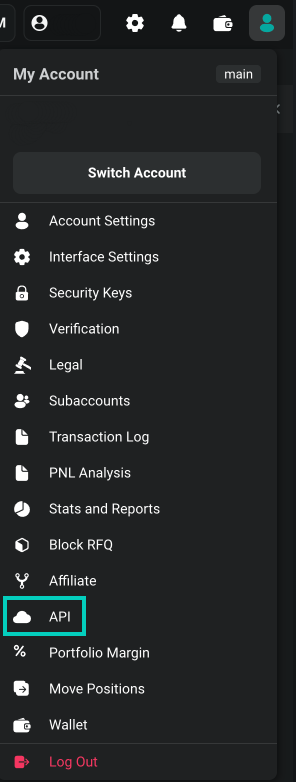
Press **'Add new key'** on the right side of the interface.
Select between Deribit-generated key and Self-generated key. Please refer to [Asymmetric API keys](/articles/asymmetric-api-keys) for more details on Self-generated keys.
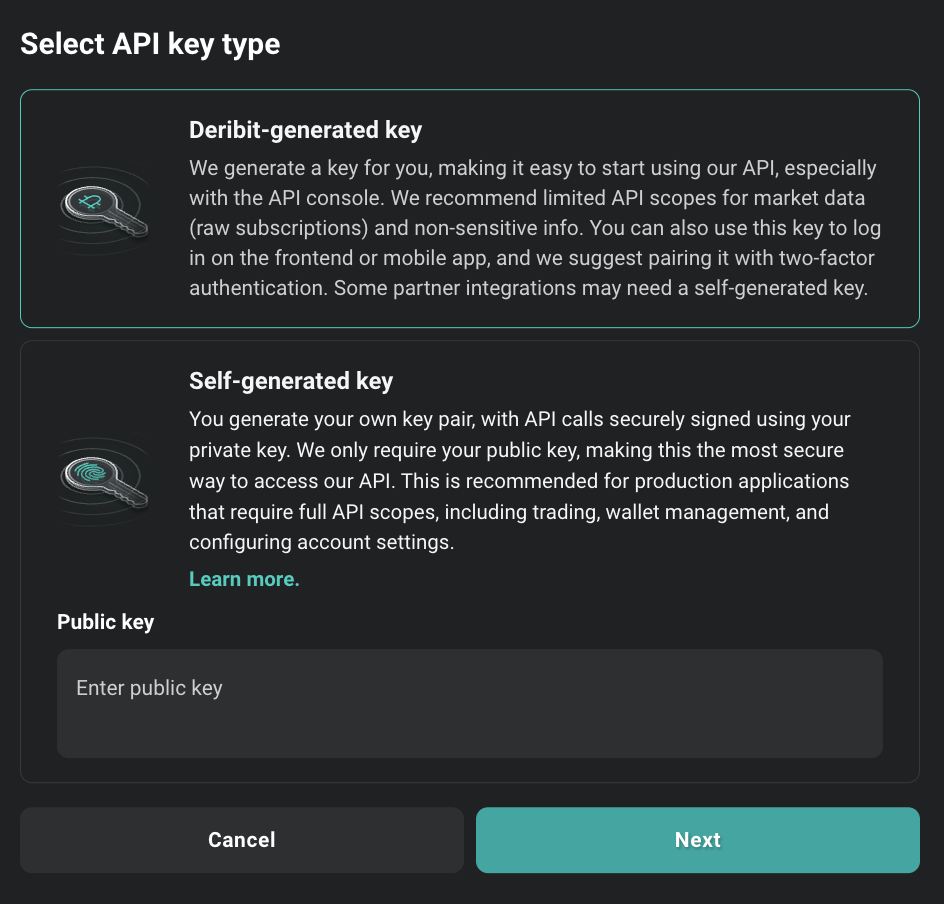
Learn about self-generated keys for enhanced security
Declare scopes and other API key details:
### Configuration Options
* **Scopes**: Describes maximal access for authorization with given key. For more information about access scopes, refer to the section [Scopes and Access Control](#scopes-and-access-control) below and consult [official API documentation](/articles/access-scope)
* **Name field**: This is a custom input you can enter to use as an identifier for the key.
* **Features field**: Additional optional features related to this API key. They may be expanded in future releases.
#### Restricted Block Trades feature
Restricted block trades feature limits the `block_trade:read` scope of the API key to block trades that have been made using this specific API key. This method can be employed to restrict the visibility of user private block trades with third parties to whom the user has provided their API key.
#### Block Trade Approval Feature
Block trade approval introduces an additional layer to the block trade verification process. When activated, it necessitates an additional approval from the user from a different API key before a block trade can be executed with the specified API key. This functionality provides users with enhanced oversight, particularly when a registered partner possessing an API key intends to carry out a block trade on their behalf.
* **IP Whitelisting**: An additional security feature, this field restricts which IPs can connect using this API key.

Once created you will receive **Client ID** and **Client Secret**.

### Client ID
The Client ID is a public identifier of the API key. It's not a secret. It can be exposed in web browsers, source code, or wherever else without immediate security concerns. It's mainly used to identify the key and is not used on its own for authentication.
### Client Secret
The Client Secret is a confidential piece of information. Think of it as a password. It should be kept secret and never exposed to the public. Exposing the Client Secret can lead to serious security risks. It's used, in combination with the Client ID, to authenticate.
The Client Secret is only shown once when the key is created. Store it securely - you cannot retrieve it later.
## Scopes and Access Control
Each API key on Deribit is assigned a default access scope, which defines the maximum permissions that can be granted when authenticating. These scopes determine what operations can be performed using the authenticated session.
When calling the `public/auth` endpoint, you can request one or more access scopes by including them in the scope parameter, separated by spaces:
```
scope: account:none custody:read block_trade:read
```
However, keep in mind:
* The requested scope cannot exceed the default scope of the API key.
For example, if your API key's default scope is `account:read` and you request `account:read_write`, the resulting token will still only have `account:read` access.
* The effective scope of the authenticated session is a merge of:
* the API key's default scope, and
* the requested scope, limited by the key's permissions.
The assigned scope for the token is returned in the `scope` field of the `public/auth` response.
Learn more about access scopes and permissions
## Creating the API key using the API
To create an API key via the Deribit API, use the `private/create_api_key` endpoint. Please note that this is a private endpoint and requires prior authentication through the `public/auth` method.
### Request
```json theme={null}
{
"method": "private/create_api_key",
"params": {
"name": "test_key",
"max_scope": "account:read trade:read_write wallet:read"
},
"jsonrpc": "2.0",
"id": 1
}
```
### Response
```json theme={null}
{
"jsonrpc": "2.0",
"id": 1,
"result": {
"max_scope": "trade:read_write wallet:read account:read",
"ip_whitelist": [],
"client_secret": "5gE6eyXwolP4RcVmsNqq8rhjtnjv5M1_HNHUHKAXsgt",
"client_id": "GgUXjYUj",
"enabled_features": [],
"timestamp": 1721816749587,
"name": "test_key",
"id": 11,
"enabled": true,
"default": false
}
}
```
## Creating read-only access for non‑trading stuff
For use cases like internal dashboards, monitoring tools, or finance reporting, where trading actions are not required, you can create a secure read-only API key. This setup ensures that the key can only retrieve data without being able to execute any orders or initiate withdrawals, which significantly reduces risk in case the key is ever exposed.
When configuring your new API key, make sure to only assign read-only scopes. These typically include:
* `block_rfq:read` – view RFQs
* `block_trade:read` – view existing block trades and trade history
* `account:read` – access account details
* `wallet:read` – check balances and transaction history
* `trade:read` – review past trades and open positions
* `custody:read` – used by third-party custodians when enabled by the client
Avoid selecting any scopes that end with `:write`. This ensures that the key cannot be used to place orders, transfer funds, or perform any actions that could impact your portfolio.
You may also consider enabling IP whitelisting to further restrict the usage of the key to trusted systems. This is particularly helpful for automation scripts or monitoring dashboards operating from static server locations.
This approach follows the principle of least privilege and is strongly recommended when API keys are used for integrations that do not require active trading functionality.
## Authentication
You can authenticate using your API credentials in two ways:
1. Directly in the Deribit login web-page using **"Log In with API credentials"** option
2. Using Deribit API by calling the `public/auth` method and passing your `client_id`, `client_secret`, and the desired read-only scopes
Make sure that the scopes requested in the auth call match the permissions assigned to the key.
For step-by-step guidance on authentication, visit [Authentication](/articles/authentication).
## Testing out your new API key
You can test your new API key in the [Deribit API console](https://www.deribit.com/api_console/?key_id=). Simply click the link to be redirected to the console, where you will already be authenticated with your new API key.
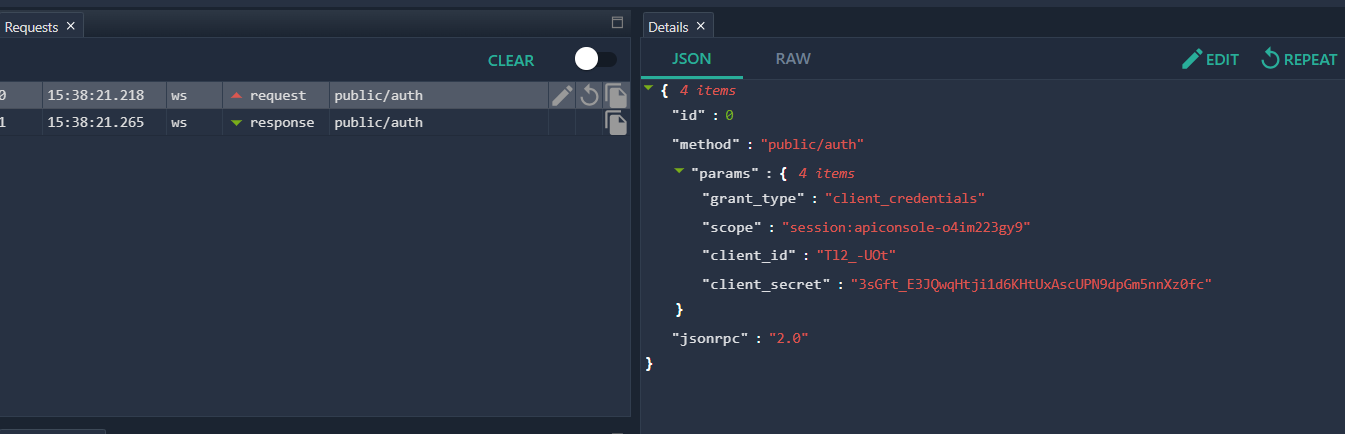
# Using the currency Parameter
Source: https://docs.deribit.com/articles/currency-parameter
Discover supported currencies with get_currencies, learn what currency selects on each Deribit method, and avoid invalid currency and spot routing errors.
Many Deribit methods take a `currency` parameter, but they do not all mean the same thing by it, and they do not all accept the same values. A currency you can deposit is not necessarily a currency you can hold a position in, and a currency that is valid on one method can be rejected on another.
This article explains what to send, how to discover the valid values at runtime, and how to avoid the two mistakes that generate most currency-related errors: asking for positions or balances in a currency the account does not support, and asking for spot trade data on a currency whose spot pair is routed to Coinbase.
The concrete currency lists in this article are a snapshot taken from production and are included to illustrate the categories. Deribit adds and removes currencies over time, so treat [`public/get_currencies`](/api-reference/market-data/public-get_currencies) and [`private/get_currencies`](/api-reference/account-management/private-get_currencies) as the authoritative sources and read them at runtime rather than hardcoding a list.
## Discover currencies instead of hardcoding them
Two methods answer the question "which currencies may I ask about?", and they answer it differently.
### public/get\_currencies
[`public/get_currencies`](/api-reference/market-data/public-get_currencies) returns every currency the platform recognizes, with its withdrawal fees, confirmation counts, precision and cross-collateral membership. This is the set that the `currency` parameter accepts on public and account-wide methods: any symbol returned here is a syntactically valid `currency`, and any symbol not returned here is rejected.
```json theme={null}
{
"jsonrpc": "2.0",
"method": "public/get_currencies",
"params": {},
"id": 1
}
```
The `currency` enum on an individual method's reference page lists the main settlement currencies rather than every value the parameter will accept. In practice these methods take any symbol `public/get_currencies` returns, and a currency with no instruments simply produces an empty result rather than an error. Validate against `get_currencies` rather than against the enum on the page.
### private/get\_currencies
[`private/get_currencies`](/api-reference/account-management/private-get_currencies) takes no parameters and returns the currencies available to the authenticated account. Because it is scoped to your account's custody arrangement, it is narrower than the public list and it is the correct list to drive wallet and balance requests from.
```json theme={null}
{
"jsonrpc": "2.0",
"method": "private/get_currencies",
"params": {},
"id": 2
}
```
Call `private/get_currencies` once when your application starts, cache the result, and iterate over that list instead of a list compiled by hand. This removes the whole class of "unsupported currency" errors, and it means new currencies are picked up without a code change.
## What currency means on each method
The same parameter name covers four different concepts. Which one applies depends on the method.
| Concept | What it selects | Typical methods |
| - | - | - |
| Settlement currency | The currency a derivative is margined and settled in, and therefore the currency a position and its margin are denominated in | [`private/get_positions`](/api-reference/account-management/private-get_positions), [`public/get_expirations`](/api-reference/market-data/public-get_expirations) |
| Wallet currency | A currency your account can hold, deposit or withdraw as a balance | [`private/get_account_summary`](/api-reference/account-management/private-get_account_summary), [`private/get_deposits`](/api-reference/wallet/private-get_deposits), [`private/get_withdrawals`](/api-reference/wallet/private-get_withdrawals), [`private/get_transfers`](/api-reference/wallet/private-get_transfers) |
| Instrument grouping | Every instrument whose name involves the currency, as base or as quote | [`public/get_instruments`](/api-reference/market-data/public-get_instruments), [`public/get_book_summary_by_currency`](/api-reference/market-data/public-get_book_summary_by_currency), [`public/get_last_trades_by_currency`](/api-reference/market-data/public-get_last_trades_by_currency), [`private/get_open_orders_by_currency`](/api-reference/trading/private-get_open_orders_by_currency) |
| Currency pair | A spot or index pair rather than a single currency, sent as `currency_pair` | [`private/cancel_all_by_currency_pair`](/api-reference/trading/private-cancel_all_by_currency_pair) |
Only a handful of methods accept the special value `any`, among them [`public/get_instruments`](/api-reference/market-data/public-get_instruments) and [`private/get_positions`](/api-reference/account-management/private-get_positions). The `by_currency` market data and trading methods require a single concrete currency, so sending `currency: "any"` to [`public/get_book_summary_by_currency`](/api-reference/market-data/public-get_book_summary_by_currency) or [`public/get_last_trades_by_currency`](/api-reference/market-data/public-get_last_trades_by_currency) is rejected. Check the method's own reference page before relying on `any`.
Starbase REST [`get_instruments`](/api-reference/market-data/list-instruments) matches `currency` to the instrument's base currency. Omit `currency` to return every base currency. `currency=any` matches no instrument and the call succeeds with an empty `result`.
### Single value or list
The `currency` parameter takes a single symbol on most methods. [`private/cancel_all_by_kind_or_type`](/api-reference/trading/private-cancel_all_by_kind_or_type) is one of the few methods that also accepts a JSON array of symbols; its reference page documents `currency` as "The currency symbol, list of currency symbols or `any` for all." Any other method rejects an array.
No method accepts a comma-separated string. Sending `currency: "BTC, USDC"` to [`private/get_positions`](/api-reference/account-management/private-get_positions) is treated as one unknown symbol and rejected with `invalid currency`. To query more than one currency at once, pass `currency: "any"` and filter the response client-side.
Currency symbols are matched case-insensitively, so `BTC` and `btc` are equivalent, but responses always use the uppercase form. Send uppercase and compare uppercase.
## Base and quote currency on spot amounts
On spot instruments the currency question also applies to sizes, because a pair has two of them: `BTC_USDT` has a base currency of BTC and a quote currency of USDT. An amount is meaningless until you know which of the two it is denominated in.
[`private/get_margins`](/api-reference/trading/private-get_margins) makes this explicit with `amount_type`, which applies to spot instruments only:
* `base`, the default, reads `amount` as a quantity of the base currency, with fees charged on top of it.
* `quote` reads `amount` as a total spend in the quote currency, with fees included in it.
Either way the resulting base quantities come back in `taker_base_amount` and `maker_base_amount`. Because taker and maker fee rates differ, a fee-inclusive spend buys a slightly different quantity in each role, and both are floored to a whole multiple of the instrument's `min_trade_amount`.
Leaving `amount_type` unset is the same as sending `base`, so a value you intended as "spend this much USDT" will be read as "buy this many BTC" unless you set `quote` explicitly. Read `base_currency` and `quote_currency` from [`public/get_instrument`](/api-reference/market-data/public-get_instrument) rather than splitting the instrument name.
## An empty result is not an error
A currency can be perfectly valid and still have nothing to return. Most currencies on Deribit are wallet-only: they can be deposited, held and withdrawn, but no instrument is listed against them. Asking for their instruments or trades succeeds and returns an empty array.
```json theme={null}
{
"jsonrpc": "2.0",
"id": 3,
"result": []
}
```
At the time of writing, only BTC, ETH and USDC have listed derivatives, and spot pairs exist for a slightly wider set. Every other currency returned by `public/get_currencies` is wallet-only. So an empty `result` from [`public/get_instruments`](/api-reference/market-data/public-get_instruments) means "this currency has no instruments", not "your request was malformed". Do not retry it, and do not treat it as a failure.
## Positions
[`private/get_positions`](/api-reference/account-management/private-get_positions) reports open derivative positions. Two things follow from that, and both are common sources of confusion.
**Spot is not a position.** Spot trades settle immediately into your balances, so there is no open position to report. Sending `kind: "spot"` is rejected:
```json theme={null}
{
"jsonrpc": "2.0",
"error": {
"code": -32602,
"message": "Invalid params",
"data": {
"param": "kind",
"reason": "spot kind not allowed"
}
},
"id": 4
}
```
The accepted values are `future`, `option`, `future_combo` and `option_combo`. To see what you hold in a spot currency, read its balance from [`private/get_account_summary`](/api-reference/account-management/private-get_account_summary) instead.
**Positions only exist in settlement currencies.** Because a position is denominated in the currency its instrument settles in, only currencies that actually carry derivatives can return positions. Requesting a wallet-only currency is not an error, but it can only ever return an empty list.
Rather than looping over currencies and guessing which ones are settlement currencies, call `private/get_positions` once with `currency: "any"` and omit `kind`. One request returns every open position across every currency and instrument kind, which is both cheaper in rate-limit credits and immune to changes in the currency list.
```json theme={null}
{
"jsonrpc": "2.0",
"method": "private/get_positions",
"params": {
"currency": "any"
},
"id": 5
}
```
## Wallet and balances
Wallet methods validate `currency` against the currencies your account can actually hold, which depends on how your account is custodied. A currency that is valid for another account, or valid on a public method, can still be rejected here, with a different reason string depending on which check failed. See [Error reference](#error-reference) below.
The fix is the same in every case: drive these calls from [`private/get_currencies`](/api-reference/account-management/private-get_currencies), which already returns only what your account supports.
For balances specifically, prefer [`private/get_account_summaries`](/api-reference/account-management/private-get_account_summaries) over a loop of [`private/get_account_summary`](/api-reference/account-management/private-get_account_summary) calls. It takes no `currency` parameter and returns one summary per currency your account holds, so there is no currency to get wrong and no unsupported currency to trip over.
```json theme={null}
{
"jsonrpc": "2.0",
"method": "private/get_account_summaries",
"params": {},
"id": 6
}
```
## Spot trade data and Coinbase-routed pairs
Some Deribit spot pairs are matched on the Deribit matching engine; others are routed to Coinbase Exchange for matching. Deribit only sees a match on a routed pair when one of your own orders was part of it, so it cannot publish a complete public trade tape for those instruments. Rather than serve partial data, it rejects trade-derived requests for them with `not_supported_for_coinbase_routed_spot` (`11060`).
The trap is that this hits currency-scoped requests you did not think of as spot requests at all. On [`public/get_last_trades_by_currency`](/api-reference/market-data/public-get_last_trades_by_currency) and [`public/get_last_trades_by_currency_and_time`](/api-reference/market-data/public-get_last_trades_by_currency_and_time), `kind` defaults to `any`, and `any` includes spot. So a request that names only a currency is treated as covering that currency's spot pairs:
```json theme={null}
{
"jsonrpc": "2.0",
"method": "public/get_last_trades_by_currency",
"params": {
"currency": "USDC"
},
"id": 7
}
```
```json theme={null}
{
"jsonrpc": "2.0",
"error": {
"code": 11060,
"message": "not_supported_for_coinbase_routed_spot"
},
"id": 7
}
```
### How to avoid it
**Send an explicit derivative `kind`.** The rejection only applies when `kind` is `spot` or `any`. Naming `future`, `option`, `future_combo` or `option_combo` scopes the request away from spot and always succeeds, even on a currency that has routed pairs:
```json theme={null}
{
"jsonrpc": "2.0",
"method": "public/get_last_trades_by_currency",
"params": {
"currency": "USDC",
"kind": "future"
},
"id": 8
}
```
**Subscribe per currency, not with `any`.** The `trades.{kind}.{currency}.{interval}` channel is refused for routed pairs, and `currency: "any"` is refused whenever any routed pair exists. Subscribe to the specific currencies or instruments you need.
**Query per instrument when you want spot.** For spot pairs matched on Deribit, [`public/get_last_trades_by_instrument`](/api-reference/market-data/public-get_last_trades_by_instrument) works normally. For routed pairs, get the full tape from Coinbase Exchange directly.
Which pairs are routed, and therefore which currencies are affected, is a configuration setting that Deribit can change. A currency can be affected even when it currently has no listed routed pair, so the affected set cannot be reliably derived from the instrument list. Do not maintain your own list of affected currencies: send an explicit derivative `kind` whenever you are not asking for spot data, and handle `11060` wherever you are.
For the full picture of how routed instruments differ, including order entry, see [Spot Trading: Deribit and Coinbase-Routed Instruments](/articles/spot-trading-venues).
## Error reference
| Code | Message | `data` | Cause and fix |
| - | - | - | - |
| -32602 | `Invalid params` | `param: currency`, `reason: invalid currency` | The symbol is not a Deribit currency, or `any` was sent to a method that requires a concrete currency. Validate against [`public/get_currencies`](/api-reference/market-data/public-get_currencies) and check whether the method accepts `any` |
| -32602 | `Invalid params` | `param: currency`, `reason: currency not supported` | A wallet method received a currency that is not available as a wallet balance. Use [`private/get_currencies`](/api-reference/account-management/private-get_currencies) |
| -32602 | `Invalid params` | `param: currency`, `reason: not supported for wallet type` | The currency exists but is not part of your account's custody arrangement. Use [`private/get_currencies`](/api-reference/account-management/private-get_currencies) |
| -32602 | `Invalid params` | `param: kind`, `reason: spot kind not allowed` | `kind: "spot"` was sent to [`private/get_positions`](/api-reference/account-management/private-get_positions). Read spot holdings as balances instead |
| -32602 | `Invalid params` | `param: kind`, `reason: invalid value` | The `kind` value is not recognized for this method. Check the accepted values on the method's reference page |
| 11060 | `not_supported_for_coinbase_routed_spot` | n/a | A trade-derived request covered a Coinbase-routed spot pair. Send an explicit derivative `kind`, or query the pair directly |
Code `11060` is also returned under its earlier message `not_supported_for_csr_spot`; treat the two as equivalent. See [Error Codes](/articles/errors) for the full list.
## Checklist
* Read `private/get_currencies` at startup and cache it; never hardcode a currency list.
* Send uppercase symbols and compare uppercase.
* Do not send `any` unless the method's reference page documents it.
* Use `private/get_positions` with `currency: "any"` instead of looping over currencies, and never send `kind: "spot"`.
* Use `private/get_account_summaries` instead of a loop of `private/get_account_summary` calls.
* Always send an explicit derivative `kind` on `by_currency` trade methods unless you genuinely want spot data.
* On spot, be explicit about `amount_type` so `amount` is read in the currency you meant.
* Treat an empty `result` as "nothing to return", not as a failed request.
# Quickstart Guide
Source: https://docs.deribit.com/articles/deribit-quickstart
Set up the Deribit API environment, send your first authenticated JSON-RPC request, and use the key endpoints to place an order in minutes.
Deribit provides three different interfaces to access the API:
* **JSON-RPC over WebSocket** (recommended) - Real-time, bidirectional communication
* **JSON-RPC over HTTP** - Simple REST-like interface
* **FIX API** - Financial Information eXchange protocol for institutional trading
All examples in this documentation use the **test environment** (`test.deribit.com`). To use production, change the URLs to `www.deribit.com`. Test and production environments are separate and require different accounts and API keys.
- Log in to your Deribit account at [www.deribit.com](https://www.deribit.com) or [test.deribit.com](https://test.deribit.com) for testing
- Navigate to **Account** → **API**
- Create a new API key with appropriate permissions
- Save your **Client ID** and **Client Secret** securely
Never share your API credentials or commit them to version control. The client secret is only shown once and cannot be retrieved later.
Step-by-step guide to creating API keys
Using Ed25519 or RSA key pairs for enhanced security
For private methods, you need to authenticate. Deribit supports multiple authentication methods:
- Client Credentials - Standard OAuth 2.0 flow
- Client Signature - User generated signature
- Refresh Token - Token renewal
```bash theme={null}
# Get access token using Client Credentials
curl -X GET "https://test.deribit.com/api/v2/public/auth" \
-d "grant_type=client_credentials" \
-d "client_id=YOUR_CLIENT_ID" \
-d "client_secret=YOUR_CLIENT_SECRET"
```
Response:
```json theme={null}
{
"jsonrpc": "2.0",
"result": {
"access_token": "eyJ0eXAiOiJKV1QiLCJhbGc...",
"expires_in": 31536000,
"refresh_token": "eyJ0eXAiOiJKV1QiLCJhbGc...",
"scope": "account:read trade:read",
"token_type": "bearer"
}
}
```
```javascript theme={null}
const WebSocket = require('ws');
const ws = new WebSocket('wss://test.deribit.com/ws/api/v2');
ws.on('open', function open() {
// Authenticate
ws.send(JSON.stringify({
"jsonrpc": "2.0",
"method": "public/auth",
"params": {
"grant_type": "client_credentials",
"client_id": "YOUR_CLIENT_ID",
"client_secret": "YOUR_CLIENT_SECRET"
},
"id": 1
}));
});
ws.on('message', function incoming(data) {
const response = JSON.parse(data);
if (response.result && response.result.access_token) {
console.log('Authenticated! Access token:', response.result.access_token);
// Now you can make private method calls
}
});
```
Learn more about API permissions and access scopes
**Get Market Data**
```bash theme={null}
# Get all BTC futures
curl -X GET "https://test.deribit.com/api/v2/public/get_instruments?currency=BTC&kind=future"
# Get ticker for BTC-PERPETUAL
curl -X GET "https://test.deribit.com/api/v2/public/ticker?instrument_name=BTC-PERPETUAL"
# Get order book
curl -X GET "https://test.deribit.com/api/v2/public/get_order_book?instrument_name=BTC-PERPETUAL&depth=5"
```
**Get Account Information**
```bash theme={null}
# Get account summary
curl -X GET "https://test.deribit.com/api/v2/private/get_account_summary?currency=BTC" \
-H "Authorization: Bearer YOUR_ACCESS_TOKEN"
# Get open orders
curl -X GET "https://test.deribit.com/api/v2/private/get_open_orders?currency=BTC" \
-H "Authorization: Bearer YOUR_ACCESS_TOKEN"
```
**Subscribe to Real-Time Data**
```javascript theme={null}
const WebSocket = require('ws');
const ws = new WebSocket('wss://test.deribit.com/ws/api/v2');
ws.on('open', function open() {
// Subscribe to multiple channels
ws.send(JSON.stringify({
"jsonrpc": "2.0",
"method": "public/subscribe",
"params": {
"channels": [
"book.BTC-PERPETUAL.100ms",
"ticker.BTC-PERPETUAL.100ms",
"trades.BTC-PERPETUAL.100ms"
]
},
"id": 1
}));
});
ws.on('message', function incoming(data) {
const message = JSON.parse(data);
if (message.method === 'subscription') {
console.log('Update:', message.params.channel, message.params.data);
}
});
```
Only use test.deribit.com for testing. Never test with real funds on production.
```bash theme={null}
# Place a limit buy order (testnet)
curl -X GET "https://test.deribit.com/api/v2/private/buy" \
-H "Authorization: Bearer YOUR_ACCESS_TOKEN" \
-d "instrument_name=BTC-PERPETUAL" \
-d "amount=10" \
-d "type=limit" \
-d "price=50000"
```
```javascript theme={null}
ws.send(JSON.stringify({
"jsonrpc": "2.0",
"method": "private/buy",
"params": {
"instrument_name": "BTC-PERPETUAL",
"amount": 10,
"type": "limit",
"price": 50000,
"access_token": "YOUR_ACCESS_TOKEN"
},
"id": 2
}));
```
# Error Codes
Source: https://docs.deribit.com/articles/errors
Complete reference of Deribit API error codes, HTTP status meanings, and guidance on handling common failure scenarios in production client code.
## Error Response Format
```json theme={null}
{
"jsonrpc": "2.0",
"error": {
"code": 13009,
"message": "invalid_token",
"data": {
"reason": "token has expired",
"param": "access_token"
}
},
"usIn": 1704153600000000,
"usOut": 1704153600001234,
"usDiff": 1234,
"id": 42
}
```
## Common Error Codes
### Authentication Errors (10000-10099)
| Code | Message | Description | Solution |
| - | - | - | - |
| 10000 | `authorization_required` | Authentication needed | Provide valid access token |
| 10001 | `invalid_credentials` | Invalid API key/secret | Check credentials |
| 10002 | `insufficient_funds` | Not enough balance | Add funds or reduce order size |
| 10003 | `invalid_request` | Malformed request | Check request format |
| 10004 | `not_found` | Resource not found | Verify resource exists |
| 10005 | `forbidden` | Operation not allowed | Check permissions |
| 10006 | `not_open_yet` | Trading not started | Wait for market open |
| 10007 | `already_closed` | Trading ended | Market is closed |
| 10008 | `price_too_low` | Price below minimum | Increase price |
| 10009 | `invalid_argument` | Invalid parameter | Check parameter values |
### Token Errors (13000-13099)
| Code | Message | Description | Solution |
| - | - | - | - |
| 13009 | `invalid_token` | Token expired/invalid | Refresh or re-authenticate |
| 13010 | `token_revoked` | Token was revoked | Re-authenticate |
| 13011 | `insufficient_scope` | Missing permissions | Use token with correct scope |
### Rate Limit Errors
| Code | Message | Description | Solution |
| - | - | - | - |
| 10028 | `too_many_requests` | Rate limit exceeded | Wait and retry with backoff |
### Trading Errors (11000-11099)
| Code | Message | Description | Solution |
| - | - | - | - |
| 11000 | `order_not_found` | Order doesn't exist | Check order ID |
| 11001 | `order_closed` | Order already filled/cancelled | Cannot modify |
| 11002 | `order_in_liquidation` | Order in liquidation | Wait for completion |
| 11003 | `price_out_of_range` | Price too far from mark | Adjust price |
| 11004 | `amount_too_small` | Order size too small | Increase amount |
| 11005 | `amount_too_large` | Order size too large | Reduce amount |
| 11006 | `post_only_reject` | Would take liquidity | Use different order type |
| 11007 | `reduce_only_reject` | Would increase position | Check position size |
| 11008 | `max_position_exceeded` | Position limit reached | Close positions |
| 11009 | `self_trade_reject` | Would trade with self | Adjust price |
## Complete RPC Error Codes Reference
The following table contains the complete list of all RPC error codes returned by the Deribit API.
| Error Code | Short message | Description |
| :- | :- | :- |
| 0 or absent | | Success, No error. |
| 10000 | `"authorization_required"` | Authorization issue, invalid or absent signature etc. |
| 10001 | `"error"` | Some general failure, no public information available. |
| 10002 | `"qty_too_low"` | Order quantity is too low. |
| 10003 | `"order_overlap"` | Rejection, order overlap is found and self-trading is not enabled. |
| 10004 | `"order_not_found"` | Attempt to operate with order that can't be found by specified id or label. |
| 10005 | `"price_too_low "` | Price is too low, `` defines current limit for the operation. |
| 10006 | `"price_too_low4idx "` | Price is too low for current index, `` defines current bottom limit for the operation. |
| 10007 | `"price_too_high "` | Price is too high, `` defines current up limit for the operation. |
| 10009 | `"not_enough_funds"` | Account has not enough funds for the operation. |
| 10010 | `"already_closed"` | Attempt of doing something with closed order. |
| 10011 | `"price_not_allowed"` | This price is not allowed for some reason. |
| 10012 | `"book_closed"` | Operation for an instrument which order book had been closed. |
| 10013 | `"pme_max_total_open_orders "` | Total limit of open orders has been exceeded, it is applicable for PME users. |
| 10014 | `"pme_max_future_open_orders "` | Limit of count of futures' open orders has been exceeded, it is applicable for PME users. |
| 10015 | `"pme_max_option_open_orders "` | Limit of count of options' open orders has been exceeded, it is applicable for PME users. |
| 10016 | `"pme_max_future_open_orders_size "` | Limit of size for futures has been exceeded, it is applicable for PME users. |
| 10017 | `"pme_max_option_open_orders_size "` | Limit of size for options has been exceeded, it is applicable for PME users. |
| 10018 | `"non_pme_max_future_position_size "` | Limit of size for futures has been exceeded, it is applicable for non-PME users. |
| 10019 | `"locked_by_admin"` | Trading is temporarily locked by the admin. |
| 10020 | `"invalid_or_unsupported_instrument"` | Instrument name is not valid. |
| 10021 | `"invalid_amount"` | Amount is not valid. |
| 10022 | `"invalid_quantity"` | quantity was not recognized as a valid number (for API v1). |
| 10023 | `"invalid_price"` | price was not recognized as a valid number. |
| 10024 | `"invalid_max_show"` | `max_show` parameter was not recognized as a valid number. |
| 10025 | `"invalid_order_id"` | Order id is missing or its format was not recognized as valid. |
| 10026 | `"price_precision_exceeded"` | Extra precision of the price is not supported. |
| 10027 | `"non_integer_contract_amount"` | Futures contract amount was not recognized as integer. |
| 10028 | `"too_many_requests"` | Allowed request rate has been exceeded. |
| 10029 | `"not_owner_of_order"` | Attempt to operate with not own order. |
| 10030 | `"must_be_websocket_request"` | REST request where WebSocket is expected. |
| 10031 | `"invalid_args_for_instrument"` | Some of the arguments are not recognized as valid. |
| 10032 | `"whole_cost_too_low"` | Total cost is too low. |
| 10033 | `"not_implemented"` | Method is not implemented yet. |
| 10034 | `"trigger_price_too_high"` | Trigger price is too high. |
| 10035 | `"trigger_price_too_low"` | Trigger price is too low. |
| 10036 | `"invalid_max_show_amount"` | Max Show Amount is not valid. |
| 10037 | `"non_pme_total_short_options_positions_size "` | Limit of total size for short options positions has been exceeded, it is applicable for non-PME users. |
| 10038 | `"pme_max_risk_reducing_orders "` | Limit of open risk reducing orders has been reached, it is applicable for PME users. |
| 10039 | `"not_enough_funds_in_currency "` | Returned when the user does not have sufficient spot reserves to complete the spot trade or when an option order would negatively impact the non-cross portfolio margin balance of Cross SM user. |
| 10040 | `"retry"` | Request can't be processed right now and should be retried. |
| 10041 | `"settlement_in_progress"` | Settlement is in progress. Every day at settlement time for several seconds, the system calculates user profits and updates balances. That time trading is paused for several seconds till the calculation is completed. |
| 10043 | `"price_wrong_tick"` | Price has to be rounded to an instrument tick size. |
| 10044 | `"trigger_price_wrong_tick"` | Trigger Price has to be rounded to an instrument tick size. |
| 10045 | `"can_not_cancel_liquidation_order"` | Liquidation order can't be cancelled. |
| 10046 | `"can_not_edit_liquidation_order"` | Liquidation order can't be edited. |
| 10047 | `"matching_engine_queue_full"` | Reached limit of pending Matching Engine requests for user. |
| 10048 | `"not_on_this_server"` | The requested operation is not available on this server. |
| 10049 | `"cancel_on_disconnect_failed"` | Enabling Cancel On Disconnect for the connection failed. |
| 10066 | `"too_many_concurrent_requests"` | The client has sent too many public requests that have not yet been executed. |
| 10072 | `"disabled_while_position_lock"` | Spot trading is disabled for users in reduce only mode. |
| 11008 | `"already_filled"` | This request is not allowed in regards to the filled order. |
| 11013 | `"max_spot_open_orders"` | Total limit of open orders on spot instruments has been exceeded. |
| 11021 | `"post_only_price_modification_not_possible"` | Price modification for post only order is not possible. |
| 11022 | `"max_spot_order_quantity"` | Limit of quantity per currency for spot instruments has been exceeded. |
| 11029 | `"invalid_arguments"` | Some invalid input has been detected. |
| 11030 | `"other_reject "` | Some rejects which are not considered as very often, more info may be specified in ``. |
| 11031 | `"other_error "` | Some errors which are not considered as very often, more info may be specified in ``. |
| 11035 | `"no_more_triggers "` | Allowed amount of trigger orders has been exceeded. |
| 11036 | `"invalid_trigger_price"` | Invalid trigger price (too high or too low) in relation to the last trade, index or market price. |
| 11037 | `"outdated_instrument_for_IV_order"` | Instrument already not available for trading. |
| 11038 | `"no_adv_for_futures"` | Advanced orders are not available for futures. |
| 11039 | `"no_adv_postonly"` | Advanced post-only orders are not supported yet. |
| 11041 | `"not_adv_order"` | Advanced order properties can't be set if the order is not advanced. |
| 11042 | `"permission_denied"` | Permission for the operation has been denied. |
| 11043 | `"bad_argument"` | Bad argument has been passed. |
| 11044 | `"not_open_order"` | Attempt to do open order operations with the not open order. |
| 11045 | `"invalid_event"` | Event name has not been recognized. |
| 11046 | `"outdated_instrument"` | At several minutes to instrument expiration, corresponding advanced implied volatility orders are not allowed. |
| 11047 | `"unsupported_arg_combination"` | The specified combination of arguments is not supported. |
| 11048 | `"wrong_max_show_for_option"` | Wrong Max Show for options. |
| 11049 | `"bad_arguments"` | Several bad arguments have been passed. |
| 11050 | `"bad_request"` | Request has not been parsed properly. |
| 11051 | `"system_maintenance"` | System is under maintenance. |
| 11052 | `"subscribe_error_unsubscribed"` | Subscription error. However, subscription may fail without this error, please check the list of subscribed channels returned, as some channels can be not subscribed due to wrong input or lack of permissions. |
| 11053 | `"transfer_not_found"` | Specified transfer is not found. |
| 11054 | `"post_only_reject"` | Request rejected due to `reject_post_only` flag. |
| 11055 | `"post_only_not_allowed"` | Post only flag not allowed for given order type. |
| 11056 | `"unauthenticated_public_requests_temporarily_disabled"` | Request rejected because unauthenticated public requests were temporarily disabled. |
| 11059 | `"iceberg_not_allowed"` | Iceberg orders rejected on CBE-routed spot instruments. |
| 11060 | `"not_supported_for_coinbase_routed_spot"` | The requested feature is not available on spot instruments routed to Coinbase Exchange. |
| 11090 | `"invalid_addr"` | Invalid address. |
| 11091 | `"invalid_transfer_address"` | Invalid address for the transfer. |
| 11092 | `"address_already_exist"` | The address already exists. |
| 11093 | `"max_addr_count_exceeded"` | Limit of allowed addresses has been reached. |
| 11094 | `"internal_server_error"` | Some unhandled error on server. Please report to admin. The details of the request will help to locate the problem. |
| 11095 | `"disabled_deposit_address_creation"` | Deposit address creation has been disabled by admin. |
| 11096 | `"address_belongs_to_user"` | Withdrawal instead of transfer. |
| 11097 | `"no_deposit_address"` | Deposit address not specified. |
| 11098 | `"account_locked"` | Account locked. |
| 12001 | `"too_many_subaccounts"` | Limit of subaccounts is reached. |
| 12002 | `"wrong_subaccount_name"` | The input is not allowed as the name of subaccount. |
| 12003 | `"login_over_limit"` | The number of failed login attempts is limited. |
| 12004 | `"registration_over_limit"` | The number of registration requests is limited. |
| 12005 | `"country_is_banned"` | The country is banned (possibly via IP check). |
| 12100 | `"transfer_not_allowed"` | Transfer is not allowed. Possible wrong direction or other mistake. |
| 12998 | `"security_key_authorization_over_limit"` | Too many failed security key authorizations. The client should wait for `wait` seconds to try again. |
| 13004 | `"invalid_credentials"` | Invalid credentials have been used. |
| 13005 | `"pwd_match_error"` | Password confirmation error. |
| 13006 | `"security_error"` | Invalid Security Code. |
| 13007 | `"user_not_found"` | User's security code has been changed or wrong. |
| 13008 | `"request_failed"` | Request failed because of invalid input or internal failure. |
| 13009 | `"unauthorized"` | Wrong or expired authorization token or bad signature. For example, please check the scope of the token, "connection" scope can't be reused for other connections. |
| 13010 | `"value_required"` | Invalid input, missing value. |
| 13011 | `"value_too_short"` | Input is too short. |
| 13012 | `"unavailable_in_subaccount"` | Subaccount restrictions. |
| 13013 | `"invalid_phone_number"` | Unsupported or invalid phone number. |
| 13014 | `"cannot_send_sms"` | SMS sending failed: phone number is wrong. |
| 13015 | `"invalid_sms_code"` | Invalid SMS code. |
| 13016 | `"invalid_input"` | Invalid input. |
| 13018 | `"invalid_content_type"` | Invalid content type of the request. |
| 13019 | `"orderbook_closed"` | Closed, expired order book. |
| 13020 | `"not_found"` | Instrument is not found, invalid instrument name. |
| 13021 | `"forbidden"` | Not enough permissions to execute the request, forbidden. |
| 13025 | `"method_switched_off_by_admin"` | API method temporarily switched off by the administrator. |
| 13028 | `"temporarily_unavailable"` | The requested service is not responding or processing the response takes too long. |
| 13030 | `"mmp_trigger"` | Order has been rejected due to the MMP trigger. |
| 13031 | `"verification_required"` | API method allowed only for verified users. |
| 13032 | `"non_unique_order_label"` | Request allowed only for orders uniquely identified by given label, more than one match was found. |
| 13034 | `"no_more_security_keys_allowed"` | Maximal number of tokens allowed reached. |
| 13035 | `"active_combo_limit_reached"` | Limit of active combo books was reached. The client should wait some time before retrying the request. |
| 13036 | `"unavailable_for_combo_books"` | Action is temporarily unavailable for combo books. |
| 13037 | `"incomplete_KYC_data"` | KYC verification data is insufficient for external service provider. |
| 13040 | `"mmp_required"` | User is not an MMP user. |
| 13042 | `"cod_not_enabled"` | Cancel-on-Disconnect is not enabled for the connection. |
| 13043 | `"quotes_frozen"` | Quotes are still frozen after previous cancel. |
| 13403 | `"scope_exceeded"` | Error returned after the user tried to edit / delete an API key using an authorized key connection with insufficient scope. |
| 13503 | `"unavailable"` | Method is currently not available. |
| 13666 | `"request_cancelled_by_user"` | Request was cancelled by the user with other API request. |
| 13777 | `"replaced"` | Edit request was replaced by other one. |
| 13778 | `"raw_subscriptions_not_available_for_unauthorized"` | Raw subscriptions are not available for unauthorized requests. |
| 13780 | `"move_positions_over_limit"` | The client cannot execute the request yet, and should wait for `wait` seconds to try again. |
| 13781 | `"coupon_already_used"` | The coupon has already been used by current account. |
| 13791 | `"KYC_transfer_already_initiated"` | Sharing of KYC data with a third party provider was already initiated. |
| 13792 | `"incomplete_KYC_data"` | User's KYC data stored on the platform is insufficient for sharing according to third party provider. |
| 13793 | `"KYC_data_inaccessible"` | User's KYC data is inaccessible at the moment. Client should try again later. |
| 13888 | `"timed_out"` | Server did not manage to process request when it was valid (`valid_until`). |
| 13901 | `"no_more_oto_orders"` | Total limit of open "one triggers other" orders has been exceeded. |
| 13902 | `"mass_quotes_disabled"` | Mass Quotes feature disabled for this user and currency. |
| 13903 | `"too_many_quotes"` | Number of quotes (in Mass Quotes requests) per second exceeded. |
| 13904 | `"security_key_setup_required"` | Not allowed without a full security key setup. |
| 13905 | `"too_many_quotes_per_block_rfq"` | Number of quotes for single block rfq exceeded. |
| 13906 | `"too_many_quotes_per_block_rfq_side"` | Number of quotes per single block rfq side exceeded. |
| 13907 | `"not_fully_filled"` | Block Rfq trade cannot be fully filled with matched quotes. |
| 13907 | `"too_many_open_block_rfqs"` | Number of open block rfq by taker exceeds configured max amount. |
| 13910 | `"quote_crossed"` | Quote placed by the maker crosses an already placed quote by the same maker. |
| 13911 | `"max_broker_client_count"` | Number of broker clients exceeds allowed max amount. |
| 13912 | `"broker_cannot_be_client"` | Broker accounts cannot be clients of other brokers. |
| 13913 | `"broker_already_linked"` | User has already been linked to this broker. |
| 13914 | `"user_is_a_broker_client"` | User is a client of a broker account. |
| 13915 | `"user_is_not_a_broker"` | User account is not configured as broker account. |
| 13916 | `"app_registered_to_broker"` | Application is registered to a broker. |
| 13917 | `"account_quote_limit_crossed"` | Block Rfq quote limits set for the account were crossed. |
| 13918 | `"inverse_future_cross_trading"` | Placed block rfq quote would cross trade inverse futures with block rfq quote limits set on the account. |
| 13919 | `"client_of_main_account"` | Subaccounts of brokers cannot be linked to their own broker account. |
| 13922 | `"linked_order_type_not_supported_for_csr_spot"` | Linked orders (OTO, OCO, OTOCO) are not supported on spot instruments routed to Coinbase Exchange. |
| -32602 | `"Invalid params"` | See JSON-RPC spec. The `data` object names the offending `param` and a `reason`. For the `currency` and `kind` variants, see [Using the currency Parameter](/articles/currency-parameter). |
| -32600 | `"request entity too large"` | Error thrown when body size in POST request or single frame in websocket connection frame exceeds the limit (32 kB). |
| -32601 | `"Method not found"` | See JSON-RPC spec. |
| -32700 | `"Parse error"` | See JSON-RPC spec. |
| -32000 | `"Missing params"` | See JSON-RPC spec. |
## Error Handling Strategies
### Basic Error Handler
```javascript theme={null}
function handleError(error) {
switch (error.code) {
case 13009:
// Token expired - refresh
return refreshToken();
case 10002:
// Insufficient funds
throw new Error('Insufficient funds for this operation');
case 10028:
// Rate limit - retry with backoff
return retryWithBackoff();
case 11006:
// Post-only rejected
console.log('Order would have taken liquidity');
return null;
default:
throw new Error(`API Error ${error.code}: ${error.message}`);
}
}
```
### Retry Logic
```javascript theme={null}
async function retryWithBackoff(fn, maxRetries = 3) {
for (let i = 0; i < maxRetries; i++) {
try {
return await fn();
} catch (error) {
if (error.code === 10028) {
// Rate limit - exponential backoff
const delay = Math.pow(2, i) * 1000;
console.log(`Rate limited, retrying in ${delay}ms`);
await sleep(delay);
continue;
}
if (error.code === 13009) {
// Token expired - refresh and retry
await refreshToken();
continue;
}
// Other errors - don't retry
throw error;
}
}
throw new Error('Max retries exceeded');
}
function sleep(ms) {
return new Promise(resolve => setTimeout(resolve, ms));
}
```
### Error Recovery
```javascript theme={null}
class ErrorRecovery {
constructor(apiClient) {
this.apiClient = apiClient;
this.maxRetries = 3;
}
async executeWithRecovery(fn) {
let lastError;
for (let attempt = 0; attempt < this.maxRetries; attempt++) {
try {
return await fn();
} catch (error) {
lastError = error;
const shouldRetry = await this.handleError(error, attempt);
if (!shouldRetry) {
throw error;
}
}
}
throw lastError;
}
async handleError(error, attempt) {
switch (error.code) {
case 13009: // Token expired
await this.apiClient.refreshToken();
return true;
case 10028: // Rate limit
const delay = Math.pow(2, attempt) * 1000;
await sleep(delay);
return true;
case 10002: // Insufficient funds
console.error('Insufficient funds - cannot retry');
return false;
case 11000: // Order not found
console.warn('Order not found - may have been filled');
return false;
default:
// Unknown error - don't retry
return false;
}
}
}
// Usage
const recovery = new ErrorRecovery(apiClient);
try {
const result = await recovery.executeWithRecovery(async () => {
return await apiClient.placeOrder({
instrument_name: 'BTC-PERPETUAL',
amount: 10,
price: 50000
});
});
console.log('Order placed:', result);
} catch (error) {
console.error('Failed after retries:', error);
}
```
## Error Monitoring
### Error Logger
```javascript theme={null}
class ErrorLogger {
constructor() {
this.errors = [];
}
log(error, context = {}) {
this.errors.push({
code: error.code,
message: error.message,
data: error.data,
context,
timestamp: Date.now()
});
// Alert on critical errors
if (this.isCritical(error)) {
this.alert(error);
}
}
isCritical(error) {
const criticalCodes = [10002, 11008]; // Insufficient funds, max position
return criticalCodes.includes(error.code);
}
alert(error) {
console.error('CRITICAL ERROR:', error);
// Send to monitoring service
}
getStats() {
const errorCounts = {};
this.errors.forEach(err => {
errorCounts[err.code] = (errorCounts[err.code] || 0) + 1;
});
return {
total: this.errors.length,
byCode: errorCounts,
recent: this.errors.slice(-10)
};
}
}
```
### Error Metrics
```javascript theme={null}
class ErrorMetrics {
constructor() {
this.metrics = {
total: 0,
byCode: {},
byMethod: {},
lastHour: []
};
}
record(error, method) {
this.metrics.total++;
// Count by error code
this.metrics.byCode[error.code] =
(this.metrics.byCode[error.code] || 0) + 1;
// Count by method
this.metrics.byMethod[method] =
(this.metrics.byMethod[method] || 0) + 1;
// Track recent errors
this.metrics.lastHour.push({
code: error.code,
method,
timestamp: Date.now()
});
// Clean old errors
this.cleanOldErrors();
}
cleanOldErrors() {
const oneHourAgo = Date.now() - 3600000;
this.metrics.lastHour = this.metrics.lastHour.filter(
err => err.timestamp > oneHourAgo
);
}
getErrorRate() {
return this.metrics.lastHour.length / 3600; // errors per second
}
getMostCommonErrors(limit = 5) {
return Object.entries(this.metrics.byCode)
.sort((a, b) => b[1] - a[1])
.slice(0, limit)
.map(([code, count]) => ({ code: parseInt(code), count }));
}
}
```
## Validation Errors
### Parameter Validation
```javascript theme={null}
function validateOrderParams(params) {
const errors = [];
// Required fields
if (!params.instrument_name) {
errors.push({
code: 10009,
message: 'invalid_argument',
param: 'instrument_name'
});
}
if (!params.amount || params.amount <= 0) {
errors.push({
code: 10009,
message: 'invalid_argument',
param: 'amount'
});
}
// Type validation
if (params.type === 'limit' && !params.price) {
errors.push({
code: 10009,
message: 'invalid_argument',
param: 'price',
reason: 'price required for limit orders'
});
}
return errors;
}
// Usage
const errors = validateOrderParams(orderParams);
if (errors.length > 0) {
throw new Error(`Validation failed: ${JSON.stringify(errors)}`);
}
```
## Complete Error Handler
```javascript theme={null}
class DeribitErrorHandler {
constructor(apiClient) {
this.apiClient = apiClient;
this.logger = new ErrorLogger();
this.metrics = new ErrorMetrics();
}
async handle(error, context = {}) {
// Log error
this.logger.log(error, context);
this.metrics.record(error, context.method);
// Handle specific errors
switch (error.code) {
case 13009:
return this.handleTokenExpired();
case 10028:
return this.handleRateLimit(context.attempt || 0);
case 10002:
return this.handleInsufficientFunds(error);
case 11006:
return this.handlePostOnlyReject(context);
default:
return this.handleGenericError(error);
}
}
async handleTokenExpired() {
console.log('Token expired, refreshing...');
await this.apiClient.refreshToken();
return { retry: true };
}
async handleRateLimit(attempt) {
const delay = Math.min(Math.pow(2, attempt) * 1000, 30000);
console.log(`Rate limited, waiting ${delay}ms`);
await sleep(delay);
return { retry: true, delay };
}
handleInsufficientFunds(error) {
console.error('Insufficient funds:', error.data);
return { retry: false, fatal: true };
}
handlePostOnlyReject(context) {
console.log('Post-only order would take liquidity');
return { retry: false, adjustPrice: true };
}
handleGenericError(error) {
console.error(`API Error ${error.code}: ${error.message}`);
return { retry: false };
}
getMetrics() {
return {
logger: this.logger.getStats(),
metrics: {
total: this.metrics.metrics.total,
errorRate: this.metrics.getErrorRate(),
mostCommon: this.metrics.getMostCommonErrors()
}
};
}
}
// Usage
const errorHandler = new DeribitErrorHandler(apiClient);
try {
const result = await apiClient.placeOrder(params);
} catch (error) {
const action = await errorHandler.handle(error, {
method: 'private/buy',
params
});
if (action.retry) {
// Retry the operation
} else if (action.fatal) {
// Stop and alert
}
}
```
## Best Practices
### 1. Always Check for Errors
```javascript theme={null}
const response = await apiCall();
if (response.error) {
handleError(response.error);
}
```
### 2. Implement Exponential Backoff
```javascript theme={null}
async function withBackoff(fn, maxRetries = 3) {
for (let i = 0; i < maxRetries; i++) {
try {
return await fn();
} catch (error) {
if (i === maxRetries - 1) throw error;
await sleep(Math.pow(2, i) * 1000);
}
}
}
```
### 3. Log All Errors
```javascript theme={null}
function logError(error, context) {
console.error({
code: error.code,
message: error.message,
context,
timestamp: new Date().toISOString()
});
}
```
### 4. Monitor Error Rates
```javascript theme={null}
if (errorMetrics.getErrorRate() > 1) {
console.warn('High error rate detected');
// Alert or throttle requests
}
```
# Coinbase International Exchange API Migration
Source: https://docs.deribit.com/articles/intx-api-migration
How International Exchange API and FIX integrations connect to Deribit after the migration: keys, endpoints, instruments, orders, and positions.
Coinbase International Exchange consolidated into Deribit on **1 October 2026**. This article is for institutional clients who trade over **API or FIX**. It covers how your integration talks to Deribit: new keys, endpoints, instrument names, order attributes, migrated positions, and the checks to run before you restore size.
Sign-in, balances, eligibility, and the rest of the account are in the knowledge base:
Sign-in, account checks, deposits, and non-API cutover details.
International Exchange API keys do not work on Deribit. Create a new Deribit key for every account or subaccount that trades through an integration.
## Accounts and keys
Your first International Exchange portfolio is the Deribit **main account**. Each additional portfolio is a **subaccount** named after its portfolio UID. Subaccounts do not share margin, positions, or collateral. A subaccount session cannot see the main account or other subaccounts. [`private/get_subaccounts`](/api-reference/account-management/private-get_subaccounts) returns the mapping.
Create the first Deribit key in the UI on the target account (the main account for the first portfolio, or the matching subaccount for each of the others). Further keys can be created with [`private/create_api_key`](/api-reference/account-management/private-create_api_key). Set IP allowlists on the Deribit key. International Exchange allowlists are not on Deribit.
Authenticate with [`public/auth`](/api-reference/authentication/public-auth). On WebSocket, send `access_token` in params; on HTTP, use `Authorization: Bearer`. A main-account session can switch to a subaccount with [`public/exchange_token`](/api-reference/authentication/public-exchange_token) and `subject_id`.
If you already had a Deribit account, that account is unchanged. The International Exchange book is on this **new main account and its subaccounts**, separate from any existing book.
UI and API key creation, scopes, IP allowlists
`public/auth`, tokens, `exchange_token`
## Endpoints
Point clients at Deribit. Testnet (`test.deribit.com`) and production use **separate accounts and keys**. JSON-RPC uses named parameters only, and prices and sizes are JSON **numbers**, not decimal strings.
| Interface | Production | Testnet |
| - | - | - |
| JSON-RPC WebSocket | `wss://www.deribit.com/ws/api/v2` | `wss://test.deribit.com/ws/api/v2` |
| JSON-RPC HTTP | `https://www.deribit.com/api/v2/{method}` | `https://test.deribit.com/api/v2/{method}` |
| FIX TCP | `fix.deribit.com:9881` | `fix-test.deribit.com:9881` |
| FIX SSL | `fix.deribit.com:9883` | `fix-test.deribit.com:9883` |
On FIX, `Username`(`553`) is the Deribit Client ID and `Password`(`554`) is derived from the Client Secret. See [JSON-RPC](/articles/json-rpc-overview) and [FIX overview](/fix-api/production/overview). Starbase is a separate stack with separate keys; see [Starbase](/starbase/overview).
You can try the interface and API on [test.deribit.com](https://test.deribit.com) before you restore production size.
## Instruments
Symbols such as `BTC-PERP-INTX` are Deribit linear perpetuals such as `BTC_USDC-PERPETUAL`. Discover names at runtime rather than maintaining a static map:
```json theme={null}
{
"jsonrpc": "2.0",
"id": 1,
"method": "public/get_instruments",
"params": {
"currency": "USDC",
"kind": "future"
}
}
```
Perpetuals are `kind: "future"` with `settlement_period: "perpetual"`. International Exchange-style books are `instrument_type: "linear"`. On linear instruments, `amount` is in the **base coin**, not USD. Inverse instruments use USD `amount`. [`public/get_instruments`](/api-reference/market-data/public-get_instruments) is rate-limited (1 req/s); keep the cache current with [`instrument.state.{kind}.{currency}`](/subscriptions/market-data/instrumentstatekindcurrency).
Read `price_index` from the instrument. Many linear perps use the Coinbase Index; BTC, ETH, SOL, XRP, HYPE, AVAX, and TRX names with listed Deribit options keep the Deribit index. Use [`public/get_index_price`](/api-reference/market-data/public-get_index_price) for a snapshot and [`deribit_price_index.{index_name}`](/subscriptions/market-data/deribit_price_indexindex_name) for the stream. Charts, marks, and funding can differ from International Exchange displays.
## Orders
Types and time-in-force are **lowercase**. Deribit has no timestamp good-til-time order; `good_til_day` lasts until session end. Combined take profit / stop loss is not a single order — use linked OCO/OTO instead. A stop-limit has two ids (`trigger_order_id` after trigger). Iceberg size is `display_amount`; hidden quantity always takes.
| International Exchange | Deribit |
| - | - |
| Order types / TIF | `limit`, `market`, `stop_limit`, `good_til_cancelled`, `good_til_day`, `immediate_or_cancel`, `fill_or_kill` on [`private/buy`](/api-reference/trading/private-buy) / [`private/sell`](/api-reference/trading/private-sell) |
| Combined TPSL | [`linked_order_type` / `otoco_config`](/articles/order-management-best-practices#linked-orders-oto-oco-otoco) |
| Client order id | `label` (max 64) |
| Cancel on disconnect | Optional via [`private/enable_cancel_on_disconnect`](/api-reference/session-management/private-enable_cancel_on_disconnect). Not available over HTTP. |
Open International Exchange orders are not on Deribit. This includes stop, take-profit, iceberg, and good-til-time orders. Recreate them after you have checked balances and positions, starting with hedges and orders that reduce risk.
## Wallet, rate limits, and history
The deposit address is unchanged. Generate it with [`private/create_deposit_address`](/api-reference/wallet/private-create_deposit_address); Coinbase-custodied accounts also pass `network` ([Coinbase Wallet API](/articles/coinbase-wallet-api)).
Withdrawal addresses on the main account and on subaccounts match the corresponding International Exchange portfolios and were imported with **no waiting period**. Subaccount withdrawal addresses are not shown in the interface; read them with [`private/get_address_book`](/api-reference/wallet/private-get_address_book). Withdrawals from subaccounts are not allowed. Additional addresses can still be added with [`private/add_to_address_book`](/api-reference/wallet/private-add_to_address_book); those new entries follow Deribit's usual delay (default 3 days).
Rate limits are a credit pool **per main account and per subaccount** and do not inherit from International Exchange. A subaccount may not have the same throughput as its International Exchange portfolio. When credits are exhausted the API returns `too_many_requests` (`10028`) and **drops the WebSocket** (unlike a typical HTTP 429). Contact your account manager if you need a higher limit. See [Rate limits](/articles/rate-limits).
International Exchange margin loans and USDC borrow are not on Deribit. International Exchange trade, order, and fill history does not appear on Deribit. Those historical APIs remain available for about **12 months from 1 October 2026**.
## Positions
Open positions from International Exchange are open on Deribit at the **migration reference price**. They are not closed.
In trade history, the booking entries are **block trades tagged `Migration`**. They appear with `block_trade_id` set. They record the transfer onto Deribit. They are not new trading activity, and they incur no trading, transfer, or settlement fees.
The average entry price on Deribit is the migration reference price. If the International Exchange mark and the Deribit mark differed at that price, unrealized profit and loss can differ from the last figure on International Exchange. That gap is unrealized PnL, not a fee.
You can list those trades with [`private/get_user_trades_by_currency`](/api-reference/trading/private-get_user_trades_by_currency) or [`private/get_transaction_log`](/api-reference/account-management/private-get_transaction_log) (`query`: `block_trade`).
## Before you restore size
On the main account and every mapped subaccount, use [`private/get_account_summary`](/api-reference/account-management/private-get_account_summary) and [`private/get_positions`](/api-reference/account-management/private-get_positions) (`currency: "USDC"` for linear books).
Confirm authentication, [`public/set_heartbeat`](/api-reference/session-management/public-set_heartbeat), and a small order plus cancel before restoring size. Open orders from International Exchange are gone, so the book needs to be rebuilt. Configure MMP with [`private/set_mmp_config`](/api-reference/trading/private-set_mmp_config). Migrated accounts default to `cross_sm` (Cross Standard Margin). Preview a change with [`private/change_margin_model`](/api-reference/account-management/private-change_margin_model) and `dry_run: true`.
Session PnL on open perps is realized **daily at 08:00 UTC**, not every 5 minutes. Positions stay open. Funding accrues continuously in realized session profit and loss and is cash-settled at that same settlement; the published rate is an **8-hour** rate. Use [`public/ticker`](/api-reference/market-data/public-ticker), [`public/get_funding_rate_value`](/api-reference/market-data/public-get_funding_rate_value), and [`private/get_settlement_history_by_currency`](/api-reference/trading/private-get_settlement_history_by_currency) for the current values. Margin models are `cross_sm`, `cross_pm`, `segregated_sm`, and `segregated_pm`. The main account and each subaccount can use its own model.
# JSON-RPC 2.0 Protocol
Source: https://docs.deribit.com/articles/json-rpc-overview
Deribit API uses JSON-RPC 2.0 for all API communications. This standardized protocol provides a simple and consistent way to make remote procedure calls.
## What is JSON-RPC?
JSON-RPC is a stateless, light-weight remote procedure call (RPC) protocol that uses JSON (RFC 7159) for data encoding. The Deribit API implements JSON-RPC 2.0 specification with specific extensions and limitations.
**Key features**:
* Simple request/response model with bidirectional communication support
* Standardized error handling with structured error objects
* Transport-agnostic design (HTTP, WebSocket, etc.)
* Stateless protocol (each request is independent)
* Type-safe parameter passing via named parameters only
**JSON-RPC 2.0 Feature Limitations**:
The following JSON-RPC 2.0 specification features are **not supported** by the Deribit API:
* **Positional parameters**: Only named parameters (object properties) are accepted
* **Batch requests**: Each request must be sent individually; batching multiple requests in a single message is not supported
* **Notifications as requests**: While the server sends notification messages (subscriptions), clients cannot send notification-style requests (requests without `id` field are rejected)
Attempting to use unsupported features will result in error responses with appropriate error codes.
WebSocket is the preferred transport mechanism because it's faster, supports bidirectional communication, and enables real-time subscriptions. HTTP has fundamental limitations: subscriptions and cancel on disconnect are not supported due to HTTP's request-response model.
## Request Format
### Basic Structure
All requests must conform to the JSON-RPC 2.0 request structure:
```json theme={null}
{
"jsonrpc": "2.0",
"method": "public/get_instruments",
"params": {
"currency": "BTC",
"kind": "future"
},
"id": 42
}
```
### Field Specifications
| Field | Type | Required | Description |
| - | - | - | - |
| `jsonrpc` | string | Yes | JSON-RPC protocol version. Must be exactly `"2.0"` |
| `method` | string | Yes | Method to be invoked. Format: `{scope}/{method_name}` (e.g., `public/get_time`, `private/buy`). Must match an available API method exactly |
| `params` | object | Conditional | Parameter values for the method. Must be an object with named properties. Field names must match expected parameter names exactly (case-sensitive). Can be omitted if method requires no parameters |
| `id` | integer\|string | Yes | Request identifier. Must be unique within the connection context. The response will contain the same identifier. For WebSocket connections, use a monotonically increasing integer or UUID to ensure proper request/response correlation |
### Request ID Management
**Critical for WebSocket connections**: Since WebSocket is full-duplex and responses may arrive out of order, proper request ID management is essential:
* **Use unique IDs**: Each request must have a unique identifier within the connection lifetime
* **Monotonically increasing integers**: Recommended pattern: start at 1, increment for each request
* **UUIDs**: Alternative for distributed systems where multiple clients may share connection pools
* **Store pending requests**: Maintain a map of `request_id -> callback/promise` to route responses correctly
### Parameter Validation
* **Named parameters only**: All parameters must be passed as object properties
* **Case-sensitive**: Parameter names are case-sensitive (`currency` ≠ `Currency`)
* **Type validation**: Parameters are validated server-side; incorrect types will result in error responses
* **Optional parameters**: Omit optional parameters entirely rather than passing `null` or empty values
### HTTP REST Requests
**Endpoint**: `https://www.deribit.com/api/v2/{method}` (production)\
**Endpoint**: `https://test.deribit.com/api/v2/{method}` (test environment)
**Technical Specifications**:
* **HTTP Methods**: Both GET and POST are supported
* **Content-Type**: `application/json` required when sending JSON-RPC in request body
* **Parameter Passing**:
* **GET**: Parameters can be passed as URL query string (URL-encoded) or in request body as JSON-RPC
* **POST**: Parameters passed in request body as JSON-RPC
* **Connection Lifetime**: Each HTTP connection expires after 15 minutes of inactivity
* **Keep-Alive**: HTTP/1.1 keep-alive is supported but connections are terminated after 15 minutes regardless
```bash theme={null}
curl "https://www.deribit.com/api/v2/public/get_instruments?currency=BTC&kind=future"
```
```bash theme={null}
curl -X GET "https://www.deribit.com/api/v2/public/get_instruments" \
-H "Content-Type: application/json" \
-d '{
"jsonrpc": "2.0",
"method": "public/get_instruments",
"params": {
"currency": "BTC",
"kind": "future"
},
"id": 42
}'
```
```bash theme={null}
curl -X POST "https://www.deribit.com/api/v2/public/get_instruments" \
-H "Content-Type: application/json" \
-d '{
"jsonrpc": "2.0",
"method": "public/get_instruments",
"params": {
"currency": "BTC",
"kind": "future"
},
"id": 42
}'
```
### Authenticated Requests
For private methods, authentication is required. The mechanism differs by transport.
Comprehensive guide to OAuth 2.0 authentication, token management, and security best practices.
Learn about connection scopes, session management, and connection limits.
## Response Format
### Success Response
```json theme={null}
{
"jsonrpc": "2.0",
"id": 42,
"result": [
{
"tick_size": 2.5,
"tick_size_steps": [],
"taker_commission": 0.0005,
"settlement_period": "month",
"settlement_currency": "BTC",
"quote_currency": "USD",
"price_index": "btc_usd",
"min_trade_amount": 10,
"max_liquidation_commission": 0.0075,
"max_leverage": 50,
"maker_commission": 0,
"kind": "future",
"is_active": true,
"instrument_name": "BTC-29SEP23",
"instrument_id": 138583,
"instrument_type": "reversed",
"expiration_timestamp": 1695974400000,
"creation_timestamp": 1664524802000,
"counter_currency": "USD",
"contract_size": 10,
"block_trade_tick_size": 0.01,
"block_trade_min_trade_amount": 200000,
"block_trade_commission": 0.00025,
"base_currency": "BTC"
},
{
"tick_size": 0.5,
"tick_size_steps": [],
"taker_commission": 0.0005,
"settlement_period": "perpetual",
"settlement_currency": "BTC",
"quote_currency": "USD",
"price_index": "btc_usd",
"min_trade_amount": 10,
"max_liquidation_commission": 0.0075,
"max_leverage": 50,
"maker_commission": 0,
"kind": "future",
"is_active": true,
"instrument_name": "BTC-PERPETUAL",
"instrument_id": 124972,
"instrument_type": "reversed",
"expiration_timestamp": 32503708800000,
"creation_timestamp": 1534167754000,
"counter_currency": "USD",
"contract_size": 10,
"block_trade_tick_size": 0.01,
"block_trade_min_trade_amount": 200000,
"block_trade_commission": 0.00025,
"base_currency": "BTC"
}
]
}
```
### Error Response
```json theme={null}
{
"jsonrpc": "2.0",
"id": 8163,
"error": {
"code": 11050,
"message": "bad_request"
},
"testnet": false,
"usIn": 1535037392434763,
"usOut": 1535037392448119,
"usDiff": 13356
}
```
### Response Fields
| Field | Type | Required | Description |
| - | - | - | - |
| `jsonrpc` | string | Yes | Always `"2.0"` |
| `id` | integer\|string | Yes | Same `id` that was sent in the request. Used to correlate responses with requests |
| `result` | any | Conditional | Present only if request succeeded. Type and structure depend on the method called |
| `error` | object | Conditional | Present only if request failed. Mutually exclusive with `result` |
| `testnet` | boolean | Yes | `false` for production environment, `true` for test environment |
| `usIn` | integer | Yes | Timestamp when request was received (microseconds since Unix epoch, UTC) |
| `usOut` | integer | Yes | Timestamp when response was sent (microseconds since Unix epoch, UTC) |
| `usDiff` | integer | Yes | Server-side processing time in microseconds (`usOut - usIn`) |
**Response Guarantees**:
* Every request with a valid `id` will receive exactly one response
* Responses maintain the same `id` as the request for correlation
* `result` and `error` are mutually exclusive (never both present)
The fields `testnet`, `usIn`, `usOut`, and `usDiff` are **Deribit-specific extensions** to the JSON-RPC 2.0 specification. They are provided for:
* **Environment identification**: Determine if response came from test or production
* **Performance monitoring**: Calculate round-trip time and server processing time
* **Latency analysis**: `usDiff` shows server-side processing time; compare with total RTT to identify network latency
### Error Object
When an error occurs, the response contains an `error` object conforming to JSON-RPC 2.0 specification:
| Field | Type | Required | Description |
| - | - | - | - |
| `code` | integer | Yes | Numeric error code indicating the error type. Negative codes are JSON-RPC standard errors; positive codes are Deribit-specific errors |
| `message` | string | Yes | Human-readable error message. For standard JSON-RPC errors, matches specification messages |
| `data` | any | No | Additional error context. May contain structured data, error details, or method-specific error information |
See [Error Codes](/articles/errors) for a complete list of error codes and handling strategies.
### Conditional Response Formats
Certain methods support a `detailed` boolean parameter that modifies the response structure. When `detailed=true`, the response format changes from a simple count to a comprehensive list of execution reports.
#### Detailed Response for Cancel Methods
The following methods support the `detailed` parameter:
* [`private/cancel_all`](/api-reference/trading/private-cancel_all) - Cancel all orders across all currencies and instrument kinds
* [`private/cancel_all_by_currency`](/api-reference/trading/private-cancel_all_by_currency) - Cancel all orders by currency
* [`private/cancel_all_by_currency_pair`](/api-reference/trading/private-cancel_all_by_currency_pair) - Cancel all orders by currency pair
* [`private/cancel_all_by_instrument`](/api-reference/trading/private-cancel_all_by_instrument) - Cancel all orders by instrument
* [`private/cancel_all_by_kind_or_type`](/api-reference/trading/private-cancel_all_by_kind_or_type) - Cancel all orders by kind or type
* [`private/cancel_by_label`](/api-reference/trading/private-cancel_by_label) - Cancel orders by label
**Default Behavior** (`detailed=false`):
* Returns a single integer representing the total count of cancelled orders
* Response format: `{ "jsonrpc": "2.0", "result": 5, "id": 42 }`
**Detailed Response** (`detailed=true`):
* Returns an array of execution report objects
* Each execution report corresponds to a separate internal cancellation request
* Provides granular information about successful and failed cancellations per currency, order type, and instrument
* Response format: `{ "jsonrpc": "2.0", "result": [{...}, {...}], "id": 42 }`
**Technical Implementation Details**:
Internally, `cancel_all*` methods decompose the cancellation request into multiple sub-requests, each targeting a specific combination of:
* Currency (e.g., BTC, ETH)
* Order type (e.g., limit, stop)
* Instrument book
When `detailed=true`, the response aggregates execution reports from all sub-requests, allowing clients to:
* Identify which specific currency/type combinations succeeded or failed
* Handle partial failures gracefully
* Debug cancellation issues at a granular level
* Track cancellation results per instrument or currency
**Example Usage**:
```json theme={null}
// Request with detailed=true
{
"jsonrpc": "2.0",
"method": "private/cancel_all",
"params": {
"detailed": true
},
"id": 42
}
// Response with detailed execution reports
{
"jsonrpc": "2.0",
"id": 42,
"result": [
{
"order": {
"order_id": "12345678",
"instrument_name": "BTC-PERPETUAL",
"order_state": "cancelled",
// ... full order details
}
},
{
"order": {
"order_id": "87654321",
"instrument_name": "ETH-PERPETUAL",
"order_state": "cancelled",
// ... full order details
}
}
// ... additional execution reports for each currency/type combination
]
}
```
**Performance Considerations**:
* `detailed=true` increases response payload size significantly
* Processing time may be slightly higher due to aggregation overhead
* Use `detailed=false` (default) when only the cancellation count is needed
* Use `detailed=true` when granular cancellation tracking is required for error handling or auditing
## Transport Protocols
### WebSocket (Preferred)
**Endpoints**:
* **Production**: `wss://www.deribit.com/ws/api/v2`
* **Test Environment**: `wss://test.deribit.com/ws/api/v2`
**Technical Specifications**:
* **Protocol**: WebSocket (RFC 6455) over TLS (WSS)
* **Subprotocol**: None required
* **Frame Format**: Text frames (UTF-8 encoded JSON)
* **Message Format**: Each WebSocket message contains a single JSON-RPC request or response
* **Connection Limits**: Maximum 32 connections per IP address
* **Session Limits**: Maximum 16 sessions per API key
**Advantages**:
* **Bidirectional Communication**: Full-duplex connection enables server-to-client notifications
* **Lower Latency**: Persistent connection eliminates HTTP handshake overhead
* **Real-time Subscriptions**: Supports subscription channels for live market data
* **Cancel on Disconnect**: Automatic order cancellation on connection loss (when enabled)
* **Session Persistence**: Session-scoped authentication persists across reconnections
* **Higher Rate Limits**: Authenticated WebSocket connections have higher rate limits than HTTP
**Connection Lifecycle**:
1. **Establish Connection**: Open WebSocket connection to endpoint
2. **Authenticate**: Send `public/auth` request with credentials
3. **Maintain Connection**: Keep connection alive with heartbeat/ping if needed
4. **Handle Reconnection**: Implement reconnection logic with exponential backoff
5. **Re-authenticate**: Re-authenticate and re-subscribe after reconnection
**Message Handling**:
* **Request/Response Correlation**: Use `id` field to match responses to requests
* **Notification Messages**: Handle server-initiated messages (method: `"subscription"`) without `id` field
* **Message Ordering**: Responses may arrive out of order; use `id` for correlation
* **Backpressure**: If client cannot process messages fast enough, connection may be terminated with `connection_too_slow` error
### HTTP REST
**Endpoints**:
* **Production**: `https://www.deribit.com/api/v2/{method}`
* **Test Environment**: `https://test.deribit.com/api/v2/{method}`
**Technical Specifications**:
* **Protocol**: HTTP/1.1 or HTTP/2 over TLS (HTTPS)
* **Methods**: GET and POST supported
* **Content-Type**: `application/json` for POST requests
* **Connection Lifetime**: 15 minutes maximum per connection
* **Keep-Alive**: Supported but connections expire after 15 minutes regardless
**Limitations**:
* **No Subscriptions**: HTTP's request-response model cannot support server-initiated messages
* **No Cancel on Disconnect**: No persistent connection to monitor for disconnection events
* **Higher Latency**: Each request requires TCP/TLS handshake (unless connection pooling/reuse)
* **Lower Rate Limits**: Unauthenticated HTTP requests have stricter rate limits
* **No Session Persistence**: Each request is independent; no connection state
**Use Cases for HTTP**:
* One-off data retrieval
* Simple scripts and automation
* Environments where WebSocket is not available
* Testing and debugging
**HTTP Limitations**:
* Subscriptions are **not supported** via HTTP. Use WebSocket for any subscription-based functionality.
* Cancel on disconnect is **not supported** via HTTP. This feature requires a persistent WebSocket connection.
* For production trading systems, WebSocket is strongly recommended for lower latency and real-time capabilities.
## Notification Messages
JSON-RPC 2.0 defines notification messages as requests without an `id` field. Deribit uses this mechanism for server-to-client subscription updates.
### Notification Format
```json theme={null}
{
"jsonrpc": "2.0",
"method": "subscription",
"params": {
"channel": "deribit_price_index.btc_usd",
"data": {
"timestamp": 1535098298227,
"price": 6521.17,
"index_name": "btc_usd"
}
}
}
```
**Key Characteristics**:
* **No `id` field**: Notifications do not include an `id` field (per JSON-RPC 2.0 spec)
* **Method**: Always `"subscription"` for Deribit notifications
* **Params Structure**: Always contains `channel` (string) and `data` (any) fields
* **One-way Communication**: Notifications are server-initiated; no response expected
**Technical Considerations**:
* **Message Ordering**: Notifications are sent in order per channel, but different channels may interleave
* **Backpressure**: If client cannot process notifications fast enough, connection may be terminated
* **Reconnection**: After reconnection, re-subscribe to channels; first notification per channel is typically a full snapshot
See [Notifications](/articles/notifications) for detailed information about subscription channels and notification handling.
## Connection Management
### Connection Limits
* **Per IP**: Maximum 32 simultaneous connections (HTTP + WebSocket combined)
* **Per API Key**: Maximum 16 active sessions
* **Per Account**: Maximum 20 subaccounts
**Connection Counting**:
* Each HTTP request creates a temporary connection
* Each WebSocket connection counts as one persistent connection
* Both connection-scoped and session-scoped connections count toward limits
### Session vs Connection Scope
**Connection Scope** (default):
* Token valid only for the specific connection
* Token invalidated when connection closes
* Must re-authenticate on reconnection
* Does not count against session limit
**Session Scope**:
* Token valid across multiple connections
* Specify `session:name` in authentication request
* Token persists until session expires or is invalidated
* Counts against 16-session limit per API key
* Subsequent requests on same connection can omit token
See [Connection Management Best Practices](/articles/connection-management-best-practices) for detailed guidance.
## Instrument Naming
Deribit tradeable assets or instruments use the following system of naming.
Inverse (coin-settled) instruments omit the quote currency from the name. Linear (USDC-settled) instruments include the quote currency after an underscore.
| Kind | Examples | Template | Comments |
| - | - | - | - |
| Future | `BTC-25MAR23`, `BTC-5AUG23` | `BTC-DMMMYY` | `BTC` is currency, `DMMMYY` is expiration date, `D` stands for day of month (1 or 2 digits), `MMM` - month (3 first letters in English), `YY` stands for year. |
| Inverse perpetual | `BTC-PERPETUAL`, `ETH-PERPETUAL` | `BTC-PERPETUAL` | Inverse perpetual contract for currency `BTC`. |
| Linear perpetual | `BTC_USDC-PERPETUAL`, `ETH_USDC-PERPETUAL` | `BASE_USDC-PERPETUAL` | Linear (USDC-settled) perpetual. `BASE` is the underlying currency (uppercase letters and digits). The `_USDC-PERPETUAL` suffix is the linear perpetual convention. |
| Option | `BTC-25MAR23-420-C`, `BTC-5AUG23-580-P` | `BTC-DMMMYY-STRIKE-K` | `STRIKE` is option strike price in USD. Template `K` is option kind: `C` for call options or `P` for put options. **In Linear Options `d` is used as a decimal point for decimal strikes.** **Example:** For `XRP_USDC-30JUN23-0d625-C` strike is 0.625. |
## Best Practices
1. Use unique request IDs
- Critical for WebSocket: Responses may arrive out of order
- Use monotonically increasing integers or UUIDs
- Maintain a map of pending requests for correlation
- Implement request timeouts (recommended: 30 seconds)
2. Handle errors appropriately
- Always check for
error field in responses
- Distinguish between JSON-RPC protocol errors and application errors
- Implement retry logic for transient errors (rate limits, timeouts)
- Log error details including
error.data for debugging
3. Monitor timing fields
- Track
usDiff to identify slow server processing
- Calculate total RTT:
(current\_time - request\_time) \* 1000000 microseconds
- Network latency = Total RTT -
usDiff
- Alert on high latency or processing times
4. Use WebSocket for production systems
- Lower latency for trading operations
- Required for subscriptions and real-time data
- Supports cancel on disconnect
- Higher rate limits for authenticated connections
5. Use HTTP for simple operations
- One-off data retrieval
- Scripts and automation
- Testing and debugging
- When WebSocket is not available
6. Implement connection pooling (HTTP)
- Reuse connections when possible
- Be aware of 15-minute connection expiration
- Use HTTP/2 when available for multiplexing
7. Optimize WebSocket usage
- Keep connections alive and reuse them
- Avoid connection churn (open/close repeatedly)
- Implement exponential backoff for reconnections
- Use session-scoped authentication to reduce token overhead
8. Manage subscriptions efficiently
- Only subscribe to channels you need
- Use aggregated intervals (
100ms, agg2) when appropriate
- Unsubscribe from unused channels
- Monitor for
connection\_too\_slow errors
9. Implement robust error handling
- Handle rate limit errors (10028) with backoff
- Detect and handle connection failures
- Implement circuit breakers for repeated failures
- Log errors with context for debugging
10. Handle reconnections gracefully
- Re-authenticate after reconnection
- Re-subscribe to all active channels
- Handle missed messages (use
change\_id for order books)
- Maintain state across reconnections
11. Secure credential management
- Never expose API keys or secrets in client-side code
- Use environment variables or secure key stores
- Rotate credentials regularly
- Implement proper token refresh logic
12. Validate all inputs
- Validate parameters before sending requests
- Handle unexpected response structures
- Sanitize user inputs to prevent injection attacks
# Liquidity Support Program (LSP) API Guide
Source: https://docs.deribit.com/articles/lsp-api-guide
Deribit's Liquidity Support Program (LSP) transfers liquidated positions to designated participant accounts before falling back to auto-deleveraging (ADL).
The Liquidity Support Program (LSP) is Deribit's first line of defense for handling positions from liquidated accounts on linear (USDC-settled) perpetuals. Instead of immediately auto-deleveraging (ADL) counterparties, Deribit first attempts to transfer the liquidated position directly to one or more designated **LSP participant** accounts, at a small spread to the reference price. Only if no LSP participant has capacity does the position fall back to ADL, and from there to the standard liquidation engine.
This article is relevant to three different audiences:
* **Any client whose position could be liquidated** should read [What happens when your position is liquidated](#what-happens-when-your-position-is-liquidated) to understand the order of operations and the notifications you'll receive.
* **Any client holding a position on an ADL-eligible instrument** should read [What happens if you're an ADL counterparty](#what-happens-if-youre-an-adl-counterparty). If Deribit needs to auto-deleverage, your open position could absorb part of it even if you were never at risk of liquidation yourself.
* **LSP participants** (accounts designated by Deribit to receive assigned positions) should read the full article, since it also covers configuration, capacity limits, and the reduce-only restriction that comes with participation.
For how each of these events hits cash balances versus the daily settlement, see [Balance impact](#balance-impact).
## Key Concepts
* **LSP participant** – A subaccount designated by Deribit to receive positions from liquidated accounts. Participation is arranged directly with Deribit; there is no public API to self-enroll.
* **Cooldown group** – Every LSP-eligible instrument is classified into one of 7 groups based on its underlying currency: crypto tiers `1`–`6`, or `rwa` for tokenized real-world-asset instruments (e.g. equities, commodities).
* **Group limit (`pct`)** – The maximum amount a participant can be assigned within a single cooldown group, expressed as a **percentage of the participant's own equity**.
* **Cooldown period** – A fixed time window (5 minutes by default) over which assignments to a group are accumulated against that group's limit. Usage stays flat until the window closes, then resets to zero in one step (see [Understanding the Cooldown Period](#understanding-the-cooldown-period)).
* **Notional capacity factor** – A platform-wide cap on the total notional a participant can hold, expressed as a multiple of their own equity (2x by default), that further limits how much they can absorb, independent of the group limit. It does not change the account's own maximum leverage.
* **Transfer price** – The price at which an assignment or ADL move is executed: the reference price adjusted by a small spread.
* **Commission** – A small fee charged on the account being liquidated/deleveraged for the transferred amount.
If you're not sure whether an account is an LSP participant, call [`private/get_lsp_participant_config`](/api-reference/lsp/private-get_lsp_participant_config) with that account's API key. It returns an error if the account has no LSP configuration.
## Which Instruments Are LSP/ADL-Eligible
LSP and ADL only apply to **linear (USDC-settled) perpetuals**. The following are **never** eligible for either:
* **Options**: handled entirely by other mechanisms.
* **Dated futures**: only perpetuals are in scope, even if linear.
* **Inverse (coin-margined) perpetuals**: for example `BTC-PERPETUAL` is not eligible; only the linear/USDC-settled version of an instrument is.
### LSP
Within linear perpetuals, eligibility depends on your margin model:
* **Standard Margin (SM) accounts**: every linear perpetual is eligible, except pre-IPO instruments (which go straight to ADL). For example, `BTC_USDC-PERPETUAL` is LSP-eligible on Standard Margin.
* **Portfolio Margin (PM) accounts**: a linear perpetual is eligible only if its currency pair has **no listed options** and the currency isn't pre-IPO. Currency pairs with listed options are handled by PM's own risk mechanisms instead.
LSP evaluates a participant's assignment capacity against their **USDC portfolio equity**. Make sure your LSP participant account carries its risk capital in USDC.
### ADL
ADL only applies to perpetuals that do not have an option series listed in the same currency pair. If options are listed for that instrument, the perpetual is not subject to ADL under either Standard Margin or Portfolio Margin. The instruments that are not eligible are listed under [Eligibility of instruments](https://support.deribit.com/hc/en-us/articles/38374258465437-Auto-Deleveraging-ADL).
## Understanding Cooldown Groups
Every LSP-eligible instrument is classified into a cooldown group based on its base currency:
| Group | Description |
| - | - |
| `1`–`5` | Curated crypto tiers, roughly ordered by liquidity (e.g. tier `1` includes BTC and ETH). |
| `6` | Catch-all tier for any other crypto base currency not listed in tiers `1`–`5`. |
| `rwa` | Real-world-asset instruments: any base currency whose underlying type is a commodity or equity (e.g. tokenized gold or tokenized stock perpetuals). New RWA listings are classified into this group automatically. |
Group membership is maintained by Deribit and may change over time as new instruments are listed or reclassified. Use [`private/get_lsp_usage`](/api-reference/lsp/private-get_lsp_usage) to see your current per-group usage rather than assuming a fixed instrument-to-group mapping.
## Understanding Group Limits
Each cooldown group has a limit, expressed as a **percentage of the participant's equity**, that caps how much notional can be assigned to that participant within a single group during one cooldown window:
* A platform-wide default limit applies to every group unless overridden.
* Deribit can set a **per-participant override** for any group, via the `group_limits` field on the participant's LSP configuration.
* Setting a group's limit to `0` disables assignments to that participant for that group entirely.
* The maximum limit for any group is capped at `notional_capacity_factor × 100` (see [Understanding the Notional Capacity Factor](#understanding-the-notional-capacity-factor)). A higher percentage would never bind, since the notional capacity factor would already prevent it.
For example, a participant with `equity = $1,000,000` and a tier `1` limit of `15%` can be assigned up to `$150,000` notional in tier `1` instruments within a single cooldown window.
## Understanding the Cooldown Period
Assignments are tracked in a **fixed time window** (5 minutes by default, platform-configurable), not a smoothly decaying rolling window. The mechanics:
* The first assignment to a group opens a new window, anchored at that assignment's timestamp.
* Every subsequent assignment within `cooldown_period` of that anchor is added to the same window. `used` accumulates, but the window's start does **not** move.
* `used` does **not** decrease as individual assignments individually "age out". It stays flat at its accumulated total for the entire window.
* Once an assignment arrives more than `cooldown_period` after the window's anchor, the **entire window resets at once**: `used` drops to `0`, and that assignment opens a brand new window.
In practice this means: if you're near a group's limit 4 minutes into a 5-minute window, waiting 1 more minute doesn't free up any capacity. You need to wait until the full window (5 minutes from the *first* assignment in it) elapses, at which point all of that window's usage clears in one step.
[`private/get_lsp_usage`](/api-reference/lsp/private-get_lsp_usage) and [`private/get_lsp_participants_usage`](/api-reference/lsp/private-get_lsp_participants_usage) report the window directly via `cooldown_start` (the anchor, when the first assignment in the current window happened) and `cooldown_end` (`cooldown_start + cooldown_period_ms`, when the window closes and `used` resets to `0`) per group, alongside `pct` and `used`. See [Checking your current usage](#checking-your-current-usage).
If a participant's group usage reaches its limit, that participant is skipped for further assignments to that group until the current window closes.
## Understanding the Notional Capacity Factor
Independent of group limits, a **notional capacity factor** (2x by default) further constrains how much a participant can absorb. It caps the participant's total notional at a multiple of their equity; it is not a change to the account's own maximum leverage:
```
remaining_capacity = min(
notional_capacity_factor * equity - current_notional, # notional capacity headroom
group_limit_pct / 100 * equity - group_used # group allowance remaining
)
```
The API does not return this computed `remaining_capacity` value directly. [`private/get_lsp_usage`](/api-reference/lsp/private-get_lsp_usage) and [`private/get_lsp_participants_usage`](/api-reference/lsp/private-get_lsp_participants_usage) only report `pct`, `used`, and the cooldown window's timing per group. To estimate your own remaining capacity you'll need to combine `pct`/`used` with your account equity from `private/get_account_summary`. Even then, your true remaining capacity may be lower if you are already leveraged elsewhere in your portfolio, since the notional-capacity headroom term above is not exposed on any endpoint.
If a participant has no remaining capacity in the relevant group (whether due to the group limit or the notional capacity factor), they are simply excluded from that assignment. There is no rejection notification for this case.
## Transfer Pricing
When a position is assigned to a participant (LSP) or auto-deleveraged (ADL), the trade executes at a **transfer price**: the instrument's reference price, adjusted against the liquidated/deleveraged position by a small spread (i.e. in the receiving side's favor). A short position transfers above the reference price, a long position transfers below it. This mirrors how liquidation penalties work generally: the cost of the spread falls on the account being liquidated or deleveraged. The spread applied to LSP transfers is configured separately from the spread applied to ADL transfers, though both currently default to the same small value.
A small **commission** is also charged on the account being liquidated/deleveraged, proportional to the amount actually transferred. For ADL specifically, a single run can close part of a position against the account's own subaccounts (at the position's average price) and part against external counterparties (at the ADL transfer price). You may see both in your notifications and transaction log for one liquidation event. Commission is charged on both stages alike, with each receiving account's share proportional to the position it absorbed. If an assignment or ADL transfer is only partially filled, the commission is charged pro-rata to the amount moved.
Both the transfer amount and the commission appear in `private/get_transaction_log`. See [Transaction Log Entries](#transaction-log-entries) below.
## Balance impact
An LSP or ADL transfer changes the **position and the margin requirement immediately**. Neither waits for the daily settlement at 08:00 UTC. What happens to **cash** depends on which side of the transfer you are on.
### If the transfer is applied to your account
This is your account when a position is transferred away from it under LSP or ADL. For ADL, it also covers a counterparty whose opposing position is reduced.
* **Cash adjustments, fees, and insurance fund credits** change the cash balance when they are posted. They are not held until the next daily settlement. Fees here include the LSP or ADL commission charged on the liquidated or deleveraged account.
* **Trading P\&L that has not yet been settled** on the transferred size is moved into cash as part of the transfer.
### If you are the LSP participant
* You **receive the position and take on its risk immediately**. The margin requirement updates at the same time.
* The **favorable transfer price is not an immediate cash payment**. That benefit is unsettled P\&L and follows the normal daily settlement at 08:00 UTC.
* **LSP payouts** are credited to the cash balance when they are posted.
An assignment still opens or adds to a position at the transfer price and consumes margin immediately, as described in [What Happens When You Receive an Assignment](#what-happens-when-you-receive-an-assignment). The spread in your favor is the part that stays in unsettled P\&L until settlement.
## Becoming an LSP Participant
There is no public API to opt an account into the LSP program. Participation is arranged directly with Deribit. Once an account is configured as an LSP participant:
The account is **automatically locked to reduce-only trading** platform-side. This is not automatically released when the participant is removed from the program. An admin must clear it manually. Plan your position management around this: an LSP participant account cannot open new positions on its own initiative, only receive assignments and reduce/close them.
## Monitoring Your LSP Participation
Four private methods let you inspect your own LSP participation and, if you're the main account, your participants' as well.
### Checking your configuration
[`private/get_lsp_participant_config`](/api-reference/lsp/private-get_lsp_participant_config) returns the calling account's LSP configuration:
```json theme={null}
{
"jsonrpc": "2.0",
"id": 1,
"method": "private/get_lsp_participant_config",
"params": {}
}
```
```json theme={null}
{
"jsonrpc": "2.0",
"id": 1,
"result": {
"config": {
"enabled": true,
"group_limits": {
"1": 15.0,
"6": 0.0
}
}
}
}
```
Groups absent from `group_limits` inherit the platform-wide default for that group. In this example, the participant has an overridden `15%` limit for tier `1` and is fully opted out of tier `6` (`0%`), with every other group left at the default.
### Listing participants under your main account
If you manage multiple LSP participant subaccounts, [`private/get_lsp_participants`](/api-reference/lsp/private-get_lsp_participants) (called with the main account's API key) lists them all:
```json theme={null}
{
"jsonrpc": "2.0",
"id": 2,
"method": "private/get_lsp_participants",
"params": { "detailed": false }
}
```
```json theme={null}
{
"jsonrpc": "2.0",
"id": 2,
"result": {
"participants": [
{ "user_id": 172345, "enabled": true },
{ "user_id": 172346, "enabled": false }
]
}
}
```
Pass `"detailed": true` to include each participant's full `config` alongside `user_id` and `enabled`.
### Checking your current usage
[`private/get_lsp_usage`](/api-reference/lsp/private-get_lsp_usage) returns the calling participant's usage against each cooldown group within the current fixed window, including the window's timing:
```json theme={null}
{
"jsonrpc": "2.0",
"id": 3,
"result": {
"cooldown_period_ms": 300000,
"groups": {
"1": { "pct": 15.0, "used": 250000.0, "cooldown_start": 1750000100000, "cooldown_end": 1750000400000 },
"2": { "pct": 10.0, "used": 0.0, "cooldown_start": null, "cooldown_end": null },
"rwa": { "pct": 10.0, "used": 0.0, "cooldown_start": null, "cooldown_end": null }
}
}
}
```
`cooldown_start` is the timestamp of the first assignment in the group's current fixed window; `cooldown_end` (`cooldown_start + cooldown_period_ms`) is when that window closes and `used` resets to `0` in one step. Both are `null` when the group has no tracked usage.
[`private/get_lsp_participants_usage`](/api-reference/lsp/private-get_lsp_participants_usage) returns the same breakdown for every participant under your main account (optionally filtered to one participant via `user_id`).
## What Happens When Your Position Is Liquidated
If your account breaches its margin requirements on an LSP/ADL-eligible instrument, Deribit attempts the following, in order, for that position:
1. **LSP**: if enabled and the instrument is LSP-eligible for your margin model, Deribit looks for LSP participants with spare capacity and transfers the position to one or more of them.
2. **ADL**: if the instrument is ADL-eligible and LSP did not take the position (no LSP participant has capacity, or the instrument isn't LSP-eligible, e.g. pre-IPO), the position is auto-deleveraged against a counterparty instead.
3. **Standard liquidation**: if neither route is available, the position is handed off to the standard, order-book-based liquidation engine.
You'll receive real-time updates on the `user.liquidation` channel throughout this process:
```
private/subscribe
{ "channels": ["user.liquidation"] }
```
```json theme={null}
{
"jsonrpc": "2.0",
"method": "subscription",
"params": {
"channel": "user.liquidation",
"data": {
"state": "lsp_transfer",
"user_id": 7,
"instrument_name": "BTC_USDC-PERPETUAL",
"direction": "sell",
"amount": 5000,
"price": 63481.75,
"currency": "usdc",
"commission": 1.25,
"timestamp": 1750000400000
}
}
}
```
The `state` field tells you which stage of the process this event represents:
| `state` | Meaning |
| - | - |
| `liquidation_started` / `liquidation_completed` | The standard, order-book-based liquidation process has started or completed for this account. |
| `close_out_liquidation_started` / `close_out_liquidation_completed` | The LSP/ADL close-out process has started or completed for this account. |
| `lsp_transfer` | A position was transferred off your account to an LSP participant. |
| `adl_transfer` | A position was auto-deleveraged off your account. |
You can receive **both** the `liquidation_*` pair and the `close_out_liquidation_*` pair for the same episode. That happens, for example, if LSP/ADL close-out only partially resolves the breach and the remainder is handed off to standard liquidation. Each pair is independent and tied to its own mechanism's lifecycle.
If your account is an isolated-margin subaccount, affected events include `"isolated": true`, and the same events are additionally delivered to your main account on `user.isolated.liquidation`.
The assigned/deleveraged amount and the commission charged will also show up in your transaction log. See below. On this account, cash adjustments, fees, and insurance fund credits change the cash balance when they are posted, and trading P\&L that has not yet been settled is moved into cash. See [Balance impact](#balance-impact).
## What Happens If You're an ADL Counterparty
Auto-deleveraging works by matching a deleveraged position against a counterparty's open position on the same instrument. That counterparty doesn't need to be at risk of liquidation themselves; they're simply selected because their position is on the other side of the trade. If your account absorbs part of an ADL'd position, you'll receive an `adl_transfer_received` event on your own `user.liquidation` channel:
```json theme={null}
{
"jsonrpc": "2.0",
"method": "subscription",
"params": {
"channel": "user.liquidation",
"data": {
"state": "adl_transfer_received",
"user_id": 42,
"instrument_name": "DOGE_USDC-PERPETUAL",
"direction": "buy",
"amount": 4000,
"price": 0.07936,
"currency": "usdc",
"commission": 0.2,
"timestamp": 1750000400000
}
}
}
```
`commission` here is your share of the deleveraged account's commission for this transfer, proportional to the position your account absorbed. Intra-account moves (for example a position absorbed by one of your own subaccounts) are commissioned the same way. The position change and the margin update are immediate. Unsettled trading P\&L on the reduced size is moved into cash as part of the transfer, and any cash adjustment, fee, or insurance fund credit hits the cash balance when it is posted. See [Balance impact](#balance-impact).
## What Happens When You Receive an Assignment
As an LSP participant, subscribe to the `user.lsp` channel to be notified about assignment attempts and configuration changes:
```
private/subscribe
{ "channels": ["user.lsp"] }
```
```json theme={null}
{
"jsonrpc": "2.0",
"method": "subscription",
"params": {
"channel": "user.lsp",
"data": {
"type": "transfer",
"instrument_name": "BTC_USDC-PERPETUAL",
"direction": "sell",
"amount": 5000,
"price": 63481.75,
"currency": "usdc",
"success": true,
"starbase_match_id": 987654321,
"timestamp": 1750000400000
}
}
}
```
The `type` field distinguishes four kinds of events on this channel:
| `type` | Meaning |
| - | - |
| `transfer` | An assignment attempt to you completed. Check `success` to see whether it succeeded or failed. On failure, `error_reason` explains why and the amount was redistributed to other participants (or fell through to ADL). |
| `enabled` | Your LSP configuration transitioned from disabled to enabled. |
| `disabled` | Your LSP configuration transitioned from enabled to disabled. Check `automatic` to see whether this was a manual change/removal or an automatic disable after repeated transfer failures. |
| `configuration_changed` | Your effective configuration changed, from your own edit or from a platform-wide default change that affects you. Carries the full resolved `configuration` (`enabled` + every group's effective limit). |
A failed `transfer` includes a machine-readable `error_reason`: `platform_locked`, `lock_count_exceeded`, `timeout`, `temporarily_unavailable`, `not_enough_funds`, or `internal_error`. There is no `usd_value` field, and there is no commission field on this channel. Participants don't pay LSP commission (only the liquidated account does, see [Transfer Pricing](#transfer-pricing)).
A successful assignment is also delivered on the [Starbase FIX Drop Copy](/starbase/fix-drop-copy-api) session of the Starbase Member that owns that portfolio. You do not have to move successful-assignment handling to this WebSocket channel if that session already covers the portfolio.
| Feed | What you get for an LSP assignment |
| - | - |
| FIX Drop Copy TradeCaptureReport (`35=AE`) | Successful moves only, and only for a portfolio under a Starbase Member. TradeType (828) `3`. The receiving portfolio has TransferReason (830) `ASSIGNED` and LiquidationMechanism (8002) `LSP`. The liquidated portfolio has TransferReason (830) `LIQUIDATED` and no LiquidationMechanism (8002). TrdMatchID (880) equals `starbase_match_id` on the successful `user.lsp` `transfer`. |
| `user.lsp` | The receiving participant. Successful and **failed** attempts, plus `enabled`, `disabled`, and `configuration_changed`. Failures and configuration events are not on Drop Copy. |
| `user.liquidation` | The liquidated account (`state` `lsp_transfer`) and ADL counterparties. Started/completed states are WebSocket-only. |
Only a position move whose reason is admin is omitted from Drop Copy. LSP and ADL assignments are sent.
An assignment immediately opens or adds to a position in your account at the transfer price, consuming margin exactly like a normal trade would. The favorable transfer price is not an immediate cash payment; that benefit stays in unsettled P\&L until the daily settlement. See [Balance impact](#balance-impact). Because your account is reduce-only, you cannot open an opposing hedge directly on it. Plan your risk management (e.g. hedging via another account) accordingly.
## Auto-Disable
If your account repeatedly fails to accept assignments within a short window (for example, due to insufficient margin), Deribit automatically disables your LSP participation to avoid repeated failed attempts. You'll receive a `disabled` event on `user.lsp` with `automatic: true`:
```json theme={null}
{
"type": "disabled",
"automatic": true,
"failure_count": 5,
"window_minutes": 10,
"timestamp": 1750000500000
}
```
A manual disable (or participant removal) emits the same `disabled` type with `automatic: false` and no `failure_count`/`window_minutes`.
Auto-disable turns off future assignments (`enabled: false`, reflected in a following `configuration_changed` event) but does **not** release the reduce-only lock on your account. Contact Deribit to re-enable participation once the underlying issue is resolved.
## Transaction Log Entries
Both sides of a transfer appear in [`private/get_transaction_log`](/api-reference/account-management/private-get_transaction_log). Use **two different fields**:
| Field | What it tells you |
| - | - |
| `type` | The category of the log entry. Present on every log. |
| `role` | Which side of a **position move** this entry is. Present only on transfer/move types (see below). |
* `"type": "LSP transfer"` / `"type": "ADL transfer"`: the position move itself. **Both sides share this same `type`.** Distinguish them with `role`:
* `"role": "source"`: the liquidated or deleveraged account
* `"role": "destination"`: the receiving account (the LSP participant, or the ADL counterparty)
* `"type": "LSP commission"` / `"type": "ADL commission"`: the commission charged on the liquidated/deleveraged account. These entries have **no** `role` field.
`role` is omitted on every other transaction-log `type` as well (`trade`, `settlement`, `transfer`, and so on). It is not the same as `user_role` (`maker` / `taker`) on trades.
WebSocket channels do not use `role`. `user.liquidation` distinguishes sides with `state` (`lsp_transfer` / `adl_transfer` for the source account, `adl_transfer_received` for an ADL counterparty). The receiving LSP participant is notified on `user.lsp` with `"type": "transfer"`.
## Best Practices
* **If you're a regular trader**: subscribe to `user.liquidation` so you're notified immediately if your position starts moving through the liquidation process, regardless of which mechanism (LSP, ADL, or standard liquidation) ultimately handles it, and so you're notified if you absorb part of someone else's ADL as a counterparty.
* **If you're an LSP participant**: monitor `user.lsp` for `transfer` events (checking `success`), and poll [`private/get_lsp_usage`](/api-reference/lsp/private-get_lsp_usage) periodically to track how close you are to your per-group limits using `pct`, `used`, and `cooldown_end`. Remember that none of this includes the notional-capacity headroom, so keep spare margin available.
* **If you're an LSP participant**: remember your account is reduce-only. Size your available equity and group limits around the assignments you're willing to receive, since you cannot proactively open positions to manage risk on that account.
* Always check `enabled` (via `configuration_changed`, or [`private/get_lsp_participant_config`](/api-reference/lsp/private-get_lsp_participant_config)) after any auto `disabled` event. Repeated failures require manual re-enablement by Deribit, not just fixing the underlying cause.
# Managing Deposits
Source: https://docs.deribit.com/articles/managing-deposits-api
Generate deposit addresses, check deposit status and history, and submit Travel Rule originator information using the Deribit deposit API endpoints.
This section explains how to generate deposit addresses, check deposit history and submit originator information for the Travel Rule using API. Before calling any private method you must authenticate.
Please refer to [API Authentication Guide](/articles/authentication) for more information regarding authentication.
## Creating a deposit address
In order to generate a new on-chain deposit address for a selected currency use the [`private/create_deposit_address`](/api-reference/wallet/private-create_deposit_address) method. Each subaccount has its own deposit address. Only [verified](https://support.deribit.com/hc/en-us/articles/25944487291549-Know-Your-Customer-KYC) accounts can generate deposit addresses.
### Example Request
```json theme={null}
{
"jsonrpc": "2.0",
"method": "private/create_deposit_address",
"params": {
"currency": "BTC"
},
"id": 1
}
```
### Response
On success the API returns an object with:
* `address` - The generated deposit address
* `creation_timestamp` - Timestamp when the address was created
* `currency` - The currency for which the address was generated
* `type` - The address type (e.g., "deposit")
If you already generated an address and only want to retrieve it, use [`private/get_current_deposit_address`](/api-reference/wallet/private-get_current_deposit_address) with the same currency parameter. This returns the existing address and its status.
## Retrieving deposit history
In order to obtain a list of completed or pending deposits for a selected currency, use the [`private/get_deposits`](/api-reference/wallet/private-get_deposits) method. This method returns information about past deposits, including the deposit address, amount, status, and transaction hash.
### Example Request
```json theme={null}
{
"jsonrpc": "2.0",
"method": "private/get_deposits",
"params": {
"currency": "BTC",
"count": 10
},
"id": 1
}
```
### Response
The result has the fields `count` and `data`. Each entry in `data` includes:
* `address` - The deposit address used
* `amount` - The deposit amount
* `currency` - The currency of the deposit
* `state` - The state of the deposit (e.g., "completed", "pending")
* `received_timestamp` - When the deposit was received
* `updated_timestamp` - When the deposit was last updated
* `transaction_hash` - The blockchain transaction hash
* `confirmation_count` - Number of confirmations
If you receive an empty list, the deposit may not have enough confirmations. Deposits on Deribit are credited a few minutes after the required number of confirmations. Ensure that you are using the correct network and that the transaction has sufficient confirmations.
## Submitting originator information
For deposits exceeding AED 3,500 (about USD 953), Deribit must collect and exchange originator data with the sending VASP. If the required information is not received, the deposit will still be credited but may be subject to withdrawal restrictions until the information is provided.
In order to provide the originator's details for deposits that require Travel Rule compliance, you can either:
1. Use the [`private/add_to_address_book`](/api-reference/wallet/private-add_to_address_book) method with `deposit_source` type to register a deposit source address for future use, or
2. Use the [`private/set_clearance_originator`](/api-reference/wallet/private-set_clearance_originator) method to provide details for a single, exact deposit.
In the web interface, deposits arriving from a new blockchain address are marked with a "Missing Info" label, prompting you to submit the originator's information.
### Information to provide
When submitting originator information, you need to provide:
* `currency` - The currency of the deposit
* `transaction_hash` - The transaction hash of the deposit
* `originator_name` - Name of the originator
* `originator_address` - Address of the originator (optional)
* `originator_account_number` - Account number of the originator (optional)
### Example Request
```json theme={null}
{
"jsonrpc": "2.0",
"method": "private/set_clearance_originator",
"params": {
"currency": "BTC",
"transaction_hash": "abc123...",
"originator_name": "John Doe",
"originator_address": "123 Main St, City, Country"
},
"id": 1
}
```
### Response
```json theme={null}
{
"jsonrpc": "2.0",
"id": 1,
"result": {
"success": true
}
}
```
## Notes and best practices
* **Supported protocols and confirmations**: Check the supported networks and the number of confirmations required for each asset on the deposit page.
* **Always use correct chain**: Depositing via unsupported chains or wrapped tokens may result in [unrecoverable funds](https://support.deribit.com/hc/en-us/articles/360000123169).
* **Verification required**: You must complete account [verification](https://support.deribit.com/hc/en-us/articles/360000123169) before you can generate deposit addresses.
* **Multiple deposits in one transaction**: Sending multiple deposits in a single transaction may delay crediting.
* **Travel Rule compliance**: Provide accurate originator details when prompted. Incomplete or incorrect information can lead to withdrawal locks.
# Managing Subaccounts
Source: https://docs.deribit.com/articles/managing-subaccounts-api
Create, rename, configure permissions, and manage Deribit subaccounts programmatically via API for team access control and portfolio segregation.
Subaccounts allow you to organize trading activities, manage risk, and separate different strategies or clients under a single main account. This guide explains how to manage subaccounts programmatically using the Deribit API.
Before calling any private method you must authenticate. Please refer to [API Authentication Guide](/articles/authentication) for more information regarding authentication.
## Overview
Subaccounts are separate trading accounts that belong to a main account. They share the same KYC verification status as the main account but operate independently for trading, positions, and wallet balances. Subaccounts are useful for:
* **Risk management**: Isolating different trading strategies
* **Client segregation**: Managing multiple clients under one account
* **Organizational structure**: Separating different departments or teams
Only main accounts can create and manage subaccounts. Subaccounts cannot create other subaccounts. All subaccount management operations require the `account:read_write` scope and must be performed from the main account.
## Creating Subaccounts
**Method**: [`private/create_subaccount`](/api-reference/account-management/private-create_subaccount)
Creates a new subaccount with a default name. Takes no parameters. Returns the subaccount ID (`id`), username, and initial configuration.
Store the subaccount ID (`id`) returned in the response. It is required for all subsequent subaccount management operations.
## Retrieving Subaccount Information
### List All Subaccounts
**Method**: [`private/get_subaccounts`](/api-reference/account-management/private-get_subaccounts)
Retrieves information about all subaccounts. Optional parameter `with_portfolio` (set to `true`) includes portfolio information (equity, available funds, maintenance margin).
Returns an array with subaccount details including ID, username, email, login status, notification settings, and optionally portfolio information.
### Get Detailed Subaccount Information
**Method**: [`private/get_subaccounts_details`](/api-reference/account-management/private-get_subaccounts_details)
Retrieves detailed trading information for all subaccounts including positions, balances, and optionally open orders.
**Required parameters**:
* `currency` - The currency symbol (e.g., "BTC", "ETH")
**Optional parameters**:
* `with_open_orders` - Set to `true` to include open orders
## Configuring Subaccount Settings
### Change Subaccount Name
**Method**: [`private/change_subaccount_name`](/api-reference/account-management/private-change_subaccount_name)
Changes the display name of a subaccount. Requires the subaccount ID (`sid`) and the new name.
### Assign Email Address
**Method**: [`private/set_email_for_subaccount`](/api-reference/account-management/private-set_email_for_subaccount)
Assigns an email address to a subaccount. The subaccount user will receive a confirmation email.
This operation requires Two-Factor Authentication (2FA). See [Security Keys](/articles/security-keys) for details.
### Enable or Disable Login
**Method**: [`private/toggle_subaccount_login`](/api-reference/account-management/private-toggle_subaccount_login)
Controls whether a subaccount can log in through the web interface. Requires the subaccount ID (`sid`) and state (`"enable"` or `"disable"`).
This operation requires Two-Factor Authentication (2FA). If login is disabled and an active session exists, that session will be terminated immediately.
### Enable or Disable Notifications
**Method**: [`private/toggle_notifications_from_subaccount`](/api-reference/account-management/private-toggle_notifications_from_subaccount)
Controls whether a subaccount receives email notifications. Requires the subaccount ID (`sid`) and state (`true` to enable, `false` to disable).
This operation requires Two-Factor Authentication (2FA).
## Switching Between Subaccounts
To perform operations on behalf of a subaccount, switch your authentication context using the [`public/exchange_token`](/api-reference/authentication/public-exchange_token) method. Provide your refresh token and the `subaccount_id`.
After switching to a subaccount context, all subsequent API calls will operate on that subaccount's data until you switch back or authenticate with a different token.
## Accessing Subaccount Data via Other Endpoints
Many API endpoints support accessing subaccount data by including the `subaccount_id` parameter. This allows you to query subaccount information without switching authentication context.
**Supported endpoints include**:
* [`private/get_positions`](/api-reference/account-management/private-get_positions) - Get subaccount positions
* [`private/get_account_summary`](/api-reference/account-management/private-get_account_summary) - Get subaccount account summary
* [`private/get_user_trades_by_currency`](/api-reference/trading/private-get_user_trades_by_currency) - Get subaccount trades
* And many other trading and account endpoints
When using the `subaccount_id` parameter, you must have appropriate permissions (`account:read` or `trade:read` scopes) and the request must be made from the main account.
## Removing a Subaccount
**Method**: [`private/remove_subaccount`](/api-reference/account-management/private-remove_subaccount)
Removes a subaccount permanently. Requires the subaccount ID.
This operation requires Two-Factor Authentication (2FA). The subaccount must be empty (no positions, no open orders, zero balance) before it can be removed. This operation cannot be undone.
## Transferring Funds Between Subaccounts
Subaccounts can transfer funds between each other and to/from the main account. See the [Managing Transfers via API](/articles/managing-transfers-api) guide for detailed information on:
* Transferring from main account to subaccount
* Transferring between subaccounts
* Checking transfer status
## Moving Positions Between Subaccounts
You can move positions from one subaccount to another using the [`private/move_positions`](/api-reference/trading/private-move_positions) method. See the [Moving Positions via API](/articles/moving-positions-api) guide for details.
Position moves have distinct rate limiting requirements: sustained rate of 6 requests/minute. See [Rate Limits](/articles/rate-limits) for more information.
## Important Rules and Requirements
### Permissions and Scopes
* **Main account only**: All subaccount management operations must be performed from the main account
* **Required scopes**:
* `account:read` for read-only operations (listing, viewing details)
* `account:read_write` for management operations (creating, modifying, removing)
* **API key location**: API keys used for subaccount management must be created on the main account, not on subaccounts
### Two-Factor Authentication Requirements
The following operations require 2FA:
* Assigning email addresses (`set_email_for_subaccount`)
* Enabling/disabling login (`toggle_subaccount_login`)
* Enabling/disabling notifications (`toggle_notifications_from_subaccount`)
* Removing subaccounts (`remove_subaccount`)
See [Security Keys](/articles/security-keys) for implementation details.
### Subaccount Removal Requirements
Before removing a subaccount, ensure it has:
* No open positions
* No open orders
* Zero balance in all currencies
### Subaccount ID
The subaccount ID (`id`) returned when creating a subaccount is required for all management operations. Always store this value for future reference.
## Best Practices
1. **Store Subaccount IDs**: Always save the subaccount ID returned when creating a subaccount
2. **Use Descriptive Names**: Assign meaningful names to subaccounts to easily identify their purpose
3. **Manage Permissions Carefully**: Ensure API keys have appropriate scopes and are created on the main account
4. **Monitor Subaccount Activity**: Regularly check subaccount positions, balances, and trading activity
5. **Handle 2FA Requirements**: Ensure your application flow supports providing the second factor when needed
6. **Empty Subaccounts Before Removal**: Ensure all positions are closed, orders cancelled, and balances are zero before removal
## Troubleshooting
### Cannot Create Subaccount
* **Error**: `invalid_scope` or `insufficient_permissions`
* **Solution**: Ensure your API key has the `account:read_write` scope and was created on the main account.
### Cannot Access Subaccount Data
* **Error**: `invalid_subaccount_id` or `subaccount_not_found`
* **Solution**: Verify the subaccount ID is correct and belongs to your main account. Use `get_subaccounts` to list all available subaccounts.
### 2FA Required Error
* **Error**: `security_key_authorization_error` (code: 13668)
* **Solution**: Operations like setting email, toggling login, or removing subaccounts require 2FA. Provide the second factor in your API request. See [Security Keys](/articles/security-keys).
### Cannot Remove Subaccount
* **Error**: `subaccount_not_empty` or similar
* **Solution**: Ensure the subaccount has no positions, open orders, or balances. Transfer or close all positions and cancel all orders before removal.
### Subaccount Login Disabled
* **Issue**: Subaccount cannot log in through web interface
* **Solution**: Check if login is enabled using `get_subaccounts`. If disabled, use `toggle_subaccount_login` with `state: "enable"` to re-enable it.
## Related Articles
* [Managing Transfers via API](/articles/managing-transfers-api) - Transfer funds between accounts
* [Moving Positions via API](/articles/moving-positions-api) - Move positions between subaccounts
* [API Authentication Guide](/articles/authentication) - Authentication and token management
* [Security Keys](/articles/security-keys) - Two-Factor Authentication for sensitive operations
* [Creating API Key](/articles/creating-api-key) - Setting up API keys with appropriate scopes
# Managing Transfers
Source: https://docs.deribit.com/articles/managing-transfers-api
Transfer funds between the main account and subaccounts or to other Deribit users using the API, including two-step confirmation flows for security.
**Main Account Authorization Required**: You **MUST** authorize as the main account first before performing any transfers. This applies to all transfer types, including transfers from subaccount to subaccount. After main account authorization, you can use [`public/exchange_token`](/api-reference/authentication/public-exchange_token) or [`public/fork_token`](/api-reference/authentication/public-fork_token) to switch to a subaccount context if needed.
## Step 1: Create an API key on the main account
Create an API key on your main account with appropriate permissions for transfers.
Please refer to [Creating new API key on Deribit](/articles/creating-api-key) for guidance on API key creation.
## Step 2: Authenticate with the API key
Call [`public/auth`](/api-reference/authentication/public-auth) to authenticate:
### Example Request
```json theme={null}
{
"jsonrpc": "2.0",
"method": "public/auth",
"params": {
"grant_type": "client_credentials",
"client_id": "YOUR_CLIENT_ID",
"client_secret": "YOUR_CLIENT_SECRET"
},
"id": 1
}
```
This will return your `refresh_token`. **Important**: You are now authenticated as the main account, which is required for all transfer operations.
## Step 2a: Switch to subaccount context (for subaccount-to-subaccount transfers)
If you need to perform transfers **between subaccounts**, you must first authorize as the main account (Step 2), then switch to the subaccount context using [`public/exchange_token`](/api-reference/authentication/public-exchange_token) or [`public/fork_token`](/api-reference/authentication/public-fork_token).
**Why switch to subaccount?** While transfers between subaccounts require main account authorization, switching to the subaccount context allows you to perform the transfer from the subaccount's perspective. This is the recommended approach for subaccount-to-subaccount transfers.
### Using exchange\_token
Use [`public/exchange_token`](/api-reference/authentication/public-exchange_token) with the `refresh_token` received from main account authentication:
### Example Request
```json theme={null}
{
"jsonrpc": "2.0",
"method": "public/exchange_token",
"params": {
"refresh_token": "YOUR_REFRESH_TOKEN",
"subaccount_id": 12345
},
"id": 2
}
```
This returns a new `access_token` and `refresh_token` for the specified subaccount.
### Using fork\_token (alternative)
Alternatively, you can use [`public/fork_token`](/api-reference/authentication/public-fork_token) to create a new session token for the subaccount:
```json theme={null}
{
"jsonrpc": "2.0",
"method": "public/fork_token",
"params": {
"refresh_token": "YOUR_REFRESH_TOKEN",
"session_name": "subaccount_transfer_session",
"subject_id": 12345
},
"id": 2
}
```
For more details on token management, see the [Authentication Guide](/articles/authentication) section on Fork and Exchange Tokens.
## Step 3: Perform the transfer
### Transfer from main account to subaccount
To transfer funds from the main account to a subaccount, call [`private/submit_transfer_to_subaccount`](/api-reference/wallet/private-submit_transfer_to_subaccount). **You must be authenticated as the main account** (from Step 2):
### Example Request
```json theme={null}
{
"jsonrpc": "2.0",
"method": "private/submit_transfer_to_subaccount",
"params": {
"currency": "BTC",
"amount": 1.5,
"destination": 12345
},
"id": 3
}
```
### Response
```json theme={null}
{
"jsonrpc": "2.0",
"id": 3,
"result": {
"id": 67890,
"state": "prepared",
"currency": "BTC",
"amount": 1.5,
"created_timestamp": 1234567890,
"updated_timestamp": 1234567890
}
}
```
### Transfer between subaccounts
To transfer funds between two subaccounts under the same main account, call [`private/submit_transfer_between_subaccounts`](/api-reference/wallet/private-submit_transfer_between_subaccounts).
**Main Account Authorization Required**: This method requires that you first authorize as the main account (Step 2). After main account authorization, you can optionally switch to subaccount context using `exchange_token` or `fork_token` (Step 2a) to perform the transfer from the subaccount's perspective.
### Example Request
```json theme={null}
{
"jsonrpc": "2.0",
"method": "private/submit_transfer_between_subaccounts",
"params": {
"currency": "BTC",
"amount": 0.5,
"destination": 12346,
"source": 12345
},
"id": 4
}
```
### Response
```json theme={null}
{
"jsonrpc": "2.0",
"id": 4,
"result": {
"id": 67891,
"state": "prepared",
"currency": "BTC",
"amount": 0.5,
"created_timestamp": 1234567890,
"updated_timestamp": 1234567890
}
}
```
## Execution details
Transfers are executed immediately and are reflected in both accounts. You can check the transfer status using the [`private/get_transfers`](/api-reference/wallet/private-get_transfers) method.
### Example Request
```json theme={null}
{
"jsonrpc": "2.0",
"method": "private/get_transfers",
"params": {
"currency": "BTC",
"count": 10
},
"id": 5
}
```
## Troubleshooting
If you encounter issues with transfers:
* **Insufficient balance**: Ensure the source account has sufficient balance for the transfer amount
* **Invalid subaccount ID**: Verify that the destination subaccount ID is correct and belongs to your main account
* **Authentication errors**: Make sure you're using a valid access token with appropriate permissions
* **Transfer limits**: Check if there are any transfer limits or restrictions on your account
# Managing Withdrawals
Source: https://docs.deribit.com/articles/managing-withdrawals-api
Whitelist withdrawal addresses, create withdrawal requests, and handle Travel Rule compliance through Deribit API endpoints for crypto asset payouts.
This section explains how to manage withdrawal addresses, create withdrawals, check withdrawal history, and handle Travel Rule compliance using API. Before calling any private method you must authenticate.
Please refer to [API Authentication Guide](/articles/authentication) for more information regarding authentication.
Withdrawals require security key approval with the 'Wallet' scope. All withdrawal-related actions must be approved using a security key.
## Managing withdrawal addresses
### Adding a withdrawal address
To add a new withdrawal address to your address book, use the [`private/add_to_address_book`](/api-reference/wallet/private-add_to_address_book) method. Each address must include beneficiary information for Travel Rule compliance.
### Example Request
```json theme={null}
{
"jsonrpc": "2.0",
"method": "private/add_to_address_book",
"params": {
"currency": "BTC",
"type": "withdrawal",
"address": "bc1qxy2kgdygjrsqtzq2n0yrf2493p83kkfjhx0wlh",
"name": "My Cold Wallet",
"is_private_wallet": true,
"is_beneficiary": true
},
"id": 1
}
```
### Response
```json theme={null}
{
"jsonrpc": "2.0",
"id": 1,
"result": {
"address": "bc1qxy2kgdygjrsqtzq2n0yrf2493p83kkfjhx0wlh",
"currency": "BTC",
"type": "withdrawal",
"creation_timestamp": 1234567890,
"available_at": 1234824690
}
}
```
### Address delay time
By default, new withdrawal addresses have a 3-day delay before they become available. This means any address that is added will become available for withdrawals after 3 days (72 hours). The delay time is a global setting that affects all assets.
* **Default value**: 3 days
* **Minimum value**: 0 days
* **Maximum value**: 60 days
The `available_at` field in the response indicates when the address will become available for withdrawals.
To avoid unexpected delays in the future when you wish to withdraw, it's a good idea to add at least one withdrawal address as soon as you have created the account.
### Retrieving address book
To retrieve all withdrawal addresses in your address book, use the [`private/get_address_book`](/api-reference/wallet/private-get_address_book) method:
### Example Request
```json theme={null}
{
"jsonrpc": "2.0",
"method": "private/get_address_book",
"params": {
"currency": "BTC",
"type": "withdrawal"
},
"id": 2
}
```
### Updating a withdrawal address
Addresses added prior to December 2024 may require additional information before they can be used again due to updates in Travel Rule and AML requirements. If your withdrawal address shows "\[Missing info]" in the address book, the address requires additional information before it can be used.
Use the [`private/update_in_address_book`](/api-reference/wallet/private-update_in_address_book) method to update address information:
### Example Request
```json theme={null}
{
"jsonrpc": "2.0",
"method": "private/update_in_address_book",
"params": {
"currency": "BTC",
"type": "withdrawal",
"address": "bc1qxy2kgdygjrsqtzq2n0yrf2493p83kkfjhx0wlh",
"name": "Updated Wallet Name",
"is_private_wallet": true,
"is_beneficiary": true
},
"id": 3
}
```
### Removing a withdrawal address
To remove an address from your address book, use the [`private/remove_from_address_book`](/api-reference/wallet/private-remove_from_address_book) method:
### Example Request
```json theme={null}
{
"jsonrpc": "2.0",
"method": "private/remove_from_address_book",
"params": {
"currency": "BTC",
"type": "withdrawal",
"address": "bc1qxy2kgdygjrsqtzq2n0yrf2493p83kkfjhx0wlh"
},
"id": 4
}
```
## Travel Rule and beneficiary information
For withdrawals exceeding AED 3,500 (about USD 953), Deribit must collect and exchange beneficiary data with the receiving VASP. To ensure compliance with the Travel Rule, Deribit uses third parties that provide Travel Rule solutions.
### Saving beneficiary information
When adding or updating a withdrawal address, you must provide beneficiary information:
* **Is this address from a private (unhosted) wallet, or from a Virtual Asset Service Provider (VASP)?**
* `is_private_wallet`: `true` for self-hosted or owned wallets (e.g., Trezor, MetaMask)
* `is_private_wallet`: `false` for VASP addresses (e.g., exchanges)
* **Are you the beneficiary of this address?**
* `is_beneficiary`: `true` if the address belongs to you
* `is_beneficiary`: `false` if it belongs to someone else (you must provide the beneficiary's full name)
### Using save\_address\_beneficiary
You can also use the [`private/save_address_beneficiary`](/api-reference/wallet/private-save_address_beneficiary) method to save beneficiary information separately:
### Example Request
```json theme={null}
{
"jsonrpc": "2.0",
"method": "private/save_address_beneficiary",
"params": {
"currency": "BTC",
"address": "bc1qxy2kgdygjrsqtzq2n0yrf2493p83kkfjhx0wlh",
"beneficiary_name": "John Doe",
"beneficiary_address": "123 Main St, City, Country"
},
"id": 5
}
```
### Retrieving beneficiary information
To retrieve beneficiary information for an address, use the [`private/get_address_beneficiary`](/api-reference/wallet/private-get_address_beneficiary) method:
### Example Request
```json theme={null}
{
"jsonrpc": "2.0",
"method": "private/get_address_beneficiary",
"params": {
"currency": "BTC",
"address": "bc1qxy2kgdygjrsqtzq2n0yrf2493p83kkfjhx0wlh"
},
"id": 6
}
```
## Creating a withdrawal
To create a withdrawal, use the [`private/withdraw`](/api-reference/wallet/private-withdraw) method. The withdrawal address must be previously added to your address book and available (past the delay period).
### Example Request
```json theme={null}
{
"jsonrpc": "2.0",
"method": "private/withdraw",
"params": {
"currency": "BTC",
"address": "bc1qxy2kgdygjrsqtzq2n0yrf2493p83kkfjhx0wlh",
"amount": 0.5,
"priority": "normal"
},
"id": 7
}
```
### Response
```json theme={null}
{
"jsonrpc": "2.0",
"id": 7,
"result": {
"id": 12345,
"state": "unconfirmed",
"currency": "BTC",
"amount": 0.5,
"address": "bc1qxy2kgdygjrsqtzq2n0yrf2493p83kkfjhx0wlh",
"created_timestamp": 1234567890,
"updated_timestamp": 1234567890,
"fee": 0.0001
}
}
```
### Withdrawal statuses
Withdrawals go through several statuses:
* **Unconfirmed**: The withdrawal requires email confirmation. If a secondary email is activated, this status will show until both emails have confirmed the withdrawal. The withdrawal can be cancelled.
* **Pending**: The withdrawal has the required email confirmation (or none if email confirmation is turned off) and is awaiting processing on Deribit's side. The withdrawal can be cancelled.
* **Completed**: The withdrawal is processed and presented to our wallet manager. As soon as the withdrawal is broadcast, the corresponding transaction hash will be shown next to the address.
* **Cancelled**: The withdrawal is cancelled by the account.
* **Rejected**: The withdrawal is rejected. The most common issue is a missing email confirmation or duplicate initiated withdrawals while there is no available balance to process the request.
* **Failed**: There is an error with the withdrawal. Reach out to [support@deribit.com](mailto:support@deribit.com) for more details.
In rare occurrences, the cancel request could be submitted for a withdrawal that is already processing. In such cases, when a withdrawal is in an active processing queue and the status is not updated immediately, the cancellation might not be possible.
## Withdrawal checks and balance update
Withdrawal funds are checked twice: when a user requests a withdrawal and again when they confirm it via the email link. If available funds decrease between these steps, the withdrawal may be rejected.
A withdrawal may also be rejected if the on-chain fee increases between the request and confirmation.
The withdrawal amount is deducted only after all checks pass and the transaction is scheduled. Funds are only deducted from the balance once Deribit has processed the withdrawal. The status will change from 'Pending' to 'Completed'.
## Retrieving withdrawal history
To retrieve a list of withdrawals, use the [`private/get_withdrawals`](/api-reference/wallet/private-get_withdrawals) method:
### Example Request
```json theme={null}
{
"jsonrpc": "2.0",
"method": "private/get_withdrawals",
"params": {
"currency": "BTC",
"count": 10
},
"id": 8
}
```
### Response
The result has the fields `count` and `data`. Each entry in `data` includes:
* `id` - The withdrawal ID
* `state` - The state of the withdrawal (e.g., "unconfirmed", "pending", "completed")
* `currency` - The currency of the withdrawal
* `amount` - The withdrawal amount
* `address` - The withdrawal address
* `created_timestamp` - When the withdrawal was created
* `updated_timestamp` - When the withdrawal was last updated
* `fee` - The withdrawal fee
* `transaction_hash` - The blockchain transaction hash (when completed)
## Cancelling a withdrawal
Withdrawals can be cancelled if the status is "unconfirmed" or "pending". To cancel a withdrawal, use the [`private/cancel_withdrawal`](/api-reference/wallet/private-cancel_withdrawal) method:
### Example Request
```json theme={null}
{
"jsonrpc": "2.0",
"method": "private/cancel_withdrawal",
"params": {
"id": 12345
},
"id": 9
}
```
### Response
```json theme={null}
{
"jsonrpc": "2.0",
"id": 9,
"result": {
"id": 12345,
"state": "cancelled"
}
}
```
## Security settings
### Email confirmation
If email confirmation is enabled for an address, an email is sent to the primary email address (and secondary email address if activated) with a confirmation link when a withdrawal is initiated. The confirmation link is valid for 1 hour and needs to be approved on a browser that is logged into Deribit.
If email confirmation is toggled off, it will require a one-time approval by email. Once approved via the link inside the confirmation email, the withdrawal address can be used without email confirmation for future withdrawals.
If a secondary email is configured in the withdrawal security settings, both email addresses will receive a confirmation link, and both must approve the change.
### Security key requirements
All withdrawal-related actions require approval with a security key with the scope 'Wallet':
* Adding a withdrawal address
* Updating a withdrawal address
* Removing a withdrawal address
* Creating a withdrawal
* Changing email confirmation settings
## Notes and best practices
* **Supported protocols**: Check the supported networks for each asset. Unless otherwise indicated, do not use any wrapped tokens or alternative chains/protocols. Deribit may not be able to recover funds sent via methods not specifically mentioned.
* **Address delay**: Plan ahead and add withdrawal addresses well in advance of when you need them, as new addresses have a default 3-day delay.
* **Travel Rule compliance**: Provide accurate beneficiary details when adding addresses. Incomplete or incorrect information can lead to withdrawal restrictions.
* **Balance checks**: Ensure sufficient balance is available at both the request and confirmation stages, as the balance is checked twice.
* **Transaction fees**: Be aware that on-chain fees may change between request and confirmation, which could cause rejection.
* **XRP addresses**: For XRP addresses that require a tag, an additional field for the tag will be required.
# Market Data Collection
Source: https://docs.deribit.com/articles/market-data-collection-best-practices
Efficient Deribit market data ingestion patterns covering snapshots, incremental updates, throttling, and channel selection per instrument.
This article outlines how to get the most timely and reliable market data from Deribit's API, while minimizing latency and system load. We cover Deribit's market data architecture, choosing the right interface (WebSocket, FIX, or Multicast), raw vs. aggregated data streams, optimal subscription patterns, and connection management. Following these best practices will help ensure you receive price and order book updates as quickly as possible without overloading your systems or Deribit's.
## Market Data Architecture and Latency
Deribit's trading platform distributes market data through a multi-node, parallelized system. Each instrument (order book) produces its own stream of events (orders, trades, etc.) independently, which are then distributed across multiple processing nodes for formatting and forwarding to clients. This means the load is shared and market data is generated in parallel, for example, BTC and ETH products are handled on separate threads/cores. As a user, you won't usually see this complexity (and there's no indicator of which node sent a given update), but it underpins Deribit's ability to handle high throughput.
**Event Ordering**: Deribit guarantees that within each instrument's feed, events are delivered in the exact order they occurred. Sequence numbers (like `change_id` for order book updates) allow your client to verify continuity. So, you can trust that price updates for a given instrument won't arrive out of sequence. (Cross-instrument timing is inherently asynchronous, e.g. BTC updates may interleave with ETH updates, but each instrument's chronology is preserved.)
If you want to know more details regarding order management, please refer to [Order Management - Best Practices](/articles/order-management-best-practices).
For receiving realtime data, WebSocket and FIX connections are equally fast in practice. Both interfaces tap into the same event streams and deliver updates as soon as they're processed. In other words, there's no inherent latency advantage to using FIX over WebSocket, or vice versa, for market data as they both provide millisecond-level realtime updates. Use whichever suits your infrastructure (WebSocket's JSON is convenient and feature-rich, while FIX uses binary feeds compliant with financial industry norms), knowing that speed will be comparable.
Learn about WebSocket connections and subscriptions
FIX connections provide the same latency as WebSocket for market data. FIX uses binary feeds compliant with financial industry norms, making it suitable for institutional trading systems.
Learn about FIX API for institutional trading
For the lowest possible latency, Deribit offers a multicast market data feed for clients in close network proximity. This is available to co-located clients (and via special AWS arrangements) as a UDP stream using SBE (Simple Binary Encoding). Deribit's multicast feed provides a high-performance broadcast of public market data with minimal overhead and latency. Migrating heavy data consumers to multicast can significantly reduce latency (no JSON parsing, no per-connection delivery delays) and also relieve load on Deribit's API nodes. This is the fastest way to receive Deribit data – but it requires more complex integration (binary message decoding) and network setup (joining multicast groups, typically in LD4 or supported AWS regions).
This is the legacy SBE feed, which is scheduled for deprecation at the end of 2026. New low-latency integrations should target the Starbase multicast feed instead. See the Starbase tab.
Deribit enables access to its multicast feed for AWS-hosted clients. This solution packages the multicast data into TCP streams and leverages AWS's ability to share multicast across accounts. Clients in AWS (London eu-west-2 or Tokyo ap-northeast-1) can subscribe to Deribit's low-latency feed and receive the same market data simultaneously as colocation users, with very similar latency to a direct LD4 connection. In other words, all subscribers in the AWS relay get the updates in parallel, eliminating any edge a "faster" connection might have, and bringing cloud users nearly on par with physical co-location in terms of tick-to-trade speed.
Starbase is Deribit's high-performance matching engine, available to selected clients. Its SBE market data feed is the lowest-latency option Deribit offers and the successor to the legacy multicast feed. It differs from the channels described in this article in several ways worth planning around:
* **Level 3 only.** Every matching engine event that touches the book is published market-by-order, so you reconstruct the book locally. There is no aggregated or price-level feed, and no raw-versus-100ms choice.
* **Channels per product group.** Feeds are sharded by product (BTC perps/futures, BTC options, ETH perps/futures, ETH options, Tier 2/3, RWA) rather than subscribed per instrument, so subscription filtering is a network-level decision.
* **A/B twins, snapshot and incremental.** Join both sides and both channel types, and use the retransmit gateway to recover gaps instead of a REST resync.
* **Private connectivity only.** Hosted colocation or a cross-connect in LD4, or AWS Private Link. Never use the public internet.
Feed characteristics, channel-to-product mapping, and retransmit endpoints
If you want to know more details regarding Multicast and AWS setup please refer to these articles:
* [Multicast Developer Guide](https://support.deribit.com/hc/en-us/sections/28388652682653-Multicast)
* [Deribit AWS Multicast Service Instruction](https://support.deribit.com/hc/en-us/articles/25944617728285-Deribit-AWS-Multicast-Service-Instruction)
If ultra-low latency is not critical in your strategy, Deribit actually encourages you to use the higher-level aggregated feeds. Using these reduces the load on core systems, benefitting overall exchange performance. In summary: use the rawest, fastest feeds only if you truly need them; otherwise, a slightly throttled feed or the shared event node is "good enough" and friendlier to both client and server.
## Raw vs. Aggregated Data Streams
Deribit provides market data channels in two flavors: "raw" feeds vs. aggregated (batched) feeds.
Raw channels deliver every single update as an individual message, with no batching. For example, subscribing to [`book..raw`](/subscriptions/orderbook/bookinstrument_nameinterval) gives you an order book change notification for every order insertion, update, or deletion in that book. This yields the most granular, up-to-the-moment view of the market. If you want the absolutely earliest signal of a book change or trade, use raw channels. However, raw feeds generate high message volumes, especially in active instruments, which can tax your network and client if not handled efficiently.
Raw public feeds require an authenticated connection, as a safeguard against abuse.
Aggregated channels deliver updates in batches or at a fixed interval. For instance, you might subscribe to [`book.BTC-PERPETUAL.100ms`](/subscriptions/orderbook/bookinstrument_nameinterval) (updates grouped by 100ms) or `agg2` aggregation type. These feeds consolidate multiple updates into one message or snapshot at a set frequency. The result is lower message frequency, easier for clients to process, at the cost of a few milliseconds of delay. If you don't require tick-by-tick detail, aggregated feeds are recommended to reduce load.
The `agg2` aggregation channel groups updates at roughly 1 second intervals.
In general, both raw and aggregated channels are processed with the same priority on Deribit's side. Subscribing to an aggregated feed doesn't mean Deribit will send it any slower – the data pipeline is the same, just with batching. Where you will notice a difference is in throughput: a raw feed might send dozens of messages in a volatile second, whereas a 100ms feed might send 1–2 messages in that same second (each possibly containing multiple changes). Fewer messages mean less client-side JSON parsing and less chance of your inbound queue backing up.
**Raw Feed Coalescing**: Deribit strives to never aggregate the raw feed… but there are rare cases during extreme load where even "raw" subscriptions can arrive slightly aggregated. This is due to multiple internal processes handling notifications; if certain nodes or CPU cores are under heavy strain, some events might get combined before reaching you. This scenario is unlikely in normal operation, but be aware that during peak bursts (e.g. huge volatility spikes) you might occasionally see a raw order book change that actually represents two or three changes at once. Your client logic should handle this gracefully (e.g. by applying the batched changes in order) – it's effectively the same outcome, just not one update per message in that moment.
## Subscription Strategies and Filters
Deribit's API allows a flexible subscription to many channels. Here are practices to optimize what you subscribe to and how:
### Subscribe only to what you need (Narrow vs. Wide subscriptions)
You can subscribe at different scopes. For example, [`trades.BTC-PERPETUAL.raw`](/subscriptions/trades/tradesinstrument_nameinterval) gives only trades on that instrument, whereas [`trades.future.BTC.raw`](/subscriptions/trades/tradeskindcurrencyinterval) would deliver all BTC futures trades across every expiration. While both will ultimately deliver the same information if you aggregate it, the wide subscription (`trades.future.BTC.raw`) will flood you with a lot of data if you only care about a few specific futures. In general, specificity is better for performance – subscribing to a narrower channel means less data sent over your connection, less JSON to parse, and less filtering for you to do on the client side. Wide subscriptions (using broad channel patterns like all options or all instruments of a currency) are convenient, but they include many events you might not be interested in, which can overwhelm your client or network. If you know you only need certain instruments, subscribe to them individually.
The only downside of narrow subscriptions is that you must keep track of instruments dynamically. For example, if you want to track all options for BTC, subscribing to each one individually is efficient, but you'll need to catch when new option strikes are listed and subscribe to those too (Deribit lists new expiries/strikes regularly). This is manageable using the instrument notifications (described below), but requires a bit more logic. By contrast, [`trades.option.BTC.raw`](/subscriptions/trades/tradeskindcurrencyinterval) will automatically cover new options as they appear – at the cost of a lot of unwanted noise. Decide based on your use-case: if missing a new instrument for a few seconds matters, you might use one broad subscription; otherwise, it's usually worth the upkeep to stay narrow.
### Instrument Lifecycle Feed
To manage a dynamic set of subscriptions (as new instruments come and old ones expire), take advantage of the instrument lifecycle feed. Deribit provides a channel [`instrument.state.{kind}.{currency}`](/subscriptions/market-data/instrumentstatekindcurrency) which notifies you of state changes for instruments, including when new instruments become available for trading, when they enter different lifecycle stages (such as settlement or delivery), and when they are archived after expiry. For example, you can subscribe to `instrument.state.option.BTC` to get events whenever a BTC option's state changes. Many institutional users subscribe to `instrument.state.any.any` (all instruments) to drive their subscription management logic. This is far better than polling [`/public/get_instruments`](/api-reference/market-data/public-get_instruments) repeatedly. In fact, Deribit explicitly requests clients to use this channel instead of frequent instrument queries, which put unnecessary load on the system. By handling these notifications, you can automatically subscribe to new instruments of interest as soon as they appear (when their state becomes `open`), and drop subscriptions for instruments that reach terminal states like `delivered` or `archivized`.
The `state` field represents the current lifecycle stage of an instrument's order book and defines what actions are permitted at each stage. Key states include:
* `open` - Active trading state where orders, edits, and cancellations are accepted
* `locked` - New orders and edits are not accepted, but cancellations are allowed
* `settlement` - During settlement or delivery processing; no new orders, edits, or cancellations
* `delivered` - Final state after delivery completion; all open orders are canceled
* `inactive` - Book is not tradable; all open orders are canceled
* `halted` - Error condition state; settlement is not possible
* `archivized` - Final archival state after the instrument is moved to expired instruments
You can also use the [`public/get_expirations`](/api-reference/market-data/public-get_expirations) method to retrieve the current list of valid expirations for a given currency and instrument type, which is helpful for initializing subscriptions or verifying expiry dates when new instruments appear.
### Avoid excessive REST polling
On a related note, prefer the real-time subscription channels to any kind of constant polling via REST. For instance, if you want live trades or quotes, do not call [`/public/get_last_trades_by_instrument`](/api-reference/market-data/public-get_last_trades_by_instrument) or [`/public/get_order_book`](/api-reference/market-data/public-get_order_book) in a loop – use the WebSocket feed to push updates to you. Polling not only introduces latency (you're always behind by your polling interval), but it also consumes your rate limits and adds load to the API servers. Reserve REST for infrequent queries (snapshots, historical data, or occasional state syncs). The streaming API is designed to push timely data to you – use it for anything time-sensitive.
### Backfilling historical data
Subscriptions only deliver data from the moment you subscribe. To backfill history, use the REST endpoints below, then switch to the live channels:
| Historical data | Method | Notes |
| - | - | - |
| OHLC candles | [`public/get_tradingview_chart_data`](/api-reference/market-data/public-get_tradingview_chart_data) | Works for any instrument, including perpetuals. |
| Public trades | [`public/get_last_trades_by_instrument_and_time`](/api-reference/market-data/public-get_last_trades_by_instrument_and_time), [`public/get_last_trades_by_currency_and_time`](/api-reference/market-data/public-get_last_trades_by_currency_and_time) | Filter by instrument or currency within a time range. |
| Mark prices | [`public/get_mark_price_history`](/api-reference/market-data/public-get_mark_price_history) | 5-minute data. Available only for options that participate in volatility index calculations. Futures and perpetuals return an empty list; use OHLC candles for those instead. |
| Funding rates (perpetuals) | [`public/get_funding_rate_history`](/api-reference/market-data/public-get_funding_rate_history), [`public/get_funding_chart_data`](/api-reference/market-data/public-get_funding_chart_data) | Hourly funding rate records or chart-ready data points. |
| Settlements and deliveries | [`public/get_last_settlements_by_currency`](/api-reference/market-data/public-get_last_settlements_by_currency), [`public/get_last_settlements_by_instrument`](/api-reference/market-data/public-get_last_settlements_by_instrument), [`public/get_delivery_prices`](/api-reference/market-data/public-get_delivery_prices) | Settlement, delivery, and bankruptcy events, plus historical delivery prices per index. |
For your own past trades and orders, set `historical: true` on the `private/get_user_trades_*` and `private/get_order_history_*` endpoints. See [Accessing Historical Trades and Orders](/articles/accessing-historical-trades-orders).
### Batch your subscription requests
Deribit allows you to subscribe to multiple channels in a single API call, which is much more efficient than subscribing one by one. When your WebSocket connection is open, prepare a single [`public/subscribe`](/api-reference/subscription-management/public-subscribe) call with an array of all channels you want. The system can handle up to 500 channels in one subscription message, which should be more than sufficient in practice. Subscribing in bulk reduces the overhead (latency and load) of sending many small requests and ensures you start receiving all data at once. For example, instead of doing 100 separate `public/subscribe` calls for 100 instruments, do one call with a "channels" list of those 100. The snippet below illustrates a single request subscribing to four channels at once:
```json theme={null}
{
"jsonrpc": "2.0",
"id": 42,
"method": "public/subscribe",
"params": {
"channels": [
"ticker.BTC-PERPETUAL.raw",
"ticker.ETH-PERPETUAL.raw",
"book.BTC-PERPETUAL.raw",
"book.ETH-PERPETUAL.raw"
]
}
}
```
Channel references: [`ticker.*`](/subscriptions/market-data/tickerinstrument_nameinterval), [`book.*`](/subscriptions/orderbook/bookinstrument_nameinterval)
The response will confirm all channels subscribed. Using one message means minimal round-trip delay and a synchronized start for your feeds. (If you have extremely many channels, you can break them into batches – e.g. 2 messages of 500 each – but avoid spamming the API with hundreds of separate subscribe calls.)
## Connection Management and Performance
### Use separate connections for trading vs. market data
Perhaps the most important practice for performance is to isolate your order traffic from your data feed. Deribit allows multiple WebSocket (or FIX) connections, and you should take advantage of that. Run one connection dedicated to market data subscriptions, and another (or several) dedicated to order entry and other private actions. The reason is that if you combine them, a flood of incoming data can congest the connection and delay your outgoing order commands or their acknowledgments. Even though Deribit's infrastructure processes public (data) and private (order) messages in separate threads, they still share the same TCP pipeline on one socket. A heavy stream of JSON quotes could fill up the TCP receive buffer or your client's processing loop, meaning your next order cancel might sit behind a pile of incoming messages. By splitting data and trading onto different sockets, you ensure that a surge of market events does not block your critical trading messages.
For further guidance on connection setup, see the [Connection Management - Best Practices](/articles/connection-management-best-practices) article.
Deribit's FIX API offers a `ConnectionOnlyExecutionReports` flag (tag 9010 on Logon) that can further isolate order updates if you use multiple FIX connections for a single account. Setting this to "Y" on a FIX session means that session will only receive execution reports for orders it placed, not for orders from your other sessions. This can be useful if you have two or more active trading algorithms using separate FIX connections.
### Monitor your connection health and latency
With high-throughput data streams, it's important to watch for any signs of lag. Deribit includes sequence numbers (`change_id` and `prev_change_id` in order book updates, incremental `trade_id` or timestamps for trades, etc.) – use these to detect if you've missed a message (e.g. a gap in sequence). If you suspect you missed data (perhaps due to a momentary network issue), you can call REST endpoints like [`/public/get_order_book`](/api-reference/market-data/public-get_order_book) to resync. It's rare, but maintaining a resiliency mechanism is a best practice for any real-time feed.
### Optimize your network location
Deribit's primary servers are in London (Equinix LD4). If low latency is crucial, host your client as close to London as possible or even consider co-location services. Internet latency and routing can vary – many serious traders use cross-connects. Even the \~1ms added by a load balancer or the 50ms cross-continent delay can matter in high-frequency trading. If you're on the other side of the world and cannot relocate, using the AWS Multicast (in Tokyo or London regions) might be the next best thing to get a level playing field.
## Summary
By using the guidelines above, you can build a market data collection system that is both fast and robust:
* **Choose the right feed** – Use WebSockets or FIX for real-time data (they have similar performance). If you need ultra-low latency, the Starbase SBE multicast feed is the fastest option and the successor to the legacy multicast and AWS Multicast feeds, though it is limited to selected clients on private connectivity. Otherwise, the default feeds are sufficient and easier to work with.
* **Raw vs Aggregated** – Subscribe to raw book/trade feeds only if you truly need every tick. Otherwise, opt for 100ms or aggregated updates to reduce noise. Deribit's system will thank you for using aggregated channels when possible.
* **Minimize data volume** – Filter your subscriptions to only what you need. Avoid wildcards that dump unnecessary data on you. Use multiple targeted channels rather than one huge firehose.
* **Subscribe smartly** – Batch subscriptions in one request (up to 500 channels) for efficiency. Utilize the [`instrument.state`](/subscriptions/market-data/instrumentstatekindcurrency) feed to catch new listings and expirations so you can adapt your subscriptions in real-time.
* **Isolate connections** – Always use separate connections for market data vs. order execution. This isolation prevents data surges from delaying your trading. If using multiple connections on FIX, consider the 9010 tag to avoid duplicate reports.
By following these best practices, you'll ensure you're getting the fastest possible market updates from Deribit in a reliable manner, positioning you to react quickly in the market while maintaining a stable system. Happy trading!
# Market Maker Protection (MMP) API Configuration
Source: https://docs.deribit.com/articles/market-maker-protection
Configure MMP thresholds, freeze times, and reset behavior for market maker order flow on Deribit via API to guard against toxic fills and runaways.
Market Maker Protection (MMP) helps reduce exposure risk by automatically pausing quoting activity when certain limits are reached.
Each MMP configuration contains the following key parameters:
* **Quantity Limit** – Maximum total traded volume (in base currency) allowed before MMP triggers.
* **Delta Limit** – Maximum directional exposure.
* **Vega Limit** – (Options only) Maximum change in vega exposure allowed before triggering.
* **Time Interval** – Time window (in seconds) over which limits are measured.
* **Frozen Time** – Duration (in seconds) for which quoting remains disabled after an MMP trigger.
* **Maximum Quote Quantity (MQQ)** – Maximum combined open MMP order size, configured per index but enforced per side, per instrument (order book).
MMP groups exist but apply only to Mass Quotes Specifications. For standard order-based quoting, MMP configuration is defined per index.
All configuration parameters support up to 4 decimal places of precision. Each limit is monitored independently. If any one is breached, all MMP-tagged orders are cancelled, and a freeze is applied according to the configured `frozen_time`.
For comprehensive details on MMP configuration and management, refer to the Deribit API Documentation.
MMP Settings can also be configured inside the Account settings page.
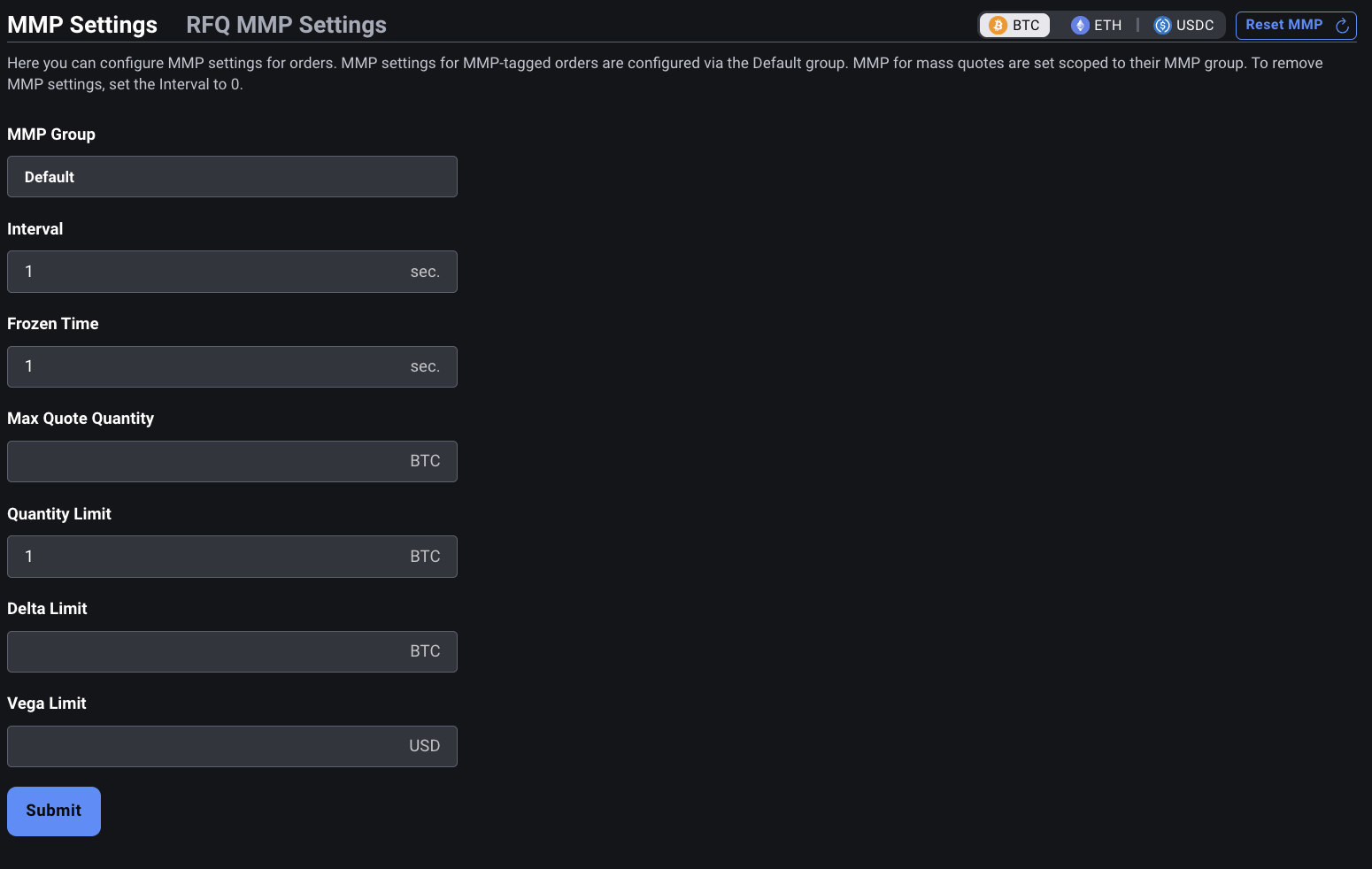
## Understanding Interval vs Frozen Time
These two required parameters serve different roles within the MMP system:
### interval
The `interval` defines how long Deribit tracks trading activity after the first trade occurs:
* It starts after the first trade.
* If no new trades happen after the interval ends, a new interval begins with the next trade.
* If trades occur during the interval, it continues uninterrupted.
* All activity inside a single interval is counted toward MMP limits.
* If set to 0, MMP is removed and any reserved margin is released.
### frozen\_time – Freeze Duration
The `frozen_time` defines how long MMP remains triggered and blocking new MMP orders after a limit is breached:
* During the frozen period, quoting for that index is disabled.
* After the frozen period ends, MMP resets automatically.
* Setting `frozen_time = 0` disables automatic reset. In this case:
* A manual reset is required using `private/reset_mmp`.
## Understanding Maximum Quote Quantity (MQQ)
Maximum Quote Quantity (MQQ) defines the cumulative limit on the total size of open MMP quotes or orders. It acts as an exposure cap, preventing excessive quoting volume even before trades occur.
MQQ is **configured per index** (via `index_name` in `set_mmp_config`) but **enforced per side, per instrument (order book)**. This means a single MQQ value is set for an entire index (e.g., `eth_usd`), but the limit is applied independently to each instrument on that index. Options, futures, and perpetuals each have their own separate enforcement.
For example, with ETH instruments, MQQ is configured once for the `eth_usd` index but is enforced independently for each of the following:
* `ETH-1APR26-1975-C`
* `ETH-1APR26-2175-C`
* `ETH-26JUN26`
* `ETH-PERPETUAL`
### Key Concepts
**Configured per Index, Enforced per Instrument (Order Book):**
MQQ is not aggregated across instruments or expiries. Each instrument (order book) has its own separate MQQ enforcement, even though the configuration is shared at the index level.
**Cumulative Size Limit, Not Order Count:**
MQQ limits the total combined size of open MMP orders per side, not the number of orders.
Example: with MQQ = 3 BTC, you can place three 1 BTC orders, or one 2.5 BTC and one 0.5 BTC order, as long as the total per side per instrument ≤ 3 BTC.
**Independent per MMP Group:**
Each MMP group (used only for mass quotes) has its own MQQ configuration. Limits are applied separately for each group.
**Relation to Quantity Limit:**
MQQ can be set greater than `quantity_limit`.
This allows larger open quotes while still letting MMP trigger on partial fills, and decouples MMP's reserved margin from the quantity limit.
**Base Currency Enforcement:**
MQQ is specified and enforced in the base currency of the instrument.
**Size Calculations:**
* Inverse futures: `size = amount / price`
* Inverse spreads: `size = amount / indexPrice`
* (Switching to minimum mark price of legs in December 2025.)
**Account Limitations:**
MMP orders and quotes on options or option combos are not supported for SM accounts.
**Rejections and Validations:**
* Quotes or MMP orders exceeding `max_quote_quantity` are rejected.
* Regular orders above MQQ may still enter the market, but new quotes that would exceed the limit are not accepted.
* Starting December 2025, if one side of a two-sided quote is rejected, the other side will also be rejected.
**Precision:**
All MMP configuration parameters, including MQQ, support up to four decimal places.
**Margin Calculation:**
MMP **continuously reserves initial margin** based on your MQQ setting, regardless of open positions or open orders:
* From 18.11.2025 Release: `margin reserved = max(MQQ, quantity_limit)`
* From December 2025 Release: `margin reserved = MQQ × 0.03`
Reserved margin is held as long as MMP is configured. To release it, set `interval` to `0` via `private/set_mmp_config`. This removes the MMP configuration and frees all held margin. You can verify your current MMP margin requirement in the **Portfolio Margin** section of the Deribit platform.
**Speed Bump Interaction:**
When an MMP order or quote is submitted and subject to a speed bump, its full quantity is immediately counted toward the Max Quote Quantity (MQQ) open size. Once the speed bump period elapses and the order or quote is released into the order book, any filled quantity is deducted from the MQQ open size.
## Understanding other parameters
### index\_name
Identifier of the derivative instrument (index) on the Deribit platform, such as `btc_usd` or `eth_usd`. All configuration settings will apply specifically to this index.
### quantity\_limit
The total traded quantity, measured in units of the base currency (e.g., BTC in BTC-PERPETUAL), within the interval.
This count is direction-agnostic. A buy followed by a sell counts double.
Example: Buy 10 BTC and sell 10 BTC = 20 total quantity.
Applicable to both options and futures.
Once this is set, an initial margin will be reserved even without any open positions. Initial margin is now reserved based on `max_quote_quantity`: `margin reserved = max_quote_quantity * 0.03`
### delta\_limit
The maximum allowable net transaction delta change during the interval.
Expressed in units of base currency.
The delta limit is treated as an absolute threshold:
e.g., `delta_limit: 10` → MMP is triggered if net transaction delta exceeds +10 or drops below -10.
Direction matters: buying +5 delta and selling −5 delta cancels out if within the same interval.
Note that we use the net transaction delta instead of delta.
Net Transaction Delta = Delta - Mark Price.
In the rest of this document, "delta" actually refers to net transaction delta.
### vega\_limit
The maximum change in vega exposure allowed within a given interval, measured in absolute terms.
Expressed in USD, representing the change in sensitivity to implied volatility across executed trades.
This parameter is primarily relevant for options traders managing risk in volatile markets.
Similar to `delta_limit`, the `vega_limit` is direction-aware and evaluated on a net basis. If the exposure exceeds the set threshold (positively or negatively), MMP will be triggered.
When evaluating Delta and Vega limits for MMP, Deribit uses the greeks at the moment of trade execution. The system does not re-evaluate Delta or Vega using live greeks at the time of MMP checking.
### mmp\_group
Specifies the MMP group used for Mass Quotes. If left empty (omitted), the methods apply to the **orders MMP group**, the MMP configuration that governs regular MMP-tagged orders.
Leaving `mmp_group` empty is explicitly allowed and is the correct way to configure the orders MMP group. It is not an error or an incomplete request. Omitting the field intentionally targets the default orders MMP group rather than any named mass quote group.
MMP groups are a feature dedicated to Mass Quotes and are not available for regular order flow. For details on how to use MMP groups with Mass Quotes, see Mass Quotes Specifications.
### block\_rfq
When set to `true`, the methods apply to Block RFQ MMP settings. See Deribit Block RFQ API walkthrough for more details.
## Setting up MMP
To configure Market Maker Protection (MMP) for a specific index, you must define the interval duration, freeze duration, and at least one exposure limit. MMP configuration is applied using the `private/set_mmp_config` method.
### Required parameters
**index\_name**
The index for which MMP is being configured (e.g., `btc_usd`, `eth_usd`).
**interval**
Duration (in seconds) used to track trading activity.
**frozen\_time**
Duration (in seconds) that MMP remains active/frozen once triggered.
**At least one limit parameter**
You must set at least one of the following:
* `quantity_limit`
* `delta_limit`
* `vega_limit`
* `max_quote_quantity` (MQQ)
After December 2025 Release, MQQ will be enforced as a required parameter.
### Example
```json theme={null}
{
"jsonrpc": "2.0",
"id": 42,
"method": "private/set_mmp_config",
"params": {
"index_name": "btc_usd",
"interval": 3,
"frozen_time": 30,
"quantity_limit": 5.0,
"delta_limit": 15.0,
"max_quote_quantity": 2.0
}
}
```
Once this configuration is submitted, the system enforces MMP for the selected index based on the configured parameters.
**Block RFQ MMP**
MMP can also be configured for Block RFQ quoting. The configuration process for Block RFQ MMP is described in the Deribit Block RFQ API walkthrough article.
## Resetting MMP
If your MMP protection has been triggered and quoting is frozen for a given index, you can resume quoting either automatically after the configured freeze time or manually via the API using `private/reset_mmp`.
### Behavior
* If the configured `frozen_time` has expired, the system will automatically reset MMP and quoting resumes for that index.
* If `frozen_time` is set to 0 (automatic reset disabled), you must call `private/reset_mmp` to re-enable quoting.
* You can also perform a manual reset during the frozen period if you want to resume quoting early.
* After reset, the previous MMP configuration remains unchanged (the limits, interval, etc. stay in effect).
## Placing orders with MMP flag
Clients can control whether individual limit orders are subject to Market Maker Protection by setting the `mmp` flag in `buy`, `sell`, or `edit` requests.
To enable or disable MMP for a specific order, include `"mmp": true` or `"mmp": false` in the request.
If you're only updating price or size and wish to retain the current MMP setting, you can simply omit the `mmp` parameter. Its state will remain unchanged.
The `edit` method supports toggling the MMP flag, allowing you to apply or remove protection without cancelling and resubmitting the order.
## Monitoring MMP
You can monitor both the current configuration and the live MMP state for any index using two API methods.
### 1. Checking the Current MMP Configuration
Calling `private/get_mmp_config` returns all currently active MMP parameters for the selected index, including the interval, `frozen_time`, quantity/delta/vega limits, and `max_quote_quantity`. This is useful for verifying your configuration or confirming applied updates.
### 2. Checking the Current MMP Status
Calling `private/get_mmp_status` returns the live MMP state for the index, including:
* Whether MMP is enabled or triggered
* Remaining frozen time (if triggered)
* Whether quoting is currently allowed
* Any active freeze conditions
This method lets you track whether protection is active and when quoting will resume.
## MMP Events and Notifications
Deribit provides real-time feedback on MMP (Market Maker Protection) activity via `user.mmp_trigger.{index_name}` subscription and event flags, enabling clients to react promptly when protection is triggered.
Clients can subscribe to the channel:
```
user.mmp_trigger.{index_name}
```
Replace `{index_name}` with the desired instrument index, such as:
* `user.mmp_trigger.btc`
Upon MMP being triggered for a given index, the client will receive a trigger notification in the following format:
```json theme={null}
{
"frozen_until": 1594390902986
}
```
The value is a Unix timestamp in milliseconds indicating until when the MMP is active (i.e., orders remain blocked).
If `frozen_until: 0`, it means MMP will remain active until manually reset using the `private/reset_mmp` method.
This notification allows the client to track MMP state per index and avoid submitting new orders that would be rejected due to ongoing MMP freeze.
## MMP Flags in WebSocket Responses
In addition to the event channel, Deribit also communicates MMP-trigger-related actions using a special field in order event messages.
If an order is cancelled as a direct result of an MMP trigger, the order event will include:
```json theme={null}
{
"mmp_cancelled": true
}
```
This field will be absent in all other cases, allowing clients to clearly distinguish between MMP-related cancellations and other reasons (e.g., manual, timeout, user API).
## Best Practices
* Monitor both `user.mmp_trigger` events and `mmp_cancelled` flags to maintain a complete picture of your quoting activity and protection status.
* On receiving a `frozen_until` timestamp, you should pause quote submission for the affected index until the freeze period ends or you manually reset MMP.
* Always handle the `mmp_cancelled` flag explicitly in order management logic to prevent resubmitting orders that may immediately be cancelled again.
## FIX Configuration
Please review the FIX specs here: [MMProtection Limits (MM)](/fix-api/production/mmprotection-limits)
# Mass Quotes Specifications
Source: https://docs.deribit.com/articles/mass-quotes-specifications
Use the Deribit mass quote API to submit many bid and ask pairs in a single request for lower latency during option and future market making.
Deribit offers a **mass quote functionality** that allows users to place multiple orders (referred to as *quotes*) in a single request. Unlike traditional order entry, mass quotes do not require order IDs for subsequent amendments or cancellations. This significantly reduces latency by bypassing most of the platform's standard risk checks.
To maintain platform safety while skipping risk checks, **Market Maker Protection (MMP) groups** are introduced. Each mass quote must be linked to an MMP group, which reserves initial margin (IM) based on a user-defined **quantity limit**. To ensure that the reserved IM is sufficient:
* Only one quote per **side** per **instrument** is allowed within a group.
* Each quote must have a size below the group's defined limit.
Users can configure up to **16 MMP groups per (sub)account**. These groups function similarly to [Deribit's existing MMP system](/articles/market-maker-protection) but offer more flexibility:
* They allow multiple quotes on the same side of the same instrument (as long as each belongs to a different group).
* They support different margin settings across instruments with varying risk profiles.
Quotes are rate-limited separately from regular orders and are fully integrated into Deribit's existing event system.
Enabling [Market Maker Protection (MMP)](/articles/market-maker-protection) **does not automatically enable** the **Mass Quote** feature. These are separate systems and must be requested and activated independently. If you require Mass Quote functionality, please contact Deribit support to request access explicitly.
## Mass Quote Behavior and Requirements
### Quote Behavior
* Quotes behave like **limit orders with good-til-cancel TIF** and cannot be hidden or custom-priced.
* **Bid and ask sides are processed deterministically** to avoid client-side spread crossing:
* If both move up → ask is modified first.
* If both move down → bid is modified first.
* **Crossing quotes are rejected or cancelled** automatically.
* **Each side is validated independently.** One side may succeed while the other fails. Note: this is specific to the [classic JSON-RPC](/articles/json-rpc-overview) mass quote system. In the [Starbase Binary API](/starbase/mass-quotes), an invalid quantity on either side causes the entire `MassQuoteRequest` to be rejected.
* **Amendments with no amount** are processed safely; if no quote exists, an error is returned.
* **Errored amendments cancel the affected resting quote(s)** on that side.
* **Priority is preserved** when reducing size or changing only the `quote_set_id`.
* Quotes interact with **reduce-only orders** the same way as regular orders.
* **Post-only logic** applies similarly. Quotes can reject or amend based on post-only rules.
### Instrument Availability
Mass quotes are supported for the following instrument types:
* Perpetual contracts
* Dated futures
* Options
* Option combos
* Future spreads
They are **not available** for:
* Options on **Standard Margin (SM)** accounts, since long options on SM are not margined
* **Spot instruments**, as spot products are not margined on Deribit
### Subaccounts
All mass quote functionality operates at the **subaccount level**:
* Margin for MMP groups is drawn from the specific subaccount.
* Quotes and MMP group limits are managed separately per subaccount.
* This design allows isolated risk and quote behavior across subaccounts within the same user.
### Rate Limits
Mass quoting has a dedicated [rate limit](/articles/rate-limits) system:
* A **guaranteed base rate limit** is always available, regardless of the size of each mass quote.
* A **higher maximum rate limit** is accessible **only if the number of quotes per message remains below a set threshold**.
This approach encourages efficient batching for liquid instruments, while still supporting smaller, instrument-specific batches for:
* Dated futures
* Future spreads
* Deep ITM options
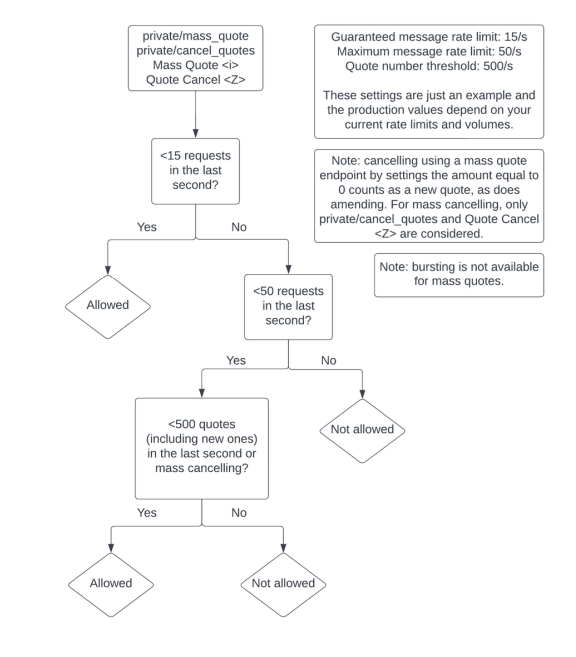
Mass quote **cancellations** also have separate rate limits.
### UI
* Quotes are shown in the UI with an extra tag, "Quote".
* All quotes can be cancelled using the "Cancel all" button.
### Session Requirements
To use mass quote methods:
* Your session **must have** [Cancel-on-Disconnect enabled](https://docs.deribit.com/#private-enable_cancel_on_disconnect). Without it, methods like mass\_quote or cancel\_quote will return an error.
* However, **routine use of Cancel-on-Disconnect to remove quotes is discouraged**. It's intended as a safeguard, not a quote management strategy.
Always manage quote state proactively using [cancel\_quotes](https://docs.deribit.com/#private-cancel_quotes) or [reset\_mmp](https://docs.deribit.com/#private-reset_mmp).
### Priority in the Order Book
Mass quotes follow standard Deribit **limit order book (LOB) priority rules**, with the following nuances:
* You may **change only the `quote_set_id` without affecting priority**.
* **Each side of a quote (buy/sell) has independent priority**. Amending one side does **not affect** the priority of the other.
Access to Mass Quotes will be restricted in case of abuse, including:
* Spamming identical quotes.
* Spamming cancellations.
* Attempting to place quotes above the MMP `quantity_limit`.
* Exceeding the rate limit.
* Triggering MMP frequently.
## MMP Groups behavior
MMP groups let market makers define custom protection rules – such as quantity, delta, and vega limits – for mass quotes. Clients create or update these groups via the [/private/set\_mmp\_config](https://docs.deribit.com/#private-set_mmp_config) API call. The group name is **user-defined** (no fixed format), but it must be *unique within the account*. Groups are identified by this name and tied to a specific index (trading pair) in the configuration.
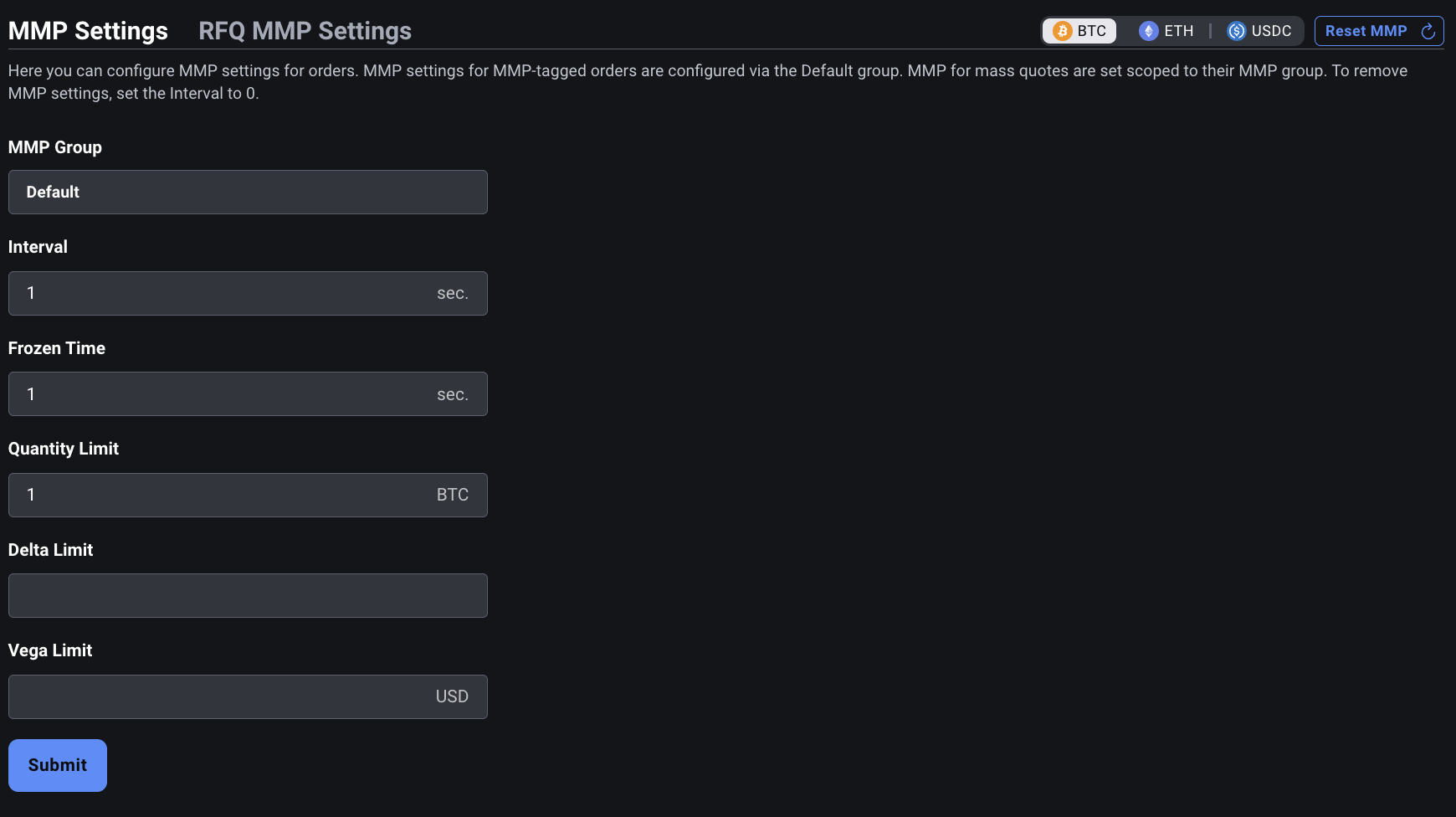
MMP groups can also be accessed using the [Account settings page](/articles/creating-api-key).
### Group Limits and Usage
* **Naming:** You can choose any string for the group name, as long as it is unique within your (sub)account. Group names are user-defined and there is no specific naming convention. The maximum length is 64 characters. Names are case sensitive and cannot be an empty string.
* **Parameters:** Each group's thresholds (`quantity_limit`, `delta_limit`, `vega_limit`, etc.) must be set to non-negative values (zero or higher).
* **IM Reservation:** Each MMP group continuously reserves initial margin (IM), regardless of open orders or positions.
* **Group Assignment:** Each mass quote request must include a `mmp_group` name. All quotes in the request will be linked to that group. If `mmp_group` is omitted or left empty in `set_mmp_config` or `reset_mmp`, the call applies to the **orders MMP group**, the default group governing regular MMP-tagged orders, not mass quotes.
* **Group count:** You can configure up to **16 MMP groups** per (sub)account. Attempting to create a 17th group will result in an error.
* **Instrument membership:** The same instrument (index) can be assigned to multiple groups simultaneously. In other words, one product can participate in several MMP groups with different limits (useful for layered quoting strategies).
* **Priority:** All MMP groups operate at the same level; there is no hierarchy or priority among groups.
* **Lifespan:** An MMP group remains in effect until explicitly removed. To delete a group, set its interval parameter to 0 with [set\_mmp\_config](https://docs.deribit.com/#private-set_mmp_config) – **this releases any reserved margin and removes the group**. Otherwise the group (and its reserved initial margin in the context of Mass Quotes) persists indefinitely.
* **Delta Constraint:** A system rule enforces `delta_limit` \< `quantity_limit` to maintain proper margin coverage.
* **Quantity Limits:** **500 BTC** or **5000 ETH**
### Managing and Renaming Groups
* **Modifying groups:** Use the [set\_mmp\_config](https://docs.deribit.com/#private-set_mmp_config) method to edit an existing group's settings (or create a new one). If some parameters are not included, those parameters are NOT kept as old values. They are set to undefined, so in fact disabled.
* **Renaming groups:** There is no separate "rename" operation. If you call [set\_mmp\_config](https://docs.deribit.com/#private-set_mmp_config) with a different `mmp_group` name, a new group is created instead. The old group continues to exist until deleted (**setting** `interval` = `"0"` **removes the group**).
### Quotes in MMP Groups
* Only one quote per **side** per **instrument** per **MMP group** is allowed.
* Submitting a new quote replaces any existing one in the same group.
* To support *"n"* layers in the order book, *"n"* separate MMP groups are required.
* Each quote's amount must be strictly **less than** the group's `quantity_limit`.
* All mass quotes are implicitly treated as `mmp=true`.
* Quotes exceeding the group's `quantity_limit` will be **cancelled** if the limit is reduced after they are placed.
## Mass Quote Flow
### Step 1: Send a Mass Quote
You can submit up to **100 quotes total** (max 100 bids + 100 asks) per [private/mass\_quote](https://docs.deribit.com/#private-mass_quote) request.
**Requirements:**
* All quotes **must use the same index (currency pair)**.
* Quotes must belong to an **existing MMP group**.
* Each quote can include an optional `quote_id` (client defined string for tracking).
* Quotes are **processed in order**, so prioritize from most to least important.
* **Identical re-submissions are discouraged** to avoid unnecessary load and lost priority.
If any of these conditions fail, the **entire request will be rejected**.
Quotes can be grouped with a shared `quote_set_id` to manage priority behavior.
**Example request:**
```json theme={null}
{
"jsonrpc": "2.0",
"id": 7859,
"method": "private/mass_quote",
"params": {
"detailed": true,
"quote_id": "1",
"mmp_group": "default",
"quotes": [
{
"instrument_name": "BTC-PERPETUAL",
"quote_set_id": "futures",
"ask": {
"price": 43800,
"amount": 10
},
"bid": {
"price": 43700,
"amount": 10
}
},
{
"instrument_name": "BTC-22DEC23-41600-C",
"quote_set_id": "options",
"ask": {
"price": 0.05,
"amount": 1
},
"bid": {
"price": 0.04,
"amount": 1
}
}
]
}
}
```
**Example response:**
```json theme={null}
{
"jsonrpc": "2.0",
"id": 7859,
"result": {
"errors": [
{
"instrument_name": "BTC-PERPETUAL",
"side": "bid",
"error": {
"message": "price_too_high 43666.4288",
"code": 10007
}
}
],
"orders": [
{
"is_liquidation": false,
"reduce_only": false,
"risk_reducing": false,
"last_update_timestamp": 1703162550180,
"creation_timestamp": 1703162478689,
"filled_amount": 0,
"average_price": 0,
"order_type": "limit",
"order_state": "open",
"quote": true,
"quote_set_id": "options",
"quote_id": "1",
"post_only": false,
"replaced": false,
"mmp_group": "default",
"web": false,
"mmp": true,
"api": false,
"instrument_name": "BTC-22DEC23-41600-C",
"order_id": "6653852",
"max_show": 1,
"time_in_force": "good_til_cancelled",
"price": 0.04,
"direction": "buy",
"amount": 1,
"label": ""
},
{
"is_liquidation": false,
"reduce_only": false,
"risk_reducing": false,
"last_update_timestamp": 1703162550180,
"creation_timestamp": 1703162478689,
"filled_amount": 0,
"average_price": 0,
"order_type": "limit",
"order_state": "open",
"quote": true,
"quote_set_id": "options",
"quote_id": "1",
"post_only": false,
"replaced": false,
"mmp_group": "default",
"web": false,
"mmp": true,
"api": false,
"instrument_name": "BTC-22DEC23-41600-C",
"order_id": "6653853",
"max_show": 1,
"time_in_force": "good_til_cancelled",
"price": 0.05,
"direction": "sell",
"amount": 1,
"label": ""
},
{
"is_liquidation": false,
"reduce_only": false,
"risk_reducing": false,
"last_update_timestamp": 1703162550180,
"creation_timestamp": 1703162478689,
"filled_amount": 0,
"average_price": 0,
"order_type": "limit",
"order_state": "open",
"quote": true,
"quote_set_id": "futures",
"quote_id": "1",
"post_only": false,
"replaced": false,
"mmp_group": "default",
"web": false,
"mmp": true,
"api": false,
"instrument_name": "BTC-PERPETUAL",
"order_id": "6653855",
"max_show": 10,
"time_in_force": "good_til_cancelled",
"price": 43800,
"direction": "sell",
"amount": 10,
"label": ""
}
],
"trades": []
}
}
```
Depending on the detailed flag in the mass quote request, the system will:
* Return either a simple success/error count
* Or list each error mapped to `instrument_name` and `side`
### Step 2: Monitor Quote Status
To retrieve currently active quotes, use [private/get\_open\_orders](https://docs.deribit.com/#private-get_open_orders):
* All quotes are tagged with `"quote": true`
* Standard filtering by instrument, kind, or quote flag is available
### Step 3: Cancel Quotes
Method [private/cancel\_quotes](https://docs.deribit.com/#private-cancel_quotes) allows for cancelling quotes **in bulk**, filtered by:
* Currency pair
* Instrument kind
* Specific instrument
* `quote_set_id`
* **Delta range** (for options/combos only, not futures or spreads)
Setting `amount` = `"0"` in a new mass quote is also treated as a cancellation for that quote.
After issuing a mass cancel, newly submitted quotes may be **rejected for 1 second** to prevent immediate quote re-spamming.
**Example cancel request:**
```json theme={null}
{
"jsonrpc": "2.0",
"id": 5663,
"method": "private/cancel_quotes",
"params": {
"cancel_type": "delta",
"min_delta": 0.4,
"max_delta": 0.6
}
}
```
### Segregated Pathway
Standard order endpoints such as [private/buy](https://docs.deribit.com/#private-buy), [private/sell](https://docs.deribit.com/#private-sell), or [private/edit](https://docs.deribit.com/#private-edit) **do not apply to quotes**. This separation ensures performance and risk control for market makers.
## FIX Logic
Mass quoting is fully supported via FIX, using dedicated message types that segregate quote flow from regular orders.
### Sending & Cancelling Quotes
* [Mass Quote (i)](/fix-api/production/mass-quote) – Used to submit new quotes or amend existing ones.
Setting `OrderQty` = `"0"` acts as a cancel for that quote.
* [Quote Cancel (Z)](/fix-api/production/quote-cancel) – Cancels quotes in bulk.
Can be filtered by instrument, product type, `QuoteSetID`, or delta range (for options only).
After issuing a mass cancel, newly submitted quotes may be **rejected for 1 second** to prevent immediate quote re-spamming.
### Retrieving & Monitoring Quotes
* [Quote Request (R)](/fix-api/production/mass-quote) – Retrieve active quotes.
* [Execution Report (8)](/fix-api/production/execution-reports) – Sent when a quote is amended or executed.
* [Mass Quote Acknowledgement (b)](/fix-api/production/mass-quote-acknowledgement) – Response to `Mass Quote (i)`, depending on `QuoteResponseLevel`.
* [Quote Status Report (AI)](/fix-api/production/quote-cancel) – Response to `Quote Cancel (Z)` and `Quote Request (R)`.
Standard FIX order messages (e.g. `New Order Single (D)`) **do not apply to quotes**.
# Moving Positions
Source: https://docs.deribit.com/articles/moving-positions-api
Transfer open positions between Deribit subaccounts using the API, including required permissions, valuation, and settlement of moved contracts.
This section explains how to move positions from one subaccount to another within the same main account using the API. Before calling any private method you must authenticate.
Please refer to [API Authentication Guide](/articles/authentication) for more information regarding authentication.
This method requires main account authorization. You must authenticate with the **main account UID** (not a subaccount), and the API token must have the `mainaccount` scope.
## Important considerations
* **Same main account only**: Position moves are only possible between subaccounts that belong to the same main account.
* **Free of charge**: There are no fees for moving positions between subaccounts.
* **Equity is not moved**: Only the position itself is transferred. Equity remains in the source subaccount. Make sure the destination subaccount has sufficient equity to support the incoming position's margin requirements.
* **No limit on positions per call**: There is no limit on the number of positions (instruments) you can include in a single `move_positions` call.
* **Same currency per call**: All positions in a single call must be denominated in the same currency. To move positions across multiple currencies (e.g., BTC and ETH), you need separate calls - each counting toward the weekly limit.
* **Price options**: You can choose to move a position at its original entry price (default) or at a specific price such as the current market price.
## Prerequisites
* Both the source and destination subaccounts must belong to the same main account
* You must authenticate with the main account UID
* The API key must have `trade:read_write` scope
* The API key must have `mainaccount` scope
* You need the subaccount IDs (UIDs) which can be found in `My Account >> Subaccounts` tab
## Rate limits
This method has distinct API rate limiting requirements: **Sustained rate: 6 requests/minute**. For more information, see [Rate Limits](/articles/rate-limits).
**Weekly Usage Limit**: There is a limit of **`100 move_positions uses per week (168 hours)`**. Each call counts as one use regardless of how many positions are included. Moving positions across multiple currencies requires separate calls, each counting toward this limit.
If you exceed the rate limit, you will receive error code `13780` (`move_positions_over_limit`) with a `wait` parameter indicating how many seconds you should wait before trying again.
## Moving positions
To move positions from a source subaccount to a target subaccount, use the [`private/move_positions`](https://docs.deribit.com/api-reference/trading/private-move_positions) method.
### Example Request
```json theme={null}
{
"jsonrpc": "2.0",
"method": "private/move_positions",
"params": {
"currency": "BTC",
"source_uid": 3,
"target_uid": 23,
"trades": [
{
"instrument_name": "BTC-PERPETUAL",
"price": "35800",
"amount": "110"
},
{
"instrument_name": "BTC-28JAN22-32500-C",
"amount": "0.1"
}
]
},
"id": 1
}
```
### Parameters
* `currency` (required): The currency symbol. All positions in a single call must share the same currency.
* `source_uid` (required): ID of the source subaccount. Can be found in `My Account >> Subaccounts` tab.
* `target_uid` (required): ID of the target subaccount. Can be found in `My Account >> Subaccounts` tab.
* `trades` (required): Array of objects describing which positions to move. There is no limit on the number of entries. Each entry can contain:
* `instrument_name` (required): The instrument name (e.g., "BTC-PERPETUAL", "BTC-28JAN22-32500-C")
* `amount` (required): The size of the position to move. For perpetual and inverse futures the amount is in USD units. For options and linear futures it is the underlying base currency coin. Must not exceed the current position size.
* `price` (optional): The price at which to move the position. If not specified, Deribit uses the average entry price of the position in the source subaccount.
### Response
```json theme={null}
{
"jsonrpc": "2.0",
"id": 1,
"result": [
{
"target_uid": 23,
"source_uid": 3,
"price": 0.1223,
"instrument_name": "BTC-28JAN22-32500-C",
"direction": "sell",
"amount": 0.1
},
{
"target_uid": 23,
"source_uid": 3,
"price": 35800,
"instrument_name": "BTC-PERPETUAL",
"direction": "buy",
"amount": 110
}
]
}
```
The response is an array of objects, each representing a successfully moved position. Each object contains:
* `target_uid`: The target subaccount ID
* `source_uid`: The source subaccount ID
* `price`: The price at which the position was moved
* `instrument_name`: The instrument name
* `direction`: The direction of the position from the source's perspective ("buy" for long positions, "sell" for short positions)
* `amount`: The amount that was moved
## Pricing
When moving a position you have two pricing options:
* **Original entry price** (default): If no `price` is specified, Deribit uses the **average entry price** of the position in the source subaccount. This preserves the original cost basis of the position.
* **Custom price**: You can explicitly specify a `price` value - for example, the current market price - to revalue the position at the time of transfer.
## Moving full vs partial positions
You can move either full or partial positions:
* **Full position**: Specify the entire position amount in the `amount` field
* **Partial position**: Specify a portion of the position amount
The `amount` must not exceed the available position size in the source subaccount.
## Error handling
### Rate limit errors
If you exceed the rate limit (6 requests/minute), you will receive:
```json theme={null}
{
"jsonrpc": "2.0",
"id": 1,
"error": {
"code": 13780,
"message": "move_positions_over_limit",
"data": {
"wait": 10
}
}
}
```
Wait for the number of seconds specified in the `wait` field before retrying.
### Internal server errors
In rare cases, the request may return an `internal_server_error`. This does not necessarily mean the operation failed entirely. Part or all of the position transfer might have still been processed successfully.
If you receive an internal server error, check the positions in both the source and target subaccounts to verify the actual state.
### Common errors
* **Invalid subaccount IDs**: Ensure both `source_uid` and `target_uid` are valid and belong to the same main account
* **Insufficient position**: The `amount` specified exceeds the available position in the source subaccount
* **Invalid instrument**: The `instrument_name` is not valid or the position doesn't exist
* **Scope errors**: Ensure your API key has both `trade:read_write` and `mainaccount` scopes
## Best practices
* **Check positions first**: Before moving positions, verify the current positions in the source subaccount using [`private/get_positions`](https://docs.deribit.com/api-reference/account-management/private-get_positions)
* **Ensure sufficient equity**: Since equity is not transferred with the position, confirm the destination subaccount has enough equity to cover the margin requirements of the incoming position
* **Bundle positions in one call**: There is no limit on the number of positions per call, so include all positions of the same currency in a single request to minimize usage against the weekly limit
* **Verify after move**: After moving positions, verify the positions in both source and target subaccounts to confirm the move was successful
* **Handle errors gracefully**: Implement retry logic with exponential backoff for rate limit errors
* **Plan multi-currency moves**: If you need to move positions across multiple currencies, plan ahead - each currency requires a separate call counting toward the 100/week limit
## Example: Moving multiple positions
Here's an example of moving multiple positions across different instruments in the same currency:
```json theme={null}
{
"jsonrpc": "2.0",
"method": "private/move_positions",
"params": {
"currency": "BTC",
"source_uid": 3,
"target_uid": 23,
"trades": [
{
"instrument_name": "BTC-PERPETUAL",
"amount": "110",
"price": "35800"
},
{
"instrument_name": "BTC-28JAN22-32500-C",
"amount": "0.1"
},
{
"instrument_name": "BTC-28JAN22-40000-P",
"amount": "5",
"price": "0.05"
}
]
},
"id": 2
}
```
## Related methods
* [`private/get_positions`](https://docs.deribit.com/api-reference/account-management/private-get_positions) - Get current positions for an account
* [`private/get_subaccounts`](https://docs.deribit.com/api-reference/account-management/private-get_subaccounts) - List all subaccounts under your main account
* [`private/get_subaccounts_details`](https://docs.deribit.com/api-reference/account-management/private-get_subaccounts_details) - Get detailed information about subaccounts
# Options Data Collection
Source: https://docs.deribit.com/articles/options-data-collection-best-practices
Collect Deribit options market data efficiently, covering order books, ticker greeks, mark prices, implied volatility, combos, trades, and settlement data.
This guide is for anyone building a market data pipeline against Deribit options:
quants backfilling historical IV surfaces, market makers streaming live order books,
or risk teams tracking greeks and mark prices across an option chain. It focuses on
what's specific to **options**: which channel or method covers greeks, IV, combos,
and settlement, and how option instruments behave differently from futures and
perpetuals when collecting data. For general WebSocket/REST tradeoffs, subscription
patterns, and connection handling that apply across all instrument kinds, see the
articles linked throughout this guide.
This guide assumes familiarity with the general data-collection patterns covered in
[Market Data Collection - Best Practices](/articles/market-data-collection-best-practices)
and [Notifications](/articles/notifications). Read those first if you haven't already.
All examples use `BTC` options. The same patterns apply to `ETH` and any other
currency with a listed options market. Swap the `currency` / `instrument_name`
parameter and (for `book.{instrument_name}.{group}.{depth}.{interval}`) the
allowed `group` values.
## Discover and track the option chain
Don't rebuild the instrument list from scratch on every run:
1. On startup, call [`public/get_instruments`](/api-reference/market-data/public-get_instruments)
with `currency=BTC` and `kind=option` once to seed your local instrument set.
2. From then on, track changes via the
[`instrument.creation.{kind}.{currency}`](/subscriptions/market-data/instrumentcreationkindcurrency)
and [`instrument.state.{kind}.{currency}`](/subscriptions/market-data/instrumentstatekindcurrency)
channels instead of re-polling. See [Market Data Collection - Best Practices](/articles/market-data-collection-best-practices#instrument-lifecycle-feed)
for how the lifecycle states work.
`public/get_instruments` has a **distinct, much lower rate limit** than other
market-data endpoints (see [Rate Limits](/articles/rate-limits) for the full table).
Polling it on a timer to detect new expiries or check `is_active` will exhaust your
budget quickly. Use the `instrument.state` / `instrument.creation` channels for that
instead, and only call `get_instruments` again when you need a fresh full listing
(e.g. on reconnect after an extended outage).
Each option instrument also carries an `expiration_timestamp`. Precompute expiries
locally from the seeded instrument list rather than deriving them by parsing
instrument names. The `option_type` (`call`/`put`) and `strike` fields are also
provided directly on each instrument record.
## Order books
Two channels cover order book depth, with a real bandwidth/completeness tradeoff:
| Channel | Depth | Use when |
| - | - | - |
| [`book.{instrument_name}.{interval}`](/subscriptions/orderbook/bookinstrument_nameinterval) | Full book, all price levels | You need the complete book (e.g. reconstructing liquidity at any level, feeding a local matching simulation) |
| [`book.{instrument_name}.{group}.{depth}.{interval}`](/subscriptions/orderbook/bookinstrument_namegroupdepthinterval) | Grouped/rounded, capped depth (1/10/20 levels) | You only need top-of-book or a coarse depth view across many instruments. Message volume is much lower |
For a full option chain (dozens to hundreds of instruments per expiry), the grouped
channel is usually the right default. Subscribing to full-depth raw books on every
strike/expiry combination multiplies message volume unnecessarily, and the
[narrow-vs-wide subscription tradeoffs](/articles/market-data-collection-best-practices#subscribe-only-to-what-you-need-narrow-vs-wide-subscriptions)
apply just as much across strikes as they do across currencies.
**Amount units differ for options.** On both book channels, `amount` for options is
denominated in the underlying cryptocurrency (BTC or ETH contracts), not USD as it
is for perpetuals/futures. Normalize this at ingestion time if your storage schema
assumes USD-denominated size.
For how to maintain book state correctly across snapshots, incremental updates, and
`change_id`/`prev_change_id` gap detection, see
[Notifications - Order Book Notifications](/articles/notifications#order-book-notifications).
The same mechanics apply to option order books; option instrument names just look
like `BTC-27JUL26-70000-C` instead of `BTC-PERPETUAL`. As with other instruments, the
`raw` interval is only available on authenticated connections. Use `100ms` or
`agg2` on public connections.
## Ticker, greeks, and implied volatility
[`ticker.{instrument_name}.{interval}`](/subscriptions/market-data/tickerinstrument_nameinterval)
streams the full ticker payload per instrument, including `mark_price`, `mark_iv`,
`bid_iv`, `ask_iv`, and the full `greeks` object (`delta`, `gamma`, `theta`, `vega`,
`rho`) for options. For a chain with many strikes, prefer
[`incremental_ticker.{instrument_name}`](/subscriptions/market-data/incremental_tickerinstrument_name)
where available. It only pushes fields that changed since the last update,
reducing bandwidth versus the full-payload channel when you're tracking many
instruments at once.
`incremental_ticker` is capped at one update per second per instrument, so if you
need sub-second ticker precision on a small number of instruments, use the
full `ticker.{instrument_name}.{interval}` channel instead.
If all you need is the current spread (best bid/ask price and size, no greeks,
no full book), [`quote.{instrument_name}`](/subscriptions/market-data/quoteinstrument_name)
is lighter than either ticker channel and avoids the cost of tracking book state
entirely.
For a **whole-chain** view of mark prices and IV without subscribing to every
instrument individually, use
[`markprice.options.{index_name}`](/subscriptions/market-data/markpriceoptionsindex_name).
It streams mark price and mark IV updates for every option under that index in one
channel. This is the most efficient way to track valuation across an entire option
chain in real time (portfolio marking, P\&L, risk dashboards).
If you only need a periodic full-chain snapshot rather than a continuous stream,
for example to validate your WebSocket-derived state or to seed a new pipeline,
[`public/get_book_summary_by_currency`](/api-reference/market-data/public-get_book_summary_by_currency)
with `kind=option` returns mark price, IV, volume, and open interest for every
option in one REST call. Use it for point-in-time reconciliation, not as a
substitute for the streaming channels.
## Historical and realized/implied volatility
* [`public/get_historical_volatility`](/api-reference/market-data/public-get_historical_volatility):
realized volatility time series for a currency, useful as a model input or a
sanity check against streamed `mark_iv`.
* [`deribit_volatility_index.{index_name}`](/subscriptions/market-data/deribit_volatility_indexindex_name)
(WebSocket) and
[`public/get_volatility_index_data`](/api-reference/market-data/public-get_volatility_index_data)
(REST, candle-formatted): Deribit's DVOL index, an expectation of forward
volatility analogous to VIX. Use the WebSocket channel for live DVOL, the REST
method for backfilling DVOL history.
## Trades
| Need | Method / Channel |
| - | - |
| Live trade prints for one instrument | [`trades.{instrument_name}.{interval}`](/subscriptions/trades/tradesinstrument_nameinterval) |
| Live trade prints across an entire chain (e.g. all BTC options) | [`trades.{kind}.{currency}.{interval}`](/subscriptions/trades/tradeskindcurrencyinterval) |
| Historical backfill by time range | [`public/get_last_trades_by_instrument_and_time`](/api-reference/market-data/public-get_last_trades_by_instrument_and_time) |
| Historical backfill by trade sequence range | [`public/get_last_trades_by_instrument`](/api-reference/market-data/public-get_last_trades_by_instrument) with `start_seq`/`end_seq` |
| OHLC candles for charting | [`chart.trades.{instrument_name}.{resolution}`](/subscriptions/market-data/charttradesinstrument_nameresolution) (live) / [`public/get_tradingview_chart_data`](/api-reference/market-data/public-get_tradingview_chart_data) (backfill) |
As with order books, prefer the per-currency+kind channel
(`trades.option.BTC.raw`, for example) over one subscription per instrument when
you're covering a full chain. See
[Subscription Strategies and Filters](/articles/market-data-collection-best-practices#subscription-strategies-and-filters)
for the general tradeoff. It scales far better as new strikes and expiries are
listed, since you don't need to manage per-instrument subscriptions as the chain
changes.
For REST backfill, `count` is capped at **1000** per call on both trade-history
methods. See [Pagination patterns at a glance](#pagination-patterns-at-a-glance)
below for how to page through a full history without gaps or duplicates.
Sequence-based pagination (`start_seq`/`end_seq`) is preferable when you need a
gapless history, since it isn't affected by multiple trades sharing a timestamp.
## Multi-leg strategies (combos)
Combo (multi-leg option spread) books are a separate object from individual option
instruments:
* [`public/get_combo_ids`](/api-reference/combo-books/public-get_combo_ids):
list combo IDs for a currency (optionally filtered by state).
* [`public/get_combos`](/api-reference/combo-books/public-get_combos): active
combos with full leg structure for a currency.
* [`public/get_combo_details`](/api-reference/combo-books/public-get_combo_details):
full detail for one combo ID.
* [`user.combo_trades.{instrument_name}.{interval}`](/subscriptions/user/usercombo_tradesinstrument_nameinterval) /
[`user.combo_trades.{kind}.{currency}.{interval}`](/subscriptions/user/usercombo_tradeskindcurrencyinterval):
trade prints for combo instruments (requires the private/authenticated
connection scope, since these are user-trade channels).
If your pipeline needs to track combo books alongside single-leg instruments,
treat combo IDs as their own instrument namespace. They aren't returned by
`public/get_instruments` with `kind=option`.
## Settlement and expiration data
* [`public/get_delivery_prices`](/api-reference/market-data/public-get_delivery_prices):
historical settlement/delivery prices for an index, paginated via
`offset`/`count` (max 1000 per page). Use this for backtesting how options
actually settled.
* [`estimated_expiration_price.{index_name}`](/subscriptions/market-data/estimated_expiration_priceindex_name)
(WebSocket): live estimate of the price that will be used at the next
settlement, useful for monitoring expected settlement levels intraday as
expiry approaches.
## Starbase options feed
Everything above describes the [classic JSON-RPC](/articles/json-rpc-overview) and WebSocket APIs. If you consume
options data from **Starbase** (Deribit's high-performance matching engine, available
to selected clients over private connectivity in LD4 or via AWS Private Link), the
options-specific tradeoffs change:
* **Options have their own multicast channels**, separate from perpetuals and futures
(BTC Options and Option Combinations, ETH Options and Option Combinations, Tier 2
Options and Option Combinations), each with A/B snapshot and incremental feeds. You
take an entire product group rather than subscribing per strike, so chain growth
doesn't change your subscription set.
* **Level 3 only.** There is no grouped or depth-limited book equivalent, so the
bandwidth argument for using capped-depth books across a chain doesn't apply.
Budget for full market-by-order volume on every listed strike in the group.
* **Combination books are not a separate namespace.** Option combos arrive as ordinary
order books on the same feed, identified by their own order book ID.
* **Instrument metadata comes from `InstrumentDefinition`**, which carries strike,
expiry, the put/call flag, tick sizes, and minimum order quantity. Treat it as
authoritative for Starbase order entry, and note that quantities use Deribit's native
amount rather than contract counts.
* **Greeks and IV are not on the feed.** Mark price and price bands arrive via
`InstrumentInfo`, index prices via `IndexInfo`, and settlement, delivery, and open
interest via `InstrumentRef`. Fields such as `delta`/`gamma`/`vega`, `mark_iv`/`bid_iv`/`ask_iv`,
DVOL, and 24-hour volume have no Starbase equivalent. Keep the standard
[`ticker`](/subscriptions/market-data/tickerinstrument_nameinterval),
[`markprice.options.{index_name}`](/subscriptions/market-data/markpriceoptionsindex_name),
and DVOL channels for valuation and analytics alongside the Starbase book.
Options channel addresses, feed characteristics, and retransmit endpoints
Instrument definitions and which derived statistics the feed does and doesn't publish
## Pagination patterns at a glance
Different endpoints paginate differently. Matching the right pattern to the right
endpoint avoids gaps or duplicate records in backfilled data:
| Pattern | Endpoints | Notes |
| - | - | - |
| `offset` + `count` | `get_delivery_prices` | Simple page cursor; fine for data that doesn't mutate between pages |
| `start_seq` / `end_seq` | `get_last_trades_by_instrument` | Sequence-based. Safe when several trades share a timestamp |
| `start_timestamp` / `end_timestamp` | `get_last_trades_by_instrument_and_time`, `get_volatility_index_data` | Window-based; page by advancing the timestamp boundary |
| `continuation` token | order/Block RFQ history endpoints | Opaque cursor returned by the previous call; keep requesting until omitted from the response |
`count` parameters across these methods cap at **1000** per request. Always loop
until a page returns fewer than the requested count (or an empty continuation)
rather than assuming one call is exhaustive.
## Summary checklist
Seed instruments once via `get_instruments` (mind its tight rate limit);
track changes via `instrument.creation`/`instrument.state` channels, not polling.
Use grouped/depth-limited books for chain-wide views; remember option
`amount` is denominated in the underlying, not USD.
Prefer `markprice.options.{index_name}` for chain-wide mark price/IV over
per-instrument ticker polling.
Subscribe per-currency (`trades.{kind}.{currency}.{interval}`) instead of
per-instrument when covering a full chain.
Treat combo IDs as a separate namespace from single-leg options; use
`get_delivery_prices` and `estimated_expiration_price` for settlement data.
Paginate historical calls with the right cursor for the endpoint
(`offset`/`count`, `start_seq`/`end_seq`, or timestamp windows).
# Order Management
Source: https://docs.deribit.com/articles/order-management-best-practices
High-performance order management on Deribit, covering batching, cancel and replace flows, label usage, and how to avoid rate-limit throttling under load.
This article explains how orders are processed through Deribit's system and outlines best practices to achieve the fastest and most reliable execution. We cover the order submission pipeline, internal queues, latency optimization, cancellation strategies, order editing vs. replacing, advanced order types (like OCO/OTO), and other tips for developers and institutional traders using the Deribit API. The goal is to help you manage orders effectively while minimizing latency and avoiding common pitfalls.
## Order Submission Architecture
When you send an order to Deribit (whether via REST API, WebSocket, or FIX), it travels through a multi-node architecture before reaching the matching engine. Deribit's trading platform is built in Erlang and uses several gateway nodes that accept client connections and requests. These gateway nodes are shared among all participants; a load balancer assigns your session to a node based on load and network location. Each node communicates with a central master node or matching engine cluster to determine the state of orders and execute trades. Your order goes from the client, into one of Deribit's API gateway nodes and then into the matching engine where it is matched against other orders.
All API interfaces (REST, WebSocket, FIX) ultimately feed into the same matching engine. Using WebSocket or FIX provides a persistent connection to these nodes, whereas REST establishes a new HTTP connection per request. The multiple gateway nodes ensure scalability and load distribution, but they do not alter the fairness of matching – all orders meet at the single matching engine for execution.
**Starbase does not share this pipeline.** Starbase order entry is a separate stack, available to selected clients, in which SBE messages go from its own hot-hot A/B gateways straight to the Starbase matching engine. It is not layered on top of FIX or WebSocket internals. The queueing, load-balancer, and per-currency lock behavior described in this article does not carry over; see [Starbase Overview](/starbase/overview) and [Gateway Connectivity](/starbase/gateway-connectivity) for its architecture.
## Order Processing Queues
Along the path from your system to the matching engine, orders may queue at several stages. Understanding these queues can help in optimizing performance:
### Client-Side and TCP Queue
First, your order may sit briefly in the TCP send buffer of your connection. This is a client-specific queue and is not shared with other participants. High network latency or sending large bursts of data can cause this to build up.
### Deribit Entry Node Queues
Within the Deribit node that received your order, there are separate thread pools for different request types. For example, "public" data requests (like market data subscriptions) may use a shared pool, while "private" actions (like placing or cancelling orders) use a different pool. Private order requests from your session typically go into a queue dedicated to your connection (not shared with others), whereas certain public feeds are processed in shared queues. This design prevents, for instance, a slow public feed from blocking your private order commands.
### Inter-Node Communication
If the gateway node needs to communicate with the master matching engine or other nodes (using Erlang's distribution protocol), those messages go through an internal TCP channel. This inter-node channel can be considered shared in the sense that messages from many participants might flow through it, potentially queuing under high load.
### User-Level Lock Queue
At the matching engine layer, Deribit enforces an ordering for actions per user per currency. All requests that affect a single user's account for a given currency are funneled through a user process lock. This means if you send multiple actions (orders, cancels) on the same account and same currency, they will be executed sequentially in the order they were received. If you have multiple connections (or API keys) on the same account trading the same currency, they still share this queue for consistency. This queue is shared among all connections of that user for that currency.
### Matching Engine Queue
Finally, each instrument's order book process has its own queue for incoming orders and cancels. This is where your order ultimately competes with others. This is shared by all participants trading that instrument – only one action can be processed at a time per order book. If many orders arrive around the same time, they will queue here briefly before being matched in sequence.
In summary, some queues (like your connection's TCP and private worker queue) are exclusive to you, while others (like the global order book) are naturally shared. Knowing this, you can see why sometimes there may be slight delays or non-deterministic ordering if the system is under heavy load – for example, if a lot of messages hit the same instrument's book at once.
## Concurrency and Request Pipelining
Deribit's API is asynchronous and multi-threaded, which means requests can be handled out of order and in parallel when possible. The platform effectively pipelines different types of requests to maximize throughput. For instance, there are separate internal workers for different categories of actions on a WebSocket connection: one for private matching-engine actions on BTC, another for private actions on ETH (and similarly for other currencies), another for non-matching-engine private requests (like account queries), and another for public data subscriptions. Because of this separation, requests sent back-to-back might be processed concurrently if they belong to different categories.
### Out-of-order responses
It is normal to receive responses in a different order than you sent the requests. For example, if you quickly send a subscription request (public data) followed by an order placement (private trading action), you might see the subscription reply arrive before the order confirmation, even though you sent the order first. This is due to the requests being handled by different worker threads and does not indicate any issue. Deribit's architecture ensures each category (and each currency's orders) are processed in parallel, so the fastest reply wins. In one example, a user noted that a subscription response arrived before an earlier request's response – this is expected behavior under the multi-threaded design.
### Race conditions between participants
In a high-frequency environment, two participants might race to exploit an opportunity. Who wins this race depends largely on external factors (network latency, message timing) and a bit of luck in scheduling. From the moment an order reaches the platform and enters the matching engine, all users' orders are treated fairly in a first-come-first-served manner. However, in a distributed, multi-node system, there is some non-determinism in which order arrives first if they are extremely close in time. A slightly slower participant could get their order matched first if the faster one experienced more network delay or if thread scheduling caused a brief reorder. Essentially, there is no guarantee that the participant who intended to be first always will be – the actual winner is whoever's request makes it through the pipeline to the matching engine first, which can vary in a parallel processing environment.
### Cancelable queued requests
One advanced feature of Deribit's WebSocket API is the ability to cancel or override requests that are still in your session's queue. For example, if you fire off a burst of orders and then send a `cancel_all` command, the system will not only cancel orders that have reached the order book, but also those still waiting in your connection's queue (if any). Those cancelled-before-execution requests will return an error with code 13666 ("request\_cancelled\_by\_user"), indicating that the request never hit the order book because you cancelled it in-flight. Similarly, `cancel_by_label` can cancel a specific subset of queued orders by label before they execute. This mechanism helps prevent a backlog of orders from executing if they are no longer needed – effectively giving you control to purge your own queue.
The error code 13666 is not a bad sign; it explicitly tells you that a pending request was successfully withdrawn. In practice, you might see this if you send a batch of orders and then quickly cancel-all – some of those orders might get cancelled before they even hit the matching engine, returning the cancellation error for those specific requests.
## Latency Best Practices
Speed is often critical. Here are some best practices to get your orders to the matching engine as quickly as possible:
WebSocket (JSON-RPC) and FIX connections are persistent and optimized for low-latency, whereas REST incurs extra overhead per request. In fact, WebSocket and FIX offer almost identical latency in most cases. FIX can be marginally faster for certain actions like mass cancels because it bypasses some queueing, but it comes with fewer features compared to WebSockets. REST, on the other hand, is slightly slower since each HTTP request must be set up, authorized, and processed individually. Bottom line: if you are submitting frequent orders or need realtime speed, prefer WebSocket or FIX. Use REST only for infrequent requests or if simplicity is more important than speed.
Learn about JSON-RPC protocol and transport options
Avoid sending or receiving an excessive amount of data on the same connection, as large bursts can fill up the TCP pipeline and JSON parser. For example, if you subscribe to every tick for hundreds of instruments on the same WebSocket you use for trading, the flood of incoming data could delay processing of your order messages. It can be wise to separate heavy market data subscriptions onto a different connection from your order entry, or at least throttle the volume of data.
Best practices for managing WebSocket connections
If you need to submit many orders, avoid firing extremely large batches all at once. While Deribit's pipelining can process high volumes, sending "tens of orders at once" in a single burst on the same instrument or currency can create a backlog, increasing latency for later orders (a "snowball effect"). Instead, consider staggering batches slightly or using multiple connections (or threads) for very large submissions, splitting them by instrument or currency where possible.
For high-frequency market making, the Mass Quotes functionality offers a more efficient approach. Instead of sending many individual order placement requests, Mass Quotes lets you submit or update multiple bid/ask pairs for one or more instruments in a single API call. This reduces per-order overhead, lowers network traffic, and helps keep latency low even when quoting across many strikes or maturities.
Remember that within a single currency, requests are serialized per user. Sending 50 orders for BTC in one go will queue them in sequence; Mass Quotes or careful pacing can help you achieve the same quoting objectives with less queue buildup and faster overall turnaround.
Learn about Mass Quotes for efficient market making
Ensure your trading server has a fast, reliable network path to Deribit's servers. If you are latency-sensitive, consider hosting in a location close to Deribit's data center (London LD4 for the main exchange). External internet connections pass through load balancers and have longer routes, adding a bit of latency (on the order of microseconds for the LB hop, plus any geographic delay). Some firms opt for colocation to reduce round-trip time. While this is an infrastructure consideration beyond the API itself, it's a significant factor in race scenarios.
Once you have removed the obvious overhead (persistent connection, lightweight socket, modest bursts), the remaining latency is largely protocol and network. **Starbase**, Deribit's high-performance matching engine available to selected clients, addresses both: SBE binary order entry talks directly to the matching engine, and access is over hosted colocation or a cross-connect in LD4, or AWS Private Link, never the public internet. It requires a separate API key and a separate integration. Open Starbase orders are not visible through the [classic JSON-RPC](/articles/json-rpc-overview) order methods. They appear in the web UI, but open orders and pre-trade risk refresh every 10 seconds and may not reflect the latest state immediately.
Binary order entry, multicast market data, FIX Drop Copy, and how to get access
By following these practices – using the right protocol, managing your connection load, and optimizing networking – you can minimize the time it takes for your orders to reach the matching engine.
## Risk Checks
Every order that modifies a portfolio (new orders, edits, closing positions, etc.) must first pass a risk check. This process ensures that balances, positions, and margins remain consistent across the platform. Risk checks are executed inside the Portfolio Queue, where each request waits for a "lock" before the portfolio state can be updated.
### When risk checks may take longer
Risk checks are normally fast, but several factors can extend their processing time:
* **Large portfolios**: A very high number of open positions increases the incremental portfolio updates and synchronization needed.
* **High order activity**: A large amount of active open orders leads to heavier margin calculations.
* **Queue congestion**: If many connections and requests are waiting for portfolio access, checks may be delayed.
### Order types and risk checks
All order types are processed with the same risk checks. Reduce-only flags or time-in-force instructions (e.g., GFD, IOC) do not affect speed.
Cancel requests (`cancel`, `cancel_all`, `cancel_by_label`) also go through the Portfolio Queue, but they are executed without risk checks.
Mass Quotes are the one exception. They skip most risk checks to support high-performance quoting.
### Errors related to risk checks
* **10047 matching\_engine\_queue\_full**: The Portfolio Queue can hold up to 8 waiting processes. If it is full, new requests will be rejected with this error. In FIX this appears as too many requests.
* **10050 lock\_time\_exceeded**: If a request cannot complete the lock procedure within 5 seconds, it times out, even if fewer than 8 processes are waiting.
**Best practices:**
* Keep the number of simultaneous client connections below the maximum of 8 to minimize the chance of hitting error 10047.
* Be aware that internal actions (trigger orders, liquidation orders, advanced option orders) also consume queue slots, leaving fewer available for client activity.
On Starbase, MMP-tagged orders and mass quotes skip the risk module entirely and go straight from the gateway to the matching engine, the equivalent of the Mass Quotes exception above, but extended to single orders. This requires the MMP Quantity Limit to be less than or equal to the Max Quote Quantity; see [Risk Bypass](/starbase/risk-bypass).
## Order Cancellation Strategies
Managing open orders efficiently often involves bulk cancellations, especially for market makers or algorithmic traders who need to update quotes rapidly. Deribit provides several API endpoints to cancel orders, each suited for different scenarios:
* **Cancel a single order**: You can cancel by order ID using the `private/cancel` method (providing the specific `order_id`). This is straightforward for one-off cancellations.
* **Cancel by label**: If you tag your orders with a label (a user-defined string up to 64 chars) when placing them, you can cancel all orders with that label in one call via `private/cancel_by_label`. This is useful to group and manage related orders. For example, you might label all orders from a particular strategy or instrument and then cancel them in one go by label.
* **Cancel all orders**: `private/cancel_all` will attempt to cancel every open order in your account, across all instruments and currencies. While convenient, this is the heaviest cancel call because it covers everything.
* **Cancel all in a currency**: `private/cancel_all_by_currency` is a more targeted mass cancel – it will cancel all orders in a given currency (e.g., all BTC orders, or all ETH orders). You can even filter by instrument kind or order type if needed (for instance, only options, or only stop orders).
* **Cancel all in an instrument**: `private/cancel_all_by_instrument` will cancel all orders for a specific instrument (e.g., a particular option or future).
* **Cancel quotes via Mass Quotes**: If you are quoting multiple instruments using the Mass Quotes feature, you can cancel all active quotes in a single API call (`private/cancel_quotes`). This is more efficient than cancelling each quoted order individually and is particularly useful for market makers managing large, multi-instrument quoting books.
**Which is fastest?**
In terms of raw latency, a cancel by currency tends to be faster than a global cancel-all. This is because when you call the generic `cancel_all`, the system internally splits it into separate cancellations per currency (one for BTC, one for ETH, etc.) plus some overhead.
If you know you only need to cancel orders in, say, BTC and ETH, it can be quicker to call `private/cancel_all_by_currency` twice (once for BTC, once for ETH) in parallel. This eliminates the extra splitting logic and focuses the cancel requests directly. The result is lower latency for mass cancelling, which can be crucial during fast market moves.
Below is an example of using the JSON-RPC API (over WebSocket or HTTP) to cancel all orders for BTC instruments:
```json theme={null}
{
"jsonrpc": "2.0",
"id": 42,
"method": "private/cancel_all_by_currency",
"params": {
"currency": "BTC"
}
}
```
The response will indicate how many orders were successfully cancelled. For instance, a result of `{"result": 3}` means three orders were cancelled. You could call this for each currency you trade. Always handle the possibility that some orders might have already filled or been cancelled; those will simply be skipped.
## Order Editing vs. Cancel & Replace
When you need to change an open order's parameters (price or size), you generally have two choices: edit the order in place, or cancel and place a new order. Deribit's API supports editing orders, and it is usually more efficient than cancelling and resubmitting a new order.
### Performance advantage
An edit is a single request to the system, whereas cancel + new order is two requests. Fewer requests mean less overhead in your API queue and less work for the matching engine. In practice, editing an order tends to be faster and results in less latency between the change being initiated and the order reflecting the new parameters. It also reduces load on your connection and on Deribit's infrastructure (parsing, queueing, etc.), which is beneficial during high throughput periods.
### Order book priority
If you decrease the order's quantity or keep the price the same, an edit will not change the order's priority in the book – it retains its time priority at that price level. Similarly, if you are only reducing size, you keep your place in the queue for the remaining quantity. In contrast, if you cancelled and placed a new order, you would lose your original queue position entirely; the new order would be considered fresh at the back of the queue for that price.
If you increase the order quantity or change the price (making it either more aggressive or more passive), the edited order is treated akin to a new order at that price level, meaning it will go to the end of the queue for the new price. (This is logical since other orders were already resting at that price.) Importantly, if you edit just the price, even to improve it (e.g., moving a buy up or a sell down), you forfeit the time priority because the order is essentially relocating to a different spot in the book.
### Partial fill considerations
Editing preserves the history of any fills. If an order was partially filled before the edit, those fills remain accounted for. The cumulative filled amount stays the same, and the remaining size is simply adjusted based on the new total quantity.
For example, suppose you had an order for 200 units, and 100 were filled, leaving 100 unfilled. If you edit the order to increase the total amount to 400, the filled 100 remains part of the order's history, and the remaining quantity is updated to 300. The previous fills are not "reset" when editing an order.
If instead you cancelled the remaining 100 and placed a new order for 300, the new order would have no record of the earlier 100 fill and would receive a new ID and timestamp. Editing is often cleaner for accounting purposes, especially when you need to calculate average fill prices or fees for that order.
### Conclusion
Whenever possible, prefer editing an order over cancelling and recreating it, as long as your change falls within what's allowed (e.g., you cannot change a limit order into a stop order via edit; it's meant for price/amount adjustments). Deribit's `private/edit` (by `order_id`) or `private/edit_by_label` (if you use a label) can be used for this purpose. Below is an example of editing an order by its label:
```json theme={null}
{
"jsonrpc": "2.0",
"id": 123,
"method": "private/edit_by_label",
"params": {
"instrument_name": "BTC-PERPETUAL",
"label": "my_order_group",
"price": 50111.0,
"amount": 150
}
}
```
In this example, we target the order identified by label "my\_order\_group" and change its price to 50111.0 and quantity to 150. The response will return the updated order details (new price, remaining amount, etc.). Use `private/edit` with an `order_id` if you track orders by their IDs instead of labels.
## Partial Fills and Cancellation Notifications
It's important to understand how Deribit notifies you of order events, especially in cases of partial fills. A common point of confusion is seeing an order cancelled notification and an order filled notification for the same order. How can one order be both filled and cancelled?
This happens when an order is partially filled and then the remainder is cancelled. For example, say you posted a sell order for 1000 contracts. It immediately got a partial fill for 500, leaving 500 unfilled. If you then cancel the order, what remains (500) is removed from the book. You will receive:
* One or more trade or fill events for the 500 that traded (via the `user.trades.*` channel or execution reports).
* An order cancellation event indicating the order is no longer active (via the `user.orders.*` channel).
Interpreting a fill notification together with a cancel notification for the same order means recognizing that the order was partially executed and the remaining quantity was removed from the book. Such an order is neither fully filled nor still open; it was partially completed and then closed.
Trading systems should always be designed to process both trade notifications and order updates to maintain accurate tracking of positions and order states, ensuring the ability to decide whether further action is required. A cancel in this context does not undo any executed trades but prevents further execution of the remaining quantity, and an order should not be assumed to be all-or-nothing unless it was placed with a specific instruction such as Fill-Or-Kill.
## Price Band Protections
To protect against erroneous orders or extreme price movements, Deribit employs trading price bandwidth limits on all instruments. This defines an upper and lower bound around a reference price (often the index or last trade price) within which orders can be placed. If you submit an order with a price outside this permitted range, it will be rejected with an error like `price_too_high` or `price_too_low`.
**What to do**: If you encounter these errors, check that your pricing logic is correct. It may be that your price source is stale or you had a bug. If you intentionally want to place an order outside the normal trading range (maybe as a deep stop or extreme hedge), you simply cannot – you'll need to monitor the market until that price comes into range. This mechanism is there to guard all participants from flash crashes or wild prints due to outlier orders.
For more detailed information on price bandwidths, refer to the instrument specifications in Deribit's Knowledge Base. Bandwidth limits can vary between different instrument kinds, so it is important to review the specifications for each product you trade.
## Post-Only Orders and Price Adjustments
Deribit offers a "Post-Only" option on orders, which is a common feature for avoiding taker fees or undesired executions. A Post-Only order will only place liquidity; it will never take liquidity from the order book. If you submit a post-only order that would immediately match against an existing order (thus making you a taker), Deribit will adjust or reject it based on settings:
### Default behavior (price adjustment)
By default, if a post-only order would cross the spread and execute, Deribit will automatically adjust the price to just one tick inside the spread to ensure it becomes a maker order. For example, suppose the best ask is 10,000 and you submit a buy order with `post_only` at 11,000. Instead of filling at 10,000, the system will place your order at \$9,999.50 (assuming a \$0.50 tick) – just below the best ask – so that it rests in the book without executing. This behavior ensures your post-only intent is honored by price sliding.
### Reject mode
If you prefer the order to be strictly not executed and not adjusted, you can enable the post-only reject feature. In the JSON API this is done with `"reject_post_only": true` (and in FIX, by using ExecInst 6A instead of 6). With this setting, if your post-only order would cause an immediate match, the system will reject the order rather than adjusting the price. This gives you more control, as the order either places unmodified at your price (with no match) or it fails. Some traders use this to avoid even the slight difference in price, preferring an outright rejection if the order isn't purely adding liquidity.
### Editing post-only orders
If you edit an existing post-only order in a way that makes it aggressive (for instance, moving its price to a level that would execute against the current book), the behavior depends on the mode:
* In standard post-only mode, the system will adjust the price on edit to remain a maker (similar to initial placement).
* In reject mode (ExecInst 6A / `reject_post_only : true`), the edit request will cause the order to cancel if it would otherwise turn into a taker. Essentially, the order won't persist if your change would violate post-only conditions.
Post-only orders are very useful for market making and ensuring you don't take liquidity inadvertently. Just be aware of the price sliding behavior so you're not surprised by an order resting at a slightly different price than you requested. If you need the exact price or nothing, use the reject mode.
## Iceberg Orders
An Iceberg order allows you to place a large order while only showing a small portion (the `display_amount`) in the order book. Once the visible portion is filled, the system automatically replenishes it (up to the refresh amount) until the total order size is executed or cancelled. The visible part behaves like a maker order, while the hidden portions that trade are treated as takers for fee purposes.
When placing or editing an order using API (`private/buy`, `private/sell`, or `private/edit`), include:
* `display_amount`: the visible tip of the order.
* `refresh_amount`: the fixed amount used to replenish the visible portion when it is filled.
Both parameters are optional, but if `display_amount` is set, it must meet these requirements:
* At least 100 × the instrument's minimum order size.
* At least 1% of the total order size.
### Additional Notes
* The `refresh_amount` remains constant; only the `display_amount` changes as the order is filled.
* Hidden portions execute immediately when matched and incur taker fees.
* Iceberg orders are useful for executing large trades discreetly without revealing the full size to the market.
Iceberg orders are not supported on options or future spreads. Sending `display_amount` on an options instrument is rejected.
## Linked Orders (OTO, OCO, OTOCO)
Deribit allows linking orders together with conditional relationships, which can be extremely useful for automating complex strategies. The primary linked order types are:
### OTO – One-Triggers-Other
This involves a primary order and one or more secondary orders that lie dormant until the primary order executes. When the primary order fully or partially fills (depending on the trigger condition), it triggers the secondary order(s) to be placed. For example, you want to buy 100 BTC-PERP if price drops to \$20,000, and if that order fills, you want to immediately place a take-profit sell order at \$22,000. This is a one-triggers-other setup: your buy is the primary; the sell is secondary and will only enter the book after your buy executes.
### OCO – One-Cancels-Other
This links two orders such that if one order executes, the other is automatically cancelled. A common use case is bracketing the market with a stop loss and take profit. You might have a stop-market order to sell if price falls to \$19,000 and a limit sell order to take profit at \$22,000, both for the same position size. You only want one of them to eventually hit – whichever comes first cancels the other. These two orders would be linked as OCO. If the stop triggers and fills, the take profit is cancelled, and vice versa.
### OTOCO – One-Triggers-One-Cancels-Other
This is essentially combining OTO and OCO. You have a primary order, and upon its execution it triggers two secondary orders which are themselves in an OCO relationship. This is the classic entry with bracket exit scenario. For instance, you enter a long position (primary order). When it fills, it triggers placing a stop loss order and a take profit order simultaneously (the two secondaries). Those two secondaries are OCO-linked to each other, so only one can eventually execute – if the profit target hits, the stop is cancelled, or if the stop hits, the profit order is cancelled. OTOCO thus automates the full cycle: entry, with a protected exit either way. It's very useful for hands-off trading, ensuring that risk is managed and profits are taken without manual intervention.
These linked orders let you set up complex logic server-side. You don't have to watch for your primary order to fill and then manually send the secondaries – the platform will do it for you in a single atomic setup. It's particularly valuable for strategies where immediate reaction is needed (like entering a position with predetermined exit conditions).
## Linked Order Fill Conditions
When using linked orders, you have control over the fill condition that triggers the secondary orders (or cancellations, in the case of OCO). Deribit supports a few modes for how and when the linkage is activated:
### First Hit
The moment any portion of the primary order executes (even a partial fill), the condition triggers. In a First Hit setting:
* **For OTO**: A partial fill of the primary will immediately trigger placing the secondary order(s) in full.
* **For OCO**: A partial fill of the primary will immediately start the cancellation of the secondary (in practice, with OCO, usually you wait for a complete fill, but the system allows first-hit logic).
* **For OTOCO**: As soon as the primary gets its first execution, both secondary orders are placed, and linked to each other via OCO. Essentially, the protective orders go live as soon as your position starts to open, even before it's completely filled.
### Complete Fill
This mode waits until the primary order is entirely filled (fully executed) before triggering any secondaries. Under Complete Fill:
* **OTO**: The secondary order(s) will only be placed after the primary has completely filled. If the primary only partially fills and then is cancelled or expires, the secondaries would never activate.
* **OCO**: The secondary order would be cancelled only when the primary is filled entirely. (A bit of an odd case for OCO since usually the primary fill isn't what's cancelling the secondary – more applicable in OTOCO context.)
* **OTOCO**: Both secondary orders are placed only once the primary is 100% filled. This means your take profit and stop won't enter the book until your entry order is fully done. Some traders prefer this to avoid having exits in the market for a position they haven't fully obtained.
### Incremental (Proportional)
This is the default on the UI and a very slick feature. In incremental mode, secondary orders are adjusted proportionally to the primary order's filled quantity:
* **For OCO**: The secondary (say a stop loss) will cancel in proportion to how much of the primary filled. For example, if your primary is filled 50%, an OCO-linked secondary might cancel 50% of its size. (OCO with incremental is less common in usage; it's more intuitive in OTOCO context.)
* **For OTO**: The secondary order will be placed in increments proportional to the fill. If your primary gets partially filled, a corresponding fraction of the secondary order is placed. For instance, primary to buy 100 BTC, secondary to sell 100 BTC (take profit). If 40 BTC of the primary fills, an order to sell 40 (or slightly less, see rounding) BTC at the take-profit price will be placed immediately. If more of the primary fills later, additional secondary amount is placed up to the total.
* **For OTOCO**: Both secondaries (stop and take profit) are placed incrementally. Using the same example, if 40% of your position is acquired, the system will place 40% of your full take-profit order and 40% of your full stop order. As your primary continues to fill, it will increase the size of those secondary orders proportionally.
**Rounding**: In incremental mode, fractional contracts or lots don't make sense, so Deribit will round the secondary order size down to the nearest whole contract that does not exceed the intended proportion. This ensures you never over-allocate secondary orders. The leftover amount (from rounding) would only be placed once the primary fully fills (if at all). Essentially, the system errs on the side of being slightly conservative in secondary size until the final fill.
Which fill condition to choose depends on your strategy. First Hit offers the fastest protection – your secondaries kick in as soon as any part of the primary is dealt. Complete Fill ensures you only place exits when you have the full position, avoiding potential scenarios where an exit could execute without the full entry (though the system prevents that anyway by linking them). Incremental strikes a balance: your protection and profit orders grow with your position, which can be useful if partial fills happen over time.
## Creating linked orders in the API
To create linked orders via API, you submit the primary order together with the configuration for any secondary orders. In the JSON-RPC API, this is done using the `linked_order_type`, `trigger_fill_condition`, and `otoco_config` parameters when placing the primary order.
* `linked_order_type` specifies the relationship between the orders
* `trigger_fill_condition` determines when the secondary orders are placed or cancelled in relation to fills on the primary order (default is "first\_hit")
* `otoco_config` is an array of objects describing the secondary orders to be created or cancelled when the primary order meets the trigger condition. Each object includes the order parameters such as instrument name, type, amount, and price.
The API will return all resulting order IDs and statuses once processed. While the web UI may restrict combinations for simplicity and safety (often allowing only one stop and one take-profit), the API provides more flexibility, enabling multiple secondary orders of different types. This flexibility should be used carefully, as incorrect configurations can lead to unintended order behavior.
### OTOCO order example
```json theme={null}
{
"method": "private/buy",
"params": {
"instrument_name": "BTC-PERPETUAL",
"amount": 1000,
"type": "limit",
"price": 115000,
"linked_order_type": "one_triggers_one_cancels_other",
"trigger_fill_condition": "complete_fill",
"otoco_config": [
{
"amount": 1000,
"direction": "buy",
"type": "market",
"price": 100000,
"trigger": "last_price"
},
{
"amount": 1000,
"direction": "sell",
"price": 112000,
"trigger": "mark_price"
}
]
},
"jsonrpc": "2.0",
"id": 3
}
```
### What this request means
This sends a primary limit buy order for BTC-PERPETUAL at \$115,000.
Once this primary order is completely filled (`trigger_fill_condition = complete_fill`), it will trigger two secondary orders:
1. A market buy order of the same size, triggered by the last\_price hitting \$100,000.
2. A limit sell order at \$112,000, triggered by the mark\_price.
The two secondary orders are linked in an OCO relationship, so if one executes, the other is automatically cancelled.
### Example response
```json theme={null}
{
"jsonrpc": "2.0",
"id": 3,
"result": {
"order": {
"label": "",
"price": 115000,
"user_id": 48595,
"direction": "buy",
"time_in_force": "good_til_cancelled",
"instrument_name": "BTC-PERPETUAL",
"api": true,
"web": false,
"amount": 1000,
"order_id": "58167917688",
"creation_timestamp": 1754907086852,
"mmp": false,
"order_type": "limit",
"order_state": "open",
"replaced": false,
"filled_amount": 0,
"trigger_fill_condition": "complete_fill",
"post_only": false,
"last_update_timestamp": 1754907086852,
"reduce_only": false,
"average_price": 0,
"contracts": 100,
"is_primary_otoco": true,
"is_liquidation": false,
"risk_reducing": false,
"oto_order_ids": [
"OTO-10838714",
"OTO-10838715"
]
},
"trades": []
}
}
```
### What this response confirms
* The primary buy limit order is now open at \$115,000.
* It is marked as the primary OTOCO (`is_primary_otoco = true`) with two secondary order configurations already assigned IDs (`oto_order_ids`).
* No fills yet (`filled_amount = 0`), so the secondary orders are not yet active. They will only be placed when the primary is completely filled, per the `trigger_fill_condition`.
The API does not babysit your linked orders beyond the conditions you've set.
Unlike the web UI, which might prevent you from setting obviously wrong combos (like a stop loss above a take profit for a long position), the API will accept what you give it. It's possible to create a linked order setup that immediately cancels one another due to pricing overlap, or otherwise doesn't make sense. So, use this feature carefully and test your logic on the testnet if possible.
## Other Considerations
Before we wrap up, here are a few additional best practices and facts to keep in mind:
### Rounding of position averages
When your position changes as a result of trades, Deribit calculates the new average entry price as `total_cost / total_quantity`. Internally, costs in USD are maintained with high precision (up to 8 decimal places) and amounts in BTC with up to 12 decimal places. For display purposes, however, the average price is rounded to 2 decimal places. This means the PnL shown in the UI is based on the rounded average price, while internal calculations and final settlement use the exact values. If you reconcile position costs, be aware that small rounding differences may appear between what you see in the interface and the precise calculation.
### Order and trade IDs
Each order and trade you get from the system has a unique identifier. These IDs are not globally sequential, but they are guaranteed to be unique and increasing over time. For example, your trade IDs will increase, but not every single number is used (there could be gaps, especially since trades on other accounts or instruments happen). You can rely on the fact that a later trade will have a higher ID than an earlier trade, but not that it's exactly +1. Similar for order IDs – not consecutive, but monotonic increasing in general.
### Cancel-on-disconnect (CoD)
Deribit offers an optional feature, disabled by default, called cancel-on-disconnect (CoD). When enabled, it automatically cancels your active orders if your API connection is lost. This applies to both FIX and WebSocket sessions. If you run strategies where a connection drop could leave orders in the market unmonitored, enabling CoD can help mitigate risk.
CoD must be explicitly enabled through the API or in the web interface settings. If it is not enabled and your connection drops, your orders will remain active until you cancel them manually, they are cancelled by another action, or they are fully filled or expire.
For detailed instructions on enabling and managing CoD, refer to the [Connection Management - Best Practices](/articles/connection-management-best-practices) article or the API documentation.
Starbase implements CoD separately, opted into per order or per session and always scoped to the submitting session. See [Starbase Cancel on Disconnect](/starbase/cancel-on-disconnect).
### Rate limits
While not directly covered in the section above, remember Deribit has API rate limits. Bursty behavior like sending many orders or cancellations rapidly is subject to limits. Hitting a rate limit will cause your session to disconnect and could negate your latency gains. Best practice is to stay within documented limits or contact Deribit if you need higher thresholds for institutional trading.
Starbase uses its own leaky-bucket limits, applied per member, per gateway, and per quoting type, with separate buckets for orders and mass quotes. Notably, cancels are never rejected there even when the bucket is full, so a mass cancel remains available as a risk action under load. See [Starbase API Rate Limits](/starbase/api-rate-limits).
### Test in the Testnet environment
If you are deploying complex order logic (like OTOCO or high-frequency strategies), always test on `test.deribit.com` first. The API is virtually identical, and you can simulate scenarios (including partial fills, cancels, etc.) without risking real funds. This can also confirm that your understanding of the API calls (especially for linked orders) is correct. Please refer to Testnet related articles for more details.
By incorporating the strategies and considerations discussed above, you can significantly improve your order management on Deribit. From reducing latency in order submission to utilizing advanced order types for automation, these best practices will help ensure your trading is efficient, robust, and aligned with how the Deribit platform works internally.
# Rate Limits
Source: https://docs.deribit.com/articles/rate-limits
How credit-based rate limiting works on the Deribit API, including burst and sustained caps, matching engine limits, and per-tier request quotas.
Exchange-Wide Compliance (OTV & API Usage Policy)
All API traffic, whether authenticated or public, **must follow Deribit's broader trading-integrity rules**, including the **Order-to-Volume (OTV) limits** and other anti-abuse protections. Violations can trigger immediate session disconnects, additional throttling, or stronger enforcement actions.
For full guidelines, please review our [API Usage Policy](/articles/api-usage-policy) (which also covers OTV thresholds and other exchange-abuse rules).
This system ensures efficient use of platform resources while accommodating different trading volumes.
Rate limits described in this article **do not apply to Mass Quotes**. Mass Quotes follow their own dedicated rate-limiting rules, which are documented separately in the [Mass Quotes Specifications article](/articles/mass-quotes-specifications).
## Credit-Based System
Each API request consumes a certain number of credits. The refill rate and maximum credit pool for your sub-account depend on your trading activity and tier. **If a request arrives when no credits remain, we immediately send a `too_many_requests` (`code 10028`) or similar error and terminate the session.** After a disconnect, you must wait for credits to replenish and then re-establish a new connection before sending additional requests.
Key elements of this system include:
### Credit Refill
Credits are **replenished continuously at a fixed rate**, depending on your sub-account's tier. This refill acts like a **leaky bucket**: each second, a certain number of credits "drip" back into your sub-account's credit pool. You can think of this as a "credits per second" (CPS) refill rate.
Rate limits are applied [per sub-account](https://www.deribit.com/hc/en-us/articles/25944616386973#UUID-038b9516-2490-c84d-c77a-c8e627bd7b18). Each sub-account has its own independent rate limit.
* **Example**: If your refill rate is 20 credits/second, and each request costs 1 credit, you can sustainably send 20 requests per second without depleting your credits.
* The refill continues **even when you're not making requests**, allowing you to accumulate credits back up to your **maximum credit limit**.
* If your maximum credit cap is 200 and your refill rate is 20 credits/sec, it will take 10 seconds to fully refill from 0 to 200.
This refill mechanism helps to:
* Allow **burst activity** (e.g., submitting multiple orders at once), as long as it doesn't exceed the maximum credit limit.
* Encourage **consistent and predictable usage**, minimizing sudden surges that could strain the system.
### Maximum Credits
This is the **upper bound** of your available credit pool. You cannot accumulate more credits than this cap, regardless of how long you wait. It determines the size of request bursts you can make.
### Cost per Request
Using WebSocket subscriptions for real-time data reduces REST credit consumption.
Methods with Non-Default Rate Limits
The following methods have custom rate limits that differ from the standard non-matching engine defaults:
Cost
Credits
Sustained Rate
Burst Capacity
Cost10,000
Credits500,000
Sustained Rate1 request/second
Burst Capacity50 requests
Cost3,000
Credits30,000
Sustained Rate\~3.3 requests/second
Burst Capacity10 requests
Cost100,000
Credits600,000
Sustained Rate6 requests/minute
Burst Capacity6 requests
Cost10,000
Credits80,000
Sustained Rate1 request/second
Burst Capacity8 requests
These limits are enforced using the same credit-based system as other methods, but with different cost and credit pool configurations.
**Weekly Usage Limit for [`private/move_positions`](https://docs.deribit.com/api-reference/trading/private-move_positions)**: In addition to the per-minute rate limit, there is a limit of **100 move\_positions uses per week (168 hours)**.
Webpage Usage Also Consumes API Credits
Please note that using the [Deribit web platform](https://www.deribit.com/futures/BTC-PERPETUAL) also generates API requests behind the scenes. This means **browsing certain pages (e.g., order book, positions, account info)** can **consume credits from your API rate limit**, just like programmatic API calls.
If you are running automated scripts or trading bots in parallel with an open Deribit web session, you may reach your credit limit more quickly than expected. When this happens, you may receive a `too_many_requests` error (code `10028`), even if your script appears to be within the expected request volume.
To optimize performance:
* **Avoid keeping multiple browser tabs open** on data-intensive pages.
* Consider logging out of the web interface when running high-frequency strategies.
* **Note**: If you customize a trading page by adding more components, that may affect the rate limit.
## Matching vs Non-Matching Engine Requests
There are two main categories of API requests:
* **Matching engine requests**: These interact with the order book, such as placing or cancelling an order.
* **Non-matching engine requests**: These involve general queries, such as retrieving account information or market data.
Each type of request consumes credits at a different rate.
### Default Settings for Non-Matching Engine Requests
* **Cost per Request**: 500 credits.
* **Maximum Credits**: 50,000 credits.
* **Refill Rate**: Credits are refilled at a rate that allows up to 20 requests per second (10,000 credits per second).
* **Burst Capacity**: Allows up to 100 requests at once, considering the maximum credit pool.
#### Burst and Refill Example (non-matching defaults)
All rate-limit values in this example are illustrative only. They describe how the mechanism works and do not represent your actual limits.
* The burst counter starts with **50,000 credits** (the maximum pool).
* Each request costs **500 credits**; 100 back-to-back requests would fully drain the pool if you ignore refills.
* Credits **refill continuously** at **10 credits per millisecond** (10,000 per second) even while you are bursting.
* If credits reach zero, new requests fail with `too_many_requests` (code `10028`).
* Sustained traffic at **20 req/s** (20 × 500 = 10,000) matches the refill rate, so the pool stays stable. A rapid **100+ request burst** can still trigger `10028` if it outpaces the current credits.
* If you hit `10028` and need to cancel orders, waiting \~**50 ms** restores \~**500 credits** (10 credits/ms), enough to send a mass-cancel.
### Matching Engine Requests
Each sub-account has an hourly updated rate limit, applicable across all books. Users can check their current rate limits via the [`private/get_account_summary`](https://docs.deribit.com/api-reference/account-management/private-get_account_summary) method.
| Tier Level | 7-Day Trading Volume | Sustained Rate Limit (Requests/Second) | Burst Rate Limit | Description |
| - | - | - | - | - |
| Tier 1 | Over USD 25 million | 30 requests/second | 100 requests (burst) | Suitable for high-volume traders, allowing up to 100 requests in a rapid burst or a steady rate of 30 requests per second. |
| Tier 2 | Over USD 5 million | 20 requests/second | 50 requests (burst) | Designed for medium-volume traders, permitting up to 50 requests in a burst or 20 requests per second. |
| Tier 3 | Over USD 1 million | 10 requests/second | 30 requests (burst) | Appropriate for active traders, enabling up to 30 requests in a burst or 10 requests per second. |
| Tier 4 | Up to USD 1 million | 5 requests/second | 20 requests (burst) | For regular traders, allowing up to 20 requests in a burst or a steady rate of 5 requests per second. |
### Automatic Rate Limit Updates
* We recalculate limits **every hour**. There is no “volume/7 per day” delay. The most recent 7-day trading volume is evaluated each hour for every sub-account that has trading stats.
* **Volume window**: the trailing **7-day** trading volume determines your tier. Each hourly recalculation uses the latest 7-day sum.
* **Upgrades**: if your 7-day volume crosses a higher-tier threshold during an hourly check, we immediately move you to that tier (we can skip intermediate tiers; e.g., jumping from Tier 1 straight to Tier 4 is possible).
* **Downgrades**: during an hourly check, if your 7-day volume falls below your current tier’s threshold after being above it in the prior hour, the limits are lowered accordingly. This can also skip tiers if the 7-day volume drops multiple thresholds.
Public Access Limitations
Public, **non-authorized** API requests are rate-limited on a **per-IP basis**. They do not draw from the sub-account-level credit pool. If an IP exceeds its public request allowance, subsequent calls may be **temporarily rejected** or the connection **disconnected** to protect platform stability.
Whenever possible, use **authorized requests tied to your API key**. Authenticated traffic benefits from:
* **Higher and more transparent limits** that scale with your sub-account's tier.
* **Client-ID visibility**, letting us distinguish heavy legitimate usage from abusive traffic, so rather than an immediate block, we can apply graduated safeguards if your limit is exceeded.
In short, authorized requests are always the safer, more reliable option for sustained or high-frequency access.
Production and [Testnet environment](https://test.deribit.com/) operate **on separate, independently-tracked rate-limit pools**. **Limits are not shared** between environments. Exceeding Testnet limits will not affect your Production credits, and vice-versa.
## Checking current rate limits
Users can access the current rate limits by calling the [`private/get_account_summary`](https://docs.deribit.com/api-reference/account-management/private-get_account_summary) method and receiving the `limits` field in response. The configuration of rate limits can be either on a per-currency basis or a default set applied globally across all currencies. Per-currency limits are not the default setting and are enabled only for specific clients upon request.
Per-currency rate limits currently are used **exclusively to decrease** access limits for specific currencies when needed. They are not applied to increase rate limits.
### Limits field
`non_matching_engine`: Describes rate limits applicable to requests that do not involve the matching engine. Defined by:
* `burst`: The maximum number of requests permitted in a short burst.
* `rate`: The sustained number of requests allowed over time.
`matching_engine`: Outlines rate limits related to operations that utilize the matching engine, with the following structure:
### Common Limits for All Configurations
#### Spot and Cancel Limits
* `spot`: Applies to spot trading between two different currencies.
* `cancel_all`: Used when canceling all orders globally or by label without specifying a currency.
### Global vs. Per-Currency Limits
* When `limits_per_currency` = `false`, limits apply globally:
* `trading`: Overall trading operations
* `maximum_quotes`: Total number of quotes
* `maximum_mass_quotes`: Mass quoting operations
* `guaranteed_mass_quotes`: Guaranteed mass quotes
* When `limits_per_currency` = `true`, limits are set **per settlement currency** under the `matching_engine` object:
* Each currency key includes:
* `trading`: Per-currency trading limits
* `maximum_quotes`: Per-currency quote limits
* `maximum_mass_quotes`: Per-currency mass quoting limits
* `guaranteed_mass_quotes`: Per-currency guaranteed mass quotes
### Cancel Method Logic
* [`private/cancel_all`](https://docs.deribit.com/api-reference/trading/private-cancel_all): Uses the global `cancel_all` limit.
* [`private/cancel_all_by_currency`](https://docs.deribit.com/api-reference/trading/private-cancel_all_by_currency) / [`private/cancel_all_by_instrument`](https://docs.deribit.com/api-reference/trading/private-cancel_all_by_instrument): Applies the relevant trading or spot limit for the specified currency or instrument.
* [`private/cancel_all_by_kind_or_type`](https://docs.deribit.com/api-reference/trading/private-cancel_all_by_kind_or_type):
* No currency specified → uses cancel\_all
* Specific currency → uses per-currency trading limit
* Spot instrument → uses spot limit
**Example for users without per currency config (default):**
```json theme={null}
{
"non_matching_engine": {
"burst": 1500,
"rate": 1000
},
"limits_per_currency": false,
"matching_engine": {
"trading": {
"total": {
"burst": 20,
"rate": 5
}
},
"spot": {
"burst": 250,
"rate": 200
},
"maximum_quotes": {
"burst": 500,
"rate": 500
},
"maximum_mass_quotes": {
"burst": 10,
"rate": 10
},
"guaranteed_mass_quotes": {
"burst": 2,
"rate": 2
},
"cancel_all": {
"burst": 250,
"rate": 200
}
}
}
```
**Example for users with per currency config:**
```json theme={null}
{
"non_matching_engine": {
"burst": 1500,
"rate": 1000
},
"limits_per_currency": true,
"matching_engine": {
"cancel_all": {
"burst": 250,
"rate": 200
},
"spot": {
"burst": 250,
"rate": 200
},
"usdt": {
"maximum_quotes": {
"burst": 500,
"rate": 500
},
"maximum_mass_quotes": {
"burst": 10,
"rate": 10
},
"guaranteed_mass_quotes": {
"burst": 2,
"rate": 2
},
"trading": {
"total": {
"burst": 250,
"rate": 200
}
}
},
"usdc": {
"maximum_quotes": {
"burst": 500,
"rate": 500
},
"maximum_mass_quotes": {
"burst": 10,
"rate": 10
},
"guaranteed_mass_quotes": {
"burst": 2,
"rate": 2
},
"trading": {
"total": {
"burst": 250,
"rate": 200
}
}
},
"eth": {
"maximum_quotes": {
"burst": 500,
"rate": 500
},
"maximum_mass_quotes": {
"burst": 10,
"rate": 10
},
"guaranteed_mass_quotes": {
"burst": 2,
"rate": 2
},
"trading": {
"total": {
"burst": 250,
"rate": 200
}
}
},
"btc": {
"maximum_quotes": {
"burst": 500,
"rate": 500
},
"maximum_mass_quotes": {
"burst": 10,
"rate": 10
},
"guaranteed_mass_quotes": {
"burst": 2,
"rate": 2
},
"trading": {
"perpetuals": {
"burst": 20,
"rate": 10
},
"total": {
"burst": 150,
"rate": 100
}
}
}
}
}
```
## Matching Engine Requests Overview
All requests **not listed below** are treated as **non-matching engine** requests.
* [`private/buy`](https://docs.deribit.com/api-reference/trading/private-buy)
* [`private/sell`](https://docs.deribit.com/api-reference/trading/private-sell)
* [`private/edit`](https://docs.deribit.com/api-reference/trading/private-edit)
* [`private/edit_by_label`](https://docs.deribit.com/api-reference/trading/private-edit_by_label)
* [`private/cancel`](https://docs.deribit.com/api-reference/trading/private-cancel)
* [`private/cancel_by_label`](https://docs.deribit.com/api-reference/trading/private-cancel_by_label)
* [`private/cancel_all`](https://docs.deribit.com/api-reference/trading/private-cancel_all)
* [`private/cancel_all_by_instrument`](https://docs.deribit.com/api-reference/trading/private-cancel_all_by_instrument)
* [`private/cancel_all_by_currency`](https://docs.deribit.com/api-reference/trading/private-cancel_all_by_currency)
* [`private/cancel_all_by_kind_or_type`](https://docs.deribit.com/api-reference/trading/private-cancel_all_by_kind_or_type)
* [`private/close_position`](https://docs.deribit.com/api-reference/trading/private-close_position)
* [`private/verify_block_trade`](https://docs.deribit.com/api-reference/block-trade/private-verify_block_trade)
* [`private/execute_block_trade`](https://docs.deribit.com/api-reference/block-trade/private-execute_block_trade)
* [`private/move_positions`](https://docs.deribit.com/api-reference/trading/private-move_positions)
* [`private/mass_quote`](https://docs.deribit.com/api-reference/trading/private-mass_quote)
* [`private/cancel_quotes`](https://docs.deribit.com/api-reference/trading/private-cancel_quotes)
* [`private/add_block_rfq_quote`](https://docs.deribit.com/api-reference/block-rfq/private-add_block_rfq_quote)
* [`private/edit_block_rfq_quote`](https://docs.deribit.com/api-reference/block-rfq/private-edit_block_rfq_quote)
* [`private/cancel_block_rfq_quote`](https://docs.deribit.com/api-reference/block-rfq/private-cancel_block_rfq_quote)
* [`private/cancel_all_block_rfq_quotes`](https://docs.deribit.com/api-reference/block-rfq/private-cancel_all_block_rfq_quotes)
## FIX Message Types
* [`new_order_single`](https://docs.deribit.com/fix-api/production/new-order-single)
* [`order_cancel_request`](https://docs.deribit.com/fix-api/production/order-cancel-request)
* [`order_mass_cancel_request`](https://docs.deribit.com/fix-api/production/order-mass-cancel-request)
* [`order_cancel_replace_request`](https://docs.deribit.com/fix-api/production/order-cancel-replace)
* [`mass_quote`](https://docs.deribit.com/fix-api/production/mass-quote)
* [`quote_cancel`](https://docs.deribit.com/fix-api/production/quote-cancel)
# Security Keys
Source: https://docs.deribit.com/articles/security-keys
Hardware security keys and additional signing requirements for sensitive Deribit API methods like withdrawals, key management, and Travel Rule data.
Certain API operations require additional security confirmation using **Security Keys**. This applies to sensitive operations such as **withdrawals**, **API key management**, and other security-related account actions. When your account has **Two-Factor Authentication (2FA)** enabled, you must provide a **TOTP (Time-based One-Time Password)** code to complete these operations via the API.
Learn how to set up Two-Factor Authentication (2FA) and Security Keys in your Deribit account through the web interface.
## Overview
When you call an API method that requires **security key authorization**, the server will respond with a special response indicating that additional authorization is needed. Instead of executing the operation immediately, the server returns a response with `security_key_authorization_required` set to `true`, along with a **`challenge`** that must be included in your retry request.
## Process Flow
The security key authorization process follows these steps:
Send your API request as normal. The server will detect if security key authorization is required.
The server responds with security\_key\_authorization\_required: true and provides a challenge that must be used in the retry request.
Generate a TOTP code from your 2FA secret using a TOTP library. The code is valid for 30 seconds.
Resend the original request with authorization\_data (the TOTP code) and the challenge from step 2. The challenge expires after 1 minute.
The server either processes your request or returns an error if the code is invalid. If an error occurs, you must start over from step 1.
## Step-by-Step Example
### Step 1: Initial Request
Send your API request as you normally would:
```json theme={null}
{
"method": "private/list_api_keys",
"params": {}
}
```
### Step 2: Authorization Required Response
The server responds with a **non-error response** indicating that **security key authorization** is required:
```json theme={null}
{
"jsonrpc": "2.0",
"result": {
"security_keys": [
{
"type": "tfa",
"name": "tfa"
}
],
"security_key_authorization_required": true,
"rp_id": "test.deribit.com",
"challenge": "+Di4SKN9VykrSoHlZO2KF3LEyEZF4ih9CZXVuudQiKQ="
}
}
```
**Response Fields:**
* **`security_key_authorization_required`** - Set to `true` when additional authorization is needed
* **`security_keys`** - A list of available security key types. Each object contains:
* **`type`** - The type of security key: `"tfa"` for **TOTP Two-Factor Authentication**
* **`name`** - The name of the security key
* **`rp_id`** - **Relying party identifier** (used with WebAuthn for hardware keys)
* **`challenge`** - A unique challenge string that must be included in your retry request. **Valid for 1 minute only.**
### Step 3: Generate TOTP Code
Generate a **TOTP code** from your **2FA secret**. See the [TOTP Code Generation](#totp-code-generation) section below for code examples in various programming languages.
### Step 4: Retry Request with Authorization
Resend your original request, adding the **`authorization_data`** (your **TOTP code**) and the **`challenge`** from the previous response:
```json theme={null}
{
"id": 88,
"method": "private/list_api_keys",
"params": {
"authorization_data": "602051",
"challenge": "+Di4SKN9VykrSoHlZO2KF3LEyEZF4ih9CZXVuudQiKQ="
}
}
```
**Important Notes:**
* The **`challenge`** must be the **exact value** received in step 2
* The **`authorization_data`** must be the **current TOTP code** (typically **6 digits**)
* The challenge **expires after 1 minute** - if it expires, you must start over from step 1
## TOTP Code Generation
To generate **TOTP codes** programmatically, you need:
1. Your **2FA secret** (the **base32-encoded secret key** you received when setting up 2FA)
![2FA Secret Setup]() 2. A **TOTP library** for your programming language
The **TOTP algorithm** generates a **6-digit code** that changes every **30 seconds** based on the current time and your secret key.
**Security**: Before implementing TOTP code generation in production, please review the [Security Best Practices for TOTP Implementation](#security-best-practices-for-totp-implementation) section to ensure proper handling of your 2FA secret and secure implementation.
```python theme={null}
import pyotp
import time
# Your 2FA secret (base32 encoded string)
# This is the secret you received when setting up 2FA in your Deribit account
secret = "JBSWY3DPEHPK3PXP" # Replace with your actual secret
# Create TOTP object
totp = pyotp.TOTP(secret)
# Generate current TOTP code
current_code = totp.now()
print(f"Current TOTP code: {current_code}")
# Example: Use in API request
import requests
# First request
response = requests.post("https://test.deribit.com/api/v2/private/list_api_keys",
json={"method": "private/list_api_keys", "params": {}})
result = response.json()
if result.get("result", {}).get("security_key_authorization_required"):
challenge = result["result"]["challenge"]
totp_code = totp.now()
# Retry with authorization
retry_response = requests.post("https://test.deribit.com/api/v2/private/list_api_keys",
json={
"method": "private/list_api_keys",
"params": {
"authorization_data": totp_code,
"challenge": challenge
}
})
```
**Installation:** `pip install pyotp`
```javascript theme={null}
const speakeasy = require('speakeasy');
// Your 2FA secret (base32 encoded string)
// This is the secret you received when setting up 2FA in your Deribit account
const secret = 'JBSWY3DPEHPK3PXP'; // Replace with your actual secret
// Generate current TOTP code
const token = speakeasy.totp({
secret: secret,
encoding: 'base32'
});
console.log(`Current TOTP code: ${token}`);
// Example: Use in API request
const axios = require('axios');
async function makeAuthenticatedRequest() {
// First request
const response = await axios.post('https://test.deribit.com/api/v2/private/list_api_keys', {
method: 'private/list_api_keys',
params: {}
});
if (response.data.result?.security_key_authorization_required) {
const challenge = response.data.result.challenge;
const totpCode = speakeasy.totp({
secret: secret,
encoding: 'base32'
});
// Retry with authorization
const retryResponse = await axios.post('https://test.deribit.com/api/v2/private/list_api_keys', {
method: 'private/list_api_keys',
params: {
authorization_data: totpCode,
challenge: challenge
}
});
return retryResponse.data;
}
return response.data;
}
```
**Installation:** `npm install speakeasy axios`
```cpp theme={null}
#include
#include
#include
#include
#include
#include
#include
// Base32 decoding (simplified - you may want to use a library)
// TOTP generation function
std::string generateTOTP(const std::string& secret, int timeStep = 30) {
// Get current time in seconds
time_t currentTime = time(nullptr);
long counter = currentTime / timeStep;
// Convert counter to 8-byte big-endian
unsigned char counterBytes[8];
for (int i = 7; i >= 0; i--) {
counterBytes[i] = counter & 0xff;
counter >>= 8;
}
// HMAC-SHA1 (you'll need to base32 decode the secret first)
unsigned char hmac[20];
unsigned int hmacLen;
HMAC(EVP_sha1(), secret.c_str(), secret.length(),
counterBytes, 8, hmac, &hmacLen);
// Dynamic truncation
int offset = hmac[19] & 0x0f;
int binary = ((hmac[offset] & 0x7f) << 24) |
((hmac[offset + 1] & 0xff) << 16) |
((hmac[offset + 2] & 0xff) << 8) |
(hmac[offset + 3] & 0xff);
int otp = binary % 1000000;
// Format as 6-digit string
std::ostringstream oss;
oss << std::setfill('0') << std::setw(6) << otp;
return oss.str();
}
int main() {
std::string secret = "JBSWY3DPEHPK3PXP"; // Replace with your actual secret
std::string totpCode = generateTOTP(secret);
std::cout << "Current TOTP code: " << totpCode << std::endl;
return 0;
}
```
**Note:** This is a simplified example. For production use, consider using a library like `liboath` or implementing proper base32 decoding.
## Security Best Practices for TOTP Implementation
**Critical**: When implementing TOTP in production, you must follow security best practices to protect your 2FA secret and prevent unauthorized access.
### Getting Your 2FA Secret
When you set up **2FA** in your Deribit account, you receive a **secret key** (displayed as a **QR code** and as a **text string**). This secret is what you use to generate **TOTP codes**.
**Important Security Notes:**
* The secret is **base32-encoded**
* Store your **2FA secret securely** (e.g., in **environment variables** or a **secure key management system**)
* **Never commit** your 2FA secret to **version control**
- **Never hardcode** your 2FA secret in source code
- Use **environment variables** or **secure configuration files** with restricted permissions
- Consider **dedicated key management systems** (AWS Secrets Manager, HashiCorp Vault, Azure Key Vault, etc.)
- Encrypt secrets at rest if stored in databases or files
- Use **file system permissions** to restrict access (e.g., `chmod 600` on Unix systems)
* Limit access to the 2FA secret to only the processes that need it
* Use **principle of least privilege** - only grant access to necessary services/users
* Implement **audit logging** for access to secrets
* Rotate secrets periodically if your key management system supports it
* Never log or print TOTP codes or secrets in production
* Use **HTTPS/TLS** for all API communications
* Avoid transmitting secrets over unencrypted channels
* Sanitize error messages to prevent secret leakage
* Ensure **accurate system time** using **NTP (Network Time Protocol)**
* TOTP is time-sensitive - clock drift can cause authentication failures
* Monitor and alert on significant time discrepancies
* Consider implementing **time window tolerance** in your code (some libraries support this)
* Implement **rate limiting** on TOTP validation attempts to prevent brute force attacks
* Don't expose detailed error messages that could help attackers
* Log failed authentication attempts for security monitoring
* Implement **account lockout** after multiple failed attempts
* Use **cryptographically secure random number generators** for nonces
* Generate TOTP codes **on-demand** rather than pre-generating and storing them
* Clear sensitive data from memory when no longer needed (where possible)
* Use **secure libraries** that are actively maintained and audited
* Store **encrypted backups** of your 2FA secret in a secure location
* Document your **recovery process** in case of secret loss
* Consider **multiple authorized personnel** for secret management (with proper access controls)
* Test your recovery process regularly
* Monitor for **unusual authentication patterns**
* Set up alerts for **multiple failed TOTP attempts**
* Track and log all security key authorization requests
* Review access logs regularly for suspicious activity
* Use **separate 2FA secrets** for development, staging, and production environments
* Never use production secrets in development or testing
* Implement **environment-specific configuration** management
* Use **secrets management tools** that support environment separation
* Maintain **audit trails** of secret access and TOTP usage
* Follow your organization's **security policies** and compliance requirements
* Regularly review and update your security practices
* Conduct **security audits** of your TOTP implementation
**Example: Secure Secret Loading (Python)**
```python theme={null}
import os
from cryptography.fernet import Fernet
import pyotp
# Option 1: Environment variable (recommended for most cases)
secret = os.getenv('DERIBIT_2FA_SECRET')
if not secret:
raise ValueError("DERIBIT_2FA_SECRET environment variable not set")
# Option 2: Encrypted file with key from environment
# encryption_key = os.getenv('SECRET_ENCRYPTION_KEY')
# cipher = Fernet(encryption_key)
# with open('encrypted_secret.bin', 'rb') as f:
# encrypted_secret = f.read()
# secret = cipher.decrypt(encrypted_secret).decode()
# Create TOTP object
totp = pyotp.TOTP(secret)
# Generate code (only when needed, not stored)
code = totp.now()
# Use code immediately, don't log it
```
## Error Handling
When there is an error related to **Security Key authorization**, the server returns an error response with code **`13668`** and message **`security_key_authorization_error`**. The error includes a **`data.reason`** field indicating the specific issue:
**Possible Error Reasons:**
* **`tfa_code_not_matched`** - The provided **TFA code** was invalid or incorrect
* **`used_tfa_code`** - The provided **TFA code** was already used (**TOTP codes can only be used once**)
* **`challenge_timeout`** - The **challenge has expired** (valid for **1 minute only**)
* **`tfa_code_is_required`** - The **TFA code** was empty or not provided
**Error Response Example:**
```json theme={null}
{
"jsonrpc": "2.0",
"error": {
"message": "security_key_authorization_error",
"data": {
"reason": "tfa_code_not_matched"
},
"code": 13668
}
}
```
When an error occurs, you must **start the process over**:
Send a new **initial request** (without **authorization\_data**)
Receive a new **challenge** from the server
Generate a **fresh TOTP code** (old codes cannot be reused)
Retry with the new **challenge** and **TOTP code**
**Clock Synchronization**: Ensure your server's clock is **synchronized** (**TOTP is time-based**). Use **NTP** if possible.
**Code Reuse**: Each **TOTP code can only be used once**. If a request fails, generate a **new code**.
**Challenge Expiry**: **Challenges expire after 1 minute**. If you're retrying after an error, make sure to get a **fresh challenge**.
Complete reference for all API error codes
# Spot Trading: Deribit and Coinbase-Routed Instruments
Source: https://docs.deribit.com/articles/spot-trading-venues
Which Deribit spot instruments are matched on Deribit and which are routed to Coinbase Exchange, and how order entry and market data differ between them.
Deribit spot instruments are matched in one of two places:
* **On the Deribit matching engine**, the same engine that matches derivatives. A small number of spot instruments continue to work this way.
* **On Coinbase Exchange (CBE)**, where Deribit routes the order for matching. Most spot instruments are routed.
Both kinds trade through the same Deribit APIs, with the same authentication, the same sessions and the same instrument names, and both return the same order and trade objects. Routed instruments accept a narrower set of order parameters and do not serve the public trade tape, which is what the rest of this article describes.
Derivatives are never affected, including derivatives on the same currency pair. A routed spot instrument does not change anything about the futures, perpetuals or options quoted in the same currencies.
For the background to the routing change, see [Spot trading routed to Coinbase Exchange](https://support.deribit.com/hc/en-us/articles/38375233938205-18-August-2026) in the Deribit knowledge base.
## Telling the two apart
[`public/get_instrument`](/api-reference/market-data/public-get_instrument) and [`public/get_instruments`](/api-reference/market-data/public-get_instruments) return `is_cbe_routed: true`, and its alias `is_csr: true`, for routed spot instruments:
```json theme={null}
{
"instrument_name": "USDC_USDT",
"kind": "spot",
"is_cbe_routed": true,
"is_csr": true,
"...": "..."
}
```
Both fields are omitted entirely for spot instruments matched on Deribit, and for every other instrument, so test for their presence rather than for a `false` value. Routed spot instruments also omit `block_trade_commission`, `block_trade_tick_size` and `block_trade_min_trade_amount`, because block trading is not available on them.
Which pairs are routed is a configuration decision that can change, so read the flag from the instrument metadata instead of maintaining your own list.
The [`instrument.creation.{kind}.{currency}`](/subscriptions/market-data/instrumentcreationkindcurrency) and [`instrument.state.{kind}.{currency}`](/subscriptions/market-data/instrumentstatekindcurrency) notifications carry `is_csr` only; the `is_cbe_routed` alias is added by the two instrument methods above.
On FIX there is no routing flag in the reference data. [`Security List`(`y`)](/fix-api/production/security-list) returns both kinds as ordinary `FXSPOT` entries, so identify routed instruments through the JSON-RPC methods above.
## What applies to every spot instrument
These rules hold for spot regardless of where the instrument is matched, and are differences from derivatives rather than from routing:
* `good_til_day` is rejected. On FIX, `TimeInForce`(`59`)=`0` is rejected.
* `reduce_only` is not supported, and `mmp` is not available. Mass quotes are derivatives-only.
* Spot holdings are balances, not positions: [`private/get_positions`](/api-reference/account-management/private-get_positions) rejects `kind: "spot"`.
## Order entry
### JSON-RPC
The table compares [`private/buy`](/api-reference/trading/private-buy), [`private/sell`](/api-reference/trading/private-sell), [`private/edit`](/api-reference/trading/private-edit) and [`private/edit_by_label`](/api-reference/trading/private-edit_by_label) across the two venues.
| Feature | Matched on Deribit | Routed to Coinbase |
| - | - | - |
| `type` | `limit`, `market`, `market_limit`, `stop_limit`, `stop_market`, `take_limit`, `take_market`, `trailing_stop` | `limit`, `market` and `stop_limit` only |
| `time_in_force`, limit orders | `good_til_cancelled`, `immediate_or_cancel`, `fill_or_kill` | Same |
| `time_in_force`, market orders | Omit it, or send `good_til_cancelled` | Omit it, or send `immediate_or_cancel` |
| `post_only` | Supported. The price is adjusted into the spread unless `reject_post_only` is set | Supported only with `reject_post_only: true`. The price is never adjusted |
| `display_amount` (iceberg) | Supported | Not supported |
| `trigger` on stop orders | `last_price`, `mark_price` or `index_price` | `last_price` only |
| Linked orders (OTO, OCO, OTOCO) | Supported | Not supported |
| Block trades and Block RFQ legs | Supported | Not supported |
Cancelling works the same on both. [`private/cancel`](/api-reference/trading/private-cancel), [`private/cancel_all_by_instrument`](/api-reference/trading/private-cancel_all_by_instrument) and the other cancel methods accept routed spot orders, including untriggered stop-limit orders.
### FIX
The same differences apply to [`New Order Single`(`D`)](/fix-api/production/new-order-single) and [`Order Cancel/Replace Request`(`G`)](/fix-api/production/order-cancel-replace).
| Tag | Name | Matched on Deribit | Routed to Coinbase |
| - | - | - | - |
| 40 | `OrdType` | The same set as derivatives, resolved together with `StopPx`(`99`) | `1` = Market, `2` = Limit and `4` = Stop Limit only |
| 59 | `TimeInForce` | `1` = Good 'Til Cancelled, `3` = Immediate or Cancel, `4` = Fill or Kill | Same |
| 18 | `ExecInst` | `6` and `6A` are both accepted | `6A` only. A bare `6` is rejected with `post_only_not_allowed`, and `E` (reduce only) with `reduce_only_not_allowed` |
| 1138 | `DisplayQty` | Supported | Not supported. Iceberg orders are rejected with `iceberg_not_allowed` |
| 5127 | `DeribitConditionTriggerMethod` | `1` = mark price, `2` = trade or `3` = index, required on stop orders | Required on stop limit orders, and must be `2` = trade |
### Post-only
On the Deribit matching engine, a post-only order that would match on arrival has its price adjusted by one tick into the spread, unless you set `reject_post_only: true` (`ExecInst`(`18`)=`6A` on FIX), in which case it is rejected instead.
On a routed instrument the price is never adjusted. The order is either placed unmodified or rejected, which is why the reject flag is mandatory there: post-only without it is rejected with `post_only_not_allowed` (11055). An order that would match on arrival is rejected with `post_only_reject` (11054) on both venues.
### Errors and rejections
The errors below are specific to routed instruments. On JSON-RPC they are returned in the response to the request; on FIX, rejected orders arrive as an [`Execution Report`(`8`)](/fix-api/production/execution-reports) with `OrdStatus`(`39`)=`8` and the reason in `Text`(`58`).
| Code | Message | Cause |
| - | - | - |
| 11030 | `other_reject ` | The rejection originated at Coinbase, for example `other_reject price_band` or `other_reject not_enough_funds` |
| 11054 | `post_only_reject` | A post-only order would have matched on arrival |
| 11055 | `post_only_not_allowed` | Post-only was requested without the reject flag |
| 11059 | `iceberg_not_allowed` | `display_amount`, or `DisplayQty`(`1138`), was set on a routed spot instrument |
| 11060 | `not_supported_for_coinbase_routed_spot` | The requested order type, time in force, trigger, block trade or market data call is not available on a routed spot instrument |
| 13922 | `linked_order_type_not_supported_for_csr_spot` | A linked order (OTO, OCO or OTOCO) was submitted for a routed spot instrument |
Parameters that are unavailable on spot generally, such as `reduce_only` and `good_til_day`, come back as `Invalid params` (-32602) on both venues rather than as one of the codes above. See [Error codes](/articles/errors) for the full list. Code 11060 is also returned under its legacy message `not_supported_for_csr_spot`; treat the two as equivalent.
On routed instruments, fills are asynchronous. `private/buy`, `private/sell`, `private/edit` and `private/edit_by_label`, and on FIX the first `Execution Report` for the order, acknowledge the order once Coinbase has accepted it, and do not necessarily carry any fills. Subscribe to [`user.trades.{instrument_name}.{interval}`](/subscriptions/user/usertradesinstrument_nameinterval) and [`user.orders.{instrument_name}.{interval}`](/subscriptions/user/userordersinstrument_nameinterval), or track the subsequent Execution Reports on the FIX session, to follow execution.
## Market data
Deribit only observes a match on Coinbase when one of your own orders was a party to it, so the public trade tape it could publish for a routed instrument would be incomplete. Rather than serve partial data, trade-derived methods, channels and message types are rejected for routed instruments. Order book data is unaffected, because Deribit receives the full Coinbase book.
| Data | Matched on Deribit | Routed to Coinbase |
| - | - | - |
| Public trade tape (`public/get_last_trades_*`) | Served | Rejected with 11060 |
| `trades.*` channels | Served | Rejected as invalid channels |
| Candles (`public/get_tradingview_chart_data`, `chart.trades.*`) | Served | Rejected |
| Trade entries on FIX, `MDEntryType`(`269`)=`2` | Served | Rejected |
| Order book methods, and the `book.*`, `quote.*` and `ticker.*` channels | Served from the Deribit book | Served from the Coinbase book |
| `stats` in [`public/ticker`](/api-reference/market-data/public-ticker) | Full | `volume_notional` and `volume_usd` omitted |
| `spot_volume` in [`public/get_trade_volumes`](/api-reference/market-data/public-get_trade_volumes) | Present | Omitted |
Your own fills are always complete on both venues: [`private/get_user_trades_by_instrument`](/api-reference/trading/private-get_user_trades_by_instrument), the `user.trades.*` channels, and on FIX both [Execution Reports](/fix-api/production/execution-reports) and [`Trade Capture Report`(`AE`)](/fix-api/production/trade-capture-report), report every trade you were a party to.
### Methods that return an error
For routed instruments these return `not_supported_for_coinbase_routed_spot` (11060):
* [`public/get_last_trades_by_instrument`](/api-reference/market-data/public-get_last_trades_by_instrument)
* [`public/get_last_trades_by_instrument_and_time`](/api-reference/market-data/public-get_last_trades_by_instrument_and_time)
* [`public/get_last_trades_by_currency`](/api-reference/market-data/public-get_last_trades_by_currency) and [`public/get_last_trades_by_currency_and_time`](/api-reference/market-data/public-get_last_trades_by_currency_and_time), when `kind` is `spot` or `any`. `any` is the default when `kind` is omitted, and a currency counts as routed when it is either the base or the quote of a routed pair
* [`public/get_tradingview_chart_data`](/api-reference/market-data/public-get_tradingview_chart_data)
Requesting a derivative `kind` on a currency that happens to have a routed spot pair is unaffected, so `kind: "future"` still returns trades for that currency.
### Subscriptions that are rejected
[`public/subscribe`](/api-reference/subscription-management/public-subscribe) refuses these channels for routed instruments, reporting them as invalid channels rather than as error 11060:
* [`trades.{instrument_name}.{interval}`](/subscriptions/trades/tradesinstrument_nameinterval)
* [`trades.{kind}.{currency}.{interval}`](/subscriptions/trades/tradeskindcurrencyinterval) for `kind` `spot` or `any`
* [`chart.trades.{instrument_name}.{resolution}`](/subscriptions/market-data/charttradesinstrument_nameresolution)
`currency: "any"` is rejected as well whenever any routed spot pair exists, so subscribe per currency, or per instrument, if you need spot trades for instruments matched on Deribit.
### FIX market data
* `MDEntryType`(`269`)=`2` (Trade) is rejected for routed spot instruments in a [`Market Data Request`(`V`)](/fix-api/production/market-data-request), which is answered with a [`Market Data Request Reject`(`Y`)](/fix-api/production/market-data-request-reject). `0` (Bid) and `1` (Offer) requested in the same message are still served.
* [`Market Data Snapshot/Full Refresh`(`W`)](/fix-api/production/market-data-snapshot) and [`Market Data Incremental Refresh`(`X`)](/fix-api/production/market-data-incremental) therefore never carry trade entries for routed spot instruments.
Bid and offer snapshots and incremental updates are fed from the full Coinbase L2 book, and [`Security List Request`(`x`)](/fix-api/production/security-list-request) and [`Security Status Request`(`e`)](/fix-api/production/security-status-request) are unaffected.
### Responses that omit fields
For routed instruments, two responses drop fields instead of returning an error:
* [`public/get_trade_volumes`](/api-reference/market-data/public-get_trade_volumes) omits `spot_volume`, and `spot_volume_7d` and `spot_volume_30d` under `extended`, for any currency that has a routed pair. The futures and options volume fields are unaffected.
* [`public/ticker`](/api-reference/market-data/public-ticker) and the [`ticker.{instrument_name}.{interval}`](/subscriptions/market-data/tickerinstrument_nameinterval) channel omit `volume_notional` and `volume_usd` from `stats`. The base currency `volume` field is still returned.
### Getting the routed data from Coinbase
For the full public trade tape, candles and venue volume of a routed instrument, query Coinbase Exchange directly:
* [Get product trades](https://docs.cdp.coinbase.com/exchange/reference/exchangerestapi_getproducttrades)
* [Get product candles](https://docs.cdp.coinbase.com/exchange/reference/exchangerestapi_getproductcandles)
* [Get all product volume](https://docs.cdp.coinbase.com/exchange/reference/exchangerestapi_getproductvolume)
* The [`matches` WebSocket channel](https://docs.cdp.coinbase.com/exchange/websocket-feed/channels) and the [FIX Market Data API](https://docs.cdp.coinbase.com/exchange/fix-api/market-data)
# Voice Broker Trading API
Source: https://docs.deribit.com/articles/voice-broker-trading-api
How voice brokers submit block trades for clients on Deribit and how clients approve, reject, and monitor those trades via API endpoints and events.
Voice Broker Trading enables a licensed broker to execute block trades on behalf of two client counterparties in a single API call. No signature exchange between clients is required. Trades are block trades and appear with `broker_name` and `broker_code` fields in each client's trade history.
Broker accounts must be enabled by Deribit staff. Authentication is required for all private methods. See the [Authentication Guide](/articles/authentication).
## Key Concepts
* **Broker Code**: a unique string identifying a broker client (counterparty group). Multiple users from the same client group can link using the same code. Trades carry this code, allowing clients to filter their history by broker.
* **Client / Client Link**: the broker identifies each side of a trade by `client_id` (counterparty group) and `client_link_id` (specific linked user).
* **Trade Confirmations**: each client link has a `confirmations_required` flag. When `true` (the default), the trade is held **pending** until the client approves it via API. The window is **10 minutes**; expiry or rejection cancels the trade.
## Broker: List Clients
[**`private/get_broker_clients`**](/api-reference/block-trade/private-get_broker_clients) (scope: `block_trade:read`)
Returns all clients registered under the broker account. Use this endpoint to look up the `client_id` and `client_link_id` values required by other broker methods such as `private/execute_broker_trade`.
Each client record contains:
* **`client_id`**: numeric identifier grouping one or more linked users under a single client name.
* **`links`**: array of individual user connections within that client. Each entry includes a `client_link_id` that uniquely identifies a single linked user.
**Link states:**
* `connected`: user has accepted the broker invitation and is ready to trade.
* `pending`: invitation not yet accepted.
* `rejected`: link is inactive.
Call this endpoint without parameters to retrieve all clients, locate the client by name, then read `client_id` from the top-level object and `client_link_id` from the relevant entry in `links`.
| Parameter | Description |
| - | - |
| `client_id` | Optional. Filter to return only this client's record. |
| `include_subaccounts` | Optional. Set `true` to include clients managed by broker sub-accounts. |
## Broker: Execute a Trade
**`private/execute_broker_trade`** (scope: `block_trade:read_write`)
Submits both sides in one call. `direction` is always from the **maker's perspective**.
```json theme={null}
{
"jsonrpc": "2.0",
"method": "private/execute_broker_trade",
"id": 1,
"params": {
"maker": { "client_id": 2, "client_link_id": 3 },
"taker": { "client_id": 1, "client_link_id": 1 },
"trades": [
{
"instrument_name": "BTC-PERPETUAL",
"direction": "buy",
"price": 102000.0,
"amount": 100000
}
]
}
}
```
| Parameter | Required | Description |
| - | - | - |
| `maker` / `taker` | No | Client info for each side. Omit to leave that side unregistered. |
| `maker.client_id`, `taker.client_id` | Yes (if side provided) | Broker's client ID. |
| `maker.client_link_id`, `taker.client_link_id` | Yes (if side provided) | Specific linked user within that client. |
| `trades[]` | Yes | Up to 20 legs. Each requires `instrument_name`, `direction`, `price`, `amount`. |
**If no confirmations are required**, the response is a completed block trade with `id`, `timestamp`, `trades[]`, and `maker`/`taker` objects containing `client_id`, `client_link_id`, `client_name`, `client_link_name`, `confirmations_required`, and an obscured `user_id` (e.g. `***123`).
**If confirmations are required**, the response is a pending trade request:
```json theme={null}
{
"jsonrpc": "2.0",
"id": 1,
"result": {
"timestamp": 1747239767111,
"nonce": "3WqPoAsmde9aXCSEBVUmi2XxGkgA",
"request_state": "pending",
"expires_at": 1747240367111,
"trades": [
{
"instrument_name": "BTC-PERPETUAL",
"direction": "buy",
"price": 102000.0,
"amount": 100000
}
],
"maker": {
"client_id": 2,
"client_link_id": 3,
"client_name": "Acme Capital",
"client_link_name": "Acme Capital 1",
"user_id": "***123",
"confirmations_required": true,
"state": { "value": "initial", "timestamp": 1747239767111 }
},
"taker": {
"client_id": 1,
"client_link_id": 1,
"client_name": "Beta Fund",
"client_link_name": "Beta Fund 1",
"user_id": "***456",
"confirmations_required": true,
"state": { "value": "initial", "timestamp": 1747239767111 }
}
}
}
```
Side `state.value`: `initial` → `approved` / `rejected`. The trade executes once all required approvals are received.
## Broker: Cancel a Pending Trade
**`private/cancel_broker_trade_request`** (scope: `block_trade:read_write`)
Cancels a pending trade using the `nonce` and `timestamp` from the execute response.
```json theme={null}
{
"jsonrpc": "2.0",
"method": "private/cancel_broker_trade_request",
"id": 2,
"params": {
"timestamp": 1747239767111,
"nonce": "3WqPoAsmde9aXCSEBVUmi2XxGkgA"
}
}
```
## Broker: Monitor Pending Requests
[**`private/get_broker_trade_requests`**](/api-reference/block-trade/private-get_broker_trade_requests) (scope: `block_trade:read`)
Returns an array of all pending (and recently settled) broker trade requests with current per-side states. Takes no parameters.
**WebSocket:** subscribe to `broker.trade_requests.{currency}` for real-time updates on every state change.
## Broker: Trade History
[**`private/get_broker_trades`**](/api-reference/block-trade/private-get_broker_trades) (scope: `block_trade:read`)
```json theme={null}
{
"jsonrpc": "2.0",
"method": "private/get_broker_trades",
"id": 3,
"params": {
"currency": "BTC",
"count": 10
}
}
```
| Parameter | Description |
| - | - |
| `currency` | Filter by currency. Omit for all. |
| `count` | Results per page (default 10, max 50). |
| `start_id` / `end_id` | Paginate by block trade ID. |
| `start_timestamp` / `end_timestamp` | Paginate by time (ms). Cannot combine with ID pagination. |
| `continuation` | Opaque token returned when using timestamp pagination. |
Response: `{ "history": [...], "next_start_id": 41 }`. Pass `next_start_id` as `start_id` for the next page (`null` = no more results). Each entry includes `id`, `timestamp`, `trades[]`, and `maker`/`taker` with client info and obscured `user_id`.
## Client: Approve or Reject a Pending Trade
When `confirmations_required = true`, the client is notified and must act within **10 minutes**.
**Subscribe** to [`block_trade_confirmations`](/subscriptions/block-trade/block_trade_confirmations) for real-time notifications. The notification data includes `timestamp`, `nonce`, `role` (`maker` or `taker`), `broker_name`, `broker_code`, `trades[]`, and `state`.
**Poll** pending trades with [`private/get_block_trade_requests`](/api-reference/block-trade/private-get_block_trade_requests). Pass `broker_code` to filter broker-only requests.
### Approve
```json theme={null}
{
"jsonrpc": "2.0",
"method": "private/approve_block_trade",
"id": 4,
"params": {
"timestamp": 1747239767111,
"nonce": "3WqPoAsmde9aXCSEBVUmi2XxGkgA",
"role": "maker"
}
}
```
### Reject
```json theme={null}
{
"jsonrpc": "2.0",
"method": "private/reject_block_trade",
"id": 5,
"params": {
"timestamp": 1747239767111,
"nonce": "3WqPoAsmde9aXCSEBVUmi2XxGkgA",
"role": "maker"
}
}
```
If `confirmations_shared = true` on the client link, any sub-account in the same client group may approve or reject, not just the originally linked user.
## Client: Trade History
Broker trades appear in regular block trade history. Filter by broker using the `broker_code` parameter on [`private/get_block_trades`](/api-reference/block-trade/private-get_block_trades). Each broker trade includes `broker_name` and `broker_code` fields.
## Notes
* **Obscured user IDs**: brokers see only the last 3 digits of a client's user ID (e.g. `***123`).
* **Self-trading**: the same Deribit user cannot be both maker and taker.
* **KYC**: both clients must be verified for block trading.
* **Account locks / settlement proximity**: trades fail if a client account is locked for the traded currency, or if the instrument is too close to expiry.
## Common Errors
| Error | Cause |
| - | - |
| `user_not_a_broker` | Account is not enabled as a voice broker. |
| `not_connected` | Client link is not in `connected` state. |
| `not_verified` | Client's KYC level is insufficient for block trading. |
| `not_a_client` | `client_id` does not exist or doesn't belong to this broker. |
| `same_client_id` / `self_trade` | Maker and taker are the same client or user. |
| `min_block_trade_limit` | Amount is below the minimum block trade size. |
| `too_close_to_settlement` | Instrument expires too soon. |
| `account_locked` | Client account is locked for the traded currency. |
## Related Methods
**Broker**
* [`private/get_broker_clients`](/api-reference/block-trade/private-get_broker_clients): List registered clients and their link IDs
* `private/execute_broker_trade`: Submit a block trade on behalf of two clients
* `private/cancel_broker_trade_request`: Cancel a pending trade request
* [`private/get_broker_trade_requests`](/api-reference/block-trade/private-get_broker_trade_requests): List pending and recently settled trade requests
* [`private/get_broker_trades`](/api-reference/block-trade/private-get_broker_trades): Broker's completed trade history
**Client**
* [`private/get_block_trade_requests`](/api-reference/block-trade/private-get_block_trade_requests): List pending block trade requests (filter by `broker_code` for broker trades)
* [`private/approve_block_trade`](/api-reference/block-trade/private-approve_block_trade): Approve a pending trade
* [`private/reject_block_trade`](/api-reference/block-trade/private-reject_block_trade): Reject a pending trade
* [`private/get_block_trades`](/api-reference/block-trade/private-get_block_trades): Client's block trade history (filter by `broker_code`)
**WebSocket**
* [`block_trade_confirmations`](/subscriptions/block-trade/block_trade_confirmations): Real-time notifications for trade confirmation requests
* `broker.trade_requests.{currency}`: Real-time updates for broker trade request state changes
# FIX API Changelog
Source: https://docs.deribit.com/changelogs/fix
Release notes for the Deribit FIX API covering new tags, message changes, session behavior updates, and backward-compatibility announcements.
The named MMP group limit of 16 now applies per currency pair. Each pair, for example `btc_usd` and `btc_usdc`, has its own budget of 16 named groups.
The FIX rejection text names the currency pair that hit the limit.
For spot instruments routed to Coinbase Exchange (CBE), several order-entry fields are restricted:
* `OrdType` (`40`): only `1` = Market, `2` = Limit and `4` = Stop Limit are accepted.
* `TimeInForce` (`59`): `0` = Good Til Day is rejected for all spot.
* `ExecInst` (`18`): only `6A` (post-only with reject) is accepted. A bare `6` is rejected with `post_only_not_allowed`, and `E` (reduce only) with `reduce_only_not_allowed`.
* `DisplayQty` (`1138`): rejected with `iceberg_not_allowed`.
* `DeribitConditionTriggerMethod`: required on routed stop-limits and must be `2` = trade.
* `MDEntryType` (`269`): `2` = Trade is rejected in market data requests; `0` = Bid and `1` = Offer in the same request are still served.
`Security List` (`y`): `UnderlyingSecurityType` (`310`) is now included in the response for all instruments. Possible values: `CRYPTO`, `COMMODITY`, `EQUITY`.
`Execution Reports` (`8`): added nonmandatory tag `CashOrderQty` (`152`) to differentiate value based orders from quantity based orders. For value based orders (BTC & ETH inverse futures and perpetuals where the order size is specified as a USD amount), both `OrderQty` (`38`) and `CashOrderQty` (`152`) are present and equal. For quantity based orders, `CashOrderQty` is absent.
Removed deprecated RFQ messages as previously announced.
* Removed Quote Request (R)
* Removed Quote Request Reject (AG)
* Removed Quote Status Report (AI)
* Removed RFQ Request (AH)
* `MaxShow` (`210`) is replaced with `DisplayQty` (`1138`). The iceberg orders cannot be fully invisible anymore. Setting `DisplayQty` (`1138`) = 0 is interpreted as no hidden volume, i.e. the full order quantity is displayed to the market. Omitting the field gives the same result.
* `Execution Reports` (`8`): added nonmandatory tag `RefreshQty` (`1088`).
Support for non-printable ASCII characters (such as control characters ranging from 0x00 to 0x1F) in string values has been removed to ensure compliance with the WS/REST API. Attempting to use non-printable ASCII characters will now result in a decoding error.
* `Order Cancel/Replace Request` (`G`): removed support of undocumented tag `MaxShow` (`210`) in compliance with the WS/REST API.
* `Order Mass Status Request` (`AF`): added the `History` (`10`) value of the `MassStatusReqType` (`585`) tag for retrieving history of orders that have been partially or fully filled; added optional tags `OrderHistoryIncludeUnfilled` (`9037`), `OrderHistoryOffset` (`9039`) and `TotNumReports` (`911`).
`New Order Single` (`D`) and `Order Cancel/Replace Request` (`G`) once again support `QtyType=Units`, allowing the `OrderQty` to be sent in units (amount) instead of contracts.
`Order Mass Cancel Request` (`q`): added `FreezeQuotes` (`9031`) tag.
* `Mass Quote Acknowledgement` (`b`): added more values of `QuoteEntryStatus` (`1167`): `18 = Canceled by MM`, `19 = Replaced`, `20 = Filled`, `21 = Open`, `22 = Closed`, `23 = Triggered`, `24 = Untriggered`, `25 = Unknown`.
* `MMProtection Limits` (`MM`): added `ProtectionVegaLimit` (`20118`).
* `New Order Single` (`D`): added nonmandatory tag `ValidUntilTime` (`62`).
* `Order Cancel/Replace Request` (`G`): added nonmandatory tag `ValidUntilTime` (`62`).
* `Mass Quote` (`i`): added nonmandatory tag `ValidUntilTime` (`62`).
* `Execution Reports` (`8`): added nonmandatory tags `IsLiquidation` (`9034`), `IsRebalance` (`9035`) and `IsRiskReducing` (`9036`).
* `SecurityListRequest` (`x`): added `Currency`, `SecurityType` and `SecondaryCurrency`.
* `SecurityStatusRequest` (`e`): added subscription.
* `SecurityStatus` (`f`): added `Text` field.
* Changed scope for `MMProtection Limits` (`MM`) from `account` to `trade`.
* Added `Mass Quote` (`i`).
* Added `Mass Quote Acknowledgement` (`b`).
* `Execution Reports` (`8`): added nonmandatory tags `MMPGroup` (`9019`), `QuoteSetID` (`302`), `QuoteID` (`117`) and `QuoteEntryID` (`299`) related to Mass Quoting.
* Added `Quote Cancel` (`Z`).
* `Mass Cancel Report` (`r`): added one more type for `MassCancelRequestType`; added an optional field `QuoteCancelType` for mass cancel reports generated by `Quote Cancel` (`Z`); `ClOrdID` is no longer a required tag.
* `MMProtection Reset` (`MZ`) and `MMProtection Limits` (`MM`): added optional `MMPGroup`.
Fixed an issue where `Reject` (`3`) was incorrectly returned instead of `OrderCancelReject` (`9`), with the specified `ClOrdID`, `DeribitLabel`, or `OrigClOrdId`, in response to an `Order Cancel Request` (`F`).
`User Request` (`BE`): added `CROSS` as currency.
`DeribitLiquidation` is hidden from the public for the first hour after the trade (to prevent abuse).
Changed `MMProtectionLimits` and `MMProtectionReset` to work with a currency pair instead of a single currency.
* Added fields `NoTickRules` (`1205`), `StartTickPriceRange` (`1206`) and `TickIncrement` (`1208`) to the instrument for tick size steps.
* Added option `DisplayIncrementSteps` (`9018`) to `Logon` and `Security List Request` (`x`) so the client can enable receiving the above-mentioned new fields in the instrument.
Added the following messages: `TradeCaptureReportRequest` (`AD`), `TradeCaptureReportRequestAck` (`AQ`) and `TradeCaptureReport` (`AE`). Clients can now utilize these to subscribe for receiving reports on their own trades.
* Added the possibility to search closed orders by `ClOrdID` or `DeribitLabel` via `OrderMassStatusRequest`.
* Incremental refresh for indices now has 1 entry instead of 2.
* BTC-DVOL and ETH-DVOL are renamed in compliance with other indices: `BTCDVOL_USDC-DERIBIT-INDEX`, `ETHDVOL_USDC-DERIBIT-INDEX`.
* `SecurityList` (`y`): added new value `FXSPOT` of `SecurityType` for the currency exchange spot market.
* `SecurityList` (`y`): added `PriceQuoteCurrency` (`1524`).
Documentation alignment.
* Added `Security Definition Request` (`c`).
* Added `Security Definition` (`d`).
* Added `Quote Request` (`R`).
* Added `Quote Request Reject` (`AG`).
* Added `Quote Status Report` (`AI`).
* Added `RFQ Request` (`AH`).
* `MarketData Request` (`V`): added `DeribitShowBlockTradeId` (`9012`).
* `MarketData` (`W`) and (`X`): added `TrdMatchID` (`880`) as block trade ID.
`MarketData Request` (`V`): added `DeribitSkipBlockTrades` (`9011`).
Added the possibility to use the client's `ClOrdID` and `DeribitLabel` in `Order Cancel Request` (`F`), `Order Mass Cancel Request` (`q`) and `Order Cancel/Replace Request` (`G`) without an exchange-generated `OrigClOrdID` (equivalent of REST/WS `cancel_by_label` etc.).
* Added `Sequence Reset` (`4`).
* `Security List Request` (`x`): added `SubscriptionRequestType` (`263`) so clients can get notifications about new or terminated instruments.
* `SecurityList` (`y`): added `SecurityStatus` (`965`) in the notifications.
`Logon` (`A`): added custom tag `ConnectionOnlyExecutionReports` (`9010`).
`Order Cancel/Replace Request` (`G`): adjusted behavior for MMP orders when the `DeribitMMProtection` (`9008`) flag is not specified.
* `SecurityList` (`y`): added Deribit Volatility Index instruments: BTC-VIX, ETH-VIX.
* `MarketData Request` (`V`): added requests for the Deribit Volatility Index.
* Added `MMProtection Limits` (`MM`).
* Added `MMProtection Limits Result/Reject` (`MR`).
* Added `MMProtection Reset` (`MZ`).
* `New Order Single` (`D`): added nonmandatory `DeribitMMProtection` (`9008`).
* `Order Cancel/Replace Request` (`G`): added nonmandatory `DeribitMMProtection` (`9008`).
* `Execution Reports` (`8`): added nonmandatory `DeribitMMProtection` (`9008`).
* `Logon` (`A`): added custom tag `DeribitSequential` (`9007`).
* `Execution Reports` (`8`): added `SecondaryExecID`, which is the ID of the last change of the order.
* FIX parameter `9003` `DontCancelOnDisconnect` has been added to disable 'Cancel On Disconnect' actions.
* A `Security Status Request` has been added, with a response message of `Security Status`.
Added `SecurityStatusRequest` (`e`) request and `SecurityStatus` (`f`) response.
# JSON-RPC API Changelog
Source: https://docs.deribit.com/changelogs/jsonrpc
Release notes for the Deribit JSON-RPC API covering new endpoints, parameter changes, subscription updates, and backward-compatibility announcements.
The named [MMP group](https://docs.deribit.com/articles/mass-quotes-specifications) limit of 16 now applies per currency pair. Each pair, for example `btc_usd` and `btc_usdc`, has its own budget of 16 named groups.
The `group_mmp_config_count_limit` error (13038) now includes `currency_pair` in the response data.
**Breaking Change: Position updates omitted when an order update does not generate a trade**
Position updates are no longer included when an order update does not generate a trade. Affected channels: `user.changes.{kind}.{currency}.{interval}` and `user.changes.{instrument_name}.{interval}`. Positions will only be published on these channels when a trade actually occurs.
**New method providing basket index composition (postponed)**
The new method [public/get\_basket\_index\_composition](https://docs.deribit.com/api-reference/upcoming/market-data/public-get_basket_index_composition) has been postponed and will not be added in this release.
**Breaking Change: Estimated Liquidation Ratio fields removed**
The `estimated_liquidation_ratio` and `estimated_liquidation_ratio_map` fields have been removed from all portfolio and account summary objects. Affected methods: [private/get\_account\_summary](https://docs.deribit.com/api-reference/account-management/private-get_account_summary), [private/get\_account\_summaries](https://docs.deribit.com/api-reference/account-management/private-get_account_summaries) and [private/simulate\_portfolio](https://docs.deribit.com/api-reference/account-management/private-simulate_portfolio). Affected channel: `user.portfolio.{currency}`. These fields were only ever returned for accounts using the `segregated_sm` margin model; accounts on any other margin model are unaffected. The related `estimated_liquidation_price` field on positions is unaffected and continues to be returned as `null`.
**Spot trading routed to Coinbase Exchange**
Selected spot instruments are now matched on Coinbase Exchange (CBE) rather than the Deribit matching engine. Trading works through the usual Deribit API, but several features behave differently or are unavailable. Derivatives are unaffected.
* Identifying routed instruments: [public/get\_instrument](https://docs.deribit.com/api-reference/market-data/public-get_instrument) and [public/get\_instruments](https://docs.deribit.com/api-reference/market-data/public-get_instruments) return `is_cbe_routed: true` (and its alias `is_csr: true`) for routed spot instruments. Both fields are omitted for every other instrument, so test for presence rather than for a `false` value. Routed spot instruments also omit `block_trade_commission`, `block_trade_tick_size` and `block_trade_min_trade_amount`.
* Order placement (`private/buy`, `private/sell`, `private/edit`, `private/edit_by_label`): only `limit`, `market` and `stop_limit` order types; time in force limited to `good_til_cancelled`, `immediate_or_cancel` and `fill_or_kill`; `post_only` is allowed only together with `reject_post_only: true`; `reduce_only`, `display_amount` (iceberg) and linked orders (OTO / OCO / OTOCO) are not supported; the stop-limit trigger is `last_price` only. `good_til_day` is rejected for all spot instruments.
* Errors: `post_only_not_allowed` (11055), `iceberg_not_allowed` (11059), `not_supported_for_coinbase_routed_spot` (11060) and `linked_order_type_not_supported_for_csr_spot` (13922). Rejections originating at Coinbase are returned as code 11030 with the message `other_reject `.
* Fills are asynchronous: order placement is acknowledged once Coinbase accepts the order, and fills are not guaranteed to be present in the `trades` array of the response. Subscribe to `user.trades.{...}` and `user.orders.{...}` to track execution.
* Market data: `public/get_last_trades_by_instrument`, `public/get_last_trades_by_instrument_and_time`, `public/get_last_trades_by_currency`, `public/get_last_trades_by_currency_and_time` (when `kind` is `spot` or `any`) and `public/get_tradingview_chart_data` return `not_supported_for_coinbase_routed_spot` (11060); the `trades.*` and `chart.trades.*` subscriptions are rejected. `public/get_trade_volumes` omits `spot_volume` (and `spot_volume_7d` / `spot_volume_30d` under `extended`) for any currency with a routed pair, and `public/ticker` / the `ticker.*` channel omit `volume_notional` and `volume_usd` for routed spot. Order book data is unaffected.
**Estimated Liquidation Price (ELP) deprecation**
`estimated_liquidation_price` is being deprecated and will no longer be returned for Segregated Standard Margin (`segregated_sm`) accounts (it is currently only added for futures). ELP remains available via Position Builder and the Position Builder API. Affected methods: [private/get\_position](https://docs.deribit.com/api-reference/account-management/private-get_position) and [private/get\_positions](https://docs.deribit.com/api-reference/account-management/private-get_positions).
**Unaggregated (`.raw`) market data**
All unaggregated market data subscriptions, identified by the `.raw` postfix, are now aggregated on a 1 millisecond basis due to the integration between the multicast, WebSocket and FIX market data APIs and Starbase. 1 millisecond is below the median latency of any non-Starbase market data feed, so no major degradation in performance is expected.
**Starbase identifiers on orders and trades**
* Order objects: new `starbase_client_order_id` field (client order id for orders submitted directly to Starbase via direct access; not returned for orders placed through the Deribit API). Combo legs inherit the parent combo order's client order id.
* User trade objects: new `starbase_order_id` and `starbase_client_order_id` fields, present only for trades matched in Starbase. `starbase_client_order_id` reflects your own order (maker or taker side); for self-trades it is the taker order's client order id.
* Combo trade legs carry the full set of Starbase fields (`starbase_match_id`, `starbase_order_id`, `starbase_client_order_id`, `starbase_timestamp`) when matched in Starbase, and `starbase_last_update_timestamp` is available on combo leg order updates.
* [private/get\_transaction\_log](https://docs.deribit.com/api-reference/account-management/private-get_transaction_log): trade entries executed in Starbase include `starbase_match_id`, `starbase_order_id` and `starbase_timestamp`.
**New instrument fields**
[public/get\_instrument](https://docs.deribit.com/api-reference/market-data/public-get_instrument) and [public/get\_instruments](https://docs.deribit.com/api-reference/market-data/public-get_instruments) now include `product_group` (product group classification of the instrument's base currency: BTC, ETH, TIER\_2, TIER\_3) and `index_id` (numeric identifier of the price index used by the instrument, shared by instruments with the same `price_index`).
A new method [private/get\_currencies](https://docs.deribit.com/api-reference/account-management/private-get_currencies) has been added. It returns a list of cryptocurrencies available for the authenticated user's account.
The following fields have been added to the Trade and Order objects in order to support the Starbase migration:
**Trade object**
* `starbase_match_id`: The unique identifier for a match (trade) in Starbase. Note: This is separate from the standard trade ID.
* `starbase_timestamp`: The timestamp of the match (trade) in Starbase, provided in nanosecond precision.
**Order object**
* `starbase_order_id`: The unique identifier for an order in Starbase. Note: This is separate from the standard order ID.
* `starbase_last_update_timestamp`: The last-update timestamp of the order in Starbase, provided in nanosecond precision.
The response of [private/get\_margins](https://docs.deribit.com/api-reference/trading/private-get_margins) now includes fee fields.
The `underlying_type` field is now returned in [public/get\_instrument](https://docs.deribit.com/api-reference/market-data/public-get_instrument) and [public/get\_instruments](https://docs.deribit.com/api-reference/market-data/public-get_instruments).
As part of our ongoing platform improvements, there are a few minor breaking changes.
**Editing the mmp flag is no longer supported**
Passing an `mmp` value that differs from the order's current value is rejected. Passing the same value the order already has continues to be accepted. `private/edit` returns an `Invalid params` error (`-32602`) with `param: mmp` and `reason: "editing mmp flag is not supported"`.
**Editing a quote-originated order is rejected**
Attempting to edit a quote-originated order via `private/edit` now returns `order_not_found` (code `10004`). Previously this would cancel the entire quote; now the quote remains open.
**SMP taker orders may now be cancelled instead of rejected**
With self-match prevention in reject-taker mode, the taker order may now be cancelled instead of rejected. In both cases the taker does not enter the book and the maker order remains resting. When the taker is cancelled, `cancel_reason` is populated. Affected methods: `private/buy`, `private/sell` and `private/edit`. The `cancel_reason` is `order_overlap` for SMP within the same account and `order_overlap_another_sub` for SMP across subaccounts.
**Breaking Change: MMP configuration time limits**
[MMP configuration](https://docs.deribit.com/api-reference/trading/private-set_mmp_config) `interval` and `frozen_time` parameters are now capped at a maximum of 3,600 seconds (1 hour).
This change affects existing configurations. Existing configurations exceeding this limit will be automatically migrated to the maximum allowed value.
**Instrument creation notification channel**
New public subscription channel `instrument.creation..` delivers a single notification with full instrument data (same format as [public/get\_instruments](https://docs.deribit.com/api-reference/market-data/public-get_instruments)) when an instrument is created. The notification fires once at creation time, regardless of the instrument's initial state. Examples: `instrument.creation.any.any` (all instruments), `instrument.creation.future.BTC` (BTC futures only), `instrument.creation.option.any` (all options).
**Main account trade query access**
Main accounts are now permitted to call the following methods to retrieve subaccount trade data: `private/get_user_trades_by_instrument`, `private/get_user_trades_by_instrument_and_time`, `private/get_user_trades_by_currency_and_time` and `private/get_user_trades_by_order`. To retrieve trades for a specific subaccount, use the `subaccount_id` parameter.
**Direct access status in account summary**
The `is_direct_access_allowed` field has been added to the response of [private/get\_account\_summary](https://docs.deribit.com/api-reference/account-management/private-get_account_summary).
**Idempotent subaccount transfers**
An optional `nonce` parameter has been added to [private/withdraw](https://docs.deribit.com/api-reference/wallet/private-withdraw) and `private/submit_transfer_between_subaccounts` for idempotency. Duplicate requests carrying the same `nonce` will be rejected. The `nonce` is persisted on the transaction record and returned in the response.
New API method: [public/get\_index\_chart\_data](https://docs.deribit.com/api-reference/market-data/public-get_index_chart_data) is now publicly accessible.
**Action required:** The deprecated method [private/get\_pending\_block\_trades](https://docs.deribit.com/api-reference/block-trade/private-get_pending_block_trades) will be removed. Please use [private/get\_block\_trade\_requests](https://docs.deribit.com/api-reference/block-trade/private-get_block_trade_requests) instead.
**⚠️ New order book lifecycle - BREAKING CHANGE**
As part of the **Instrument Order Book lifecycle enhancement**, the `state` field in the following methods and channels has been updated:
**Affected methods:**
* [/public/get\_instrument](https://docs.deribit.com/api-reference/market-data/public-get_instrument)
* [/public/get\_instruments](https://docs.deribit.com/api-reference/market-data/public-get_instruments)
* [/public/get\_order\_book](https://docs.deribit.com/api-reference/market-data/public-get_order_book)
* [/public/get\_order\_book\_by\_instrument\_id](https://docs.deribit.com/api-reference/market-data/public-get_order_book_by_instrument_id)
* [/public/ticker](https://docs.deribit.com/api-reference/market-data/public-ticker)
**Affected channels:**
* `incremental_ticker.{instrument_name}`
* `instrument.state.{kind}.{currency}`
* `ticker.{instrument_name}.{interval}`
**Extended pme/simulate method with additional data**
Extended [private/pme/simulate](https://docs.deribit.com/api-reference/account-management/private-simulate) API response with `pre_aggregated_risk_vectors`, which contain `aggregated_risk_vectors` before applying the `pnl_offset` and `extended_dampener` params.
`max_quote_quantity` is now required in [/private/set\_mmp\_config](https://docs.deribit.com/api-reference/trading/private-set_mmp_config).
The precision of MMP configuration limits is restricted to a maximum of four decimal places.
New fields were added to the responses of [private/get\_account\_summary](https://docs.deribit.com/api-reference/account-management/private-get_account_summary) and [private/get\_account\_summaries](https://docs.deribit.com/api-reference/account-management/private-get_account_summaries):
* `affiliate_promotion_fee` (if greater than 0.0)
* `trading_products_details` (which trading products are enabled or can be overwritten for the account)
* `receive_notifications`
The `fees` field structure in [private/get\_account\_summary](https://docs.deribit.com/api-reference/account-management/private-get_account_summary) and [private/get\_account\_summaries](https://docs.deribit.com/api-reference/account-management/private-get_account_summaries) has been updated. It is now a list of fee objects for all currency pairs and instrument types related to the currency. This field is visible when parameter `extended` = `true` and the user has any discounts.
**Breaking Changes**
Removed deprecated method `public/get_index`. Users are advised to use [/public/get\_index\_price](https://docs.deribit.com/api-reference/market-data/public-get_index_price) instead.
**Non-Breaking Changes**
Added `max_quote_quantity` parameter to [private/set\_mmp\_config](https://docs.deribit.com/api-reference/trading/private-set_mmp_config) (when `block_rfq: false`).
Limited precision of Quantity Limit, Delta Limit and Vega Limit to 4 decimals.
**Breaking Changes**
* `fee_precision` field has been removed from the [public/get\_currencies](https://docs.deribit.com/api-reference/market-data/public-get_currencies) method.
**Non-Breaking Changes**
Added USDC APR data to [public/get\_currencies](https://docs.deribit.com/api-reference/market-data/public-get_currencies) and [public/get\_apr\_history](https://docs.deribit.com/api-reference/market-data/public-get_apr_history).
Introduced new method [private/get\_reward\_eligibility](https://docs.deribit.com/api-reference/wallet/private-get_reward_eligibility) returning reward eligibility status and 7-day SMA APR per currency.
**Breaking Changes**
API keys with the `account:read` scope can no longer view secrets of other API keys, even if those keys share the same scope. Only API keys with the `account:read_write` scope are now permitted to view API key secrets.
**Non-Breaking Changes**
The [public/get\_index\_price\_names](https://docs.deribit.com/api-reference/market-data/public-get_index_price_names) method now provides information regarding the potential creation of future/option combinations for the specified index.
Added `expires_at` to the [private/verify\_block\_trade](https://docs.deribit.com/api-reference/block-trade/private-verify_block_trade) response.
**Non-Breaking Changes**
The `currency` parameter is now optional for the [private/get\_block\_trades](https://docs.deribit.com/api-reference/block-trade/private-get_block_trades) method. If the method is called without specifying a currency, it will return block trades for all available currencies.
**Breaking Changes**
Deprecated the `max_show` parameter and introduced `display_amount` to define the visible portion of an iceberg order.
The [private/buy](https://docs.deribit.com/api-reference/trading/private-buy), [private/sell](https://docs.deribit.com/api-reference/trading/private-sell), and [private/edit](https://docs.deribit.com/api-reference/trading/private-edit) API methods now support the optional `display_amount` parameter.
Order responses and events for iceberg orders now include `display_amount` (current visible portion) and `refresh_amount` (initially requested display amount).
`refresh_amount` remains constant throughout the order's lifecycle. It represents the intended size of each iceberg "tip" as it gets replenished. The actual `display_amount` can be lower than `refresh_amount` when the order is partially or nearly fully filled.
For example, if the total order amount is 10,000, `refresh_amount` is 1,000, and 9,500 has already been filled, the current `display_amount` would be 500 (the remaining visible portion).
Fee discounts are now returned per currency pair in the responses of [private/get\_account\_summary](https://docs.deribit.com/api-reference/account-management/private-get_account_summary) and [private/get\_account\_summaries](https://docs.deribit.com/api-reference/account-management/private-get_account_summaries).
Rate limiting for [public/get\_instruments](https://docs.deribit.com/api-reference/market-data/public-get_instruments) on the WebSocket API has been updated: 1 request per 10 seconds, with a burst of 5.
To avoid rate limits, we recommend using either the REST requests or the WebSocket subscription to `instrument_state.{kind}.{currency}` for real-time updates.
Added a new field `beneficiary_vasp_website` to [private/add\_to\_address\_book](https://docs.deribit.com/api-reference/wallet/private-add_to_address_book), [private/update\_in\_address\_book](https://docs.deribit.com/api-reference/wallet/private-update_in_address_book), and [private/get\_address\_book](https://docs.deribit.com/api-reference/wallet/private-get_address_book). This field is mandatory if the address belongs to a VASP not listed among known VASPs.
**Non-Breaking Changes**
Added a new `extra_currencies` parameter to the [private/add\_to\_address\_book](https://docs.deribit.com/api-reference/wallet/private-add_to_address_book) method, allowing a list of valid ERC20 currencies. The `extra_currencies` parameter can only be used when currency is set to an ERC20 and type is set to withdrawal.
Introduced a new event channel `block_trade_confirmations.{currency}`, which functions like `block_trade_confirmations` but supports filtering by currency for more efficient data handling.
**Breaking Changes**
The [public/exchange\_token](https://docs.deribit.com/api-reference/authentication/public-exchange_token) method now supports an optional `scope` parameter. This allows overriding the token scope when creating a new session for a subaccount. Scopes cannot be elevated beyond the caller's permissions. If no `session` scope is provided to [public/exchange\_token](https://docs.deribit.com/api-reference/authentication/public-exchange_token) then the provided `refresh_token` (and corresponding `access_token`) will be invalidated.
**Important (Breaking Change)**
In the previous version, the `scope` parameter wasn't available. As of this release, if no scope is provided, the associated `refresh_token` and `access_token` will be invalidated. When the `scope` parameter is provided to [public/exchange\_token](https://docs.deribit.com/api-reference/authentication/public-exchange_token), the created token will no longer include the `mainaccount` scope.
This affects all implementations relying on the previous behavior and may lead to unexpected session terminations if not updated accordingly.
We recommend explicitly providing a session scope, along with any other required scopes, to both [public/auth](https://docs.deribit.com/api-reference/authentication/public-auth) and [public/exchange\_token](https://docs.deribit.com/api-reference/authentication/public-exchange_token).
More details about access scopes can be found in our [API documentation](https://docs.deribit.com/articles/access-scope).
The methods `private/get_portfolio_margins` and `public/get_portfolio_margins` have now been fully removed from the API, following a period of deprecation.
Please head to [private/simulate\_portfolio](https://docs.deribit.com/api-reference/portfolio-margin/private-simulate_portfolio) to perform simulation on current margin models.
**Non-Breaking Changes**
We have introduced a new [public/get\_apr\_history](https://docs.deribit.com/api-reference/market-data/public-get_apr_history) method. This method retrieves historical APR data for a specified currency. This applies to yield-generating tokens, currently including `USDE` and `STETH`.
The `apr` field has been added to the [public/get\_currencies](https://docs.deribit.com/api-reference/market-data/public-get_currencies) result. It represents the Simple Moving Average (SMA) of the last 7 days of rewards. If there are fewer than 7 days of reward data, the APR is calculated as the average of the available rewards. This applies to yield-generating tokens, currently including `USDE` and `STETH`.
* An `ip` field has been added to trade type transaction logs in `private/get_transaction_log`.
* Added `price` parameter to `/private/add_block_rfq_quote` and `/private/edit_block_rfq_quote`. This parameter can be used as aggregated price for quoting future spreads.
* Added new endpoint [/private/get\_mmp\_status](https://docs.deribit.com/api-reference/trading/private-get_mmp_status) to retrieve MMP status for a triggered index or MMP group.
* The `public/get_expirations` endpoint now supports filtering by currency pair using the new `currency_pair` parameter.
* The main account can now use the `subaccount_id` parameter in `private/get_transaction_log` to retrieve the transaction log for a specific subaccount.
Our API now allows users to retrieve historical trade and order records by utilizing the `historical` parameter. This feature has been added recently and is immediately available. While recent records (30 minutes for orders and 24 hours for trades) can be accessed without this parameter, they are only stored temporarily and eventually removed. After this period, the records are only available through the `historical` parameter.
The following API endpoints support historical data retrieval:
* `private/get_order_history_by_instrument`
* `private/get_order_history_by_currency`
* `private/get_user_trades_by_instrument`
* `private/get_user_trades_by_instrument_and_time`
* `private/get_user_trades_by_currency`
* `private/get_user_trades_by_currency_and_time`
* `private/get_user_trades_by_order`
To retrieve historical trades and orders, use the `historical` parameter in your API request to any of the endpoints listed above:
* `historical`: `false` → Retrieves recent records (available immediately after execution).
* `historical`: `true` → Retrieves historical records (available after a short delay for indexing).
The following methods can be used to manage the withdrawal process:
* [private/add\_to\_address\_book](https://docs.deribit.com/api-reference/wallet/private-add_to_address_book)
* [private/update\_in\_address\_book](https://docs.deribit.com/api-reference/wallet/private-update_in_address_book)
* [private/remove\_from\_address\_book](https://docs.deribit.com/api-reference/wallet/private-remove_from_address_book)
* [private/get\_address\_book](https://docs.deribit.com/api-reference/wallet/private-get_address_book)
* [private/set\_clearance\_originator](https://docs.deribit.com/api-reference/wallet/private-set_clearance_originator)
The following API updates have been added recently and are already available for use:
* A new transaction type, `options_settlement_summary`, has been added to `/private/get_transaction_log`. This provides realized and unrealized profit and loss for an account's option positions.
* Deposit originator information can now be submitted using `/private/set_clearance_originator` ([docs](https://docs.deribit.com/api-reference/wallet/private-set_clearance_originator)).
**Potential breaking change: scientific notation in JSON responses**
We have updated the JSON formatting of numeric values in our API responses. Starting with this release, some numerical values, such as prices, may be returned in scientific notation. For example, `"strike": 64000` may now be returned as `"strike": 6.4e4`. Our system does not enforce a strict rule for its use, so numeric values may be represented either way. Scientific notation is fully compatible with JSON standards and supported by most modern JSON libraries. Clients are advised to test their implementation against testnet to ensure compatibility.
**Breaking changes**
* We have removed the legacy method `private/toggle_portfolio_margining`. Clients are advised to use [private/change\_margin\_model](https://docs.deribit.com/api-reference/account-management/private-change_margin_model) instead.
A new method [public/get\_expirations](https://docs.deribit.com/api-reference/market-data/public-get_expirations) has been added. It returns a map of all expiration strings for the given currency and instrument kind.
We added validation to check the tick size of secondary OTO, OCO, and OTOCO orders when they are placed, in addition to the existing validation when they are triggered. Affected methods:
* `private/buy`
* `private/sell`
`private/add_to_address_book` and `private/update_in_address_book`: when executed for one of the ETH/ERC20 supported currencies, we will automatically add or update the address for all other ETH/ERC20 supported currencies.
**Breaking changes**
* Added a `settlement_price` field to transaction logs of type delivery in [/private/get\_transaction\_log](https://docs.deribit.com/api-reference/trading/private-get_transaction_log). The `index_price` field now contains the index price instead of the settlement price.
* `freeze_quotes` will only affect the given currency pair instead of the entire currency when cancelling quotes by currency pair in [/private/cancel\_all\_by\_currency\_pair](https://docs.deribit.com/api-reference/trading/private-cancel_all_by_currency_pair).
**New**
* [private/get\_mmp\_config](https://docs.deribit.com/api-reference/trading/private-get_mmp_config) and [private/set\_mmp\_config](https://docs.deribit.com/api-reference/trading/private-set_mmp_config): we now allow `delta_limit` to be greater than `quantity_limit`, and added `vega_limit`.
* Added `simulated_positions` and `add_positions` to [private/pme/simulate](https://docs.deribit.com/api-reference/portfolio-margin/private-pme-simulate).
**Breaking changes**
* Matching engine rate limits: the `matching_engine` field in the `limits` field of [private/get\_account\_summary](https://docs.deribit.com/api-reference/account-management/private-get_account_summary) now contains multiple groups, and for each group there are objects with burst and rate. The `_quotes` rate limits are the rate limits for mass quotes; the `cancel_all` rate limit refers to cancelling all orders; the `spot` limits are the rate limits for spot instruments.
* Removed the deprecated `stop_price` and `stop_order_id` fields from the responses of [/private/get\_order\_state](https://docs.deribit.com/api-reference/trading/private-get_order_state), `/private/get_open_orders*`, `/private/cancel*` and the `user.orders.*` notification.
* Removed the deprecated `stop_price` param, which was replaced by `trigger_price`, from [/private/buy](https://docs.deribit.com/api-reference/trading/private-buy), [/private/sell](https://docs.deribit.com/api-reference/trading/private-sell) and `/private/edit*`.
* Removed the deprecated `stop_id` field from the [/private/get\_trigger\_order\_history](https://docs.deribit.com/api-reference/trading/private-get_trigger_order_history) response.
* Removed `open_orders_margin` from positions in `user.changes.*` notifications. This field was always zero and hence irrelevant.
**New**
* Added block trade approval related endpoints and channel: [/private/get\_pending\_block\_trades](https://docs.deribit.com/api-reference/block-trade/private-get_pending_block_trades), [/private/approve\_block\_trade](https://docs.deribit.com/api-reference/block-trade/private-approve_block_trade), [/private/reject\_block\_trade](https://docs.deribit.com/api-reference/block-trade/private-reject_block_trade) and `block_trade_confirmations`.
* Added [private/set\_disabled\_trading\_products](https://docs.deribit.com/api-reference/account-management/private-set_disabled_trading_products) to deactivate trading products for specific subaccounts.
* The `freeze_quotes` parameter has been added to multiple requests. This parameter determines whether incoming quotes should be rejected for 1 second after cancellation. Affected endpoints: [private/cancel\_all](https://docs.deribit.com/api-reference/trading/private-cancel_all), [private/cancel\_all\_by\_kind\_or\_type](https://docs.deribit.com/api-reference/trading/private-cancel_all_by_kind_or_type), [private/cancel\_all\_by\_currency](https://docs.deribit.com/api-reference/trading/private-cancel_all_by_currency), [private/cancel\_all\_by\_instrument](https://docs.deribit.com/api-reference/trading/private-cancel_all_by_instrument) and [private/cancel\_quotes](https://docs.deribit.com/api-reference/trading/private-cancel_quotes).
* The `mark_iv` field has been added to multiple responses. This field indicates the implied volatility of a mark price and is applicable only to options. Affected endpoints: [public/get\_book\_summary\_by\_currency](https://docs.deribit.com/api-reference/market-data/public-get_book_summary_by_currency) and [public/get\_book\_summary\_by\_instrument](https://docs.deribit.com/api-reference/market-data/public-get_book_summary_by_instrument).
* New API endpoint [private/simulate\_portfolio](https://docs.deribit.com/api-reference/portfolio-margin/private-simulate_portfolio) has been added. This new endpoint functions in the same manner as the now deprecated `get_portfolio_margins` endpoints.
* Added `currency` to the `not_enough_funds_in_currency` API error.
* Added `index_price` to settlements in [private/get\_transaction\_log](https://docs.deribit.com/api-reference/trading/private-get_transaction_log).
**Breaking changes**
* Renamed the `session_bankrupcy` field to `session_bankruptcy` in `/public/get_last_settlements_by_*` and `/private/get_settlement_history_by_*`.
* `/private/get_transaction_log` will return the Invalid params exception when the `count` parameter is negative.
**New**
* The `currency` parameter has been made optional for some methods, and the value `any` is now supported: `/public/get_instruments`, `/public/get_combos` and `/private/get_positions`.
* Added subscription channel `user.portfolio.any`, which returns notifications for portfolios for all currencies.
* Added a new API method `/private/get_account_summaries`, which returns all the account summaries for all currencies.
* Added a new API method `/private/get_open_orders` that returns all open orders for all currencies.
**Mass Quotes**
Mass quote functionality allows users to place multiple quotes in a single request, based on the predefined MMP group configuration. Mass Quote functionality is auto-enabled for all accounts with MMP settings activated.
* Added `private/mass_quote`.
* Added `private/cancel_quote`.
**MMP Groups**
* Added an optional `mmp_group` parameter and response field to `private/get_mmp_config`, `private/reset_mmp` and `private/set_mmp_config`.
* Added an optional `mmp_group` to the `user.mmp_trigger.{index_name}` channel.
**Other (non-breaking)**
* Added XRP and MATIC currencies to multiple API endpoints.
* `private/get_transaction_log`: added a `contracts` field to see linear USDC option contracts.
* `private/get_subaccounts`: added a `margin_model` field.
**Breaking Change**
When `private/get_subaccounts` is called from a subaccount, the following fields are no longer shown for the main account object: `security_keys_enabled`, `security_keys_assignments`, `proof_id_signature`, `proof_id`, `login_enabled` and `is_password`.
**Non-breaking change**
When a new book is started we now first emit the instrument state event and subsequently the ticker events (previously the ticker event was emitted first). Affected channels: `instrument.state.{kind}.{currency}`, `incremental_ticker.{instrument_name}` and `ticker.{instrument_name}.{interval}`.
* Added support for USDT to multiple API methods and channels. USDT is not yet available in the wallet or for trading until the official launch.
**MMP: Breaking Changes**
MMP methods now require the `trade` scope instead of `account`. Affected methods:
* `private/set_mmp_config` → `trade:read_write`
* `private/reset_mmp` → `trade:read_write`
* `private/get_mmp_config` → `trade:read`
Clients are recommended to add the `trade` scope to current production keys before the release and remove the `account` scope after the release.
**Liquidation information**
To avoid sharing potentially price-sensitive data with the market, Deribit has removed the real-time liquidation field for all public trade subscriptions and methods. Clients undergoing liquidation still receive this information via private subscriptions and methods. One hour after a liquidation trade has been executed, the field is made available in public methods so that it remains possible to obtain liquidation statistics. Affected methods: `/public/get_last_trades_by_currency`, `/public/get_last_trades_by_currency_and_time`, `/public/get_last_trades_by_instrument` and `/public/get_last_trades_by_instrument_and_time`. Affected channels: `trades.{instrument_name}.{interval}` and `trades.{kind}.{currency}.{interval}`.
**Breaking changes**
* As announced on 1 August, `profit_loss` and `commission` are removed from order objects to further improve platform performance and reduce latencies.
* Removed `profit_loss` and `commission` from order-related method responses and event notifications.
* Commissions per trade can still be retrieved using trade methods (e.g. `private/get_user_trades_by_currency`) or from the transaction log ([private/get\_transaction\_log](https://docs.deribit.com/api-reference/trading/private-get_transaction_log)).
**API changes**
* Backwards incompatible change for `private/get_position`: for USDC instruments the delta is now in the base currency instead of USDC.
* New method `public/get_supported_index_names` to list all supported index names (this can, for instance, be used to get all index names supported in MMP).
* New greeks breakdown for USDC options: `options_gamma_map`, `options_vega_map` and `options_theta_map` are added to `user.portfolio.{currency}` notifications and `private/get_account_summary`.
* `private/get_account_summary` (with `extended` = `true`) will include `mmp_enabled`: `true` when the user has MMP enabled.
* `private/edit` will return the cancel reason `edit_post_only_reject` if the edit fails because of `reject_post_only` behavior.
**MMP: switch from currency to index name**
MMP configuration switches from a currency-based configuration to an index-name-based one (e.g. `btc_usd` instead of `btc`). Existing currency-based MMP configurations are automatically migrated (`btc` → `btc_usd`, `eth` → `eth_usd`); MMP configuration for SOL and USDC is removed.
* `private/get_mmp_config`: the `currency` param is replaced with `index_name`. `index_name` is optional; omitting it returns all configured MMP settings. A list is always returned.
* `private/set_mmp_config`: the `currency` param is replaced with `index_name`. On success, the new configuration is returned instead of "OK".
* `private/reset_mmp`: the `currency` param is replaced with `index_name`.
* `user.mmp_trigger.{currency}`: `{currency}` is replaced with `{index_name}`. The `user.mmp_trigger.any` channel is also available.
**Deprecations**
* In September we will remove `profit_loss` and `commission` from order objects.
The instrument object returned in `public/get_instrument` and `public/get_instruments` has two changes:
* The `tick_size` field represents the new minimum tick size.
* A new `tick_size_steps` field represents the new price-step validation rules. It is a list of objects `{above_price, tick_size}`, describing that a price above `above_price` should be a multiple of `tick_size`. Multiple price steps are possible.
An order will be rejected if the price does not conform to the appropriate tick size.
Allow the main account to read the account summary, trades and positions of a subaccount. To do this, use the `subaccount_id` parameter. Supported methods:
* `/private/get_account_summary`
* `/private/get_user_trades_by_currency`
* `/private/get_positions`
**Potential Breaking Changes**
* Block trades returned by the API no longer have the `currency` field. Affected methods: `/private/execute_block_trade`, `/private/get_last_block_trades_by_currency` and `/private/get_block_trade`.
* `private/verify_block_trade`: changed the error returned when the minimum amount requirement is not satisfied. The response now includes a `minimums` object (for example `btc_future` and `btc_option`) instead of the previous free-text reason.
* After this release all active sessions will be removed and all API access/refresh tokens will be invalidated (API keys stay valid).
**New Features**
* Block trades: spot instruments can be included, and instruments in different currencies can be included in a single block trade.
**Non-breaking Changes**
* New block trade IDs are prefixed with `BLOCK`, e.g. `BLOCK-123`. Historical block trades are not affected.
* The `currency` field is ignored in block trade API methods: `private/execute_block_trade`, `private/verify_block_trade` and `private/simulate_block_trade`.
**Breaking WS API Changes**
* Removed `open_interest` from the combo book ticker. Affected endpoint: `public/ticker`. Affected subscriptions: `ticker.{instrument_name}.{interval}` and `incremental_ticker.{instrument_name}`.
* `private/close_position`: returns an error if the given price is not a multiple of the tick size.
* The error code `11098` (`account_locked`) is returned when the account is locked.
* The trade endpoints return an error instead of an empty result if a parameter is invalid (time, trade id, …): `public/get_last_trades_by_currency`, `public/get_last_trades_by_currency_and_time`, `public/get_last_trades_by_instrument`, `public/get_last_trades_by_instrument_and_time`, `private/get_user_trades_by_currency`, `private/get_user_trades_by_currency_and_time`, `private/get_user_trades_by_instrument` and `private/get_user_trades_by_instrument_and_time`.
**Non-breaking WS API changes**
* Added `volume_usd` (for options) and `volume_notional` (volume in quote currency, for linear futures) to ticker and book summary. Affected endpoints: `public/ticker`, `public/get_book_summary_by_currency` and `public/get_book_summary_by_instrument`.
* New endpoints for fetching open orders by label: `private/get_open_orders_by_label` and `private/get_order_state_by_label`.
**Potentially Breaking Change**
* `private/get_portfolio_margins` will return an error when called for currency USDC, as Portfolio Margin is not yet available for USDC.
**WS API changes**
* Deribit Event Nodes is a new feature created to offload traffic from the retail nodes and to decrease latency. It is dedicated to handling public subscriptions and allows unauthenticated users to subscribe to raw and aggregated market data. To use Event Nodes, change the WebSocket endpoint: for test, use `wss://test.deribit.com/den/ws`; for production, use `wss://streams.deribit.com/ws/api/v2`.
* `public/get_instrument`: the field `future_type` is deprecated and will be replaced by the new field `instrument_type`.
* Added optional `start_timestamp` and `end_timestamp` filters to `public/get_last_trades_by_currency`, `public/get_last_trades_by_instrument`, `private/get_user_trades_by_currency` and `private/get_user_trades_by_instrument`.
* `order` object: new optional `mobile` field (`true` for orders made with the mobile app) and new `cancel_reason` field (the reason the order was canceled). Affected endpoints: `private/get_open_orders_by_currency`, `private/get_open_orders_by_instrument`, `private/get_order_history_by_currency`, `private/get_order_history_by_instrument` and `private/get_order_state`. Affected subscriptions: `user.orders.{kind}.{currency}.raw`, `user.orders.{kind}.{currency}.{interval}`, `user.orders.{instrument_name}.raw`, `user.orders.{instrument_name}.{interval}` and `user.changes.{kind}.{currency}.{interval}`.
* `/public/get_order_book` and `get_order_book_by_instrument_id`: random numbers for the depth parameter are no longer permitted. Supported depth levels are `[1, 5, 10, 20, 50, 100, 1000, 10000]`. If the depth parameter is not one of the supported levels it will be rounded up to the closest supported level, with a maximum value of 10,000.
* `private/toggle_portfolio_margining`: the `user_id` parameter is now optional (by default the authenticated user is used). The method is also available for subaccounts, so users that only have access to one of the subaccounts can also switch margin settings from standard to portfolio margining (and vice versa).
* Fixed a bug that prevented sending combination or strategy orders.
* Resetting the login password will close all open sessions.
* New WS API error when an order falls outside the trading bandwidth for futures & perpetual orders (when a bid is higher than the Max Buy or an ask is lower than the Min Sell). Previously these orders were price-adjusted to the Min Sell or Max Buy; as of this release they receive the error `price_too_high` or `price_too_low`.
* All trades & orders in API results are now always chronologically ordered. Previously these were sorted by order/trade ID, which was not necessarily chronological.
* Added two numerical fields `block_trade_tick_size` and `block_trade_min_trade_amount` to `/public/get_instruments` and `/public/get_instrument` (WS API).
* New WS endpoint `private/simulate_block_trade`. This endpoint can be used to verify whether a certain trade would be accepted by Deribit (price trading bandwidth, quantity, margins, risks, and all other platform checks).
* Margin balance will be equal to equity for PM users in `private/get_account_summary` and `user.portfolio.{currency}` notifications.
* Direct transfers between sub-accounts are no longer allowed (they can only be done via the main account).
* Position move: when the price is not specified, the average price of the position (which can be outside the trading bandwidth) is used instead of the instrument mark price.
* Support for RSA and ed25519 signatures in the API.
**Potential Breaking Change**
* Subscribing to instruments that are not open is no longer allowed. This implies clients cannot subscribe to deactivated combo books.
* Deribit will only allow subscriptions to the `combo_trades` endpoint for combo instruments and rejects the subscription for other instruments.
**Other changes**
* Add index price to deposits, withdrawals, transfers and swap logs in the transaction log.
* Removed the minimum order price on Call Calendar Spread and Put Calendar Spread combos.
* Allowed the `any` value for the `currency` field in `public/get_rfqs`.
* Subscription `user.portfolio.{currency}` now also works with `account:read`-scoped API keys (previously it worked only for `trade:read`).
**Potential Breaking Change**
* The `deribit_price_ranking.{index_name}` notification now returns `null` values instead of `"undefined"` for unavailable ranking prices.
**Other changes**
* Added an initial event for the `deribit_volatility_index` subscription.
* Increased the limit of whitelisted addresses for API keys.
* Access for all 3rd party applications is revoked after a password change and requires renewed consent.
* Added `MMP` and `risk_reducing` flags to the order response object (request responses and subscription notifications).
* Added `MMP`, `risk_reducing` and `API` flags and an `advanced` field to the private trade response object (request responses and subscription notifications).
* New field `sid` (session id) in the `public/auth` response, returned for session tokens (scope `session:name`). This allows a user to kill a specific session instead of all sessions.
* Added `private/toggle_portfolio_margining` method (it existed earlier but was designed only for internal use). Added a `dry_run` parameter to only check the effect of toggling PM. It skips risk checks (returns the portfolio change even if it would otherwise return a `not_enough_funds` error).
* Added an `interest_value` field to `public/ticker`, `private/get_position` and `private/get_positions` responses and to `incremental_ticker.{instrument_name}`, `ticker.{instrument_name}.{interval}` and `user.changes.*` (in positions) notifications for perpetual instruments.
* `public/get_instruments` now returns instruments pre-sorted by expiration date and kind (futures before options).
**Possible Breaking Change**
* In all notifications from the `platform_state` subscription, the `currency` field has been removed and replaced by a `price_index` field. This enables locking a specific instrument range (e.g. USDC perpetual linked to the ADA index) instead of all instruments within a currency.
**Other changes**
* Added field `price_index` with the name of the Price Index used in the instrument to `/public/get_instrument` and `/public/get_instruments` results.
* New error `move_positions_over_limit` (code `13780`) is returned after a user reaches the allowed number of `private/move_positions` executions.
* New trailing stop-loss order type: it lets the client set a max drop from the high of an instrument, measured in USD for inverse instruments and USDC for linear instruments. It can be triggered by the same triggers as other triggers (index price, mark price or last price). If the price moves in favor of the client, the trigger level moves up accordingly; once the instrument price falls by the maximum offset value (`trigger_offset`), the position gets stopped out.
* Added a new `valid_until` parameter (timestamp) to all `private/buy`, `private/sell`, `private/edit` and `private/edit_by_label` requests. The request is only executed if the current server timestamp is lower than the provided value when the request reaches the book; otherwise a `timed_out` error is returned. This feature is not available from the UI.
* Added a new `/private/send_rfq` request, which sends a notification to market makers or anyone subscribing to the `rfq.{currency}` notification channel or requesting RFQs via `/public/get_rfqs`. The RFQ request is rate limited to 10 per 3 days. Amount and side (buy/sell) are non-compulsory fields.
* The `platform_state` channel notification has been modified: in addition to existing currency lock notifications, `{"maintenance": true}` data is now sent before moving the platform to maintenance mode during releases.
* Added the `private/move_positions` method, enabling clients to move full or partial existing positions from a source subaccount to a target subaccount. It is not possible to create new open interest (non-existing positions) using this method. A maximum of 1 position transfer per day per account per currency is allowed (one transfer can consist of multiple positions).
* Added the following fields to `public/get_instrument` and `public/get_instruments` responses (to facilitate trading of linear instruments): `settlement_currency`, `counter_currency` and `future_type` (futures only; possible values: `linear`, `reversed`).
* Deribit will no longer allow unauthenticated connections to subscribe to raw book changes (WS users only). Affected subscriptions: `book.{instrument_name}.raw`, `ticker.{instrument_name}.raw`, `trades.{instrument_name}.raw`, `trades.{instrument_kind}.{currency}.raw` and `perpetual.{instrument_name}.raw`. Attempts to subscribe without authentication are rejected with `raw_subscriptions_not_available_for_unauthorized`.
* Fee coupons/vouchers: a new `fee_balance` field with the current value of the fee balance is added to the response of `private/get_transaction_log` (for every log), to the response of `private/get_account_summary`, and to the `user.portfolio.{currency}` notification.
* All orders with an invalid quantity or price (not conforming to the tick size) are now rejected instead of being truncated to the minimum granularity. Affected methods: `private/buy`, `private/sell`, `private/edit`, `private/verify_block_trade` and `private/execute_block_trade`.
* Passing the optional `detailed: true` parameter to `private/cancel_all*` and `private/cancel_by_label` methods changes their response to contain a detailed report of cancelling errors/results.
* Added a new `user.access_log` subscription; the `private/get_access_log` method has been made visible in the documentation.
* `private/get_portfolio_margins` can now be used with the `account:read` scope (previously the more restrictive `account:read_write` was required).
* Complex parameters can now be provided in GET requests as URI-encoded strings (the `trades` parameter in `private/verify_block_trade` and `private/execute_block_trade`).
* Reversed the sorting of the bids and asks lists generated by the `change` event of the `book.{instrument_name}.{interval}` and `book.{instrument_name}.{group}.{depth}.{interval}` subscription channels.
**Breaking Changes**
* Using the `stop` value for the `type` parameter in `/private/cancel_all_by_currency` and `/private/cancel_all_by_instrument` will now result in cancellation of only Stop-Loss orders. To cancel Take-Profit orders, use one of two new values: `take` (only Take-Profit) or `trigger_all` (both Stop-Loss and Take-Profit). `trigger_all` should be used in place of `algo_all`, which is now deprecated and will be removed in future updates.
* Removed the `initiator_user_id` and `executor_user_id` fields from the response object of `/private/execute_block_trade`, `/private/get_block_trade` and `/private/get_last_block_trades_by_currency`.
**Other changes**
* Added an optional `app_name` field to the block trade response object.
* Added `private/get_daily_withdrawal_limit` and `private/set_daily_withdrawal_limit` (only for reducing the current limit) methods.
* Added the ability to whitelist an IP range (subnet) for an API Key, for example `126.23.12.x/24`.
* Added `private/get_portfolio_margins` method, returning portfolio margins for provided simulated positions.
* Added `private/get_subaccounts_details` method. Affects `/private/get_position` and `/private/get_positions`: added parameter `all_accounts` (default `false`); if set to `true` this returns the positions for all subaccounts.
* Added an optional `currency` parameter for `private/cancel_by_label` (passing it optimizes execution, but cancels orders only in the selected currency).
* Added notifications after editing notes in withdrawals, deposits and transfers (`withdrawal.*`, `deposit.*` and `transfer.*` channels).
* Added the `incremental_ticker.{instrument_name}` subscription. It is more efficient in terms of the number of updates and data sent: it sends a full ticker in the initial event and later only incremental changes between consecutive tickers; it is not sent more than once per second; if nothing changes it is not sent at all (a normal ticker is sent at least every 5 seconds), but if nothing changes for more than 1 minute a full ticker is resent.
* Clients subscribing to private channels of multiple accounts on the same connection can now receive the assigned label in notification messages.
* Deribit has enabled sending market-limit orders to be placed as hidden orders.
* Added new `public/unsubscribe_all` and `private/unsubscribe_all` API endpoints for fast unsubscribing.
* Optimised the `markprice.options.{index_name}` subscription: the initial event sends all prices and after that only changes are propagated; values are rounded to 4 decimal places (as they were in the initial event before); a `timestamp` field has been added; and the undocumented `synthetic_future` field has been removed.
* New feature to set a maximum quantity of total short options for non-PM accounts. To notify the client of a breach of this limit, a new API error code `non_pme_total_short_options_positions_size` (code `10037`) is introduced.
**New features / changes**
* The instrument descriptive field "quoted currency" for BTC and ETH options has been corrected from USD to the respective currency (BTC or ETH). The actual quoted currency does not change, but this may be a breaking change for some clients. Affected endpoints: `/public/get_instruments`, `/public/get_book_summary_by_currency` and `/public/get_book_summary_by_instrument`.
* Modified error message text for API error codes: `10034` `stop_price_too_high` → `trigger_price_too_high`; `10035` `stop_price_too_low` → `trigger_price_too_low`; `10044` `stop_price_wrong_tick` → `trigger_price_wrong_tick`; `11036` `invalid_stop_price` → `invalid_trigger_price`.
**New order types**
* New order type "Market Limit" (market-to-limit): submitted as a market order to execute at the current best available market price. If only partially filled, the remainder is entered as a limit order with the limit price equal to the price at which the filled portion was executed. Available for all products using the API.
* New time-in-force order type "Good 'til day" (GTD): a limit order that stays in the book until the end of the session at 8 UTC, when it is automatically cancelled (maximum lifetime up to 24 hrs).
* New "Take profit" algorithmic orders: order types `take_market` and `take_limit` were added to `/private/buy` and `/private/sell`; order types `algo_all`, `take_all`, `take_market` and `take_limit` were added to the filter lists of `/private/get_open_orders_by_instrument`, `/private/get_open_orders_by_currency` and `/private/get_subaccount_details`.
* The optional `stop_price` parameter for `/private/buy`, `/private/sell` and `/private/edit` was renamed to `trigger_price`. Fallback to the old parameter name is preserved but will be removed soon.
* The `trigger_price` field was added to the responses of `/private/buy`, `/private/sell`, `/private/edit` and `/private/get_order_state` as a replacement for `stop_price`.
* The `stop_id` and `stop_order_id` fields were replaced with `trigger_order_id` in the API response documentation, but remain present in the JSON object for backward compatibility.
* The `/private/get_stop_order_history` endpoint was renamed to `/private/get_trigger_order_history`. The old one remains for backward compatibility only.
**Other**
* New API v2 method `/private/edit_by_label`, which can edit orders that are waiting to be processed. This feature is only available for WebSocket, not FIX.
* More restrictive instrument validation in APIv1 and APIv2 subscriptions (only "active" instruments allowed); subscribing to expired instruments has been disabled.
* Added a new public subscription channel `deribit_price_statistics.{index_name}`, which disseminates 24h price index statistics (`low24h`, `high24h` and `change24h` prices), updated every 15 seconds.
**Breaking changes**
* Removed `estimated_liquidation_price` from positions in `user.changes.{instrument_name}.{interval}` notifications.
* In responses of `/private/get_position` and `/private/get_positions`, `estimated_liquidation_price` is now returned as `null` if it has an undefined value (previously `999999.99` was returned in such a case).
* Renamed the `rpl` and `upl` fields to `session_rpl` and `session_upl` to maintain the same naming convention as in other methods. Documentation was also added for the previously undocumented `/private/get_transaction_log` method.
**Other changes**
* Added an `estimated_liquidation_ratio` field to `user.portfolio.{currency}` notifications (returned only for non-PM users). Users can use this ratio to determine the estimated liquidation price of their future positions by multiplying the current position market price by this ratio.
* New message informing clients when the system is in Maintenance Mode: `{"jsonrpc":"2.0","error":{"message":"system_maintenance","code":11051}}`.
* Market Maker Protection: a new MMP flag `mmp_cancelled` is available in WS responses and event notifications, indicating that an order was cancelled due to MMP triggering.
* Due to event pipeline optimisations, clients using the incremental changes subscription may (in a very low-chance scenario) receive redundant events with `change_id <= snapshot change_id` after the initial full book snapshot. Such events should simply be discarded.
* Canceling an unprocessed order in the manageable request queue now results in a new error code `13666` `request_cancelled_by_user`.
* A new authorization method has been added for registered applications to generate access tokens using API keys provided by their users (such access token has an additional `app_id: APP_ID` scope).
* All WS API trade responses have been expanded with a new field `profit_loss` (the same field already present for all orders).
* Added MMP (Market Maker Protection) functionality, available via the API.
* `public/get_trade_volumes` is enriched with rolling 7 and 30 days trade volume statistics.
* Additional fields in `estimated_expiration_price`, `user_portfolio` notifications and the `get_account_summary` method response: `projected_delta_total`, `left_ticks` and `total_ticks`.
* Added APIv2 methods `private/enable_affiliate_program` and `private/get_affiliate_program_info` to provide details about affiliate status.
* `public/get_trade_volumes` accepts a new parameter `extended`, which allows receiving statistics for 7 and 30 days.
* A new mark price field has been added to the trade confirmations for REST and WebSocket (this field is not available in FIX). The field is added in all responses that return a list of trades, i.e. `buy`/`sell`/`edit`/`get_last_trades` and trades events.
* APIv2 method `private/get_stop_order_history` provides new fields: `order_type`, `label`, `post_only` and `reduce_only`.
* For API v2 a `price_change` response/notification parameter has been introduced; it reflects the 24-hour asset price change.
* The API v2 request `private/get_account_summary` has been extended with a `creation_timestamp` field.
* Added APIv2 method `public/get_delivery_prices`.
* APIv2 response parameter `position` (for perpetual instruments) includes the field `realized_funding`.
* APIv2 methods `public/exchange_token` and `public/fork_token` don't accept registered application tokens.
# Starbase API Changelog
Source: https://docs.deribit.com/changelogs/starbase
Release notes for the Deribit Starbase binary and REST APIs covering new messages, protocol changes, performance updates, and compatibility notes.
## API Changes
### Order Entry
The order entry SBE schema has been updated to version `19` (`semanticVersion` remains `1.5`), on both production and testnet. Both changes are additive.
Schema version `18`:
* `OrderRejectReason`: new reason code `CANCEL_ONLY` (`31`). While global algo cancel-only mode is active, new algo parent submissions are rejected with this reason. Only cancel-only orders can be submitted.
Schema version `19`:
* `NewOrderResponse` (200): new `flags` field (`OrderFlags`, `uint16`) echoing the order flags from the submitted order. Present only when the session has negotiated schema version `19` or later. Sessions negotiated below `19` do not receive this field.
See [NewOrderResponse](/starbase/placing-new-order#neworderresponse-200) and [Rejection Reason Codes](/starbase/binary-api-reference#rejection-reason-codes).
## API Changes
### REST gateway
`GET /api/v2/private/get_starbase_risk_limits` returns the effective per-underlying position limits for the authenticated portfolio. An optional `currency` query parameter selects one underlying. The call is read-only.
Each field is the portfolio override when that field is set, otherwise the currency-pair default. Unset fields are omitted. `-1` means explicitly unlimited. The endpoint is capped at 1 request per minute per portfolio per REST gateway.
`GET /api/v2/private/get_open_orders` is capped at 10 requests per minute per portfolio on each REST gateway. The A and B gateways enforce this cap independently. See [REST Gateway Limits](/starbase/api-rate-limits#rest-gateway-limits).
See [Get Starbase Risk Limits](/api-reference/portfolio-management/get-starbase-risk-limits) and [Portfolio Management](/starbase/portfolio-management#position-limits).
## API Changes
### Order Entry
The order entry SBE schema has been updated to version `17` (`semanticVersion` remains `1.5`), on both production and testnet. The change is additive and backward-compatible: no message layouts changed, so codecs generated from schema version `16` still decode the feed.
* When another session cancels an order, the session that submitted the order receives an unsolicited [`OrdersCanceled` (310)](/starbase/unsolicited-events#orderscanceled-310). The session that sent the cancel still receives [`CancelOrderResponse` (220)](/starbase/cancelling-order#cancelorderresponse-220). The submitting session receives this `OrdersCanceled` when it has negotiated schema version `17` or later. Sessions negotiated below `17` keep the previous routing: `CancelOrderResponse` is delivered to both sessions.
See [Cancelling an Order](/starbase/cancelling-order).
### REST gateway
`GET /api/v2/public/get_instruments` accepts three additional optional filters. Supplied filters are combined:
* `instrument_id`: the numeric instrument id
* `product_group`: Starbase product group (`BTC`, `ETH`, `TIER_2`, `TIER_3`), case-insensitive
* `state`: instrument lifecycle state (`open`, `inactive`, `settlement`, `delivered`, `locked`, `halted`), case-insensitive. These match SBE `InstrumentStatus`
`GET /api/v2/private/get_open_orders` now includes `instrument_id` and `product_group` on each order.
See [List Instruments](/api-reference/market-data/list-instruments) and [Get Open Orders](/api-reference/trading/get-open-orders).
### Market Data
Delivered instruments can be removed from the market-data snapshot cache. `EVICT_DELIVERED_INSTRUMENTS_FROM_MD_SNAPSHOT` ships **off**. This deploy does not change snapshot contents. Eviction runs only after that flag is turned on, and only when `EMIT_MD_INSTRUMENT_STATUS_ONLY` and `EMIT_INDEX_DEFINITION` are also on.
While eviction is active, an instrument that reaches status `DELIVERED` (`3`) is dropped from the snapshot cache and omitted from later snapshot cycles. Joined clients still see the transition on the incremental feed as [`InstrumentStatusUpdate` (16)](/starbase/reference-data#instrumentstatusupdate-16). The market-data schema `version` / `semanticVersion` remains `1` / `1.0`.
See [Snapshot messages](/starbase/order-book-maintenance#snapshot-messages).
## API Changes
### Order Entry
A dedicated SBE order-entry gateway pair is now available for RWA instruments. It shares the Tier 3 hosts and uses port `4214`:
| Gateway | Side | Address | Port | Protocol | AWS Port |
| - | - | - | - | - | - |
| sbe-order (RWA) | A | 195.138.37.7 | 4214 | TCP | 34214 |
| sbe-order (RWA) | B | 195.138.37.8 | 4214 | TCP | 44214 |
See [Gateway Connectivity](/starbase/gateway-connectivity).
### FIX Drop Copy
FIX Drop Copy no longer sends cancel reports (`150=4`) for:
* `MassQuoteCancelRequest`
* `MassCancelRequest`
* Cancel on Disconnect (COD)
Single-order cancels via `CancelOrderRequest` still produce a Canceled (`150=4`) Execution Report. For mass cancels and COD, cancelled orders are reported on the originating SBE session as [`OrdersCanceled` (310)](/starbase/unsolicited-events#orderscanceled-310).
See [ExecutionReport 150=0/4/5](/starbase/fix-drop-copy-api#order-execution-reports).
## API Changes
### Order Entry
The order entry SBE schema has been updated to version `16` (`semanticVersion` remains `1.5`), on both production and testnet:
* `CancelOrderResponse` (220): new `quantity` and `totalFilled` fields (`Decimal72`). `quantity` is the order quantity known to the matching engine; `totalFilled` is the cumulative filled quantity. Clients derive cancelled/leaves quantity as `quantity - totalFilled`. Present only when the session has negotiated schema version `16` or later.
See [Cancelling an Order](/starbase/cancelling-order#cancelorderresponse-220).
### FIX Drop Copy
The Drop Copy application schema is now version `2`:
* The [FIX Specification XML](/specifications/FIX50.xml) root carries `custApplVerId='2'`
* New `OrdRejReason` (103) value: `70` (`MMP_MIN_FREEZE_TIME_NOT_ELAPSED`)
Orders, amends, and mass quotes submitted during the mandatory 1-second MMP freeze (including those that set the `resetMmp` flag) are rejected with this reason. This matches the SBE `OrderRejectReason` `30` / `MassQuoteRejectReason` `9` added on 25.08.2026.
See [FIX Version](/starbase/fix-drop-copy-api#fix-version) and [Market Maker Protection](/starbase/mmp#resetting-mmp).
## API Changes
### Order Entry
The order entry SBE schema has been updated to version `15` (`semanticVersion` remains `1.5`), on both production and testnet:
* `OrderRejectReason`: new reason code `MMP_MIN_FREEZE_TIME_NOT_ELAPSED` (30): the MMP minimum freeze duration has not yet elapsed
* `MassQuoteRejectReason`: new reason code `MMP_MIN_FREEZE_TIME_NOT_ELAPSED` (9): the MMP minimum freeze duration has not yet elapsed
Orders, amends, and mass quotes submitted during the mandatory 1-second MMP freeze (including those that set the `resetMmp` flag) are rejected with this reason.
See [Rejection Reason Codes](/starbase/binary-api-reference#rejection-reason-codes) and [MassQuoteReject](/starbase/mass-quotes#massquotereject-232).
## API Changes
### FIX Drop Copy
The Drop Copy application schema is now versioned. The current version is `1`:
* The [FIX Specification XML](/specifications/FIX50.xml) root carries `custApplVerId='1'`
* The gateway echoes the same value on the **server** Logon as `DefaultCstmApplVerID` (Tag `1408`). There is no version negotiation. The client does not send this tag, and the session remains fully backwards compatible. A higher value than you last integrated against means new fields may have been added; download the latest spec
See [FIX Version](/starbase/fix-drop-copy-api#fix-version) for full details.
### REST gateway
`GET /api/v2/private/get_open_orders` now returns order flags:
* `post_only`: post-only (price is amended to the best bid/ask if the order would take). Corresponds to SBE `postOnly`
* `reject_post_only`: post-only reject (the order is rejected if it would take). Corresponds to SBE `postOnlyReject`. Mutually exclusive with `post_only`
* `reduce_only`: reduce-only. Per-order reduce-only originates from [classic JSON-RPC](/articles/json-rpc-overview) or FIX; it cannot be set per order in SBE
See [Get Open Orders](/api-reference/trading/get-open-orders).
## API Changes
The following changes go live with the direct access (SBE order entry) gateway go-live on **Tuesday, 11th of August**.
### FIX Drop Copy
Per-portfolio scoping of a Drop Copy session:
* New optional `PortfolioScopeOnly` field (Tag `25002`) on the logon message: `Y` scopes the session to the single portfolio (subaccount) the logon credentials belong to. The gateway filters out events for the Member's other subaccounts server-side, including the open order snapshot on connect. `N` or omitted keeps the default full per-Member feed. Every Execution Report and Trade Capture Report identifies its portfolio in Tag 1 `Account` (the `portfolioId`)
See [Scoping a Session to One Portfolio](/starbase/fix-drop-copy-api#scoping-a-session-to-one-portfolio-25002) for full details.
### Market Data
TCP retransmit for clients connecting over AWS Private Link:
* The market data retransmit service is available over **TCP** on the AWS ports listed in [Gateway Connectivity](/starbase/gateway-connectivity): `34240–34247` (A-side) and `24240–24247` (B-side). Direct cross-connect and colocation clients continue to use the UDP unicast protocol described on the [Retransmit Gateway](/starbase/retransmit-gateway) page. On the test environment, retransmit over AWS is not yet available
### Session Messages
The order entry SBE schema has been updated to version `14` (`semanticVersion` remains `1.5`), on both production and testnet:
* `Reject` (30): new reason code `GATEWAY_NOT_ACTIVE` (6): the target gateway is not active
See [Reject](/starbase/session-messages#reject-30) for the full list of reject reason codes.
The updated [order entry SDK](/starbase/binary-api-reference#downloads) `14.0`, built from schema version `14`, has been uploaded and is available for download.
Session-wide cancel-on-disconnect, announced with schema version `13` (`semanticVersion` `1.5`) on 07.08.2026, is live with the gateway go-live:
* `LogonRequest` (1): the optional `cancelOnDisconnect` field opts the entire session into CoD: the gateway applies cancel-on-disconnect to every `NewOrderRequest` and mass-quote leg submitted on the session, so resting liquidity is pulled if the client disconnects. The session value is a floor, not an override. An individual order cannot opt out once the session has opted in
See [Session-level CoD](/starbase/cancel-on-disconnect#session-level-cod) for full details on cancel-on-disconnect handling.
## Announcement
### Client Checklist for the August 11th Go-Live
Ahead of the direct access (SBE order entry) gateway go-live on **Tuesday, 11th of August** (immediately after the scheduled maintenance at 9:00 AM UTC), we have published a [production readiness checklist](/starbase/production-readiness-checklist) for clients already onboarded to Starbase.
The checklist covers Member setup, API key scopes for SBE order entry, the MMP risk bypass for the lowest-latency order path, the latest SBE XML versions, and logon and heartbeat testing on the production gateways. Please work through it before Tuesday and reach out to your technical account manager with any questions.
## API Changes
The order entry SBE schema has been updated to version `13` (`semanticVersion` `1.5`).
### Session Messages
Session-wide cancel-on-disconnect opt-in at logon:
* `LogonRequest` (1): new optional `cancelOnDisconnect` field: when set, the gateway applies cancel-on-disconnect to every `NewOrderRequest` and mass-quote leg submitted on the session, so resting liquidity is pulled if the client disconnects. The session value is a floor, not an override. An individual order cannot opt out once the session has opted in. If absent, each order and quote leg carries its own per-message `cancelOnDisconnect` flag
See [Session-level CoD](/starbase/cancel-on-disconnect#session-level-cod) for full details on cancel-on-disconnect handling.
## Bugfix
### Market Data
The market data SBE XML has been corrected. Index prices, mark prices, price bands, funding, and open interest are published on the multicast feeds:
* `IndexInfo` (12): index price per currency pair (`indexId` = `currencyPairId`), shared across the pair's instruments; sent on index price change and at the start of every snapshot cycle (one per known index price on the channel, batched into as few packets as fit)
* `InstrumentInfo` (14): `minSellPrice`, `maxBuyPrice`, and `markPrice` per instrument
* `InstrumentRef` (15): funding, settlement/delivery prices, and open interest per instrument (all optional)
The schema `version`/`semanticVersion` remains `1`/`1.0`.
**Action required:** re-download the SBE XMLs ([order entry](/specifications/deribit-sbe-xmls/deribit-sbe-order-api.xml), [market data](/specifications/deribit-sbe-xmls/deribit-sbe-market-data-api.xml)) and regenerate your SBE codecs (or update to the latest SDK).
See [Reference Data](/starbase/reference-data#index-prices-and-derived-statistics) for full message details.
## API Changes
The order entry SBE schema has been updated to version `12` (`semanticVersion` `1.4`).
### Session Messages
Explicit schema version negotiation at logon:
* `LogonRequest` (1): new optional `schemaVersion` field: the SBE schema (protocol) version the client wants to use. It acts as a gate, determining whether new messages and new versions of existing messages are sent to the client. A value outside the gateway's accepted range is rejected at logon
* `LogonResponse` (2): new `schemaVersion` field echoing the schema version accepted by the gateway
See [Session Messages](/starbase/session-messages#logonrequest-1) for full message details.
## Announcement
### Revised Go-Live Schedule
During testing over the last few days, we discovered several gaps in Starbase's pre-trade risk module. A go-live with these gaps, however small, would create unacceptable platform risk. The gaps do not affect the current Production environment because all orders still pass through existing risk modules. When the [direct access gateways](/starbase/gateway-connectivity) are enabled, these risk modules would be bypassed. We are confident we can close these gaps, but it involves a few code changes and a scheduled maintenance. This scheduled maintenance will be on **August 11th at 9AM UTC**, instead of the previously announced August 4th. We will enable the direct access gateways immediately after the scheduled maintenance.
We had planned to enable [speed bumps](/starbase/speed-bumps) on production on Thursday, July 30th. We have also decided to push this back from July 30th to **August 4th**. Enabling the speed bump ahead of the direct access gateway go-live allows us time to monitor, and a week is adequate. Another postponement also allows time to adjust to the recent API changes announced on Sunday.
To summarize:
* **Speed bump enablement** is moved from Thursday, 30th of July between 9 and 11 AM UTC to **Tuesday, 4th of August between 9 and 11 AM UTC**
* **Direct access gateway go-live** is moved from Tuesday, 4th of August 9AM UTC to **Tuesday, 11th of August 9AM UTC**
We sincerely apologize for the additional delay. We feel this is the prudent decision to guarantee stability and market quality throughout this transition. Please reach out to your technical account manager with any questions.
## Announcement
### Speed Bump API Change
Due to a large amount of client feedback, we are changing the appearance of the [speed bump](/starbase/speed-bumps) in Deribit's WebSocket and non-Starbase FIX APIs. Currently, the response generated by a speed-bumped order or quote indicates that the order or quote has been speed bumped. For example, the WebSocket API will return a response with `order_state: speed_bumped`. After this change is made, the response generated by a speed-bumped order or quote will be exactly the same as for an order not subject to a speed bump, simply 10 milliseconds slower (the speed bump duration).
This change ensures that any existing client integration remains fully backwards-compatible when the speed bump is enabled. We realize that some clients would prefer an early acknowledgment. However, for most latency-sensitive clients, 10 milliseconds is below their average exchange-side roundtrip latency. Additionally, when a client switches to Starbase's order entry gateway on August 4th, this design decision will no longer affect them. We apologize for any inconvenience experienced in the interim.
To allow us to complete this change, we will enable the speed bump not on Tuesday, 28th of July, as previously communicated, but on **Thursday, 30th of July**. We will enable the speed bump separately per settlement currency:
* **30th of July, 9AM UTC:** All USDC-settled instruments
* **30th of July, 10AM UTC:** All ETH-settled instruments
* **30th of July, 11AM UTC:** All BTC-settled instruments
For any questions on the implications of the above change, please contact your technical account manager.
### Rolling Deployment of FIX Drop Copy and Multicast
Starbase has the ability to conduct rolling deployments: deploying each of a set of redundant components one-by-one so clients can fail over to one of the other components without disruption of their activities. Today, Tuesday, 28th of July, we will deploy all A-side components of the production Starbase Multicast feeds, Starbase FIX Drop Copy and Starbase order entry gateways. On Wednesday, we will deploy all B-side components of the same APIs. Please ensure that your integrations can fail over from the A-side to the B-side, if you are already relying on these production APIs. Please reach out to your technical account manager if you require a more specific timeslot.
### Go-Live of the Order Entry Gateway
The go-live of the order entry gateway is still scheduled for **August 4th**. There will be a scheduled maintenance at 9AM UTC, followed by a longer cancel-only period, during which the order entry gateways will be fully available. Mass quoting via the WebSocket or FIX APIs is not possible on subaccounts enabled for Starbase access by being included in a Member. To ensure falling back in case of issues is easy, we've documented the following endpoints. Please note that these are also available in the Starbase tab of your UI.
* [private/set\_member](https://docs.deribit.com/api-reference/account-management/private-set_member)
* [private/delete\_member](https://docs.deribit.com/api-reference/account-management/private-delete_member)
* [private/get\_members](https://docs.deribit.com/api-reference/account-management/private-get_members)
After the speed bump is enabled on Thursday, another circular will be sent, including the final details and reminders for the August 4th go-live.
## API Changes
The order entry SBE schema has been updated to version `11` (`semanticVersion` `1.3`).
Updated SBE XMLs ([order entry](/specifications/deribit-sbe-xmls/deribit-sbe-order-api.xml), [market data](/specifications/deribit-sbe-xmls/deribit-sbe-market-data-api.xml)) and [Starbase SDK](/starbase/binary-api-reference#downloads) `0.5.1` reflecting these changes have been uploaded and are available for download.
### Order Entry
New messages for querying MMP freeze status:
* `GetMassQuoteMmpStatusRequest` (155): request the MMP status for a given `mmpGroupId`
* `GetOrdersMmpStatusRequest` (156): request the MMP status for a given underlying index (`currencyPairId`)
* `GetMassQuoteMmpStatusResponse` (280): returns `mmpGroupId` and `frozenUntilTime` (optional, present only while frozen)
* `GetMassQuoteMmpStatusReject` (281): rejects the request with a `reason`
* `GetOrdersMmpStatusResponse` (282): returns the underlying index and `frozenUntilTime` (optional, present only while frozen)
* `GetOrdersMmpStatusReject` (283): rejects the request with a `reason`
See [Querying MMP Status](/starbase/mmp#binary-api) for full message details.
New `MmpStatusRejectReason` enum, used by the reject messages above:
* `SYSTEM_ERROR` (0)
* `INVALID_MMP_GROUP` (1)
New `OrderFlags` value (`NewOrderRequest`):
* `resetMmp`: reset MMP for the order's `mmpGroupId` before processing it
### Session Messages
New `RejectReason` value, used by the `Reject` (30) message:
* `MESSAGE_DISABLED` (5): the message being submitted has been administratively disabled
The `Reject` (30) message and its `RejectReason` enum are now documented on the [Session Messages](/starbase/session-messages#reject-30) page.
## Announcement
The IP and port layout of the SBE Order Entry Gateway was changed from:
| Gateway | Side | Address | Port | Protocol | AWS Port |
| - | - | - | - | - | - |
| sbe-order | A | 195.138.37.1
2. A **TOTP library** for your programming language
The **TOTP algorithm** generates a **6-digit code** that changes every **30 seconds** based on the current time and your secret key.
**Security**: Before implementing TOTP code generation in production, please review the [Security Best Practices for TOTP Implementation](#security-best-practices-for-totp-implementation) section to ensure proper handling of your 2FA secret and secure implementation.
```python theme={null}
import pyotp
import time
# Your 2FA secret (base32 encoded string)
# This is the secret you received when setting up 2FA in your Deribit account
secret = "JBSWY3DPEHPK3PXP" # Replace with your actual secret
# Create TOTP object
totp = pyotp.TOTP(secret)
# Generate current TOTP code
current_code = totp.now()
print(f"Current TOTP code: {current_code}")
# Example: Use in API request
import requests
# First request
response = requests.post("https://test.deribit.com/api/v2/private/list_api_keys",
json={"method": "private/list_api_keys", "params": {}})
result = response.json()
if result.get("result", {}).get("security_key_authorization_required"):
challenge = result["result"]["challenge"]
totp_code = totp.now()
# Retry with authorization
retry_response = requests.post("https://test.deribit.com/api/v2/private/list_api_keys",
json={
"method": "private/list_api_keys",
"params": {
"authorization_data": totp_code,
"challenge": challenge
}
})
```
**Installation:** `pip install pyotp`
```javascript theme={null}
const speakeasy = require('speakeasy');
// Your 2FA secret (base32 encoded string)
// This is the secret you received when setting up 2FA in your Deribit account
const secret = 'JBSWY3DPEHPK3PXP'; // Replace with your actual secret
// Generate current TOTP code
const token = speakeasy.totp({
secret: secret,
encoding: 'base32'
});
console.log(`Current TOTP code: ${token}`);
// Example: Use in API request
const axios = require('axios');
async function makeAuthenticatedRequest() {
// First request
const response = await axios.post('https://test.deribit.com/api/v2/private/list_api_keys', {
method: 'private/list_api_keys',
params: {}
});
if (response.data.result?.security_key_authorization_required) {
const challenge = response.data.result.challenge;
const totpCode = speakeasy.totp({
secret: secret,
encoding: 'base32'
});
// Retry with authorization
const retryResponse = await axios.post('https://test.deribit.com/api/v2/private/list_api_keys', {
method: 'private/list_api_keys',
params: {
authorization_data: totpCode,
challenge: challenge
}
});
return retryResponse.data;
}
return response.data;
}
```
**Installation:** `npm install speakeasy axios`
```cpp theme={null}
#include
#include
#include
#include
#include
#include
#include
// Base32 decoding (simplified - you may want to use a library)
// TOTP generation function
std::string generateTOTP(const std::string& secret, int timeStep = 30) {
// Get current time in seconds
time_t currentTime = time(nullptr);
long counter = currentTime / timeStep;
// Convert counter to 8-byte big-endian
unsigned char counterBytes[8];
for (int i = 7; i >= 0; i--) {
counterBytes[i] = counter & 0xff;
counter >>= 8;
}
// HMAC-SHA1 (you'll need to base32 decode the secret first)
unsigned char hmac[20];
unsigned int hmacLen;
HMAC(EVP_sha1(), secret.c_str(), secret.length(),
counterBytes, 8, hmac, &hmacLen);
// Dynamic truncation
int offset = hmac[19] & 0x0f;
int binary = ((hmac[offset] & 0x7f) << 24) |
((hmac[offset + 1] & 0xff) << 16) |
((hmac[offset + 2] & 0xff) << 8) |
(hmac[offset + 3] & 0xff);
int otp = binary % 1000000;
// Format as 6-digit string
std::ostringstream oss;
oss << std::setfill('0') << std::setw(6) << otp;
return oss.str();
}
int main() {
std::string secret = "JBSWY3DPEHPK3PXP"; // Replace with your actual secret
std::string totpCode = generateTOTP(secret);
std::cout << "Current TOTP code: " << totpCode << std::endl;
return 0;
}
```
**Note:** This is a simplified example. For production use, consider using a library like `liboath` or implementing proper base32 decoding.
## Security Best Practices for TOTP Implementation
**Critical**: When implementing TOTP in production, you must follow security best practices to protect your 2FA secret and prevent unauthorized access.
### Getting Your 2FA Secret
When you set up **2FA** in your Deribit account, you receive a **secret key** (displayed as a **QR code** and as a **text string**). This secret is what you use to generate **TOTP codes**.
**Important Security Notes:**
* The secret is **base32-encoded**
* Store your **2FA secret securely** (e.g., in **environment variables** or a **secure key management system**)
* **Never commit** your 2FA secret to **version control**
- **Never hardcode** your 2FA secret in source code
- Use **environment variables** or **secure configuration files** with restricted permissions
- Consider **dedicated key management systems** (AWS Secrets Manager, HashiCorp Vault, Azure Key Vault, etc.)
- Encrypt secrets at rest if stored in databases or files
- Use **file system permissions** to restrict access (e.g., `chmod 600` on Unix systems)
* Limit access to the 2FA secret to only the processes that need it
* Use **principle of least privilege** - only grant access to necessary services/users
* Implement **audit logging** for access to secrets
* Rotate secrets periodically if your key management system supports it
* Never log or print TOTP codes or secrets in production
* Use **HTTPS/TLS** for all API communications
* Avoid transmitting secrets over unencrypted channels
* Sanitize error messages to prevent secret leakage
* Ensure **accurate system time** using **NTP (Network Time Protocol)**
* TOTP is time-sensitive - clock drift can cause authentication failures
* Monitor and alert on significant time discrepancies
* Consider implementing **time window tolerance** in your code (some libraries support this)
* Implement **rate limiting** on TOTP validation attempts to prevent brute force attacks
* Don't expose detailed error messages that could help attackers
* Log failed authentication attempts for security monitoring
* Implement **account lockout** after multiple failed attempts
* Use **cryptographically secure random number generators** for nonces
* Generate TOTP codes **on-demand** rather than pre-generating and storing them
* Clear sensitive data from memory when no longer needed (where possible)
* Use **secure libraries** that are actively maintained and audited
* Store **encrypted backups** of your 2FA secret in a secure location
* Document your **recovery process** in case of secret loss
* Consider **multiple authorized personnel** for secret management (with proper access controls)
* Test your recovery process regularly
* Monitor for **unusual authentication patterns**
* Set up alerts for **multiple failed TOTP attempts**
* Track and log all security key authorization requests
* Review access logs regularly for suspicious activity
* Use **separate 2FA secrets** for development, staging, and production environments
* Never use production secrets in development or testing
* Implement **environment-specific configuration** management
* Use **secrets management tools** that support environment separation
* Maintain **audit trails** of secret access and TOTP usage
* Follow your organization's **security policies** and compliance requirements
* Regularly review and update your security practices
* Conduct **security audits** of your TOTP implementation
**Example: Secure Secret Loading (Python)**
```python theme={null}
import os
from cryptography.fernet import Fernet
import pyotp
# Option 1: Environment variable (recommended for most cases)
secret = os.getenv('DERIBIT_2FA_SECRET')
if not secret:
raise ValueError("DERIBIT_2FA_SECRET environment variable not set")
# Option 2: Encrypted file with key from environment
# encryption_key = os.getenv('SECRET_ENCRYPTION_KEY')
# cipher = Fernet(encryption_key)
# with open('encrypted_secret.bin', 'rb') as f:
# encrypted_secret = f.read()
# secret = cipher.decrypt(encrypted_secret).decode()
# Create TOTP object
totp = pyotp.TOTP(secret)
# Generate code (only when needed, not stored)
code = totp.now()
# Use code immediately, don't log it
```
## Error Handling
When there is an error related to **Security Key authorization**, the server returns an error response with code **`13668`** and message **`security_key_authorization_error`**. The error includes a **`data.reason`** field indicating the specific issue:
**Possible Error Reasons:**
* **`tfa_code_not_matched`** - The provided **TFA code** was invalid or incorrect
* **`used_tfa_code`** - The provided **TFA code** was already used (**TOTP codes can only be used once**)
* **`challenge_timeout`** - The **challenge has expired** (valid for **1 minute only**)
* **`tfa_code_is_required`** - The **TFA code** was empty or not provided
**Error Response Example:**
```json theme={null}
{
"jsonrpc": "2.0",
"error": {
"message": "security_key_authorization_error",
"data": {
"reason": "tfa_code_not_matched"
},
"code": 13668
}
}
```
When an error occurs, you must **start the process over**:
Send a new **initial request** (without **authorization\_data**)
Receive a new **challenge** from the server
Generate a **fresh TOTP code** (old codes cannot be reused)
Retry with the new **challenge** and **TOTP code**
**Clock Synchronization**: Ensure your server's clock is **synchronized** (**TOTP is time-based**). Use **NTP** if possible.
**Code Reuse**: Each **TOTP code can only be used once**. If a request fails, generate a **new code**.
**Challenge Expiry**: **Challenges expire after 1 minute**. If you're retrying after an error, make sure to get a **fresh challenge**.
Complete reference for all API error codes
# Spot Trading: Deribit and Coinbase-Routed Instruments
Source: https://docs.deribit.com/articles/spot-trading-venues
Which Deribit spot instruments are matched on Deribit and which are routed to Coinbase Exchange, and how order entry and market data differ between them.
Deribit spot instruments are matched in one of two places:
* **On the Deribit matching engine**, the same engine that matches derivatives. A small number of spot instruments continue to work this way.
* **On Coinbase Exchange (CBE)**, where Deribit routes the order for matching. Most spot instruments are routed.
Both kinds trade through the same Deribit APIs, with the same authentication, the same sessions and the same instrument names, and both return the same order and trade objects. Routed instruments accept a narrower set of order parameters and do not serve the public trade tape, which is what the rest of this article describes.
Derivatives are never affected, including derivatives on the same currency pair. A routed spot instrument does not change anything about the futures, perpetuals or options quoted in the same currencies.
For the background to the routing change, see [Spot trading routed to Coinbase Exchange](https://support.deribit.com/hc/en-us/articles/38375233938205-18-August-2026) in the Deribit knowledge base.
## Telling the two apart
[`public/get_instrument`](/api-reference/market-data/public-get_instrument) and [`public/get_instruments`](/api-reference/market-data/public-get_instruments) return `is_cbe_routed: true`, and its alias `is_csr: true`, for routed spot instruments:
```json theme={null}
{
"instrument_name": "USDC_USDT",
"kind": "spot",
"is_cbe_routed": true,
"is_csr": true,
"...": "..."
}
```
Both fields are omitted entirely for spot instruments matched on Deribit, and for every other instrument, so test for their presence rather than for a `false` value. Routed spot instruments also omit `block_trade_commission`, `block_trade_tick_size` and `block_trade_min_trade_amount`, because block trading is not available on them.
Which pairs are routed is a configuration decision that can change, so read the flag from the instrument metadata instead of maintaining your own list.
The [`instrument.creation.{kind}.{currency}`](/subscriptions/market-data/instrumentcreationkindcurrency) and [`instrument.state.{kind}.{currency}`](/subscriptions/market-data/instrumentstatekindcurrency) notifications carry `is_csr` only; the `is_cbe_routed` alias is added by the two instrument methods above.
On FIX there is no routing flag in the reference data. [`Security List`(`y`)](/fix-api/production/security-list) returns both kinds as ordinary `FXSPOT` entries, so identify routed instruments through the JSON-RPC methods above.
## What applies to every spot instrument
These rules hold for spot regardless of where the instrument is matched, and are differences from derivatives rather than from routing:
* `good_til_day` is rejected. On FIX, `TimeInForce`(`59`)=`0` is rejected.
* `reduce_only` is not supported, and `mmp` is not available. Mass quotes are derivatives-only.
* Spot holdings are balances, not positions: [`private/get_positions`](/api-reference/account-management/private-get_positions) rejects `kind: "spot"`.
## Order entry
### JSON-RPC
The table compares [`private/buy`](/api-reference/trading/private-buy), [`private/sell`](/api-reference/trading/private-sell), [`private/edit`](/api-reference/trading/private-edit) and [`private/edit_by_label`](/api-reference/trading/private-edit_by_label) across the two venues.
| Feature | Matched on Deribit | Routed to Coinbase |
| - | - | - |
| `type` | `limit`, `market`, `market_limit`, `stop_limit`, `stop_market`, `take_limit`, `take_market`, `trailing_stop` | `limit`, `market` and `stop_limit` only |
| `time_in_force`, limit orders | `good_til_cancelled`, `immediate_or_cancel`, `fill_or_kill` | Same |
| `time_in_force`, market orders | Omit it, or send `good_til_cancelled` | Omit it, or send `immediate_or_cancel` |
| `post_only` | Supported. The price is adjusted into the spread unless `reject_post_only` is set | Supported only with `reject_post_only: true`. The price is never adjusted |
| `display_amount` (iceberg) | Supported | Not supported |
| `trigger` on stop orders | `last_price`, `mark_price` or `index_price` | `last_price` only |
| Linked orders (OTO, OCO, OTOCO) | Supported | Not supported |
| Block trades and Block RFQ legs | Supported | Not supported |
Cancelling works the same on both. [`private/cancel`](/api-reference/trading/private-cancel), [`private/cancel_all_by_instrument`](/api-reference/trading/private-cancel_all_by_instrument) and the other cancel methods accept routed spot orders, including untriggered stop-limit orders.
### FIX
The same differences apply to [`New Order Single`(`D`)](/fix-api/production/new-order-single) and [`Order Cancel/Replace Request`(`G`)](/fix-api/production/order-cancel-replace).
| Tag | Name | Matched on Deribit | Routed to Coinbase |
| - | - | - | - |
| 40 | `OrdType` | The same set as derivatives, resolved together with `StopPx`(`99`) | `1` = Market, `2` = Limit and `4` = Stop Limit only |
| 59 | `TimeInForce` | `1` = Good 'Til Cancelled, `3` = Immediate or Cancel, `4` = Fill or Kill | Same |
| 18 | `ExecInst` | `6` and `6A` are both accepted | `6A` only. A bare `6` is rejected with `post_only_not_allowed`, and `E` (reduce only) with `reduce_only_not_allowed` |
| 1138 | `DisplayQty` | Supported | Not supported. Iceberg orders are rejected with `iceberg_not_allowed` |
| 5127 | `DeribitConditionTriggerMethod` | `1` = mark price, `2` = trade or `3` = index, required on stop orders | Required on stop limit orders, and must be `2` = trade |
### Post-only
On the Deribit matching engine, a post-only order that would match on arrival has its price adjusted by one tick into the spread, unless you set `reject_post_only: true` (`ExecInst`(`18`)=`6A` on FIX), in which case it is rejected instead.
On a routed instrument the price is never adjusted. The order is either placed unmodified or rejected, which is why the reject flag is mandatory there: post-only without it is rejected with `post_only_not_allowed` (11055). An order that would match on arrival is rejected with `post_only_reject` (11054) on both venues.
### Errors and rejections
The errors below are specific to routed instruments. On JSON-RPC they are returned in the response to the request; on FIX, rejected orders arrive as an [`Execution Report`(`8`)](/fix-api/production/execution-reports) with `OrdStatus`(`39`)=`8` and the reason in `Text`(`58`).
| Code | Message | Cause |
| - | - | - |
| 11030 | `other_reject ` | The rejection originated at Coinbase, for example `other_reject price_band` or `other_reject not_enough_funds` |
| 11054 | `post_only_reject` | A post-only order would have matched on arrival |
| 11055 | `post_only_not_allowed` | Post-only was requested without the reject flag |
| 11059 | `iceberg_not_allowed` | `display_amount`, or `DisplayQty`(`1138`), was set on a routed spot instrument |
| 11060 | `not_supported_for_coinbase_routed_spot` | The requested order type, time in force, trigger, block trade or market data call is not available on a routed spot instrument |
| 13922 | `linked_order_type_not_supported_for_csr_spot` | A linked order (OTO, OCO or OTOCO) was submitted for a routed spot instrument |
Parameters that are unavailable on spot generally, such as `reduce_only` and `good_til_day`, come back as `Invalid params` (-32602) on both venues rather than as one of the codes above. See [Error codes](/articles/errors) for the full list. Code 11060 is also returned under its legacy message `not_supported_for_csr_spot`; treat the two as equivalent.
On routed instruments, fills are asynchronous. `private/buy`, `private/sell`, `private/edit` and `private/edit_by_label`, and on FIX the first `Execution Report` for the order, acknowledge the order once Coinbase has accepted it, and do not necessarily carry any fills. Subscribe to [`user.trades.{instrument_name}.{interval}`](/subscriptions/user/usertradesinstrument_nameinterval) and [`user.orders.{instrument_name}.{interval}`](/subscriptions/user/userordersinstrument_nameinterval), or track the subsequent Execution Reports on the FIX session, to follow execution.
## Market data
Deribit only observes a match on Coinbase when one of your own orders was a party to it, so the public trade tape it could publish for a routed instrument would be incomplete. Rather than serve partial data, trade-derived methods, channels and message types are rejected for routed instruments. Order book data is unaffected, because Deribit receives the full Coinbase book.
| Data | Matched on Deribit | Routed to Coinbase |
| - | - | - |
| Public trade tape (`public/get_last_trades_*`) | Served | Rejected with 11060 |
| `trades.*` channels | Served | Rejected as invalid channels |
| Candles (`public/get_tradingview_chart_data`, `chart.trades.*`) | Served | Rejected |
| Trade entries on FIX, `MDEntryType`(`269`)=`2` | Served | Rejected |
| Order book methods, and the `book.*`, `quote.*` and `ticker.*` channels | Served from the Deribit book | Served from the Coinbase book |
| `stats` in [`public/ticker`](/api-reference/market-data/public-ticker) | Full | `volume_notional` and `volume_usd` omitted |
| `spot_volume` in [`public/get_trade_volumes`](/api-reference/market-data/public-get_trade_volumes) | Present | Omitted |
Your own fills are always complete on both venues: [`private/get_user_trades_by_instrument`](/api-reference/trading/private-get_user_trades_by_instrument), the `user.trades.*` channels, and on FIX both [Execution Reports](/fix-api/production/execution-reports) and [`Trade Capture Report`(`AE`)](/fix-api/production/trade-capture-report), report every trade you were a party to.
### Methods that return an error
For routed instruments these return `not_supported_for_coinbase_routed_spot` (11060):
* [`public/get_last_trades_by_instrument`](/api-reference/market-data/public-get_last_trades_by_instrument)
* [`public/get_last_trades_by_instrument_and_time`](/api-reference/market-data/public-get_last_trades_by_instrument_and_time)
* [`public/get_last_trades_by_currency`](/api-reference/market-data/public-get_last_trades_by_currency) and [`public/get_last_trades_by_currency_and_time`](/api-reference/market-data/public-get_last_trades_by_currency_and_time), when `kind` is `spot` or `any`. `any` is the default when `kind` is omitted, and a currency counts as routed when it is either the base or the quote of a routed pair
* [`public/get_tradingview_chart_data`](/api-reference/market-data/public-get_tradingview_chart_data)
Requesting a derivative `kind` on a currency that happens to have a routed spot pair is unaffected, so `kind: "future"` still returns trades for that currency.
### Subscriptions that are rejected
[`public/subscribe`](/api-reference/subscription-management/public-subscribe) refuses these channels for routed instruments, reporting them as invalid channels rather than as error 11060:
* [`trades.{instrument_name}.{interval}`](/subscriptions/trades/tradesinstrument_nameinterval)
* [`trades.{kind}.{currency}.{interval}`](/subscriptions/trades/tradeskindcurrencyinterval) for `kind` `spot` or `any`
* [`chart.trades.{instrument_name}.{resolution}`](/subscriptions/market-data/charttradesinstrument_nameresolution)
`currency: "any"` is rejected as well whenever any routed spot pair exists, so subscribe per currency, or per instrument, if you need spot trades for instruments matched on Deribit.
### FIX market data
* `MDEntryType`(`269`)=`2` (Trade) is rejected for routed spot instruments in a [`Market Data Request`(`V`)](/fix-api/production/market-data-request), which is answered with a [`Market Data Request Reject`(`Y`)](/fix-api/production/market-data-request-reject). `0` (Bid) and `1` (Offer) requested in the same message are still served.
* [`Market Data Snapshot/Full Refresh`(`W`)](/fix-api/production/market-data-snapshot) and [`Market Data Incremental Refresh`(`X`)](/fix-api/production/market-data-incremental) therefore never carry trade entries for routed spot instruments.
Bid and offer snapshots and incremental updates are fed from the full Coinbase L2 book, and [`Security List Request`(`x`)](/fix-api/production/security-list-request) and [`Security Status Request`(`e`)](/fix-api/production/security-status-request) are unaffected.
### Responses that omit fields
For routed instruments, two responses drop fields instead of returning an error:
* [`public/get_trade_volumes`](/api-reference/market-data/public-get_trade_volumes) omits `spot_volume`, and `spot_volume_7d` and `spot_volume_30d` under `extended`, for any currency that has a routed pair. The futures and options volume fields are unaffected.
* [`public/ticker`](/api-reference/market-data/public-ticker) and the [`ticker.{instrument_name}.{interval}`](/subscriptions/market-data/tickerinstrument_nameinterval) channel omit `volume_notional` and `volume_usd` from `stats`. The base currency `volume` field is still returned.
### Getting the routed data from Coinbase
For the full public trade tape, candles and venue volume of a routed instrument, query Coinbase Exchange directly:
* [Get product trades](https://docs.cdp.coinbase.com/exchange/reference/exchangerestapi_getproducttrades)
* [Get product candles](https://docs.cdp.coinbase.com/exchange/reference/exchangerestapi_getproductcandles)
* [Get all product volume](https://docs.cdp.coinbase.com/exchange/reference/exchangerestapi_getproductvolume)
* The [`matches` WebSocket channel](https://docs.cdp.coinbase.com/exchange/websocket-feed/channels) and the [FIX Market Data API](https://docs.cdp.coinbase.com/exchange/fix-api/market-data)
# Voice Broker Trading API
Source: https://docs.deribit.com/articles/voice-broker-trading-api
How voice brokers submit block trades for clients on Deribit and how clients approve, reject, and monitor those trades via API endpoints and events.
Voice Broker Trading enables a licensed broker to execute block trades on behalf of two client counterparties in a single API call. No signature exchange between clients is required. Trades are block trades and appear with `broker_name` and `broker_code` fields in each client's trade history.
Broker accounts must be enabled by Deribit staff. Authentication is required for all private methods. See the [Authentication Guide](/articles/authentication).
## Key Concepts
* **Broker Code**: a unique string identifying a broker client (counterparty group). Multiple users from the same client group can link using the same code. Trades carry this code, allowing clients to filter their history by broker.
* **Client / Client Link**: the broker identifies each side of a trade by `client_id` (counterparty group) and `client_link_id` (specific linked user).
* **Trade Confirmations**: each client link has a `confirmations_required` flag. When `true` (the default), the trade is held **pending** until the client approves it via API. The window is **10 minutes**; expiry or rejection cancels the trade.
## Broker: List Clients
[**`private/get_broker_clients`**](/api-reference/block-trade/private-get_broker_clients) (scope: `block_trade:read`)
Returns all clients registered under the broker account. Use this endpoint to look up the `client_id` and `client_link_id` values required by other broker methods such as `private/execute_broker_trade`.
Each client record contains:
* **`client_id`**: numeric identifier grouping one or more linked users under a single client name.
* **`links`**: array of individual user connections within that client. Each entry includes a `client_link_id` that uniquely identifies a single linked user.
**Link states:**
* `connected`: user has accepted the broker invitation and is ready to trade.
* `pending`: invitation not yet accepted.
* `rejected`: link is inactive.
Call this endpoint without parameters to retrieve all clients, locate the client by name, then read `client_id` from the top-level object and `client_link_id` from the relevant entry in `links`.
| Parameter | Description |
| - | - |
| `client_id` | Optional. Filter to return only this client's record. |
| `include_subaccounts` | Optional. Set `true` to include clients managed by broker sub-accounts. |
## Broker: Execute a Trade
**`private/execute_broker_trade`** (scope: `block_trade:read_write`)
Submits both sides in one call. `direction` is always from the **maker's perspective**.
```json theme={null}
{
"jsonrpc": "2.0",
"method": "private/execute_broker_trade",
"id": 1,
"params": {
"maker": { "client_id": 2, "client_link_id": 3 },
"taker": { "client_id": 1, "client_link_id": 1 },
"trades": [
{
"instrument_name": "BTC-PERPETUAL",
"direction": "buy",
"price": 102000.0,
"amount": 100000
}
]
}
}
```
| Parameter | Required | Description |
| - | - | - |
| `maker` / `taker` | No | Client info for each side. Omit to leave that side unregistered. |
| `maker.client_id`, `taker.client_id` | Yes (if side provided) | Broker's client ID. |
| `maker.client_link_id`, `taker.client_link_id` | Yes (if side provided) | Specific linked user within that client. |
| `trades[]` | Yes | Up to 20 legs. Each requires `instrument_name`, `direction`, `price`, `amount`. |
**If no confirmations are required**, the response is a completed block trade with `id`, `timestamp`, `trades[]`, and `maker`/`taker` objects containing `client_id`, `client_link_id`, `client_name`, `client_link_name`, `confirmations_required`, and an obscured `user_id` (e.g. `***123`).
**If confirmations are required**, the response is a pending trade request:
```json theme={null}
{
"jsonrpc": "2.0",
"id": 1,
"result": {
"timestamp": 1747239767111,
"nonce": "3WqPoAsmde9aXCSEBVUmi2XxGkgA",
"request_state": "pending",
"expires_at": 1747240367111,
"trades": [
{
"instrument_name": "BTC-PERPETUAL",
"direction": "buy",
"price": 102000.0,
"amount": 100000
}
],
"maker": {
"client_id": 2,
"client_link_id": 3,
"client_name": "Acme Capital",
"client_link_name": "Acme Capital 1",
"user_id": "***123",
"confirmations_required": true,
"state": { "value": "initial", "timestamp": 1747239767111 }
},
"taker": {
"client_id": 1,
"client_link_id": 1,
"client_name": "Beta Fund",
"client_link_name": "Beta Fund 1",
"user_id": "***456",
"confirmations_required": true,
"state": { "value": "initial", "timestamp": 1747239767111 }
}
}
}
```
Side `state.value`: `initial` → `approved` / `rejected`. The trade executes once all required approvals are received.
## Broker: Cancel a Pending Trade
**`private/cancel_broker_trade_request`** (scope: `block_trade:read_write`)
Cancels a pending trade using the `nonce` and `timestamp` from the execute response.
```json theme={null}
{
"jsonrpc": "2.0",
"method": "private/cancel_broker_trade_request",
"id": 2,
"params": {
"timestamp": 1747239767111,
"nonce": "3WqPoAsmde9aXCSEBVUmi2XxGkgA"
}
}
```
## Broker: Monitor Pending Requests
[**`private/get_broker_trade_requests`**](/api-reference/block-trade/private-get_broker_trade_requests) (scope: `block_trade:read`)
Returns an array of all pending (and recently settled) broker trade requests with current per-side states. Takes no parameters.
**WebSocket:** subscribe to `broker.trade_requests.{currency}` for real-time updates on every state change.
## Broker: Trade History
[**`private/get_broker_trades`**](/api-reference/block-trade/private-get_broker_trades) (scope: `block_trade:read`)
```json theme={null}
{
"jsonrpc": "2.0",
"method": "private/get_broker_trades",
"id": 3,
"params": {
"currency": "BTC",
"count": 10
}
}
```
| Parameter | Description |
| - | - |
| `currency` | Filter by currency. Omit for all. |
| `count` | Results per page (default 10, max 50). |
| `start_id` / `end_id` | Paginate by block trade ID. |
| `start_timestamp` / `end_timestamp` | Paginate by time (ms). Cannot combine with ID pagination. |
| `continuation` | Opaque token returned when using timestamp pagination. |
Response: `{ "history": [...], "next_start_id": 41 }`. Pass `next_start_id` as `start_id` for the next page (`null` = no more results). Each entry includes `id`, `timestamp`, `trades[]`, and `maker`/`taker` with client info and obscured `user_id`.
## Client: Approve or Reject a Pending Trade
When `confirmations_required = true`, the client is notified and must act within **10 minutes**.
**Subscribe** to [`block_trade_confirmations`](/subscriptions/block-trade/block_trade_confirmations) for real-time notifications. The notification data includes `timestamp`, `nonce`, `role` (`maker` or `taker`), `broker_name`, `broker_code`, `trades[]`, and `state`.
**Poll** pending trades with [`private/get_block_trade_requests`](/api-reference/block-trade/private-get_block_trade_requests). Pass `broker_code` to filter broker-only requests.
### Approve
```json theme={null}
{
"jsonrpc": "2.0",
"method": "private/approve_block_trade",
"id": 4,
"params": {
"timestamp": 1747239767111,
"nonce": "3WqPoAsmde9aXCSEBVUmi2XxGkgA",
"role": "maker"
}
}
```
### Reject
```json theme={null}
{
"jsonrpc": "2.0",
"method": "private/reject_block_trade",
"id": 5,
"params": {
"timestamp": 1747239767111,
"nonce": "3WqPoAsmde9aXCSEBVUmi2XxGkgA",
"role": "maker"
}
}
```
If `confirmations_shared = true` on the client link, any sub-account in the same client group may approve or reject, not just the originally linked user.
## Client: Trade History
Broker trades appear in regular block trade history. Filter by broker using the `broker_code` parameter on [`private/get_block_trades`](/api-reference/block-trade/private-get_block_trades). Each broker trade includes `broker_name` and `broker_code` fields.
## Notes
* **Obscured user IDs**: brokers see only the last 3 digits of a client's user ID (e.g. `***123`).
* **Self-trading**: the same Deribit user cannot be both maker and taker.
* **KYC**: both clients must be verified for block trading.
* **Account locks / settlement proximity**: trades fail if a client account is locked for the traded currency, or if the instrument is too close to expiry.
## Common Errors
| Error | Cause |
| - | - |
| `user_not_a_broker` | Account is not enabled as a voice broker. |
| `not_connected` | Client link is not in `connected` state. |
| `not_verified` | Client's KYC level is insufficient for block trading. |
| `not_a_client` | `client_id` does not exist or doesn't belong to this broker. |
| `same_client_id` / `self_trade` | Maker and taker are the same client or user. |
| `min_block_trade_limit` | Amount is below the minimum block trade size. |
| `too_close_to_settlement` | Instrument expires too soon. |
| `account_locked` | Client account is locked for the traded currency. |
## Related Methods
**Broker**
* [`private/get_broker_clients`](/api-reference/block-trade/private-get_broker_clients): List registered clients and their link IDs
* `private/execute_broker_trade`: Submit a block trade on behalf of two clients
* `private/cancel_broker_trade_request`: Cancel a pending trade request
* [`private/get_broker_trade_requests`](/api-reference/block-trade/private-get_broker_trade_requests): List pending and recently settled trade requests
* [`private/get_broker_trades`](/api-reference/block-trade/private-get_broker_trades): Broker's completed trade history
**Client**
* [`private/get_block_trade_requests`](/api-reference/block-trade/private-get_block_trade_requests): List pending block trade requests (filter by `broker_code` for broker trades)
* [`private/approve_block_trade`](/api-reference/block-trade/private-approve_block_trade): Approve a pending trade
* [`private/reject_block_trade`](/api-reference/block-trade/private-reject_block_trade): Reject a pending trade
* [`private/get_block_trades`](/api-reference/block-trade/private-get_block_trades): Client's block trade history (filter by `broker_code`)
**WebSocket**
* [`block_trade_confirmations`](/subscriptions/block-trade/block_trade_confirmations): Real-time notifications for trade confirmation requests
* `broker.trade_requests.{currency}`: Real-time updates for broker trade request state changes
# FIX API Changelog
Source: https://docs.deribit.com/changelogs/fix
Release notes for the Deribit FIX API covering new tags, message changes, session behavior updates, and backward-compatibility announcements.
The named MMP group limit of 16 now applies per currency pair. Each pair, for example `btc_usd` and `btc_usdc`, has its own budget of 16 named groups.
The FIX rejection text names the currency pair that hit the limit.
For spot instruments routed to Coinbase Exchange (CBE), several order-entry fields are restricted:
* `OrdType` (`40`): only `1` = Market, `2` = Limit and `4` = Stop Limit are accepted.
* `TimeInForce` (`59`): `0` = Good Til Day is rejected for all spot.
* `ExecInst` (`18`): only `6A` (post-only with reject) is accepted. A bare `6` is rejected with `post_only_not_allowed`, and `E` (reduce only) with `reduce_only_not_allowed`.
* `DisplayQty` (`1138`): rejected with `iceberg_not_allowed`.
* `DeribitConditionTriggerMethod`: required on routed stop-limits and must be `2` = trade.
* `MDEntryType` (`269`): `2` = Trade is rejected in market data requests; `0` = Bid and `1` = Offer in the same request are still served.
`Security List` (`y`): `UnderlyingSecurityType` (`310`) is now included in the response for all instruments. Possible values: `CRYPTO`, `COMMODITY`, `EQUITY`.
`Execution Reports` (`8`): added nonmandatory tag `CashOrderQty` (`152`) to differentiate value based orders from quantity based orders. For value based orders (BTC & ETH inverse futures and perpetuals where the order size is specified as a USD amount), both `OrderQty` (`38`) and `CashOrderQty` (`152`) are present and equal. For quantity based orders, `CashOrderQty` is absent.
Removed deprecated RFQ messages as previously announced.
* Removed Quote Request (R)
* Removed Quote Request Reject (AG)
* Removed Quote Status Report (AI)
* Removed RFQ Request (AH)
* `MaxShow` (`210`) is replaced with `DisplayQty` (`1138`). The iceberg orders cannot be fully invisible anymore. Setting `DisplayQty` (`1138`) = 0 is interpreted as no hidden volume, i.e. the full order quantity is displayed to the market. Omitting the field gives the same result.
* `Execution Reports` (`8`): added nonmandatory tag `RefreshQty` (`1088`).
Support for non-printable ASCII characters (such as control characters ranging from 0x00 to 0x1F) in string values has been removed to ensure compliance with the WS/REST API. Attempting to use non-printable ASCII characters will now result in a decoding error.
* `Order Cancel/Replace Request` (`G`): removed support of undocumented tag `MaxShow` (`210`) in compliance with the WS/REST API.
* `Order Mass Status Request` (`AF`): added the `History` (`10`) value of the `MassStatusReqType` (`585`) tag for retrieving history of orders that have been partially or fully filled; added optional tags `OrderHistoryIncludeUnfilled` (`9037`), `OrderHistoryOffset` (`9039`) and `TotNumReports` (`911`).
`New Order Single` (`D`) and `Order Cancel/Replace Request` (`G`) once again support `QtyType=Units`, allowing the `OrderQty` to be sent in units (amount) instead of contracts.
`Order Mass Cancel Request` (`q`): added `FreezeQuotes` (`9031`) tag.
* `Mass Quote Acknowledgement` (`b`): added more values of `QuoteEntryStatus` (`1167`): `18 = Canceled by MM`, `19 = Replaced`, `20 = Filled`, `21 = Open`, `22 = Closed`, `23 = Triggered`, `24 = Untriggered`, `25 = Unknown`.
* `MMProtection Limits` (`MM`): added `ProtectionVegaLimit` (`20118`).
* `New Order Single` (`D`): added nonmandatory tag `ValidUntilTime` (`62`).
* `Order Cancel/Replace Request` (`G`): added nonmandatory tag `ValidUntilTime` (`62`).
* `Mass Quote` (`i`): added nonmandatory tag `ValidUntilTime` (`62`).
* `Execution Reports` (`8`): added nonmandatory tags `IsLiquidation` (`9034`), `IsRebalance` (`9035`) and `IsRiskReducing` (`9036`).
* `SecurityListRequest` (`x`): added `Currency`, `SecurityType` and `SecondaryCurrency`.
* `SecurityStatusRequest` (`e`): added subscription.
* `SecurityStatus` (`f`): added `Text` field.
* Changed scope for `MMProtection Limits` (`MM`) from `account` to `trade`.
* Added `Mass Quote` (`i`).
* Added `Mass Quote Acknowledgement` (`b`).
* `Execution Reports` (`8`): added nonmandatory tags `MMPGroup` (`9019`), `QuoteSetID` (`302`), `QuoteID` (`117`) and `QuoteEntryID` (`299`) related to Mass Quoting.
* Added `Quote Cancel` (`Z`).
* `Mass Cancel Report` (`r`): added one more type for `MassCancelRequestType`; added an optional field `QuoteCancelType` for mass cancel reports generated by `Quote Cancel` (`Z`); `ClOrdID` is no longer a required tag.
* `MMProtection Reset` (`MZ`) and `MMProtection Limits` (`MM`): added optional `MMPGroup`.
Fixed an issue where `Reject` (`3`) was incorrectly returned instead of `OrderCancelReject` (`9`), with the specified `ClOrdID`, `DeribitLabel`, or `OrigClOrdId`, in response to an `Order Cancel Request` (`F`).
`User Request` (`BE`): added `CROSS` as currency.
`DeribitLiquidation` is hidden from the public for the first hour after the trade (to prevent abuse).
Changed `MMProtectionLimits` and `MMProtectionReset` to work with a currency pair instead of a single currency.
* Added fields `NoTickRules` (`1205`), `StartTickPriceRange` (`1206`) and `TickIncrement` (`1208`) to the instrument for tick size steps.
* Added option `DisplayIncrementSteps` (`9018`) to `Logon` and `Security List Request` (`x`) so the client can enable receiving the above-mentioned new fields in the instrument.
Added the following messages: `TradeCaptureReportRequest` (`AD`), `TradeCaptureReportRequestAck` (`AQ`) and `TradeCaptureReport` (`AE`). Clients can now utilize these to subscribe for receiving reports on their own trades.
* Added the possibility to search closed orders by `ClOrdID` or `DeribitLabel` via `OrderMassStatusRequest`.
* Incremental refresh for indices now has 1 entry instead of 2.
* BTC-DVOL and ETH-DVOL are renamed in compliance with other indices: `BTCDVOL_USDC-DERIBIT-INDEX`, `ETHDVOL_USDC-DERIBIT-INDEX`.
* `SecurityList` (`y`): added new value `FXSPOT` of `SecurityType` for the currency exchange spot market.
* `SecurityList` (`y`): added `PriceQuoteCurrency` (`1524`).
Documentation alignment.
* Added `Security Definition Request` (`c`).
* Added `Security Definition` (`d`).
* Added `Quote Request` (`R`).
* Added `Quote Request Reject` (`AG`).
* Added `Quote Status Report` (`AI`).
* Added `RFQ Request` (`AH`).
* `MarketData Request` (`V`): added `DeribitShowBlockTradeId` (`9012`).
* `MarketData` (`W`) and (`X`): added `TrdMatchID` (`880`) as block trade ID.
`MarketData Request` (`V`): added `DeribitSkipBlockTrades` (`9011`).
Added the possibility to use the client's `ClOrdID` and `DeribitLabel` in `Order Cancel Request` (`F`), `Order Mass Cancel Request` (`q`) and `Order Cancel/Replace Request` (`G`) without an exchange-generated `OrigClOrdID` (equivalent of REST/WS `cancel_by_label` etc.).
* Added `Sequence Reset` (`4`).
* `Security List Request` (`x`): added `SubscriptionRequestType` (`263`) so clients can get notifications about new or terminated instruments.
* `SecurityList` (`y`): added `SecurityStatus` (`965`) in the notifications.
`Logon` (`A`): added custom tag `ConnectionOnlyExecutionReports` (`9010`).
`Order Cancel/Replace Request` (`G`): adjusted behavior for MMP orders when the `DeribitMMProtection` (`9008`) flag is not specified.
* `SecurityList` (`y`): added Deribit Volatility Index instruments: BTC-VIX, ETH-VIX.
* `MarketData Request` (`V`): added requests for the Deribit Volatility Index.
* Added `MMProtection Limits` (`MM`).
* Added `MMProtection Limits Result/Reject` (`MR`).
* Added `MMProtection Reset` (`MZ`).
* `New Order Single` (`D`): added nonmandatory `DeribitMMProtection` (`9008`).
* `Order Cancel/Replace Request` (`G`): added nonmandatory `DeribitMMProtection` (`9008`).
* `Execution Reports` (`8`): added nonmandatory `DeribitMMProtection` (`9008`).
* `Logon` (`A`): added custom tag `DeribitSequential` (`9007`).
* `Execution Reports` (`8`): added `SecondaryExecID`, which is the ID of the last change of the order.
* FIX parameter `9003` `DontCancelOnDisconnect` has been added to disable 'Cancel On Disconnect' actions.
* A `Security Status Request` has been added, with a response message of `Security Status`.
Added `SecurityStatusRequest` (`e`) request and `SecurityStatus` (`f`) response.
# JSON-RPC API Changelog
Source: https://docs.deribit.com/changelogs/jsonrpc
Release notes for the Deribit JSON-RPC API covering new endpoints, parameter changes, subscription updates, and backward-compatibility announcements.
The named [MMP group](https://docs.deribit.com/articles/mass-quotes-specifications) limit of 16 now applies per currency pair. Each pair, for example `btc_usd` and `btc_usdc`, has its own budget of 16 named groups.
The `group_mmp_config_count_limit` error (13038) now includes `currency_pair` in the response data.
**Breaking Change: Position updates omitted when an order update does not generate a trade**
Position updates are no longer included when an order update does not generate a trade. Affected channels: `user.changes.{kind}.{currency}.{interval}` and `user.changes.{instrument_name}.{interval}`. Positions will only be published on these channels when a trade actually occurs.
**New method providing basket index composition (postponed)**
The new method [public/get\_basket\_index\_composition](https://docs.deribit.com/api-reference/upcoming/market-data/public-get_basket_index_composition) has been postponed and will not be added in this release.
**Breaking Change: Estimated Liquidation Ratio fields removed**
The `estimated_liquidation_ratio` and `estimated_liquidation_ratio_map` fields have been removed from all portfolio and account summary objects. Affected methods: [private/get\_account\_summary](https://docs.deribit.com/api-reference/account-management/private-get_account_summary), [private/get\_account\_summaries](https://docs.deribit.com/api-reference/account-management/private-get_account_summaries) and [private/simulate\_portfolio](https://docs.deribit.com/api-reference/account-management/private-simulate_portfolio). Affected channel: `user.portfolio.{currency}`. These fields were only ever returned for accounts using the `segregated_sm` margin model; accounts on any other margin model are unaffected. The related `estimated_liquidation_price` field on positions is unaffected and continues to be returned as `null`.
**Spot trading routed to Coinbase Exchange**
Selected spot instruments are now matched on Coinbase Exchange (CBE) rather than the Deribit matching engine. Trading works through the usual Deribit API, but several features behave differently or are unavailable. Derivatives are unaffected.
* Identifying routed instruments: [public/get\_instrument](https://docs.deribit.com/api-reference/market-data/public-get_instrument) and [public/get\_instruments](https://docs.deribit.com/api-reference/market-data/public-get_instruments) return `is_cbe_routed: true` (and its alias `is_csr: true`) for routed spot instruments. Both fields are omitted for every other instrument, so test for presence rather than for a `false` value. Routed spot instruments also omit `block_trade_commission`, `block_trade_tick_size` and `block_trade_min_trade_amount`.
* Order placement (`private/buy`, `private/sell`, `private/edit`, `private/edit_by_label`): only `limit`, `market` and `stop_limit` order types; time in force limited to `good_til_cancelled`, `immediate_or_cancel` and `fill_or_kill`; `post_only` is allowed only together with `reject_post_only: true`; `reduce_only`, `display_amount` (iceberg) and linked orders (OTO / OCO / OTOCO) are not supported; the stop-limit trigger is `last_price` only. `good_til_day` is rejected for all spot instruments.
* Errors: `post_only_not_allowed` (11055), `iceberg_not_allowed` (11059), `not_supported_for_coinbase_routed_spot` (11060) and `linked_order_type_not_supported_for_csr_spot` (13922). Rejections originating at Coinbase are returned as code 11030 with the message `other_reject `.
* Fills are asynchronous: order placement is acknowledged once Coinbase accepts the order, and fills are not guaranteed to be present in the `trades` array of the response. Subscribe to `user.trades.{...}` and `user.orders.{...}` to track execution.
* Market data: `public/get_last_trades_by_instrument`, `public/get_last_trades_by_instrument_and_time`, `public/get_last_trades_by_currency`, `public/get_last_trades_by_currency_and_time` (when `kind` is `spot` or `any`) and `public/get_tradingview_chart_data` return `not_supported_for_coinbase_routed_spot` (11060); the `trades.*` and `chart.trades.*` subscriptions are rejected. `public/get_trade_volumes` omits `spot_volume` (and `spot_volume_7d` / `spot_volume_30d` under `extended`) for any currency with a routed pair, and `public/ticker` / the `ticker.*` channel omit `volume_notional` and `volume_usd` for routed spot. Order book data is unaffected.
**Estimated Liquidation Price (ELP) deprecation**
`estimated_liquidation_price` is being deprecated and will no longer be returned for Segregated Standard Margin (`segregated_sm`) accounts (it is currently only added for futures). ELP remains available via Position Builder and the Position Builder API. Affected methods: [private/get\_position](https://docs.deribit.com/api-reference/account-management/private-get_position) and [private/get\_positions](https://docs.deribit.com/api-reference/account-management/private-get_positions).
**Unaggregated (`.raw`) market data**
All unaggregated market data subscriptions, identified by the `.raw` postfix, are now aggregated on a 1 millisecond basis due to the integration between the multicast, WebSocket and FIX market data APIs and Starbase. 1 millisecond is below the median latency of any non-Starbase market data feed, so no major degradation in performance is expected.
**Starbase identifiers on orders and trades**
* Order objects: new `starbase_client_order_id` field (client order id for orders submitted directly to Starbase via direct access; not returned for orders placed through the Deribit API). Combo legs inherit the parent combo order's client order id.
* User trade objects: new `starbase_order_id` and `starbase_client_order_id` fields, present only for trades matched in Starbase. `starbase_client_order_id` reflects your own order (maker or taker side); for self-trades it is the taker order's client order id.
* Combo trade legs carry the full set of Starbase fields (`starbase_match_id`, `starbase_order_id`, `starbase_client_order_id`, `starbase_timestamp`) when matched in Starbase, and `starbase_last_update_timestamp` is available on combo leg order updates.
* [private/get\_transaction\_log](https://docs.deribit.com/api-reference/account-management/private-get_transaction_log): trade entries executed in Starbase include `starbase_match_id`, `starbase_order_id` and `starbase_timestamp`.
**New instrument fields**
[public/get\_instrument](https://docs.deribit.com/api-reference/market-data/public-get_instrument) and [public/get\_instruments](https://docs.deribit.com/api-reference/market-data/public-get_instruments) now include `product_group` (product group classification of the instrument's base currency: BTC, ETH, TIER\_2, TIER\_3) and `index_id` (numeric identifier of the price index used by the instrument, shared by instruments with the same `price_index`).
A new method [private/get\_currencies](https://docs.deribit.com/api-reference/account-management/private-get_currencies) has been added. It returns a list of cryptocurrencies available for the authenticated user's account.
The following fields have been added to the Trade and Order objects in order to support the Starbase migration:
**Trade object**
* `starbase_match_id`: The unique identifier for a match (trade) in Starbase. Note: This is separate from the standard trade ID.
* `starbase_timestamp`: The timestamp of the match (trade) in Starbase, provided in nanosecond precision.
**Order object**
* `starbase_order_id`: The unique identifier for an order in Starbase. Note: This is separate from the standard order ID.
* `starbase_last_update_timestamp`: The last-update timestamp of the order in Starbase, provided in nanosecond precision.
The response of [private/get\_margins](https://docs.deribit.com/api-reference/trading/private-get_margins) now includes fee fields.
The `underlying_type` field is now returned in [public/get\_instrument](https://docs.deribit.com/api-reference/market-data/public-get_instrument) and [public/get\_instruments](https://docs.deribit.com/api-reference/market-data/public-get_instruments).
As part of our ongoing platform improvements, there are a few minor breaking changes.
**Editing the mmp flag is no longer supported**
Passing an `mmp` value that differs from the order's current value is rejected. Passing the same value the order already has continues to be accepted. `private/edit` returns an `Invalid params` error (`-32602`) with `param: mmp` and `reason: "editing mmp flag is not supported"`.
**Editing a quote-originated order is rejected**
Attempting to edit a quote-originated order via `private/edit` now returns `order_not_found` (code `10004`). Previously this would cancel the entire quote; now the quote remains open.
**SMP taker orders may now be cancelled instead of rejected**
With self-match prevention in reject-taker mode, the taker order may now be cancelled instead of rejected. In both cases the taker does not enter the book and the maker order remains resting. When the taker is cancelled, `cancel_reason` is populated. Affected methods: `private/buy`, `private/sell` and `private/edit`. The `cancel_reason` is `order_overlap` for SMP within the same account and `order_overlap_another_sub` for SMP across subaccounts.
**Breaking Change: MMP configuration time limits**
[MMP configuration](https://docs.deribit.com/api-reference/trading/private-set_mmp_config) `interval` and `frozen_time` parameters are now capped at a maximum of 3,600 seconds (1 hour).
This change affects existing configurations. Existing configurations exceeding this limit will be automatically migrated to the maximum allowed value.
**Instrument creation notification channel**
New public subscription channel `instrument.creation..` delivers a single notification with full instrument data (same format as [public/get\_instruments](https://docs.deribit.com/api-reference/market-data/public-get_instruments)) when an instrument is created. The notification fires once at creation time, regardless of the instrument's initial state. Examples: `instrument.creation.any.any` (all instruments), `instrument.creation.future.BTC` (BTC futures only), `instrument.creation.option.any` (all options).
**Main account trade query access**
Main accounts are now permitted to call the following methods to retrieve subaccount trade data: `private/get_user_trades_by_instrument`, `private/get_user_trades_by_instrument_and_time`, `private/get_user_trades_by_currency_and_time` and `private/get_user_trades_by_order`. To retrieve trades for a specific subaccount, use the `subaccount_id` parameter.
**Direct access status in account summary**
The `is_direct_access_allowed` field has been added to the response of [private/get\_account\_summary](https://docs.deribit.com/api-reference/account-management/private-get_account_summary).
**Idempotent subaccount transfers**
An optional `nonce` parameter has been added to [private/withdraw](https://docs.deribit.com/api-reference/wallet/private-withdraw) and `private/submit_transfer_between_subaccounts` for idempotency. Duplicate requests carrying the same `nonce` will be rejected. The `nonce` is persisted on the transaction record and returned in the response.
New API method: [public/get\_index\_chart\_data](https://docs.deribit.com/api-reference/market-data/public-get_index_chart_data) is now publicly accessible.
**Action required:** The deprecated method [private/get\_pending\_block\_trades](https://docs.deribit.com/api-reference/block-trade/private-get_pending_block_trades) will be removed. Please use [private/get\_block\_trade\_requests](https://docs.deribit.com/api-reference/block-trade/private-get_block_trade_requests) instead.
**⚠️ New order book lifecycle - BREAKING CHANGE**
As part of the **Instrument Order Book lifecycle enhancement**, the `state` field in the following methods and channels has been updated:
**Affected methods:**
* [/public/get\_instrument](https://docs.deribit.com/api-reference/market-data/public-get_instrument)
* [/public/get\_instruments](https://docs.deribit.com/api-reference/market-data/public-get_instruments)
* [/public/get\_order\_book](https://docs.deribit.com/api-reference/market-data/public-get_order_book)
* [/public/get\_order\_book\_by\_instrument\_id](https://docs.deribit.com/api-reference/market-data/public-get_order_book_by_instrument_id)
* [/public/ticker](https://docs.deribit.com/api-reference/market-data/public-ticker)
**Affected channels:**
* `incremental_ticker.{instrument_name}`
* `instrument.state.{kind}.{currency}`
* `ticker.{instrument_name}.{interval}`
**Extended pme/simulate method with additional data**
Extended [private/pme/simulate](https://docs.deribit.com/api-reference/account-management/private-simulate) API response with `pre_aggregated_risk_vectors`, which contain `aggregated_risk_vectors` before applying the `pnl_offset` and `extended_dampener` params.
`max_quote_quantity` is now required in [/private/set\_mmp\_config](https://docs.deribit.com/api-reference/trading/private-set_mmp_config).
The precision of MMP configuration limits is restricted to a maximum of four decimal places.
New fields were added to the responses of [private/get\_account\_summary](https://docs.deribit.com/api-reference/account-management/private-get_account_summary) and [private/get\_account\_summaries](https://docs.deribit.com/api-reference/account-management/private-get_account_summaries):
* `affiliate_promotion_fee` (if greater than 0.0)
* `trading_products_details` (which trading products are enabled or can be overwritten for the account)
* `receive_notifications`
The `fees` field structure in [private/get\_account\_summary](https://docs.deribit.com/api-reference/account-management/private-get_account_summary) and [private/get\_account\_summaries](https://docs.deribit.com/api-reference/account-management/private-get_account_summaries) has been updated. It is now a list of fee objects for all currency pairs and instrument types related to the currency. This field is visible when parameter `extended` = `true` and the user has any discounts.
**Breaking Changes**
Removed deprecated method `public/get_index`. Users are advised to use [/public/get\_index\_price](https://docs.deribit.com/api-reference/market-data/public-get_index_price) instead.
**Non-Breaking Changes**
Added `max_quote_quantity` parameter to [private/set\_mmp\_config](https://docs.deribit.com/api-reference/trading/private-set_mmp_config) (when `block_rfq: false`).
Limited precision of Quantity Limit, Delta Limit and Vega Limit to 4 decimals.
**Breaking Changes**
* `fee_precision` field has been removed from the [public/get\_currencies](https://docs.deribit.com/api-reference/market-data/public-get_currencies) method.
**Non-Breaking Changes**
Added USDC APR data to [public/get\_currencies](https://docs.deribit.com/api-reference/market-data/public-get_currencies) and [public/get\_apr\_history](https://docs.deribit.com/api-reference/market-data/public-get_apr_history).
Introduced new method [private/get\_reward\_eligibility](https://docs.deribit.com/api-reference/wallet/private-get_reward_eligibility) returning reward eligibility status and 7-day SMA APR per currency.
**Breaking Changes**
API keys with the `account:read` scope can no longer view secrets of other API keys, even if those keys share the same scope. Only API keys with the `account:read_write` scope are now permitted to view API key secrets.
**Non-Breaking Changes**
The [public/get\_index\_price\_names](https://docs.deribit.com/api-reference/market-data/public-get_index_price_names) method now provides information regarding the potential creation of future/option combinations for the specified index.
Added `expires_at` to the [private/verify\_block\_trade](https://docs.deribit.com/api-reference/block-trade/private-verify_block_trade) response.
**Non-Breaking Changes**
The `currency` parameter is now optional for the [private/get\_block\_trades](https://docs.deribit.com/api-reference/block-trade/private-get_block_trades) method. If the method is called without specifying a currency, it will return block trades for all available currencies.
**Breaking Changes**
Deprecated the `max_show` parameter and introduced `display_amount` to define the visible portion of an iceberg order.
The [private/buy](https://docs.deribit.com/api-reference/trading/private-buy), [private/sell](https://docs.deribit.com/api-reference/trading/private-sell), and [private/edit](https://docs.deribit.com/api-reference/trading/private-edit) API methods now support the optional `display_amount` parameter.
Order responses and events for iceberg orders now include `display_amount` (current visible portion) and `refresh_amount` (initially requested display amount).
`refresh_amount` remains constant throughout the order's lifecycle. It represents the intended size of each iceberg "tip" as it gets replenished. The actual `display_amount` can be lower than `refresh_amount` when the order is partially or nearly fully filled.
For example, if the total order amount is 10,000, `refresh_amount` is 1,000, and 9,500 has already been filled, the current `display_amount` would be 500 (the remaining visible portion).
Fee discounts are now returned per currency pair in the responses of [private/get\_account\_summary](https://docs.deribit.com/api-reference/account-management/private-get_account_summary) and [private/get\_account\_summaries](https://docs.deribit.com/api-reference/account-management/private-get_account_summaries).
Rate limiting for [public/get\_instruments](https://docs.deribit.com/api-reference/market-data/public-get_instruments) on the WebSocket API has been updated: 1 request per 10 seconds, with a burst of 5.
To avoid rate limits, we recommend using either the REST requests or the WebSocket subscription to `instrument_state.{kind}.{currency}` for real-time updates.
Added a new field `beneficiary_vasp_website` to [private/add\_to\_address\_book](https://docs.deribit.com/api-reference/wallet/private-add_to_address_book), [private/update\_in\_address\_book](https://docs.deribit.com/api-reference/wallet/private-update_in_address_book), and [private/get\_address\_book](https://docs.deribit.com/api-reference/wallet/private-get_address_book). This field is mandatory if the address belongs to a VASP not listed among known VASPs.
**Non-Breaking Changes**
Added a new `extra_currencies` parameter to the [private/add\_to\_address\_book](https://docs.deribit.com/api-reference/wallet/private-add_to_address_book) method, allowing a list of valid ERC20 currencies. The `extra_currencies` parameter can only be used when currency is set to an ERC20 and type is set to withdrawal.
Introduced a new event channel `block_trade_confirmations.{currency}`, which functions like `block_trade_confirmations` but supports filtering by currency for more efficient data handling.
**Breaking Changes**
The [public/exchange\_token](https://docs.deribit.com/api-reference/authentication/public-exchange_token) method now supports an optional `scope` parameter. This allows overriding the token scope when creating a new session for a subaccount. Scopes cannot be elevated beyond the caller's permissions. If no `session` scope is provided to [public/exchange\_token](https://docs.deribit.com/api-reference/authentication/public-exchange_token) then the provided `refresh_token` (and corresponding `access_token`) will be invalidated.
**Important (Breaking Change)**
In the previous version, the `scope` parameter wasn't available. As of this release, if no scope is provided, the associated `refresh_token` and `access_token` will be invalidated. When the `scope` parameter is provided to [public/exchange\_token](https://docs.deribit.com/api-reference/authentication/public-exchange_token), the created token will no longer include the `mainaccount` scope.
This affects all implementations relying on the previous behavior and may lead to unexpected session terminations if not updated accordingly.
We recommend explicitly providing a session scope, along with any other required scopes, to both [public/auth](https://docs.deribit.com/api-reference/authentication/public-auth) and [public/exchange\_token](https://docs.deribit.com/api-reference/authentication/public-exchange_token).
More details about access scopes can be found in our [API documentation](https://docs.deribit.com/articles/access-scope).
The methods `private/get_portfolio_margins` and `public/get_portfolio_margins` have now been fully removed from the API, following a period of deprecation.
Please head to [private/simulate\_portfolio](https://docs.deribit.com/api-reference/portfolio-margin/private-simulate_portfolio) to perform simulation on current margin models.
**Non-Breaking Changes**
We have introduced a new [public/get\_apr\_history](https://docs.deribit.com/api-reference/market-data/public-get_apr_history) method. This method retrieves historical APR data for a specified currency. This applies to yield-generating tokens, currently including `USDE` and `STETH`.
The `apr` field has been added to the [public/get\_currencies](https://docs.deribit.com/api-reference/market-data/public-get_currencies) result. It represents the Simple Moving Average (SMA) of the last 7 days of rewards. If there are fewer than 7 days of reward data, the APR is calculated as the average of the available rewards. This applies to yield-generating tokens, currently including `USDE` and `STETH`.
* An `ip` field has been added to trade type transaction logs in `private/get_transaction_log`.
* Added `price` parameter to `/private/add_block_rfq_quote` and `/private/edit_block_rfq_quote`. This parameter can be used as aggregated price for quoting future spreads.
* Added new endpoint [/private/get\_mmp\_status](https://docs.deribit.com/api-reference/trading/private-get_mmp_status) to retrieve MMP status for a triggered index or MMP group.
* The `public/get_expirations` endpoint now supports filtering by currency pair using the new `currency_pair` parameter.
* The main account can now use the `subaccount_id` parameter in `private/get_transaction_log` to retrieve the transaction log for a specific subaccount.
Our API now allows users to retrieve historical trade and order records by utilizing the `historical` parameter. This feature has been added recently and is immediately available. While recent records (30 minutes for orders and 24 hours for trades) can be accessed without this parameter, they are only stored temporarily and eventually removed. After this period, the records are only available through the `historical` parameter.
The following API endpoints support historical data retrieval:
* `private/get_order_history_by_instrument`
* `private/get_order_history_by_currency`
* `private/get_user_trades_by_instrument`
* `private/get_user_trades_by_instrument_and_time`
* `private/get_user_trades_by_currency`
* `private/get_user_trades_by_currency_and_time`
* `private/get_user_trades_by_order`
To retrieve historical trades and orders, use the `historical` parameter in your API request to any of the endpoints listed above:
* `historical`: `false` → Retrieves recent records (available immediately after execution).
* `historical`: `true` → Retrieves historical records (available after a short delay for indexing).
The following methods can be used to manage the withdrawal process:
* [private/add\_to\_address\_book](https://docs.deribit.com/api-reference/wallet/private-add_to_address_book)
* [private/update\_in\_address\_book](https://docs.deribit.com/api-reference/wallet/private-update_in_address_book)
* [private/remove\_from\_address\_book](https://docs.deribit.com/api-reference/wallet/private-remove_from_address_book)
* [private/get\_address\_book](https://docs.deribit.com/api-reference/wallet/private-get_address_book)
* [private/set\_clearance\_originator](https://docs.deribit.com/api-reference/wallet/private-set_clearance_originator)
The following API updates have been added recently and are already available for use:
* A new transaction type, `options_settlement_summary`, has been added to `/private/get_transaction_log`. This provides realized and unrealized profit and loss for an account's option positions.
* Deposit originator information can now be submitted using `/private/set_clearance_originator` ([docs](https://docs.deribit.com/api-reference/wallet/private-set_clearance_originator)).
**Potential breaking change: scientific notation in JSON responses**
We have updated the JSON formatting of numeric values in our API responses. Starting with this release, some numerical values, such as prices, may be returned in scientific notation. For example, `"strike": 64000` may now be returned as `"strike": 6.4e4`. Our system does not enforce a strict rule for its use, so numeric values may be represented either way. Scientific notation is fully compatible with JSON standards and supported by most modern JSON libraries. Clients are advised to test their implementation against testnet to ensure compatibility.
**Breaking changes**
* We have removed the legacy method `private/toggle_portfolio_margining`. Clients are advised to use [private/change\_margin\_model](https://docs.deribit.com/api-reference/account-management/private-change_margin_model) instead.
A new method [public/get\_expirations](https://docs.deribit.com/api-reference/market-data/public-get_expirations) has been added. It returns a map of all expiration strings for the given currency and instrument kind.
We added validation to check the tick size of secondary OTO, OCO, and OTOCO orders when they are placed, in addition to the existing validation when they are triggered. Affected methods:
* `private/buy`
* `private/sell`
`private/add_to_address_book` and `private/update_in_address_book`: when executed for one of the ETH/ERC20 supported currencies, we will automatically add or update the address for all other ETH/ERC20 supported currencies.
**Breaking changes**
* Added a `settlement_price` field to transaction logs of type delivery in [/private/get\_transaction\_log](https://docs.deribit.com/api-reference/trading/private-get_transaction_log). The `index_price` field now contains the index price instead of the settlement price.
* `freeze_quotes` will only affect the given currency pair instead of the entire currency when cancelling quotes by currency pair in [/private/cancel\_all\_by\_currency\_pair](https://docs.deribit.com/api-reference/trading/private-cancel_all_by_currency_pair).
**New**
* [private/get\_mmp\_config](https://docs.deribit.com/api-reference/trading/private-get_mmp_config) and [private/set\_mmp\_config](https://docs.deribit.com/api-reference/trading/private-set_mmp_config): we now allow `delta_limit` to be greater than `quantity_limit`, and added `vega_limit`.
* Added `simulated_positions` and `add_positions` to [private/pme/simulate](https://docs.deribit.com/api-reference/portfolio-margin/private-pme-simulate).
**Breaking changes**
* Matching engine rate limits: the `matching_engine` field in the `limits` field of [private/get\_account\_summary](https://docs.deribit.com/api-reference/account-management/private-get_account_summary) now contains multiple groups, and for each group there are objects with burst and rate. The `_quotes` rate limits are the rate limits for mass quotes; the `cancel_all` rate limit refers to cancelling all orders; the `spot` limits are the rate limits for spot instruments.
* Removed the deprecated `stop_price` and `stop_order_id` fields from the responses of [/private/get\_order\_state](https://docs.deribit.com/api-reference/trading/private-get_order_state), `/private/get_open_orders*`, `/private/cancel*` and the `user.orders.*` notification.
* Removed the deprecated `stop_price` param, which was replaced by `trigger_price`, from [/private/buy](https://docs.deribit.com/api-reference/trading/private-buy), [/private/sell](https://docs.deribit.com/api-reference/trading/private-sell) and `/private/edit*`.
* Removed the deprecated `stop_id` field from the [/private/get\_trigger\_order\_history](https://docs.deribit.com/api-reference/trading/private-get_trigger_order_history) response.
* Removed `open_orders_margin` from positions in `user.changes.*` notifications. This field was always zero and hence irrelevant.
**New**
* Added block trade approval related endpoints and channel: [/private/get\_pending\_block\_trades](https://docs.deribit.com/api-reference/block-trade/private-get_pending_block_trades), [/private/approve\_block\_trade](https://docs.deribit.com/api-reference/block-trade/private-approve_block_trade), [/private/reject\_block\_trade](https://docs.deribit.com/api-reference/block-trade/private-reject_block_trade) and `block_trade_confirmations`.
* Added [private/set\_disabled\_trading\_products](https://docs.deribit.com/api-reference/account-management/private-set_disabled_trading_products) to deactivate trading products for specific subaccounts.
* The `freeze_quotes` parameter has been added to multiple requests. This parameter determines whether incoming quotes should be rejected for 1 second after cancellation. Affected endpoints: [private/cancel\_all](https://docs.deribit.com/api-reference/trading/private-cancel_all), [private/cancel\_all\_by\_kind\_or\_type](https://docs.deribit.com/api-reference/trading/private-cancel_all_by_kind_or_type), [private/cancel\_all\_by\_currency](https://docs.deribit.com/api-reference/trading/private-cancel_all_by_currency), [private/cancel\_all\_by\_instrument](https://docs.deribit.com/api-reference/trading/private-cancel_all_by_instrument) and [private/cancel\_quotes](https://docs.deribit.com/api-reference/trading/private-cancel_quotes).
* The `mark_iv` field has been added to multiple responses. This field indicates the implied volatility of a mark price and is applicable only to options. Affected endpoints: [public/get\_book\_summary\_by\_currency](https://docs.deribit.com/api-reference/market-data/public-get_book_summary_by_currency) and [public/get\_book\_summary\_by\_instrument](https://docs.deribit.com/api-reference/market-data/public-get_book_summary_by_instrument).
* New API endpoint [private/simulate\_portfolio](https://docs.deribit.com/api-reference/portfolio-margin/private-simulate_portfolio) has been added. This new endpoint functions in the same manner as the now deprecated `get_portfolio_margins` endpoints.
* Added `currency` to the `not_enough_funds_in_currency` API error.
* Added `index_price` to settlements in [private/get\_transaction\_log](https://docs.deribit.com/api-reference/trading/private-get_transaction_log).
**Breaking changes**
* Renamed the `session_bankrupcy` field to `session_bankruptcy` in `/public/get_last_settlements_by_*` and `/private/get_settlement_history_by_*`.
* `/private/get_transaction_log` will return the Invalid params exception when the `count` parameter is negative.
**New**
* The `currency` parameter has been made optional for some methods, and the value `any` is now supported: `/public/get_instruments`, `/public/get_combos` and `/private/get_positions`.
* Added subscription channel `user.portfolio.any`, which returns notifications for portfolios for all currencies.
* Added a new API method `/private/get_account_summaries`, which returns all the account summaries for all currencies.
* Added a new API method `/private/get_open_orders` that returns all open orders for all currencies.
**Mass Quotes**
Mass quote functionality allows users to place multiple quotes in a single request, based on the predefined MMP group configuration. Mass Quote functionality is auto-enabled for all accounts with MMP settings activated.
* Added `private/mass_quote`.
* Added `private/cancel_quote`.
**MMP Groups**
* Added an optional `mmp_group` parameter and response field to `private/get_mmp_config`, `private/reset_mmp` and `private/set_mmp_config`.
* Added an optional `mmp_group` to the `user.mmp_trigger.{index_name}` channel.
**Other (non-breaking)**
* Added XRP and MATIC currencies to multiple API endpoints.
* `private/get_transaction_log`: added a `contracts` field to see linear USDC option contracts.
* `private/get_subaccounts`: added a `margin_model` field.
**Breaking Change**
When `private/get_subaccounts` is called from a subaccount, the following fields are no longer shown for the main account object: `security_keys_enabled`, `security_keys_assignments`, `proof_id_signature`, `proof_id`, `login_enabled` and `is_password`.
**Non-breaking change**
When a new book is started we now first emit the instrument state event and subsequently the ticker events (previously the ticker event was emitted first). Affected channels: `instrument.state.{kind}.{currency}`, `incremental_ticker.{instrument_name}` and `ticker.{instrument_name}.{interval}`.
* Added support for USDT to multiple API methods and channels. USDT is not yet available in the wallet or for trading until the official launch.
**MMP: Breaking Changes**
MMP methods now require the `trade` scope instead of `account`. Affected methods:
* `private/set_mmp_config` → `trade:read_write`
* `private/reset_mmp` → `trade:read_write`
* `private/get_mmp_config` → `trade:read`
Clients are recommended to add the `trade` scope to current production keys before the release and remove the `account` scope after the release.
**Liquidation information**
To avoid sharing potentially price-sensitive data with the market, Deribit has removed the real-time liquidation field for all public trade subscriptions and methods. Clients undergoing liquidation still receive this information via private subscriptions and methods. One hour after a liquidation trade has been executed, the field is made available in public methods so that it remains possible to obtain liquidation statistics. Affected methods: `/public/get_last_trades_by_currency`, `/public/get_last_trades_by_currency_and_time`, `/public/get_last_trades_by_instrument` and `/public/get_last_trades_by_instrument_and_time`. Affected channels: `trades.{instrument_name}.{interval}` and `trades.{kind}.{currency}.{interval}`.
**Breaking changes**
* As announced on 1 August, `profit_loss` and `commission` are removed from order objects to further improve platform performance and reduce latencies.
* Removed `profit_loss` and `commission` from order-related method responses and event notifications.
* Commissions per trade can still be retrieved using trade methods (e.g. `private/get_user_trades_by_currency`) or from the transaction log ([private/get\_transaction\_log](https://docs.deribit.com/api-reference/trading/private-get_transaction_log)).
**API changes**
* Backwards incompatible change for `private/get_position`: for USDC instruments the delta is now in the base currency instead of USDC.
* New method `public/get_supported_index_names` to list all supported index names (this can, for instance, be used to get all index names supported in MMP).
* New greeks breakdown for USDC options: `options_gamma_map`, `options_vega_map` and `options_theta_map` are added to `user.portfolio.{currency}` notifications and `private/get_account_summary`.
* `private/get_account_summary` (with `extended` = `true`) will include `mmp_enabled`: `true` when the user has MMP enabled.
* `private/edit` will return the cancel reason `edit_post_only_reject` if the edit fails because of `reject_post_only` behavior.
**MMP: switch from currency to index name**
MMP configuration switches from a currency-based configuration to an index-name-based one (e.g. `btc_usd` instead of `btc`). Existing currency-based MMP configurations are automatically migrated (`btc` → `btc_usd`, `eth` → `eth_usd`); MMP configuration for SOL and USDC is removed.
* `private/get_mmp_config`: the `currency` param is replaced with `index_name`. `index_name` is optional; omitting it returns all configured MMP settings. A list is always returned.
* `private/set_mmp_config`: the `currency` param is replaced with `index_name`. On success, the new configuration is returned instead of "OK".
* `private/reset_mmp`: the `currency` param is replaced with `index_name`.
* `user.mmp_trigger.{currency}`: `{currency}` is replaced with `{index_name}`. The `user.mmp_trigger.any` channel is also available.
**Deprecations**
* In September we will remove `profit_loss` and `commission` from order objects.
The instrument object returned in `public/get_instrument` and `public/get_instruments` has two changes:
* The `tick_size` field represents the new minimum tick size.
* A new `tick_size_steps` field represents the new price-step validation rules. It is a list of objects `{above_price, tick_size}`, describing that a price above `above_price` should be a multiple of `tick_size`. Multiple price steps are possible.
An order will be rejected if the price does not conform to the appropriate tick size.
Allow the main account to read the account summary, trades and positions of a subaccount. To do this, use the `subaccount_id` parameter. Supported methods:
* `/private/get_account_summary`
* `/private/get_user_trades_by_currency`
* `/private/get_positions`
**Potential Breaking Changes**
* Block trades returned by the API no longer have the `currency` field. Affected methods: `/private/execute_block_trade`, `/private/get_last_block_trades_by_currency` and `/private/get_block_trade`.
* `private/verify_block_trade`: changed the error returned when the minimum amount requirement is not satisfied. The response now includes a `minimums` object (for example `btc_future` and `btc_option`) instead of the previous free-text reason.
* After this release all active sessions will be removed and all API access/refresh tokens will be invalidated (API keys stay valid).
**New Features**
* Block trades: spot instruments can be included, and instruments in different currencies can be included in a single block trade.
**Non-breaking Changes**
* New block trade IDs are prefixed with `BLOCK`, e.g. `BLOCK-123`. Historical block trades are not affected.
* The `currency` field is ignored in block trade API methods: `private/execute_block_trade`, `private/verify_block_trade` and `private/simulate_block_trade`.
**Breaking WS API Changes**
* Removed `open_interest` from the combo book ticker. Affected endpoint: `public/ticker`. Affected subscriptions: `ticker.{instrument_name}.{interval}` and `incremental_ticker.{instrument_name}`.
* `private/close_position`: returns an error if the given price is not a multiple of the tick size.
* The error code `11098` (`account_locked`) is returned when the account is locked.
* The trade endpoints return an error instead of an empty result if a parameter is invalid (time, trade id, …): `public/get_last_trades_by_currency`, `public/get_last_trades_by_currency_and_time`, `public/get_last_trades_by_instrument`, `public/get_last_trades_by_instrument_and_time`, `private/get_user_trades_by_currency`, `private/get_user_trades_by_currency_and_time`, `private/get_user_trades_by_instrument` and `private/get_user_trades_by_instrument_and_time`.
**Non-breaking WS API changes**
* Added `volume_usd` (for options) and `volume_notional` (volume in quote currency, for linear futures) to ticker and book summary. Affected endpoints: `public/ticker`, `public/get_book_summary_by_currency` and `public/get_book_summary_by_instrument`.
* New endpoints for fetching open orders by label: `private/get_open_orders_by_label` and `private/get_order_state_by_label`.
**Potentially Breaking Change**
* `private/get_portfolio_margins` will return an error when called for currency USDC, as Portfolio Margin is not yet available for USDC.
**WS API changes**
* Deribit Event Nodes is a new feature created to offload traffic from the retail nodes and to decrease latency. It is dedicated to handling public subscriptions and allows unauthenticated users to subscribe to raw and aggregated market data. To use Event Nodes, change the WebSocket endpoint: for test, use `wss://test.deribit.com/den/ws`; for production, use `wss://streams.deribit.com/ws/api/v2`.
* `public/get_instrument`: the field `future_type` is deprecated and will be replaced by the new field `instrument_type`.
* Added optional `start_timestamp` and `end_timestamp` filters to `public/get_last_trades_by_currency`, `public/get_last_trades_by_instrument`, `private/get_user_trades_by_currency` and `private/get_user_trades_by_instrument`.
* `order` object: new optional `mobile` field (`true` for orders made with the mobile app) and new `cancel_reason` field (the reason the order was canceled). Affected endpoints: `private/get_open_orders_by_currency`, `private/get_open_orders_by_instrument`, `private/get_order_history_by_currency`, `private/get_order_history_by_instrument` and `private/get_order_state`. Affected subscriptions: `user.orders.{kind}.{currency}.raw`, `user.orders.{kind}.{currency}.{interval}`, `user.orders.{instrument_name}.raw`, `user.orders.{instrument_name}.{interval}` and `user.changes.{kind}.{currency}.{interval}`.
* `/public/get_order_book` and `get_order_book_by_instrument_id`: random numbers for the depth parameter are no longer permitted. Supported depth levels are `[1, 5, 10, 20, 50, 100, 1000, 10000]`. If the depth parameter is not one of the supported levels it will be rounded up to the closest supported level, with a maximum value of 10,000.
* `private/toggle_portfolio_margining`: the `user_id` parameter is now optional (by default the authenticated user is used). The method is also available for subaccounts, so users that only have access to one of the subaccounts can also switch margin settings from standard to portfolio margining (and vice versa).
* Fixed a bug that prevented sending combination or strategy orders.
* Resetting the login password will close all open sessions.
* New WS API error when an order falls outside the trading bandwidth for futures & perpetual orders (when a bid is higher than the Max Buy or an ask is lower than the Min Sell). Previously these orders were price-adjusted to the Min Sell or Max Buy; as of this release they receive the error `price_too_high` or `price_too_low`.
* All trades & orders in API results are now always chronologically ordered. Previously these were sorted by order/trade ID, which was not necessarily chronological.
* Added two numerical fields `block_trade_tick_size` and `block_trade_min_trade_amount` to `/public/get_instruments` and `/public/get_instrument` (WS API).
* New WS endpoint `private/simulate_block_trade`. This endpoint can be used to verify whether a certain trade would be accepted by Deribit (price trading bandwidth, quantity, margins, risks, and all other platform checks).
* Margin balance will be equal to equity for PM users in `private/get_account_summary` and `user.portfolio.{currency}` notifications.
* Direct transfers between sub-accounts are no longer allowed (they can only be done via the main account).
* Position move: when the price is not specified, the average price of the position (which can be outside the trading bandwidth) is used instead of the instrument mark price.
* Support for RSA and ed25519 signatures in the API.
**Potential Breaking Change**
* Subscribing to instruments that are not open is no longer allowed. This implies clients cannot subscribe to deactivated combo books.
* Deribit will only allow subscriptions to the `combo_trades` endpoint for combo instruments and rejects the subscription for other instruments.
**Other changes**
* Add index price to deposits, withdrawals, transfers and swap logs in the transaction log.
* Removed the minimum order price on Call Calendar Spread and Put Calendar Spread combos.
* Allowed the `any` value for the `currency` field in `public/get_rfqs`.
* Subscription `user.portfolio.{currency}` now also works with `account:read`-scoped API keys (previously it worked only for `trade:read`).
**Potential Breaking Change**
* The `deribit_price_ranking.{index_name}` notification now returns `null` values instead of `"undefined"` for unavailable ranking prices.
**Other changes**
* Added an initial event for the `deribit_volatility_index` subscription.
* Increased the limit of whitelisted addresses for API keys.
* Access for all 3rd party applications is revoked after a password change and requires renewed consent.
* Added `MMP` and `risk_reducing` flags to the order response object (request responses and subscription notifications).
* Added `MMP`, `risk_reducing` and `API` flags and an `advanced` field to the private trade response object (request responses and subscription notifications).
* New field `sid` (session id) in the `public/auth` response, returned for session tokens (scope `session:name`). This allows a user to kill a specific session instead of all sessions.
* Added `private/toggle_portfolio_margining` method (it existed earlier but was designed only for internal use). Added a `dry_run` parameter to only check the effect of toggling PM. It skips risk checks (returns the portfolio change even if it would otherwise return a `not_enough_funds` error).
* Added an `interest_value` field to `public/ticker`, `private/get_position` and `private/get_positions` responses and to `incremental_ticker.{instrument_name}`, `ticker.{instrument_name}.{interval}` and `user.changes.*` (in positions) notifications for perpetual instruments.
* `public/get_instruments` now returns instruments pre-sorted by expiration date and kind (futures before options).
**Possible Breaking Change**
* In all notifications from the `platform_state` subscription, the `currency` field has been removed and replaced by a `price_index` field. This enables locking a specific instrument range (e.g. USDC perpetual linked to the ADA index) instead of all instruments within a currency.
**Other changes**
* Added field `price_index` with the name of the Price Index used in the instrument to `/public/get_instrument` and `/public/get_instruments` results.
* New error `move_positions_over_limit` (code `13780`) is returned after a user reaches the allowed number of `private/move_positions` executions.
* New trailing stop-loss order type: it lets the client set a max drop from the high of an instrument, measured in USD for inverse instruments and USDC for linear instruments. It can be triggered by the same triggers as other triggers (index price, mark price or last price). If the price moves in favor of the client, the trigger level moves up accordingly; once the instrument price falls by the maximum offset value (`trigger_offset`), the position gets stopped out.
* Added a new `valid_until` parameter (timestamp) to all `private/buy`, `private/sell`, `private/edit` and `private/edit_by_label` requests. The request is only executed if the current server timestamp is lower than the provided value when the request reaches the book; otherwise a `timed_out` error is returned. This feature is not available from the UI.
* Added a new `/private/send_rfq` request, which sends a notification to market makers or anyone subscribing to the `rfq.{currency}` notification channel or requesting RFQs via `/public/get_rfqs`. The RFQ request is rate limited to 10 per 3 days. Amount and side (buy/sell) are non-compulsory fields.
* The `platform_state` channel notification has been modified: in addition to existing currency lock notifications, `{"maintenance": true}` data is now sent before moving the platform to maintenance mode during releases.
* Added the `private/move_positions` method, enabling clients to move full or partial existing positions from a source subaccount to a target subaccount. It is not possible to create new open interest (non-existing positions) using this method. A maximum of 1 position transfer per day per account per currency is allowed (one transfer can consist of multiple positions).
* Added the following fields to `public/get_instrument` and `public/get_instruments` responses (to facilitate trading of linear instruments): `settlement_currency`, `counter_currency` and `future_type` (futures only; possible values: `linear`, `reversed`).
* Deribit will no longer allow unauthenticated connections to subscribe to raw book changes (WS users only). Affected subscriptions: `book.{instrument_name}.raw`, `ticker.{instrument_name}.raw`, `trades.{instrument_name}.raw`, `trades.{instrument_kind}.{currency}.raw` and `perpetual.{instrument_name}.raw`. Attempts to subscribe without authentication are rejected with `raw_subscriptions_not_available_for_unauthorized`.
* Fee coupons/vouchers: a new `fee_balance` field with the current value of the fee balance is added to the response of `private/get_transaction_log` (for every log), to the response of `private/get_account_summary`, and to the `user.portfolio.{currency}` notification.
* All orders with an invalid quantity or price (not conforming to the tick size) are now rejected instead of being truncated to the minimum granularity. Affected methods: `private/buy`, `private/sell`, `private/edit`, `private/verify_block_trade` and `private/execute_block_trade`.
* Passing the optional `detailed: true` parameter to `private/cancel_all*` and `private/cancel_by_label` methods changes their response to contain a detailed report of cancelling errors/results.
* Added a new `user.access_log` subscription; the `private/get_access_log` method has been made visible in the documentation.
* `private/get_portfolio_margins` can now be used with the `account:read` scope (previously the more restrictive `account:read_write` was required).
* Complex parameters can now be provided in GET requests as URI-encoded strings (the `trades` parameter in `private/verify_block_trade` and `private/execute_block_trade`).
* Reversed the sorting of the bids and asks lists generated by the `change` event of the `book.{instrument_name}.{interval}` and `book.{instrument_name}.{group}.{depth}.{interval}` subscription channels.
**Breaking Changes**
* Using the `stop` value for the `type` parameter in `/private/cancel_all_by_currency` and `/private/cancel_all_by_instrument` will now result in cancellation of only Stop-Loss orders. To cancel Take-Profit orders, use one of two new values: `take` (only Take-Profit) or `trigger_all` (both Stop-Loss and Take-Profit). `trigger_all` should be used in place of `algo_all`, which is now deprecated and will be removed in future updates.
* Removed the `initiator_user_id` and `executor_user_id` fields from the response object of `/private/execute_block_trade`, `/private/get_block_trade` and `/private/get_last_block_trades_by_currency`.
**Other changes**
* Added an optional `app_name` field to the block trade response object.
* Added `private/get_daily_withdrawal_limit` and `private/set_daily_withdrawal_limit` (only for reducing the current limit) methods.
* Added the ability to whitelist an IP range (subnet) for an API Key, for example `126.23.12.x/24`.
* Added `private/get_portfolio_margins` method, returning portfolio margins for provided simulated positions.
* Added `private/get_subaccounts_details` method. Affects `/private/get_position` and `/private/get_positions`: added parameter `all_accounts` (default `false`); if set to `true` this returns the positions for all subaccounts.
* Added an optional `currency` parameter for `private/cancel_by_label` (passing it optimizes execution, but cancels orders only in the selected currency).
* Added notifications after editing notes in withdrawals, deposits and transfers (`withdrawal.*`, `deposit.*` and `transfer.*` channels).
* Added the `incremental_ticker.{instrument_name}` subscription. It is more efficient in terms of the number of updates and data sent: it sends a full ticker in the initial event and later only incremental changes between consecutive tickers; it is not sent more than once per second; if nothing changes it is not sent at all (a normal ticker is sent at least every 5 seconds), but if nothing changes for more than 1 minute a full ticker is resent.
* Clients subscribing to private channels of multiple accounts on the same connection can now receive the assigned label in notification messages.
* Deribit has enabled sending market-limit orders to be placed as hidden orders.
* Added new `public/unsubscribe_all` and `private/unsubscribe_all` API endpoints for fast unsubscribing.
* Optimised the `markprice.options.{index_name}` subscription: the initial event sends all prices and after that only changes are propagated; values are rounded to 4 decimal places (as they were in the initial event before); a `timestamp` field has been added; and the undocumented `synthetic_future` field has been removed.
* New feature to set a maximum quantity of total short options for non-PM accounts. To notify the client of a breach of this limit, a new API error code `non_pme_total_short_options_positions_size` (code `10037`) is introduced.
**New features / changes**
* The instrument descriptive field "quoted currency" for BTC and ETH options has been corrected from USD to the respective currency (BTC or ETH). The actual quoted currency does not change, but this may be a breaking change for some clients. Affected endpoints: `/public/get_instruments`, `/public/get_book_summary_by_currency` and `/public/get_book_summary_by_instrument`.
* Modified error message text for API error codes: `10034` `stop_price_too_high` → `trigger_price_too_high`; `10035` `stop_price_too_low` → `trigger_price_too_low`; `10044` `stop_price_wrong_tick` → `trigger_price_wrong_tick`; `11036` `invalid_stop_price` → `invalid_trigger_price`.
**New order types**
* New order type "Market Limit" (market-to-limit): submitted as a market order to execute at the current best available market price. If only partially filled, the remainder is entered as a limit order with the limit price equal to the price at which the filled portion was executed. Available for all products using the API.
* New time-in-force order type "Good 'til day" (GTD): a limit order that stays in the book until the end of the session at 8 UTC, when it is automatically cancelled (maximum lifetime up to 24 hrs).
* New "Take profit" algorithmic orders: order types `take_market` and `take_limit` were added to `/private/buy` and `/private/sell`; order types `algo_all`, `take_all`, `take_market` and `take_limit` were added to the filter lists of `/private/get_open_orders_by_instrument`, `/private/get_open_orders_by_currency` and `/private/get_subaccount_details`.
* The optional `stop_price` parameter for `/private/buy`, `/private/sell` and `/private/edit` was renamed to `trigger_price`. Fallback to the old parameter name is preserved but will be removed soon.
* The `trigger_price` field was added to the responses of `/private/buy`, `/private/sell`, `/private/edit` and `/private/get_order_state` as a replacement for `stop_price`.
* The `stop_id` and `stop_order_id` fields were replaced with `trigger_order_id` in the API response documentation, but remain present in the JSON object for backward compatibility.
* The `/private/get_stop_order_history` endpoint was renamed to `/private/get_trigger_order_history`. The old one remains for backward compatibility only.
**Other**
* New API v2 method `/private/edit_by_label`, which can edit orders that are waiting to be processed. This feature is only available for WebSocket, not FIX.
* More restrictive instrument validation in APIv1 and APIv2 subscriptions (only "active" instruments allowed); subscribing to expired instruments has been disabled.
* Added a new public subscription channel `deribit_price_statistics.{index_name}`, which disseminates 24h price index statistics (`low24h`, `high24h` and `change24h` prices), updated every 15 seconds.
**Breaking changes**
* Removed `estimated_liquidation_price` from positions in `user.changes.{instrument_name}.{interval}` notifications.
* In responses of `/private/get_position` and `/private/get_positions`, `estimated_liquidation_price` is now returned as `null` if it has an undefined value (previously `999999.99` was returned in such a case).
* Renamed the `rpl` and `upl` fields to `session_rpl` and `session_upl` to maintain the same naming convention as in other methods. Documentation was also added for the previously undocumented `/private/get_transaction_log` method.
**Other changes**
* Added an `estimated_liquidation_ratio` field to `user.portfolio.{currency}` notifications (returned only for non-PM users). Users can use this ratio to determine the estimated liquidation price of their future positions by multiplying the current position market price by this ratio.
* New message informing clients when the system is in Maintenance Mode: `{"jsonrpc":"2.0","error":{"message":"system_maintenance","code":11051}}`.
* Market Maker Protection: a new MMP flag `mmp_cancelled` is available in WS responses and event notifications, indicating that an order was cancelled due to MMP triggering.
* Due to event pipeline optimisations, clients using the incremental changes subscription may (in a very low-chance scenario) receive redundant events with `change_id <= snapshot change_id` after the initial full book snapshot. Such events should simply be discarded.
* Canceling an unprocessed order in the manageable request queue now results in a new error code `13666` `request_cancelled_by_user`.
* A new authorization method has been added for registered applications to generate access tokens using API keys provided by their users (such access token has an additional `app_id: APP_ID` scope).
* All WS API trade responses have been expanded with a new field `profit_loss` (the same field already present for all orders).
* Added MMP (Market Maker Protection) functionality, available via the API.
* `public/get_trade_volumes` is enriched with rolling 7 and 30 days trade volume statistics.
* Additional fields in `estimated_expiration_price`, `user_portfolio` notifications and the `get_account_summary` method response: `projected_delta_total`, `left_ticks` and `total_ticks`.
* Added APIv2 methods `private/enable_affiliate_program` and `private/get_affiliate_program_info` to provide details about affiliate status.
* `public/get_trade_volumes` accepts a new parameter `extended`, which allows receiving statistics for 7 and 30 days.
* A new mark price field has been added to the trade confirmations for REST and WebSocket (this field is not available in FIX). The field is added in all responses that return a list of trades, i.e. `buy`/`sell`/`edit`/`get_last_trades` and trades events.
* APIv2 method `private/get_stop_order_history` provides new fields: `order_type`, `label`, `post_only` and `reduce_only`.
* For API v2 a `price_change` response/notification parameter has been introduced; it reflects the 24-hour asset price change.
* The API v2 request `private/get_account_summary` has been extended with a `creation_timestamp` field.
* Added APIv2 method `public/get_delivery_prices`.
* APIv2 response parameter `position` (for perpetual instruments) includes the field `realized_funding`.
* APIv2 methods `public/exchange_token` and `public/fork_token` don't accept registered application tokens.
# Starbase API Changelog
Source: https://docs.deribit.com/changelogs/starbase
Release notes for the Deribit Starbase binary and REST APIs covering new messages, protocol changes, performance updates, and compatibility notes.
## API Changes
### Order Entry
The order entry SBE schema has been updated to version `19` (`semanticVersion` remains `1.5`), on both production and testnet. Both changes are additive.
Schema version `18`:
* `OrderRejectReason`: new reason code `CANCEL_ONLY` (`31`). While global algo cancel-only mode is active, new algo parent submissions are rejected with this reason. Only cancel-only orders can be submitted.
Schema version `19`:
* `NewOrderResponse` (200): new `flags` field (`OrderFlags`, `uint16`) echoing the order flags from the submitted order. Present only when the session has negotiated schema version `19` or later. Sessions negotiated below `19` do not receive this field.
See [NewOrderResponse](/starbase/placing-new-order#neworderresponse-200) and [Rejection Reason Codes](/starbase/binary-api-reference#rejection-reason-codes).
## API Changes
### REST gateway
`GET /api/v2/private/get_starbase_risk_limits` returns the effective per-underlying position limits for the authenticated portfolio. An optional `currency` query parameter selects one underlying. The call is read-only.
Each field is the portfolio override when that field is set, otherwise the currency-pair default. Unset fields are omitted. `-1` means explicitly unlimited. The endpoint is capped at 1 request per minute per portfolio per REST gateway.
`GET /api/v2/private/get_open_orders` is capped at 10 requests per minute per portfolio on each REST gateway. The A and B gateways enforce this cap independently. See [REST Gateway Limits](/starbase/api-rate-limits#rest-gateway-limits).
See [Get Starbase Risk Limits](/api-reference/portfolio-management/get-starbase-risk-limits) and [Portfolio Management](/starbase/portfolio-management#position-limits).
## API Changes
### Order Entry
The order entry SBE schema has been updated to version `17` (`semanticVersion` remains `1.5`), on both production and testnet. The change is additive and backward-compatible: no message layouts changed, so codecs generated from schema version `16` still decode the feed.
* When another session cancels an order, the session that submitted the order receives an unsolicited [`OrdersCanceled` (310)](/starbase/unsolicited-events#orderscanceled-310). The session that sent the cancel still receives [`CancelOrderResponse` (220)](/starbase/cancelling-order#cancelorderresponse-220). The submitting session receives this `OrdersCanceled` when it has negotiated schema version `17` or later. Sessions negotiated below `17` keep the previous routing: `CancelOrderResponse` is delivered to both sessions.
See [Cancelling an Order](/starbase/cancelling-order).
### REST gateway
`GET /api/v2/public/get_instruments` accepts three additional optional filters. Supplied filters are combined:
* `instrument_id`: the numeric instrument id
* `product_group`: Starbase product group (`BTC`, `ETH`, `TIER_2`, `TIER_3`), case-insensitive
* `state`: instrument lifecycle state (`open`, `inactive`, `settlement`, `delivered`, `locked`, `halted`), case-insensitive. These match SBE `InstrumentStatus`
`GET /api/v2/private/get_open_orders` now includes `instrument_id` and `product_group` on each order.
See [List Instruments](/api-reference/market-data/list-instruments) and [Get Open Orders](/api-reference/trading/get-open-orders).
### Market Data
Delivered instruments can be removed from the market-data snapshot cache. `EVICT_DELIVERED_INSTRUMENTS_FROM_MD_SNAPSHOT` ships **off**. This deploy does not change snapshot contents. Eviction runs only after that flag is turned on, and only when `EMIT_MD_INSTRUMENT_STATUS_ONLY` and `EMIT_INDEX_DEFINITION` are also on.
While eviction is active, an instrument that reaches status `DELIVERED` (`3`) is dropped from the snapshot cache and omitted from later snapshot cycles. Joined clients still see the transition on the incremental feed as [`InstrumentStatusUpdate` (16)](/starbase/reference-data#instrumentstatusupdate-16). The market-data schema `version` / `semanticVersion` remains `1` / `1.0`.
See [Snapshot messages](/starbase/order-book-maintenance#snapshot-messages).
## API Changes
### Order Entry
A dedicated SBE order-entry gateway pair is now available for RWA instruments. It shares the Tier 3 hosts and uses port `4214`:
| Gateway | Side | Address | Port | Protocol | AWS Port |
| - | - | - | - | - | - |
| sbe-order (RWA) | A | 195.138.37.7 | 4214 | TCP | 34214 |
| sbe-order (RWA) | B | 195.138.37.8 | 4214 | TCP | 44214 |
See [Gateway Connectivity](/starbase/gateway-connectivity).
### FIX Drop Copy
FIX Drop Copy no longer sends cancel reports (`150=4`) for:
* `MassQuoteCancelRequest`
* `MassCancelRequest`
* Cancel on Disconnect (COD)
Single-order cancels via `CancelOrderRequest` still produce a Canceled (`150=4`) Execution Report. For mass cancels and COD, cancelled orders are reported on the originating SBE session as [`OrdersCanceled` (310)](/starbase/unsolicited-events#orderscanceled-310).
See [ExecutionReport 150=0/4/5](/starbase/fix-drop-copy-api#order-execution-reports).
## API Changes
### Order Entry
The order entry SBE schema has been updated to version `16` (`semanticVersion` remains `1.5`), on both production and testnet:
* `CancelOrderResponse` (220): new `quantity` and `totalFilled` fields (`Decimal72`). `quantity` is the order quantity known to the matching engine; `totalFilled` is the cumulative filled quantity. Clients derive cancelled/leaves quantity as `quantity - totalFilled`. Present only when the session has negotiated schema version `16` or later.
See [Cancelling an Order](/starbase/cancelling-order#cancelorderresponse-220).
### FIX Drop Copy
The Drop Copy application schema is now version `2`:
* The [FIX Specification XML](/specifications/FIX50.xml) root carries `custApplVerId='2'`
* New `OrdRejReason` (103) value: `70` (`MMP_MIN_FREEZE_TIME_NOT_ELAPSED`)
Orders, amends, and mass quotes submitted during the mandatory 1-second MMP freeze (including those that set the `resetMmp` flag) are rejected with this reason. This matches the SBE `OrderRejectReason` `30` / `MassQuoteRejectReason` `9` added on 25.08.2026.
See [FIX Version](/starbase/fix-drop-copy-api#fix-version) and [Market Maker Protection](/starbase/mmp#resetting-mmp).
## API Changes
### Order Entry
The order entry SBE schema has been updated to version `15` (`semanticVersion` remains `1.5`), on both production and testnet:
* `OrderRejectReason`: new reason code `MMP_MIN_FREEZE_TIME_NOT_ELAPSED` (30): the MMP minimum freeze duration has not yet elapsed
* `MassQuoteRejectReason`: new reason code `MMP_MIN_FREEZE_TIME_NOT_ELAPSED` (9): the MMP minimum freeze duration has not yet elapsed
Orders, amends, and mass quotes submitted during the mandatory 1-second MMP freeze (including those that set the `resetMmp` flag) are rejected with this reason.
See [Rejection Reason Codes](/starbase/binary-api-reference#rejection-reason-codes) and [MassQuoteReject](/starbase/mass-quotes#massquotereject-232).
## API Changes
### FIX Drop Copy
The Drop Copy application schema is now versioned. The current version is `1`:
* The [FIX Specification XML](/specifications/FIX50.xml) root carries `custApplVerId='1'`
* The gateway echoes the same value on the **server** Logon as `DefaultCstmApplVerID` (Tag `1408`). There is no version negotiation. The client does not send this tag, and the session remains fully backwards compatible. A higher value than you last integrated against means new fields may have been added; download the latest spec
See [FIX Version](/starbase/fix-drop-copy-api#fix-version) for full details.
### REST gateway
`GET /api/v2/private/get_open_orders` now returns order flags:
* `post_only`: post-only (price is amended to the best bid/ask if the order would take). Corresponds to SBE `postOnly`
* `reject_post_only`: post-only reject (the order is rejected if it would take). Corresponds to SBE `postOnlyReject`. Mutually exclusive with `post_only`
* `reduce_only`: reduce-only. Per-order reduce-only originates from [classic JSON-RPC](/articles/json-rpc-overview) or FIX; it cannot be set per order in SBE
See [Get Open Orders](/api-reference/trading/get-open-orders).
## API Changes
The following changes go live with the direct access (SBE order entry) gateway go-live on **Tuesday, 11th of August**.
### FIX Drop Copy
Per-portfolio scoping of a Drop Copy session:
* New optional `PortfolioScopeOnly` field (Tag `25002`) on the logon message: `Y` scopes the session to the single portfolio (subaccount) the logon credentials belong to. The gateway filters out events for the Member's other subaccounts server-side, including the open order snapshot on connect. `N` or omitted keeps the default full per-Member feed. Every Execution Report and Trade Capture Report identifies its portfolio in Tag 1 `Account` (the `portfolioId`)
See [Scoping a Session to One Portfolio](/starbase/fix-drop-copy-api#scoping-a-session-to-one-portfolio-25002) for full details.
### Market Data
TCP retransmit for clients connecting over AWS Private Link:
* The market data retransmit service is available over **TCP** on the AWS ports listed in [Gateway Connectivity](/starbase/gateway-connectivity): `34240–34247` (A-side) and `24240–24247` (B-side). Direct cross-connect and colocation clients continue to use the UDP unicast protocol described on the [Retransmit Gateway](/starbase/retransmit-gateway) page. On the test environment, retransmit over AWS is not yet available
### Session Messages
The order entry SBE schema has been updated to version `14` (`semanticVersion` remains `1.5`), on both production and testnet:
* `Reject` (30): new reason code `GATEWAY_NOT_ACTIVE` (6): the target gateway is not active
See [Reject](/starbase/session-messages#reject-30) for the full list of reject reason codes.
The updated [order entry SDK](/starbase/binary-api-reference#downloads) `14.0`, built from schema version `14`, has been uploaded and is available for download.
Session-wide cancel-on-disconnect, announced with schema version `13` (`semanticVersion` `1.5`) on 07.08.2026, is live with the gateway go-live:
* `LogonRequest` (1): the optional `cancelOnDisconnect` field opts the entire session into CoD: the gateway applies cancel-on-disconnect to every `NewOrderRequest` and mass-quote leg submitted on the session, so resting liquidity is pulled if the client disconnects. The session value is a floor, not an override. An individual order cannot opt out once the session has opted in
See [Session-level CoD](/starbase/cancel-on-disconnect#session-level-cod) for full details on cancel-on-disconnect handling.
## Announcement
### Client Checklist for the August 11th Go-Live
Ahead of the direct access (SBE order entry) gateway go-live on **Tuesday, 11th of August** (immediately after the scheduled maintenance at 9:00 AM UTC), we have published a [production readiness checklist](/starbase/production-readiness-checklist) for clients already onboarded to Starbase.
The checklist covers Member setup, API key scopes for SBE order entry, the MMP risk bypass for the lowest-latency order path, the latest SBE XML versions, and logon and heartbeat testing on the production gateways. Please work through it before Tuesday and reach out to your technical account manager with any questions.
## API Changes
The order entry SBE schema has been updated to version `13` (`semanticVersion` `1.5`).
### Session Messages
Session-wide cancel-on-disconnect opt-in at logon:
* `LogonRequest` (1): new optional `cancelOnDisconnect` field: when set, the gateway applies cancel-on-disconnect to every `NewOrderRequest` and mass-quote leg submitted on the session, so resting liquidity is pulled if the client disconnects. The session value is a floor, not an override. An individual order cannot opt out once the session has opted in. If absent, each order and quote leg carries its own per-message `cancelOnDisconnect` flag
See [Session-level CoD](/starbase/cancel-on-disconnect#session-level-cod) for full details on cancel-on-disconnect handling.
## Bugfix
### Market Data
The market data SBE XML has been corrected. Index prices, mark prices, price bands, funding, and open interest are published on the multicast feeds:
* `IndexInfo` (12): index price per currency pair (`indexId` = `currencyPairId`), shared across the pair's instruments; sent on index price change and at the start of every snapshot cycle (one per known index price on the channel, batched into as few packets as fit)
* `InstrumentInfo` (14): `minSellPrice`, `maxBuyPrice`, and `markPrice` per instrument
* `InstrumentRef` (15): funding, settlement/delivery prices, and open interest per instrument (all optional)
The schema `version`/`semanticVersion` remains `1`/`1.0`.
**Action required:** re-download the SBE XMLs ([order entry](/specifications/deribit-sbe-xmls/deribit-sbe-order-api.xml), [market data](/specifications/deribit-sbe-xmls/deribit-sbe-market-data-api.xml)) and regenerate your SBE codecs (or update to the latest SDK).
See [Reference Data](/starbase/reference-data#index-prices-and-derived-statistics) for full message details.
## API Changes
The order entry SBE schema has been updated to version `12` (`semanticVersion` `1.4`).
### Session Messages
Explicit schema version negotiation at logon:
* `LogonRequest` (1): new optional `schemaVersion` field: the SBE schema (protocol) version the client wants to use. It acts as a gate, determining whether new messages and new versions of existing messages are sent to the client. A value outside the gateway's accepted range is rejected at logon
* `LogonResponse` (2): new `schemaVersion` field echoing the schema version accepted by the gateway
See [Session Messages](/starbase/session-messages#logonrequest-1) for full message details.
## Announcement
### Revised Go-Live Schedule
During testing over the last few days, we discovered several gaps in Starbase's pre-trade risk module. A go-live with these gaps, however small, would create unacceptable platform risk. The gaps do not affect the current Production environment because all orders still pass through existing risk modules. When the [direct access gateways](/starbase/gateway-connectivity) are enabled, these risk modules would be bypassed. We are confident we can close these gaps, but it involves a few code changes and a scheduled maintenance. This scheduled maintenance will be on **August 11th at 9AM UTC**, instead of the previously announced August 4th. We will enable the direct access gateways immediately after the scheduled maintenance.
We had planned to enable [speed bumps](/starbase/speed-bumps) on production on Thursday, July 30th. We have also decided to push this back from July 30th to **August 4th**. Enabling the speed bump ahead of the direct access gateway go-live allows us time to monitor, and a week is adequate. Another postponement also allows time to adjust to the recent API changes announced on Sunday.
To summarize:
* **Speed bump enablement** is moved from Thursday, 30th of July between 9 and 11 AM UTC to **Tuesday, 4th of August between 9 and 11 AM UTC**
* **Direct access gateway go-live** is moved from Tuesday, 4th of August 9AM UTC to **Tuesday, 11th of August 9AM UTC**
We sincerely apologize for the additional delay. We feel this is the prudent decision to guarantee stability and market quality throughout this transition. Please reach out to your technical account manager with any questions.
## Announcement
### Speed Bump API Change
Due to a large amount of client feedback, we are changing the appearance of the [speed bump](/starbase/speed-bumps) in Deribit's WebSocket and non-Starbase FIX APIs. Currently, the response generated by a speed-bumped order or quote indicates that the order or quote has been speed bumped. For example, the WebSocket API will return a response with `order_state: speed_bumped`. After this change is made, the response generated by a speed-bumped order or quote will be exactly the same as for an order not subject to a speed bump, simply 10 milliseconds slower (the speed bump duration).
This change ensures that any existing client integration remains fully backwards-compatible when the speed bump is enabled. We realize that some clients would prefer an early acknowledgment. However, for most latency-sensitive clients, 10 milliseconds is below their average exchange-side roundtrip latency. Additionally, when a client switches to Starbase's order entry gateway on August 4th, this design decision will no longer affect them. We apologize for any inconvenience experienced in the interim.
To allow us to complete this change, we will enable the speed bump not on Tuesday, 28th of July, as previously communicated, but on **Thursday, 30th of July**. We will enable the speed bump separately per settlement currency:
* **30th of July, 9AM UTC:** All USDC-settled instruments
* **30th of July, 10AM UTC:** All ETH-settled instruments
* **30th of July, 11AM UTC:** All BTC-settled instruments
For any questions on the implications of the above change, please contact your technical account manager.
### Rolling Deployment of FIX Drop Copy and Multicast
Starbase has the ability to conduct rolling deployments: deploying each of a set of redundant components one-by-one so clients can fail over to one of the other components without disruption of their activities. Today, Tuesday, 28th of July, we will deploy all A-side components of the production Starbase Multicast feeds, Starbase FIX Drop Copy and Starbase order entry gateways. On Wednesday, we will deploy all B-side components of the same APIs. Please ensure that your integrations can fail over from the A-side to the B-side, if you are already relying on these production APIs. Please reach out to your technical account manager if you require a more specific timeslot.
### Go-Live of the Order Entry Gateway
The go-live of the order entry gateway is still scheduled for **August 4th**. There will be a scheduled maintenance at 9AM UTC, followed by a longer cancel-only period, during which the order entry gateways will be fully available. Mass quoting via the WebSocket or FIX APIs is not possible on subaccounts enabled for Starbase access by being included in a Member. To ensure falling back in case of issues is easy, we've documented the following endpoints. Please note that these are also available in the Starbase tab of your UI.
* [private/set\_member](https://docs.deribit.com/api-reference/account-management/private-set_member)
* [private/delete\_member](https://docs.deribit.com/api-reference/account-management/private-delete_member)
* [private/get\_members](https://docs.deribit.com/api-reference/account-management/private-get_members)
After the speed bump is enabled on Thursday, another circular will be sent, including the final details and reminders for the August 4th go-live.
## API Changes
The order entry SBE schema has been updated to version `11` (`semanticVersion` `1.3`).
Updated SBE XMLs ([order entry](/specifications/deribit-sbe-xmls/deribit-sbe-order-api.xml), [market data](/specifications/deribit-sbe-xmls/deribit-sbe-market-data-api.xml)) and [Starbase SDK](/starbase/binary-api-reference#downloads) `0.5.1` reflecting these changes have been uploaded and are available for download.
### Order Entry
New messages for querying MMP freeze status:
* `GetMassQuoteMmpStatusRequest` (155): request the MMP status for a given `mmpGroupId`
* `GetOrdersMmpStatusRequest` (156): request the MMP status for a given underlying index (`currencyPairId`)
* `GetMassQuoteMmpStatusResponse` (280): returns `mmpGroupId` and `frozenUntilTime` (optional, present only while frozen)
* `GetMassQuoteMmpStatusReject` (281): rejects the request with a `reason`
* `GetOrdersMmpStatusResponse` (282): returns the underlying index and `frozenUntilTime` (optional, present only while frozen)
* `GetOrdersMmpStatusReject` (283): rejects the request with a `reason`
See [Querying MMP Status](/starbase/mmp#binary-api) for full message details.
New `MmpStatusRejectReason` enum, used by the reject messages above:
* `SYSTEM_ERROR` (0)
* `INVALID_MMP_GROUP` (1)
New `OrderFlags` value (`NewOrderRequest`):
* `resetMmp`: reset MMP for the order's `mmpGroupId` before processing it
### Session Messages
New `RejectReason` value, used by the `Reject` (30) message:
* `MESSAGE_DISABLED` (5): the message being submitted has been administratively disabled
The `Reject` (30) message and its `RejectReason` enum are now documented on the [Session Messages](/starbase/session-messages#reject-30) page.
## Announcement
The IP and port layout of the SBE Order Entry Gateway was changed from:
| Gateway | Side | Address | Port | Protocol | AWS Port |
| - | - | - | - | - | - |
| sbe-order | A | 195.138.37.1
195.138.37.1
195.138.37.3
195.138.37.3 | 4210
4211
4212
4213 | TCP | 34210
34211
34212
34213 |
| sbe-order | B | 195.138.37.2
195.138.37.2
195.138.37.4
195.138.37.4 | 4210
4211
4212
4213 | TCP | 44210
44211
44212
44213 |
to:
| Gateway | Side | Address | Port | Protocol | AWS Port |
| - | - | - | - | - | - |
| sbe-order (BTC) | A | 195.138.37.1 | 4210 | TCP | 34210 |
| sbe-order (ETH) | A | 195.138.37.3 | 4211 | TCP | 34211 |
| sbe-order (Tier 2) | A | 195.138.37.5 | 4212 | TCP | 34212 |
| sbe-order (Tier 3) | A | 195.138.37.7 | 4213 | TCP | 34213 |
| sbe-order (BTC) | B | 195.138.37.2 | 4210 | TCP | 44210 |
| sbe-order (ETH) | B | 195.138.37.4 | 4211 | TCP | 44211 |
| sbe-order (Tier 2) | B | 195.138.37.6 | 4212 | TCP | 44212 |
| sbe-order (Tier 3) | B | 195.138.37.8 | 4213 | TCP | 44213 |
See the [Gateway Connectivity](/starbase/gateway-connectivity) page for full, up-to-date connection details.
## API Changes
The order entry SBE schema has been updated to version `9` (`semanticVersion` `1.2`).
### Order Entry
New `OrderFlags` value (`NewOrderRequest`):
* `cancelOnDisconnect`: new order-level flag for cancel-on-disconnect handling
New `CancelReason` value:
* `QTY_TICK_SIZE_RESCALE` (17): instrument `qtyTickSize` changed and the order's quantity is not exactly representable under the new tick
New `OrderRejectReason` value:
* `MEMBER_SPEED_BUMP_LIMIT_EXCEEDED` (29): member has too many live speed-bumped orders
New `CancelOrderRejectReason` values:
* `TIME_IN_FORCE` (7): cancel rejected based on the order's time in force
* `SPEED_BUMP_CONVERTED_TO_IOC` (8): cancel rejected because the speed-bumped order was already converted to IOC
`OrderPlaced` (312) updated:
* New `correlationId` field: echoes the `correlationId` from the originating `NewOrderRequest`, aligning `OrderPlaced` with other order-entry response messages
### FIX Drop Copy
New `ExecutionReport` fields:
* `TransferReason`
* `MmpGroupId` (tag `8001`)
New `OrdRejReason` (103) value:
* `69`: `MEMBER_SPEED_BUMP_LIMIT_EXCEEDED`
New `ExecType` (150) value:
* `I`: `ORDER_STATUS`
## Announcement
We're writing to inform you of a **delay** to the Starbase production go-live. The two key dates are changing, resulting in a total delay **of 2 weeks**.
* Market data, FIX Drop Copy and gateway connectivity: now 21st of July, previously 13th of July
* Speed bump activation: now 28th of July, previously 13th of July
* SBE order entry gateway access: now 4th of August, previously 20th of July
We have recently experienced postponements in production deployments, which in turn delayed the rollout of key features. To ensure stability throughout the entire migration, we are adjusting the schedule.
Certain production order books are already matching on Starbase. The more order books we have on Starbase and the longer they match, the more certain we are of performance and resilience. We migrated some order books later than we would have liked and feel additional time is prudent.
Three key features will appear on Starbase's test environment in the coming week or so. To give you and us ample time to test these, two extra weeks are necessary.
* Speed bumps. We aim to activate speed bumps on the test environment early next week.
* Cancel-on-disconnect. Cancel-on-disconnect (CoD) is not yet available on the test environment. We will ensure this is available one week before the 4th of August.
* L2 market data. As some of you have noticed, orders or quotes submitted directly on Starbase are not yet reflected in the Deribit UI or legacy L2 market data feeds. We aim to integrate this on the test environment next week.
Deribit is undergoing many changes this year. We want to assure you that many of the other key initiatives are NOT affected by this delay, including:
* The merger with Coinbase International, now scheduled for the 9th of September. This was communicated to Coinbase International clients earlier this week. If you are unaware, please reach out to your point of contact.
* We plan to list all of Coinbase International's perpetuals on Deribit between the 10th of August and 9th of September.
* Our BTC and ETH options will switch from cash-settled to futures-settled as of August 1st.
* New fees, quoting programs and the launch of the Liquidity Support Program are still slated for August 1st.
We apologize for the delay and hope the additional two weeks allow you to better support Starbase at launch. Please reach out to your point of contact with any questions or concerns.
## API Changes
The order entry SBE schema has been updated to version `4`.
### Order Entry
New message:
* `CancelOrderByIdRequest` (125): cancel an order by its exchange-assigned `orderId` instead of `clientOrderId`
New `CancelOrderRejectReason` values:
* `IN_LIQUIDATION` (5): cancel rejected because the portfolio is in liquidation
* `INVALID_INSTRUMENT` (6): cancel rejected because the instrument is not valid
New `MassQuoteRejectReason` value:
* `DUPLICATE_INSTRUMENT` (8): the same instrument appears in more than one entry of a single mass quote
## Announcement
We are one month away from the go-live of Starbase. Below is a confirmation of key timelines along with important details on speed bumps, rate limits, spot and circuit redundancy.
### Confirmation of Timelines
* **July 13th:** Member and API key creation will be available in the UI, along with four SBE Order Entry endpoints for connectivity testing: Logon, Logout, Heartbeat, and Test. Access to market data and FIX drop copy will also be enabled on this date. Multicast market data feeds will begin propagating to client servers within LD4, AWS eu-west-2 and AWS ap-northeast-1 for all derivatives. This phased rollout ensures a smooth transition before order entry go-live.
* **July 20th (Go-Live):** Clients will receive full access to the SBE Order Entry gateway for all derivatives.
### Speed Bumps
We have experienced delays in the rollout of [speed bumps](/starbase/speed-bumps) to the test environment due to some downstream processes not handling the new order state well. The speed bump as described in our documentation will go live on Starbase's test environment at least two weeks ahead of the production go-live.
Speed bumps will apply to every instrument except the top 5 crypto perpetuals by volume: BTC, ETH, SOL, XRP and HYPE. This also means BTC and ETH inverse perpetuals are exempt from speed bumps. The following instruments will all be speed bumped:
* All crypto and RWA perpetuals, except BTC, ETH, SOL, XRP and HYPE
* All options, both inverse and linear
* All dated futures, both inverse and linear
* All multi-leg instruments including one of the above as a leg (future spreads, option combinations)
To align with market standards, each order or quote in the speed bump is guaranteed to be firm. Cancelling an order or quote in the speed bump will convert its TIF into IOC. CoD or triggers will also convert speed-bumped orders and quotes into IOCs. An order or quote subject to [self-match prevention](/starbase/smp) that leaves the speed bump will have the `CANCEL_MAKER` behavior, even if `CANCEL_TAKER` is configured.
### Rate Limits
The Starbase rate limit framework has been finalised. See the [rate limits article](/starbase/api-rate-limits) for a full explanation of the mechanics. Two important points:
* Members receiving this announcement will likely receive a **Member Override**. Do not assume the default values in the article apply to you; treat them as illustrative examples. Please reach out to your account manager to confirm your production rate limits as of July 20th.
* Rate limits are applied **per member, per gateway**. As each instrument is available through two gateways, not utilising both means not utilising your full rate limit allocation.
### Spot
Deribit's spot order books will not be available on Starbase. Shortly after go-live, spot orders will be routed to Coinbase Exchange, located in the US. Until that migration, spot order books will remain available only via the current WebSocket and FIX APIs. A small subset of order books not available on Coinbase (such as BUIDL, USYC and USDE) will remain on Deribit's legacy matching engine indefinitely.
### Redundant Cross-Connect
We strongly recommend maintaining a primary and a secondary circuit. During switch maintenance or cable-length validations, we assume clients have redundant connectivity in place so that trading can continue uninterrupted.
Starbase is only available via hosted co-location, cross-connect or AWS PrivateLink. Downtime on a single circuit may require you to fall back to the WebSocket API. Please reach out to [colo-support@coinbase.com](mailto:colo-support@coinbase.com) or your technical account manager with any questions.
## Starbase Release
### Key Dates & Access
* **July 13th:** Member and API key creation will become available in the UI, along with four SBE Order Entry endpoints for connectivity testing: Logon, Logout, Heartbeat, and Test. Access to market data and FIX drop copy will also be granted on this date. Multicast market data feeds will begin propagating to client servers within LD4, AWS eu-west-2 and AWS ap-northeast-1 for all derivatives.
* **July 20th (Go-Live):** Clients will receive full access to the SBE Order Entry gateway for all derivatives.
### Equalization
Due to hardware shortages and delivery delays, equalization of all connections for trading on Starbase is expected before the end of August. The maximum possible latency difference between the fastest and slowest member is \<5 microseconds, depending on the length of the cross connects. Equalization will involve migrating existing cross connects; no new cross connects are necessary. Because Deribit's hosted co-location uses very short cables to the edge switch, hosted co-location is expected to be a few microseconds faster than cross connects during July and some parts of August.
### Stability
Starbase's test environment has performed stably for two consecutive weeks and is well positioned to support technical integration.
### Introduction of ETH to Starbase's test environment
Inverse and linear ETH products have been migrated from the legacy matching engine to Starbase on test.deribit.com. The following products are now matching on Starbase in the test environment:
* Linear ETH options, futures and the perpetual (options and futures with a 10ms speed bump)
* Inverse ETH options, futures and the perpetual (options and futures with a 10ms speed bump)
* AVAX options, futures and perpetual (all with a 10ms speed bump)
* PAXG perpetual
All BTC products remain on the legacy matching engine.
### REST gateway
A REST API with utility endpoints is now [available](/starbase/rest-authentication). Notable endpoints include:
* **Platform-wide mass cancellation:** allows cancellation of all open orders across the platform.
* **Subaccount lock:** enables you to completely lock Starbase APIs from accessing a specific subaccount. This endpoint also cancels all open orders and will be made available over the internet.
### Environment resets
In the coming weeks, engineers may trigger resets of Starbase's test environment. These resets will cause only brief downtime and will not reset any credentials or configurations. However, they will disconnect open connections and wipe all open orders and related histories. Please reach out to your account manager to be notified in advance of any resets.
### Documentation updates
Now that Starbase has stabilized, the SDK and PCAPs will be versioned with the `version` and `semanticVersion` from the XML messageSchema. The latest `version` and `semanticVersion` will appear on the specification pages.
## API Changes
### Market Data
`Instrument` message has been renamed to `InstrumentDefinition` and redesigned:
* New fields added: `indexId`, `underlying`, `quantityAsset`, `priceAsset`, `minOrderQuantity`
* Removed fields: `symbol`, `baseCurrency`, `quoteCurrency`, `baseIncrement`, `creationTime`, `logicalExpiry`
* Large tick size information is now represented as a repeating `largeTickSizes` group instead of flat fields
* A new repeating `legs` group has been added to support combo instruments
New `IndexDefinition` message added, providing `indexId` and `name` for each index.
Message ID changes:
* `TradingStatusUpdate` has been removed and replaced by `InstrumentStatusUpdate`
* `InstrumentInfo` and `InstrumentRef` have been renumbered
`sortOrderId` field added to `Buy Put` and `Sell Put` messages.
`TradeSummary` message redesigned:
* `impliedVolatility` field removed
* `tradeCount` field added: indicates the number of `Trade` messages following the summary
* `takerFlags` field renumbered
### Order Entry
New `CancelReason` values:
* `PORTFOLIO_LOCKED`: order cancelled because the portfolio is locked
* `POST_ONLY`: post-only order would have crossed
New `OrderRejectReason` values:
* `PORTFOLIO_LOCKED`: order rejected because the portfolio is locked
* `POSITION_LIMIT_EXCEEDED`: future or options position size limit exceeded
* `ORDER_SIZE_LIMIT_EXCEEDED`: open order aggregate size limit exceeded
New `MassQuoteRejectReason` value:
* `PORTFOLIO_LOCKED`: mass quote rejected because the portfolio is locked
## Announcement
Thank you to everyone who has already started trading on the Starbase test environment. Members have logged on and sent, amended, and cancelled orders, including mass quotes.
### Documentation and downloads
Refreshed XMLs, PCAPs and SDKs can be found on the [Binary API Reference](/starbase/binary-api-reference) page. Updated documentation is available across the [Starbase](/starbase/overview) section.
### Multicast
Nothing will change for the current production multicast feeds. They will continue as-is under all circumstances. To receive the new Starbase multicast feeds:
1. **Deribit-hosted colo servers:** No changes needed. Send an IGMP join for the multicast feeds you want to consume.
2. **Cross-connected clients:** PIM configuration with an RP is required. For configuration details, contact [colo-support@coinbase.com](mailto:colo-support@coinbase.com).
3. **Third-party clients (Beeks, UltraFX, LiquidityConnect, AWS):** Setup is in progress. You will be notified when connectivity is verified and ready.
Since only AVAX/USDC and PAXG/USDC instruments have been migrated, not every multicast channel has market data flowing yet. To test connectivity, use channel `224.0.12.234`, which includes all AVAX options. All channels are listed on the [Multicast Channels](/starbase/multicast-channels) page. A [table mapping underlyings to tiers](/starbase/underlying-tiers) is also available.
For any questions or concerns, contact [colo-support@coinbase.com](mailto:colo-support@coinbase.com).
## Announcement
Starbase is now live on test.deribit.com. Starbase is Deribit's new matching engine, which unlocks throughput of more than 100k orders per second with submillisecond latencies, and will be the home of all of Coinbase's international derivatives. To learn more, see the [Starbase overview](/starbase/overview).
### Instruments on Starbase (test.deribit.com)
The following instruments are currently handled by Starbase:
* PAXG\_USDC-PERPETUAL
* AVAX\_USDC-PERPETUAL
* All AVAX\_USDC dated futures
* All AVAX\_USDC options
All other instruments operate on the legacy matching engine. Starbase is under active development, so improvements will be added to the test.deribit.com deployment often and without notice.
### Connecting
1. Contact your Deribit account manager via Telegram or Slack with your test.deribit.com main account user ID. They will enable direct access for all underlying subaccounts.
2. [Create and assign a Member](/starbase/creating-member) on the main account before generating any key.
3. [Create a Starbase API key](/starbase/creating-api-key).
4. Use the connectivity details below for order entry and market data.
No changes are required for existing cross-connects or other direct connections. Full connectivity details are available on the [Gateway Connectivity](/starbase/gateway-connectivity) page.
### SDK and specifications
The latest [SDK](/starbase/binary-api-reference#downloads) is available for download. XML schemas for the SBE APIs are included with the SDK release.
Starbase remains on track to go live on Deribit's production environment for all derivatives in the first half of July.
## Announcement
Starbase will replace some order books on test.deribit.com on **April 8th**. On that date:
* Members can create API keys to authenticate against Starbase using the existing API key creation UI on test.deribit.com.
* Members will receive an email with the IPs of the gateways and the usable ports.
* Market data will be published on the [multicast channels](/starbase/multicast-channels).
* That same email will include a list of instruments whose order books have been migrated to Starbase.
* XML specs for the SBE APIs will be made available.
[FIX Drop Copy specifications](/starbase/fix-drop-copy-api) are now available. A Python SDK (.whl) is also available to kickstart integration of the Starbase order entry and market data APIs.
## Announcement
A change in company strategy has led to changes in technology and timelines, driven by the decision to align with other Coinbase exchanges.
### What won't change
All existing APIs will continue to work throughout the ME replacement. The physical location and network connectivity won't change, and the tradeable contracts will stay the same. Unless you care about performance, you won't notice a thing.
### Timelines
* **Early April:** A test environment will be made available.
* **Early June:** We will start rolling out direct access.
* **August:** Every order book will have moved over and every direct access API will be available.
### Starbase specifications
The new matching engine, Starbase, comes with a low-latency order entry API and multicast market data feed. The specifications are available [here](/starbase/overview). Other key information:
* [Market model](/starbase/market-model)
* [Account model](/starbase/account-model)
* [Market Maker Protection](/starbase/mmp)
* [Self-Match Prevention](/starbase/smp)
* [Speed Bumps](/starbase/speed-bumps)
* [Gateway connectivity model and limits](/starbase/gateway-connectivity)
This is made available early to allow for feedback and to help with planning your integration.
### Coming soon
* FIX Drop Copy specifications will be made available next month
* A REST API with utility endpoints will be made available next month
* XML specs of the SBE and FIX APIs will be available before the test environment is live
* PCAPs of all APIs will be available before the test environment is live
* Code examples will be available before the test environment is live
Minor updates to the APIs can be expected as designs are adapted based on member feedback.
# Welcome to Deribit API
Source: https://docs.deribit.com/index
Deribit is a crypto derivatives exchange offering futures, options, and perpetuals. This documentation is your integration entry point for the API.
Two versions of the API documentation are available. You can switch between them using the version selector button at the top of the page. Changes in the upcoming version will be available in the production version after the next release. For release notes and information about upcoming releases, visit the [Releases section](https://support.deribit.com/hc/en-us/sections/25944734788637-Releases).
## API Interfaces
Deribit provides three different interfaces to access the API:
Real-time, bidirectional communication. Recommended for most use cases.
Simple REST-like interface for HTTP requests.
Financial Information eXchange protocol for institutional trading.
## Starbase
Deribit's high-performance matching engine for institutional traders and market makers, with a Simple Binary Encoding (SBE) order entry API, multicast market data, and FIX Drop Copy.
**Available to selected clients only.** Access requires hosted colocation or a cross-connect in LD4, or AWS PrivateLink. Internet connectivity is not supported.
## Get Started
Get up and running in minutes with our step-by-step quickstart guide. Make your first API call and start building.
## Core Concepts
Learn how to create and manage API keys, and authenticate your requests.
Understand rate limits, credit system, and how to optimize API usage.
Learn about API permissions and access scopes for controlling what operations your API keys can perform.
Subscribe to real-time market data and account updates.
Reference guide for all API error codes and error handling.
Interactive API testing tool for exploring and testing API methods.
## Environments
Deribit provides separate test and production environments. All examples in this documentation use the test environment (`test.deribit.com`). Test and production require separate accounts and API keys.
**Purpose:** Development and testing
**HTTP Endpoint:** `https://test.deribit.com/api/v2`
**WebSocket Endpoint:** `wss://test.deribit.com/ws/api/v2`
**Links:**
* [Platform](https://test.deribit.com)
* [API Console](https://test.deribit.com/api_console/)
* [API Management](https://test.deribit.com/account/BTC/api)
**Purpose:** Live trading
**HTTP Endpoint:** `https://www.deribit.com/api/v2`
**WebSocket Endpoint:** `wss://www.deribit.com/ws/api/v2`
**Links:**
* [Platform](https://www.deribit.com)
* [API Console](https://www.deribit.com/api_console/)
* [API Management](https://www.deribit.com/account/BTC/api)
## Need Help?
Browse help articles and documentation.
Get technical support, API assistance, or report bugs. Available via Telegram, email, or support portal.
# Account Model
Source: https://docs.deribit.com/starbase/account-model
How the Starbase account and subaccount hierarchy differs from the Deribit main platform for order entry, drop copy, and permission scoping.
| Concept | Description | Mapping to Deribit |
| - | - | - |
| **Portfolio** | Container for positions, funds, and balances across all currencies | 1:1 with account (main- or sub-account) |
| **Member** | Group of portfolios representing a trading participant | Can span multiple subaccounts under one main account |
Members can only be configured from a **main account**. Subaccounts cannot create or manage Members. Additionally, the [Starbase section](https://www.deribit.com/account/BTC/starbase/api-keys) will only appear in your Account Panel once your account has been authorized by a Deribit admin. For the UI and API workflow, see [Creating and Assigning a Member](/starbase/creating-member).
### Manage Members through classic JSON-RPC
Authorized main accounts can manage their Starbase Members programmatically with the [classic JSON-RPC API](/articles/json-rpc-overview):
* [`private/get_members`](/api-reference/account-management/private-get_members): list the Members configured for the account
* [`private/set_member`](/api-reference/account-management/private-set_member): create a Member or update its name, assigned accounts, or active state
* [`private/delete_member`](/api-reference/account-management/private-delete_member): delete a Member
`private/get_members` requires `account:read`. Creating, updating, or deleting a Member requires `account:read_write`, main-account authentication, and Direct Access trading to be enabled.
### Do subaccounts need to belong to a Member?
Only subaccounts you intend to trade on Starbase need to belong to a Member. Starbase API key creation is scoped to a Member (see [Creating and Assigning a Member](/starbase/creating-member)), so a subaccount that isn't added to any Member simply has no way to authenticate against Starbase gateways, and therefore has no Starbase rate limit allocation of its own. A subaccount left outside of every Member is unaffected by anything in this page; it continues to trade exclusively through the standard Deribit APIs under the main platform's own limits.
### Using standard APIs alongside Starbase
Adding a portfolio to a Member enables Starbase access; it does not disable standard WebSocket or REST access for that portfolio. Orders submitted through either path affect the same portfolio balances, positions, margin, MMP, and SMP state, but the protocols are not interchangeable:
* Starbase and standard Deribit API keys are separate.
* Open Starbase orders and their lifecycle events are not available through the standard private WebSocket order feed. Use the originating SBE session or [FIX Drop Copy](/starbase/fix-drop-copy-api).
* Trades and positions resulting from Starbase orders remain available through the standard private APIs.
* Rate-limit allocations for Starbase are separate from the main platform's limits.
**Mass quoting is the exception.** Adding a portfolio to a Member blocks the classic mass quotes API for that portfolio. [`private/mass_quote`](/api-reference/trading/private-mass_quote) over [classic JSON-RPC](/articles/json-rpc-overview) (WebSocket) and mass quoting over the FIX API stop working. Mass quotes for Member portfolios must be submitted through the [Starbase Binary API](/starbase/mass-quotes).
**Mass quoting uses one operating mode per portfolio.** A portfolio can use either classic JSON-RPC/FIX mass quoting or Starbase mass quoting, but not both concurrently. You can switch the portfolio between Classic and Starbase mass-quote modes in real time through the API or Account Panel. Stop submission and reconcile resting quotes before switching modes.
### Member limits
Rate limits are allocated **per Member** and are shared across all API keys, sessions, and portfolios within that Member. Having more sessions or more portfolios does not increase your rate limits.
See the table below for the Member/Portfolio setup for the three major account types.
| Use Case | Description |
| :- | :- |
| **Directly onboarded client** | These clients use **exactly one Member**. Add every main-account and subaccount UID that needs Starbase access to this Member. |
| **Broker clients** | Brokers can request separate Members for independent end clients. Multi-Member access must first be enabled by Deribit Support. After enablement, each new portfolio or subaccount must be assigned to the appropriate Member. |
The Account Panel may offer an option to add another Member even when the account is limited to one. Unless you are an enabled broker client, assign all UIDs that need Starbase access to the existing Member. Brokers that require multiple Members should contact [support@deribit.com](mailto:support@deribit.com). Multi-Member setups do not receive higher rate limits than single-Member setups.
### Members and margin mode
A Member is a grouping of portfolios and can contain a mix of margin modes. For example, one subaccount on Standard Margin (SM) can sit alongside others on Segregated Portfolio Margin (S:PM) or Cross Portfolio Margin (X:PM). However, options positions are not supported on Standard Margin, and this restriction is enforced per portfolio regardless of where the order originates:
* **Existing positions**: A subaccount that already holds options positions while on Standard Margin cannot be added to a Member, even if other subaccounts being added to the same Member succeed.
* **New positions**: Once a Standard Margin subaccount is scoped to a Member, no new options positions can be opened on it, whether the order is submitted via Starbase (Direct Access) or via the [classic JSON-RPC](/articles/json-rpc-overview) API.
To trade options on a subaccount that belongs to a Member, switch that subaccount's margin mode to Segregated Portfolio Margin or Cross Portfolio Margin.
# Amending an Order
Source: https://docs.deribit.com/starbase/amending-order
Amend existing orders using the Starbase Binary API including AmendOrderRequest, AmendOrderResponse, and AmendOrderReject messages.
## Amending an existing order
**Cross-Session Amending**: Orders can be amended from a different SBE session than the one that submitted them. An order submitted on gateway side A can be amended on side B of the same pair.
**Response Routing**: When those sessions differ, `AmendOrderResponse` is delivered to both the session that sent the `AmendOrderRequest` and the session that submitted the order. Fills stay on the submitting session. See [Cross-session acknowledgements](#cross-session-acknowledgements).
### Cross-session acknowledgements
On a hot-hot A/B gateway pair, an amend or cancel can be sent from the side that did not place the order.
**Amend.** When the requesting session and the submitting session differ, [`AmendOrderResponse`](#amendorderresponse-210) is delivered to both. The matching-engine event carries two session stamps: the session that submitted the order, and the session that sent the request. Each gateway forwards the acknowledgement to its own session. Both copies share `clientOrderId`, `orderId`, and `correlationId`. The per-session sequence number differs. Dedupe the copies by `correlationId` and `orderId` across the two sessions.
**Cancel.** The session that sends the cancel receives [`CancelOrderResponse`](/starbase/cancelling-order#cancelorderresponse-220). When that session is not the one that submitted the order, and the submitting session has negotiated schema version `17` or later, the submitting session receives an unsolicited [`OrdersCanceled` (310)](/starbase/unsolicited-events#orderscanceled-310). Schema version `17` is additive and backward-compatible: the `OrdersCanceled` layout is unchanged. Sessions negotiated below `17` keep the previous routing, with `CancelOrderResponse` delivered to both sessions. See [Cancelling an Order](/starbase/cancelling-order).
Fills are delivered to the session that submitted the order. A fill carries that submitting session only, so after an amend sent on the other side the fill still arrives on the owning session.
A later amend follows the same split as above. A later cancel from another session again sends `CancelOrderResponse` to the requester and `OrdersCanceled` to the owner. Any fill stays on the owning session.
### Pending amend limit
The number of **unacknowledged amend (replace) requests per order** is capped. An amend counts as pending from the time the exchange receives it until its `AmendOrderResponse` or `AmendOrderReject` is generated:
| Order type | Max pending amends |
| - | - |
| Normal orders | 4 |
| OCO / reduce-only orders | 1 |
Once the cap is reached, any further amend on that order (the 5th for a normal order, the 2nd for an OCO or reduce-only order) is rejected with [`AmendOrderReject`](#amendorderreject-212) reason `19` ([`TOO_MANY_PENDING_REPLACES`](/starbase/binary-api-reference#rejection-reason-codes)) until one of the pending amends is acknowledged.
This cap applies per order, not per session or connection: it is independent of the [gateway rate limits](/starbase/api-rate-limits) and is not a gateway-side concurrency limit. OCO and per-order reduce-only orders originate on the other Deribit APIs (see [Placing a New Order](/starbase/placing-new-order#neworderrequest-100)); the tighter cap applies to those orders regardless of which API amends them.
### AmendOrderRequest (110)
Request to change the modifiable fields of an existing order.
**Null values**: Some optional fields use `NULL_LONG` / `NULL_QUANTITY` (`0x8000000000000000L`) as a sentinel to indicate "not set". For example, set `displayAmount = NULL_QUANTITY` to keep the order non-iceberg.
| Field | Name | Type | Length | Description |
| - | - | - | - | - |
| 1 | clientOrderId | int64 | 8 | Numeric client order ID |
| 2 | correlationId | int64 | 8 | Client-assigned ID |
| 3 | instrumentId | int64 | 8 | Numeric instrument ID |
| 4 | limitPrice | Price9 | 8 | New price |
| 5 | quantity | Decimal72 | 9 | New quantity |
| 6 | showQty | Decimal72 | 9 | New visible amount for iceberg orders. Setting this field to any value (including equal to `amount`) marks the order as an iceberg order. To submit a non-iceberg order, omit this field or set it to `NULL_QUANTITY`. Iceberg orders are not supported for options and combo instruments. |
| 7 | flags | uint16 | 2 | See the table below. |
The table below outlines the content of field 7 (flags) of `AmendOrderRequest`.
| Bit number (from last to first) | Name | Description |
| - | - | - |
| 1 | postOnly | Enables post-only that amends the order to the best bid/ask if the edit would make it immediately executable. The amended price is then validated against price limits. Mutually exclusive with `postOnlyReject`. |
| 2 | postOnlyReject | Enables post-only that rejects the edit if it would make the order immediately executable. The original order remains in the book unchanged. Mutually exclusive with `postOnly`. |
| 3 | Reserved for future use | |
| 4 | Reserved for future use | |
| 5 | Reserved for future use | |
| 6 | Reserved for future use | |
| 7 | Reserved for future use | |
| 8 | Reserved for future use | |
| 9-16 | Reserved for future use | |
**No reduce-only flag**: reduce-only cannot be set per order in SBE, on amend or on submit. See [Placing a New Order](/starbase/placing-new-order#neworderrequest-100) for the alternatives.
### AmendOrderResponse (210)
Response to confirm an `AmendOrderRequest` was successful, sent from the exchange to the client. When the amend is sent from a different session than the one that submitted the order, this response is delivered on both sessions. See [Cross-session acknowledgements](#cross-session-acknowledgements). Any immediate fills generated by the `AmendOrderRequest` will be included in the `AmendOrderResponse` and will NOT be sent additionally in an `OrderUpdate`.
If the amendment causes the order to aggress and it is speed bumped, the `AmendOrderResponse` is sent immediately with `orderState = 4` (queued). Once the speed bump period expires, an unsolicited `OrderPlaced` message is sent. See [Speed Bumps](/starbase/speed-bumps) for details.
| Field | Name | Type | Length | Description |
| - | - | - | - | - |
| 1 | transactTime | int64 | 8 | Nanoseconds since epoch. Time of entry into the order book |
| 2 | execId | int64 | 8 | Exchange-assigned event ID |
| 3 | clientOrderId | int64 | 8 | Numeric client order ID |
| 4 | correlationId | int64 | 8 | Client-assigned ID |
| 5 | orderId | int64 | 8 | Numeric exchange assigned order ID |
| 6 | instrumentId | int64 | 8 | Numeric instrument ID |
| 7 | limitPrice | Price9 | 8 | Price. Can differ from submitted price when post-only (amend) is enabled |
| 8 | quantity | Decimal72 | 9 | Order quantity accepted by the exchange after the amend |
| 9 | totalFilled | Decimal72 | 9 | Filled quantity |
| 10 | visibleQty | Decimal72 | 9 | Currently visible in market data |
| 11 | receiveTime | int64 | 8 | Nanoseconds since epoch. Time of receipt of order on the gateway. |
| 12 | status | int8 | 1 | `1`=Active
`2`=filled
`3`=cancelled
`4`=queued (speed bumped) |
| 13 | cancelReason | int8 | 1 | See [Cancel Reason Codes](/starbase/binary-api-reference#cancel-reason-codes) |
| 14 | blockLengthOfFills | uint16 | 2 | 24 (bytes) |
| 15 | numberOfFills | uint16 | 2 | Indicates the length of the following repeating group containing all immediate fills when the order was submitted |
| ->16 | matchId | int64 | 8 | Transaction ID representing match, shared by all fills within match |
| ->17 | fillPrice | Price9 | 8 | Price of fill |
| ->18 | fillQty | Decimal72 | 9 | Quantity of fill |
| 19 | blockLengthOfLegs | uint16 | 2 | 33 (bytes) |
| 20 | numberOfLegs | uint16 | 2 | Indicates the length of the following repeating group containing all combo leg quantities and prices.
Non-zero for trades on combo instruments only. |
| ->21 | matchId | int64 | 8 | Transaction ID representing match. |
| ->22 | instrumentId | int64 | 8 | Numeric instrument ID. |
| ->23 | legPrice | Price9 | 8 | Price of this leg in the combo instrument |
| ->24 | legQty | Decimal72 | 9 | Quantity of this leg in the combo instrument |
| ->25 | legSide | int8 | 1 | `1`=BUY
`-1`=SELL |
### AmendOrderReject (212)
Reject generated in case an `AmendOrderRequest` is unsuccessful.
| Field | Name | Type | Length | Description |
| - | - | - | - | - |
| 1 | transactTime | int64 | 8 | Nanoseconds since epoch. Time of entry into the order book |
| 2 | execId | int64 | 8 | Exchange-assigned event ID |
| 3 | clientOrderId | int64 | 8 | Numeric client order ID |
| 4 | correlationId | int64 | 8 | Client-assigned ID |
| 5 | orderId | int64 | 8 | Numeric exchange assigned order ID |
| 6 | instrumentId | int64 | 8 | Numeric instrument ID |
| 7 | reason | int8 | 1 | Rejection reason code. See [Rejection Reason Codes](/starbase/binary-api-reference#rejection-reason-codes) for possible values. |
| 8 | details | char | 0-255 | ASCII-encoded string |
# Starbase API Rate Limits
Source: https://docs.deribit.com/starbase/api-rate-limits
Rate limiting rules for the Starbase order entry gateways. Covers per-subaccount key quotas, burst-equals-refill defaults, and gateway throttling behavior.
## Overview
Rate limits are applied per member, per gateway, and per quoting type (order entry or mass quoting). Each gateway enforces its limits independently; violating a rate limit on gateway A does not affect gateway B.
This page covers the order entry gateways only. The multicast retransmit gateway has a separate rate limit, applied per source IP address and shared across all channels. See [Retransmit gateway rate limiting](/starbase/retransmit-gateway#rate-limiting).
Orders and mass quotes consume tokens from separate buckets, allowing you to manage order and quoting activity independently. Order cancels count toward the order bucket, and mass quote cancels count toward the mass quote bucket.
## Leaky Bucket Algorithm
Starbase uses a leaky bucket algorithm. Each bucket has two parameters:
| Parameter | Description |
| :- | :- |
| **B** | Bucket capacity (maximum number of tokens) |
| **R** | Leak rate (tokens drained per millisecond) |
Every request adds tokens to the bucket, up to the bucket capacity B. The bucket cannot exceed B. Tokens that would push it past capacity are discarded. When the bucket is full, subsequent requests are rejected until enough tokens have drained. The bucket drains at a constant rate of R tokens per millisecond.
This translates to two intuitive limits:
1. **Burst**: The maximum number of messages you can send instantaneously: `B / (tokens per request)`
2. **Steady state**: The maximum sustained throughput: `R / (tokens per request) × 1000` messages per second
### Token Cost per Request
Each request type consumes a fixed number of tokens:
| Request | Tokens |
| :- | :- |
| `NewOrderRequest` | 2000 |
| `AmendOrderRequest` | 2000 |
| `CancelOrderRequest` | 2000 |
| `MassQuoteRequest` | 2000 |
| `MassQuoteCancelRequest` | 100 |
| `MassCancelRequest` | 0 |
Cancel requests are unconditionally accepted and never rejected due to rate limits, even when the bucket is full. `CancelOrderRequest` consumes 2000 tokens from the order bucket, the same cost as a new order. `MassQuoteCancelRequest` consumes 100 tokens from the mass quote bucket, 1/20th the cost of a `MassQuoteRequest`. This reflects the fact that mass quote rate limits are lower than order limits because one mass quote can be equivalent to roughly 20 orders. `MassCancelRequest` (mass order cancel) consumes no tokens. Amends consume from the same order bucket as new orders.
### Mass Quote Cancels
In mass quotes, quotes are cancelled by setting their quantity to zero (`bidQty = 0` or `askQty = 0`). A `MassQuoteRequest` where **all** quantities are zero is treated as a cancel: it adds **100 tokens** (1/20th of a normal `MassQuoteRequest`) to the mass quote bucket but is **never rejected due to rate limits**, even when the bucket is full. Token addition is capped at the bucket capacity B. A cancel-only mass quote cannot push the bucket past full. The same 100-token cost applies to a dedicated `MassQuoteCancelRequest`.
A `MassQuoteRequest` that contains any non-zero quantity is subject to normal rate limiting and will be rejected if the bucket is full.
## Default Rate Limits
The table below shows the default rate limits. These defaults apply to all members unless overridden. See [Underlying Tiers](/starbase/underlying-tiers) for the full tier classification.
**Default limits are a baseline, not a ceiling.** Per-member overrides are common. Any firm that represents a large part of the market will typically receive higher limits than the defaults. Do not assume the defaults apply to your firm, regardless of size; confirm your actual allocation with your Account Manager before sizing infrastructure or strategies around these numbers.
All five product tiers share the same defaults:
| | Orders | Mass Quotes |
| :- | :- | :- |
| **R** (tokens/ms) | 100 | 20 |
| **B** (max tokens) | 100k | 20k |
| **Burst** (messages) | 50 | 10 |
| **Steady** (messages/s) | 50 | 10 |
By default, the burst rate and the steady-state refill rate are identical. Custom per-member overrides can decouple the two. For example, a Tier 2 override may allow a burst of 150 messages with a steady refill of only 50 messages/s (see the example override below).
Mass quotes have separate, lower rate limits than orders. Option market makers should use mass quotes for quoting. Mass quotes are lighter on the system and are allocated accordingly. Within a product tier, options and futures share the same rate-limit buckets; there are no separate options vs futures allocations. High order rate-limit overrides are generally not granted for option-quoting strategies. For strategies quoting perpetuals, dated futures, and future spreads, higher order or mass quote rate limits can be granted based on the preference of the market maker.
### Per-Member Overrides
Rate limits can be increased on a per-member basis at the discretion of Deribit, based on current or expected contribution to liquidity. In practice, firms that constitute a large part of the market receive overrides above the defaults. Overrides are configured per product tier and quoting type independently.
The following tables illustrate an example override:
**Bucket parameters** (R in tokens/ms, B in max tokens)
| Product Tier | Orders R | Orders B | MQ R | MQ B |
| :- | :- | :- | :- | :- |
| BTC | 400 | 400k | 200 | 200k |
| ETH | 400 | 400k | 200 | 200k |
| Tier 2 | 100 | 300k | 40 | 300k |
| Tier 3 | 100 | 100k | 20 | 20k |
| RWA + Pre-IPO | 100 | 100k | 20 | 20k |
**Rate limits** (burst in messages, steady in messages/s)
| Product Tier | Orders Burst | Orders Steady | MQ Burst | MQ Steady |
| :- | :- | :- | :- | :- |
| BTC | 200 | 200 | 100 | 100 |
| ETH | 200 | 200 | 100 | 100 |
| Tier 2 | 150 | 50 | 150 | 20 |
| Tier 3 | 50 | 50 | 10 | 10 |
| RWA + Pre-IPO | 50 | 50 | 10 | 10 |
Rate limits are assigned based on the technical needs of the strategy. In practice, the majority of Starbase's total capacity is allocated to market makers who provide continuous two-way liquidity across many instruments. The spread of the instruments quoted influences the allocation: quoting a perpetual future at a bid-ask spread of less than 1 basis point will receive a much larger rate limit allocation than a dated future trading at a spread of 10 basis points.
## Rate Limit Violations
When a bucket is full, new orders, amends, and mass quotes containing non-zero quantities are rejected. The reject response indicates the rate limit was exceeded. Cancel requests (`CancelOrderRequest`, `MassQuoteCancelRequest`, `MassCancelRequest`, and `MassQuoteRequest` consisting entirely of zero quantities) are never rejected due to rate limits, though they do consume tokens from their respective buckets as described above.
Rate limit violations are scoped to a single gateway. Exceeding a rate limit on gateway A will not cause requests on gateway B to be rejected.
## Gateway Redundancy
Each gateway pair consists of two independent gateways (A and B). Both gateways enforce identical and independent rate limits. This design encourages clients to load balance across both gateways without requiring the gateways to synchronize rate limit state.
## Review Schedule
Rate limit allocations are reviewed periodically. The contribution of trading members is assessed to ensure their performance aligns with allocated rate limits. Rate limits are not adjusted automatically and only change with prior notice.
### Change notifications
* Changes to default limits, token costs, or rate-limit behavior are recorded in the [Starbase Changelog](/changelogs/starbase).
* Member-specific allocation changes are communicated to the affected member before they take effect. Confirm your production allocation with your Account Manager rather than assuming that the defaults on this page apply.
* Changes to underlying tiers follow the separate [Tier Change Policy](/starbase/underlying-tiers#tier-change-policy).
Review the changelog and the upcoming documentation version before deploying a new schema or changing production capacity assumptions.
## Other Limits
### API Key Limits
Each subaccount can have up to **8 Starbase API keys** by default. This limit can be increased at the discretion of Deribit. Please reach out to Support if this limit is too low for your activities.
Each API key can hold exactly **one session per gateway** (see [Gateway Connectivity](/starbase/gateway-connectivity#api-keys)). With 5 gateway pairs, one key can hold up to 10 simultaneous connections. Reconnecting the same key to the same gateway terminates the existing session. There is no separate cap on the number of simultaneous clients/sessions beyond the API key limit above. Each additional key can open its own set of gateway connections.
### REST Gateway Limits
The rate limits described above are applied per member and per gateway, not per IP address. Starbase private REST endpoints are rate-limited **per portfolio, per endpoint, per REST gateway**, on a fixed one-minute window aligned to UTC. The A and B REST gateways each keep their own counter. A portfolio can use its cap on gateway A and again on gateway B. Exceeding a cap returns HTTP 429 and a `Retry-After` header set to the number of seconds until the next window. There is no limit on the number of IP addresses a member can whitelist.
`GET /api/v2/public/get_instruments` is not subject to this per-portfolio cap.
| Endpoint | Default |
| :- | :- |
| `GET /api/v2/private/get_open_orders` | 10 requests / minute / portfolio / gateway |
| `GET /api/v2/private/get_starbase_risk_limits` | 1 request / minute / portfolio / gateway |
| `GET /api/v2/private/cancel_all` | 1 request / minute / portfolio / gateway |
| `GET /api/v2/private/lock_portfolio` | 1 request / minute / portfolio / gateway |
| `GET /api/v2/private/unlock_portfolio` | 1 request / minute / portfolio / gateway |
`get_open_orders` is a recovery snapshot, not a live order feed. `get_starbase_risk_limits` returns the effective per-underlying position limits for the authenticated portfolio. See [Portfolio Management](/starbase/portfolio-management#position-limits).
### Open Order Limits
The number of orders and quotes active at any time is limited per member. The default is 2,000 and can be increased at the discretion of Deribit. Please reach out to Support if this limit is too low for your activities.
### Pending Amend Limits
Separate from gateway rate limits, each order can have at most **4 unacknowledged amend (replace) requests** in flight at once (**1 for OCO / reduce-only orders**). Once the cap is reached, further amends on that order are rejected with `TOO_MANY_PENDING_REPLACES` until a pending amend is acknowledged. This cap applies per order rather than per connection and is independent of the gateway rate limit buckets. See [Amending an Order](/starbase/amending-order#pending-amend-limit).
# Binary API Reference
Source: https://docs.deribit.com/starbase/binary-api-reference
Complete reference for the Starbase Binary API, covering SBE encoding, order entry messages, market data channels, and session lifecycle handling.
## Downloads
Schema definition for SBE order entry.
* [Production](/specifications/deribit-sbe-xmls/deribit-sbe-order-api.xml), latest version 19 (semantic version 1.5)
* [Testnet](/specifications/deribit-sbe-xmls/deribit-sbe-order-api-testnet.xml), latest version 19 (semantic version 1.5)
Schema definition for SBE market data.
* [Production](/specifications/deribit-sbe-xmls/deribit-sbe-market-data-api.xml), latest version 1 (semantic version 1.0)
* [Testnet](/specifications/deribit-sbe-xmls/deribit-sbe-market-data-api-testnet.xml), latest version 1 (semantic version 1.0)
Client SDKs for integrating with Starbase, built from the latest schemas.
* [Order entry SDK](/starbase/starbase-deribit-order-sdk-14.0.zip), schema version 14 (semantic version 1.5)
* [Market data SDK](/starbase/starbase-deribit-md-sdk-1.0.zip), schema version 1 (semantic version 1.0)
Sample packet capture for market data
## Historical XMLs
Previous versions of the SBE Order API schema. Each XML is the final state of that semantic version.
| Semantic version | Schema version | Release date | Download |
| - | - | - | - |
| 1.0 | 1 | [2026-05-06](/changelogs/starbase#starbase-release-06-05-2026-v1-0) | [deribit-sbe-order-api-v1.0.xml](/specifications/deribit-sbe-xmls/historical/deribit-sbe-order-api-v1.0.xml) |
| 1.1 | 7 | [2026-06-26](/changelogs/starbase#starbase-release-26-06-2026-v1-1) | [deribit-sbe-order-api-v1.1.xml](/specifications/deribit-sbe-xmls/historical/deribit-sbe-order-api-v1.1.xml) |
| 1.2 | 9 | [2026-07-15](/changelogs/starbase#starbase-release-15-07-2026-v1-2) | [deribit-sbe-order-api-v1.2.xml](/specifications/deribit-sbe-xmls/historical/deribit-sbe-order-api-v1.2.xml) |
| 1.3 | 11 | [2026-07-21](/changelogs/starbase#starbase-release-21-07-2026-v1-3) | [deribit-sbe-order-api-v1.3.xml](/specifications/deribit-sbe-xmls/historical/deribit-sbe-order-api-v1.3.xml) |
| 1.4 | 12 | [2026-08-04](/changelogs/starbase#starbase-release-04-08-2026-v1-4) | [deribit-sbe-order-api-v1.4.xml](/specifications/deribit-sbe-xmls/historical/deribit-sbe-order-api-v1.4.xml) |
## What is SBE?
SBE is a compact binary encoding format with fixed-width fields at fixed offsets, in contrast to standard FIX with ASCII-encoded human-readable tag=value pairs. SBE provides:
* **Minimizes latency**: Binary encoding eliminates text parsing overhead
* **Reduces bandwidth**: Compact binary representation uses less network bandwidth than text-based protocols
* **Provides type safety**: Strong typing ensures data integrity
* **Fixed offsets**: Fields are at fixed positions within each message
## Message Structure
### TCP messages
All SBE messages sent over TCP follow a consistent structure:
1. **Message Header** (32 bytes): Contains protocol identification, message type, sequence numbers, and timing information
2. **Message Body**: Contains the specific message data fields
Messages are sent over TCP connections and can be bidirectional - clients send requests and receive responses/updates on the same connection.
Each message starts with the following 32-byte header:
| Field | Name | Type | Length | Description |
| - | - | - | - | - |
| 1 | protocolId | uint8 | 1 | Constant (= `0xDB`) |
| 2 | flags | uint8 | 1 | Bitset of flags:
`0x01` = resend |
| 3 | messageLength | uint16 | 2 | Total length of message including this header and body |
| 4 | messageTypeId | uint16 | 2 | Message type ID (e.g., `100` for `NewOrderRequest`) |
| 5 | version | uint16 | 2 | Per-message version stamp: the newest schema version at which this message type last changed, capped at the schema version negotiated at logon. May be lower than the negotiated version. See [schema version negotiation](/starbase/session-messages#logonresponse-2) |
| 6 | sequenceNum | int64 | 8 | Message sequence number |
| 7 | lastProcessedSeqNum | int64 | 8 | Sequence number of last message received from client when this message was sent |
| 8 | sendTime | int64 | 8 | Time when this message was sent in nanoseconds since epoch |
### UDP messages
Incremental, snapshot and retransmit channels share the same basic packet and message structure. Each UDP packet will start with a packet header followed by zero or more messages. Each message within the packet will start with a message header.
All messages have a sequence number, although only the sequence number of the first message in the packet is specified (in the packet header). Thus the next expected sequence number in the next packet is packet sequenceNum plus messageCount. \
Heartbeat packets will have a messageCount of 0 with the next expected sequence number. This same sequence number will be repeated with the first real message.
Each UDP packet starts with the following 24-byte packet header:
| Field | Name | Type | Length | Description |
| - | - | - | - | - |
| 1 | sendTime | int64 | 8 | Time when this message was sent in nanoseconds since epoch |
| 2 | sequenceNum | int64 | 8 | Message sequence number |
| 3 | channelId | int32 | 4 | Channel identifier for product group |
| 4 | type | uint16 | 2 | Bitset: `1`=IncrementalUpdate
`2`=Snapshot
`4`=Retransmit |
| 5 | messageCount | uint16 | 2 | Number of messages in packet. 0 for heartbeats |
Each message within a packet starts with the following 16-byte header:
| Field | Name | Type | Length | Description |
| - | - | - | - | - |
| 1 | messageLength | uint16 | 2 | Total length of message including this header and body |
| 2 | messageTypeId | uint16 | 2 | Message type ID |
| 3 | version | uint16 | 2 | Message version number |
| 4 | flags | uint16 | 2 | Bitset of flags:
0=startOfTransaction
1=endOfTransaction |
| 5 | transactTime | int64 | 8 | Timestamp of event in matching engine. Nanoseconds since epoch |
### Key Concepts
**Message Type ID**: Each message type has a unique `messageTypeId` (uint16) that identifies its purpose. The `messageTypeId` is located in field 4 of the message header and is used to determine how to parse and process the message body.
For example, a `NewOrderRequest` message has `messageTypeId = 100`. When the gateway receives a message with `messageTypeId = 100` in the header, it knows to parse the message body as a `NewOrderRequest` containing fields such as `clientOrderId`, `correlationId`, `limitPrice`, `amount`, etc.
**Message Types**: Each message type has a unique `messageTypeId` that identifies its purpose (e.g., `NewOrderRequest` (100), `NewOrderResponse` (200), `OrderFilled` (300)).
**Sequence Numbers**: Every TCP message header includes:
* **sequenceNum**: Sequence number of the current message
* **lastProcessedSeqNum**: Sequence number of the last message received from the client (in responses)
Sequence numbers persist across reconnects unless reset. They are used for ordering, gap detection, and client-initiated recovery via [`ResendRequest`](/starbase/session-messages#resendrequest-20).
They are **not** a full FIX recovery session. In particular:
* The gateway **never** sends `ResendRequest` to the client.
* On reconnect with `resetSeqNum=0`, a **too-low** inbound seqNum is rejected (`LoggedOut` with `sequence number too low`); a **gap** (too high) is ignored.
* The exchange resets sequence numbers **weekly on Saturday at approximately 12:00 US Central** and disconnects sessions with reason `SEQUENCE_RESET`. Reconnect with `resetSeqNum=1`.
See [Sequence numbers](/starbase/session-messages#sequence-numbers) for the full logon and reset rules.
**Correlation IDs**: Order entry messages (requests, responses, rejects, and `OrderFilled`) contain an 8-byte integer `correlationId`. Clients can assign any value to `correlationId`, which is not validated by the server. However, Deribit recommends monotonically increasing the value. `correlationId` is used for matching responses to requests and for indirectly correlated messages, such as order fill and system cancel notifications. Messages from server to client use the `correlationId` of either the **corresponding request message from the client** or of the **last related request**. Market data messages (order book updates, trades, reference data) do not contain correlation IDs.
**Protocol ID**: All messages start with `protocolId = 0xDB` to identify the Deribit Starbase protocol.
### Data Types
All multi-byte fields are encoded in **little-endian** byte order.
SBE uses standard binary data types:
* **int8/int16/int32/int64**: Signed integers of various sizes
* **uint8/uint16**: Unsigned integers
* **double**: 64-bit floating point (used for prices)
* **char**: Fixed-length character arrays
In addition, Starbase uses the following custom composite types:
* **Decimal72** (also referred to as **DFP**, or Decimal Floating Point): A 9-byte variable-precision quantity encoding defined as an SBE composite of a 64-bit signed integer mantissa and an 8-bit signed integer exponent, where `value = mantissa × 10^exponent`. The variable exponent provides a wide range of precision across different underlying assets. It is used for quantities throughout the protocol.
* **QuantityMantissa**: A 64-bit signed integer (int64) representing the mantissa component of a Decimal72 quantity. Used in market data messages where only the mantissa is transmitted (8 bytes).
### Byte Alignment and Message Padding
The frame length of all outbound messages to the client is rounded up to the nearest multiple of 8. Clients are encouraged to do the same with inbound messages, although this is not required.
### Clock Synchronization
Deribit exposes **PTP (Precision Time Protocol)** to clients colocated in LD4, allowing `sendTime` and `transactTime` (both nanoseconds since epoch) to be correlated against a client's own clock. Contact [colo-support@coinbase.com](mailto:colo-support@coinbase.com) for the PTP service agreement.
### Usage Workflow
1. **Connect**: Establish a TCP connection to the gateway
2. **Authenticate**: Authenticate using your API credentials
3. **Send Requests**: Send binary-encoded request messages
4. **Receive Responses**: Process binary-encoded response and update messages
5. **Handle Sequence**: Continue inbound sequence numbers across reconnects (`resetSeqNum=0`), or reset with `resetSeqNum=1`. After a successful logon to the same host, send `ResendRequest` if you need missed outbound events. See [Sequence numbers](/starbase/session-messages#sequence-numbers).
### Order Expiration
When an order expires (e.g., a good-til-day order at the next 08:00 UTC settlement, or when an instrument expires), an `OrderCanceled` message is sent via the unsolicited events channel.
**Fill Limits**: The maximum number of fills on a single order or mass quote is **2000 fills for single-leg instruments** and **400 fills for combo instruments**.
## Rejection Reason Codes
Reject messages in the Starbase Binary API include a `reason` field that indicates why the request was rejected. The following table lists all possible rejection reason codes:
| Value | Name | Description |
| - | - | - |
| `0` | `SYSTEM_ERROR` | |
| `1` | `INVALID_INSTRUMENT` | |
| `2` | `INVALID_FIELD` | Includes unsupported `timeInForce` values. Accepted values are `-2` (IOC), `-1` (FOK), `0` (GTC), and `1` (GTD, cancelled at the next 08:00 UTC settlement). Multi-day GTD (`timeInForce > 1`) is rejected. |
| `3` | `INSUFFICIENT_MARGIN` | |
| `4` | `DUPLICATE_CLIENT_ORDER_ID` | |
| `5` | `INVALID_QUANTITY` | |
| `6` | `INVALID_PRICE` | |
| `7` | `NOT_ALLOWED_BY_MARKET_STATE` | |
| `8` | `POST_ONLY` | |
| `9` | `TOO_MANY_OPEN_ORDERS` | Exceeded max open orders for instrument/side |
| `10` | `PERMISSION_ERROR` | |
| `11` | `PORTFOLIO_NOT_FOUND` | |
| `12` | `ORDER_NOT_FOUND` | For replaces and engine responses |
| `13` | `MMP_NOT_CONFIGURED` | |
| `14` | `MMP_MAX_QUOTE_QTY_EXCEEDED` | |
| `15` | `MMP_GROUP_FROZEN` | |
| `16` | `INVALID_MARGIN_MODE` | E.g. an options order or quote submitted against a Standard Margin (SM) portfolio, which does not support options positions |
| `17` | `IN_LIQUIDATION` | Portfolio is in liquidation |
| `18` | `RISK_CHECK_TIMED_OUT` | |
| `19` | `TOO_MANY_PENDING_REPLACES` | Exceeded the per-order cap on unacknowledged amends: max 4 pending amends per order, 1 for OCO / reduce-only orders. See [Amending an Order](/starbase/amending-order#pending-amend-limit) |
| `20` | `ICEBERG_NOT_ALLOWED` | |
| `21` | `INVALID_ALLOCATIONS` | Block trade error |
| `22` | `PRICE_TOO_HIGH` | Price exceeds upper price band limit |
| `23` | `PRICE_TOO_LOW` | Price exceeds lower price band limit |
| `24` | `PRICE_BAND_UNAVAILABLE` | No price band or mark price available |
| `25` | `RATE_LIMIT` | Gateway rate limit exceeded |
| `26` | `PORTFOLIO_LOCKED` | Portfolio is locked |
| `27` | `POSITION_LIMIT_EXCEEDED` | Future or options position size limit exceeded |
| `28` | `ORDER_SIZE_LIMIT_EXCEEDED` | Open order aggregate size limit exceeded |
| `29` | `MEMBER_SPEED_BUMP_LIMIT_EXCEEDED` | Member has too many live speed-bumped orders. The default cap is 50 per member per speed bump configuration. See [Member Speed Bump Limit](/starbase/speed-bumps#member-speed-bump-limit) |
| `30` | `MMP_MIN_FREEZE_TIME_NOT_ELAPSED` | MMP minimum freeze duration not yet elapsed |
| `31` | `CANCEL_ONLY` | Only cancel-only orders can be submitted. While global algo cancel-only mode is active, new algo parent submissions are rejected with this reason. Added in schema version `18`. |
These rejection reason codes are used in the following reject messages:
* [`NewOrderReject`](/starbase/placing-new-order#neworderreject) - Field 7 (`reason`)
* [`AmendOrderReject`](/starbase/amending-order#amendorderreject) - Field 7 (`reason`)
* [`MassQuoteResponse`](/starbase/mass-quotes#massquoteresponse) - Fields 20 (`bidRejectReason`) and 21 (`askRejectReason`)
`CancelOrderReject` and `MassCancelReject` use separate enumeration types with their own reason codes, documented inline in their respective message tables.
## Cancel Reason Codes
The `cancelReason` field uses a single enumeration across all contexts, indicating why an order was (partially) canceled.
| Value | Name | Description |
| - | - | - |
| `0` | `UNKNOWN` | |
| `1` | `SELF_MATCH_PREVENTION` | Canceled due to self-match prevention |
| `2` | `TIME_IN_FORCE` | Canceled because time-in-force condition was not met |
| `3` | `ADMIN` | Canceled by exchange administration |
| `4` | `MM_PROTECTION` | Canceled because MMP was triggered |
| `5` | `LIQUIDATION` | Canceled as part of a liquidation |
| `6` | `MARKET_STATE_TRANSITION` | |
| `7` | `CLIENT_DISCONNECT` | |
| `8` | `REDUCE_ONLY` | The portfolio is restricted to reduce-only trading and the order would have increased a position. Reduce-only is a portfolio-level restriction applied by Deribit and cannot be set per order in SBE |
| `9` | `DELIVERED` | Instrument status changed to `DELIVERED` |
| `10` | `SETTLEMENT` | Instrument entered settlement |
| `11` | `BOOK_DEACTIVATED` | Instrument status changed to `INACTIVE` |
| `12` | `BY_REQUEST` | Canceled in response to a client mass cancel request or MMP reset |
| `13` | `RISK_CHECK_TIMED_OUT` | |
| `14` | `MMP_GROUP_DELETED` | |
| `15` | `PORTFOLIO_LOCKED` | Order canceled because the portfolio is locked |
| `16` | `POST_ONLY` | Post-only order would have crossed |
| `17` | `QTY_TICK_SIZE_RESCALE` | Instrument `qtyTickSize` changed and this order's quantity is not exactly representable under the new tick |
Used in:
* [`NewOrderResponse`](/starbase/placing-new-order#neworderresponse), Field 14 (`cancelReason`)
* [`AmendOrderResponse`](/starbase/amending-order#amendorderresponse), Field 13 (`cancelReason`)
* [`OrderPlaced`](/starbase/unsolicited-events#orderplaced-312), `cancelReason` field
* [`OrdersCanceled`](/starbase/unsolicited-events#orderscanceled-310), Field 3 (`cancelReason`)
* [`MassQuoteOrdersPlaced`](/starbase/unsolicited-events#massquoteordersplaced-314), `cancelReason` field (per quote entry)
# Cancel on Disconnect
Source: https://docs.deribit.com/starbase/cancel-on-disconnect
Automatically cancel working orders when a Starbase session drops. Enable Cancel on Disconnect, configure it, and combine it with heartbeats for safety.
Cancel On Disconnect (CoD) is a risk management feature that automatically cancels tagged open orders when a connection to the Starbase gateway is lost or terminated. CoD helps prevent orders from remaining active after a client disconnection and reduces exposure to unintended positions.
**CoD is opt-in (per order or per session) and is never enabled by default.** An order is covered if it is explicitly tagged with the `cancelOnDisconnect` flag (`OrderFlags` bit 0) or if it was submitted on a session that opted in at logon (see [Session-level CoD](#session-level-cod)). Per-order tagging applies to quotes too: `MassQuoteRequest` sets the same flag per quote side in `bidFlags`/`askFlags`. Orders that are neither tagged nor covered by a session opt-in are not cancelled on disconnect and remain resting. CoD is **session-scoped**, meaning it cancels only the covered orders associated with the specific disconnected session.
## Session-level CoD
The optional `cancelOnDisconnect` field on [`LogonRequest`](/starbase/session-messages#logonrequest-1) opts the entire session into CoD at logon. When set, the gateway applies CoD to every order and quote submitted on that session, including both `NewOrderRequest` and `MassQuoteRequest`, with no need to tag each one individually.
The session value is a floor, not an override: an individual order cannot opt out once the session has opted in. If the field is absent (or `0`), each order and quote side carries its own per-message `cancelOnDisconnect` flag.
## Session Model
The gateway tracks which session submitted each order to determine which orders should be cancelled when a connection is lost. Each session is completely independent:
* **One session per API Key per gateway host**: A client may have at most one active session per API Key per gateway host
* **Independent sessions**: Two sessions for the same API key on different gateway hosts (Gateway A vs Gateway B) are completely independent with respect to CoD
* **Session-to-order mapping**: This enables accurate cancellation scoped to the disconnected session
## Cancellation Behavior and Detection
When a connection is lost, **CoD triggers instantaneously** and cancels all active CoD-tagged orders and quotes (from [mass quote requests](/starbase/mass-quotes)) submitted through the disconnected session. Orders submitted without the flag are left resting. Any tagged orders that are currently speed-bumped are converted to IOC rather than removed immediately. They will attempt to fill when the speed bump expires and any unfilled remainder is cancelled. See [Cancelling Pending Orders](/starbase/speed-bumps#cancelling-pending-orders) for details. Cancelled orders are reported via the [`OrdersCanceled`](/starbase/unsolicited-events#orderscanceled-310) unsolicited event message, which includes:
* The cancelled orders (buy orders, sell orders, and quotes)
* The `cancelReason` field indicating the reason for cancellation (`CLIENT_DISCONNECT` for CoD)
* Order details including `clientOrderId`, `orderId`, `instrumentId`, and `totalFilled`
The gateway detects connection loss through:
* **TCP connection closure**
* **Missing heartbeats**: SBE uses heartbeats to detect connection issues, helping detect stale or dropped connections more quickly. **Heartbeat monitoring cannot be disabled.** The heartbeat interval is returned by the server in the `LogonResponse` (`heartbeatIntervalSeconds` field) and is **5 seconds** by default. This value is set by the server and cannot be configured by the client at logon. If a client maintains the TCP connection but stops sending heartbeats, CoD will trigger after approximately one heartbeat interval (5 seconds).
* **Explicit logout**: A graceful/explicit logout still triggers CoD for tagged orders. It is not a way to preserve them.
* **Session displacement**: A second logon with the same API key on the same gateway host displaces the existing session; the displaced session is dropped and its tagged orders are cancelled.
Authentication occurs only at logon time before any orders can be submitted, so it has no impact on cancellation detection.
## Connection Management
### Re-establishment
If a connection is lost and then re-established:
* **Orders are not automatically restored.** Clients must resubmit orders if they wish to maintain their order book.
* **CoD is per order**: reapply the `cancelOnDisconnect` flag on any resubmitted orders you want covered.
### Multiple Gateway Connections
When using multiple gateway connections, each session operates independently:
* Orders submitted on Gateway A are only cancelled if the Gateway A session is lost
* Orders submitted on Gateway B are only cancelled if the Gateway B session is lost
* **Losing one session does not affect orders on other sessions**
### Cross-Session Amends and Cancels
Cross-session amending and cross-session cancelling are both supported. CoD binding, however, always stays with the session that originally submitted the order. It does not rebind when the order is amended or cancelled from a different session.
If an order is submitted on session A and later amended or cancelled from session B, disconnecting session A will still trigger CoD for that order (if it is still active), regardless of whether session B remains connected.
See [Gateway Connectivity](/starbase/gateway-connectivity) for more information on managing multiple connections.
## Best Practices
* **Tag Deliberately**: Apply the `cancelOnDisconnect` flag only to orders you want pulled on disconnect; leave it off for orders that should survive a session teardown
* **Monitor Connection Health**: Implement robust connection monitoring and automatic reconnection logic to minimize unintended CoD triggers
* **Handle Cancellations**: Ensure your application properly handles [`OrdersCanceled`](/starbase/unsolicited-events#orderscanceled-310) messages to maintain accurate order state
* **Re-submit Orders**: After reconnecting, evaluate whether previously cancelled orders should be resubmitted based on current market conditions
* **Session Independence**: Each session is independent. Orders submitted on one session will only generate events on that session.
* **Graceful Logout**: A graceful logout still triggers CoD for tagged orders. It does not preserve them. Untag orders you intend to keep across an intentional disconnect.
Once an order is tagged with CoD it cannot be exempted, and it will trigger regardless of how the session ends (abrupt disconnect, missing heartbeats, session displacement, or graceful logout). Orders that are not tagged are never auto-cancelled.
# Cancelling an Order
Source: https://docs.deribit.com/starbase/cancelling-order
Cancel a working order with the Starbase Binary API. Covers CancelOrderRequest, CancelOrderResponse, and CancelOrderReject message flow and error codes.
## Cancelling an order
**Cross-Session Cancelling**: Orders can be cancelled from a different SBE session than the one that submitted them. An order submitted on gateway side A can be cancelled on side B of the same pair.
**Response Routing**: The session that sends the cancel receives `CancelOrderResponse`. When that session is not the one that submitted the order, and the submitting session has negotiated schema version `17` or later, the submitting session receives an unsolicited [`OrdersCanceled` (310)](/starbase/unsolicited-events#orderscanceled-310). The `OrdersCanceled` layout is unchanged (additive, backward-compatible). Sessions negotiated below `17` keep the previous routing: `CancelOrderResponse` is delivered to both sessions. Fills stay on the submitting session. See [Cross-session acknowledgements](/starbase/amending-order#cross-session-acknowledgements).
### CancelOrderRequest (120)
Request to cancel an existing order by its client order ID. This message cannot cancel quotes.
| Field | Name | Type | Length | Description |
| - | - | - | - | - |
| 1 | clientOrderId | int64 | 8 | Numeric client order ID |
| 2 | correlationId | int64 | 8 | Client-assigned ID |
| 3 | instrumentId | int64 | 8 | Instrument identifier |
### CancelOrderByIdRequest (125)
Request to cancel an existing order by its exchange-assigned order ID. Use this when the `clientOrderId` is not known. This message cannot cancel quotes. Responses are the same as for `CancelOrderRequest`: a `CancelOrderResponse` (220) on success or a `CancelOrderReject` (222) on failure.
| Field | Name | Type | Length | Description |
| - | - | - | - | - |
| 1 | orderId | int64 | 8 | Numeric exchange-assigned order ID |
| 2 | correlationId | int64 | 8 | Client-assigned ID |
| 3 | instrumentId | int64 | 8 | Instrument identifier |
### CancelOrderResponse (220)
Response to confirm a `CancelOrderRequest` or `CancelOrderByIdRequest` was successful, sent to the session that sent the cancel. When the cancel is sent from a different session than the one that submitted the order, the submitting session is notified with an unsolicited [`OrdersCanceled` (310)](/starbase/unsolicited-events#orderscanceled-310) once that session has negotiated schema version `17` or later. See [Cross-session acknowledgements](/starbase/amending-order#cross-session-acknowledgements).
| Field | Name | Type | Length | Description |
| - | - | - | - | - |
| 1 | transactTime | int64 | 8 | Nanoseconds since epoch. Time of exit out of the order book |
| 2 | execId | int64 | 8 | Exchange-assigned event ID |
| 3 | clientOrderId | int64 | 8 | Numeric client order ID |
| 4 | correlationId | int64 | 8 | Client-assigned ID |
| 5 | orderId | int64 | 8 | Numeric exchange assigned order ID |
| 6 | instrumentId | int64 | 8 | Numeric instrument ID |
| 7 | receiveTime | int64 | 8 | Nanoseconds since epoch. Time of receipt of cancellation on the gateway. |
| 8 | quantity | Decimal72 | 9 | Order quantity known to the matching engine. Added in schema version `16`. |
| 9 | totalFilled | Decimal72 | 9 | Cumulative filled quantity. Cancelled/leaves quantity is `quantity - totalFilled`. Added in schema version `16`. |
`quantity` (field 8) and `totalFilled` (field 9) were added in schema version `16`. Clients that negotiate a schema version below `16` do not receive these fields.
### CancelOrderReject (222)
Reject generated in case a `CancelOrderRequest` is unsuccessful.
| Field | Name | Type | Length | Description |
| - | - | - | - | - |
| 1 | transactTime | int64 | 8 | Nanoseconds since epoch. Time of entry into the order book |
| 2 | execId | int64 | 8 | Exchange-assigned event ID |
| 3 | clientOrderId | int64 | 8 | Numeric client order ID |
| 4 | correlationId | int64 | 8 | Client-assigned ID |
| 5 | orderId | int64 | 8 | Numeric exchange assigned order ID |
| 6 | instrumentId | int64 | 8 | Numeric instrument ID |
| 7 | reason | int8 | 1 | `0`=Error
`1`=UnknownOrder
`2`=ClientPermissionError
`3`=NotAllowedByMarketState
`4`=CancelPending
`5`=InLiquidation
`6`=InvalidInstrument
`7`=TimeInForce
`8`=SpeedBumpConvertedToIoc |
| 8 | details | char | 0-255 | ASCII-encoded string |
# Infrastructure, Connectivity & Best Practices
Source: https://docs.deribit.com/starbase/connectivity-best-practices
Deployment options, commercial considerations, gateway architecture, protocols, failover, and low-latency integration guidance for Starbase.
Starbase is Deribit's high-performance matching engine and API for clients who are market making or deploying high-frequency strategies. The API provides lower-latency access through several protocols, including SBE order entry, SBE multicast market data, FIX Drop Copy, and REST. Deribit and Starbase are located in **LD4**.
**Existing Deribit APIs remain available.** Standard WebSocket and REST order entry continue to work for supported instruments, but they are not wire- or behavior-compatible with Starbase SBE. They use separate credentials and sessions, have different response semantics, and do not expose live open-order state for orders submitted through Starbase.
To have your **Test account enabled** for Starbase, please reach out to your Account Manager or Technical Account Manager.
## Architecture & Location
The Starbase matching engine and its gateways run in **LD4**. None of Deribit's infrastructure is deployed in the cloud. Clients on AWS can reach Starbase over **AWS Private Link** without traversing the public internet, but this is a connectivity option only, not a change in where the infrastructure runs. For server-level detail, see [Server Infrastructure](https://support.deribit.com/hc/en-us/articles/25944617582877-Server-Infrastructure).
There is no layering between Starbase protocols. SBE order entry and SBE market data talk directly to the matching engine and are not built on top of FIX or WebSocket internals (nor vice versa). SBE is the most performant option Deribit offers and is expected to remain so.
For the lowest possible network latency, run the latency-sensitive trading stack in **LD4** using hosted colocation or a cross-connect. A server in another region, including Tokyo, must still reach the matching engine in London and therefore cannot provide the same round-trip latency as an LD4 deployment. Remote infrastructure can still be used for monitoring, risk, research, and disaster recovery.
Per-hop latency breakdowns (network, gateway, matching engine processing time, etc.) are not published yet. Deribit is deploying Corvil monitoring in LD4 to produce these figures.
## Deployment Options
| Option | Recommended use | Latency characteristics |
| - | - | - |
| **Hosted colocation in LD4** | Clients that want managed hosting close to Starbase | Lowest-latency option without operating their own LD4 footprint |
| **Cross-connect in LD4** | Clients with their own LD4 presence | Lowest-latency direct connectivity from the client's LD4 infrastructure |
| **AWS Private Link** | Clients whose trading systems run on AWS | Private connectivity without traversing the public internet; network latency depends on the client's AWS region and route to LD4 |
| **Remote support infrastructure** | Monitoring, risk, reconciliation, research, and disaster recovery | Suitable for non-critical-path services; not equivalent to LD4 colocation for order round trips |
Starbase does **not** accept connections over the public internet. For hosted colocation, cross-connects, AWS connectivity, multicast delivery, PTP access, and network onboarding, contact [colo-support@coinbase.com](mailto:colo-support@coinbase.com).
### Commercial Costs
There is no single public price that applies to every deployment. The total cost depends on the connectivity model and the services purchased from the chosen data-center or hosting provider.
Plan for the following line items:
* Hosted-colocation fees, or rack space and power for clients operating their own LD4 footprint
* Cross-connect installation and recurring charges
* Network transit or AWS connectivity charges
* Optional managed hosting or remote-hands services
* Optional PTP service
Contact [colo-support@coinbase.com](mailto:colo-support@coinbase.com) for connectivity requirements and your hosting or colocation provider for a commercial quote. Contact your Deribit Account Manager to confirm Starbase access and discuss rate-limit requirements. Higher rate limits are capacity allocations based on the strategy's technical needs and expected liquidity contribution; they should not be treated as an automatically purchasable add-on. See [API Rate Limits](/starbase/api-rate-limits).
## Getting Started
### Starbase API Key
Starbase uses a **separate API key** from your standard Deribit API key. [Create and assign a Member](/starbase/creating-member) first, then follow [Creating a Starbase API Key](/starbase/creating-api-key).
### Available Protocols and Interfaces
| Protocol or interface | Purpose |
| - | - |
| SBE Order Entry | Place, amend, and cancel orders via the binary protocol |
| SBE Market Data | Low-latency L3 multicast market data feeds |
| SBE Retransmit | Request retransmission of missed market data packets |
| FIX Drop Copy | Consolidated account-wide order and trade feed |
| REST | Utility endpoints (order snapshot, purge, reference data) |
### Compatibility with standard Deribit APIs
“Existing APIs remain available” means clients can continue using the standard APIs alongside Starbase. It does not mean requests, responses, or private event streams are interchangeable.
| Capability | [Classic JSON-RPC](/articles/json-rpc-overview) | Starbase |
| - | - | - |
| Authentication | Standard Deribit API key | Separate Starbase API key |
| Order entry | Classic JSON-RPC methods | SBE order-entry messages |
| Open Starbase order lifecycle | Not returned by `private/get_open_orders*` or private order subscriptions | Originating SBE session, Starbase REST order snapshot, or Starbase FIX Drop Copy |
| Starbase trades and positions | Available | Available through SBE and FIX Drop Copy |
| Mass-quote validation | Each side is validated independently | The entire `MassQuoteRequest` is rejected if any quantity is invalid |
| Reference and configuration APIs | Used for data such as derived statistics and MMP configuration | SBE provides latency-sensitive trading and market data; REST provides a utility subset |
Design each protocol as a separate adapter and reconcile them through exchange-assigned identifiers and trade/position records. See [Mass Quotes](/starbase/mass-quotes), [Reference Data](/starbase/reference-data), and [FIX Drop Copy](/starbase/fix-drop-copy-api) for the protocol-specific behavior.
### Recommended Production Architecture
Keep the execution path small and run order entry, book building, and strategy logic close together:
1. Subscribe to both **A and B incremental and snapshot multicast feeds** for every traded product group.
2. Reconstruct and maintain the L3 order book locally.
3. Connect to both **A and B order-entry gateways** for each traded product group.
4. Load-balance order flow across A and B while retaining automatic failover.
5. Consume **FIX Drop Copy** independently from order-entry sessions and persist its Execution Reports for reconciliation.
6. Keep slower control-plane functions, analytics, and long-term storage outside the critical execution path.
FIX Drop Copy is the recommended source for a consolidated order and trade audit trail. Standard WebSocket APIs continue to expose Starbase trades and positions, but they do not expose open Starbase orders or their lifecycle updates.
### Protocol Support
| Protocol | Support |
| - | - |
| IPv4 | Supported |
| IPv6 | Not supported |
| TLS | Not used. REST, FIX Drop Copy, and SBE Market Data multicast are all unencrypted. Every Starbase service is reachable only via hosted colocation, cross-connect, or AWS Private Link, never the public internet, and skipping TLS keeps latency lower. |
| HTTP/3 | Not implemented |
| QUIC | Not implemented |
***
## Gateway Architecture
Starbase uses a distributed gateway architecture designed for high availability and horizontal scaling:
* Gateways run in **hot-hot A/B pairs**. Both gateways in a pair are fully active at all times; neither is a standby.
* Each gateway pair provides access to a specific set of order books.
* Order books for the same underlying asset are always on the same gateway pair, ensuring atomicity of MMP and implied matching.
* All sessions connected to a given gateway share a **single inbound event-loop thread**. Requests from every session on that gateway are processed sequentially, in receipt order.
### Rule 1: Connection Limits per API Key
| Rule | Detail |
| - | - |
| One connection per gateway per API key | Each API key can establish exactly **one** connection to each gateway instance |
| Multi-gateway connections allowed | The same API key can connect to **all** gateway pairs simultaneously |
| Duplicate connection handling | A second connection attempt with the same key to the same gateway **disconnects the first** |
With 5 gateway pairs, a single API key can establish up to **10 simultaneous connections**, one to each instance: 1A, 1B, 2A, 2B, 3A, 3B, 4A, 4B, 5A, 5B.
### Rule 2: Event Scoping
| Rule | Detail |
| - | - |
| Session-scoped placement and fills | An SBE connection receives placement events and fills for orders sent by that API key on that gateway |
| Cross-session amend and cancel acks | An amend sent from the other session delivers `AmendOrderResponse` to both the requesting session and the submitting session. Both copies share `clientOrderId`, `orderId`, and `correlationId`; dedupe by `correlationId` and `orderId`. A cancel sent from the other session delivers `CancelOrderResponse` to the requesting session and an unsolicited `OrdersCanceled` to the submitting session (schema version `17` or later). Fills stay on the submitting session. See [Cross-session acknowledgements](/starbase/amending-order#cross-session-acknowledgements) |
| Per-key isolation | Orders submitted with API Key A do not generate events on connections using API Key B |
This design allows multiple API keys to be assigned to a single portfolio without creating portfolio-level bottlenecks.
### Rule 3: Rate Limits
| Rule | Detail |
| - | - |
| Independent rate limits | Rate limits on Gateway A and B are completely independent |
| Effective combined rate | A rate limit of 100 req/s per gateway yields an effective combined rate of **200 req/s** per pair |
***
## Gateway-to-Product Mapping
* **Order Entry Gateways:** See [Gateway Connectivity](/starbase/gateway-connectivity)
* **Multicast Market Data Channels:** See [Multicast Channels](/starbase/multicast-channels)
### Quick Reference
| Trading Focus | Order Entry Gateways | Market Data Channels |
| - | - | - |
| BTC only | 1A + 1B | BTC Perps + BTC Options (A+B) |
| ETH only | 2A + 2B | ETH Perps + ETH Options (A+B) |
| BTC + ETH | 1A + 1B + 2A + 2B | BTC + ETH channels (A+B) |
| Tier 2 Alts | 3A + 3B | Tier 2 channels (A+B) |
| Tier 3 Alts | 4A + 4B | Tier 3 channels (A+B) |
| RWA and pre-IPO | 5A + 5B | RWA and pre-IPO channels (A+B) |
| All products | All 10 gateways | All multicast channels |
***
## Failover Scenarios
### Scenario 1: Single Gateway Failure (A or B)
| Situation | Action |
| - | - |
| Gateway A fails | Continue trading on Gateway B |
| Gateway B fails | Continue trading on Gateway A |
| Impact | No service interruption if connected to both |
Always connect to **both A and B** gateways in each pair, send orders to both for optimal latency, and implement automatic failover logic in your client.
### Scenario 2: Connection Loss & Cancel on Disconnect (CoD)
Cancel on Disconnect is **always enabled** on Starbase and cannot be disabled or configured.
| Behavior | Detail |
| - | - |
| Scope | Session-scoped. Only cancels orders from the disconnected session |
| Trigger | Immediate upon connection loss |
| Impact on other sessions | Losing Gateway A does **not** affect orders open on Gateway B |
**Connection loss is detected via:**
* TCP connection closure
* Missing heartbeats (heartbeats cannot be disabled)
* Explicit logout
### Scenario 3: Reconnection After Disconnect
| Rule | Detail |
| - | - |
| Orders not restored | Previously cancelled orders are **not** automatically restored after reconnection |
| Resubmission required | Clients must resubmit orders to re-establish their order book |
| CoD remains enabled | The new session also has CoD always enabled |
| Sequence numbers persist | Reconnect with `resetSeqNum=0` to continue the previous sequence. A too-low inbound seqNum is rejected (`sequence number too low`); a gap is ignored. The gateway never sends `ResendRequest`. See [Sequence numbers](/starbase/session-messages#sequence-numbers). |
| After a weekly reset | Reconnect with `resetSeqNum=1` (SBE) or `ResetSeqNumFlag=Y` (FIX Drop Copy). |
### Scenario 4: Weekly Sequence Reset
SBE order-entry and FIX Drop Copy sequence numbers are reset **weekly on Saturday at approximately 12:00 US Central**. All sessions are disconnected with reason `SEQUENCE_RESET`. Clients must reconnect with `resetSeqNum=1` / `ResetSeqNumFlag=Y`. CoD-covered orders on those sessions are cancelled as for any other disconnect.
### Scenario 5: Cross-Session Amends and CoD
| Rule | Detail |
| - | - |
| CoD is bound to the originating session | CoD tracks whichever session originally submitted the order |
| No rebinding on amend | If an order submitted on Session A is amended from Session B, disconnecting Session A will still cancel the order, even if Session B remains connected |
***
## Consolidated View: FIX Drop Copy
Because SBE connections are session-scoped, use [FIX Drop Copy](/starbase/fix-drop-copy-api) for:
* A consolidated view of all activity across a single portfolio
* Reconciliation across all gateways
* Aggregated trade feed
* Durable order/trade record-keeping. Order history endpoints don't retroactively return rejected or zero-fill orders, so persist Execution Reports from Drop Copy as they arrive (see the note on rejected orders in [FIX Drop Copy](/starbase/fix-drop-copy-api))
Trades placed through Starbase also appear on the standard WebSocket/FIX feeds, but **open Starbase orders do not**. Those are only visible via Starbase FIX Drop Copy or an SBE session.
***
## Best Practices Summary
### Connection Management
* Connect to **both A and B** gateways in each pair
* Implement robust connection monitoring and automatic reconnection
* Handle `SEQUENCE_RESET` (weekly Saturday \~12:00 US Central) by reconnecting with `resetSeqNum=1` / `ResetSeqNumFlag=Y`
* Handle `OrdersCanceled` messages to maintain accurate order state
* Re-evaluate and resubmit orders after reconnection based on current market conditions
* Use graceful logout when intentionally disconnecting
### Order Management
* Remember each SBE session is independent for order placement and fills
* When an amend is sent from the other side of an A/B pair, `AmendOrderResponse` is delivered to both sessions. Dedupe those copies by `correlationId` and `orderId`. A cancel from the other side delivers `CancelOrderResponse` to the cancelling session and `OrdersCanceled` to the submitting session (schema version `17` or later). See [Cross-session acknowledgements](/starbase/amending-order#cross-session-acknowledgements)
* Fills are delivered to the session that submitted the order
* Avoid cross-session amends when CoD behavior is critical
* Use the same API key across gateways for a simpler audit trail
### Market Data
* Subscribe to **both A and B** multicast feeds. They have similar latency profiles
* Subscribe to both **Snapshot** and **Incremental** channels
* Implement full order book reconstruction from L3 data
### Protocol Selection
* Use **SBE order entry** for the lowest-latency placement, amendment, and cancellation path.
* Use **SBE multicast market data** for the lowest-latency L3 book.
* Use **FIX Drop Copy** for consolidated order lifecycle events, fills, and durable reconciliation. Persist events as they arrive: rejected and zero-fill orders cannot always be recovered later from order-history endpoints.
* Use **REST** for utility and recovery workflows, not as the primary execution or live order-state path. In particular, `get_open_orders` is limited to 10 requests per minute per portfolio on each REST gateway.
* Use the standard **WebSocket API** where its additional latency is acceptable or for data not yet available in the Starbase feed. Do not rely on it for open Starbase order updates.
### Access and Capacity Planning
* Create a dedicated Starbase API key; standard Deribit API keys cannot authenticate to Starbase.
* Allowlist all source IP addresses that will establish Starbase connections.
* Size connections by product gateway and resilience requirements, not to multiply throughput. Rate limits are shared per Member, per gateway, and per quoting type across all keys, sessions, and portfolios.
* Use both sides of a gateway pair: A and B have independent rate-limit buckets.
* Use mass quotes for option quoting rather than sending equivalent batches of single orders.
* Discuss non-default rate-limit requirements with your Account Manager before production rollout.
## Network Troubleshooting Checklist
When reporting a connectivity or latency issue, include enough detail to identify the route and reproduce the problem:
* Environment: test or production
* Connectivity type: LD4 cross-connect, managed colocation, or AWS Private Link
* Account UID and Starbase ClientID
* Affected protocol or interface, gateway side, destination address, and port
* Source IP address and, for colocated clients, hosting provider and cross-connect identifier
* UTC timestamps with nanosecond precision where available
* Whether the issue affects side A, side B, or both
* TCP connection and application-session status, including the last successful heartbeat or sequence number
* Ping and TCP-connectivity results where supported by the network path
* A short packet capture covering the incident, with credentials and sensitive payloads removed
* Expected and observed behavior, including relevant reject codes or sequence gaps
For persistent network or multicast issues, send this information to [colo-support@coinbase.com](mailto:colo-support@coinbase.com). For protocol-level rejects or account configuration, contact your Technical Account Manager or Deribit Support.
# Creating a Starbase API Key
Source: https://docs.deribit.com/starbase/creating-api-key
Create Starbase API keys, pick Starbase-specific scopes, and resolve the No active member error after the target account belongs to a Member.
Starbase API keys are created through the [**Starbase section**](https://www.deribit.com/account/BTC/starbase/api-keys) of the Account Panel (not the API section). The creation flow is otherwise the same as standard Deribit API keys, but with a different set of available scopes.
Complete [Creating and Assigning a Member](/starbase/creating-member) on the main account before generating any key. Key creation is scoped to a Member; skipping that step is the usual cause of the **"No active member"** error.
The Starbase section is only visible after your account has been authorized by a Deribit admin. If you do not see the section, contact [support@deribit.com](mailto:support@deribit.com).
**"No active member" error**: If key creation fails with a "No active member" error, the account you are creating the key for does not belong to an active Member. Go back to [Creating and Assigning a Member](/starbase/creating-member), add the account on the **main-account** level, then create the key while switched into the subaccount UID that will use it.
Starbase API key management is a sensitive operation. If your account has Two-Factor Authentication (2FA) enabled, you will be prompted for a security key confirmation. See [Security Keys](/articles/security-keys) for details.
## Front-end interface
Open the [**Starbase section**](https://www.deribit.com/account/BTC/starbase/api-keys) in the Account Panel.
The Starbase section is separate from the standard **API** section. Make sure you are in the correct section.
![Starbase Section]() Switch into the **subaccount UID** that will use the key. The Member must already include this UID. See [Creating and Assigning a Member](/starbase/creating-member) if it does not.
With the Member selected, press **Add new key** to open the key creation dialog.
Provide an optional **Name** for the key, then select one or more scopes from the following:
| Scope | Description |
| - | - |
| **FIX Drop Copy** | Receive a consolidated drop copy of all activity on the portfolio via the [FIX Drop Copy API](/starbase/fix-drop-copy-api) |
| **SBE Order Entry** | Submit, amend, and cancel orders via the [Simple Binary Encoding (SBE) Order Entry API](/starbase/binary-api-reference) |
| **REST** | Access REST endpoints (portfolio management, cancel all, etc.) |
Scopes are not currently enforced on the REST gateway: any Starbase API key belonging to a direct-access-enabled portfolio can call every Starbase REST endpoint (order entry and portfolio management, including `cancel_all`, `lock_portfolio`, and `unlock_portfolio`), regardless of the scopes selected here. Scope-based restrictions may be introduced in the future, so select the scopes that match the key's intended use.
Multicast market data and the retransmit API are unauthenticated. No API key or scope is required to subscribe to them.
Switch into the **subaccount UID** that will use the key. The Member must already include this UID. See [Creating and Assigning a Member](/starbase/creating-member) if it does not.
With the Member selected, press **Add new key** to open the key creation dialog.
Provide an optional **Name** for the key, then select one or more scopes from the following:
| Scope | Description |
| - | - |
| **FIX Drop Copy** | Receive a consolidated drop copy of all activity on the portfolio via the [FIX Drop Copy API](/starbase/fix-drop-copy-api) |
| **SBE Order Entry** | Submit, amend, and cancel orders via the [Simple Binary Encoding (SBE) Order Entry API](/starbase/binary-api-reference) |
| **REST** | Access REST endpoints (portfolio management, cancel all, etc.) |
Scopes are not currently enforced on the REST gateway: any Starbase API key belonging to a direct-access-enabled portfolio can call every Starbase REST endpoint (order entry and portfolio management, including `cancel_all`, `lock_portfolio`, and `unlock_portfolio`), regardless of the scopes selected here. Scope-based restrictions may be introduced in the future, so select the scopes that match the key's intended use.
Multicast market data and the retransmit API are unauthenticated. No API key or scope is required to subscribe to them.
![Create API Key Dialog]() Click **Create API Key** to generate the key.
Once created, you will receive a **Client ID** and **Client Secret**.
Click **Create API Key** to generate the key.
Once created, you will receive a **Client ID** and **Client Secret**.
![API Key Created]() The Client Secret is only shown once when the key is created. Store it securely, as you cannot retrieve it later.
For a description of what these credentials are, see the [Client ID and Client Secret](/articles/creating-api-key#client-id) section of the Creating new API key guide.
## API key limits
Each subaccount can have up to **8 Starbase API keys**. Because each gateway connection requires its own API key, plan your key allocation based on the number of gateway connections you intend to maintain.
Each API key can hold **one connection per gateway**. With 5 gateway pairs, that is up to 10 simultaneous connections per key. Reconnecting the same key to the same gateway terminates the existing session. See [Gateway Connectivity](/starbase/gateway-connectivity#api-keys) for the full connection rules.
Starbase API keys use a separate counter from standard Deribit API keys. Starbase API keys do not count toward your standard API key quota, and standard API keys do not count toward your Starbase quota. A standard Deribit API key cannot authenticate to Starbase. You always need a separate Starbase key.
## Next steps
Required before any Starbase API key can be created
How API keys map to gateway connections and connection rules
SBE protocol structure, message headers, and data types
Submit your first order via the SBE Order Entry API
Consolidated drop copy of all portfolio activity
Logon, logout, and heartbeat session message flows
Automatic order cancellation on connection loss
# Creating and Assigning a Member
Source: https://docs.deribit.com/starbase/creating-member
Create a Starbase Member on the main account and assign every subaccount that will trade before you generate API keys.
A **Member** is the Starbase trading participant. You cannot create a Starbase API key, authenticate to a gateway, or receive a rate-limit allocation until the target account belongs to an active Member.
Do this **before** [Creating a Starbase API Key](/starbase/creating-api-key). If you skip it, key creation usually fails with **"No active member"**, and the subaccount cannot authenticate to Starbase.
Members are configured on the **main account only**. Subaccounts cannot create or manage Members. Switch into the main-account UID in the Account Panel (or authenticate as the main account over the [classic JSON-RPC API](/articles/json-rpc-overview)) before you continue.
The [Starbase section](https://www.deribit.com/account/BTC/starbase/api-keys) is only visible after your account has been authorized by a Deribit admin. If you do not see the section, contact your Account Manager or [support@deribit.com](mailto:support@deribit.com).
A Member groups one or more **portfolios** (main account and/or subaccounts) into a single trading participant. See [Account Model](/starbase/account-model) for the concepts, rate-limit sharing, and margin-mode constraints.
## Who must belong to a Member
Add every main-account or subaccount UID that will trade on Starbase. A subaccount left outside every Member can still use the standard Deribit APIs, but it cannot authenticate to Starbase.
Most clients can configure only **one Member**. Add every UID that needs Starbase access to that Member. Broker clients that require separate Members for independent end clients must contact [support@deribit.com](mailto:support@deribit.com) to have multi-Member access enabled. The panel may display an option to add another Member even when the account is not enabled to save it.
## Front-end interface
Open the [**Starbase section**](https://www.deribit.com/account/BTC/starbase/api-keys) of the Account Panel while logged in as the **main account**. The Starbase section is separate from the standard **API** section.
The Client Secret is only shown once when the key is created. Store it securely, as you cannot retrieve it later.
For a description of what these credentials are, see the [Client ID and Client Secret](/articles/creating-api-key#client-id) section of the Creating new API key guide.
## API key limits
Each subaccount can have up to **8 Starbase API keys**. Because each gateway connection requires its own API key, plan your key allocation based on the number of gateway connections you intend to maintain.
Each API key can hold **one connection per gateway**. With 5 gateway pairs, that is up to 10 simultaneous connections per key. Reconnecting the same key to the same gateway terminates the existing session. See [Gateway Connectivity](/starbase/gateway-connectivity#api-keys) for the full connection rules.
Starbase API keys use a separate counter from standard Deribit API keys. Starbase API keys do not count toward your standard API key quota, and standard API keys do not count toward your Starbase quota. A standard Deribit API key cannot authenticate to Starbase. You always need a separate Starbase key.
## Next steps
Required before any Starbase API key can be created
How API keys map to gateway connections and connection rules
SBE protocol structure, message headers, and data types
Submit your first order via the SBE Order Entry API
Consolidated drop copy of all portfolio activity
Logon, logout, and heartbeat session message flows
Automatic order cancellation on connection loss
# Creating and Assigning a Member
Source: https://docs.deribit.com/starbase/creating-member
Create a Starbase Member on the main account and assign every subaccount that will trade before you generate API keys.
A **Member** is the Starbase trading participant. You cannot create a Starbase API key, authenticate to a gateway, or receive a rate-limit allocation until the target account belongs to an active Member.
Do this **before** [Creating a Starbase API Key](/starbase/creating-api-key). If you skip it, key creation usually fails with **"No active member"**, and the subaccount cannot authenticate to Starbase.
Members are configured on the **main account only**. Subaccounts cannot create or manage Members. Switch into the main-account UID in the Account Panel (or authenticate as the main account over the [classic JSON-RPC API](/articles/json-rpc-overview)) before you continue.
The [Starbase section](https://www.deribit.com/account/BTC/starbase/api-keys) is only visible after your account has been authorized by a Deribit admin. If you do not see the section, contact your Account Manager or [support@deribit.com](mailto:support@deribit.com).
A Member groups one or more **portfolios** (main account and/or subaccounts) into a single trading participant. See [Account Model](/starbase/account-model) for the concepts, rate-limit sharing, and margin-mode constraints.
## Who must belong to a Member
Add every main-account or subaccount UID that will trade on Starbase. A subaccount left outside every Member can still use the standard Deribit APIs, but it cannot authenticate to Starbase.
Most clients can configure only **one Member**. Add every UID that needs Starbase access to that Member. Broker clients that require separate Members for independent end clients must contact [support@deribit.com](mailto:support@deribit.com) to have multi-Member access enabled. The panel may display an option to add another Member even when the account is not enabled to save it.
## Front-end interface
Open the [**Starbase section**](https://www.deribit.com/account/BTC/starbase/api-keys) of the Account Panel while logged in as the **main account**. The Starbase section is separate from the standard **API** section.
![Starbase Section]() Click **Add Member** and fill in:
* **Member Name**: a label for this Member (for example `Primary`)
* **Accounts**: select every main-account and/or subaccount UID that should trade on Starbase
Click **Add Member** and fill in:
* **Member Name**: a label for this Member (for example `Primary`)
* **Accounts**: select every main-account and/or subaccount UID that should trade on Starbase
![Starbase Members List]() Click **Add Member** to open the dialog:
Click **Add Member** to open the dialog:
![Add Member Dialog]() Once saved, the Member appears in the Starbase member list.
If a subaccount was created after the Member, or was omitted from the first save, edit the Member and add its UID. API key creation is scoped to the Member that the current account belongs to, so assign the account before you create a key for that UID.
**"No active member" error**: Key creation fails if the target account does not belong to an active Member. Add the account to a Member first, then create the key while switched into the **subaccount UID** that will use it.
## Create and assign a Member via API
Authorized main accounts can manage Members with the [classic JSON-RPC API](/articles/json-rpc-overview). Creating, updating, or deleting a Member requires `account:read_write`, main-account authentication, and Direct Access trading to be enabled. Listing Members requires `account:read`.
Omit `member_id` to create a Member. `accounts` must be a non-empty list of UIDs:
```json theme={null}
{
"jsonrpc": "2.0",
"id": 59,
"method": "private/set_member",
"params": {
"name": "Primary",
"accounts": [12345, 67890]
}
}
```
To assign additional UIDs later, send the existing `member_id` with the **full** replacement `accounts` list. Omitting `accounts` on an edit clears the Member's accounts:
```json theme={null}
{
"jsonrpc": "2.0",
"id": 60,
"method": "private/set_member",
"params": {
"member_id": 195,
"name": "Primary",
"accounts": [12345, 67890, 11111]
}
}
```
Confirm the result with [`private/get_members`](/api-reference/account-management/private-get_members). See also [`private/set_member`](/api-reference/account-management/private-set_member) and [`private/delete_member`](/api-reference/account-management/private-delete_member).
Toggling `is_active` cannot be combined with a `name` or `accounts` change in the same request. A pure active-state toggle must resend the Member's current `name` and `accounts`. A Member cannot be created inactive.
## Next steps
Create keys on each assigned subaccount after the Member exists
How Members, portfolios, rate limits, and margin modes relate
Continue from Member setup through gateway validation
Confirm Member assignment for order entry
# Starbase FIX Drop Copy API
Source: https://docs.deribit.com/starbase/fix-drop-copy-api
Starbase FIX Drop Copy delivers a per-Member feed of orders, trades, and executions, with reconciliation guidance for ID mapping, dedup, and gap replay.
## Downloads
FIX 5.0 SP2 specification file for the Drop Copy API.
* [Production](/specifications/FIX50.xml)
* [Testnet](/specifications/FIX50.xml)
The FIX Drop Copy API provides a complete record of orders and trades. It uses two distinct message types depending on the trade type:
The FIX Drop Copy gateway is designed for **direct access users**: clients placing orders through one of the Starbase order entry gateways. Non-direct users (e.g. orders placed via the Web UI or WebSocket API) are not supported.
**Drop Copy is configured per Member.** By default a single Drop Copy session receives the full Member feed, which includes order and trade activity for **all** portfolios (subaccounts) assigned to that Member, across all gateways and API keys. Every message identifies the portfolio it belongs to in **Tag 1 `Account`** (the `portfolioId` of the subaccount the order or trade is booked to), so you can demultiplex a full-Member feed per subaccount.
If you want the gateway to restrict a session to a **single portfolio** instead of filtering client-side, set **`PortfolioScopeOnly` (Tag 25002 = `Y`)** on logon. The session is then scoped to the portfolio the API key's credentials belong to, and events for the Member's other subaccounts are filtered out server-side. See [Scoping a Session to One Portfolio](#scoping-a-session-to-one-portfolio-25002).
## Connection and Authentication
### FIX Version
The gateway uses **FIX 5.0 SP2 (FIXT.1.1)**. The `BeginString` field in the logon message must be set to `FIXT.1.1`. Connections using an older version (e.g. `FIX.4.4`) are rejected before parsing can identify the sender, so no reject message is returned.
The Drop Copy application schema has its own version, independent of the FIX protocol version. It is declared as `custApplVerId` on the [FIX Specification XML](#downloads) root (currently `2`) and echoed by the gateway on a successful Logon as **`DefaultCstmApplVerID` (Tag 1408)**. There is **no version negotiation**: the client does not send this tag (if sent, it is ignored), and the session is fully backwards compatible regardless of the value. When Tag 1408 is higher than the `custApplVerId` you last integrated against, new fields may have been added; download the latest spec.
```text theme={null}
Example FIX logon message (client)
8=FIXT.1.1|9=280|35=A|49=|56=CBDRBDC|34=1|52=|98=0|108=30|141=Y|1137=9|553=|554=|96=|95=78|58=|10=135|
```
```text theme={null}
Example successful Logon from the server (note 1408=2)
8=FIXT.1.1|9=...|35=A|49=CBDRBDC|56=|34=1|52=|98=0|108=30|141=Y|1137=9|1408=2|10=135|
```
### Logon Fields
| Tag | Name | Value |
| - | - | - |
| 49 | SenderCompID | Client-defined. Must remain consistent for the duration of the session. |
| 56 | TargetCompID | `CBDRBDC` |
| 141 | ResetSeqNumFlag | BOOLEAN. `Y` = reset both sides' sequence numbers to `1`. `N` = continue the previous session's sequence numbers. Required `Y` after a weekly `SEQUENCE_RESET`. See [Sequence Numbers](#sequence-numbers). |
| 553 | Username | Client ID (API key) |
| 554 | Password | Client Secret (API Secret) |
| 96 | RawData | `raw_data` as generated below |
| 58 | Text | `signature` as generated below |
| 1408 | DefaultCstmApplVerID | STRING. **Server-sent** on the Logon response. Matches `custApplVerId` on the [FIX Specification XML](#downloads) (currently `2`). Informational only. There is no negotiation, and the field is fully backwards compatible. See [FIX Version](#fix-version). |
| 25001 | Messages | `TRADES_ONLY`
Once saved, the Member appears in the Starbase member list.
If a subaccount was created after the Member, or was omitted from the first save, edit the Member and add its UID. API key creation is scoped to the Member that the current account belongs to, so assign the account before you create a key for that UID.
**"No active member" error**: Key creation fails if the target account does not belong to an active Member. Add the account to a Member first, then create the key while switched into the **subaccount UID** that will use it.
## Create and assign a Member via API
Authorized main accounts can manage Members with the [classic JSON-RPC API](/articles/json-rpc-overview). Creating, updating, or deleting a Member requires `account:read_write`, main-account authentication, and Direct Access trading to be enabled. Listing Members requires `account:read`.
Omit `member_id` to create a Member. `accounts` must be a non-empty list of UIDs:
```json theme={null}
{
"jsonrpc": "2.0",
"id": 59,
"method": "private/set_member",
"params": {
"name": "Primary",
"accounts": [12345, 67890]
}
}
```
To assign additional UIDs later, send the existing `member_id` with the **full** replacement `accounts` list. Omitting `accounts` on an edit clears the Member's accounts:
```json theme={null}
{
"jsonrpc": "2.0",
"id": 60,
"method": "private/set_member",
"params": {
"member_id": 195,
"name": "Primary",
"accounts": [12345, 67890, 11111]
}
}
```
Confirm the result with [`private/get_members`](/api-reference/account-management/private-get_members). See also [`private/set_member`](/api-reference/account-management/private-set_member) and [`private/delete_member`](/api-reference/account-management/private-delete_member).
Toggling `is_active` cannot be combined with a `name` or `accounts` change in the same request. A pure active-state toggle must resend the Member's current `name` and `accounts`. A Member cannot be created inactive.
## Next steps
Create keys on each assigned subaccount after the Member exists
How Members, portfolios, rate limits, and margin modes relate
Continue from Member setup through gateway validation
Confirm Member assignment for order entry
# Starbase FIX Drop Copy API
Source: https://docs.deribit.com/starbase/fix-drop-copy-api
Starbase FIX Drop Copy delivers a per-Member feed of orders, trades, and executions, with reconciliation guidance for ID mapping, dedup, and gap replay.
## Downloads
FIX 5.0 SP2 specification file for the Drop Copy API.
* [Production](/specifications/FIX50.xml)
* [Testnet](/specifications/FIX50.xml)
The FIX Drop Copy API provides a complete record of orders and trades. It uses two distinct message types depending on the trade type:
The FIX Drop Copy gateway is designed for **direct access users**: clients placing orders through one of the Starbase order entry gateways. Non-direct users (e.g. orders placed via the Web UI or WebSocket API) are not supported.
**Drop Copy is configured per Member.** By default a single Drop Copy session receives the full Member feed, which includes order and trade activity for **all** portfolios (subaccounts) assigned to that Member, across all gateways and API keys. Every message identifies the portfolio it belongs to in **Tag 1 `Account`** (the `portfolioId` of the subaccount the order or trade is booked to), so you can demultiplex a full-Member feed per subaccount.
If you want the gateway to restrict a session to a **single portfolio** instead of filtering client-side, set **`PortfolioScopeOnly` (Tag 25002 = `Y`)** on logon. The session is then scoped to the portfolio the API key's credentials belong to, and events for the Member's other subaccounts are filtered out server-side. See [Scoping a Session to One Portfolio](#scoping-a-session-to-one-portfolio-25002).
## Connection and Authentication
### FIX Version
The gateway uses **FIX 5.0 SP2 (FIXT.1.1)**. The `BeginString` field in the logon message must be set to `FIXT.1.1`. Connections using an older version (e.g. `FIX.4.4`) are rejected before parsing can identify the sender, so no reject message is returned.
The Drop Copy application schema has its own version, independent of the FIX protocol version. It is declared as `custApplVerId` on the [FIX Specification XML](#downloads) root (currently `2`) and echoed by the gateway on a successful Logon as **`DefaultCstmApplVerID` (Tag 1408)**. There is **no version negotiation**: the client does not send this tag (if sent, it is ignored), and the session is fully backwards compatible regardless of the value. When Tag 1408 is higher than the `custApplVerId` you last integrated against, new fields may have been added; download the latest spec.
```text theme={null}
Example FIX logon message (client)
8=FIXT.1.1|9=280|35=A|49=|56=CBDRBDC|34=1|52=|98=0|108=30|141=Y|1137=9|553=|554=|96=|95=78|58=|10=135|
```
```text theme={null}
Example successful Logon from the server (note 1408=2)
8=FIXT.1.1|9=...|35=A|49=CBDRBDC|56=|34=1|52=|98=0|108=30|141=Y|1137=9|1408=2|10=135|
```
### Logon Fields
| Tag | Name | Value |
| - | - | - |
| 49 | SenderCompID | Client-defined. Must remain consistent for the duration of the session. |
| 56 | TargetCompID | `CBDRBDC` |
| 141 | ResetSeqNumFlag | BOOLEAN. `Y` = reset both sides' sequence numbers to `1`. `N` = continue the previous session's sequence numbers. Required `Y` after a weekly `SEQUENCE_RESET`. See [Sequence Numbers](#sequence-numbers). |
| 553 | Username | Client ID (API key) |
| 554 | Password | Client Secret (API Secret) |
| 96 | RawData | `raw_data` as generated below |
| 58 | Text | `signature` as generated below |
| 1408 | DefaultCstmApplVerID | STRING. **Server-sent** on the Logon response. Matches `custApplVerId` on the [FIX Specification XML](#downloads) (currently `2`). Informational only. There is no negotiation, and the field is fully backwards compatible. See [FIX Version](#fix-version). |
| 25001 | Messages | `TRADES_ONLY`
`ORDERS_AND_TRADES`
`ALL_EVENTS` - Enabled by default |
| 25002 | PortfolioScopeOnly | BOOLEAN. `Y` = scope this session to the single portfolio (subaccount) the credentials belong to; events for the Member's other subaccounts are **not** delivered. `N` or omitted = full per-Member feed (default). See [Scoping a Session to One Portfolio](#scoping-a-session-to-one-portfolio-25002). |
```python theme={null}
import base64
import hashlib
import secrets
def build_signature(secret: str) -> tuple[str, str]:
"""Returns (raw_data, signature_b64)"""
timestamp_ms = int(time.time() * 1000)
nonce = secrets.token_hex(32)
raw_data = f"{timestamp_ms}.{nonce}"
digest = hashlib.sha256((raw_data + secret).encode("utf-8")).digest()
signature = base64.b64encode(digest).decode("ascii")
return raw_data, signature
```
### Sequence Numbers
Drop Copy uses standard FIX `MsgSeqNum` (34). Sequence numbers persist across reconnects unless the client or the exchange resets them.
The examples on this page use `ResetSeqNumFlag` (Tag 141) = `Y`, which starts a fresh sequence on every logon. After a weekly exchange-initiated reset, reconnecting with `141=Y` is required.
The exchange resets Drop Copy sequence numbers **weekly on Saturday at approximately 12:00 US Central** (the same default as INTX and [SBE order entry](/starbase/session-messages#weekly-sequence-reset)). All sessions are disconnected with reason `SEQUENCE_RESET`. Clients must reconnect with `ResetSeqNumFlag=Y`.
The weekly reset also disconnects SBE order-entry sessions. [Cancel on Disconnect](/starbase/cancel-on-disconnect) therefore applies on those sessions as for any other disconnect.
For recovering missed **application** data after a gap or reconnect (fills, block trades, open orders), do not rely on FIX session resend. Use the [open order snapshot](#open-order-snapshot-on-connect), [`EventResendRequest` (F3)](#eventresendrequest-f3), and [`TradeCaptureReportRequest` (AD)](#tradecapturereportrequest-ad). See [Fill Execution Report Replay](#fill-execution-report-replay).
### Scoping a Session to One Portfolio (25002)
By default a Drop Copy session delivers the **full Member feed**, covering every portfolio (subaccount) assigned to the Member. There are two ways to work with a specific portfolio:
* **Client-side demux (default):** take the full feed and split it yourself on **Tag 1 `Account`** (the `portfolioId`) present on every Execution Report and Trade Capture Report.
* **Server-side scoping:** set **`PortfolioScopeOnly` (Tag 25002) = `Y`** on the logon message. The session is scoped to the single portfolio the logon credentials belong to, and the gateway suppresses events for the Member's other subaccounts.
`PortfolioScopeOnly` is a FIX `BOOLEAN`. The value is `Y` or `N`. Omitting the tag is equivalent to `N` (full feed).
```text theme={null}
Example logon scoped to the credentials' portfolio (note 25002=Y)
8=FIXT.1.1|9=288|35=A|49=|56=CBDRBDC|34=1|52=|98=0|108=30|141=Y|1137=9|553=|554=|96=|95=78|58=|25002=Y|10=135|
```
With `25002=Y`, the [open order snapshot on connect](#open-order-snapshot-on-connect) and all subsequent Execution Reports / Trade Capture Reports are limited to the credentials' own portfolio. To receive events for every subaccount under the Member on one session, omit the tag (or send `25002=N`) and demultiplex on Tag 1 `Account`. To run each portfolio on its own session, log on with that portfolio's API key and `25002=Y`.
* **Execution Reports** (`35=8`) cover orders and trades that occur **in the order book.**
* **Trade Capture Reports** (`35=AE`) cover trades that occur **outside the order book.**
Mass quotes (submitted via the SBE Mass Quote API) appear in the Drop Copy feed **only when they result in fills**. Unexecuted quotes are not included.
**Old rejected and zero-fill orders cannot be recovered after the fact.** REST/WebSocket order history endpoints (e.g. `private/get_order_history_by_instrument`) only return orders that reached the book or filled. An IOC/FAK order that expired with zero fills, or any order that was hard-rejected synchronously (invalid params, insufficient margin, etc.), will not appear there, and there is no separate endpoint to retrieve them retroactively. To maintain a complete audit trail of every order outcome including rejects, persist Execution Reports from this Drop Copy feed as they arrive rather than relying on pulling history later. Note that synchronous hard rejects fail before an order is accepted, so they will not appear on Drop Copy either. Track your own request/response pairs for those.
Trades placed through Starbase are visible on both the standard WebSocket/FIX trade feeds and on Starbase FIX Drop Copy. **Open Starbase orders are different**: they are only visible via Starbase FIX Drop Copy (or an SBE order-entry session). The standard Deribit WebSocket and FIX feeds do not surface open order state for orders placed through Starbase. See [Consolidated View: FIX Drop Copy](/starbase/connectivity-best-practices#consolidated-view-fix-drop-copy) for the reasoning.
## Open Order Snapshot on Connect
When a new Drop Copy session is established, Starbase immediately sends Execution Reports for all currently open orders. These snapshot messages are sent automatically (no request is needed) and are marked with a snapshot indicator to distinguish them from live messages. This allows clients to synchronize their order state on connect without requesting an ER replay.
## Report Types
### Order book trades: Execution Reports
Execution Reports are sent for all activity that goes through the order book:
| Source | Description |
| - | - |
| Starbase Order Entry | Orders placed via the Starbase Direct Access APIs. |
| Other Order Entry | Orders placed via other methods: Websocket API, Web UI, mobile app, etc. |
| Liquidations | Liquidation and rebalancing orders generated by Deribit's risk system. |
### Reported trades: Trade Capture Reports
Trade Capture Reports are sent for trades that bypass the order book entirely:
| Source | Description |
| - | - |
| Block Trades | Privately negotiated trades reported to the exchange. Includes Block RFQ. |
| Position Moves | Off-book position transfers for a portfolio under a Starbase Member, including LSP and ADL assignments. Each side gets a TradeCaptureReport (`35=AE`) with TradeType (828) `3`. |
On a position-move TradeCaptureReport, TransferReason (830) is `LIQUIDATED` for the account the position is taken from and `ASSIGNED` for the account receiving it. LiquidationMechanism (8002) is set only on that receiving side, to `LSP` or `ADL`. It is not set on a liquidation trade (TradeType (828) `2`). Only a position move whose reason is admin is omitted. LSP and ADL assignments are sent. Failed assignment attempts are WebSocket-only on [`user.lsp`](/subscriptions/user/userlsp).
## Drop Copy Message Types
* [ExecutionReport \<8> | 150=0/4/5](#order-execution-reports): Sent when an order is new, amended, or cancelled. Intermediate speed-bump states are suppressed.
* [ExecutionReport \<8> | 150=F](#trade-150f): Sent on any trade generated by an order.
* [TradeCaptureReport \](#tradecapturereport-ae): Sent on any trade *not* generated by an order (e.g. block trades).
* [TradeCaptureReportRequestAck \](#tradecapturereportrequestack-aq): Marks the end of a successful trade-capture replay, or rejects the replay request.
## Parties Repeating Group (453)
| Tag | Name | FIX Type | Req | Description |
| :- | :- | :- | :- | :- |
| 453 | NoPartyIDs | NumInGroup | Y | Number of PartyIDs in repeating group: `453=5` for all order-status, trade, and drop copy messages. |
| → 448 | PartyID | String(20) | Y | Party identifier/code |
| → 447 | PartyIDSource | Char | Y | 447 = D (Proprietary) |
| → 452 | PartyRole | Int | Y | 1 - Subfirm Code
4 - Clearing Firm Code
11 - Order Originating Trader
55 - Session ID
3 - Client ID (ITM name used for the order) |
The new `PartyRole=3 (Client ID)` entry carries the name of the ITM (clearing account) that the order actually used. When firm/ITM overrides are enabled on Order Entry, this value reflects the overridden ITM; otherwise it matches the user's default ITM.
## Orders
### ExecutionReport \<8> | 150=0/4/5
New (`150=0`), Canceled (`150=4`), and Replaced (`150=5`) reports share the same subset of Execution Report tags. The gateway ignores the intermediate speed-bump state and does not emit Pending New (`150=A`) or Pending Replace (`150=E`) reports for it.
* **New** (`150=0`): Confirms a new order in response to any request to generate a new order, such as `NewOrderResponse(200)` via the SBE Order Entry API. Sent for every new order, even those matched immediately.
* **Canceled** (`150=4`): Confirms an order is canceled in response to a single-order cancel, such as `CancelOrderRequest(120)` via the SBE Order Entry API. Not sent for `MassCancelRequest`, `MassQuoteCancelRequest`, or Cancel on Disconnect (COD). Those cancellations are reported on the originating SBE session as [`OrdersCanceled` (310)](/starbase/unsolicited-events#orderscanceled-310).
* **Replaced** (`150=5`): Confirms order is replaced in response to any request to amend an order such as `AmendOrderRequest(110)` via the SBE Order Entry API.
| Tag | Name | FIX Type | Req | Description |
| :- | :- | :- | :- | :- |
| 1 | Account | String(16) | Y | Unique ID representing the account, which is the `portfolioId` of the subaccount this order is booked to. On a full per-Member session, split the feed on this tag to separate portfolios; with `PortfolioScopeOnly` (25002=Y) it always equals the credentials' own portfolio. |
| 453 | NoPartyIDs | NumInGroup | Y | Represents the Parties repeating group. See [Parties Repeating Group (453)](#parties-repeating-group-453). |
| 11 | ClOrdID | String(36) | Y | Unique client ID representing the order. Must not exceed 36 ascii characters. Client system must maintain uniqueness of this value for the life of the order. |
| 14 | CumQty | Int(9) | Y | Cumulated traded quantity throughout lifespan of an order. |
| 17 | ExecID | String(40) | Y | Unique exchange ID representing the trade execution. |
| 37 | OrderID | String(17) | Y | Unique exchange ID representing the order. |
| 38 | OrderQty | Int(9) | Y | Order quantity. |
| 39 | OrdStatus | Char(1) | Y | Represents order status. - `0` = New
- `4` = Canceled
- `5` = Replaced
|
| 40 | OrdType | Char(1) | Y | Order type. Market orders are not accepted during opening auction. |
| 41 | OrigClOrdID | String(36) | N | Last accepted `ClOrdID` in the order chain. |
| 44 | Price | Price(20) | C | Price per single contract unit. Required for limit or stop-limit orders. |
| 54 | Side | Char(1) | Y | Side of order. |
| 55 | Symbol | String(24) | Y | Represents details of an instrument. Future Example: `EUM20` |
| 167 | SecurityType | String(6) | N | Represents security type. |
| 59 | TimeInForce | Char(1) | N | Represents how long the order remains in effect. Default is `59=0` (TimeInForce="Day"). For `59=3` (TimeInForce="FAK"), `MinQty` can also be specified. |
| 60 | TransactTime | UTCTimestamp(21) | Y | Time when the order message was submitted. UTC format `YYYYMMDD-HH:MM:SS.ssssss` in microseconds.
Example: `20091216-19:21:41.109000` |
| 99 | StopPx | Price(20) | C | Stop price of the order. Required for stop and stop-limit orders. |
| 18 | ExecInst | Char | N | The execution instruction flags for the order.
Supported values:
`6` = Add Liquidity Only (Post Only) |
| 110 | MinQty | Int(9) | N | Minimum quantity of an order to be executed. Used only when `59=3` (TimeInForce="Fill and Kill"). |
| 150 | ExecType | Char(1) | Y | Represents execution type. - `0` = New
- `4` = Canceled
- `5` = Replaced
|
| 151 | LeavesQty | Int(9) | Y | Number of contracts remaining for execution. |
| 378 | ExecRestatementReason | Int(3) | N | Reason why the order was canceled by the system (e.g., self-match prevention). Not present for MassCancel, MassQuoteCancel, or COD, which do not produce a `150=4` report. |
| 432 | ExpireDate | LocalMktDate(8) | C | Order expiration date, or the last day the order could trade. |
| 528 | OrderCapacity | Int(1) | C | Pass through field from/when present in NewOrder. Identifies origin of order (i.e., capacity of firm placing the order). |
| 582 | CustOrderCapacity | Char(1) | C | Pass through field from/when present in NewOrder. Customer Type Indicator as defined by NFA. |
| 1028 | ManualOrderIndicator | Boolean(1) | Y | Represents whether or not the order was generated manually (`Y`) or automatically (`N`) with trading software. |
| 1031 | CustOrderHandlingInst | String(1) | Y | Source of the original order. |
| 3040 | StopLimitPx | Price(20) | C | Limit order price when stop loss is triggered |
| 5979 | RequestTime | Int(20) | N | Time when the request was received by the exchange. Integer value representing UTC time in microseconds since epoch. |
| 7928 | SelfMatchPreventionID | Int(8) | C | Unique ID (per executing firm) representing two orders that should not match. Required when market participants enable SelfMatch Prevention. Max length is 8 digits. |
| 8000 | SelfMatchPreventionStrategy | Char(1) | N | Represents type of cancel instruction when SelfMatch Prevention is triggered. Client systems must also include `SelfMatchPreventionID` (7928) on the originating message. |
| 8001 | MmpGroupId | String | N | Identifier of the Market Maker Protection group applied to this order, mirroring the `mmpGroupId` field on the SBE Order Entry API. Present only for orders subject to MMP. |
## Trades
### ExecutionReport \<8> | 150=1 or 150=2
Sent for trades on orders.
| Tag | Name | FIX Type | Req | Description |
| :- | :- | :- | :- | :- |
| 1 | Account | String(16) | Y | Unique ID representing the account, which is the `portfolioId` of the subaccount this trade is booked to. On a full per-Member session, split the feed on this tag to separate portfolios; with `PortfolioScopeOnly` (25002=Y) it always equals the credentials' own portfolio. |
| 453 | NoPartyIDs | NumInGroup | Y | Represents the Parties repeating group. See [Parties Repeating Group (453)](#parties-repeating-group-453). |
| 11 | ClOrdID | String(36) | Y | Unique client ID representing the order. Must not exceed 36 ascii characters. Client system must maintain uniqueness of this value for the life of the order. |
| 14 | CumQty | Int(9) | Y | Cumulated traded quantity throughout lifespan of an order. |
| 17 | ExecID | String(40) | Y | Unique exchange ID representing the trade execution. |
| 880 | TrdMatchID | String (20) | Y | Unique exchange ID representing a match event that results in multiple executions or trades. |
| 31 | LastPx | Price(20) | Y | Price at which order was filled. |
| 32 | LastQty | Int(9) | Y | Quantity filled. |
| 37 | OrderID | String(17) | Y | Unique exchange ID representing the order. |
| 38 | OrderQty | Int(9) | C | Order quantity. |
| 39 | OrdStatus | Char(1) | Y | Represents order status, "Partial Fill" (`1`) or "Complete Fill" (`2`). |
| 40 | OrdType | Char(1) | Y | Order type such as market, limit, etc. |
| 41 | OrigClOrdID | String(36) | N | Last accepted `ClOrdID` in the order chain. |
| 44 | Price | Price(20) | C | Price per single contract unit.
For Execution Report messages sent in response to Market or Stop orders (with protection), Price is the Protection Price Limit (best available price +/- protection points).
If the order is not completely filled, the remaining open quantity rests on the order book at the Protection Price Limit.
**Note:** For spread trade Execution Reports, Price (44) is sent in the Execution Report – Fill Notice (35=`8`, 39=`1` or `2`) for the spread only and not the legs of the spread. |
| 54 | Side | Char(1) | Y | Side of order. |
| 55 | Symbol | String(24) | Y | Represents details of an instrument. Future Example: `EUM20`. |
| 167 | SecurityType | String(6) | N | Represents security type. |
| 59 | TimeInForce | Char(1) | N | Represents how long the order remains in effect. Default is `59=0` (TimeInForce="Day"). For `59=3` (TimeInForce="FAK"), `MinQty` can also be specified. |
| 60 | TransactTime | UTCTimestamp(21) | Y | Time when the order message was submitted. UTC format `YYYYMMDD-HH:MM:SS.ssssss` in microseconds.
Example: `20091216-19:21:41.109000` |
| 18 | ExecInst | Char | N | The execution instruction flags for the order.
Supported values:
`6` = Add Liquidity Only (Post Only) |
| 75 | TradeDate | LocalMktDate(8) | Y | Indicates date of trade referenced in this message in `YYYYMMDD` format. |
| 150 | ExecType | Char(1) | Y | Represents execution type, "Trade" (`150=1 (partial fill) or 150=2 (full fill)`). |
| 151 | LeavesQty | Int(9) | C | Number of contracts remaining for execution after this fill. |
| 393 | TotalNumSecurities | Int(3) | N | Number of leg fill acknowledgment messages sent with spread summary. Sent for spread fill messages only. |
| 442 | MultiLegReportingType | Int(1) | N | Represents acknowledgment of Outright, Leg of Spread, and Spread. |
| 527 | SecondaryExecID | String(40) | C | Unique exchange ID representing link between spread summary fill notice with leg fill notice and trade cancel messages. |
| 528 | OrderCapacity | Int(1) | Y | Represents the type of business conducted: - `528=0` = Customer/Agency
- `528=1` = Principal
|
| 1028 | ManualOrderIndicator | Boolean(1) | Y | Represents whether or not the order was generated manually (`Y`) or automatically (`N`) with trading software. |
| 1031 | CustOrderHandlingInst | String(1) | Y | Source of the original order. |
| 5979 | RequestTime | Int(20) | N | Time when the request was received by the exchange. Integer value representing UTC time in microseconds since epoch. |
| 828 | TrdType | Int(1) | N | Type of trade. - `0` = CLOB trade
- `1` = Block trade
- `2` = Liquidation trade
|
| 830 | TransferReason | String | N | Reason for the transfer; present on fills resulting from a position transfer. `LIQUIDATED`, `ASSIGNED` |
### TradeCaptureReportRequest \
By sending a TradeCaptureReportRequest on a drop copy connection, a replay of non-order book trades (block trades, position moves) is triggered as a series of sequential TradeCaptureReport (`35=AE`) messages. The replay starts from the ExecID specified in the request. Trades are available for **24 hours**. For a full history of all trades, the Websocket APIs should be utilized.
| Tag | Name | FIX Type | Req | Description |
| - | - | - | - | - |
| 568 | TradeRequestID | String | Y | |
| 569 | TradeRequestType | Int | Y | Should always be set to `1` |
| 17 | ExecID | String(40) | N | All trades with ExecIDs larger than or equal to this value will be resent by Starbase |
### TradeCaptureReportRequestAck \
`TradeCaptureReportRequestAck` (`35=AQ`) is sent at the end of a successful trade-capture replay, or if the replay request is rejected. It is the trade-capture equivalent of `EventResendComplete` (`F4`) / `EventResendReject` (`F5`) for fill Execution Report replay (`F3`).
| Tag | Name | FIX Type | Req | Description |
| - | - | - | - | - |
| 568 | TradeRequestID | String | Y | Echoed from the originating `TradeCaptureReportRequest` |
| 569 | TradeRequestType | Int | Y | Echoed from the originating `TradeCaptureReportRequest`; always `1` (matched trades) |
| 748 | TotNumTradeReports | Int | N | Total number of `TradeCaptureReport` messages sent in response to the request |
| 749 | TradeRequestResult | Int | Y | Result of the request. `0` = Successful, `9` = Not authorized to retrieve trade data, `10` = Resend already in progress, `11` = ExecID out of range, `99` = Other |
| 750 | TradeRequestStatus | Int | Y | Status of the request. `1` = Completed, `2` = Rejected |
| 58 | Text | String | N | Human-readable description of the result, present on rejects |
### TradeCaptureReport \
Sent for each non-order book trade (block trade, position move), both proactively as trades occur and in response to a `TradeCaptureReportRequest`.
| Tag | Name | FIX Type | Req | Description |
| - | - | - | - | - |
| 571 | TradeReportID | String | Y | Unique identifier for this trade report |
| 568 | TradeRequestID | String | N | Echoed from the originating `TradeCaptureReportRequest`; absent if unsolicited |
| 1 | Account | String(16) | Y | Unique ID representing the account, which is the `portfolioId` of the subaccount this trade is booked to. On a full per-Member session, split the feed on this tag to separate portfolios; with `PortfolioScopeOnly` (25002=Y) it always equals the credentials' own portfolio. |
| 150 | ExecType | Char(1) | Y | Always `F` (full and partial fills) |
| 17 | ExecID | String(40) | Y | Unique exchange identifier for this execution |
| 570 | PreviouslyReported | Boolean(1) | Y | Whether this trade was previously reported to the counterparty. `Y` = previously reported, `N` = first report |
| 1003 | TradeID | String | Y | Unique identifier for the trade |
| 828 | TradeType | Int(1) | Y | Type of trade. `0` = CLOB trade, `1` = Block trade, `2` = Liquidation trade, `3` = Position move |
| 880 | TrdMatchID | String(20) | Y | Unique identifier for the match event |
| 1040 | BlockID | String | N | Block trade identifier; present for block trades only |
| 32 | TradeQuantity | Int(9) | Y | Quantity traded |
| 31 | LastPx | Price(20) | Y | Price at which the trade occurred |
| 60 | TransactTime | UTCTimestamp(21) | Y | Time of trade in UTC; `YYYYMMDD-HH:MM:SS.ssssss` |
| 442 | MultiLegReportingType | Int(1) | N | Present for trades on multi-leg instruments. `1` = Single-leg trade, `2` = Leg of a multi-leg trade, `3` = Multi-leg trade |
| 55 | Symbol | String(24) | Y | Instrument name |
| 54 | Side | Char(1) | Y | Side of the trade. `1` = Buy, `2` = Sell |
| 75 | TradeDate | LocalMktDate(8) | Y | Trade date in `YYYYMMDD` format |
| 453 | NoPartyIDs | NumInGroup | C | Represents the Parties repeating group. See [Parties Repeating Group (453)](#parties-repeating-group-453). |
| 830 | TransferReason | String | N | Reason for the transfer; present for position moves. `LIQUIDATED` on the account the position is taken from, `ASSIGNED` on the account receiving it. |
| 8002 | LiquidationMechanism | String | N | Present only on the receiving side of an LSP or ADL position move: TradeType (828) `3` and TransferReason (830) `ASSIGNED`. `LSP` or `ADL`. Omitted on the liquidated side (TransferReason (830) `LIQUIDATED`). Not set on a liquidation trade (TradeType (828) `2`). |
## Fill Execution Report Replay
Detect gaps in the Drop Copy feed from the standard FIX `MsgSeqNum` (34) sequence numbers on incoming messages. After a gap or reconnect, recover state as follows:
* **Open orders**: resynchronize from the [open order snapshot](#open-order-snapshot-on-connect) sent automatically on connect.
* **Fills**: request a replay with `EventResendRequest` (F3), below.
* **Block trades and position moves**: request a replay with [`TradeCaptureReportRequest` (AD)](#tradecapturereportrequest-ad).
The Drop Copy connection supports on-demand replay of **fill** Execution Reports (`150=1 or 150=2`) using two message types. Non-fill Execution Reports (`150=0/4/5`) are not replayed; use the [open order snapshot](#open-order-snapshot-on-connect) to recover order state after a reconnect. Fill reports are retained for **24 hours**.
ExecIDs are sequential integers assigned per member and track fill events only. The typical flow is to first request the current last fill ExecID as a baseline, then request a replay starting from that point.
### LastFillExecIDRequest \
Sent by the client to retrieve the server's current last fill `ExecID` for this member.
| Tag | Name | FIX Type | Req | Description |
| :- | :- | :- | :- | :- |
| 35 | MsgType | String | Y | `F1` |
| 790 | TestReqID | String | N | Ignored; required only to satisfy FIX schema validation |
**Response: LastFillExecID \**
| Tag | Name | FIX Type | Req | Description |
| :- | :- | :- | :- | :- |
| 35 | MsgType | String | Y | `F2` |
| 45 | RefSeqNum | Int | Y | `MsgSeqNum` of the originating `LastFillExecIDRequest` |
| 17 | ExecID | Int | Y | Server's current last fill ExecID for this member |
***
### EventResendRequest \
Requests replay of fill Execution Reports (`150=1 or 150=2`) within an ExecID range. The server streams all matching reports in order, then sends `EventResendComplete`. Only fill events within the 24-hour retention window are available.
| Tag | Name | FIX Type | Req | Description |
| :- | :- | :- | :- | :- |
| 35 | MsgType | String | Y | `F3` |
| custom | BeginExecId | Int | Y | First fill ExecID to replay, inclusive. Must be within the 24-hour retention window. |
| custom | EndExecId | Int | N | Last fill ExecID to replay, inclusive. If omitted, defaults to the current last fill ExecID for this member. |
Replayed fill Execution Reports are identical in format to live fill reports. There is no flag or field distinguishing a replayed message from a live one.
**Response: EventResendComplete \**
Sent after all replayed reports have been delivered.
| Tag | Name | FIX Type | Req | Description |
| :- | :- | :- | :- | :- |
| 35 | MsgType | String | Y | `F4` |
| 45 | RefSeqNum | Int | Y | `MsgSeqNum` of the originating `EventResendRequest` |
| custom | ResentEventCount | Int | Y | Total number of fill Execution Reports replayed |
**Reject: EventResendReject \**
| Tag | Name | FIX Type | Req | Description |
| :- | :- | :- | :- | :- |
| 35 | MsgType | String | Y | `F5` |
| 45 | RefSeqNum | Int | Y | `MsgSeqNum` of the originating `EventResendRequest` |
| 22006 | EventResendRejectReason | Int | Y | `1` = `BEGIN_EXEC_ID_TOO_SMALL`, `2` = `END_EXEC_ID_TOO_LARGE` |
| 58 | Text | String | N | Human-readable description |
`BEGIN_EXEC_ID_TOO_SMALL` means `BeginExecId` is older than the 24-hour retention window, or no fill Execution Reports exist yet for this member. Send a `LastFillExecIDRequest` to re-establish a valid baseline.
`END_EXEC_ID_TOO_LARGE` means `EndExecId` refers to an event that does not yet exist. Omit `EndExecId` to replay up to the current last fill event.
## Reconciliation Across APIs
Use the following identifiers to reconcile Drop Copy against SBE sessions and the standard WebSocket/REST APIs.
### Mapping orders
The exchange-assigned order ID is the same value on every feed:
| Feed | Field |
| - | - |
| SBE order entry | `orderId` (int64) on responses and unsolicited events |
| FIX Drop Copy | `OrderID` (Tag 37) |
| Standard WebSocket/REST | `starbase_order_id` on orders, user trades, and transaction log entries |
To map an order seen on the standard APIs to its Drop Copy records, match `starbase_order_id` to Tag 37.
### Mapping portfolios (subaccounts)
The portfolio each event books to is carried in **Tag 1 `Account`** (the `portfolioId`) on every Execution Report and Trade Capture Report. Use it to route Drop Copy events to the right subaccount, or match it against `portfolioId` on the standard APIs. When a session is opened with `PortfolioScopeOnly` (Tag 25002=Y), Tag 1 is constant and equal to the credentials' own portfolio.
### Deduplicating fills: ExecID vs TrdMatchID
`ExecID` (Tag 17) identifies an **event**, and one event can contain multiple fills. `TrdMatchID` (Tag 880) identifies a single **fill** and is globally unique. When deduplicating fills across feeds, use the tuple `(starbase_match_id, starbase_order_id)`. `starbase_match_id` on the standard APIs corresponds to `TrdMatchID` (Tag 880) on Drop Copy.
### End-to-end client order IDs
`ClOrdID` (Tag 11) is **FIX-only**. It does not propagate to the standard WebSocket API. To track a client order ID end-to-end on WebSocket notifications, send the value in the `deribitLabel` field and read it back from the order/trade payloads there. Within SBE itself, use the numeric `clientOrderId` and the per-connection `correlationId` for request/response matching.
# Gateway Connectivity
Source: https://docs.deribit.com/starbase/gateway-connectivity
Starbase gateway endpoints, host lists, connection credentials, and network requirements for reaching the order entry and market data servers.
## Connectivity
### Test Environment
**The test network does not mirror the production gateway topology.** Test uses a single A/B order-entry pair because the full production hardware footprint is not available in the test environment. Production retains A/B redundancy but is sharded into separate BTC, ETH, Tier 2, Tier 3, and RWA gateway pairs. Build routing from the environment-specific tables below rather than reusing test addresses or connection assumptions in production.
| Gateway | Side | Address | Port | Protocol | AWS Port |
| - | - | - | - | - | - |
| sbe-order | A | 195.138.37.137 | 4210 | TCP | 14210 |
| sbe-order | B | 195.138.37.138 | 4210 | TCP | 24210 |
| fix-drop-copy | A | 195.138.37.139 | 4130 | TCP | 14130 |
| sbe-marketdata-retransmit | A | 195.138.37.139 | 4240 – 4247 | UDP Unicast
+ UDP Return | Not yet available |
| sbe-marketdata-incremental | A | [See Multicast Channels](/starbase/multicast-channels) | 4220 | UDP Multicast | Multicast Relay |
| sbe-marketdata-snapshot | A | [See Multicast Channels](/starbase/multicast-channels) | 4230 | UDP Multicast | Multicast Relay |
| REST | A | 195.138.37.137 | 4410 | HTTP | 14410 |
| REST | B | 195.138.37.138 | 4410 | HTTP | 24410 |
### Production Environment
| Gateway | Side | Address | Port | Protocol | AWS Port |
| - | - | - | - | - | - |
| sbe-order (BTC) | A | 195.138.37.1 | 4210 | TCP | 34210 |
| sbe-order (ETH) | A | 195.138.37.3 | 4211 | TCP | 34211 |
| sbe-order (Tier 2) | A | 195.138.37.5 | 4212 | TCP | 34212 |
| sbe-order (Tier 3) | A | 195.138.37.7 | 4213 | TCP | 34213 |
| sbe-order (RWA) | A | 195.138.37.7 | 4214 | TCP | 34214 |
| sbe-order (BTC) | B | 195.138.37.2 | 4210 | TCP | 44210 |
| sbe-order (ETH) | B | 195.138.37.4 | 4211 | TCP | 44211 |
| sbe-order (Tier 2) | B | 195.138.37.6 | 4212 | TCP | 44212 |
| sbe-order (Tier 3) | B | 195.138.37.8 | 4213 | TCP | 44213 |
| sbe-order (RWA) | B | 195.138.37.8 | 4214 | TCP | 44214 |
| fix-drop-copy | A | 195.138.37.7 | 4130 | TCP | 34130 |
| fix-drop-copy | B | 195.138.37.8 | 4130 | TCP | 44130 |
| sbe-marketdata-retransmit | A | 195.138.37.9 | 4240 – 4247 | UDP Unicast
+ UDP Return | 34240 – 34247 (TCP) |
| sbe-marketdata-retransmit | B | 195.138.37.10 | 4240 – 4247 | UDP Unicast
+ UDP Return | 24240 – 24247 (TCP) |
| sbe-marketdata-incremental | A | [See Multicast Channels](/starbase/multicast-channels) | 4220 | UDP Multicast | Multicast Relay |
| sbe-marketdata-incremental | B | [See Multicast Channels](/starbase/multicast-channels) | 4220 | UDP Multicast | Multicast Relay |
| sbe-marketdata-snapshot | A | [See Multicast Channels](/starbase/multicast-channels) | 4230 | UDP Multicast | Multicast Relay |
| sbe-marketdata-snapshot | B | [See Multicast Channels](/starbase/multicast-channels) | 4230 | UDP Multicast | Multicast Relay |
| REST | A | 195.138.37.5 | 4410 | HTTP | 34410 |
| REST | B | 195.138.37.6 | 4410 | HTTP | 44410 |
Retransmit uses one port per market data channel. For the mapping of each product type to its retransmit port in both environments, see [Multicast Channels](/starbase/multicast-channels).
## Gateway Architecture
Starbase will have multiple gateways available for order entry. Gateways will always be run in pairs, A and B, for resilience. Both gateways run in a **hot-hot** configuration, meaning they are both fully active at all times and neither should be treated as a backup. For optimal latency you should connect to and use both gateways in a pair simultaneously.
**Rate limits on A and B are independent.** For example, a rate limit of 100 requests/s means you can send 100 requests/s on Gateway A *and* 100 requests/s on Gateway B, for an effective combined rate of 200 requests/s per pair.
Each pair of gateways will provide access to a set of order books, to allow for horizontal scaling. The available set of order books per gateway might change depending on the distribution of throughput per order book. Order books belonging to the same underlying asset will always appear on the same gateway to ensure the atomicity of MMP and implied matching. See below for an example order book layout of the gateways.
| Gateway | Order Books |
| - | - |
| Gateway 1 A | All BTC\_USD and BTC\_USDC derivatives |
| Gateway 1 B | All BTC\_USD and BTC\_USDC derivatives |
| Gateway 2 A | All ETH\_USD and ETH\_USDC derivatives |
| Gateway 2 B | All ETH\_USD and ETH\_USDC derivatives |
| Gateway 3 A | All [Tier 2](/starbase/underlying-tiers#tier-2) derivatives |
| Gateway 3 B | All [Tier 2](/starbase/underlying-tiers#tier-2) derivatives |
| Gateway 4 A | All [Tier 3](/starbase/underlying-tiers#tier-3) derivatives |
| Gateway 4 B | All [Tier 3](/starbase/underlying-tiers#tier-3) derivatives |
| Gateway 5 A | All RWA and pre-IPO derivatives |
| Gateway 5 B | All RWA and pre-IPO derivatives |
## API Keys
Starbase uses its own API keys, separate from standard Deribit API keys and created in the [Starbase section](https://www.deribit.com/account/BTC/starbase/api-keys) of the Account Panel. A standard Deribit API key cannot authenticate to a Starbase gateway. Create and assign a [Member](/starbase/creating-member) first, then follow [Creating a Starbase API Key](/starbase/creating-api-key) for key scopes and the rest of the setup flow.
Each API key can establish exactly one connection to each gateway. For example, if there are 5 gateway pairs, one API key can be used to establish 10 connections. This ensures a clear audit trail for messages to help both Deribit and the client to debug and eliminates the need for gateways to communicate with each other.
Trying to establish a second connection with the same key to the same gateway will result in a disconnection of the first connection.
### Connecting to multiple gateways
**Connection Rules**:
* Clients can have only **one connection per gateway instance per API key**
* Clients can use the **same API key on every gateway**
This means you can connect to different gateway instances using the same API credentials, but you cannot maintain multiple simultaneous connections to the same gateway instance with the same credentials.
**Event Scoping**: An SBE connection receives events about orders sent by the API key on that gateway:
* Orders submitted on Gateway A with API Key X generate events on the Gateway A connection using API Key X
* Orders submitted on Gateway B with API Key X generate events on the Gateway B connection using API Key X
* When an amend for that order is sent from the other gateway, `AmendOrderResponse` is delivered on both connections. The two copies share `clientOrderId`, `orderId`, and `correlationId`. A cancel sent from the other gateway delivers `CancelOrderResponse` on the cancelling connection and an unsolicited `OrdersCanceled` on the submitting connection (schema version `17` or later). Fills stay on the gateway that submitted the order. See [Cross-session acknowledgements](/starbase/amending-order#cross-session-acknowledgements)
* Orders submitted with API Key A do not generate events on connections established with API Key B
This is done to ensure many API Keys can be given out to a single Portfolio without Portfolio-level bottlenecks becoming an issue.
For a consolidated view of all activity on a single Portfolio, the [FIX Drop Copy API](/starbase/fix-drop-copy-api) is available. Standard Deribit WebSocket APIs (e.g. `private/get_user_trades_by_instrument`) work for trades placed through Starbase, but `private/get_open_orders*` and private order subscriptions do not return open Starbase orders. Use the Starbase REST order snapshot, FIX Drop Copy, or an SBE session to see open order state.
# Market Model
Source: https://docs.deribit.com/starbase/market-model
The market model of Starbase is a subset of Deribit's market model. In Starbase, instruments are linked with Indices and Underlyings.
## Instrument States
Instruments can be in different states that determine their availability for trading and what operations are allowed:
| State | Description |
| - | - |
| **Open** | The instrument is available for trading. Only in this state can orders and quotes be entered or amended. |
| **Locked** | Signifies an unexpected technical event. Instruments would become locked in the case of an incident. Orders can still be cancelled. |
| **Inactive** | Instruments can be inactive for two different reasons:
- A newly listed instrument can start out as inactive, typically for new product launches.
- A combination instrument can become inactive (and later open again) to save ME capacity and to remove a quoting obligation. |
| **Settlement** | The instrument is temporarily unavailable as positions are settled and day orders are removed. Typically only lasts a few seconds. On the settlement moment where the instrument is delivered, a state of Delivered is sent instead. |
| **Halted** | Signifies an expected technical event. Instruments would become halted in the case of scheduled maintenance. Orders can still be cancelled. |
| **Delivered** | At the moment of expiry, an instrument's state will change to Delivered. Afterwards, the instrument will never become tradeable again. |
## Instrument Hierarchy
### Instrument
Any tradeable spot pair or derivative is an Instrument. Periodically, Instrument Definition Messages are disseminated on the snapshot multicast channels of the SBE Market Data Feed. Instrument definitions can change during the lifetime of the instruments. Tick sizes, states and underlying instruments can all change intra-day.
### Index
Each Instrument is linked to an Index. The Index is the top-level underlying used for delivery price calculation, funding rates and circuit breakers. The Indices are disseminated in the SBE Market Data Feed in the Index Definition Message. Indices are linked to Instruments via the indexId field in the Instrument Definition Message.
### Underlying
Each instrument also has an immediate underlying. For options, this will be the associated tradeable or synthetic futures. For futures, this will be the index. The Underlying is visible in the Instrument Definition Message as a text field.
# Starbase Mass Cancel Messages
Source: https://docs.deribit.com/starbase/mass-cancel
Cancel many Starbase orders and quotes at once using MassCancelRequest, MassQuoteCancelRequest, and the currency_pair_id sourced from InstrumentDefinition.
### Mass Cancel Granularity
Mass cancels are scoped to an instrument or underlying currency pair and per side of the order book, using the fields in the `MassCancelRequest` below. There is no equivalent of a QuoteSetID for mass cancels.
Because Starbase applies a speed bump to aggressive orders, individual cancel requests can reach the matching engine ahead of incoming aggressor orders. This makes fine-grained cancellation with regular `CancelOrderRequest` messages practical without requiring a broader mass cancel.
Mass cancels are aligned with single cancels in their treatment of speed-bumped orders: both **convert** pending orders to IOC rather than removing them immediately. When the speed bump expires, the order attempts to fill as IOC and any unfilled remainder is cancelled. See [Cancelling Pending Orders](/starbase/speed-bumps#cancelling-pending-orders) for full details.
### MassCancelRequest (140)
Request to cancel all orders and quotes submitted via the binary SBE order gateway that meet the specified criteria.
At least one of `indexId` or `instrumentId` must be specified. The gateway rejects a `MassCancelRequest` that contains neither. Each mass cancel is routed to a single matching engine shard determined by the currency pair (an instrument ID implies its currency pair), so one request cannot span multiple currency pairs. To cancel every order across all currency pairs in a single call, use the REST [`cancel_all`](/api-reference/portfolio-management/mass-cancel) endpoint instead.
| Field | Name | Type | Length | Description |
| - | - | - | - | - |
| 1 | correlationId | int64 | 8 | Client-assigned ID |
| 2 | indexId | int64 | 8 | Underlying index ID (`currencyPairId` in the SBE schema). Required unless `instrumentId` is specified. `0` matches no currency pair and results in zero cancellations. Take this value from `indexId` in the multicast [`InstrumentDefinition` (10)](/starbase/reference-data#instrumentdefinition-10) message. It is the same identifier as `index_id` in [`public/get_instruments`](/api-reference/market-data/public-get_instruments). |
| 3 | instrumentId | int64 | 8 | Instrument ID. To cancel orders for a specific instrument, pass that instrument's ID. To cancel across all instruments of the currency pair given in `indexId`, pass `null` (not `0`). Required unless `indexId` is specified. |
| 4 | productType | int8 | 1 | `0`=ALL (ignore this filter)
`1`=Options
`2`=Futures (includes Perpetuals)
`3`=Combo Futures
`4`=Combo Options
`5`=Spot |
| 5 | side | int8 | 1 | `0`=Both (ignore this filter)
`1`=BUY
`-1`=SELL |
### MassQuoteCancelRequest (145)
Request to cancel all active quotes for the specified MMP group.
| Field | Name | Type | Length | Description |
| - | - | - | - | - |
| 1 | correlationId | int64 | 8 | Client-assigned ID |
| 2 | mmpGroupId | int64 | 8 | Identifier of MMP group |
| 3 | side | int8 | 1 | `0`=Both
`1`=BUY
`-1`=SELL |
### MassCancelResponse (240)
Acknowledges the successful execution of a `MassCancelRequest` or `MassQuoteCancelRequest`.
`MassCancelResponse` is a **flat, fixed-length message**. It acknowledges the request and reports the total number of cancellations, but does not itself carry per-order details. Cancelled orders are reported separately as unsolicited [`OrdersCanceled` (310)](/starbase/unsolicited-events#orderscanceled-310) messages, which contain the `orders` repeating group with one entry per cancelled order.
| Field | Name | Type | Length | Description |
| - | - | - | - | - |
| 1 | transactTime | int64 | 8 | Nanoseconds since epoch. Time of entry into the order book |
| 2 | execId | int64 | 8 | Exchange-assigned event ID |
| 3 | correlationId | int64 | 8 | Client-assigned ID |
| 4 | receiveTime | int64 | 8 | Nanoseconds since epoch. Time of receipt of order on the gateway. |
| 5 | totalOrderCount | int32 | 4 | Total number of orders cancelled by this request |
### MassCancelReject (242)
Reject generated in case a `MassCancelRequest` or `MassQuoteCancelRequest` is unsuccessful.
| Field | Name | Type | Length | Description |
| - | - | - | - | - |
| 1 | transactTime | int64 | 8 | Nanoseconds since epoch. Time of entry into the order book |
| 2 | execId | int64 | 8 | Exchange-assigned event ID |
| 3 | correlationId | int64 | 8 | Client-assigned ID |
| 4 | reason | uint8 | 1 | Rejection reason code. See [Rejection Reason Codes](/starbase/binary-api-reference#rejection-reason-codes) for possible values. |
| 5 | details | char | 0-255 | ASCII-encoded string |
# Mass Quotes
Source: https://docs.deribit.com/starbase/mass-quotes
Submit many two-sided quotes in one Starbase Binary API message with MassQuoteRequest, MassQuoteResponse, and MassQuoteReject message details.
## Placing multiple quotes
**Mass Quotes Limit**: Mass quotes are limited to 15 double-sided quotes.
**Fill Limits**: The maximum number of fills on a single mass quote is **2000 fills for single-leg instruments** and **400 fills for combo instruments**.
**Duplicate quote handling**: When a client sends the same quote twice (identical price, amount, and instrument), Starbase **preserves** the bid and ask priorities.
**Lowest-latency quoting**: Mass quotes are always MMP-enforced and therefore use the [MMP risk bypass](/starbase/risk-bypass), the lowest-latency method for market access, which skips the pre-trade risk engine. For single orders, set the `MMP` flag to get the same treatment. Most integrating clients should prefer this path. The bypass requires the MMP group's **Quantity Limit ≤ Max Quote Quantity**.
**Quote quantity validation is all-or-nothing**: If any quote entry in a `MassQuoteRequest` contains an invalid `buyAmount` or `sellAmount`, the **entire request is rejected** and a `MassQuoteReject` (232) is returned. No quotes in the message are processed. This differs from the [classic JSON-RPC](/articles/json-rpc-overview) mass quote system, where each side is validated independently and one side may succeed while the other fails.
**Member portfolios cannot use the classic mass quotes API**: Once a portfolio is added to a Starbase [Member](/starbase/account-model), classic mass quoting is blocked for that portfolio. [`private/mass_quote`](/api-reference/trading/private-mass_quote) over [classic JSON-RPC](/articles/json-rpc-overview) (WebSocket) and mass quoting over the FIX API no longer work. Mass quotes for Member portfolios must be submitted through the Starbase Binary API. Regular order entry through the standard APIs is unaffected.
**One mass-quote operating mode per portfolio**: A portfolio cannot use classic JSON-RPC/FIX mass quoting and Starbase mass quoting concurrently. Mass-quote updates replace the resting quote, so accepting both paths at the same time could produce inconsistent quote state. Select either **Classic** or **Starbase** mass-quote mode for the portfolio.
The operating mode can be switched in real time through the API or Account Panel. Before switching, stop quote submission on the current path and reconcile or cancel its resting quotes. Mass-quote enablement remains separate from regular order-entry access.
**Rate limiting and cancels**: Setting a quote's `bidQty` or `askQty` to `0` cancels that side. A `MassQuoteRequest` where **all** quantities are zero is treated as a cancel: it consumes tokens from the mass quote bucket but is never rejected due to rate limits, even when throttled. Any message containing at least one non-zero quantity is subject to normal rate limiting. See [API Rate Limits](/starbase/api-rate-limits) for details.
### Updating a resting quote
Each side of a quote entry is handled independently. When a side already has a resting order, the result depends on the quantity and price sent for that side:
| Quantity (`bidQty` / `askQty`) | Price (`bidPrice` / `askPrice`) | Result |
| - | - | - |
| `NULL_QUANTITY` | `NULL_LONG` | Side left unchanged: the resting order keeps its price, remaining quantity and fills. |
| `0` | Any | Side cancelled. |
| Quantity | `NULL_LONG` | Side re-quoted at its current price, with the quantity sent as the new resting quantity. |
| `NULL_QUANTITY` | Price | Side re-quoted at the new price, with the last quoted quantity as the new resting quantity. |
| Quantity | Price | Side re-quoted at the new price and quantity. |
Any update other than leaving the side unchanged is a full replenishment of the side: the resulting resting quantity is the quantity sent (or the last quoted quantity if `NULL_QUANTITY`), regardless of fills since the previous quote. For example, quote 100, receive 12 in fills (88 resting), then send `NULL_QUANTITY` with a new price: 100 rests at the new price, so the side can be filled for up to 112 in total across the two quotes. To keep only the remaining size working, send the remaining quantity (88).
### MassQuoteRequest (130)
Place buy and/or sell orders for up to 15 instruments in one message.
| Field | Name | Type | Length | Description |
| - | - | - | - | - |
| 1 | quoteId | int64 | 8 | Numeric client quote ID |
| 2 | correlationId | int64 | 8 | Client-assigned ID |
| 3 | mmpGroupId | int64 | 8 | Identifier of MMP group |
| 4 | selfMatchPreventionId | int64 | 8 | SMPToken. This order cannot match with any other orders within the same portfolio with the same token. Applies to all quotes in the batch. |
| 5 | flags | uint8 | 1 | Message-level flags (`MassQuoteFlags`). Carries `resetMmp` only. See the table below |
| 6 | blockLengthOfQuotes | uint16 | 2 | 44 (bytes) |
| 7 | numberOfQuotes | uint16 | 2 | Number of quotes in repeating group. Maximum is 15. |
| ->8 | instrumentId | int64 | 8 | Numeric instrument ID |
| ->9 | bidPrice | Price9 | 8 | Limit price of buy side. `NULL_LONG` keeps the price of the resting buy order. See [Updating a resting quote](#updating-a-resting-quote) |
| ->10 | askPrice | Price9 | 8 | Limit price of sell side. `NULL_LONG` keeps the price of the resting sell order. See [Updating a resting quote](#updating-a-resting-quote) |
| ->11 | bidQty | Decimal72 | 9 | Buy quantity. 0 to cancel existing buy orders. `NULL_QUANTITY` reuses the last quoted buy quantity. See [Updating a resting quote](#updating-a-resting-quote) |
| ->12 | askQty | Decimal72 | 9 | Sell quantity. 0 to cancel existing sell orders. `NULL_QUANTITY` reuses the last quoted sell quantity. See [Updating a resting quote](#updating-a-resting-quote) |
| ->13 | bidFlags | uint16 | 2 | Per-quote flags (`OrderFlags`) for the buy side. See the table below |
| ->14 | askFlags | uint16 | 2 | Per-quote flags (`OrderFlags`) for the sell side. See the table below |
The table below outlines the content of field 5 (`flags`, type `MassQuoteFlags`) of `MassQuoteRequest`. This message-level field carries `resetMmp` only. All other quote behavior is set per side in `bidFlags`/`askFlags`.
| Bit number (from last to first) | Name | Description |
| :- | :- | :- |
| 0 | resetMmp | `0`=False
`1`=True
If an MMP freeze is active on the message's `mmpGroupId`, this flag will remove the freeze before processing the rest of the message. Keep in mind there is a mandatory `1` second freeze that cannot be overruled |
| 1 | Reserved for future use | |
| 2 | Reserved for future use | |
| 3 | Reserved for future use | |
| 4 | Reserved for future use | |
| 5 | Reserved for future use | |
| 6 | Reserved for future use | |
| 7 | Reserved for future use | |
The table below outlines the content of fields 13/14 (`bidFlags`/`askFlags`, type `OrderFlags`) of `MassQuoteRequest`. These are the same flags as field 10 of [`NewOrderRequest`](/starbase/placing-new-order#neworderrequest-100) and are set independently per quote side.
| Bit number (from last to first) | Name | Description |
| - | - | - |
| 0 | cancelOnDisconnect | Tags this quote side for [cancel-on-disconnect](/starbase/cancel-on-disconnect). Set per side. An untagged side keeps resting when the session drops. |
| 1 | postOnly | Enables post-only that amends the quote price to the best bid/ask if it would be immediately executable. The amended price is then validated against price limits. Mutually exclusive with `postOnlyReject`. |
| 2 | postOnlyReject | Enables post-only that rejects the quote if it would be immediately executable. Mutually exclusive with `postOnly`. |
| 3 | marketLimit | Set `limitPrice` based on the top-of-book instead of the price band. |
| 4 | MMP | The order will be subject to the default Market Maker Protection group |
| 5 | resetMmp | Unfreeze orders MMP group |
| 6 | Reserved for future use | |
| 7 | Reserved for future use | |
**Session-level cancel-on-disconnect**: setting `cancelOnDisconnect` on [`LogonRequest`](/starbase/session-messages#logonrequest-1) covers every order and quote submitted on that session, including both `NewOrderRequest` and `MassQuoteRequest`, with no need to tag each side individually. The per-side `cancelOnDisconnect` flag remains available. See [Session-level CoD](/starbase/cancel-on-disconnect#session-level-cod).
### MassQuoteResponse (230)
Acknowledges the successful execution of a `MassQuoteRequest`. Quotes do not have a separate fillAmount and amount. A quote's amount will always be what's still available for execution. As such, in a MassQuoteResponse, the amounts of the quotes returned will already incorporate the accompanying fills.
Individual quote sides that aggress may be speed bumped, indicated by `bidStatus = 8` or `askStatus = 8` (Queued). Once the speed bump period expires, an unsolicited `MassQuoteOrdersPlaced` message is sent for the placed sides. See [Speed Bumps](/starbase/speed-bumps) for details.
| Field | Name | Type | Length | Description |
| - | - | - | - | - |
| 1 | transactTime | int64 | 8 | Nanoseconds since epoch. Time of entry into the order book |
| 2 | execId | int64 | 8 | Exchange-assigned event ID |
| 3 | quoteId | int64 | 8 | Numeric client quote ID |
| 4 | correlationId | int64 | 8 | Client-assigned ID |
| 5 | mmpGroupId | int64 | 8 | Identifier of MMP group |
| 6 | receiveTime | int64 | 8 | Nanoseconds since epoch. Time of receipt of order on the gateway. |
| 7 | blockLengthOfQuotes | uint16 | 2 | 76 (bytes) |
| 8 | numberOfQuotes | uint16 | 2 | Number of quotes in repeating group. Maximum is 15. |
| ->9 | instrumentId | int64 | 8 | Numeric instrument ID |
| ->10 | bidOrderId | int64 | 8 | Numeric exchange assigned order ID |
| ->11 | askOrderId | int64 | 8 | Numeric exchange assigned order ID |
| ->12 | bidPrice | Price9 | 8 | Limit price of buy side (possibly different from submitted price if postOnly) |
| ->13 | askPrice | Price9 | 8 | Limit price of sell side (possibly different from submitted price if postOnly) |
| ->14 | bidQty | Decimal72 | 9 | Quantity remaining of buy side |
| ->15 | askQty | Decimal72 | 9 | Quantity remaining of sell side |
| ->16 | bidFilledQty | Decimal72 | 9 | Buy quantity filled |
| ->17 | askFilledQty | Decimal72 | 9 | Sell quantity filled |
| ->18 | bidStatus | int8 | 1 | `0`=Inactive
`1`=Unmodified
`2`=QuantityReduced
`3`=Updated
`4`=Filled
`5`=CanceledByRequest
`6`=CanceledByMmp
`7`=CanceledBySelfMatch
`8`=Queued |
| ->19 | askStatus | int8 | 1 | Refer to bidStatus for possible values |
| ->20 | bidRejectReason | int8 | 1 | Rejection reason code. See [Rejection Reason Codes](/starbase/binary-api-reference#rejection-reason-codes) for possible values. |
| ->21 | askRejectReason | int8 | 1 | Rejection reason code. See [Rejection Reason Codes](/starbase/binary-api-reference#rejection-reason-codes) for possible values. |
| 22 | blockLengthOfBidFills | uint16 | 2 | 32 (bytes) |
| 23 | numberOfBidFills | uint16 | 2 | Indicates the length of the following repeating group containing all immediate buy fills when the order was submitted |
| ->24 | matchId | int64 | 8 | Transaction ID representing match |
| ->25 | instrumentId | int64 | 8 | Numeric instrument ID |
| ->26 | fillPrice | Price9 | 8 | Price of fill |
| ->27 | fillQty | Decimal72 | 9 | Quantity of fill |
| 28 | blockLengthOfAskFills | uint16 | 2 | 32 (bytes) |
| 29 | numberOfAskFills | uint16 | 2 | Indicates the length of the following repeating group containing all immediate sell fills when the order was submitted |
| ->30 | matchId | int64 | 8 | Transaction ID representing match |
| ->31 | instrumentId | int64 | 8 | Numeric instrument ID |
| ->32 | fillPrice | Price9 | 8 | Price of fill |
| ->33 | fillQuantity | Decimal72 | 9 | Quantity of fill |
| 34 | blockLengthOfLegs | uint16 | 2 | 33 (bytes) |
| 35 | numberOfLegs | uint16 | 2 | Indicates the length of the following repeating group containing all combo leg quantities and prices.
Non-zero for trades on combo instruments only. |
| ->36 | matchId | int64 | 8 | Transaction ID representing match. |
| ->37 | instrumentId | int64 | 8 | Numeric instrument ID. |
| ->38 | legPrice | Price9 | 8 | Price of this leg in the combo instrument |
| ->39 | legQty | Decimal72 | 9 | Quantity of this leg in the combo instrument |
| ->40 | legSide | int8 | 1 | `1`=BUY
`-1`=SELL |
### MassQuoteReject (232)
Reject generated in case a `MassQuoteRequest` is unsuccessful.
| Field | Name | Type | Length | Description |
| - | - | - | - | - |
| 1 | transactTime | int64 | 8 | Nanoseconds since epoch. Time of entry into the order book |
| 2 | execId | int64 | 8 | Exchange-assigned event ID |
| 3 | quoteId | int64 | 8 | Numeric client quote ID |
| 4 | correlationId | int64 | 8 | Client-assigned ID |
| 5 | mmpGroupId | int64 | 8 | Identifier of MMP group |
| 6 | reason | int8 | 1 | `0`=SystemError
`1`=InvalidMmpGroup
`2`=MmpGroupDisabled
`3`=MmpGroupFrozen
`4`=TooManyQuotes
`5`=InvalidInstrument
`6`=RateLimit
`7`=PortfolioLocked
`8`=DuplicateInstrument
`9`=MmpMinFreezeTimeNotElapsed |
| 7 | details | char | 0-255 | ASCII-encoded string |
# Starbase Market Maker Protection (MMP)
Source: https://docs.deribit.com/starbase/mmp
Configure and reset Starbase Market Maker Protection thresholds, tag orders as MMP, and understand the per subaccount and base/quote pair MMP scope.
## Overview
Market Maker Protection (MMP) helps reduce exposure risk by automatically pausing quoting activity when certain limits are reached. MMP monitors trading activity and automatically cancels all MMP-tagged orders when exposure limits are breached, then freezes quoting for a configured duration.
**For comprehensive MMP configuration details**, see:
* [**Market Maker Protection (MMP) API Configuration**](/articles/market-maker-protection) - Complete guide to MMP configuration, parameters, and management via the [classic JSON-RPC API](/articles/json-rpc-overview)
* [**Deribit MMP (Knowledge Base)**](https://support.deribit.com/hc/en-us/articles/25944738804509-Deribit-MMP) - Detailed explanation of MMP concepts, configuration, and best practices
## MMP in Starbase Binary API
The Starbase Binary API provides the following MMP capabilities:
1. **MMP-tagged Orders** – Orders can be tagged with MMP flags to participate in MMP protection
2. **Mass Quoting** - Quotes placed by Mass Quoting have MMP enforced
3. **MMP Trigger Events** – Receive real-time notifications when MMP limits are breached via `MassQuoteMmpTriggered` and `OrdersMmpTriggered` events
4. **Resetting MMP** – Manually resetting MMP limits after a freeze to resume quoting
## MMP-Tagged Orders
Orders placed via the Starbase Binary API can be tagged with MMP flags to participate in Market Maker Protection. When MMP limits are breached, all orders within the same underlying with the MMP flag enabled are automatically canceled.
**MMP scope**: Order MMP applies **per subaccount (portfolio) and per base/quote pair** (index). Mass-quote MMP is scoped differently. Quotes are protected through an explicit `mmpGroupId` that you reference in every `MassQuoteRequest`. See [MMP Group IDs in Starbase](#mmp-group-ids-in-starbase) below.
For details on how to enable MMP for individual orders, refer to the order entry documentation:
* [Placing a New Order](/starbase/placing-new-order) - Includes MMP flag configuration
### Quotes and MMP
MMP is **required** for quotes. For quotes, MMP groups can be defined per underlying. MMP groups are entirely independent from each other, allowing you to configure different risk limits for different underlyings.
For more information on quotes:
* [Mass Quotes Specifications](/articles/mass-quotes-specifications) - Complete guide to mass quotes functionality
* [Mass Quotes SBE Messages](/starbase/mass-quotes) - Binary API messages for placing and managing quotes (MassQuoteRequest, MassQuoteResponse, MassQuoteReject)
**MMP Trigger Messaging**: Cancels resulting from MMP triggers might not be sent in the same message as the fill that caused the MMP trigger. The fact that MMP is triggered will be indicated on the order/quote fill.
**Speed-bumped orders**: When an MMP trigger cancels an order or quote that is currently speed-bumped, it is converted to IOC rather than removed immediately. It can still fill when the speed bump expires, including while the MMP group is frozen, so MMP trade limits may be exceeded by that exit fill. Use post-only attributes to avoid this path. See [MMP and speed bumps](/starbase/speed-bumps#mmp-and-speed-bumps) for details.
## MMP Group IDs in Starbase
Starbase requires MMP groups to be identified by their **integer ID** (`int64`), not by the string name shown in the GUI or used by the [classic JSON-RPC API](/articles/json-rpc-overview) (e.g., `"default"`). To find the integer ID for a given MMP group, call [`private/get_mmp_config`](/api-reference/trading/private-get_mmp_config).
The `id` field in each entry is the value to supply as `mmpGroupId` in mass quote requests. Groups that have no `mmp_group` name in the response correspond to the orders MMP group (the default group).
```json theme={null}
{
"jsonrpc": "2.0",
"id": 3,
"result": [
{
"id": 144790485158858750,
"max_quote_quantity": 5,
"quantity_limit": 5,
"delta_limit": 0.5,
"vega_limit": 0.2,
"frozen_time": 5,
"index_name": "btc_usd",
"interval": 2
},
{
"id": 175935387007455230,
"max_quote_quantity": 100,
"quantity_limit": 100,
"frozen_time": 1,
"index_name": "btc_usd",
"interval": 1,
"mmp_group": "TestBtc"
}
]
}
```
In this example:
* `144790485158858750` is the orders MMP group for `btc_usd` (no `mmp_group` name; this is the default)
* `175935387007455230` is the `"TestBtc"` mass quote MMP group for `btc_usd`
The WebSocket API still accepts string names when configuring MMP, and also supports integer IDs for Starbase compatibility. Starbase itself only accepts the integer form.
## Resetting MMP
If your MMP protection has been triggered and quoting is frozen for a given index, you can resume quoting either automatically after the configured freeze time or manually via the Starbase Binary API.
If the configured `frozen_time` has expired, the system will automatically reset MMP and quoting resumes for that index.
The minimum `frozen_time` is 1 second. Unfreezing is not possible until 1 second after an MMP trigger. This is to allow the risk engine time to process the sequence of trades that caused the trigger.
### Manual Reset Methods
You can manually reset MMP using any of the following methods:
1. **[Classic JSON-RPC API](/articles/json-rpc-overview)**: Call [`private/reset_mmp`](/api-reference/trading/private-reset_mmp) to reset MMP for a specific index or MMP group
2. **Reset Flags in Order Messages**: Use reset flags in order entry messages to unfreeze MMP while placing or amending orders:
* [**NewOrderRequest**](/starbase/placing-new-order#neworderrequest-100) (Field 10, flag 5: `resetMmp`) - Unfreeze orders MMP group when placing a new order
* [**AmendOrderRequest**](/starbase/amending-order#amendorderrequest-110) (Field 7, flag 5: `resetMmp`) - Unfreeze orders MMP group when amending an existing order
* [**MassQuoteRequest**](/starbase/mass-quotes#massquoterequest-130) (Fields 14/15, flag 3: `resetMmp`) - If an MMP freeze is active, this flag will remove the freeze before processing the rest of the message. Keep in mind there is a mandatory `1` second freeze that can't be overruled
**Mandatory Minimum Freeze Period**: There is a mandatory minimum `1` second freeze period that cannot be overruled by any reset method (including reset flags). This minimum freeze period allows Deribit to properly risk manage. When using reset flags in order messages, the MMP freeze is removed before processing the order/quote, but you must wait at least 1 second after the MMP trigger before quoting can resume. Orders, amends, and mass quotes submitted before that window elapses are rejected with `MMP_MIN_FREEZE_TIME_NOT_ELAPSED` (`OrderRejectReason` `30`; `MassQuoteRejectReason` `9`; FIX `OrdRejReason` `70`).
### Reset Behavior
* If `frozen_time` is set to `0` (automatic reset disabled), you must use one of the manual reset methods to re-enable quoting
* You can perform a manual reset during the frozen period if you want to resume quoting early (after the minimum 1 second period)
* After reset, the previous MMP configuration remains unchanged (the limits, interval, etc. stay in effect)
## Monitoring MMP
You can monitor MMP status and configuration using multiple methods:
### Classic JSON-RPC API
* [`private/get_mmp_config`](/api-reference/trading/private-get_mmp_config) - Returns all currently active MMP parameters for the selected index
* [`private/get_mmp_status`](/api-reference/trading/private-get_mmp_status) - Returns the live MMP state for the index, including whether MMP is triggered and remaining frozen time
### WebSocket Notifications
For real-time MMP trigger notifications, subscribe to the `user.mmp_trigger.{index_name}` channel via WebSocket.
### Binary API
To query MMP freeze status directly on the gateway connection, without a round trip to the classic JSON-RPC API, use the following message pairs.
#### GetMassQuoteMmpStatusRequest (155)
Request the current MMP freeze status of a mass quote MMP group. Answered with a `GetMassQuoteMmpStatusResponse` or a `GetMassQuoteMmpStatusReject`.
| Field | Name | Type | Length | Description |
| - | - | - | - | - |
| 1 | correlationId | int64 | 8 | Client-assigned ID |
| 2 | mmpGroupId | int64 | 8 | Identifier of MMP group |
#### GetMassQuoteMmpStatusResponse (280)
| Field | Name | Type | Length | Description |
| - | - | - | - | - |
| 1 | timestamp | int64 | 8 | Nanoseconds since epoch. Gateway send time |
| 2 | correlationId | int64 | 8 | Client-assigned ID |
| 3 | mmpGroupId | int64 | 8 | Identifier of MMP group |
| 4 | frozenUntilTime | int64 | 8 | Nanoseconds since epoch. Present only while the MMP group is frozen; omitted if not frozen |
#### GetMassQuoteMmpStatusReject (281)
| Field | Name | Type | Length | Description |
| - | - | - | - | - |
| 1 | timestamp | int64 | 8 | Nanoseconds since epoch. Gateway send time |
| 2 | correlationId | int64 | 8 | Client-assigned ID |
| 3 | reason | int8 | 1 | Rejection reason code. See the table below. |
#### GetOrdersMmpStatusRequest (156)
Request the current MMP freeze status of the orders MMP group for a given underlying currency pair. Answered with a `GetOrdersMmpStatusResponse` or a `GetOrdersMmpStatusReject`.
| Field | Name | Type | Length | Description |
| - | - | - | - | - |
| 1 | correlationId | int64 | 8 | Client-assigned ID |
| 2 | indexId | int64 | 8 | Underlying index ID |
#### GetOrdersMmpStatusResponse (282)
| Field | Name | Type | Length | Description |
| - | - | - | - | - |
| 1 | timestamp | int64 | 8 | Nanoseconds since epoch. Gateway send time |
| 2 | correlationId | int64 | 8 | Client-assigned ID |
| 3 | indexId | int64 | 8 | Underlying index ID |
| 4 | frozenUntilTime | int64 | 8 | Nanoseconds since epoch. Present only while the orders MMP group is frozen; omitted if not frozen |
#### GetOrdersMmpStatusReject (283)
| Field | Name | Type | Length | Description |
| - | - | - | - | - |
| 1 | timestamp | int64 | 8 | Nanoseconds since epoch. Gateway send time |
| 2 | correlationId | int64 | 8 | Client-assigned ID |
| 3 | reason | int8 | 1 | Rejection reason code. See the table below. |
The table below lists all possible values of the `reason` field used by `GetMassQuoteMmpStatusReject` and `GetOrdersMmpStatusReject`.
| Value | Name | Description |
| - | - | - |
| `0` | `SYSTEM_ERROR` | |
| `1` | `INVALID_MMP_GROUP` | |
## Binary API Trigger Events
When MMP limits are breached, the Starbase Binary API sends unsolicited events to notify you of the trigger and provide details about canceled orders.
* [**MassQuoteMmpTriggered (320)**](/starbase/unsolicited-events#massquotemmptriggered-320): Event generated when a mass quote Market Maker Protection limit is triggered. This event is sent for MMP groups used in mass quotes.
* [**OrdersMmpTriggered (322)**](/starbase/unsolicited-events#ordersmmptriggered-322): Event generated when an orders Market Maker Protection limit is triggered. This event is sent for standard orders (not mass quotes) when MMP limits are breached at the index level.
* [**MassQuoteMmpUnfrozen (324)**](/starbase/unsolicited-events#massquotemmpunfrozen-324): Event generated when a mass quote MMP group is unfrozen, either via a reset request or because the `frozenUntil` timer elapsed.
* [**OrdersMmpUnfrozen (326)**](/starbase/unsolicited-events#ordersmmpunfrozen-326): Event generated when an orders MMP group is unfrozen, either via a reset request or because the `frozenUntil` timer elapsed.
**Multiple Messages**: If not all canceled order IDs fit in one message, multiple messages may be sent. Check the `flags` field to determine if more messages are coming (`0` = isLastMessage).
## MMP Configuration
MMP configuration is managed through the [classic JSON-RPC API](/articles/json-rpc-overview). To configure MMP settings, use the [`private/set_mmp_config`](/api-reference/trading/private-set_mmp_config) method. This method allows you to set MMP parameters including quantity limits, delta limits, vega limits, interval, frozen time, and maximum quote quantity (MQQ).
**Quantity Limit must be ≤ Max Quote Quantity**: For the [risk bypass](/starbase/risk-bypass) to work, the configured Quantity Limit must be **smaller than or equal to** the Max Quote Quantity. If the Quantity Limit exceeds the Max Quote Quantity, MMP-tagged orders and quotes do not bypass the risk engine.
# Multicast Channels
Source: https://docs.deribit.com/starbase/multicast-channels
Starbase SBE Market Data Feed multicast channels over UDP. Channel assignments are sharded by product type, with A/B twins for redundancy and low latency.
**Multicast & networking support**: For detailed multicast or networking questions, contact [colo-support@coinbase.com](mailto:colo-support@coinbase.com).
Market data will only be sent by the **active** switch and duplicate data will not be received. The secondary connection will begin to receive market data during a failover scenario.
## Cross-Connects & Non-Colocated Access
Cross-connects are available in LD4. Deribit is running a cable-length equalization process so that latency does not depend on a client's rack placement within the data center. Contact [colo-support@coinbase.com](mailto:colo-support@coinbase.com) to arrange a cross-connect.
Clients who are not colocated or cross-connected can still receive multicast market data over AWS via the [Deribit AWS Multicast Service](https://support.deribit.com/hc/en-us/articles/25944617728285-Deribit-AWS-Multicast-Service-Instruction).
## Feed Characteristics
* Each gateway publishes market data from a **single event-loop thread**, so sequence numbers within a channel are strictly increasing and monotonic.
* Updates are **batched**: a single UDP packet can contain multiple messages (see `messageCount` in the [packet header](/starbase/binary-api-reference#udp-messages)).
* This is a **Level 3 (market-by-order)** feed. Every matching engine event that affects the book is reflected here, including an order that is added and then immediately removed, which still produces both the add (`Buy Put`/`Sell Put`) and the subsequent `Order Delete` message. There is no separate Level 2 (aggregated price-level) feed on Starbase.
* Alongside order book events, the feed publishes derived and reference statistics: index prices via `IndexInfo` (12), price bands and mark prices via `InstrumentInfo` (14), and funding, settlement prices, and open interest via `InstrumentRef` (15). See [Reference Data](/starbase/reference-data#index-prices-and-derived-statistics). Statistics not covered by these messages (for example, 24-hour volume) remain available from the [classic JSON-RPC API](/articles/json-rpc-overview) (for example, [`public/ticker`](/api-reference/market-data/public-ticker) or [`public/get_book_summary_by_instrument`](/api-reference/market-data/public-get_book_summary_by_instrument)).
| Product Type | Feed | Type | IP Address | Port |
| - | - | - | - | - |
| **BTC Perpetuals, Futures and Future Spreads** | A | Snapshot | 224.0.12.192 | 4230 |
| | | Incremental | 224.0.12.193 | 4220 |
| | B | Snapshot | 224.0.12.208 | 4230 |
| | | Incremental | 224.0.12.209 | 4220 |
| | Test | Snapshot | 224.0.12.224 | 4230 |
| | | Incremental | 224.0.12.225 | 4220 |
| **BTC Options and Option Combinations** | A | Snapshot | 224.0.12.194 | 4230 |
| | | Incremental | 224.0.12.195 | 4220 |
| | B | Snapshot | 224.0.12.210 | 4230 |
| | | Incremental | 224.0.12.211 | 4220 |
| | Test | Snapshot | 224.0.12.226 | 4230 |
| | | Incremental | 224.0.12.227 | 4220 |
| **ETH Perpetuals, Futures and Future Spreads** | A | Snapshot | 224.0.12.196 | 4230 |
| | | Incremental | 224.0.12.197 | 4220 |
| | B | Snapshot | 224.0.12.212 | 4230 |
| | | Incremental | 224.0.12.213 | 4220 |
| | Test | Snapshot | 224.0.12.228 | 4230 |
| | | Incremental | 224.0.12.229 | 4220 |
| **ETH Options and Option Combinations** | A | Snapshot | 224.0.12.198 | 4230 |
| | | Incremental | 224.0.12.199 | 4220 |
| | B | Snapshot | 224.0.12.214 | 4230 |
| | | Incremental | 224.0.12.215 | 4220 |
| | Test | Snapshot | 224.0.12.230 | 4230 |
| | | Incremental | 224.0.12.231 | 4220 |
| **Tier 2 Futures, Perpetuals and Future Spreads** | A | Snapshot | 224.0.12.200 | 4230 |
| | | Incremental | 224.0.12.201 | 4220 |
| | B | Snapshot | 224.0.12.216 | 4230 |
| | | Incremental | 224.0.12.217 | 4220 |
| | Test | Snapshot | 224.0.12.232 | 4230 |
| | | Incremental | 224.0.12.233 | 4220 |
| **Tier 2 Options and Option Combinations** | A | Snapshot | 224.0.12.202 | 4230 |
| | | Incremental | 224.0.12.203 | 4220 |
| | B | Snapshot | 224.0.12.218 | 4230 |
| | | Incremental | 224.0.12.219 | 4220 |
| | Test | Snapshot | 224.0.12.234 | 4230 |
| | | Incremental | 224.0.12.235 | 4220 |
| **Tier 3 Futures, Perpetuals and Future Spreads** | A | Snapshot | 224.0.12.204 | 4230 |
| | | Incremental | 224.0.12.205 | 4220 |
| | B | Snapshot | 224.0.12.220 | 4230 |
| | | Incremental | 224.0.12.221 | 4220 |
| | Test | Snapshot | 224.0.12.236 | 4230 |
| | | Incremental | 224.0.12.237 | 4220 |
| **RWA and pre-IPO perpetuals** | A | Snapshot | 224.0.12.206 | 4230 |
| | | Incremental | 224.0.12.207 | 4220 |
| | B | Snapshot | 224.0.12.222 | 4230 |
| | | Incremental | 224.0.12.223 | 4220 |
| | Test | Snapshot | 224.0.12.238 | 4230 |
| | | Incremental | 224.0.12.239 | 4220 |
Retransmit:
Each channel has its own retransmit port. The `Port` column is the UDP unicast port used by colocation and cross-connect clients; the `AWS Port` column is the **TCP** port used by clients connecting over AWS Private Link. See [Retransmit Gateway](/starbase/retransmit-gateway) for the request protocol.
| Product Type | Feed | IP Address | Port | AWS Port (TCP) |
| :- | - | :- | :- | :- |
| **BTC Perpetuals, Futures and Future Spreads** | A | 195.138.37.9 | 4240 | 34240 |
| | B | 195.138.37.10 | 4240 | 24240 |
| | Test | 195.138.37.139 | 4240 | Not yet available |
| **BTC Options and Option Combinations** | A | 195.138.37.9 | 4241 | 34241 |
| | B | 195.138.37.10 | 4241 | 24241 |
| | Test | 195.138.37.139 | 4241 | Not yet available |
| **ETH Perpetuals, Futures and Future Spreads** | A | 195.138.37.9 | 4242 | 34242 |
| | B | 195.138.37.10 | 4242 | 24242 |
| | Test | 195.138.37.139 | 4242 | Not yet available |
| **ETH Options and Option Combinations** | A | 195.138.37.9 | 4243 | 34243 |
| | B | 195.138.37.10 | 4243 | 24243 |
| | Test | 195.138.37.139 | 4243 | Not yet available |
| **Tier 2 Futures, Perpetuals and Future Spreads** | A | 195.138.37.9 | 4244 | 34244 |
| | B | 195.138.37.10 | 4244 | 24244 |
| | Test | 195.138.37.139 | 4244 | Not yet available |
| **Tier 2 Options and Option Combinations** | A | 195.138.37.9 | 4245 | 34245 |
| | B | 195.138.37.10 | 4245 | 24245 |
| | Test | 195.138.37.139 | 4245 | Not yet available |
| **Tier 3 Futures, Perpetuals and Future Spreads** | A | 195.138.37.9 | 4246 | 34246 |
| | B | 195.138.37.10 | 4246 | 24246 |
| | Test | 195.138.37.139 | 4246 | Not yet available |
| **RWA and pre-IPO perpetuals** | A | 195.138.37.9 | 4247 | 34247 |
| | B | 195.138.37.10 | 4247 | 24247 |
| | Test | 195.138.37.139 | 4247 | Not yet available |
# Multicast Subscription Guide
Source: https://docs.deribit.com/starbase/multicast-subscription-guide
Step-by-step procedure to subscribe and unsubscribe from Starbase UDP multicast market data feeds, including channel discovery and IGMP setup.
**Multicast & networking support**: For detailed multicast or networking questions, contact [colo-support@coinbase.com](mailto:colo-support@coinbase.com).
## Quick Start Guide
The IP address `224.0.12.234` used in the examples below is illustrative only. Replace it with the actual multicast group address for your feed. See the full list of available feeds on the [Multicast Channels](https://docs.deribit.com/starbase/multicast-channels) page.
### For Colo Customers (Direct Connection)
Best for customers connected via active/backup bond interfaces.
1. **Identify your interface:** Usually `bond0`.
2. **Subscribe:** Run the join command on your server:
```
smcroutectl join bond0
```
3. **Verify:** Check your local interface for incoming traffic.
4. **Unsubscribe:** Run the leave command:
```
smcroutectl leave bond0
```
### For Cross-Connect Customers (BGP/PIM)
Best for customers using routing devices with BGP peering.
1. **Configure PIM RP:** Set the Rendezvous Point on your routing device:
```
RP ADDRESS: 195.138.37.160
```
2. **Enable PIM:** Ensure `ip pim sparse-mode` is active on all interfaces facing the Starbase Gateway.
3. **Subscribe:** Send an IGMPv3 membership report from your server:
```
smcroutectl join [interface]
```
4. **Verify:** Check the PIM neighbor status and mroute table on your switch.
## Configuration Reference
### Verification Commands
To confirm the ASM tree is building correctly toward the RP:
| Command | Purpose |
| - | - |
| `show ip pim neighbor` | Check neighbors (ensure status is "sparse") |
| `show ip pim rp` | Check RP (should point to `195.138.37.160`) |
| `show ip mroute` | Check routing (verify outgoing interface is correct) |
| `show ip pim rp-hash ` | Confirm RP mapping (should return `195.138.37.160`) |
| `show ip mroute ` | Check shared tree (\*, G) entry pointing toward the RP |
# Maintaining the order book
Source: https://docs.deribit.com/starbase/order-book-maintenance
Maintain order books using the Starbase Binary API including Buy Put, Sell Put, Buy Amount Reduced, Sell Amount Reduced, and Order Delete messages.
Position in the price-time priority queue is explicitly stated and can be tracked using the `sortOrderId`. Snapshots are disseminated starting with the first-to-execute order, in sequence of execution priority. Priority should *never* be inferred from message sequence and should be taken from `sortOrderId` as speed bumped orders and certain risk-checked orders will be assigned priority some time before they are disseminated.
Every matching engine event that changes the book (including an order that is added and then cancelled within the same instant) generates messages on this feed (e.g. a `Buy Put`/`Sell Put` followed by an `Order Delete`). Starbase publishes market-by-order (L3) data only; there is no separate Level 2 (aggregated price-level) feed.
## Heartbeat messages
A heartbeat message will be sent as an empty packet (0 messages). The heartbeat interval is 5 seconds and will be sent when the interval has elapsed since the last send. The packet will contain the current sequence number. This ensures that the sequence number stream is alive even when there are no market data changes.
## Incremental messages
### Buy Put (20)
This message is sent when a new buy order is placed, an existing buy order is partially executed or an existing buy order is amended. The order specified by a `Buy Put` moves to the back of the price level queue.
| Field | Name | Type | Length | Description |
| - | - | - | - | - |
| 1 | orderId | int64 | 8 | Numeric exchange assigned order ID |
| 2 | instrumentId | int64 | 8 | Numeric instrument ID |
| 3 | quantity | QuantityMantissa | 8 | It represents the requested order's visible quantity |
| 4 | price | Price9 | 8 | The price of the order or quote |
| 5 | sortOrderId | int64 | 8 | Used to indicate order priority within a price level. A smaller number has priority over a larger number. |
### Sell Put (21)
This message is sent when a new sell order is placed, an existing sell order is partially executed or an existing sell order is amended. The order specified by a `Sell Put` moves to the back of the price level queue.
| Field | Name | Type | Length | Description |
| - | - | - | - | - |
| 1 | orderId | int64 | 8 | Numeric exchange assigned order ID |
| 2 | instrumentId | int64 | 8 | Numeric instrument ID |
| 3 | quantity | QuantityMantissa | 8 | It represents the requested order's visible quantity |
| 4 | price | Price9 | 8 | The price of the order or quote |
| 5 | sortOrderId | int64 | 8 | Used to indicate order priority within a price level. A smaller number has priority over a larger number. |
### Buy Amount Reduced (22)
This message is sent when the amount of an existing buy order is amended to be smaller. This does not affect the order's position in the price level queue.
| Field | Name | Type | Length | Description |
| - | - | - | - | - |
| 1 | orderId | int64 | 8 | Numeric exchange assigned order ID |
| 2 | instrumentId | int64 | 8 | Numeric instrument ID |
| 3 | quantity | QuantityMantissa | 8 | New quantity |
### Sell Amount Reduced (23)
This message is sent when the amount of an existing sell order is amended to be smaller. This does not affect the order's position in the price level queue.
| Field | Name | Type | Length | Description |
| - | - | - | - | - |
| 1 | orderId | int64 | 8 | Numeric exchange assigned order ID |
| 2 | instrumentId | int64 | 8 | Numeric instrument ID |
| 3 | quantity | QuantityMantissa | 8 | New quantity |
### Buy Order Delete (24)
This message is sent when a buy order is fully executed or cancelled.
| Field | Name | Type | Length | Description |
| - | - | - | - | - |
| 1 | orderId | int64 | 8 | Numeric exchange assigned order ID |
| 2 | instrumentId | int64 | 8 | Numeric instrument ID |
### Sell Order Delete (25)
This message is sent when a sell order is fully executed or cancelled.
| Field | Name | Type | Length | Description |
| - | - | - | - | - |
| 1 | orderId | int64 | 8 | Numeric exchange assigned order ID |
| 2 | instrumentId | int64 | 8 | Numeric instrument ID |
## Snapshot messages
Each snapshot cycle starts with `IndexInfo (12)` messages, one for each known index price on the channel, batched into as few packets as fit. Each snapshot for an instrument then starts with `SnapshotHeader (100)`, followed by the instrument's `InstrumentDefinition (10)`, `InstrumentInfo (14)`, and the order book as `Buy Put (20)` and `Sell Put (21)` messages, and ends with `SnapshotTrailer (101)`. After all snapshots have been sent, an `EndOfCycle (119)` message is sent.
**Delivered instruments.** Instruments in status `DELIVERED` (`3`) stay in the snapshot cache by default, so they keep appearing in later cycles. Removal is gated by `EVICT_DELIVERED_INSTRUMENTS_FROM_MD_SNAPSHOT`, which is off at deploy and does not change the feed until it is turned on. Eviction also requires `EMIT_MD_INSTRUMENT_STATUS_ONLY` and `EMIT_INDEX_DEFINITION`. While those flags are on, an instrument is dropped from the snapshot cache once it reaches `DELIVERED` and is omitted from later cycles. A client already on the incremental feed still sees the transition as [`InstrumentStatusUpdate` (16)](/starbase/reference-data#instrumentstatusupdate-16). The market-data schema stays version `1` (`semanticVersion` `1.0`).
### SnapshotHeader (100)
| Field | Name | Type | Length | Description |
| :- | :- | :- | :- | :- |
| 1 | instrumentId | int64 | 8 | Numeric instrument ID |
| 2 | incrementalTimestamp | int64 | 8 | Nanoseconds since epoch. Timestamp of last incremental update included in this snapshot. |
| 3 | incrementalSeqNum | int64 | 8 | Sequence number of last incremental update included in this snapshot |
### SnapshotTrailer (101)
| Field | Name | Type | Length | Description |
| :- | :- | :- | :- | :- |
| 1 | instrumentId | int64 | 8 | Numeric instrument ID |
| 2 | incrementalTimestamp | int64 | 8 | Nanoseconds since epoch. Timestamp of last incremental update included in this snapshot. |
| 3 | incrementalSeqNum | int64 | 8 | Sequence number of last incremental update included in this snapshot |
### EndOfCycle (119)
| Field | Name | Type | Length | Description |
| :- | :- | :- | :- | :- |
| 1 | activeInstrumentCount | int32 | 4 | Total number of active instruments |
## Synchronizing snapshots with the incremental feed
Each product type has a snapshot channel and an incremental channel (see [Multicast Channels](/starbase/multicast-channels)). To build a book and keep it current, combine the two feeds per instrument:
1. Join the incremental channel first and buffer every packet you receive, along with its `sequenceNum`.
2. Join the snapshot channel and read snapshots until you have one for each instrument you need.
3. For each instrument, read `incrementalSeqNum` from its `SnapshotHeader (100)` or `SnapshotTrailer (101)`. This is the sequence number of the last incremental update already included in that snapshot.
4. Apply buffered incremental messages for that instrument only if their sequence number is greater than its `incrementalSeqNum`. Discard messages at or below it.
5. Once every instrument you track is synchronized, you can leave the snapshot channel and process the incremental channel directly.
`incrementalSeqNum` is scoped to a single instrument's snapshot. There is no cycle-wide sequence number. Instruments in the same snapshot cycle can carry different `incrementalSeqNum` values, so track the synchronization point per instrument.
### Detecting and recovering from gaps
Only the first message in a packet carries a sequence number in the packet header. The next expected sequence number is the packet's `sequenceNum` plus its `messageCount`. Heartbeat packets have a `messageCount` of `0` and carry the next expected sequence number. See [UDP messages](/starbase/binary-api-reference#udp-messages).
If a packet arrives with a higher `sequenceNum` than expected, you have missed messages:
1. Request the missing range from the [Retransmit Gateway](/starbase/retransmit-gateway) and apply the recovered messages in sequence order.
2. If the gateway returns `SEQ_TOO_LOW`, the messages are no longer available. The missing messages could affect any instrument on the channel. Rebuild each affected book from a later snapshot whose `incrementalSeqNum` is at or past the last missing sequence number, then resume applying incremental messages after that point.
# Starbase API Overview
Source: https://docs.deribit.com/starbase/overview
Introduction to Deribit Starbase covering the low-latency binary and FIX API stack, gateway architecture, product scope, and migration from legacy SBE.
Starbase is Deribit's high-performance matching engine designed for institutional trading and market makers. Equipped with a **Simple Binary Encoding (SBE)** API, Starbase provides direct access to the matching engine with ultra-low latency, making it ideal for high-frequency trading applications.
Starbase and the standard Deribit APIs are separate order-entry protocols with different credentials, sessions, responses, and order-state visibility. Trades and positions resulting from Starbase orders are available through the standard WebSocket API, but [classic JSON-RPC](/articles/json-rpc-overview) `private/get_open_orders*` methods and private order subscriptions do not return open Starbase orders or their lifecycle updates. Use an SBE order-entry session, the Starbase REST order snapshot, or [FIX Drop Copy](/starbase/fix-drop-copy-api) for Starbase order state. The Starbase **REST** gateway also provides utility endpoints such as portfolio-wide cancellation.
Two versions of the API documentation are available. You can switch between them using the version selector button at the top of the page. Changes in the upcoming version will be available in the production version after the next release. For release notes and information about upcoming releases, see the [Starbase Changelog](/changelogs/starbase).
Review dated schema releases, gateway changes, rollout announcements, and compatibility notes before upgrading or deploying to production.
Starbase is accessible exclusively through **hosted colocation** or a **cross-connect** in LD4, or through **AWS Private Link** for clients connecting from AWS infrastructure. Internet connectivity is not supported. Contact [colo-support@coinbase.com](mailto:colo-support@coinbase.com) to arrange access.
**Open orders placed via Starbase are visible in the Deribit web UI.** Due to Starbase's performance characteristics, the feed that powers the UI cannot keep up with the matching engine in real time. Open orders and pre-trade risk refresh every 10 seconds and may not reflect the latest state immediately. Trades and positions appear in the UI as expected. For live order state, use an SBE order-entry session, the Starbase REST order snapshot, or [FIX Drop Copy](/starbase/fix-drop-copy-api).
**The main components of the Starbase API:**
The Binary Order Entry API provides **direct access to the matching engine** using a high-performance binary protocol optimized for ultra-low latency trading.
* **Order Entry**: Place, amend, and cancel orders with minimal latency. Supports single orders, [mass quotes](/articles/mass-quotes-specifications) (up to 15 double-sided quotes), and mass cancellation.
* **Market Maker Protection (MMP)**: Built-in protection against adverse selection. See [Market Maker Protection](/articles/market-maker-protection) for details.
* **Self Match Prevention (SMP):** A highly flexible system to avoid matching orders internally.
Market data is distributed via **multicast channels** organized by product type (BTC perpetuals/futures, BTC options, ETH perpetuals/futures, ETH options, etc.). The multicast channels have:
* **Market-by-order data**: Market data is sent as L3 data, allowing for full reconstruction of the order book.
* **A/B Redundancy**: Duplicate feeds (A and B) for high availability.
* **Snapshot and Incremental Updates**: Snapshot feeds provide the full order book state, while incremental feeds provide real-time updates.
The **FIX Drop Copy** feed provides a consolidated view of all orders and trades across an entire account, regardless of which gateway they were submitted through.
* **Full order visibility**: Captures all order lifecycle events (new, amended, filled, and cancelled).
* **FIX 5.0 SP2**: Standard FIX protocol for easy integration with existing OMS/EMS systems.
* **Account-wide scope**: Unlike per-gateway SBE connections, a single Drop Copy session covers the full portfolio.
Starbase gateways run in **hot-hot A/B pairs** for resilience, with independent rate limits on each side. Clients are expected to connect to both gateways in a pair simultaneously for optimal throughput and redundancy.
* **Colocated cross-connect**: Lowest latency option for clients physically present in Deribit's data center.
* **AWS Private Link**: Secure private connectivity for clients on AWS without routing traffic over the public internet.
* **Multiple gateway pairs**: Gateways are partitioned by underlying asset (BTC, ETH, Tier 2/3, RWA) to allow horizontal scaling.
**Recommended order-entry path:** Utilizing the [MMP risk bypass](/starbase/risk-bypass) is the lowest-latency method for market access in Starbase. It works for both orders (via the `MMP` flag) and mass quotes (MMP-enforced by default), reduces load on the risk and margin engines, and most integrating clients should prefer it for all order entry and quoting.
## Scope and migration
* **No spot trading on Starbase.** Spot order books are not available on Starbase; spot trading will migrate to a brokered solution via Coinbase Exchange (CBE). Existing spot APIs remain unchanged in the meantime. See the [spot announcement](/changelogs/starbase) for details.
* **Standard APIs are not going away.** The standard WebSocket API will be supported indefinitely. The legacy SBE feed is scheduled for deprecation at the end of 2026. One exception: portfolios added to a [Member](/starbase/account-model) can no longer use the classic mass quotes API and must quote through the [Starbase Binary API](/starbase/mass-quotes). All other standard API access, including regular order entry, is unaffected.
## Integration resources
Validate network access, sessions, market data, recovery, and production readiness.
Create a Member and assign every trading subaccount before generating API keys.
Identify the authoritative source for instrument units, tick sizes, tiers, and other metadata.
# Placing a New Order
Source: https://docs.deribit.com/starbase/placing-new-order
Submit new orders via the Starbase Binary API. Covers NewOrderRequest, NewOrderResponse, and NewOrderReject messages, including supported order types and flags.
## Placing a new order
**Fill Limits**: The maximum number of fills on a single order is **2000 fills for single-leg instruments** and **400 fills for combo instruments**.
**Lowest-latency order entry**: Set the `MMP` flag (field 10, bit 4) so the order uses the [MMP risk bypass](/starbase/risk-bypass), the lowest-latency method for market access, which skips the pre-trade risk engine. The bypass applies whether the order makes or takes. Most integrating clients should prefer this path for all order entry. The bypass requires the MMP configuration's **Quantity Limit ≤ Max Quote Quantity**.
### NewOrderRequest (100)
Request to place a new order sent by the client. The order will belong to the portfolio with which the connection was authenticated. Will be followed by a `NewOrderResponse` in case the order placement is successful or by a `NewOrderReject` in case the order placement is unsuccessful. Any immediate fills will be added to the `NewOrderResponse` and will NOT be sent in an `OrderFilled`. Any consecutive unsolicited change to the order (including fills) will be sent in an `OrderFilled`.
If the order aggresses and is subject to a speed bump, the `NewOrderResponse` is sent immediately with `orderState = 4` (queued). Once the speed bump period expires and the order is entered into the book, an unsolicited `OrderPlaced` message is sent. See [Speed Bumps](/starbase/speed-bumps) for details.
**Null values**: Some optional fields use `NULL_LONG` / `NULL_QUANTITY` (`0x8000000000000000L`) as a sentinel to indicate "not set". For example, set `displayAmount = NULL_QUANTITY` to place a non-iceberg order, or `limitPrice = NULL_LONG` for a market order.
**Quantity units**: Encode `quantity` as `Decimal72` in the instrument's `quantityAsset` and validate it against `minOrderQuantity` from the multicast `InstrumentDefinition`. Do not copy a FIX contract count directly into this field, and do not substitute `contract_size` for the Starbase quantity tick. See [Quantity units and contract size](/starbase/reference-data#quantity-units-and-contract-size).
| Field | Name | Type | Length | Description |
| - | - | - | - | - |
| 1 | clientOrderId | int64 | 8 | Required. Numeric client order ID. Unique per portfolio. |
| 2 | correlationId | int64 | 8 | Required. Client-assigned ID. Scope: per connection. |
| 3 | instrumentId | int64 | 8 | Required. Numeric instrument ID. |
| 4 | limitPrice | Price9 | 8 | Limit price. For market orders set to `0x8000000000000000L` and use `marketLimit` flag. |
| 5 | quantity | Decimal72 | 9 | Required. Quantity. |
| 6 | showQty | Decimal72 | 9 | Visible amount for iceberg orders. Setting this field to any value (including equal to `amount`) marks the order as an iceberg order. To submit a non-iceberg order, omit this field or set it to `NULL_QUANTITY`. Iceberg orders are not supported for options and combo instruments. |
| 7 | selfMatchPreventionId | int64 | 8 | SMP token. This order cannot match with any other orders within the same portfolio with the same token. `0` /null → no SMP enforcement. |
| 8 | side | int8 | 1 | Required.
`1`=BUY
`-1`=SELL |
| 9 | timeInForce | int8 | 1 | Accepted values only:
`-2`=Immediate-or-cancel
`-1`=Fill-or-kill
`0`=Good-til-cancel
`1`=Good-til-day (cancelled at the next 08:00 UTC settlement, not 24 hours after placement). Values greater than `1` are rejected. |
| 10 | flags | uint16 | 2 | See the table below. |
| 11 | smpMode | int8 | 1 | Required.
`0`=CancelTaker
`1`=CancelMaker
**Note**: if the taker order is [speed-bumped](/starbase/speed-bumps), the mode is overridden to `CancelMaker` regardless of this field. |
**Good-til-day is one session only.** The gateway accepts only `-2` (IOC), `-1` (FOK), `0` (GTC), and `1` (GTD). `1` is cancelled at the next 08:00 UTC settlement, the same one-session lifetime as `good_til_day` on the classic APIs. Multi-day GTD (`timeInForce > 1`) is not supported: the field is `int8` on the wire, but any value greater than `1` is rejected with [`NewOrderReject`](#neworderreject-202) reason [`INVALID_FIELD`](/starbase/binary-api-reference#rejection-reason-codes).
The table below outlines the content of field 10 (flags) of `NewOrderRequest`.
| Bit number (from last to first) | Name | Description |
| - | - | - |
| 0 | cancelOnDisconnect | Order-level cancel-on-disconnect flag. |
| 1 | postOnly | Enables post-only that amends the order price to the best bid/ask if it would be immediately executable. The amended price is then validated against price limits. Mutually exclusive with `postOnlyReject`. |
| 2 | postOnlyReject | Enables post-only that rejects the order if it would be immediately executable. Mutually exclusive with `postOnly`. |
| 3 | marketLimit | Set `limitPrice` based on the top-of-book instead of the price band. |
| 4 | MMP | The order will be subject to the default Market Maker Protection group |
| 5 | resetMmp | Unfreeze orders MMP group |
| 6 | Reserved for future use | |
| 7 | Reserved for future use | |
**No reduce-only flag**: reduce-only cannot be set per order in SBE. It exists only as a portfolio-level restriction applied by Deribit, reported as [`cancelReason = 8`](/starbase/binary-api-reference#cancel-reason-codes) (`REDUCE_ONLY`) when an order would increase a position. Per-order reduce-only is available on the [classic JSON-RPC](/articles/json-rpc-overview) ([`private/buy`](/api-reference/trading/private-buy), `reduce_only`) and FIX ([`NewOrderSingle`](/fix-api/production/new-order-single), `ExecInst = E`) APIs.
### NewOrderResponse (200)
Response to confirm a `NewOrderRequest` was successful, sent from the exchange to the client. Any immediate fills generated by the `NewOrderRequest` will be included in the `NewOrderResponse` and will NOT be sent additionally in an `OrderFilled`.
| Field | Name | Type | Length | Description |
| - | - | - | - | - |
| 1 | transactTime | int64 | 8 | Nanoseconds since epoch. Time of entry into the order book |
| 2 | execId | int64 | 8 | Exchange-assigned event ID |
| 3 | clientOrderId | int64 | 8 | Numeric client order ID |
| 4 | correlationId | int64 | 8 | Client-assigned ID |
| 5 | orderId | int64 | 8 | Numeric exchange assigned order ID |
| 6 | instrumentId | int64 | 8 | Numeric instrument ID |
| 7 | limitPrice | Price9 | 8 | Price. Can differ from submitted price when post-only (amend) is enabled |
| 8 | quantity | Decimal72 | 9 | Decimal floating point order quantity accepted by the exchange |
| 10 | totalFilled | Decimal72 | 9 | Immediate fill total |
| 11 | visibleQty | Decimal72 | 9 | For iceberg orders this is the visible amount in the book.
For non-icebergs this is the remaining amount (amount - filledAmount). |
| 12 | side | int8 | 1 | `1`=BUY
`-1`=SELL |
| 13 | status | int8 | 1 | `1`=Active
`2`=filled
`3`=cancelled
`4`=queued (speed bumped) |
| 14 | cancelReason | int8 | 1 | See [Cancel Reason Codes](/starbase/binary-api-reference#cancel-reason-codes) |
| 15 | flags | uint16 | 2 | Order flags echoed from the submitted order. Same bits as field 10 of [`NewOrderRequest`](#neworderrequest-100). Added in schema version `19`. |
| 16 | blockLengthOfFills | uint16 | 2 | 25 (bytes). Size in bytes of each fill record in the repeating group. |
| 17 | numberOfFills | uint16 | 2 | Number of fills in the following repeating group. |
| ->18 | matchId | int64 | 8 | Transaction ID representing match. |
| ->19 | fillPrice | Price9 | 8 | Price of fill |
| ->20 | fillQty | Decimal72 | 9 | Quantity of fill |
| 21 | blockLengthOfLegs | uint16 | 2 | 34 (bytes) |
| 22 | numberOfLegs | uint16 | 2 | Indicates the length of the following repeating group containing all combo leg quantities and prices.
Non-zero for trades on combo instruments only. |
| ->23 | matchId | int64 | 8 | Transaction ID representing match. |
| ->24 | instrumentId | int64 | 8 | Numeric instrument ID |
| ->25 | legPrice | Price9 | 8 | Price of this leg in the combo instrument |
| ->26 | legQty | Decimal72 | 9 | Quantity of this leg in the combo instrument |
| ->27 | legSide | int8 | 1 | `1`=BUY
`-1`=SELL |
`flags` (field 15) was added in schema version `19`. Clients that negotiate a schema version below `19` do not receive this field.
### NewOrderReject (202)
Reject generated in case a `NewOrderRequest` is unsuccessful.
| Field | Name | Type | Length | Description |
| - | - | - | - | - |
| 1 | transactTime | int64 | 8 | Nanoseconds since epoch. Time of entry into the order book |
| 2 | execId | int64 | 8 | Exchange-assigned event ID |
| 3 | clientOrderId | int64 | 8 | Numeric client order ID |
| 4 | correlationId | int64 | 8 | Client-assigned ID |
| 5 | orderId | int64 | 8 | Numeric exchange assigned order ID |
| 6 | instrumentId | int64 | 8 | Numeric instrument ID |
| 7 | reason | int8 | 1 | Rejection reason code. See [Rejection Reason Codes](/starbase/binary-api-reference#rejection-reason-codes) for possible values. Unsupported `timeInForce` (including values greater than `1`) is `INVALID_FIELD`. |
| 8 | details | char | 0-255 | ASCII-encoded string |
# Portfolio Management
Source: https://docs.deribit.com/starbase/portfolio-management
Portfolio-scoped Starbase controls for mass cancellation, direct-access order entry, and lock or unlock endpoints used in risk operations workflows.
The Starbase REST API exposes a set of portfolio-scoped management operations. All endpoints require authentication; the authenticated session determines which portfolio is acted upon. Any Starbase API key belonging to a direct-access-enabled portfolio can call these endpoints. The REST gateway does not currently enforce API key scopes (see [Creating a Starbase API Key](/starbase/creating-api-key#front-end-interface)).
## Mass Cancel
Mass cancel removes every open order and quote belonging to the authenticated portfolio in a single call. Unlike the binary [Mass Cancel](/starbase/mass-cancel) message, which targets orders by instrument or side, the REST endpoint applies unconditionally. No filters are accepted.
The typical use case is risk reduction: a single call clears the entire book across all instruments and both sides. The endpoint returns the total number of orders cancelled across all matching engine shards.
Mass cancel via REST is always available and cannot be disabled by admin configuration.
→ [`GET /api/v2/private/cancel_all`](/api-reference/portfolio-management/mass-cancel)
## Portfolio Lock State
The portfolio lock controls whether `DIRECT_ACCESS` (SBE binary) order entry is accepted. The lock is a portfolio-level toggle, independent of individual sessions or gateway connections.
### Locking
Locking a portfolio has two immediate effects:
1. All open `DIRECT_ACCESS` orders and quotes for the portfolio are cancelled.
2. Any subsequent `DIRECT_ACCESS` order or quote submission is rejected until the portfolio is unlocked.
REST-submitted orders are not subject to the lock. Only binary `DIRECT_ACCESS` order flow is gated.
→ [`GET /api/v2/private/lock_portfolio`](/api-reference/portfolio-management/lock-portfolio)
### Unlocking
Unlocking restores normal acceptance of `DIRECT_ACCESS` order entry. Orders cancelled by the preceding lock are not reinstated; clients must resubmit any desired positions.
→ [`GET /api/v2/private/unlock_portfolio`](/api-reference/portfolio-management/unlock-portfolio)
After a lock, cancelled orders are gone permanently. Unlocking the portfolio does **not** restore them.
## Position Limits
`GET /api/v2/private/get_starbase_risk_limits` returns the effective position limits for the authenticated portfolio. The response has one entry per underlying (currency pair) that has a currency-pair default or an override for this portfolio.
Each numeric field is resolved on its own: a portfolio override replaces the currency-pair default only for the fields that are set. A field unset at both levels is omitted. `-1` means the limit is explicitly unlimited. The call does not change limits.
An optional `currency` query parameter selects one underlying. Use the currency-pair name from the response (for example `BTC_USDC`). The match ignores case and separators (`btc-usdc`, `BTCUSDC`). An unknown name returns HTTP 400. A known pair with no configured limit returns an empty list.
The endpoint is capped at 1 request per minute per portfolio on each REST gateway. See [REST Gateway Limits](/starbase/api-rate-limits#rest-gateway-limits).
→ [`GET /api/v2/private/get_starbase_risk_limits`](/api-reference/portfolio-management/get-starbase-risk-limits)
## Relationship to Other Risk Controls
Portfolio management complements but does not replace other Starbase risk features:
| Control | Scope | Trigger |
| - | - | - |
| [Cancel on Disconnect](/starbase/cancel-on-disconnect) | Session | TCP disconnection or missed heartbeat |
| [Mass Cancel (binary)](/starbase/mass-cancel) | Portfolio, filtered | Explicit client request via SBE |
| Mass Cancel (REST) | Portfolio, unfiltered | Explicit client request via REST |
| [Portfolio lock](/starbase/portfolio-management#portfolio-lock-state) | Portfolio | Explicit client request via REST |
| [Position limits](/starbase/portfolio-management#position-limits) | Underlying, per portfolio | Read via REST; configured by Deribit |
| [MMP](/starbase/mmp) | Underlying, MMP-tagged orders | Exposure limit breach |
# Production Readiness Checklist
Source: https://docs.deribit.com/starbase/production-readiness-checklist
Readiness checklist for clients onboarding to Starbase SBE order entry: Member setup, API key scopes, MMP risk bypass, SBE XMLs, and logon testing.
This checklist is for clients already onboarded to Starbase. Work through the steps below to make sure production order entry is ready.
Read the [Connectivity Quickstart](/starbase/quickstart) first. It covers network access, Member assignment, key creation, and end-to-end validation. This checklist assumes that setup is done and only verifies the points most likely to block production trading.
A Member groups the portfolios (accounts/subaccounts) that trade on Starbase. Members are managed at the **main-account level only**. Subaccounts cannot create or manage Members.
* Add every main-account or subaccount UID that needs Starbase access to your Member. Most clients can configure exactly **one Member**. Broker clients that require separate Members for independent end clients must contact [support@deribit.com](mailto:support@deribit.com) to have multi-Member access enabled.
* Verify the setup in the [Starbase section](https://www.deribit.com/account/BTC/starbase/api-keys) of the Account Panel or programmatically with [`private/get_members`](/api-reference/account-management/private-get_members).
A subaccount that does not belong to an active Member cannot authenticate to Starbase. API key creation for it fails with a **"No active member"** error.
See [Creating and Assigning a Member](/starbase/creating-member), [Account Model](/starbase/account-model), and [Creating a Starbase API Key](/starbase/creating-api-key) for details.
Starbase API keys are separate from standard Deribit API keys. A standard key cannot authenticate to Starbase.
* Create keys in the [Starbase section](https://www.deribit.com/account/BTC/starbase/api-keys) of the Account Panel while switched into the **subaccount UID** that will use the key.
* The key needs the **SBE Order Entry** scope to submit, amend, and cancel orders. Add **FIX Drop Copy** and **REST** scopes if your integration uses those APIs.
* Plan your key allocation: up to **8 Starbase API keys per subaccount**, one connection per gateway per key. Reconnecting the same key to the same gateway terminates the existing session.
The lowest-latency order entry path on Starbase is the [MMP risk bypass](/starbase/risk-bypass): MMP-tagged flow goes straight from the gateway to the matching engine, skipping the risk module. It also reduces load on Deribit's risk and margin engines.
* **Orders**: set the `MMP` flag (field 10, bit 4) on [`NewOrderRequest`](/starbase/placing-new-order#neworderrequest-100). The bypass applies to both making and taking flow.
* **Mass quotes**: MMP is always enforced through the `mmpGroupId` referenced on every `MassQuoteRequest`, so mass quoting uses the bypass by default.
* Configure your MMP limits (quantity, delta, vega, interval, frozen time, and Max Quote Quantity) with [`private/set_mmp_config`](/api-reference/trading/private-set_mmp_config). Note the scoping difference: order MMP applies **per subaccount and base/quote pair**, while mass-quote MMP works through an explicit `mmpGroupId`.
The risk bypass requires **Quantity Limit ≤ Max Quote Quantity** in the MMP configuration. If the Quantity Limit is set higher than the Max Quote Quantity, MMP-tagged flow does not bypass the risk engine. Verify your values with [`private/get_mmp_config`](/api-reference/trading/private-get_mmp_config).
See [Market Maker Protection](/starbase/mmp) for configuration, reset, and monitoring details.
Download the current integration resources and regenerate your SBE codecs (or update to the latest SDK):
* [SBE order entry XML](/specifications/deribit-sbe-xmls/deribit-sbe-order-api.xml)
* [SBE market data XML](/specifications/deribit-sbe-xmls/deribit-sbe-market-data-api.xml)
* [Order entry SDK](/starbase/starbase-deribit-order-sdk-14.0.zip)
* [Market data SDK](/starbase/starbase-deribit-md-sdk-1.0.zip)
Confirm the schema versions at the top of each XML file against your local copies and the [Starbase Changelog](/changelogs/starbase). Current published versions:
* **Order entry**: schema `version` **19** (`semanticVersion` **1.5**)
* **Market data**: schema `version` **1** (`semanticVersion` **1.0**)
Note that reference data is published on the multicast market data feeds, and your integration should be comfortable consuming it from there:
* `InstrumentDefinition`: full instrument definitions on the snapshot channels
* `IndexInfo` (12): index price per currency pair
* `InstrumentInfo` (14): `minSellPrice`, `maxBuyPrice`, and `markPrice` per instrument
* `InstrumentRef` (15): funding, settlement/delivery prices, and open interest per instrument
See [Reference Data](/starbase/reference-data) for full message details.
Test Logon, Logout, Heartbeat, and Test on the production gateways for each product group you trade.
1. Establish TCP connectivity to the gateway pair for each product group you trade. See [Gateway Connectivity](/starbase/gateway-connectivity).
2. Send a `LogonRequest` and expect a `LogonResponse`. Note the `heartbeatIntervalSeconds` value the server returns.
3. Keep the session alive with `Heartbeat` messages at the expected interval, and use `TestRequest` to elicit a `Heartbeat` echoing your `correlationId`.
4. Repeat on **both the A and B sides** of each required gateway pair.
Do not treat a successful TCP connection as a pass. Authentication and the heartbeat exchange must both work. See [Session Messages](/starbase/session-messages) for the full message flows.
Starbase order state is distributed differently from the standard Deribit APIs. Make sure your reconciliation and reporting pull each data type from the right place:
| Data | Where to get it |
| - | - |
| **Open orders** | The originating SBE session, [FIX Drop Copy](/starbase/fix-drop-copy-api), or the Starbase REST `GET /api/v2/private/get_open_orders` snapshot (capped at 10 requests per minute per portfolio on each REST gateway; a recovery tool, not a live feed). Open Starbase orders appear in the web UI, but open orders and pre-trade risk refresh every 10 seconds and may not reflect the latest state immediately. They do **not** appear in the standard WebSocket/FIX order feeds. |
| **Order history** | Standard [`private/get_order_history_*`](/api-reference/trading/private-get_order_history_by_currency) endpoints return only orders that reached the book or filled. Rejected and zero-fill orders cannot be retrieved retroactively. Persist FIX Drop Copy Execution Reports as they arrive. |
| **Fees** | Trades executed on Starbase appear on the standard private trade feeds, which include per-trade `fee` and `fee_currency` fields. For example [`private/get_user_trades_by_currency`](/api-reference/trading/private-get_user_trades_by_currency). |
If you need to adjust your Member setup, [`private/set_member`](/api-reference/account-management/private-set_member), [`private/delete_member`](/api-reference/account-management/private-delete_member), and [`private/get_members`](/api-reference/account-management/private-get_members) are available on the [classic JSON-RPC API](/articles/json-rpc-overview) and in the Starbase tab of the Account Panel.
## Questions?
If anything on this list is not working as expected:
* Send network and multicast issues to [colo-support@coinbase.com](mailto:colo-support@coinbase.com).
* Send protocol rejects and account-configuration questions to your Technical Account Manager or [support@deribit.com](mailto:support@deribit.com).
## Next steps
Deployment costs, gateway architecture, failover, and protocol selection.
Production and test addresses, ports, and gateway pairs.
How MMP-tagged flow bypasses the risk module.
Release notes and schema announcements.
# Starbase Connectivity Quickstart
Source: https://docs.deribit.com/starbase/quickstart
Plan Starbase network access, assign a Member before creating API keys, connect to test gateways and multicast feeds, and prepare for production.
This quickstart takes you from network planning to a validated Starbase connection. Create and assign a Member **before** you create any API key; Starbase authentication depends on it. Message schemas and order workflows are covered in the [Binary API Reference](/starbase/binary-api-reference).
Starbase is not available over the public internet. You must connect through **hosted colocation** or a **cross-connect** in LD4, or through **AWS Private Link**. Contact [colo-support@coinbase.com](mailto:colo-support@coinbase.com) to arrange network access.
## 1. Choose a Deployment Model
The Starbase matching engine and its gateways run in **Equinix LD4 in London**. The Starbase API is exposed through several protocols, including SBE order entry, SBE multicast market data, FIX Drop Copy, and REST.
| Requirement | Recommended deployment |
| - | - |
| Lowest possible order-entry latency | Use hosted colocation or a cross-connect in LD4 |
| Private connectivity from an AWS-hosted stack | Use AWS Private Link; latency depends on the AWS region and route to LD4 |
| Monitoring, reconciliation, or disaster recovery | Run remotely, outside the critical execution path |
A server in Tokyo or another remote region cannot match the round-trip latency of LD4 colocation because every order must reach the matching engine in London.
**Scope**: Starbase is for derivatives only. Spot trading is not available on Starbase and will migrate to a brokered solution via Coinbase Exchange (existing spot APIs remain unchanged). The standard WebSocket API is supported indefinitely alongside Starbase; the legacy SBE feed is scheduled for deprecation at the end of 2026. See [Scope and migration](/starbase/overview#scope-and-migration).
For detailed trade-offs and cost categories, see [Infrastructure, Connectivity & Best Practices](/starbase/connectivity-best-practices#deployment-options).
## 2. Request Starbase Access
Before connecting:
1. Ask your Account Manager or Technical Account Manager to enable Starbase on your **test account**.
2. Confirm which main account and subaccounts will trade through Starbase.
3. Arrange hosted colocation, a cross-connect, or AWS Private Link with [colo-support@coinbase.com](mailto:colo-support@coinbase.com).
4. Provide the source IP addresses that Deribit should allowlist.
Starbase API keys are separate from standard Deribit API keys. Do not create keys yet. The next step assigns those subaccounts to a Member, which is required before any Starbase key can be created.
## 3. Create and Assign a Member
Create a Member on the **main account** and assign every UID that will trade on Starbase **before** you create any API key. Skipping this step is the usual cause of the **"No active member"** error, and leaves the subaccount with no Starbase authentication.
1. Switch into the **main-account UID**. Subaccounts cannot create or manage Members.
2. Open the [Starbase section](https://www.deribit.com/account/BTC/starbase/api-keys) of the Account Panel (not the standard **API** section).
3. Click **Add Member**, give it a name, and select every main-account and/or subaccount UID that needs Starbase access.
4. Confirm the Member is active and that each trading subaccount appears in its account list.
Most clients can configure only **one Member**, so add every UID to that Member. Broker clients that need separate Members for independent end clients must contact [support@deribit.com](mailto:support@deribit.com) first.
You can do the same programmatically from the main account with [`private/set_member`](/api-reference/account-management/private-set_member). See [Creating and Assigning a Member](/starbase/creating-member) for the UI and API workflow, and [Account Model](/starbase/account-model) for how Members, portfolios, and rate limits relate.
**"No active member" error**: Key creation fails if the target account does not belong to an active Member. Members are managed at the **main-account level only**. Add the account to a Member first, then create the key while switched into the subaccount UID. Every subaccount that trades on Starbase needs a Member; without one there is no Starbase authentication for that subaccount.
## 4. Create a Starbase API Key
Create the key from the [Starbase section](https://www.deribit.com/account/BTC/starbase/api-keys) of the Account Panel **after** the subaccount belongs to an active Member. Members are configured on the **main account**, but the key itself is created while switched into the subaccount UID that will use it. Select the Member and portfolio permissions required by the trading application.
See [Creating a Starbase API Key](/starbase/creating-api-key) for the full UI and API workflow.
Keep credentials out of source code, logs, packet captures, and support tickets. Store them in your organization's secret-management system.
Key and session limits to plan around:
* Up to **8 Starbase API keys per subaccount** (separate from the standard Deribit key quota; standard keys cannot authenticate to Starbase).
* **One connection per gateway per key**, up to 10 connections across the 5 gateway pairs with a single key.
* Reconnecting the same key to the same gateway **terminates the existing session**.
## 5. Prepare the Client
Download the integration resources:
* SBE XML schemas for [order entry](/specifications/deribit-sbe-xmls/deribit-sbe-order-api.xml) and [market data](/specifications/deribit-sbe-xmls/deribit-sbe-market-data-api.xml)
* [Order entry SDK](/starbase/starbase-deribit-order-sdk-14.0.zip) for the SBE order entry API (schema version 14, semantic version 1.5)
* [Market data SDK](/starbase/starbase-deribit-md-sdk-1.0.zip) for the SBE market data API (schema version 1, semantic version 1.0)
* [Market data PCAP](http://statics.deribit.com/files/starbase-market-data.pcap), a sample multicast packet capture
Then implement:
* [SBE framing, encoding, and decoding](/starbase/binary-api-reference#message-structure)
* [TCP session establishment, authentication, heartbeats, and sequence tracking](/starbase/session-messages)
* Automatic reconnect and state recovery
* [Cancel on Disconnect handling](/starbase/cancel-on-disconnect)
* [UDP multicast reception, packet sequencing, and gap detection](/starbase/multicast-subscription-guide)
* [Snapshot plus incremental L3 order-book reconstruction](/starbase/order-book-maintenance)
Use **IPv4**. SBE order entry uses TCP, multicast market data uses UDP, and REST utility endpoints use plain HTTP. No Starbase traffic is TLS-encrypted. REST, FIX Drop Copy, and multicast are available only on private connectivity, and omitting TLS keeps latency lower.
**Index and mark prices are published on the multicast feed.** Index prices are distributed per currency pair via `IndexInfo` (12), mark price and price bands via `InstrumentInfo` (14), and funding rates and open interest via `InstrumentRef` (15). They are also available from the standard API (`deribit_price_index.{index_name}`, [`public/get_index_price`](/api-reference/market-data/public-get_index_price), or `ticker.{instrument}.{interval}`). See [Reference Data](/starbase/reference-data#index-prices-and-derived-statistics). Note also that `quantityExponent` is available via the multicast snapshot only; Starbase REST `get_instruments` conveys the same information via `qty_tick_size`, which equals `minOrderQuantity × 10^quantityExponent`. [Classic JSON-RPC](/articles/json-rpc-overview) does not return `qty_tick_size`; use `min_trade_amount` instead. Neither field is `contract_size`. See [Reference Data](/starbase/reference-data#quantity-tick-size-across-sbe-and-rest).
## 6. Validate Test Connectivity
Use the addresses and ports in [Gateway Connectivity](/starbase/gateway-connectivity#test-environment). Validate each service separately:
1. Establish TCP connectivity to the test SBE order-entry gateway.
2. Authenticate and maintain a healthy heartbeat exchange.
3. Connect to [FIX Drop Copy](/starbase/fix-drop-copy-api) and complete its session logon.
4. Receive both snapshot and incremental traffic from the required [multicast channels](/starbase/multicast-channels).
5. Verify that [retransmit requests](/starbase/retransmit-gateway) can recover an intentional market-data gap.
6. Connect to the [REST portfolio-management endpoints](/starbase/portfolio-management) over HTTP.
Do not treat a successful TCP connection as a complete test. Authentication, heartbeats, sequence handling, multicast group membership, and recovery must all work.
## 7. Build a Resilient Session Layout
Production order-entry gateways are organized into hot-hot **A/B pairs** according to the instrument's [underlying tier](/starbase/underlying-tiers):
| Product group | Order-entry connections |
| - | - |
| [BTC (Tier 1)](/starbase/underlying-tiers#tier-1) | BTC A and BTC B |
| [ETH (Tier 1)](/starbase/underlying-tiers#tier-1) | ETH A and ETH B |
| [Tier 2](/starbase/underlying-tiers#tier-2) | Tier 2 A and Tier 2 B |
| [Tier 3](/starbase/underlying-tiers#tier-3) | Tier 3 A and Tier 3 B |
| RWA and pre-IPO | RWA A and RWA B |
Connect only to the product groups you trade, but always connect to **both A and B** within each required pair. Both sides are active, and their rate-limit buckets are independent.
Each API key can establish one connection to each gateway instance. A second connection using the same key on the same gateway disconnects the first. Order placement and fills are scoped to the API key and gateway session that originated the order. Amend and cancel acknowledgements are also delivered to the other session in the pair when that session sent the request. See [Cross-session acknowledgements](/starbase/amending-order#cross-session-acknowledgements).
## 8. Validate End-to-End Behavior
On test, verify the complete lifecycle before requesting production access:
* [Submit](/starbase/placing-new-order), [amend](/starbase/amending-order), and [cancel](/starbase/cancelling-order) a single order.
* Send a [mass quote](/starbase/mass-quotes) if your strategy uses option quoting.
* Confirm responses on the originating SBE session.
* Confirm lifecycle events and fills on [FIX Drop Copy](/starbase/fix-drop-copy-api).
* Confirm trades through the standard private WebSocket API.
* Confirm that open Starbase orders appear in the web UI (open orders and pre-trade risk refresh every 10 seconds) and do **not** appear in the private WebSocket order feed.
* Reconcile orders across feeds: `starbase_order_id` on the standard APIs maps to `OrderID` (Tag 37) on Drop Copy, and fills deduplicate on the `(starbase_match_id, starbase_order_id)` tuple. See [Reconciliation Across APIs](/starbase/fix-drop-copy-api#reconciliation-across-apis).
* Simulate a Drop Copy gap and recover it: detect the gap via `MsgSeqNum` (34), then replay fills with `EventResendRequest` (F3) and block trades with `TradeCaptureReportRequest` (AD).
* Disconnect a session and verify [Cancel on Disconnect](/starbase/cancel-on-disconnect) behavior.
* Reconnect with `resetSeqNum=0` and confirm that a too-low inbound seqNum is rejected while a gap is ignored; after a `SEQUENCE_RESET`, reconnect with `resetSeqNum=1`. See [Sequence numbers](/starbase/session-messages#sequence-numbers).
* Reconnect, rebuild state, and resubmit only after reviewing current market conditions.
* Exercise A/B failover without losing the local view of orders or the book.
**Reconciliation essentials**:
* FIX Drop Copy is configured **per Member**. One session delivers the full Member feed for all subaccounts; filter on `portfolioId` for per-portfolio separation.
* `ClOrdID` is **FIX-only**. To track a client order ID on WebSocket notifications, send it in the `deribitLabel` field.
* Liquidation cancels arrive on the gateway where the order was placed. Monitor `OrdersCanceled` with `cancelReason = 5` on every session.
* A cancel sent from another session is reported to the submitting session as `OrdersCanceled` (schema version `17` or later). The cancelling session receives `CancelOrderResponse`.
* Persist Drop Copy Execution Reports as they arrive; rejected and zero-fill orders cannot be retrieved from order history later.
Cancel on Disconnect is always enabled and session-scoped. Orders from a disconnected session are cancelled immediately and are not restored when the session reconnects.
Before production, also review behavior that can change order acceptance or timing: [speed bumps](/starbase/speed-bumps), [Market Maker Protection](/starbase/mmp), [Self Match Prevention](/starbase/smp), and [risk bypass](/starbase/risk-bypass). Note the MMP scoping difference: order MMP applies **per subaccount and base/quote pair**, while mass-quote MMP works through an explicit `mmpGroupId` referenced on every `MassQuoteRequest`.
Utilizing the [MMP risk bypass](/starbase/risk-bypass) is the lowest-latency method for market access and the recommended default for most integrating clients. It works for both orders and mass quotes and reduces load on Deribit's risk and margin engines.
## 9. Review Capacity
Starbase rate limits are applied **per Member, per gateway, and per quoting type**. API keys and sessions within the same Member do not each receive a fresh allocation.
Before production:
* Estimate steady-state and burst order rates by product tier. Burst and steady-state rates are identical under the defaults; per-member overrides can decouple them.
* Separate single-order traffic from [mass-quote](/starbase/mass-quotes) traffic. Within a product tier, options and futures share the same buckets.
* Use both A and B gateways where appropriate. Multiple keys or sessions do **not** multiply limits. The independent A and B buckets (an effective 2x per pair) are the only scaling factor.
* Remember that cancels are never rejected for rate limits but do consume tokens: standard cancels cost the same as a new order, mass-quote cancels 1/20th, and mass cancels nothing.
* Confirm the number of API keys and active orders required.
* Discuss non-default allocations with your Account Manager.
See [API Rate Limits](/starbase/api-rate-limits) for bucket behavior, defaults, and other limits, including the `get_open_orders` REST endpoint. That endpoint is capped at 10 requests per minute per portfolio on each REST gateway and is intended as a recovery tool rather than a live order feed.
## 10. Prepare for Production
Production readiness should include:
* Redundant client hosts, network interfaces, and power where applicable
* Active connections to both sides of every required gateway pair
* Both A and B [multicast feeds](/starbase/multicast-channels), including snapshot and [retransmit recovery](/starbase/retransmit-gateway)
* Independent [FIX Drop Copy](/starbase/fix-drop-copy-api) ingestion and durable event persistence
* [Clock synchronization](/starbase/binary-api-reference#clock-synchronization); colocated clients can request PTP
* Metrics and alerts for session state, heartbeats, sequence gaps, rejects, and recovery
* A tested runbook for disconnects, stale books, failover, and reconciliation
Use the production endpoints only after Deribit confirms that account, credentials, source IPs, and network access are ready.
## Troubleshooting
If connectivity fails, record:
* Test or production environment
* Connectivity type and hosting provider
* Account UID and Starbase ClientID
* Source IP, destination IP, port, protocol, gateway, and side
* UTC timestamps and the last successful heartbeat or sequence number
* Whether side A, side B, or both are affected
* TCP-connectivity results and a short sanitized packet capture
* Expected behavior, observed behavior, and any reject code
Send network and multicast issues to [colo-support@coinbase.com](mailto:colo-support@coinbase.com). Send protocol rejects and account-configuration questions to your Technical Account Manager or Deribit Support.
## Next Steps
Create the Member and assign every trading subaccount before generating API keys.
Verify Member setup, API key scopes, MMP risk bypass, SBE XMLs, and logon.
Review deployment costs, gateway architecture, failover, and protocol selection.
Find test and production addresses, ports, and gateway mappings.
Implement session and order-entry messages.
Configure multicast reception and local book maintenance.
# Starbase Reference Data and Instrument Definitions
Source: https://docs.deribit.com/starbase/reference-data
Instrument metadata for the Starbase Binary API, including InstrumentDefinition fields, index and mark price sources, and quantityExponent snapshot behavior.
## Reference data
**Combination Orders**: Combination orders are treated as orders on outright books and are not differentiated in any way. Their orderbook\_id links to a combination order book.
**Multicast is the recommended source for full reference data.** The Starbase REST API exposes a subset of instrument fields and does not include all attributes available in the SBE `InstrumentDefinition` message. For example, combination legs, large tick size steps, and the instrument flags are not available via REST. Use the multicast reference data feed to obtain complete instrument definitions.
## Reference data sources
The Starbase and standard Deribit APIs expose overlapping, but not identical, instrument metadata:
| Source | Access | Use it for |
| - | - | - |
| SBE multicast `InstrumentDefinition` | Starbase private connectivity | Authoritative Starbase order-entry units, minimum quantity, tick sizes, instrument type, status, and combo legs |
| [Standard `public/get_instruments`](/api-reference/market-data/public-get_instruments) | [Classic JSON-RPC](/articles/json-rpc-overview) public API; Starbase network access is not required | Standard instrument metadata including `contract_size`, `min_trade_amount` (quantity increment; Starbase REST name: `qty_tick_size`), `index_id`, and `product_group` |
| Starbase REST [`get_instruments`](/api-reference/market-data/list-instruments) | Starbase private connectivity | `index_id`, `product_group`, `qty_tick_size`, and a subset of standard instrument metadata; fields such as `contract_size` may be absent or `null`. Optional filters: `currency`, `kind`, `expired`, `instrument_id`, `product_group`, and `state` |
| FIX `SecurityList` | Standard FIX session | FIX contract-based metadata including `ContractMultiplier` |
Do not assume that a field available through one interface is available through every other interface. In particular, use the multicast `InstrumentDefinition` when constructing or validating SBE order-entry messages.
On Starbase REST [`get_instruments`](/api-reference/market-data/list-instruments), `currency` is an exact match on the instrument's base currency (`BTC`, `ETH`, and so on). Omit `currency` to return instruments for every base currency. `currency=any` is compared as a base-currency name, matches no instrument, and the call succeeds with `"result": []`.
## Index prices and derived statistics
Index prices, mark prices, price bands, funding, and open interest are published on the multicast feeds via three dedicated messages:
| Message | Contents | Update frequency |
| - | - | - |
| `IndexInfo` (12) | Index price per currency pair, shared across the pair's instruments | On index price change |
| `InstrumentInfo` (14) | Price band (`minSellPrice`/`maxBuyPrice`) and mark price per instrument | Frequently |
| `InstrumentRef` (15) | Funding, settlement/delivery prices, and open interest per instrument | Less frequently |
On the snapshot channel, every cycle starts with `IndexInfo` messages (one for each known index price on the channel, batched into as few packets as fit) so snapshot joiners receive current index prices before the per-instrument sequences.
These values are also available from the standard Deribit API:
| Data | Sources |
| - | - |
| Index price | `deribit_price_index.{index_name}` WebSocket channel, [`public/get_index_price`](/api-reference/market-data/public-get_index_price), or `ticker.{instrument}.{interval}` |
| Mark price, funding, open interest | `ticker.{instrument}.{interval}` WebSocket channel, [`public/ticker`](/api-reference/market-data/public-ticker), or [`public/get_book_summary_by_instrument`](/api-reference/market-data/public-get_book_summary_by_instrument) |
The multicast feed and the endpoints above carry funding **rates**, not the amounts charged to your account. Funding amounts actually paid or received on a perpetual position are recorded in the account transaction log. Retrieve them with [`private/get_transaction_log`](/api-reference/account-management/private-get_transaction_log): the `interest_pl` field holds the funding PnL for the interval covered by each entry, and `total_interest_pl` holds the funding PnL accrued in the current trading session since the last daily settlement at 08:00 UTC.
## Quantity units and contract size
Starbase does not use contract counts or contract size for matching. All SBE order, quote, trade, and position quantities use Deribit's native **amount**:
| `quantityAsset` | Starbase amount unit |
| - | - |
| `USD` | Dollar value |
| The instrument's base currency, such as `BTC` or `ETH` | Number of coins |
Encode amounts directly as [`Decimal72`](/starbase/binary-api-reference#data-types), determine whether the amount represents dollar value or coins from `quantityAsset`, and validate the value against `minOrderQuantity`.
Do not derive a contract count before sending an SBE `quantity`, and do not copy a FIX `OrderQty` expressed in contracts into an SBE message. `contract_size` and FIX `ContractMultiplier` remain available for classic JSON-RPC and FIX workflows, but Starbase does not consume either value. Do not substitute classic JSON-RPC `contract_size` for the Starbase quantity tick (`qty_tick_size` / `minOrderQuantity × 10^quantityExponent`). Classic JSON-RPC exposes that increment as `min_trade_amount`, not as `qty_tick_size`. See [Quantity tick size across SBE and REST](#quantity-tick-size-across-sbe-and-rest).
Starbase is designed as a closed system for latency-sensitive matching. Broker, clearing, and other account-management workflows remain on the standard Deribit APIs, so applications that use those workflows may still need the standard reference data in addition to the Starbase feed.
### InstrumentDefinition (10)
| Field | Name | Type | Length | Description |
| - | - | - | - | - |
| 1 | instrumentId | int64 | 8 | Numeric instrument ID |
| 2 | name | char | 128 | Name of instrument on Deribit |
| 3 | indexId | int64 | 8 | The associated index |
| 4 | underlying | char | 64 | The underlying future; only applicable to options |
| 5 | quantityAsset | char | 8 | Asset used for quantity/amount |
| 6 | priceAsset | char | 8 | Asset used for pricing |
| 7 | expiryTime | int64 | 8 | Nanoseconds since epoch. Time of expiration (optional) |
| 8 | strikePrice | int64 | 8 | Strike price mantissa (×10⁻⁹); optional |
| 9 | minOrderQuantity | int64 | 8 | Minimum order quantity mantissa (aka baseIncrement); resolved value = minOrderQuantity × 10^quantityExponent |
| 10 | tickSize | int64 | 8 | Default tick size mantissa (×10⁻⁹) |
| 11 | quantityExponent | int8 | 1 | Exponent applied to all quantity fields (value = mantissa × 10^quantityExponent) |
| 12 | type | int8 | 1 | `0`=PerpFuture `1`=Option `2`=Spot `3`=FutureCombo `4`=OptionCombo `5`=DatedFuture |
| 13 | flags | uint8 | 1 | Instrument attributes (see flags table below) |
| 14 | status | int8 | 1 | `0`=Open `1`=Inactive `2`=Settlement `3`=Delivered `4`=Locked `5`=Halted |
| 15 | blockLengthOfLargeTickSizes | uint16 | 2 | Block length of each largeTickSizes group entry |
| 16 | numberOfLargeTickSizes | uint16 | 2 | Number of large tick size steps |
| ->17 | largeTickSize | int64 | 8 | Tick size mantissa (×10⁻⁹) applicable when price ≥ thresholdPrice |
| ->18 | thresholdPrice | int64 | 8 | Prices at or above this value use largeTickSize |
| 19 | blockLengthOfLegs | uint16 | 2 | Block length of each legs group entry |
| 20 | numberOfLegs | uint16 | 2 | Number of legs in the combination instrument. Maximum 4 |
| ->21 | legInstrumentId | int64 | 8 | Numeric instrumentId of the leg instrument |
| ->22 | ratio | int8 | 1 | Amount of leg traded per combination unit. Positive = buy leg when buying combo |
The table below outlines the content of field 13 (`flags`) of `InstrumentDefinition`.
| Bit (0 = LSB) | Name | Description |
| - | - | - |
| 0 | isReversed | Set if the instrument is inverse |
| 1 | isPutOption | Set if the option is a put |
| 2 | isPerpetual | Set if the instrument is perpetual |
`quantityExponent` (field 11) is available via the **multicast snapshot only**. No API returns it as a field of its own. It derives from the instrument's quantity tick size: a tick of `1` maps to `0`, `0.1` to `-1`, `0.01` to `-2`, and so on.
#### Quantity tick size across SBE and REST
The Starbase REST `get_instruments` endpoint returns `qty_tick_size`. That field is the Starbase quantity increment, expressed as a single decimal rather than the SBE mantissa and exponent pair: `qty_tick_size = minOrderQuantity × 10^quantityExponent`.
[Classic JSON-RPC](/articles/json-rpc-overview) [`public/get_instruments`](/api-reference/market-data/public-get_instruments) does **not** return `qty_tick_size`. The same increment is named `min_trade_amount` on that API.
Reading the equivalent value from SBE therefore requires both `minOrderQuantity` (field 9) and `quantityExponent` (field 11), not `quantityExponent` alone:
| REST | Classic JSON-RPC | SBE | Value |
| - | - | - | - |
| `qty_tick_size` = 1 | `min_trade_amount` = 1 | `minOrderQuantity` = 1, `quantityExponent` = 0 | 1 |
| `qty_tick_size` = 0.1 | `min_trade_amount` = 0.1 | `minOrderQuantity` = 1, `quantityExponent` = -1 | 1 × 10⁻¹ = 0.1 |
| `qty_tick_size` = 0.01 | `min_trade_amount` = 0.01 | `minOrderQuantity` = 1, `quantityExponent` = -2 | 1 × 10⁻² = 0.01 |
The REST `qty_tick_size` and SBE `minOrderQuantity` × 10^`quantityExponent` representations are guaranteed to resolve to the same value for a given instrument. Classic JSON-RPC `min_trade_amount` is that same increment under a different field name.
**`qty_tick_size` is not `contract_size`.** Starbase matching uses the quantity tick (REST `qty_tick_size`, SBE `minOrderQuantity` × 10^`quantityExponent`, or classic JSON-RPC `min_trade_amount`). The classic JSON-RPC `contract_size` field and FIX `ContractMultiplier` are a separate value used by [classic JSON-RPC](/articles/json-rpc-overview), WebSocket, and FIX workflows. Those classic APIs remain in place and are not being replaced by Starbase.
The quantity tick and `contract_size` may currently coincide on some instruments, but that is not a guarantee. Do not rely on them being equal now or in the future. Do not look for `qty_tick_size` on classic JSON-RPC instrument objects.
***
### IndexDefinition (11)
Sent at the start of the snapshot cycle, followed by `IndexInfo`.
| Field | Name | Type | Length | Description |
| :- | :- | :- | :- | :- |
| 1 | indexId | int64 | 8 | Currency pair ID |
| 2 | name | char | 128 | Name of index |
### IndexInfo (12)
Sent when an index price changes, and at the start of every snapshot cycle (one per known index price on the channel, batched into as few packets as fit). The index price is per currency pair and is shared across the pair's instruments.
| Field | Name | Type | Length | Description |
| - | - | - | - | - |
| 1 | indexId | int64 | 8 | Currency pair ID |
| 2 | indexPrice | int64 | 8 | Index price mantissa (×10⁻⁹) |
### InstrumentInfo (14)
Frequently updated per-instrument fields.
| Field | Name | Type | Length | Description |
| - | - | - | - | - |
| 1 | instrumentId | int64 | 8 | Numeric instrument ID |
| 2 | minSellPrice | int64 | 8 | Lower price band: minimum sell price mantissa (×10⁻⁹) |
| 3 | maxBuyPrice | int64 | 8 | Upper price band: maximum buy price mantissa (×10⁻⁹) |
| 4 | markPrice | int64 | 8 | Mark price mantissa (×10⁻⁹) |
### InstrumentRef (15)
Less frequently updated per-instrument fields. All value fields are optional. A field carries its null value when not applicable to the instrument (for example, funding fields on dated futures).
| Field | Name | Type | Length | Description |
| - | - | - | - | - |
| 1 | instrumentId | int64 | 8 | Numeric instrument ID |
| 2 | currentFunding | double | 8 | Current funding rate (optional) |
| 3 | funding8h | double | 8 | 8-hour funding rate (optional) |
| 4 | estimatedDeliveryPrice | int64 | 8 | Estimated delivery price mantissa (×10⁻⁹); optional |
| 5 | deliveryPrice | int64 | 8 | Delivery price mantissa (×10⁻⁹); optional |
| 6 | settlementPrice | int64 | 8 | Settlement price mantissa (×10⁻⁹); optional |
| 7 | openInterest | double | 8 | Open interest (optional). A plain `double` with no mantissa/exponent scaling. Expressed in amount units: USD for perpetuals and inverse futures, the underlying base currency coin for options and linear futures. |
### InstrumentStatusUpdate (16)
| Field | Name | Type | Length | Description |
| - | - | - | - | - |
| 1 | instrumentId | int64 | 8 | Numeric instrument ID |
| 2 | tradingStatus | int8 | 1 | `0`=Open `1`=Inactive `2`=Settlement `3`=Delivered `4`=Locked `5`=Halted |
When `EVICT_DELIVERED_INSTRUMENTS_FROM_MD_SNAPSHOT` is on (it ships off, and also requires `EMIT_MD_INSTRUMENT_STATUS_ONLY` and `EMIT_INDEX_DEFINITION`), a transition to `DELIVERED` (`3`) removes the instrument from later snapshot cycles. See [Snapshot messages](/starbase/order-book-maintenance#snapshot-messages).
# REST Order Gateway Authentication
Source: https://docs.deribit.com/starbase/rest-authentication
Authenticate requests to the Starbase REST Order Gateway using HTTP Basic credentials, including API key handling and gateway session security.
## Downloads
OpenAPI 3.0 specification for the Starbase REST API. Latest version: 2.0
* [Production](/specifications/starbase_rest_openapi.json)
* [Testnet](/specifications/starbase_rest_openapi.json)
Every request to the REST Order Gateway must carry an `Authorization` header. There is no session or token layer. Each request re-authenticates independently.
The REST Order Gateway does not use TLS. Requests are sent over plain HTTP (`http://`). The gateway is reachable only over private, intra-datacenter connectivity (hosted colocation, cross-connect, or AWS Private Link), never the public internet, and omitting TLS removes handshake and encryption overhead from the request path.
## Authorization Header Format
```
Authorization: Basic base64({clientId}:{clientSecret})
```
The header has two parts:
1. The literal prefix `Basic ` (case-sensitive, with a trailing space).
2. Your `clientId` and `clientSecret` joined by a single colon (`:`), then base64-encoded.
### Example
Given these credentials:
| Field | Value |
| - | - |
| Client ID | `atUkltkq` |
| Client Secret | `xn-v4JVKYJxC5v8UgxVvwoBbQ-k_GvkgZFUXJgle3Ow` |
The base64 of `atUkltkq:xn-v4JVKYJxC5v8UgxVvwoBbQ-k_GvkgZFUXJgle3Ow` is `YXRVa2x0a3E6eG4tdjRKVktZSnhDNXY4VWd4VnZ3b0JiUS1rX0d2a2daRlVYSmdsZTNPdw==`, so the header you send is:
```
Authorization: Basic YXRVa2x0a3E6eG4tdjRKVktZSnhDNXY4VWd4VnZ3b0JiUS1rX0d2a2daRlVYSmdsZTNPdw==
```
```bash theme={null}
curl -X GET "http://195.138.37.137:4410/api/v2/private/cancel_all" \
-H "Authorization: Basic $(echo -n 'atUkltkq:xn-v4JVKYJxC5v8UgxVvwoBbQ-k_GvkgZFUXJgle3Ow' | base64)"
```
```python theme={null}
import base64
import requests
client_id = "atUkltkq"
client_secret = "xn-v4JVKYJxC5v8UgxVvwoBbQ-k_GvkgZFUXJgle3Ow"
credentials = base64.b64encode(f"{client_id}:{client_secret}".encode()).decode()
headers = {
"Authorization": f"Basic {credentials}"
}
response = requests.get(
"http://195.138.37.137:4410/api/v2/private/cancel_all",
headers=headers
)
print(response.json())
```
```javascript theme={null}
const clientId = "atUkltkq";
const clientSecret = "xn-v4JVKYJxC5v8UgxVvwoBbQ-k_GvkgZFUXJgle3Ow";
const credentials = btoa(`${clientId}:${clientSecret}`);
const response = await fetch("http://195.138.37.137:4410/api/v2/private/cancel_all", {
headers: {
"Authorization": `Basic ${credentials}`
}
});
const data = await response.json();
console.log(data);
```
## Error Responses
Any authentication failure returns HTTP `401`. The table below maps each failure cause to its error message:
| Cause | Error message |
| - | - |
| Header missing or not starting with `Basic ` | `Missing or invalid Authorization header` |
| Decoded credential string contains no colon | `Invalid credentials format. Expected clientId:clientSecret` |
| Deribit rejects the credentials | `Authentication failed` |
Treat every `401` as terminal for that request. Retry only after fixing the header or credentials. Do not retry an invalid request blindly.
## Practical Checklist
The gateway does not terminate TLS. Point clients at `http://` and disable any automatic HTTPS upgrade or certificate verification logic in your HTTP library.
There is no session or token reuse. Every request must include the `Authorization` header.
Concatenate `clientId:clientSecret` with a colon separator, then base64-encode the result. Send that encoded string after `Basic `.
Any Starbase API key belonging to a direct-access-enabled portfolio can authenticate to the REST Order Gateway. The gateway does not currently enforce API key scopes. A key with any scope can call every REST endpoint, including portfolio management endpoints such as `cancel_all`. Select the **REST** scope when creating the key anyway, as scope enforcement may be introduced in the future. See [Creating a Starbase API Key](/starbase/creating-api-key) for steps.
## Next Steps
Generate credentials for the REST Order Gateway
Submit your first order via the REST Order Gateway
Per-gateway rate limit rules for REST requests
Gateway addresses, ports, and connection rules
# Multicast Retransmit Gateway
Source: https://docs.deribit.com/starbase/retransmit-gateway
Recover missed Starbase multicast messages via the UDP unicast retransmit service. Request ranges by sequence number to fill incremental feed gaps.
When a client detects a gap in the incremental multicast feed's sequence numbers, it can request the missing messages from the retransmit gateway. The client sends a UDP unicast `RetransmitRequest` to the gateway; the gateway serves cached SBE messages back via UDP unicast.
See [Multicast Channels](/starbase/multicast-channels) for the list of available feeds and their addresses. See [Multicast Subscription Guide](/starbase/multicast-subscription-guide) for connection setup.
Retransmit addresses and ports for both environments, including AWS Private Link endpoints, are listed in [Gateway Connectivity](/starbase/gateway-connectivity). Clients connecting over AWS Private Link use **TCP** retransmit on the listed AWS ports; direct cross-connect and colocation clients use the UDP unicast protocol described on this page.
***
## Wire Protocol
All multi-byte values are **little-endian**.
### Packet Header
Every packet (requests and responses) begins with a 24-byte header.
| Offset | Size | Field | Notes |
| - | - | - | - |
| 0 | 8 | `sendingTime` | `int64`, nanoseconds since Unix epoch |
| 8 | 8 | `seqNum` | `int64`; in requests, used as a client-supplied `correlationId` echoed back in reject responses |
| 16 | 4 | `channelId` | `int32`, identifies the multicast channel |
| 20 | 2 | `packetType` | `uint16` bitmask (see below) |
| 22 | 2 | `messageCount` | `uint16`, number of SBE messages in this packet |
#### `packetType` Bitmask
| Bit | Hex | Meaning |
| - | - | - |
| 0 | `0x01` | `INCREMENTAL` |
| 1 | `0x02` | `SNAPSHOT` |
| 2 | `0x04` | `RETRANSMIT` |
A successful retransmit response sets `packetType = 0x05` (`INCREMENTAL | RETRANSMIT`). A reject response sets `packetType = 0x00`.
### SBE Message Header
Each SBE message within a packet is prefixed by a 16-byte `mdMessageHeader`:
| Field | Type | Description |
| - | - | - |
| `messageLength` | `uint16` | Length of the message including this header |
| `templateId` | `uint16` | SBE template ID identifying the message type |
| `version` | `uint16` | Schema version |
| `flags` | `uint16` | Bitmask: bit 0 = `startOfTransaction`, bit 1 = `endOfTransaction` |
| `transactTime` | `int64` | Nanoseconds since Unix epoch |
```xml theme={null}
0
1
```
The full schema XML is available to download from the [Binary API Reference](/starbase/binary-api-reference) page.
The gateway validates only `templateId` (must be 200) and `messageLength` (must be 25) on incoming `RetransmitRequest` packets. Other header fields are not checked.
***
## Messages
### RetransmitRequest (template ID 200)
Sent to the gateway as a UDP unicast packet.
| Field | Type | Description |
| - | - | - |
| `beginSeqNum` | `int64` | Sequence number of the first requested message |
| `messageCount` | `uint8` | Number of messages requested (maximum 255) |
The packet header's `seqNum` field (offset 8) carries the client's `correlationId`. Set this to any value you want echoed back on rejection.
`messageCount` is a `uint8` with a maximum value of **255**. To recover more than 255 messages, issue multiple sequential requests.
### RetransmitReject (template ID 202)
Returned when the request cannot be fulfilled.
| Field | Type | Description |
| - | - | - |
| `retryDelayNanos` | `int64` | Minimum wait before sending the next request (nanoseconds) |
| `details` | `char[40]` | Human-readable description |
| `reason` | `int8` | Reject reason code (see below) |
#### Reject Reason Codes
| Code | Name | Meaning |
| - | - | - |
| 1 | `SEQ_TOO_LOW` | Requested sequence is older than the cache window |
| 2 | `SEQ_TOO_HIGH` | Requested sequence has not yet been published |
| 3 | `RATE_LIMIT_EXCEEDED` | Client exceeded the per-IP request rate |
| 4 | `OTHER_ERROR` | Service not yet warmed up or other internal error |
### Successful Response
There is no separate response message type. A successful retransmit response is a normal incremental packet with `packetType = 0x05`, containing one or more SBE market data messages starting at `beginSeqNum`. The packet header's `seqNum` is set to `beginSeqNum`.
The gateway caps response size at **1400 bytes** (MTU limit). If the requested `messageCount` would exceed this, fewer messages are returned. Always read `messageCount` from the response packet header and issue follow-up requests for any remainder.
***
## Correlation ID Semantics
| Scenario | `seqNum` in response header |
| - | - |
| Reject | Gateway echoes the client's `correlationId` back |
| Success | Set to `beginSeqNum`. The client's `correlationId` is **not** preserved |
Do not use `correlationId` to identify successful responses. Match success responses by `beginSeqNum` instead.
***
## Cache Behavior
The retransmit cache stores individual SBE message frames. Older entries are evicted as new messages arrive.
A request for a `beginSeqNum` that has been evicted receives `SEQ_TOO_LOW`.
`SEQ_TOO_LOW` can be returned even for a `beginSeqNum` that appears to fall within the cached range. Treat it as unrecoverable regardless of cause, as the messages are not available in the cache.
***
## Rate Limiting
* Throttled per **source IPv4 address** (not per connection or per channel)
* Subject to a per-IP request rate limit
* Rate-limited requests receive `RetransmitReject` with `reason = RATE_LIMIT_EXCEEDED`
* The `retryDelayNanos` field in the reject specifies exactly how long to wait before retrying
Rate limiting applies to the **source IP**, not individual channels. A single host sending retransmit requests across multiple channels shares one quota. Factor this in when designing multi-channel gap-fill logic.
***
## Client Implementation Notes
**Paging large gaps.** `messageCount` in the request is `uint8` (max 255). For gaps larger than 255, send sequential requests incrementing `beginSeqNum` by the number of messages actually received in each response.
**Check response `messageCount`.** The response may contain fewer messages than requested due to the 1400-byte MTU cap. Always read `messageCount` from the response packet header to know how many messages were returned before issuing a follow-up request.
**Match success responses by `beginSeqNum`.** Successful responses do not echo `correlationId`. If you need to correlate requests with responses, match on the `beginSeqNum` value from the response packet header's `seqNum` field.
**Handle `SEQ_TOO_LOW` as unrecoverable.** Whether the sequence is genuinely older than the cache window or the byte ring has wrapped, the result is the same: the messages are gone. Fall back to the snapshot feed to re-synchronize.
**Respect `retryDelayNanos`.** On any reject, wait at least the specified delay before retrying. For `OTHER_ERROR`, apply a backoff because the service may be warming up.
**Retransmits are best-effort UDP.** Both the request and the response may be lost in transit. Implement a timeout and retry loop in your client. If no response arrives within your timeout, resend the request (subject to `retryDelayNanos` constraints).
# Risk Bypass
Source: https://docs.deribit.com/starbase/risk-bypass
How privileged Starbase sessions can bypass pre-trade risk checks for certain low-latency workflows. Covers configuration, scope, and eligibility requirements.
Starbase allows MMP orders and quotes to bypass the risk engine. Starbase can be assured that any single execution in the matching engine cannot lead to more than twice the Max Quote Quantity to be traded. A hold on initial margin is imposed on each Portfolio based on the Max Quote Quantity of each MMP Group. Together, this means that the total immediate risk exposure of a portfolio is bounded by MMP and sufficient margin is already taken to cover this risk exposure. When processing orders and quotes, Starbase does not need to risk-check these in-flight and as such these orders and quotes go straight from the gateway to the matching engine, bypassing the risk module.
**MMP configuration requirement**: For the risk bypass to work, the **Quantity Limit must be smaller than or equal to the Max Quote Quantity** in the MMP configuration. If the Quantity Limit exceeds the Max Quote Quantity, MMP-tagged orders and quotes do not bypass the risk engine. Check your settings with [`private/get_mmp_config`](/api-reference/trading/private-get_mmp_config) and adjust them with [`private/set_mmp_config`](/api-reference/trading/private-set_mmp_config).
To explain further, please see the following sequence of events:
1. Alice has a Max Quote Quantity of 10 BTC and a Quantity Limit of 10 BTC (Quantity Limit ≤ Max Quote Quantity, so the risk bypass applies)
2. A margin hold is placed in Alice's account based on the Max Quote Quantity
3. Alice enters double-sided quotes for each BTC\_USD option order book or \~1600 orders
4. Bob sends an order that fills Alice for 9 BTC
5. Bob sends a second order that fills Alice for 10 BTC
6. Alice's MMP is triggered and atomically cancels all her orders
7. Starbase prevents Alice from re-entering the market for 1 second
8. Deribit's margin engine recalculates IM based on Alice's fills and communicates this to Starbase
9. After 1 second, Alice is free to re-enter the market
## Recommended: MMP risk bypass for order entry
Utilizing the MMP risk bypass is the **lowest-latency method for market access** in Starbase. MMP-enabled flow goes straight from the gateway to the matching engine, so no order-entry path that passes through the risk module can be faster.
This works for both orders and mass quotes:
* **Orders**: set the `MMP` flag (field 10, bit 4) on [`NewOrderRequest`](/starbase/placing-new-order#neworderrequest-100) to tag the order for the default MMP group
* **Mass quotes**: MMP is always enforced for quotes via their MMP group, so mass quoting uses the bypass by default
The bypass applies to any MMP-tagged order, whether the order makes or takes. It is not restricted to resting, liquidity-providing flow. An MMP-tagged order that aggresses skips the risk module exactly like a quote does. This is independent of the [speed bump](/starbase/speed-bumps): on speed-bumped instruments, an aggressing order is still made pending for the speed bump duration, regardless of MMP tagging.
Most clients integrating with Starbase should prefer this path for all order entry and quoting:
* **Lowest latency**: the risk engine is not on the critical path for MMP-enabled flow
* **Reduced system load**: bypassing the risk module reduces strain on Starbase's risk engine and Deribit's margin engine
# Starbase Session Messages
Source: https://docs.deribit.com/starbase/session-messages
Session-level messages in the Starbase Binary API: logon and sequence-number handling, weekly sequence reset, heartbeat, logout, and session rejects.
## Session Messages
Session messages manage the lifecycle of a TCP connection to a Starbase gateway, including authentication, heartbeating, and sequence number recovery.
### Sequence numbers
SBE order-entry sequence numbers are persisted across reconnects unless the client or the exchange resets them. They are **not** recovered like a full FIX session: the gateway **never** sends [`ResendRequest` (20)](#resendrequest-20) to the client.
#### Logon with `resetSeqNum=0`
On reconnect, the `sequenceNum` in the `LogonRequest` header must continue from the previous session. A discontinuous inbound sequence is handled as follows. The two cases are **not** symmetric:
| Client Logon `sequenceNum` | Gateway behavior |
| - | - |
| Too low (replay) | Logon is **rejected**. The gateway sends [`LoggedOut`](#loggedout-5) with reason `sequence number too low` and disconnects. |
| Too high (gap) | The gap is **ignored**. Logon succeeds. The gateway does not request the missing inbound messages. |
| Next expected | Logon succeeds. |
To recover outbound events the client missed, send [`ResendRequest` (20)](#resendrequest-20) after a successful logon to the **same** gateway host.
#### Logon with `resetSeqNum=1`
Both sides reset sequence numbers to `1`. Use this after an exchange-initiated reset (see below), or whenever the client wants a fresh sequence.
#### Weekly sequence reset
The exchange resets SBE order-entry sequence numbers **weekly on Saturday at approximately 12:00 US Central** (the same default as INTX). All sessions are disconnected with reason `SEQUENCE_RESET`. Clients must reconnect with `resetSeqNum=1`.
The weekly reset also applies to [FIX Drop Copy](/starbase/fix-drop-copy-api#sequence-numbers). Reconnect there with `ResetSeqNumFlag` (Tag 141) = `Y`.
The weekly reset tears down the TCP session. [Cancel on Disconnect](/starbase/cancel-on-disconnect) therefore applies as for any other disconnect: CoD-covered orders and quotes on that session are cancelled and are not restored on reconnect.
### LogonRequest (1)
First message sent by client after establishing TCP connection.
| Field | Name | Type | Length | Description |
| - | - | - | - | - |
| 1 | username | char | 16 | Client username |
| 2 | password | char | 48 | Client password |
| 3 | resetSeqNum | int8 | 1 | `0`=no, continue the previous session's sequence numbers. A too-low inbound seqNum is rejected; a gap is ignored. See [Sequence numbers](#sequence-numbers).
`1`=yes, reset sequence numbers to `1`. Required after a weekly `SEQUENCE_RESET`. |
| 4 | schemaVersion | uint16 | 2 | Client-negotiated SBE schema (protocol) version. Optional; added in schema version `12`. See the version negotiation note below. |
| 5 | cancelOnDisconnect | int8 | 1 | Session-wide cancel-on-disconnect opt-in: `0`=no, each order and quote carries its own per-message flag
`1`=yes, every order and quote submitted on this session is covered. Optional. See [Session-level CoD](/starbase/cancel-on-disconnect#session-level-cod) |
### LogonResponse (2)
Response to `LogonRequest` on successful logon.
| Field | Name | Type | Length | Description |
| - | - | - | - | - |
| 1 | heartbeatIntervalSeconds | int32 | 4 | Interval in seconds at which the server expects heartbeat messages from the client |
| 2 | schemaVersion | uint16 | 2 | Echoes the schema (protocol) version accepted by the gateway, which is the authoritative negotiated version for the session. Added in schema version `12`. See the version negotiation note below. |
**Schema version negotiation** (schema version `12` and later): `schemaVersion` on `LogonRequest` acts as a gate. It determines whether new messages and new versions of existing messages are sent to the client. A value outside the gateway's accepted range is rejected at logon. The gateway echoes the accepted version in `LogonResponse`.
There are two version numbers on the wire, and they are not equal:
* **Session ceiling**: the `schemaVersion` sent at logon, which is the highest schema version the client can accept. One number per session, echoed back in `LogonResponse.schemaVersion`. This is the authoritative negotiated version for the session.
* **Per-message stamp**: the `version` field in the header of each message the gateway sends, which is the newest schema version at which that particular message last changed, never above the session ceiling. If a message did not change between schema versions, its stamp is not bumped.
For example, after negotiating version `19`, `LogonResponse` arrives with header `version = 12` because `LogonResponse` has not changed since version `12`. This is expected. Always read the negotiated version from the `schemaVersion` field, never from per-message header stamps.
### LogoutRequest (4)
Request by client to gracefully terminate a connection.
| Field | Name | Type | Length | Description |
| - | - | - | - | - |
| 1 | reasonLength | uint8 | 1 | Length of reason field |
| 2 | reason | char | 0-255 | ASCII-encoded string |
### LoggedOut (5)
Sent in response to `LogonRequest` if logon failed, or in response to `LogoutRequest`, or unsolicited for other reasons.
| Field | Name | Type | Length | Description |
| - | - | - | - | - |
| 1 | reasonLength | uint8 | 1 | Length of reason field |
| 2 | reason | char | 0-255 | ASCII-encoded string. Known values include `sequence number too low` (logon rejected because the inbound seqNum is below the next expected) and `SEQUENCE_RESET` (weekly exchange-initiated sequence reset; reconnect with `resetSeqNum=1`). |
### Heartbeat (10)
Sent by client or server periodically in the absence of other messages.
| Field | Name | Type | Length | Description |
| - | - | - | - | - |
| 1 | correlationId | int64 | 8 | Set if this Heartbeat is in response to a `TestRequest`; `0` if not |
### TestRequest (11)
Request a `Heartbeat` message. Can be sent by either client or server.
| Field | Name | Type | Length | Description |
| - | - | - | - | - |
| 1 | correlationId | int64 | 8 | Value the recipient should echo back in the `correlationId` of the `Heartbeat` response |
### ResendRequest (20)
Sent by the **client** to request resend of a limited number of missed outbound events. Works only when reconnecting to the same gateway host. The **server never sends this message**. Inbound sequence gaps at logon are ignored, not filled. See [Sequence numbers](#sequence-numbers).
| Field | Name | Type | Length | Description |
| - | - | - | - | - |
| 1 | fromSeqNum | int64 | 8 | Sequence number of first message to be resent |
| 2 | toSeqNum | int64 | 8 | Sequence number of the last message to be resent, or `0` if all available messages after `fromSeqNum` should be resent |
### GapFill (21)
Sent by server in lieu of admin/session messages while handling a resend request.
| Field | Name | Type | Length | Description |
| - | - | - | - | - |
| 1 | newSeqNum | int64 | 8 | Sequence number of next message to be sent by server |
### Reject (30)
Sent by the server in response to an unrecognized or malformed message from the client.
| Field | Name | Type | Length | Description |
| - | - | - | - | - |
| 1 | refSeqNum | int64 | 8 | Sequence number of the rejected message |
| 2 | reason | int8 | 1 | Rejection reason code. See the table below. |
| 3 | detailsLength | uint8 | 1 | Length of details field |
| 4 | details | char | 0-255 | ASCII-encoded string |
The table below lists all possible values of the `reason` field.
| Value | Name | Description |
| - | - | - |
| `1` | `INVALID_SCHEMA_ID` | Message schema ID does not match this gateway |
| `2` | `INVALID_TEMPLATE_ID` | Unrecognized message template ID |
| `3` | `INVALID_BLOCK_LENGTH` | Message block length does not match the template |
| `4` | `INVALID_FIELD_VALUE` | A field in the message contains an invalid value |
| `5` | `MESSAGE_DISABLED` | The message being submitted has been administratively disabled |
| `6` | `GATEWAY_NOT_ACTIVE` | The target gateway is not active |
# Self Match Prevention (SMP)
Source: https://docs.deribit.com/starbase/smp
Prevent orders on the same member from matching each other. Configure Self Match Prevention groups and choose the cancel behavior policy.
## Overview
Self Match Prevention (SMP) is a mechanism that prevents orders from matching with each other when they originate from the same member AND share the same SMP token. SMP helps prevent accidental self-trading and allows for more granular control over order matching behavior.
SMP uses three components to control order matching:
| Component | Description | Required | Scope |
| - | - | - | - |
| **SMP Mode** | Determines which order is cancelled when a self-match is detected | Per order (default configured via the WebSocket API [`private/set_self_trading_config`](/api-reference/account-management/private-set_self_trading_config)) | Order-level |
| **SMP Token** | Prevents matching between orders with the same token | Mandatory (can be set to null/0) | Order-level |
| **Member ID** | Scopes SMP to a specific member | SMP cannot trigger between Members | Member-level |
SMP mode determines which order is cancelled when a self-match is detected:
| Mode | Behavior |
| - | - |
| **CANCEL\_MAKER** | The resting (maker) order is cancelled |
| **CANCEL\_TAKER** | The incoming (taker) order is cancelled |
The SMP mode should be specified for each order. A default SMP mode can be configured via the WebSocket API [`private/set_self_trading_config`](/api-reference/account-management/private-set_self_trading_config) method, and users can change their default setting.
**Speed-bumped orders always use CANCEL\_MAKER on the SBE gateway.** When a taker order submitted via the SBE gateway is speed-bumped, the SMP mode is overridden to `CANCEL_MAKER` regardless of the value in the request. This is consistent with standard market practice for speed-bumped orders.
Orders submitted via the WebSocket API may use `CANCEL_TAKER` regardless of speed-bump state.
**SMP Mode Selection**: When a self-match is detected, the SMP mode from the **aggressing order** (the incoming order) will be used to determine which order is cancelled.
The SMP token is a mandatory field in order messages that prevents matching between orders with the same token within the same Member. The field must always be present, but can be set to null (0) to allow self-matching.
### Matching Scenarios
Matching is **prevented** only when **both** of the following conditions are met:
* The same member ID (or both orders lack a member ID)
* The same SMP token (non-null)
| Scenario | Member | SMP Token | Matching Behavior |
| - | - | - | - |
| Same member, same token | Same | Same (non-null) | **Prevented** |
| Same member, different tokens | Same | Different | **Allowed** |
| Same member, null token | Same | Null | **Allowed** (self-matching allowed) |
| Different members | Different | Same (non-null) | **Allowed** |
| Different members | Different | Different | **Allowed** |
**Key Points:**
* SMP token is a mandatory field that must be specified on each order
* Setting SMP token to null (0) allows self-matching
* Orders with the same SMP token (non-null) within the same Member will not match
* Two orders with the same SMP token from different Members can match
**Self-match prevention is scoped to a Member** (a group of portfolios representing a trading participant). Two orders with the same SMP token within the same Member cannot match, but two orders with the same SMP token from different Members can match.
### Orders from different systems
Orders originating from the WebSocket API, User Interface or other non-Starbase origin will have the SMP Token set based on the table below. To avoid matching with these orders when utilizing Starbase APIs, the same SMP Tokens should be used.
| Setting | SMP Token Value |
| - | - |
| Self-match prevention restricted to portfolio | `portfolio id` (equal to Deribit's User ID) |
| Self-match prevention enabled across all members | `main portfolio id` (equal to Deribit's User ID) |
| Self-matching allowed | `null` (empty) |
## API Usage
### Order Entry Messages
SMP fields are mandatory and must be specified in the following order entry messages:
| Message | SMP Token Field | Field Number | Description |
| - | - | - | - |
| [`NewOrderRequest`](/starbase/placing-new-order#neworderrequest) | `SMPToken` | 7 | This order cannot match with any other orders within the same portfolio with the same token. Set to null to allow self-matching. |
| [`MassQuoteRequest`](/starbase/mass-quotes#massquoterequest) | `SMPToken` | 4 | This order cannot match with any other orders within the same portfolio with the same token. Set to null to allow self-matching. |
### SMP Cancellation Indicators
When an order is cancelled due to self-match prevention, it will be indicated in the response messages:
| Message | Field | Value | Description |
| - | - | - | - |
| [`NewOrderResponse`](/starbase/placing-new-order#neworderresponse) | `cancelReason` (field 11) | `1` | `selfMatchPrevention` |
| [`AmendOrderResponse`](/starbase/amending-order#amendorderresponse) | `cancelReason` (field 12) | `1` | `selfMatchPrevention` |
| [`MassQuoteResponse`](/starbase/mass-quotes#massquoteresponse) | `buyQuoteStatus` (field 18) | `7` | `CanceledBySelfMatch` |
| [`MassQuoteResponse`](/starbase/mass-quotes#massquoteresponse) | `sellQuoteStatus` (field 19) | `7` | `CanceledBySelfMatch` |
# Speed Bumps
Source: https://docs.deribit.com/starbase/speed-bumps
Speed bumps in Starbase API for options trading, including how aggressive orders are delayed and how market makers are protected from latency arbitrage.
## Overview
SOL, XRP and HYPE linear perpetual futures have a 10 millisecond speed bump from 17 September 2026 until further notice.
Based on positive results, including tighter bid-ask spreads and significantly deeper liquidity, we have decided to keep the 10 ms speed bump active. This supersedes the previously communicated end time of 20 September 2026 at 16:00 UTC.
Linear BTC and ETH perpetual futures have the same 10 millisecond speed bump from 23 September 2026. Only non-linear BTC and ETH are currently without a speed bump. We will communicate any further changes as needed.
Speed bumps apply to all instruments except non-linear BTC and ETH. All other instruments, including linear BTC and ETH perpetual futures, options, dated futures, other perpetuals, and related multi-leg instruments, have a fixed-length speed bump of 10 milliseconds. Any aggressive order or quote, that is, an order or quote that would immediately match, is made pending for the fixed 10-millisecond duration before being entered into the order book. No other member except the owner of the order or quote is informed that this order or quote is pending. Pending orders and quotes are stored in a FIFO queue. Any jitter on speed bump timing will not cause pending orders or quotes to overtake each other.
## Purpose
In the presence of a speed bump, any liquidity providing member has a fixed period of time to detect if their orders or quotes are stale due to newly available information and to send in cancellations of those orders or quotes. In other words, latency arbitrage that prices in information on sub-millisecond timescales is avoided. Market makers can tighten their bid-ask spreads as a result.
As Deribit's market will go from a sub-second latency exchange to a sub-millisecond exchange, we have deemed it necessary to protect our option market makers with a speed bump to make sure our liquidity can transition and deepen.
The speed bump is considered a permanent feature of the market, particularly for options.
## How Speed Bumps Work
The speed bump applies to anything entering the order book that would immediately match: new orders, quotes, and edits that cause an order or quote to aggress. Cancellations are never speed bumped. Trades that do not go through the order book, such as block trades and position moves, are never speed bumped. For amendments, see the table below:
| | **Resting** | **Pending** |
| - | - | - |
| **Order amended to aggress** | Removed from book and made pending | Made pending for speed bump duration again |
| **Order amended to rest** | Immediately amended | Immediately added to book |
| **Quote replaced to aggress** | Old quote removed and new quote made pending | Old quote removed and new quote made pending |
| **Quote replaced to rest** | Old quote removed and new quote added to book | Old quote removed and new quote added to book |
The lifecycle of an aggressing order is: accepted by the gateway, held in the FIFO queue for the fixed speed bump duration, then released to the matching engine unchanged. How acceptance is exposed to the client depends on the protocol. The SBE gateway reports the queued state immediately, while WebSocket, REST, and FIX hide this intermediate state.
```mermaid theme={null}
sequenceDiagram
autonumber
participant M as Member
participant GW as Gateway
participant SB as Speed Bump (FIFO queue)
participant OB as Matching Engine
M->>GW: New aggressing order / quote
GW->>SB: Queue order (aggresses)
Note over M,GW: SBE reports queued immediately.
WebSocket and REST wait for the next state.
Note over SB: Held for fixed duration (10 ms)
SB->>OB: Released after speed bump (unchanged)
OB-->>GW: Open / filled / cancelled
GW-->>M: Protocol response or event
```
## Mass Quotes
Quotes can only be entered via `MassQuoteRequest`. Each quote in such a batch is speed bumped individually, per side. One side of a quote can be added to the book immediately while the other side remains pending.
## Member Speed Bump Limit
Each speed bump configuration enforces a maximum number of **live speed-bumped orders per member**. The limit is scoped to the member (not per portfolio), and is configured alongside the speed bump delay and queue capacity. The default is **50** live speed-bumped orders per member for that configuration.
* Orders and quotes submitted without a member (for example [classic JSON-RPC](/articles/json-rpc-overview) or retail flow) do **not** count toward the limit and are exempt.
* Exceeding the limit rejects the new order or quote with `MEMBER_SPEED_BUMP_LIMIT_EXCEEDED` (SBE reject reason `29`; FIX `OrdRejReason` `69`).
## Cancelling Pending Orders
Cancelling a speed-bumped order or quote **converts it to IOC** rather than removing it immediately. When the speed bump period expires, it enters the book as IOC, attempts to fill, and any unfilled remainder is cancelled.
The following triggers all produce this IOC conversion:
* Single cancel (`CancelOrderRequest`) and mass cancels (`MassCancelRequest`, `MassQuoteCancelRequest`)
* Market Maker Protection (MMP) trigger
* Cancel on Disconnect (CoD)
* User-initiated portfolio lock
IOC conversion is intentional for MMP and portfolio lock: hard-cancelling pending aggressors would let clients use those triggers to pull speed-bumped orders. Clients that need to avoid unintended fills during an MMP freeze should use post-only order types. See [MMP and speed bumps](#mmp-and-speed-bumps) below.
`OrderPlaced` and `MassQuoteOrdersPlaced` do **not** carry a separate `timeInForce` field. Infer the IOC conversion from the subsequent status and `cancelReason` (typically `TIME_IN_FORCE` on a partial fill or cancel, or `Filled` if the IOC fully fills).
### Order message flow
For a single-order cancel, the exchange responds immediately with a `CancelOrderReject` carrying reason `SpeedBumpConvertedToIoc` (`8`). The order remains queued (`orderState = 4`).
Once the speed bump elapses:
* **Still matches**: `OrderPlaced` with any fills, then cancellation of the unfilled remainder (`cancelReason = TIME_IN_FORCE`).
* **No longer matches**: a standard cancel confirmation is sent.
If the order is already IOC (submitted as IOC or already converted), a subsequent cancel is rejected with `TimeInForce` (`7`).
```mermaid theme={null}
sequenceDiagram
autonumber
participant M as Member
participant GW as Gateway
participant SB as Speed Bump (FIFO queue)
participant OB as Matching Engine
M->>GW: New aggressing order
GW->>SB: Queue order (aggresses)
GW-->>M: NewOrderResponse, orderState = 4 (queued)
M->>GW: Cancel (or MMP / CoD / portfolio lock)
GW-->>M: CancelOrderReject, reason = SpeedBumpConvertedToIoc
Note over SB: Order stays queued (orderState = 4), now IOC.
Full speed bump still runs.
SB->>OB: Release as IOC when speed bump elapses
OB-->>M: OrderPlaced with fills (if it still matches)
OB-->>M: Cancel unfilled remainder (cancelReason = TIME_IN_FORCE)
Note over M: If it no longer matches on release,
a standard cancel confirmation is sent instead.
```
### Mass quote message flow
Mass quotes are always submitted as GTC; there is no client-specified quote expiry. When a queued quote side is converted to IOC (cancel, MMP, CoD, or portfolio lock), the SBE flow is:
1. Immediate `MassQuoteResponse` with `bidStatus` / `askStatus` = `8` (Queued) for the speed-bumped side(s).
2. After the bump: `MassQuoteOrdersPlaced` with `status` and `cancelReason` set as applicable. For example `Filled`, or a cancel with `cancelReason = TIME_IN_FORCE` (possibly after a partial fill).
```mermaid theme={null}
sequenceDiagram
autonumber
participant M as Member
participant GW as Gateway
participant SB as Speed Bump (FIFO queue)
participant OB as Matching Engine
M->>GW: MassQuoteRequest (aggressing side)
GW->>SB: Queue quote side
GW-->>M: MassQuoteResponse, status = 8 (Queued)
Note over SB: Cancel / MMP / CoD / portfolio lock
converts queued side to IOC
SB->>OB: Release as IOC when speed bump elapses
OB-->>M: MassQuoteOrdersPlaced (Filled, or cancelReason = TIME_IN_FORCE)
```
### Cancel arriving before the order
If a cancel reaches the matching engine before the order it targets (for example while the order is still awaiting its risk check in the pre-trade risk layer), the order is also treated as **IOC** upon release.
### MMP and speed bumps
When MMP triggers, resting MMP orders are cancelled and the group is frozen, but any speed-bumped aggressor already in the queue is converted to IOC and can still trade when released, including during the freeze interval. That means MMP trade limits (quantity / delta / vega) can be exceeded by a fill from a previously queued order.
Use post-only attributes if you need to avoid this path. The same IOC conversion applies to portfolio lock.
## Additional Behavior
**Applies to all API interfaces**: The speed bump applies regardless of which gateway or protocol is used. Orders and quotes submitted via the SBE gateway, REST API, or FIX gateway are all subject to the same speed bump.
**Applies to all members**: The speed bump is applied uniformly to every member. No member is exempt on the basis of size, volume, or latency profile.
**Full duration always runs**: The speed bump duration is always served in full based on market conditions at the time of submission. If the opposing liquidity that triggered the speed bump is cancelled before the bumped order is released, the order still completes its full bump period before entering the book. The matching engine does not re-evaluate pending orders when the order book changes.
**Event-driven release**: The speed bump is not a precise hardware timer. Pending orders are checked for release on every incoming message. In practice this means the delay is very close to the configured duration, but may be marginally longer during quiet periods. This has no effect on execution outcomes. Any message that would allow the order to release would itself have triggered the evaluation.
**WebSocket and REST visibility**: A speed bump is exposed as additional response latency, not as an order-state transition. A request does not return `order_state = "speed_bumped"`; it waits until the order reaches another state such as `open`, `filled`, or `cancelled`. The intermediate state is also suppressed from `user.changes.*.*` notifications. A speed-bumped order may temporarily appear with `order_state = "speed_bumped"` when querying open orders.
## Self Match Prevention and Speed Bumps
When a self-match is detected on a taker order that is currently speed-bumped and was submitted via the SBE gateway, the SMP mode is overridden to `CANCEL_MAKER` regardless of the value in the request. Orders submitted via the WebSocket API may use `CANCEL_TAKER` regardless of speed-bump state.
See [Self Match Prevention](/starbase/smp) for details.
## Post-Only Attributes
To guarantee that trading members aiming to provide passive liquidity are not encumbered by the speed bump, Starbase has post-only-reject and post-only-amend order and quote attributes. These attributes guarantee an avoidance of the speed bump.
## Message Flow During Speed Bump
### SBE Gateway
When a new order or quote aggresses and is speed bumped, the gateway immediately acknowledges the request with a queued status. A follow-up unsolicited message is sent once the speed bump period expires and the order or quote is entered into the book.
| Event | Immediate response | Follow-up unsolicited message |
| - | - | - |
| New order speed bumped | `NewOrderResponse (200)` with `orderState = 4` (queued) | `OrderPlaced` |
| Amend causes order to aggress | `AmendOrderResponse (210)` with `orderState = 4` (queued) | `OrderPlaced` |
| Quote side speed bumped | `MassQuoteResponse (230)` with `bidStatus` / `askStatus` = `8` (Queued) per affected side | `MassQuoteOrdersPlaced` |
`OrderPlaced` includes a fills repeating group (`numberOfFills > 0`) when the order matches immediately upon book entry. See [Unsolicited Events](/starbase/unsolicited-events) for the full message specifications.
### FIX Gateway
The FIX gateway suppresses the queued speed-bump state. It does not send an `ExecutionReport (8)` with `OrdStatus = A` (Pending New) or `OrdStatus = E` (Pending Replace) for this transition. The first report reflects the next externally visible state, such as New (`0`), Partially Filled (`1`), Filled (`2`), or Canceled (`4`).
See [Execution Reports](/fix-api/production/execution-reports) for the full field specifications.
# Trades
Source: https://docs.deribit.com/starbase/trades
Trade messages on the Starbase Binary API. Covers Trade Summary, Trade, and Block Trade feeds, including execution details and counterparty data for reporting.
## Trades
### Trade Summary (30)
This message is sent when a taker order matches against one or more maker/resting orders, followed by one or more Trade messages.
| Field | Name | Type | Length | Description |
| - | - | - | - | - |
| 1 | instrumentId | int64 | 8 | Numeric instrument ID |
| 2 | takerOrderId | int64 | 8 | Unique identifier for the taker order |
| 3 | totalFilledMantissa | QuantityMantissa | 8 | Total amount filled (by the taker order) |
| 4 | deepestPrice | Price9 | 8 | Deepest price in book matched by taker order |
| 5 | markPrice | Price9 | 8 | Mark price at the time of the block trade |
| 6 | indexPrice | Price9 | 8 | Index price at the time of the block trade |
| 7 | tradeCount | int32 | 4 | Number of Trade messages that will follow this message |
| 8 | takerFlags | uint32 | 4 | Attributes of taker order, defined below |
The table below outlines the content of field 7 (takerFlags) and field 8 (makerFlags) in the Trade message:
| Bit number (from last to first) | Name | Description |
| - | - | - |
| 1 | isSell | `0`=Buy
`1`=Sell |
| 2 | isLiquidation | `0`=Not a liquidation
`1`=Liquidation trade |
| 3 | Reserved for future use | |
| 4 | Reserved for future use | |
| 5 | Reserved for future use | |
| 6 | Reserved for future use | |
| 7 | Reserved for future use | |
| 8 | Reserved for future use | |
### Trade (31)
This message is sent for each matched order (including implied orders) and synthetic leg for trades on combo instruments.
| Field | Name | Type | Length | Description |
| - | - | - | - | - |
| 1 | matchId | int64 | 8 | Unique identifier of the trade |
| 2 | instrumentId | int64 | 8 | Numeric instrument ID |
| 3 | makerOrderId | int64 | 8 | Unique identifier for the resting order. In case of implied order or synthetic leg of a combo trade, encoded as `0x8000000000000000` |
| 4 | amount | QuantityMantissa | 8 | Amount that was matched |
| 5 | price | Price9 | 8 | Price at which the match occurred |
| 6 | makerFlags | uint32 | 4 | See table above |
## Block Trades
### Block Trade (33)
This message is sent for each individual trade in a block trade. Multiple `Block Trade` messages belonging to the same block trade event are grouped as a transaction via the `startOfTransaction` and `endOfTransaction` flags in the message header. A block trade event is per instrument: a multi-leg block trade generates one transaction per leg. For example, a Block RFQ with 3 legs where the taker trades against 2 makers produces 3 transactions, each containing 2 `Block Trade` messages. Block RFQ trades include a `blockRfqId`; standard block trades omit it.
| Field | Name | Type | Length | Description |
| - | - | - | - | - |
| 1 | matchId | int64 | 8 | Unique identifier of the block trade fill |
| 2 | instrumentId | int64 | 8 | Numeric instrument ID |
| 3 | blockTradeId | int64 | 8 | Per-fill block trade identifier assigned by the matching engine |
| 4 | blockRfqId | int64 | 8 | Block RFQ identifier; absent (null value) for standard block trades, present for Block RFQ trades |
| 5 | fillQtyMantissa | QuantityMantissa | 8 | Fill quantity |
| 6 | fillPrice | Price9 | 8 | Price at which the block trade occurred |
| 7 | markPrice | Price9 | 8 | Mark price at the time of the block trade |
| 8 | indexPrice | Price9 | 8 | Index price at the time of the block trade |
| 9 | impliedVolatility | double | 8 | Implied volatility; absent (null value) for non-option instruments |
| 10 | takerFlags | uint32 | 4 | Attributes of the taker side; see flags table in [Trades](#trades) section above |
| 11 | numberOfLegs | uint16 | 2 | Total number of legs in the block trade structure |
# Underlying Tiers
Source: https://docs.deribit.com/starbase/underlying-tiers
Assets on Starbase are classified into three tiers based on liquidity. Tier assignments determine rate limits and multicast channel assignments.
## Overview
Assets are classified into three tiers based on their liquidity. Tier assignments follow [Coinbase International Exchange's perpetual futures tier classification](https://help.coinbase.com/en/international-exchange/perpetual-futures-basics/perpetual-futures-tiers) and determine:
* **Rate limits**: see [API Rate Limits](/starbase/api-rate-limits)
* **Multicast channel assignments**: see [Multicast Channels](/starbase/multicast-channels)
Tier classification is based on the **base currency** of the underlying index. All underlyings sharing the same base currency belong to the same tier. For example, both `BTC_USD` and `BTC_USDC` are Tier 1.
PAXG is classified as **Tier 2** on Starbase, differing from its Tier 3 classification on Coinbase International Exchange.
### Programmatic lookup
The `product_group` field on [`public/get_instruments`](/api-reference/market-data/public-get_instruments) reports this classification per instrument (values such as `BTC`, `ETH`, `TIER_2`, and `TIER_3`), so clients can drive gateway and channel routing from the live response instead of hard-coding the tables below. The field is documented on both the [classic JSON-RPC](/articles/json-rpc-overview) and Starbase REST versions of the endpoint.
`product_group` is a per-instrument routing classification used for gateway and multicast-channel assignment. [Rate-limit](/starbase/api-rate-limits#default-rate-limits) overrides use five product tiers (BTC, ETH, Tier 2, Tier 3, and RWA + Pre-IPO). Within a product tier, options and futures share the same rate-limit buckets.
## Tier 1
The most liquid assets. Tier 1 instruments have dedicated multicast channels and the highest allocated rate limits.
| Underlying |
| - |
| BTC\_USD |
| BTC\_USDC |
| ETH\_USD |
| ETH\_USDC |
## Tier 2
Established assets with moderate liquidity. All altcoin options are Tier 2 regardless of the underlying's tier.
| Underlying |
| - |
| ADA\_USDC |
| AVAX\_USDC |
| BCH\_USDC |
| BNB\_USDC |
| DOGE\_USDC |
| DOT\_USDC |
| HYPE\_USDC |
| LINK\_USDC |
| LTC\_USDC |
| NEAR\_USDC |
| PAXG\_USDC |
| SOL\_USDC |
| TRX\_USDC |
| UNI\_USDC |
| XRP\_USDC |
## Tier 3
Lower-liquidity assets.
| Underlying |
| - |
| ALGO\_USDC |
| BTCDVOL\_USDC |
| TRUMP\_USDC |
## Tier Change Policy
Tier assignments determine which multicast channel an instrument belongs to, so changing a tier has operational consequences for trading clients. To give clients time to adjust:
* Tier changes are made **only during planned deployments**.
* Affected clients receive **at least one week's prior notice** before any tier change takes effect.
# Starbase Unsolicited Events
Source: https://docs.deribit.com/starbase/unsolicited-events
Server-initiated Starbase Binary API events including OrderFilled fills, MMPTrigger notifications, and liquidation cancels delivered on the originating gateway.
## Unsolicited events
Unsolicited events are sent by the exchange when activity occurs on your resting orders or quotes without you directly requesting it. Examples include fills as a maker, system cancellations, or MMP triggers.
**Maker vs. taker fills**: `OrderFilled` unsolicited events are only sent to the **maker**. If your order or quote was the aggressor (taker), all fill information is returned directly on the acknowledgement message (`NewOrderResponse`, `AmendOrderResponse`, or `MassQuoteResponse`). You will not receive a separate `OrderFilled` event for taker fills.
### OrderFilled (300)
Event generated when one or more resting orders are filled by a taker order. This may include orders from different instruments if the taker order was for a combo instrument and matched an implied order.
| Field | Name | Type | Length | Description |
| - | - | - | - | - |
| 1 | transactTime | int64 | 8 | Nanoseconds since epoch. Time of entry into the order book |
| 2 | execId | int64 | 8 | Exchange-assigned event ID |
| 3 | blockLengthOfFills | uint16 | 2 | 60 (bytes) |
| 4 | numberOfFills | uint16 | 2 | Indicates the length of the following repeating group containing all immediate fills when the order was submitted |
| ->5 | clientOrderId | int64 | 8 | Numeric client order ID. Set to the `quoteId` if the order was submitted as part of a `MassQuote` |
| ->6 | orderId | int64 | 8 | Numeric exchange assigned order ID |
| ->7 | instrumentId | int64 | 8 | Numeric instrument ID |
| ->8 | matchId | int64 | 8 | Transaction ID representing match, shared by all fills within match |
| ->9 | fillPrice | Price9 | 8 | Price of fill |
| ->10 | fillQty | Decimal72 | 9 | Quantity of fill |
| ->11 | totalFilled | Decimal72 | 9 | Cumulative amount filled |
| ->12 | side | int8 | 1 | `1`=BUY
`-1`=SELL |
| ->13 | flags | uint8 | 1 | Defined in following table |
| 14 | blockLengthOfLegs | uint16 | 2 | 34 (bytes) |
| 15 | numberOfLegs | uint16 | 2 | Indicates the length of the following repeating group containing all combo leg quantities and prices.
Non-zero for trades on combo instruments only. |
| ->16 | matchId | int64 | 8 | Transaction ID representing match. |
| ->17 | instrumentId | int64 | 8 | Numeric instrument ID. |
| ->18 | legPrice | Price9 | 8 | Price of this leg in the combo instrument |
| ->19 | legQuantity | Decimal72 | 9 | Quantity of this leg in the combo instrument |
| ->20 | legSide | int8 | 1 | `1`=BUY
`-1`=SELL |
The table below outlines the content of field 13 (flags).
| Bit number (from last to first) | Name | Description |
| - | - | - |
| 1 | isQuote | `0`=False (order)
`1`=True (quote) |
| 2 | isFullyFilled | `0`=PartiallyFilled
`1`=FullyFilled |
| 3 | Reserved for future use | |
| 4 | Reserved for future use | |
| 5 | Reserved for future use | |
| 6 | Reserved for future use | |
| 7 | Reserved for future use | |
| 8 | Reserved for future use | |
### OrdersCanceled (310)
Event generated when one or more orders and/or quotes submitted via this binary API session are canceled for some reason other than in direct response to a request on this same session (`NewOrderRequest`, `AmendOrderRequest`, `CancelOrderRequest`, `MassQuoteRequest`). For example, end-of-day expiries, liquidation, admin action, a mass cancel, an MMP trigger, or a cancel sent from a different session.
| Field | Name | Type | Length | Description |
| - | - | - | - | - |
| 1 | transactTime | int64 | 8 | Nanoseconds since epoch. Time of entry into the order book |
| 2 | execId | int64 | 8 | Exchange-assigned event ID |
| 3 | flags | uint8 | 1 | `0`=isLastMessage |
| 4 | blockLengthOfOrders | uint16 | 2 | 35 (bytes) |
| 5 | numberOfOrders | uint16 | 2 | Length of the following repeating group of canceled orders |
| ->6 | clientOrderId | int64 | 8 | Numeric client order ID |
| ->7 | orderId | int64 | 8 | Numeric exchange assigned order ID |
| ->8 | instrumentId | int64 | 8 | Numeric instrument ID |
| ->9 | totalFilled | Decimal72 | 9 | Filled quantity of canceled order |
| ->10 | cancelReason | int8 | 1 | See [Cancel Reason Codes](/starbase/binary-api-reference#cancel-reason-codes) |
| ->11 | flags | uint8 | 1 | `1`=isQuote |
**Cross-session cancels** (schema version `17`): When another session cancels an order this session submitted, this session receives `OrdersCanceled` if it negotiated schema version `17` or later. The cancelling session receives [`CancelOrderResponse` (220)](/starbase/cancelling-order#cancelorderresponse-220). The message layout is unchanged from schema version `16` (additive, backward-compatible). Sessions negotiated below `17` still receive `CancelOrderResponse` on the submitting session. See [Cancelling an Order](/starbase/cancelling-order).
**Liquidation cancels**: Orders cancelled by liquidation arrive on the gateway where the order was originally placed. Consistent with [event scoping](/starbase/gateway-connectivity#connecting-to-multiple-gateways), they are not broadcast to your other sessions. Monitor `OrdersCanceled` with `cancelReason = 5` (`LIQUIDATION`) on every order-entry session to detect them.
### OrderPlaced (312)
Unsolicited event sent when a speed-bumped order completes the speed bump period and is entered into the book. Sent to the session that originally submitted the order. When the order matches immediately upon book entry, `numberOfFills` is greater than 0 and the fills repeating group is populated.
| Field | Name | Type | Length | Description |
| - | - | - | - | - |
| 1 | transactTime | int64 | 8 | Nanoseconds since epoch. Time of entry into the order book |
| 2 | execId | int64 | 8 | Exchange-assigned event ID |
| 3 | clientOrderId | int64 | 8 | Numeric client order ID |
| 4 | orderId | int64 | 8 | Numeric exchange assigned order ID |
| 5 | instrumentId | int64 | 8 | Numeric instrument ID |
| 6 | limitPrice | Price9 | 8 | Price at which the order was placed in the book |
| 7 | quantity | Decimal72 | 9 | Quantity |
| 8 | totalFilled | Decimal72 | 9 | Total quantity filled upon book entry. `0` if no immediate fills |
| 9 | visibleQty | Decimal72 | 9 | Amount currently visible in market data |
| 10 | status | int8 | 1 | `1`=Active
`2`=Filled
`3`=Cancelled (if cancelled during the speed bump period) |
| 11 | cancelReason | int8 | 1 | See [Cancel Reason Codes](/starbase/binary-api-reference#cancel-reason-codes) |
| 12 | correlationId | int64 | 8 | `correlationId` from the originating `NewOrderRequest` |
| 13 | blockLengthOfFills | uint16 | 2 | 25 (bytes) |
| 14 | numberOfFills | uint16 | 2 | Number of fills. `0` if the order entered the book without immediately matching |
| ->15 | matchId | int64 | 8 | Transaction ID representing match |
| ->16 | fillPrice | Price9 | 8 | Price of fill |
| ->17 | fillQty | Decimal72 | 9 | Quantity of fill |
| 18 | blockLengthOfLegs | uint16 | 2 | 34 (bytes) |
| 19 | numberOfLegs | uint16 | 2 | Indicates the length of the following repeating group containing all combo leg quantities and prices.
Non-zero for trades on combo instruments only. |
| ->20 | matchId | int64 | 8 | Transaction ID representing match. |
| ->21 | instrumentId | int64 | 8 | Numeric instrument ID |
| ->22 | legPrice | Price9 | 8 | Price of this leg in the combo instrument |
| ->23 | legQty | Decimal72 | 9 | Quantity of this leg in the combo instrument |
| ->24 | legSide | int8 | 1 | `1`=BUY
`-1`=SELL |
`correlationId` (field 12) and the 3-byte alignment padding preceding it were added in schema version `8`; earlier versions of this message did not carry a `correlationId`.
### MassQuoteOrdersPlaced (314)
Unsolicited event sent when one or more speed-bumped quote sides complete the speed bump period and are entered into the book. Sent to the session that originally submitted the `MassQuoteRequest`. Each placed side is reported as an entry in the `orders` repeating group (with `status` and `cancelReason`). When a side was converted to IOC during the bump, infer that from `status` / `cancelReason`. There is no separate `timeInForce` field. See [Mass quote message flow](/starbase/speed-bumps#mass-quote-message-flow).
| Field | Name | Type | Length | Description |
| - | - | - | - | - |
| 1 | transactTime | int64 | 8 | Nanoseconds since epoch. Time of entry into the order book |
| 2 | execId | int64 | 8 | Exchange-assigned event ID |
| 3 | mmpGroupId | int64 | 8 | Identifier of MMP group |
| 4 | blockLengthOfOrders | uint16 | 2 | Bytes per entry in the orders repeating group |
| 5 | numberOfOrders | uint16 | 2 | Number of placed quote-side orders in this message |
| ->6 | clientOrderId | int64 | 8 | Numeric client order ID |
| ->7 | orderId | int64 | 8 | Numeric exchange assigned order ID |
| ->8 | instrumentId | int64 | 8 | Numeric instrument ID |
| ->9 | price | Price9 | 8 | Limit price |
| ->10 | quantity | Decimal72 | 9 | Quantity |
| ->11 | totalFilled | Decimal72 | 9 | Total quantity filled upon book entry. `0` if no immediate fills |
| ->12 | visibleQty | Decimal72 | 9 | Amount currently visible in market data |
| ->13 | side | int8 | 1 | `1`=BUY
`-1`=SELL |
| ->14 | status | int8 | 1 | `1`=Active
`2`=Filled
`3`=Cancelled
`4`=Queued |
| ->15 | cancelReason | int8 | 1 | See [Cancel Reason Codes](/starbase/binary-api-reference#cancel-reason-codes) |
| 16 | blockLengthOfFills | uint16 | 2 | Bytes per entry in the fills repeating group |
| 17 | numberOfFills | uint16 | 2 | Number of fills. `0` if no immediate fills |
| ->18 | matchId | int64 | 8 | Transaction ID representing match |
| ->19 | orderId | int64 | 8 | Order ID that received the fill |
| ->20 | fillPrice | Price9 | 8 | Price of fill |
| ->21 | fillQty | Decimal72 | 9 | Quantity of fill |
| 22 | blockLengthOfLegs | uint16 | 2 | Bytes per entry in the legs repeating group |
| 23 | numberOfLegs | uint16 | 2 | Non-zero for trades on combo instruments only |
| ->24 | matchId | int64 | 8 | Transaction ID representing match |
| ->25 | instrumentId | int64 | 8 | Numeric instrument ID |
| ->26 | legPrice | Price9 | 8 | Price of this leg in the combo instrument |
| ->27 | legQty | Decimal72 | 9 | Quantity of this leg in the combo instrument |
| ->28 | legSide | int8 | 1 | `1`=BUY
`-1`=SELL |
### MassQuoteMmpTriggered (320)
Event generated when a mass quote Market Maker Protection limit is triggered. Followed by one or more OrdersCanceled messages.
| Field | Name | Type | Length | Description |
| - | - | - | - | - |
| 1 | transactTime | int64 | 8 | Nanoseconds since epoch. Time of trigger in the order book |
| 2 | execId | int64 | 8 | Exchange-assigned event ID |
| 3 | mmpGroupId | int64 | 8 | Identifier of MMP group |
| 4 | frozenUntil | int64 | 8 | Nanoseconds since epoch |
| 5 | quantityLevel | double | 8 | The total traded quantity, within a given interval, at the time of the trigger |
| 6 | vegaLevel | double | 8 | The change in vega exposure within a given interval, at the time of the trigger |
| 7 | deltaLevel | double | 8 | The change in delta within a given interval, at the time of the trigger |
| 8 | trigger | int8 | 1 | 0=quantity
1=delta
2=vega |
### OrdersMmpTriggered (322)
Event generated when an orders Market Maker Protection limit is triggered. Followed by one or more OrdersCanceled messages.
| Field | Name | Type | Length | Description |
| - | - | - | - | - |
| 1 | transactTime | int64 | 8 | Nanoseconds since epoch. Time of trigger in the order book |
| 2 | execId | int64 | 8 | Exchange-assigned event ID |
| 3 | indexId | int64 | 8 | Underlying [index](/starbase/market-model#index) ID, same as `index_id` on [`public/get_instruments`](/api-reference/market-data/public-get_instruments) and `currencyPairId` in the SBE schema |
| 4 | frozenUntil | int64 | 8 | Nanoseconds since epoch |
| 5 | quantityLevel | double | 8 | The total traded quantity, within a given interval, at the time of the trigger |
| 6 | vegaLevel | double | 8 | The change in vega exposure within a given interval, at the time of the trigger |
| 7 | deltaLevel | double | 8 | The change in delta within a given interval |
| 8 | trigger | int8 | 1 | 0=quantity
1=delta
2=vega |
### MassQuoteMmpUnfrozen (324)
Event generated when a mass quote Market Maker Protection group is unfrozen, either in response to a reset request or because the `frozenUntil` timer elapsed.
| Field | Name | Type | Length | Description |
| - | - | - | - | - |
| 1 | transactTime | int64 | 8 | Nanoseconds since epoch. Time of trigger in the order book |
| 2 | execId | int64 | 8 | Exchange-assigned event ID |
| 3 | mmpGroupId | int64 | 8 | Identifier of MMP group |
| 4 | correlationId | int64 | 8 | Client-assigned ID, or `0x8000000000000000` if unsolicited (timer elapsed) |
### OrdersMmpUnfrozen (326)
Event generated when an orders Market Maker Protection group is unfrozen, either in response to a reset request or because the `frozenUntil` timer elapsed.
| Field | Name | Type | Length | Description |
| - | - | - | - | - |
| 1 | transactTime | int64 | 8 | Nanoseconds since epoch. Time of trigger in the order book |
| 2 | execId | int64 | 8 | Exchange-assigned event ID |
| 3 | indexId | int64 | 8 | Underlying [index](/starbase/market-model#index) ID, same as `index_id` on [`public/get_instruments`](/api-reference/market-data/public-get_instruments) and `currencyPairId` in the SBE schema |
| 4 | correlationId | int64 | 8 | Client-assigned ID, or `0x8000000000000000` if unsolicited (timer elapsed) |
# Notifications
Source: https://docs.deribit.com/articles/notifications
Subscribe to Deribit WebSocket notification channels for real-time order updates, trade fills, market data changes, and account events across sessions.
This means that they will receive JSON-RPC notification-messages from the server when certain events occur, such as changes to the index price, changes to the order book for a certain instrument, or updates to user account information.
## Notification Format
In accordance with the JSON-RPC specification, the format of a notification is that of a request message **without an `id` field**. The value of the `method` field will always be `"subscription"`. The `params` field will always be an object with 2 members: `channel` and `data`.
### Basic Structure
```json theme={null}
{
"jsonrpc": "2.0",
"method": "subscription",
"params": {
"channel": "channel_name",
"data": {
// Channel-specific data
}
}
}
```
### Example Notification
```json theme={null}
{
"jsonrpc": "2.0",
"method": "subscription",
"params": {
"channel": "deribit_price_index.btc_usd",
"data": {
"timestamp": 1535098298227,
"price": 6521.17,
"index_name": "btc_usd"
}
}
}
```
## Setting Up Subscriptions
The API methods [`public/subscribe`](/api-reference/subscription-management/public-subscribe) and [`private/subscribe`](/api-reference/subscription-management/private-subscribe) are used to set up a subscription. Since HTTP does not support the sending of messages from server to client, these methods are **only available when using the WebSocket transport mechanism**.
At the moment of subscription, a "channel" must be specified. The channel determines the type of events that will be received.
Complete reference of all available subscription channels
Best practices for managing WebSocket connections and subscriptions
### Subscription Example
```json theme={null}
{
"jsonrpc": "2.0",
"method": "public/subscribe",
"params": {
"channels": [
"book.BTC-PERPETUAL.100ms",
"ticker.BTC-PERPETUAL.100ms",
"deribit_price_index.btc_usd"
]
},
"id": 1
}
```
## Channel Types
Deribit provides two main categories of channels:
Public channels provide market data and platform information that does not require authentication:
* **[Order Book](/subscriptions/orderbook/bookinstrument_nameinterval)** (`book.{instrument_name}.{interval}`) - Real-time order book updates
* **[Order Book (Grouped)](/subscriptions/orderbook/bookinstrument_namegroupdepthinterval)** (`book.{instrument_name}.{group}.{depth}.{interval}`) - Grouped order book updates with specified depth
* **[Ticker](/subscriptions/market-data/tickerinstrument_nameinterval)** (`ticker.{instrument_name}.{interval}`) - Instrument price and volume information
* **[Incremental Ticker](/subscriptions/market-data/incremental_tickerinstrument_name)** (`incremental_ticker.{instrument_name}`) - Incremental ticker updates
* **[Trades](/subscriptions/trades/tradesinstrument_nameinterval)** (`trades.{instrument_name}.{interval}`) - Public trade information
* **[Trades by Kind](/subscriptions/trades/tradeskindcurrencyinterval)** (`trades.{kind}.{currency}.{interval}`) - Public trades filtered by instrument kind and currency
* **[Index Prices](/subscriptions/market-data/deribit_price_indexindex_name)** (`deribit_price_index.{index_name}`) - Index price updates
* **[Price Ranking](/subscriptions/market-data/deribit_price_rankingindex_name)** (`deribit_price_ranking.{index_name}`) - Price ranking information
* **[Price Statistics](/subscriptions/market-data/deribit_price_statisticsindex_name)** (`deribit_price_statistics.{index_name}`) - Price statistics
* **[Volatility Index](/subscriptions/market-data/deribit_volatility_indexindex_name)** (`deribit_volatility_index.{index_name}`) - Volatility index updates
* **[Estimated Expiration Price](/subscriptions/market-data/estimated_expiration_priceindex_name)** (`estimated_expiration_price.{index_name}`) - Estimated expiration price
* **[Platform State](/subscriptions/platform/platform_state)** (`platform_state`) - Platform status and announcements
* **[Platform State (Public Methods)](/subscriptions/platform/platform_statepublic_methods_state)** (`platform_state.public_methods_state`) - Public methods state
* **[Perpetual Funding](/subscriptions/market-data/perpetualinstrument_nameinterval)** (`perpetual.{instrument_name}.{interval}`) - Funding rate information
* **[Chart Data](/subscriptions/market-data/charttradesinstrument_nameresolution)** (`chart.trades.{instrument_name}.{resolution}`) - TradingView-compatible chart data
* **Chart Data (Simple)** (`chart.trades.{instrument_name}`) - Chart data without resolution specification
* **[Quote](/subscriptions/market-data/quoteinstrument_name)** (`quote.{instrument_name}`) - Quote information
* **[Instrument State](/subscriptions/market-data/instrumentstatekindcurrency)** (`instrument.state.{kind}.{currency}`) - Instrument state updates by kind and currency
* **[Mark Price (Options)](/subscriptions/market-data/markpriceoptionsindex_name)** (`markprice.options.{index_name}`) - Options mark price updates
* **[Block RFQ Trades](/subscriptions/block-rfq/block_rfqtradescurrency)** (`block_rfq.trades.{currency}`) - Block RFQ trade information
* **[Block Trade Confirmations](/subscriptions/block-trade/block_trade_confirmations)** (`block_trade_confirmations`) - Block trade confirmation updates
* **[Block Trade Confirmations (Currency)](/subscriptions/block-trade/block_trade_confirmationscurrency)** (`block_trade_confirmations.{currency}`) - Block trade confirmations filtered by currency
Private channels require authentication and provide user-specific information:
* **[User Orders](/subscriptions/user/userordersinstrument_nameinterval)** (`user.orders.{instrument_name}.{interval}`) - Your order updates
* **[User Trades](/subscriptions/user/usertradesinstrument_nameinterval)** (`user.trades.{instrument_name}.{interval}`) - Your trade executions
* **[User Portfolio](/subscriptions/user/userportfoliocurrency)** (`user.portfolio.{currency}`) - Account balance and position updates
* **[User Changes](/subscriptions/user/userchangesinstrument_nameinterval)** (`user.changes.{instrument_name}.{interval}`) - Order and position changes
* **[MMP Triggers](/subscriptions/user/usermmp_triggerindex_name)** (`user.mmp_trigger.{index_name}`) - Market Maker Protection triggers
* **[Access Log](/subscriptions/user/useraccess_log)** (`user.access_log`) - API access logging
* **[User Locks](/subscriptions/user/userlock)** (`user.lock`) - Account lock status
## Notification Intervals
Many channels support different notification intervals to control the frequency of updates:
* **`raw`** - Immediate notifications for every change (order book only)
* **`100ms`** - Notifications aggregated over 100 milliseconds
* **`agg2`** - Dynamic value; can be changed by the technical team if needed, but by default no more often than 1 second
The `raw` interval requires an authenticated connection. Unauthenticated users cannot subscribe to raw channels.
Using aggregated intervals (like `100ms` or `agg2`) can reduce the number of messages you receive and help manage bandwidth and processing load.
## Order Book Notifications
Order book notifications have special characteristics:
### First Notification (Full Book)
The first notification after subscribing contains the **complete order book** (bid and ask amounts for all price levels):
```json theme={null}
{
"jsonrpc": "2.0",
"method": "subscription",
"params": {
"channel": "book.BTC-PERPETUAL.100ms",
"data": {
"timestamp": 1535098298227,
"instrument_name": "BTC-PERPETUAL",
"change_id": 123456,
"bids": [
["new", 50000.0, 10.5],
["new", 49999.5, 5.2],
// ... more price levels
],
"asks": [
["new", 50001.0, 8.3],
["new", 50001.5, 12.1],
// ... more price levels
]
}
}
}
```
### Subsequent Notifications (Incremental Updates)
After the first notification, you will only receive **incremental updates** for changed price levels:
```json theme={null}
{
"jsonrpc": "2.0",
"method": "subscription",
"params": {
"channel": "book.BTC-PERPETUAL.100ms",
"data": {
"timestamp": 1535098298327,
"instrument_name": "BTC-PERPETUAL",
"prev_change_id": 123456,
"change_id": 123457,
"bids": [
["change", 50000.0, 9.8],
["delete", 49999.5, 0]
],
"asks": [
["new", 50002.0, 3.5]
]
}
}
}
```
### Change ID Tracking
Each order book notification contains a `change_id` field, and each message (except the first) contains a `prev_change_id` field. This allows you to detect if any messages have been missed:
* If `prev_change_id` matches the `change_id` of the previous message, no messages were missed
* If `prev_change_id` does not match, you may have missed some updates and should consider re-subscribing
### Action Types
Order book updates use three action types:
* **`new`** - A new price level has been added
* **`change`** - An existing price level has been updated
* **`delete`** - A price level has been removed (amount is typically 0)
## User-Specific Notifications
### Order Updates
Subscribe to receive real-time updates about your orders:
```json theme={null}
{
"jsonrpc": "2.0",
"method": "subscription",
"params": {
"channel": "user.orders.BTC-PERPETUAL.100ms",
"data": {
"order": {
"order_id": "12345678",
"instrument_name": "BTC-PERPETUAL",
"direction": "buy",
"amount": 10.0,
"price": 50000.0,
"order_state": "open",
// ... more order fields
}
}
}
}
```
### Trade Executions
Receive notifications when your orders are filled:
```json theme={null}
{
"jsonrpc": "2.0",
"method": "subscription",
"params": {
"channel": "user.trades.BTC-PERPETUAL.100ms",
"data": [
{
"trade_id": "87654321",
"order_id": "12345678",
"instrument_name": "BTC-PERPETUAL",
"direction": "buy",
"amount": 5.0,
"price": 50000.0,
"timestamp": 1535098298227,
// ... more trade fields
}
]
}
}
```
### Portfolio Updates
Monitor your account balance and positions:
```json theme={null}
{
"jsonrpc": "2.0",
"method": "subscription",
"params": {
"channel": "user.portfolio.BTC",
"data": {
"currency": "BTC",
"equity": 100.5,
"available_funds": 95.2,
"maintenance_margin": 3.1,
"initial_margin": 5.3,
// ... more portfolio fields
}
}
}
```
## Notification Ordering and Reliability
### Message Ordering
* Notifications are sent in the order they occur on the server
* Different channels may send notifications at different rates
* Notifications from different channels may arrive out of order relative to each other
### Handling Missed Messages
For order book subscriptions, use `change_id` and `prev_change_id` to detect gaps:
```javascript theme={null}
let lastChangeId = null;
ws.on('message', function incoming(data) {
const message = JSON.parse(data);
if (message.method === 'subscription' && message.params.channel.startsWith('book.')) {
const changeId = message.params.data.change_id;
const prevChangeId = message.params.data.prev_change_id;
if (lastChangeId !== null && prevChangeId !== lastChangeId) {
console.warn('Missed order book updates! Re-subscribing...');
// Re-subscribe to get full book snapshot
resubscribe();
}
lastChangeId = changeId;
}
});
```
### Reconnection Handling
When a WebSocket connection is lost and re-established:
1. **Re-authenticate** if using private channels
2. **Re-subscribe** to all channels you were previously subscribed to
3. For order book channels, the first notification will be a full snapshot
4. For other channels, you may miss updates during the disconnection period
Consider implementing a subscription manager that tracks your active subscriptions and automatically re-subscribes after reconnection. See [Connection Management Best Practices](/articles/connection-management-best-practices) for more details.
## Best Practices
### Subscription Management
* **Limit the number of subscriptions** - Each subscription consumes resources. Only subscribe to channels you actually need.
* **Use appropriate intervals** - Use aggregated intervals (`100ms`, `agg2`) when real-time updates aren't critical to reduce message volume.
* **Unsubscribe when done** - Use [`public/unsubscribe`](/api-reference/subscription-management/public-unsubscribe) or [`private/unsubscribe`](/api-reference/subscription-management/private-unsubscribe) to clean up subscriptions you no longer need.
### Processing Notifications
* **Handle notifications asynchronously** - Don't block your message handler with slow processing
* **Validate notification structure** - Always check that the expected fields are present
* **Track change IDs** - For order book subscriptions, monitor `change_id` to detect missed messages
* **Separate concerns** - Use different WebSocket connections for heavy market data subscriptions vs. order management to avoid blocking order execution
### Performance Considerations
* **Separate connections** - Consider using separate WebSocket connections for:
* Heavy market data subscriptions (many instruments, high frequency)
* Order management and user-specific notifications
* This prevents market data floods from delaying order execution
* **Filter subscriptions** - Subscribe only to instruments you're actively trading or monitoring
* **Use aggregated intervals** - For non-critical data, use `agg2` interval instead of `100ms` or `raw`
Subscribing to too many channels or using `raw` intervals for many instruments can overwhelm your connection and cause delays in processing other messages, including order execution confirmations.
# List Instruments
Source: https://docs.deribit.com/api-reference/market-data/list-instruments
/specifications/starbase_rest_openapi.json get /api/v2/public/get_instruments
Returns the list of tradeable instruments, including `index_id` and `product_group`, optionally filtered by base currency, instrument kind, expiration status, instrument id, product group, and lifecycle state.
This endpoint requires no authentication, but it is served by the Starbase REST gateway and is reachable only through hosted colocation, a cross-connect, or AWS Private Link. The internet-accessible [classic JSON-RPC](https://docs.deribit.com/articles/json-rpc-overview) `public/get_instruments` method also documents `index_id` and `product_group`; backend rollout of those fields may temporarily differ between the two endpoints.
Filter semantics (supplied filters are combined):
- `currency` filters by the **base** currency of the instrument's currency pair (case-insensitive exact match, for example `BTC` or `ETH`). Omit `currency` to return instruments for every base currency. A value that is not a listed base currency, including `any`, matches no instrument: the call succeeds and `result` is an empty array. `any` is compared as a base-currency name.
- `kind` filters by instrument type (case-insensitive match against the `kind` value enum).
- `expired = true` returns only instruments whose `expiration_timestamp` is in the past; `expired = false` returns only non-expired instruments. Omit the parameter to get both.
- `instrument_id` returns the instrument with that numeric id.
- `product_group` filters by Starbase product group (case-insensitive match against `BTC`, `ETH`, `TIER_2`, `TIER_3`).
- `state` filters by instrument lifecycle state (case-insensitive). Values match SBE `InstrumentStatus`: `open`, `inactive`, `settlement`, `delivered`, `locked`, `halted`.
# Get Starbase Risk Limits
Source: https://docs.deribit.com/api-reference/portfolio-management/get-starbase-risk-limits
/specifications/starbase_rest_openapi.json get /api/v2/private/get_starbase_risk_limits
Returns the effective position ("risk") limits for the authenticated portfolio, one entry per underlying (currency pair).
Each numeric field is resolved per field: a portfolio override wins when that field is set, otherwise the currency-pair default is used. A field unset at both levels is omitted. `-1` means the limit is explicitly unlimited (distinct from unset). The call is read-only and does not change limits.
Only underlyings that have a currency-pair default or an override for this portfolio are included. Overrides that belong to other portfolios do not create an entry.
Pass `currency` to select one underlying. The value is the currency-pair name returned in `currency` (for example `BTC_USDC`). Matching is case-insensitive and ignores separators, so `btc-usdc` and `BTCUSDC` resolve to the same pair. An unknown name returns HTTP 400. A known pair with no configured limit for this portfolio returns an empty list.
The portfolio is resolved from the authenticated session. There is no parameter to query another portfolio.
This endpoint is rate-limited to 1 request per minute per portfolio on each REST gateway. The A and B gateways enforce this cap independently. Exceeding the limit returns HTTP 429.
# Lock Portfolio
Source: https://docs.deribit.com/api-reference/portfolio-management/lock-portfolio
/specifications/starbase_rest_openapi.json get /api/v2/private/lock_portfolio
Locks the authenticated portfolio. All currently open `DIRECT_ACCESS` orders and quotes for this portfolio are cancelled immediately. New `DIRECT_ACCESS` orders and quotes are rejected until the portfolio is unlocked.
REST-submitted orders are not affected by the lock state.
# Mass Cancel
Source: https://docs.deribit.com/api-reference/portfolio-management/mass-cancel
/specifications/starbase_rest_openapi.json get /api/v2/private/cancel_all
Cancels all open orders and quotes belonging to the authenticated portfolio. No filter parameters are accepted. The cancel applies to every instrument and every side.
# Unlock Portfolio
Source: https://docs.deribit.com/api-reference/portfolio-management/unlock-portfolio
/specifications/starbase_rest_openapi.json get /api/v2/private/unlock_portfolio
Unlocks the authenticated portfolio, resuming normal acceptance of `DIRECT_ACCESS` orders and quotes.
Unlocking the portfolio does **not** restore any previously cancelled orders.
# Get Open Orders
Source: https://docs.deribit.com/api-reference/trading/get-open-orders
/specifications/starbase_rest_openapi.json get /api/v2/private/get_open_orders
Returns all currently-open orders belonging to the authenticated portfolio. Orders are returned regardless of instrument or order type; filtering by instrument kind and order type is not currently supported.
Each order includes `instrument_id`, `product_group`, and the `post_only`, `reject_post_only`, and `reduce_only` flags. `instrument_id` is the numeric instrument id. `product_group` is the Starbase routing group (`BTC`, `ETH`, `TIER_2`, or `TIER_3`). `post_only` and `reject_post_only` correspond to the SBE `postOnly` and `postOnlyReject` bits and are mutually exclusive. `reduce_only` reflects per-order reduce-only from [classic JSON-RPC](https://docs.deribit.com/articles/json-rpc-overview) or FIX (it cannot be set per order in SBE).
The portfolio is resolved from the authenticated session. There is no parameter to query another portfolio's orders. MMP-flagged orders are visible via this endpoint. Orders placed via Mass Quote (MassQuoteRequest) are included.
This endpoint is rate-limited to 10 requests per minute per portfolio on each REST gateway. The A and B gateways enforce this cap independently. Exceeding the limit returns HTTP 429. Because this limit is heavily restrictive relative to typical order-book activity, this endpoint is best used for periodic reconciliation rather than to maintain live order state. To track open orders in real time, maintain a dedicated [FIX Drop Copy](/starbase/fix-drop-copy-api) session instead of polling this endpoint.
# FIX API Changelog
Source: https://docs.deribit.com/changelogs/fix
Release notes for the Deribit FIX API covering new tags, message changes, session behavior updates, and backward-compatibility announcements.
The named MMP group limit of 16 now applies per currency pair. Each pair, for example `btc_usd` and `btc_usdc`, has its own budget of 16 named groups.
The FIX rejection text names the currency pair that hit the limit.
For spot instruments routed to Coinbase Exchange (CBE), several order-entry fields are restricted:
* `OrdType` (`40`): only `1` = Market, `2` = Limit and `4` = Stop Limit are accepted.
* `TimeInForce` (`59`): `0` = Good Til Day is rejected for all spot.
* `ExecInst` (`18`): only `6A` (post-only with reject) is accepted. A bare `6` is rejected with `post_only_not_allowed`, and `E` (reduce only) with `reduce_only_not_allowed`.
* `DisplayQty` (`1138`): rejected with `iceberg_not_allowed`.
* `DeribitConditionTriggerMethod`: required on routed stop-limits and must be `2` = trade.
* `MDEntryType` (`269`): `2` = Trade is rejected in market data requests; `0` = Bid and `1` = Offer in the same request are still served.
`Security List` (`y`): `UnderlyingSecurityType` (`310`) is now included in the response for all instruments. Possible values: `CRYPTO`, `COMMODITY`, `EQUITY`.
`Execution Reports` (`8`): added nonmandatory tag `CashOrderQty` (`152`) to differentiate value based orders from quantity based orders. For value based orders (BTC & ETH inverse futures and perpetuals where the order size is specified as a USD amount), both `OrderQty` (`38`) and `CashOrderQty` (`152`) are present and equal. For quantity based orders, `CashOrderQty` is absent.
Removed deprecated RFQ messages as previously announced.
* Removed Quote Request (R)
* Removed Quote Request Reject (AG)
* Removed Quote Status Report (AI)
* Removed RFQ Request (AH)
* `MaxShow` (`210`) is replaced with `DisplayQty` (`1138`). The iceberg orders cannot be fully invisible anymore. Setting `DisplayQty` (`1138`) = 0 is interpreted as no hidden volume, i.e. the full order quantity is displayed to the market. Omitting the field gives the same result.
* `Execution Reports` (`8`): added nonmandatory tag `RefreshQty` (`1088`).
Support for non-printable ASCII characters (such as control characters ranging from 0x00 to 0x1F) in string values has been removed to ensure compliance with the WS/REST API. Attempting to use non-printable ASCII characters will now result in a decoding error.
* `Order Cancel/Replace Request` (`G`): removed support of undocumented tag `MaxShow` (`210`) in compliance with the WS/REST API.
* `Order Mass Status Request` (`AF`): added the `History` (`10`) value of the `MassStatusReqType` (`585`) tag for retrieving history of orders that have been partially or fully filled; added optional tags `OrderHistoryIncludeUnfilled` (`9037`), `OrderHistoryOffset` (`9039`) and `TotNumReports` (`911`).
`New Order Single` (`D`) and `Order Cancel/Replace Request` (`G`) once again support `QtyType=Units`, allowing the `OrderQty` to be sent in units (amount) instead of contracts.
`Order Mass Cancel Request` (`q`): added `FreezeQuotes` (`9031`) tag.
* `Mass Quote Acknowledgement` (`b`): added more values of `QuoteEntryStatus` (`1167`): `18 = Canceled by MM`, `19 = Replaced`, `20 = Filled`, `21 = Open`, `22 = Closed`, `23 = Triggered`, `24 = Untriggered`, `25 = Unknown`.
* `MMProtection Limits` (`MM`): added `ProtectionVegaLimit` (`20118`).
* `New Order Single` (`D`): added nonmandatory tag `ValidUntilTime` (`62`).
* `Order Cancel/Replace Request` (`G`): added nonmandatory tag `ValidUntilTime` (`62`).
* `Mass Quote` (`i`): added nonmandatory tag `ValidUntilTime` (`62`).
* `Execution Reports` (`8`): added nonmandatory tags `IsLiquidation` (`9034`), `IsRebalance` (`9035`) and `IsRiskReducing` (`9036`).
* `SecurityListRequest` (`x`): added `Currency`, `SecurityType` and `SecondaryCurrency`.
* `SecurityStatusRequest` (`e`): added subscription.
* `SecurityStatus` (`f`): added `Text` field.
* Changed scope for `MMProtection Limits` (`MM`) from `account` to `trade`.
* Added `Mass Quote` (`i`).
* Added `Mass Quote Acknowledgement` (`b`).
* `Execution Reports` (`8`): added nonmandatory tags `MMPGroup` (`9019`), `QuoteSetID` (`302`), `QuoteID` (`117`) and `QuoteEntryID` (`299`) related to Mass Quoting.
* Added `Quote Cancel` (`Z`).
* `Mass Cancel Report` (`r`): added one more type for `MassCancelRequestType`; added an optional field `QuoteCancelType` for mass cancel reports generated by `Quote Cancel` (`Z`); `ClOrdID` is no longer a required tag.
* `MMProtection Reset` (`MZ`) and `MMProtection Limits` (`MM`): added optional `MMPGroup`.
Fixed an issue where `Reject` (`3`) was incorrectly returned instead of `OrderCancelReject` (`9`), with the specified `ClOrdID`, `DeribitLabel`, or `OrigClOrdId`, in response to an `Order Cancel Request` (`F`).
`User Request` (`BE`): added `CROSS` as currency.
`DeribitLiquidation` is hidden from the public for the first hour after the trade (to prevent abuse).
Changed `MMProtectionLimits` and `MMProtectionReset` to work with a currency pair instead of a single currency.
* Added fields `NoTickRules` (`1205`), `StartTickPriceRange` (`1206`) and `TickIncrement` (`1208`) to the instrument for tick size steps.
* Added option `DisplayIncrementSteps` (`9018`) to `Logon` and `Security List Request` (`x`) so the client can enable receiving the above-mentioned new fields in the instrument.
Added the following messages: `TradeCaptureReportRequest` (`AD`), `TradeCaptureReportRequestAck` (`AQ`) and `TradeCaptureReport` (`AE`). Clients can now utilize these to subscribe for receiving reports on their own trades.
* Added the possibility to search closed orders by `ClOrdID` or `DeribitLabel` via `OrderMassStatusRequest`.
* Incremental refresh for indices now has 1 entry instead of 2.
* BTC-DVOL and ETH-DVOL are renamed in compliance with other indices: `BTCDVOL_USDC-DERIBIT-INDEX`, `ETHDVOL_USDC-DERIBIT-INDEX`.
* `SecurityList` (`y`): added new value `FXSPOT` of `SecurityType` for the currency exchange spot market.
* `SecurityList` (`y`): added `PriceQuoteCurrency` (`1524`).
Documentation alignment.
* Added `Security Definition Request` (`c`).
* Added `Security Definition` (`d`).
* Added `Quote Request` (`R`).
* Added `Quote Request Reject` (`AG`).
* Added `Quote Status Report` (`AI`).
* Added `RFQ Request` (`AH`).
* `MarketData Request` (`V`): added `DeribitShowBlockTradeId` (`9012`).
* `MarketData` (`W`) and (`X`): added `TrdMatchID` (`880`) as block trade ID.
`MarketData Request` (`V`): added `DeribitSkipBlockTrades` (`9011`).
Added the possibility to use the client's `ClOrdID` and `DeribitLabel` in `Order Cancel Request` (`F`), `Order Mass Cancel Request` (`q`) and `Order Cancel/Replace Request` (`G`) without an exchange-generated `OrigClOrdID` (equivalent of REST/WS `cancel_by_label` etc.).
* Added `Sequence Reset` (`4`).
* `Security List Request` (`x`): added `SubscriptionRequestType` (`263`) so clients can get notifications about new or terminated instruments.
* `SecurityList` (`y`): added `SecurityStatus` (`965`) in the notifications.
`Logon` (`A`): added custom tag `ConnectionOnlyExecutionReports` (`9010`).
`Order Cancel/Replace Request` (`G`): adjusted behavior for MMP orders when the `DeribitMMProtection` (`9008`) flag is not specified.
* `SecurityList` (`y`): added Deribit Volatility Index instruments: BTC-VIX, ETH-VIX.
* `MarketData Request` (`V`): added requests for the Deribit Volatility Index.
* Added `MMProtection Limits` (`MM`).
* Added `MMProtection Limits Result/Reject` (`MR`).
* Added `MMProtection Reset` (`MZ`).
* `New Order Single` (`D`): added nonmandatory `DeribitMMProtection` (`9008`).
* `Order Cancel/Replace Request` (`G`): added nonmandatory `DeribitMMProtection` (`9008`).
* `Execution Reports` (`8`): added nonmandatory `DeribitMMProtection` (`9008`).
* `Logon` (`A`): added custom tag `DeribitSequential` (`9007`).
* `Execution Reports` (`8`): added `SecondaryExecID`, which is the ID of the last change of the order.
* FIX parameter `9003` `DontCancelOnDisconnect` has been added to disable 'Cancel On Disconnect' actions.
* A `Security Status Request` has been added, with a response message of `Security Status`.
Added `SecurityStatusRequest` (`e`) request and `SecurityStatus` (`f`) response.
# JSON-RPC API Changelog
Source: https://docs.deribit.com/changelogs/jsonrpc
Release notes for the Deribit JSON-RPC API covering new endpoints, parameter changes, subscription updates, and backward-compatibility announcements.
The named [MMP group](https://docs.deribit.com/articles/mass-quotes-specifications) limit of 16 now applies per currency pair. Each pair, for example `btc_usd` and `btc_usdc`, has its own budget of 16 named groups.
The `group_mmp_config_count_limit` error (13038) now includes `currency_pair` in the response data.
**Breaking Change: Position updates omitted when an order update does not generate a trade**
Position updates are no longer included when an order update does not generate a trade. Affected channels: `user.changes.{kind}.{currency}.{interval}` and `user.changes.{instrument_name}.{interval}`. Positions will only be published on these channels when a trade actually occurs.
**New method providing basket index composition (postponed)**
The new method [public/get\_basket\_index\_composition](https://docs.deribit.com/api-reference/upcoming/market-data/public-get_basket_index_composition) has been postponed and will not be added in this release.
**Breaking Change: Estimated Liquidation Ratio fields removed**
The `estimated_liquidation_ratio` and `estimated_liquidation_ratio_map` fields have been removed from all portfolio and account summary objects. Affected methods: [private/get\_account\_summary](https://docs.deribit.com/api-reference/account-management/private-get_account_summary), [private/get\_account\_summaries](https://docs.deribit.com/api-reference/account-management/private-get_account_summaries) and [private/simulate\_portfolio](https://docs.deribit.com/api-reference/account-management/private-simulate_portfolio). Affected channel: `user.portfolio.{currency}`. These fields were only ever returned for accounts using the `segregated_sm` margin model; accounts on any other margin model are unaffected. The related `estimated_liquidation_price` field on positions is unaffected and continues to be returned as `null`.
**Spot trading routed to Coinbase Exchange**
Selected spot instruments are now matched on Coinbase Exchange (CBE) rather than the Deribit matching engine. Trading works through the usual Deribit API, but several features behave differently or are unavailable. Derivatives are unaffected.
* Identifying routed instruments: [public/get\_instrument](https://docs.deribit.com/api-reference/market-data/public-get_instrument) and [public/get\_instruments](https://docs.deribit.com/api-reference/market-data/public-get_instruments) return `is_cbe_routed: true` (and its alias `is_csr: true`) for routed spot instruments. Both fields are omitted for every other instrument, so test for presence rather than for a `false` value. Routed spot instruments also omit `block_trade_commission`, `block_trade_tick_size` and `block_trade_min_trade_amount`.
* Order placement (`private/buy`, `private/sell`, `private/edit`, `private/edit_by_label`): only `limit`, `market` and `stop_limit` order types; time in force limited to `good_til_cancelled`, `immediate_or_cancel` and `fill_or_kill`; `post_only` is allowed only together with `reject_post_only: true`; `reduce_only`, `display_amount` (iceberg) and linked orders (OTO / OCO / OTOCO) are not supported; the stop-limit trigger is `last_price` only. `good_til_day` is rejected for all spot instruments.
* Errors: `post_only_not_allowed` (11055), `iceberg_not_allowed` (11059), `not_supported_for_coinbase_routed_spot` (11060) and `linked_order_type_not_supported_for_csr_spot` (13922). Rejections originating at Coinbase are returned as code 11030 with the message `other_reject `.
* Fills are asynchronous: order placement is acknowledged once Coinbase accepts the order, and fills are not guaranteed to be present in the `trades` array of the response. Subscribe to `user.trades.{...}` and `user.orders.{...}` to track execution.
* Market data: `public/get_last_trades_by_instrument`, `public/get_last_trades_by_instrument_and_time`, `public/get_last_trades_by_currency`, `public/get_last_trades_by_currency_and_time` (when `kind` is `spot` or `any`) and `public/get_tradingview_chart_data` return `not_supported_for_coinbase_routed_spot` (11060); the `trades.*` and `chart.trades.*` subscriptions are rejected. `public/get_trade_volumes` omits `spot_volume` (and `spot_volume_7d` / `spot_volume_30d` under `extended`) for any currency with a routed pair, and `public/ticker` / the `ticker.*` channel omit `volume_notional` and `volume_usd` for routed spot. Order book data is unaffected.
**Estimated Liquidation Price (ELP) deprecation**
`estimated_liquidation_price` is being deprecated and will no longer be returned for Segregated Standard Margin (`segregated_sm`) accounts (it is currently only added for futures). ELP remains available via Position Builder and the Position Builder API. Affected methods: [private/get\_position](https://docs.deribit.com/api-reference/account-management/private-get_position) and [private/get\_positions](https://docs.deribit.com/api-reference/account-management/private-get_positions).
**Unaggregated (`.raw`) market data**
All unaggregated market data subscriptions, identified by the `.raw` postfix, are now aggregated on a 1 millisecond basis due to the integration between the multicast, WebSocket and FIX market data APIs and Starbase. 1 millisecond is below the median latency of any non-Starbase market data feed, so no major degradation in performance is expected.
**Starbase identifiers on orders and trades**
* Order objects: new `starbase_client_order_id` field (client order id for orders submitted directly to Starbase via direct access; not returned for orders placed through the Deribit API). Combo legs inherit the parent combo order's client order id.
* User trade objects: new `starbase_order_id` and `starbase_client_order_id` fields, present only for trades matched in Starbase. `starbase_client_order_id` reflects your own order (maker or taker side); for self-trades it is the taker order's client order id.
* Combo trade legs carry the full set of Starbase fields (`starbase_match_id`, `starbase_order_id`, `starbase_client_order_id`, `starbase_timestamp`) when matched in Starbase, and `starbase_last_update_timestamp` is available on combo leg order updates.
* [private/get\_transaction\_log](https://docs.deribit.com/api-reference/account-management/private-get_transaction_log): trade entries executed in Starbase include `starbase_match_id`, `starbase_order_id` and `starbase_timestamp`.
**New instrument fields**
[public/get\_instrument](https://docs.deribit.com/api-reference/market-data/public-get_instrument) and [public/get\_instruments](https://docs.deribit.com/api-reference/market-data/public-get_instruments) now include `product_group` (product group classification of the instrument's base currency: BTC, ETH, TIER\_2, TIER\_3) and `index_id` (numeric identifier of the price index used by the instrument, shared by instruments with the same `price_index`).
A new method [private/get\_currencies](https://docs.deribit.com/api-reference/account-management/private-get_currencies) has been added. It returns a list of cryptocurrencies available for the authenticated user's account.
The following fields have been added to the Trade and Order objects in order to support the Starbase migration:
**Trade object**
* `starbase_match_id`: The unique identifier for a match (trade) in Starbase. Note: This is separate from the standard trade ID.
* `starbase_timestamp`: The timestamp of the match (trade) in Starbase, provided in nanosecond precision.
**Order object**
* `starbase_order_id`: The unique identifier for an order in Starbase. Note: This is separate from the standard order ID.
* `starbase_last_update_timestamp`: The last-update timestamp of the order in Starbase, provided in nanosecond precision.
The response of [private/get\_margins](https://docs.deribit.com/api-reference/trading/private-get_margins) now includes fee fields.
The `underlying_type` field is now returned in [public/get\_instrument](https://docs.deribit.com/api-reference/market-data/public-get_instrument) and [public/get\_instruments](https://docs.deribit.com/api-reference/market-data/public-get_instruments).
As part of our ongoing platform improvements, there are a few minor breaking changes.
**Editing the mmp flag is no longer supported**
Passing an `mmp` value that differs from the order's current value is rejected. Passing the same value the order already has continues to be accepted. `private/edit` returns an `Invalid params` error (`-32602`) with `param: mmp` and `reason: "editing mmp flag is not supported"`.
**Editing a quote-originated order is rejected**
Attempting to edit a quote-originated order via `private/edit` now returns `order_not_found` (code `10004`). Previously this would cancel the entire quote; now the quote remains open.
**SMP taker orders may now be cancelled instead of rejected**
With self-match prevention in reject-taker mode, the taker order may now be cancelled instead of rejected. In both cases the taker does not enter the book and the maker order remains resting. When the taker is cancelled, `cancel_reason` is populated. Affected methods: `private/buy`, `private/sell` and `private/edit`. The `cancel_reason` is `order_overlap` for SMP within the same account and `order_overlap_another_sub` for SMP across subaccounts.
**Breaking Change: MMP configuration time limits**
[MMP configuration](https://docs.deribit.com/api-reference/trading/private-set_mmp_config) `interval` and `frozen_time` parameters are now capped at a maximum of 3,600 seconds (1 hour).
This change affects existing configurations. Existing configurations exceeding this limit will be automatically migrated to the maximum allowed value.
**Instrument creation notification channel**
New public subscription channel `instrument.creation..` delivers a single notification with full instrument data (same format as [public/get\_instruments](https://docs.deribit.com/api-reference/market-data/public-get_instruments)) when an instrument is created. The notification fires once at creation time, regardless of the instrument's initial state. Examples: `instrument.creation.any.any` (all instruments), `instrument.creation.future.BTC` (BTC futures only), `instrument.creation.option.any` (all options).
**Main account trade query access**
Main accounts are now permitted to call the following methods to retrieve subaccount trade data: `private/get_user_trades_by_instrument`, `private/get_user_trades_by_instrument_and_time`, `private/get_user_trades_by_currency_and_time` and `private/get_user_trades_by_order`. To retrieve trades for a specific subaccount, use the `subaccount_id` parameter.
**Direct access status in account summary**
The `is_direct_access_allowed` field has been added to the response of [private/get\_account\_summary](https://docs.deribit.com/api-reference/account-management/private-get_account_summary).
**Idempotent subaccount transfers**
An optional `nonce` parameter has been added to [private/withdraw](https://docs.deribit.com/api-reference/wallet/private-withdraw) and `private/submit_transfer_between_subaccounts` for idempotency. Duplicate requests carrying the same `nonce` will be rejected. The `nonce` is persisted on the transaction record and returned in the response.
New API method: [public/get\_index\_chart\_data](https://docs.deribit.com/api-reference/market-data/public-get_index_chart_data) is now publicly accessible.
**Action required:** The deprecated method [private/get\_pending\_block\_trades](https://docs.deribit.com/api-reference/block-trade/private-get_pending_block_trades) will be removed. Please use [private/get\_block\_trade\_requests](https://docs.deribit.com/api-reference/block-trade/private-get_block_trade_requests) instead.
**⚠️ New order book lifecycle - BREAKING CHANGE**
As part of the **Instrument Order Book lifecycle enhancement**, the `state` field in the following methods and channels has been updated:
**Affected methods:**
* [/public/get\_instrument](https://docs.deribit.com/api-reference/market-data/public-get_instrument)
* [/public/get\_instruments](https://docs.deribit.com/api-reference/market-data/public-get_instruments)
* [/public/get\_order\_book](https://docs.deribit.com/api-reference/market-data/public-get_order_book)
* [/public/get\_order\_book\_by\_instrument\_id](https://docs.deribit.com/api-reference/market-data/public-get_order_book_by_instrument_id)
* [/public/ticker](https://docs.deribit.com/api-reference/market-data/public-ticker)
**Affected channels:**
* `incremental_ticker.{instrument_name}`
* `instrument.state.{kind}.{currency}`
* `ticker.{instrument_name}.{interval}`
**Extended pme/simulate method with additional data**
Extended [private/pme/simulate](https://docs.deribit.com/api-reference/account-management/private-simulate) API response with `pre_aggregated_risk_vectors`, which contain `aggregated_risk_vectors` before applying the `pnl_offset` and `extended_dampener` params.
`max_quote_quantity` is now required in [/private/set\_mmp\_config](https://docs.deribit.com/api-reference/trading/private-set_mmp_config).
The precision of MMP configuration limits is restricted to a maximum of four decimal places.
New fields were added to the responses of [private/get\_account\_summary](https://docs.deribit.com/api-reference/account-management/private-get_account_summary) and [private/get\_account\_summaries](https://docs.deribit.com/api-reference/account-management/private-get_account_summaries):
* `affiliate_promotion_fee` (if greater than 0.0)
* `trading_products_details` (which trading products are enabled or can be overwritten for the account)
* `receive_notifications`
The `fees` field structure in [private/get\_account\_summary](https://docs.deribit.com/api-reference/account-management/private-get_account_summary) and [private/get\_account\_summaries](https://docs.deribit.com/api-reference/account-management/private-get_account_summaries) has been updated. It is now a list of fee objects for all currency pairs and instrument types related to the currency. This field is visible when parameter `extended` = `true` and the user has any discounts.
**Breaking Changes**
Removed deprecated method `public/get_index`. Users are advised to use [/public/get\_index\_price](https://docs.deribit.com/api-reference/market-data/public-get_index_price) instead.
**Non-Breaking Changes**
Added `max_quote_quantity` parameter to [private/set\_mmp\_config](https://docs.deribit.com/api-reference/trading/private-set_mmp_config) (when `block_rfq: false`).
Limited precision of Quantity Limit, Delta Limit and Vega Limit to 4 decimals.
**Breaking Changes**
* `fee_precision` field has been removed from the [public/get\_currencies](https://docs.deribit.com/api-reference/market-data/public-get_currencies) method.
**Non-Breaking Changes**
Added USDC APR data to [public/get\_currencies](https://docs.deribit.com/api-reference/market-data/public-get_currencies) and [public/get\_apr\_history](https://docs.deribit.com/api-reference/market-data/public-get_apr_history).
Introduced new method [private/get\_reward\_eligibility](https://docs.deribit.com/api-reference/wallet/private-get_reward_eligibility) returning reward eligibility status and 7-day SMA APR per currency.
**Breaking Changes**
API keys with the `account:read` scope can no longer view secrets of other API keys, even if those keys share the same scope. Only API keys with the `account:read_write` scope are now permitted to view API key secrets.
**Non-Breaking Changes**
The [public/get\_index\_price\_names](https://docs.deribit.com/api-reference/market-data/public-get_index_price_names) method now provides information regarding the potential creation of future/option combinations for the specified index.
Added `expires_at` to the [private/verify\_block\_trade](https://docs.deribit.com/api-reference/block-trade/private-verify_block_trade) response.
**Non-Breaking Changes**
The `currency` parameter is now optional for the [private/get\_block\_trades](https://docs.deribit.com/api-reference/block-trade/private-get_block_trades) method. If the method is called without specifying a currency, it will return block trades for all available currencies.
**Breaking Changes**
Deprecated the `max_show` parameter and introduced `display_amount` to define the visible portion of an iceberg order.
The [private/buy](https://docs.deribit.com/api-reference/trading/private-buy), [private/sell](https://docs.deribit.com/api-reference/trading/private-sell), and [private/edit](https://docs.deribit.com/api-reference/trading/private-edit) API methods now support the optional `display_amount` parameter.
Order responses and events for iceberg orders now include `display_amount` (current visible portion) and `refresh_amount` (initially requested display amount).
`refresh_amount` remains constant throughout the order's lifecycle. It represents the intended size of each iceberg "tip" as it gets replenished. The actual `display_amount` can be lower than `refresh_amount` when the order is partially or nearly fully filled.
For example, if the total order amount is 10,000, `refresh_amount` is 1,000, and 9,500 has already been filled, the current `display_amount` would be 500 (the remaining visible portion).
Fee discounts are now returned per currency pair in the responses of [private/get\_account\_summary](https://docs.deribit.com/api-reference/account-management/private-get_account_summary) and [private/get\_account\_summaries](https://docs.deribit.com/api-reference/account-management/private-get_account_summaries).
Rate limiting for [public/get\_instruments](https://docs.deribit.com/api-reference/market-data/public-get_instruments) on the WebSocket API has been updated: 1 request per 10 seconds, with a burst of 5.
To avoid rate limits, we recommend using either the REST requests or the WebSocket subscription to `instrument_state.{kind}.{currency}` for real-time updates.
Added a new field `beneficiary_vasp_website` to [private/add\_to\_address\_book](https://docs.deribit.com/api-reference/wallet/private-add_to_address_book), [private/update\_in\_address\_book](https://docs.deribit.com/api-reference/wallet/private-update_in_address_book), and [private/get\_address\_book](https://docs.deribit.com/api-reference/wallet/private-get_address_book). This field is mandatory if the address belongs to a VASP not listed among known VASPs.
**Non-Breaking Changes**
Added a new `extra_currencies` parameter to the [private/add\_to\_address\_book](https://docs.deribit.com/api-reference/wallet/private-add_to_address_book) method, allowing a list of valid ERC20 currencies. The `extra_currencies` parameter can only be used when currency is set to an ERC20 and type is set to withdrawal.
Introduced a new event channel `block_trade_confirmations.{currency}`, which functions like `block_trade_confirmations` but supports filtering by currency for more efficient data handling.
**Breaking Changes**
The [public/exchange\_token](https://docs.deribit.com/api-reference/authentication/public-exchange_token) method now supports an optional `scope` parameter. This allows overriding the token scope when creating a new session for a subaccount. Scopes cannot be elevated beyond the caller's permissions. If no `session` scope is provided to [public/exchange\_token](https://docs.deribit.com/api-reference/authentication/public-exchange_token) then the provided `refresh_token` (and corresponding `access_token`) will be invalidated.
**Important (Breaking Change)**
In the previous version, the `scope` parameter wasn't available. As of this release, if no scope is provided, the associated `refresh_token` and `access_token` will be invalidated. When the `scope` parameter is provided to [public/exchange\_token](https://docs.deribit.com/api-reference/authentication/public-exchange_token), the created token will no longer include the `mainaccount` scope.
This affects all implementations relying on the previous behavior and may lead to unexpected session terminations if not updated accordingly.
We recommend explicitly providing a session scope, along with any other required scopes, to both [public/auth](https://docs.deribit.com/api-reference/authentication/public-auth) and [public/exchange\_token](https://docs.deribit.com/api-reference/authentication/public-exchange_token).
More details about access scopes can be found in our [API documentation](https://docs.deribit.com/articles/access-scope).
The methods `private/get_portfolio_margins` and `public/get_portfolio_margins` have now been fully removed from the API, following a period of deprecation.
Please head to [private/simulate\_portfolio](https://docs.deribit.com/api-reference/portfolio-margin/private-simulate_portfolio) to perform simulation on current margin models.
**Non-Breaking Changes**
We have introduced a new [public/get\_apr\_history](https://docs.deribit.com/api-reference/market-data/public-get_apr_history) method. This method retrieves historical APR data for a specified currency. This applies to yield-generating tokens, currently including `USDE` and `STETH`.
The `apr` field has been added to the [public/get\_currencies](https://docs.deribit.com/api-reference/market-data/public-get_currencies) result. It represents the Simple Moving Average (SMA) of the last 7 days of rewards. If there are fewer than 7 days of reward data, the APR is calculated as the average of the available rewards. This applies to yield-generating tokens, currently including `USDE` and `STETH`.
* An `ip` field has been added to trade type transaction logs in `private/get_transaction_log`.
* Added `price` parameter to `/private/add_block_rfq_quote` and `/private/edit_block_rfq_quote`. This parameter can be used as aggregated price for quoting future spreads.
* Added new endpoint [/private/get\_mmp\_status](https://docs.deribit.com/api-reference/trading/private-get_mmp_status) to retrieve MMP status for a triggered index or MMP group.
* The `public/get_expirations` endpoint now supports filtering by currency pair using the new `currency_pair` parameter.
* The main account can now use the `subaccount_id` parameter in `private/get_transaction_log` to retrieve the transaction log for a specific subaccount.
Our API now allows users to retrieve historical trade and order records by utilizing the `historical` parameter. This feature has been added recently and is immediately available. While recent records (30 minutes for orders and 24 hours for trades) can be accessed without this parameter, they are only stored temporarily and eventually removed. After this period, the records are only available through the `historical` parameter.
The following API endpoints support historical data retrieval:
* `private/get_order_history_by_instrument`
* `private/get_order_history_by_currency`
* `private/get_user_trades_by_instrument`
* `private/get_user_trades_by_instrument_and_time`
* `private/get_user_trades_by_currency`
* `private/get_user_trades_by_currency_and_time`
* `private/get_user_trades_by_order`
To retrieve historical trades and orders, use the `historical` parameter in your API request to any of the endpoints listed above:
* `historical`: `false` → Retrieves recent records (available immediately after execution).
* `historical`: `true` → Retrieves historical records (available after a short delay for indexing).
The following methods can be used to manage the withdrawal process:
* [private/add\_to\_address\_book](https://docs.deribit.com/api-reference/wallet/private-add_to_address_book)
* [private/update\_in\_address\_book](https://docs.deribit.com/api-reference/wallet/private-update_in_address_book)
* [private/remove\_from\_address\_book](https://docs.deribit.com/api-reference/wallet/private-remove_from_address_book)
* [private/get\_address\_book](https://docs.deribit.com/api-reference/wallet/private-get_address_book)
* [private/set\_clearance\_originator](https://docs.deribit.com/api-reference/wallet/private-set_clearance_originator)
The following API updates have been added recently and are already available for use:
* A new transaction type, `options_settlement_summary`, has been added to `/private/get_transaction_log`. This provides realized and unrealized profit and loss for an account's option positions.
* Deposit originator information can now be submitted using `/private/set_clearance_originator` ([docs](https://docs.deribit.com/api-reference/wallet/private-set_clearance_originator)).
**Potential breaking change: scientific notation in JSON responses**
We have updated the JSON formatting of numeric values in our API responses. Starting with this release, some numerical values, such as prices, may be returned in scientific notation. For example, `"strike": 64000` may now be returned as `"strike": 6.4e4`. Our system does not enforce a strict rule for its use, so numeric values may be represented either way. Scientific notation is fully compatible with JSON standards and supported by most modern JSON libraries. Clients are advised to test their implementation against testnet to ensure compatibility.
**Breaking changes**
* We have removed the legacy method `private/toggle_portfolio_margining`. Clients are advised to use [private/change\_margin\_model](https://docs.deribit.com/api-reference/account-management/private-change_margin_model) instead.
A new method [public/get\_expirations](https://docs.deribit.com/api-reference/market-data/public-get_expirations) has been added. It returns a map of all expiration strings for the given currency and instrument kind.
We added validation to check the tick size of secondary OTO, OCO, and OTOCO orders when they are placed, in addition to the existing validation when they are triggered. Affected methods:
* `private/buy`
* `private/sell`
`private/add_to_address_book` and `private/update_in_address_book`: when executed for one of the ETH/ERC20 supported currencies, we will automatically add or update the address for all other ETH/ERC20 supported currencies.
**Breaking changes**
* Added a `settlement_price` field to transaction logs of type delivery in [/private/get\_transaction\_log](https://docs.deribit.com/api-reference/trading/private-get_transaction_log). The `index_price` field now contains the index price instead of the settlement price.
* `freeze_quotes` will only affect the given currency pair instead of the entire currency when cancelling quotes by currency pair in [/private/cancel\_all\_by\_currency\_pair](https://docs.deribit.com/api-reference/trading/private-cancel_all_by_currency_pair).
**New**
* [private/get\_mmp\_config](https://docs.deribit.com/api-reference/trading/private-get_mmp_config) and [private/set\_mmp\_config](https://docs.deribit.com/api-reference/trading/private-set_mmp_config): we now allow `delta_limit` to be greater than `quantity_limit`, and added `vega_limit`.
* Added `simulated_positions` and `add_positions` to [private/pme/simulate](https://docs.deribit.com/api-reference/portfolio-margin/private-pme-simulate).
**Breaking changes**
* Matching engine rate limits: the `matching_engine` field in the `limits` field of [private/get\_account\_summary](https://docs.deribit.com/api-reference/account-management/private-get_account_summary) now contains multiple groups, and for each group there are objects with burst and rate. The `_quotes` rate limits are the rate limits for mass quotes; the `cancel_all` rate limit refers to cancelling all orders; the `spot` limits are the rate limits for spot instruments.
* Removed the deprecated `stop_price` and `stop_order_id` fields from the responses of [/private/get\_order\_state](https://docs.deribit.com/api-reference/trading/private-get_order_state), `/private/get_open_orders*`, `/private/cancel*` and the `user.orders.*` notification.
* Removed the deprecated `stop_price` param, which was replaced by `trigger_price`, from [/private/buy](https://docs.deribit.com/api-reference/trading/private-buy), [/private/sell](https://docs.deribit.com/api-reference/trading/private-sell) and `/private/edit*`.
* Removed the deprecated `stop_id` field from the [/private/get\_trigger\_order\_history](https://docs.deribit.com/api-reference/trading/private-get_trigger_order_history) response.
* Removed `open_orders_margin` from positions in `user.changes.*` notifications. This field was always zero and hence irrelevant.
**New**
* Added block trade approval related endpoints and channel: [/private/get\_pending\_block\_trades](https://docs.deribit.com/api-reference/block-trade/private-get_pending_block_trades), [/private/approve\_block\_trade](https://docs.deribit.com/api-reference/block-trade/private-approve_block_trade), [/private/reject\_block\_trade](https://docs.deribit.com/api-reference/block-trade/private-reject_block_trade) and `block_trade_confirmations`.
* Added [private/set\_disabled\_trading\_products](https://docs.deribit.com/api-reference/account-management/private-set_disabled_trading_products) to deactivate trading products for specific subaccounts.
* The `freeze_quotes` parameter has been added to multiple requests. This parameter determines whether incoming quotes should be rejected for 1 second after cancellation. Affected endpoints: [private/cancel\_all](https://docs.deribit.com/api-reference/trading/private-cancel_all), [private/cancel\_all\_by\_kind\_or\_type](https://docs.deribit.com/api-reference/trading/private-cancel_all_by_kind_or_type), [private/cancel\_all\_by\_currency](https://docs.deribit.com/api-reference/trading/private-cancel_all_by_currency), [private/cancel\_all\_by\_instrument](https://docs.deribit.com/api-reference/trading/private-cancel_all_by_instrument) and [private/cancel\_quotes](https://docs.deribit.com/api-reference/trading/private-cancel_quotes).
* The `mark_iv` field has been added to multiple responses. This field indicates the implied volatility of a mark price and is applicable only to options. Affected endpoints: [public/get\_book\_summary\_by\_currency](https://docs.deribit.com/api-reference/market-data/public-get_book_summary_by_currency) and [public/get\_book\_summary\_by\_instrument](https://docs.deribit.com/api-reference/market-data/public-get_book_summary_by_instrument).
* New API endpoint [private/simulate\_portfolio](https://docs.deribit.com/api-reference/portfolio-margin/private-simulate_portfolio) has been added. This new endpoint functions in the same manner as the now deprecated `get_portfolio_margins` endpoints.
* Added `currency` to the `not_enough_funds_in_currency` API error.
* Added `index_price` to settlements in [private/get\_transaction\_log](https://docs.deribit.com/api-reference/trading/private-get_transaction_log).
**Breaking changes**
* Renamed the `session_bankrupcy` field to `session_bankruptcy` in `/public/get_last_settlements_by_*` and `/private/get_settlement_history_by_*`.
* `/private/get_transaction_log` will return the Invalid params exception when the `count` parameter is negative.
**New**
* The `currency` parameter has been made optional for some methods, and the value `any` is now supported: `/public/get_instruments`, `/public/get_combos` and `/private/get_positions`.
* Added subscription channel `user.portfolio.any`, which returns notifications for portfolios for all currencies.
* Added a new API method `/private/get_account_summaries`, which returns all the account summaries for all currencies.
* Added a new API method `/private/get_open_orders` that returns all open orders for all currencies.
**Mass Quotes**
Mass quote functionality allows users to place multiple quotes in a single request, based on the predefined MMP group configuration. Mass Quote functionality is auto-enabled for all accounts with MMP settings activated.
* Added `private/mass_quote`.
* Added `private/cancel_quote`.
**MMP Groups**
* Added an optional `mmp_group` parameter and response field to `private/get_mmp_config`, `private/reset_mmp` and `private/set_mmp_config`.
* Added an optional `mmp_group` to the `user.mmp_trigger.{index_name}` channel.
**Other (non-breaking)**
* Added XRP and MATIC currencies to multiple API endpoints.
* `private/get_transaction_log`: added a `contracts` field to see linear USDC option contracts.
* `private/get_subaccounts`: added a `margin_model` field.
**Breaking Change**
When `private/get_subaccounts` is called from a subaccount, the following fields are no longer shown for the main account object: `security_keys_enabled`, `security_keys_assignments`, `proof_id_signature`, `proof_id`, `login_enabled` and `is_password`.
**Non-breaking change**
When a new book is started we now first emit the instrument state event and subsequently the ticker events (previously the ticker event was emitted first). Affected channels: `instrument.state.{kind}.{currency}`, `incremental_ticker.{instrument_name}` and `ticker.{instrument_name}.{interval}`.
* Added support for USDT to multiple API methods and channels. USDT is not yet available in the wallet or for trading until the official launch.
**MMP: Breaking Changes**
MMP methods now require the `trade` scope instead of `account`. Affected methods:
* `private/set_mmp_config` → `trade:read_write`
* `private/reset_mmp` → `trade:read_write`
* `private/get_mmp_config` → `trade:read`
Clients are recommended to add the `trade` scope to current production keys before the release and remove the `account` scope after the release.
**Liquidation information**
To avoid sharing potentially price-sensitive data with the market, Deribit has removed the real-time liquidation field for all public trade subscriptions and methods. Clients undergoing liquidation still receive this information via private subscriptions and methods. One hour after a liquidation trade has been executed, the field is made available in public methods so that it remains possible to obtain liquidation statistics. Affected methods: `/public/get_last_trades_by_currency`, `/public/get_last_trades_by_currency_and_time`, `/public/get_last_trades_by_instrument` and `/public/get_last_trades_by_instrument_and_time`. Affected channels: `trades.{instrument_name}.{interval}` and `trades.{kind}.{currency}.{interval}`.
**Breaking changes**
* As announced on 1 August, `profit_loss` and `commission` are removed from order objects to further improve platform performance and reduce latencies.
* Removed `profit_loss` and `commission` from order-related method responses and event notifications.
* Commissions per trade can still be retrieved using trade methods (e.g. `private/get_user_trades_by_currency`) or from the transaction log ([private/get\_transaction\_log](https://docs.deribit.com/api-reference/trading/private-get_transaction_log)).
**API changes**
* Backwards incompatible change for `private/get_position`: for USDC instruments the delta is now in the base currency instead of USDC.
* New method `public/get_supported_index_names` to list all supported index names (this can, for instance, be used to get all index names supported in MMP).
* New greeks breakdown for USDC options: `options_gamma_map`, `options_vega_map` and `options_theta_map` are added to `user.portfolio.{currency}` notifications and `private/get_account_summary`.
* `private/get_account_summary` (with `extended` = `true`) will include `mmp_enabled`: `true` when the user has MMP enabled.
* `private/edit` will return the cancel reason `edit_post_only_reject` if the edit fails because of `reject_post_only` behavior.
**MMP: switch from currency to index name**
MMP configuration switches from a currency-based configuration to an index-name-based one (e.g. `btc_usd` instead of `btc`). Existing currency-based MMP configurations are automatically migrated (`btc` → `btc_usd`, `eth` → `eth_usd`); MMP configuration for SOL and USDC is removed.
* `private/get_mmp_config`: the `currency` param is replaced with `index_name`. `index_name` is optional; omitting it returns all configured MMP settings. A list is always returned.
* `private/set_mmp_config`: the `currency` param is replaced with `index_name`. On success, the new configuration is returned instead of "OK".
* `private/reset_mmp`: the `currency` param is replaced with `index_name`.
* `user.mmp_trigger.{currency}`: `{currency}` is replaced with `{index_name}`. The `user.mmp_trigger.any` channel is also available.
**Deprecations**
* In September we will remove `profit_loss` and `commission` from order objects.
The instrument object returned in `public/get_instrument` and `public/get_instruments` has two changes:
* The `tick_size` field represents the new minimum tick size.
* A new `tick_size_steps` field represents the new price-step validation rules. It is a list of objects `{above_price, tick_size}`, describing that a price above `above_price` should be a multiple of `tick_size`. Multiple price steps are possible.
An order will be rejected if the price does not conform to the appropriate tick size.
Allow the main account to read the account summary, trades and positions of a subaccount. To do this, use the `subaccount_id` parameter. Supported methods:
* `/private/get_account_summary`
* `/private/get_user_trades_by_currency`
* `/private/get_positions`
**Potential Breaking Changes**
* Block trades returned by the API no longer have the `currency` field. Affected methods: `/private/execute_block_trade`, `/private/get_last_block_trades_by_currency` and `/private/get_block_trade`.
* `private/verify_block_trade`: changed the error returned when the minimum amount requirement is not satisfied. The response now includes a `minimums` object (for example `btc_future` and `btc_option`) instead of the previous free-text reason.
* After this release all active sessions will be removed and all API access/refresh tokens will be invalidated (API keys stay valid).
**New Features**
* Block trades: spot instruments can be included, and instruments in different currencies can be included in a single block trade.
**Non-breaking Changes**
* New block trade IDs are prefixed with `BLOCK`, e.g. `BLOCK-123`. Historical block trades are not affected.
* The `currency` field is ignored in block trade API methods: `private/execute_block_trade`, `private/verify_block_trade` and `private/simulate_block_trade`.
**Breaking WS API Changes**
* Removed `open_interest` from the combo book ticker. Affected endpoint: `public/ticker`. Affected subscriptions: `ticker.{instrument_name}.{interval}` and `incremental_ticker.{instrument_name}`.
* `private/close_position`: returns an error if the given price is not a multiple of the tick size.
* The error code `11098` (`account_locked`) is returned when the account is locked.
* The trade endpoints return an error instead of an empty result if a parameter is invalid (time, trade id, …): `public/get_last_trades_by_currency`, `public/get_last_trades_by_currency_and_time`, `public/get_last_trades_by_instrument`, `public/get_last_trades_by_instrument_and_time`, `private/get_user_trades_by_currency`, `private/get_user_trades_by_currency_and_time`, `private/get_user_trades_by_instrument` and `private/get_user_trades_by_instrument_and_time`.
**Non-breaking WS API changes**
* Added `volume_usd` (for options) and `volume_notional` (volume in quote currency, for linear futures) to ticker and book summary. Affected endpoints: `public/ticker`, `public/get_book_summary_by_currency` and `public/get_book_summary_by_instrument`.
* New endpoints for fetching open orders by label: `private/get_open_orders_by_label` and `private/get_order_state_by_label`.
**Potentially Breaking Change**
* `private/get_portfolio_margins` will return an error when called for currency USDC, as Portfolio Margin is not yet available for USDC.
**WS API changes**
* Deribit Event Nodes is a new feature created to offload traffic from the retail nodes and to decrease latency. It is dedicated to handling public subscriptions and allows unauthenticated users to subscribe to raw and aggregated market data. To use Event Nodes, change the WebSocket endpoint: for test, use `wss://test.deribit.com/den/ws`; for production, use `wss://streams.deribit.com/ws/api/v2`.
* `public/get_instrument`: the field `future_type` is deprecated and will be replaced by the new field `instrument_type`.
* Added optional `start_timestamp` and `end_timestamp` filters to `public/get_last_trades_by_currency`, `public/get_last_trades_by_instrument`, `private/get_user_trades_by_currency` and `private/get_user_trades_by_instrument`.
* `order` object: new optional `mobile` field (`true` for orders made with the mobile app) and new `cancel_reason` field (the reason the order was canceled). Affected endpoints: `private/get_open_orders_by_currency`, `private/get_open_orders_by_instrument`, `private/get_order_history_by_currency`, `private/get_order_history_by_instrument` and `private/get_order_state`. Affected subscriptions: `user.orders.{kind}.{currency}.raw`, `user.orders.{kind}.{currency}.{interval}`, `user.orders.{instrument_name}.raw`, `user.orders.{instrument_name}.{interval}` and `user.changes.{kind}.{currency}.{interval}`.
* `/public/get_order_book` and `get_order_book_by_instrument_id`: random numbers for the depth parameter are no longer permitted. Supported depth levels are `[1, 5, 10, 20, 50, 100, 1000, 10000]`. If the depth parameter is not one of the supported levels it will be rounded up to the closest supported level, with a maximum value of 10,000.
* `private/toggle_portfolio_margining`: the `user_id` parameter is now optional (by default the authenticated user is used). The method is also available for subaccounts, so users that only have access to one of the subaccounts can also switch margin settings from standard to portfolio margining (and vice versa).
* Fixed a bug that prevented sending combination or strategy orders.
* Resetting the login password will close all open sessions.
* New WS API error when an order falls outside the trading bandwidth for futures & perpetual orders (when a bid is higher than the Max Buy or an ask is lower than the Min Sell). Previously these orders were price-adjusted to the Min Sell or Max Buy; as of this release they receive the error `price_too_high` or `price_too_low`.
* All trades & orders in API results are now always chronologically ordered. Previously these were sorted by order/trade ID, which was not necessarily chronological.
* Added two numerical fields `block_trade_tick_size` and `block_trade_min_trade_amount` to `/public/get_instruments` and `/public/get_instrument` (WS API).
* New WS endpoint `private/simulate_block_trade`. This endpoint can be used to verify whether a certain trade would be accepted by Deribit (price trading bandwidth, quantity, margins, risks, and all other platform checks).
* Margin balance will be equal to equity for PM users in `private/get_account_summary` and `user.portfolio.{currency}` notifications.
* Direct transfers between sub-accounts are no longer allowed (they can only be done via the main account).
* Position move: when the price is not specified, the average price of the position (which can be outside the trading bandwidth) is used instead of the instrument mark price.
* Support for RSA and ed25519 signatures in the API.
**Potential Breaking Change**
* Subscribing to instruments that are not open is no longer allowed. This implies clients cannot subscribe to deactivated combo books.
* Deribit will only allow subscriptions to the `combo_trades` endpoint for combo instruments and rejects the subscription for other instruments.
**Other changes**
* Add index price to deposits, withdrawals, transfers and swap logs in the transaction log.
* Removed the minimum order price on Call Calendar Spread and Put Calendar Spread combos.
* Allowed the `any` value for the `currency` field in `public/get_rfqs`.
* Subscription `user.portfolio.{currency}` now also works with `account:read`-scoped API keys (previously it worked only for `trade:read`).
**Potential Breaking Change**
* The `deribit_price_ranking.{index_name}` notification now returns `null` values instead of `"undefined"` for unavailable ranking prices.
**Other changes**
* Added an initial event for the `deribit_volatility_index` subscription.
* Increased the limit of whitelisted addresses for API keys.
* Access for all 3rd party applications is revoked after a password change and requires renewed consent.
* Added `MMP` and `risk_reducing` flags to the order response object (request responses and subscription notifications).
* Added `MMP`, `risk_reducing` and `API` flags and an `advanced` field to the private trade response object (request responses and subscription notifications).
* New field `sid` (session id) in the `public/auth` response, returned for session tokens (scope `session:name`). This allows a user to kill a specific session instead of all sessions.
* Added `private/toggle_portfolio_margining` method (it existed earlier but was designed only for internal use). Added a `dry_run` parameter to only check the effect of toggling PM. It skips risk checks (returns the portfolio change even if it would otherwise return a `not_enough_funds` error).
* Added an `interest_value` field to `public/ticker`, `private/get_position` and `private/get_positions` responses and to `incremental_ticker.{instrument_name}`, `ticker.{instrument_name}.{interval}` and `user.changes.*` (in positions) notifications for perpetual instruments.
* `public/get_instruments` now returns instruments pre-sorted by expiration date and kind (futures before options).
**Possible Breaking Change**
* In all notifications from the `platform_state` subscription, the `currency` field has been removed and replaced by a `price_index` field. This enables locking a specific instrument range (e.g. USDC perpetual linked to the ADA index) instead of all instruments within a currency.
**Other changes**
* Added field `price_index` with the name of the Price Index used in the instrument to `/public/get_instrument` and `/public/get_instruments` results.
* New error `move_positions_over_limit` (code `13780`) is returned after a user reaches the allowed number of `private/move_positions` executions.
* New trailing stop-loss order type: it lets the client set a max drop from the high of an instrument, measured in USD for inverse instruments and USDC for linear instruments. It can be triggered by the same triggers as other triggers (index price, mark price or last price). If the price moves in favor of the client, the trigger level moves up accordingly; once the instrument price falls by the maximum offset value (`trigger_offset`), the position gets stopped out.
* Added a new `valid_until` parameter (timestamp) to all `private/buy`, `private/sell`, `private/edit` and `private/edit_by_label` requests. The request is only executed if the current server timestamp is lower than the provided value when the request reaches the book; otherwise a `timed_out` error is returned. This feature is not available from the UI.
* Added a new `/private/send_rfq` request, which sends a notification to market makers or anyone subscribing to the `rfq.{currency}` notification channel or requesting RFQs via `/public/get_rfqs`. The RFQ request is rate limited to 10 per 3 days. Amount and side (buy/sell) are non-compulsory fields.
* The `platform_state` channel notification has been modified: in addition to existing currency lock notifications, `{"maintenance": true}` data is now sent before moving the platform to maintenance mode during releases.
* Added the `private/move_positions` method, enabling clients to move full or partial existing positions from a source subaccount to a target subaccount. It is not possible to create new open interest (non-existing positions) using this method. A maximum of 1 position transfer per day per account per currency is allowed (one transfer can consist of multiple positions).
* Added the following fields to `public/get_instrument` and `public/get_instruments` responses (to facilitate trading of linear instruments): `settlement_currency`, `counter_currency` and `future_type` (futures only; possible values: `linear`, `reversed`).
* Deribit will no longer allow unauthenticated connections to subscribe to raw book changes (WS users only). Affected subscriptions: `book.{instrument_name}.raw`, `ticker.{instrument_name}.raw`, `trades.{instrument_name}.raw`, `trades.{instrument_kind}.{currency}.raw` and `perpetual.{instrument_name}.raw`. Attempts to subscribe without authentication are rejected with `raw_subscriptions_not_available_for_unauthorized`.
* Fee coupons/vouchers: a new `fee_balance` field with the current value of the fee balance is added to the response of `private/get_transaction_log` (for every log), to the response of `private/get_account_summary`, and to the `user.portfolio.{currency}` notification.
* All orders with an invalid quantity or price (not conforming to the tick size) are now rejected instead of being truncated to the minimum granularity. Affected methods: `private/buy`, `private/sell`, `private/edit`, `private/verify_block_trade` and `private/execute_block_trade`.
* Passing the optional `detailed: true` parameter to `private/cancel_all*` and `private/cancel_by_label` methods changes their response to contain a detailed report of cancelling errors/results.
* Added a new `user.access_log` subscription; the `private/get_access_log` method has been made visible in the documentation.
* `private/get_portfolio_margins` can now be used with the `account:read` scope (previously the more restrictive `account:read_write` was required).
* Complex parameters can now be provided in GET requests as URI-encoded strings (the `trades` parameter in `private/verify_block_trade` and `private/execute_block_trade`).
* Reversed the sorting of the bids and asks lists generated by the `change` event of the `book.{instrument_name}.{interval}` and `book.{instrument_name}.{group}.{depth}.{interval}` subscription channels.
**Breaking Changes**
* Using the `stop` value for the `type` parameter in `/private/cancel_all_by_currency` and `/private/cancel_all_by_instrument` will now result in cancellation of only Stop-Loss orders. To cancel Take-Profit orders, use one of two new values: `take` (only Take-Profit) or `trigger_all` (both Stop-Loss and Take-Profit). `trigger_all` should be used in place of `algo_all`, which is now deprecated and will be removed in future updates.
* Removed the `initiator_user_id` and `executor_user_id` fields from the response object of `/private/execute_block_trade`, `/private/get_block_trade` and `/private/get_last_block_trades_by_currency`.
**Other changes**
* Added an optional `app_name` field to the block trade response object.
* Added `private/get_daily_withdrawal_limit` and `private/set_daily_withdrawal_limit` (only for reducing the current limit) methods.
* Added the ability to whitelist an IP range (subnet) for an API Key, for example `126.23.12.x/24`.
* Added `private/get_portfolio_margins` method, returning portfolio margins for provided simulated positions.
* Added `private/get_subaccounts_details` method. Affects `/private/get_position` and `/private/get_positions`: added parameter `all_accounts` (default `false`); if set to `true` this returns the positions for all subaccounts.
* Added an optional `currency` parameter for `private/cancel_by_label` (passing it optimizes execution, but cancels orders only in the selected currency).
* Added notifications after editing notes in withdrawals, deposits and transfers (`withdrawal.*`, `deposit.*` and `transfer.*` channels).
* Added the `incremental_ticker.{instrument_name}` subscription. It is more efficient in terms of the number of updates and data sent: it sends a full ticker in the initial event and later only incremental changes between consecutive tickers; it is not sent more than once per second; if nothing changes it is not sent at all (a normal ticker is sent at least every 5 seconds), but if nothing changes for more than 1 minute a full ticker is resent.
* Clients subscribing to private channels of multiple accounts on the same connection can now receive the assigned label in notification messages.
* Deribit has enabled sending market-limit orders to be placed as hidden orders.
* Added new `public/unsubscribe_all` and `private/unsubscribe_all` API endpoints for fast unsubscribing.
* Optimised the `markprice.options.{index_name}` subscription: the initial event sends all prices and after that only changes are propagated; values are rounded to 4 decimal places (as they were in the initial event before); a `timestamp` field has been added; and the undocumented `synthetic_future` field has been removed.
* New feature to set a maximum quantity of total short options for non-PM accounts. To notify the client of a breach of this limit, a new API error code `non_pme_total_short_options_positions_size` (code `10037`) is introduced.
**New features / changes**
* The instrument descriptive field "quoted currency" for BTC and ETH options has been corrected from USD to the respective currency (BTC or ETH). The actual quoted currency does not change, but this may be a breaking change for some clients. Affected endpoints: `/public/get_instruments`, `/public/get_book_summary_by_currency` and `/public/get_book_summary_by_instrument`.
* Modified error message text for API error codes: `10034` `stop_price_too_high` → `trigger_price_too_high`; `10035` `stop_price_too_low` → `trigger_price_too_low`; `10044` `stop_price_wrong_tick` → `trigger_price_wrong_tick`; `11036` `invalid_stop_price` → `invalid_trigger_price`.
**New order types**
* New order type "Market Limit" (market-to-limit): submitted as a market order to execute at the current best available market price. If only partially filled, the remainder is entered as a limit order with the limit price equal to the price at which the filled portion was executed. Available for all products using the API.
* New time-in-force order type "Good 'til day" (GTD): a limit order that stays in the book until the end of the session at 8 UTC, when it is automatically cancelled (maximum lifetime up to 24 hrs).
* New "Take profit" algorithmic orders: order types `take_market` and `take_limit` were added to `/private/buy` and `/private/sell`; order types `algo_all`, `take_all`, `take_market` and `take_limit` were added to the filter lists of `/private/get_open_orders_by_instrument`, `/private/get_open_orders_by_currency` and `/private/get_subaccount_details`.
* The optional `stop_price` parameter for `/private/buy`, `/private/sell` and `/private/edit` was renamed to `trigger_price`. Fallback to the old parameter name is preserved but will be removed soon.
* The `trigger_price` field was added to the responses of `/private/buy`, `/private/sell`, `/private/edit` and `/private/get_order_state` as a replacement for `stop_price`.
* The `stop_id` and `stop_order_id` fields were replaced with `trigger_order_id` in the API response documentation, but remain present in the JSON object for backward compatibility.
* The `/private/get_stop_order_history` endpoint was renamed to `/private/get_trigger_order_history`. The old one remains for backward compatibility only.
**Other**
* New API v2 method `/private/edit_by_label`, which can edit orders that are waiting to be processed. This feature is only available for WebSocket, not FIX.
* More restrictive instrument validation in APIv1 and APIv2 subscriptions (only "active" instruments allowed); subscribing to expired instruments has been disabled.
* Added a new public subscription channel `deribit_price_statistics.{index_name}`, which disseminates 24h price index statistics (`low24h`, `high24h` and `change24h` prices), updated every 15 seconds.
**Breaking changes**
* Removed `estimated_liquidation_price` from positions in `user.changes.{instrument_name}.{interval}` notifications.
* In responses of `/private/get_position` and `/private/get_positions`, `estimated_liquidation_price` is now returned as `null` if it has an undefined value (previously `999999.99` was returned in such a case).
* Renamed the `rpl` and `upl` fields to `session_rpl` and `session_upl` to maintain the same naming convention as in other methods. Documentation was also added for the previously undocumented `/private/get_transaction_log` method.
**Other changes**
* Added an `estimated_liquidation_ratio` field to `user.portfolio.{currency}` notifications (returned only for non-PM users). Users can use this ratio to determine the estimated liquidation price of their future positions by multiplying the current position market price by this ratio.
* New message informing clients when the system is in Maintenance Mode: `{"jsonrpc":"2.0","error":{"message":"system_maintenance","code":11051}}`.
* Market Maker Protection: a new MMP flag `mmp_cancelled` is available in WS responses and event notifications, indicating that an order was cancelled due to MMP triggering.
* Due to event pipeline optimisations, clients using the incremental changes subscription may (in a very low-chance scenario) receive redundant events with `change_id <= snapshot change_id` after the initial full book snapshot. Such events should simply be discarded.
* Canceling an unprocessed order in the manageable request queue now results in a new error code `13666` `request_cancelled_by_user`.
* A new authorization method has been added for registered applications to generate access tokens using API keys provided by their users (such access token has an additional `app_id: APP_ID` scope).
* All WS API trade responses have been expanded with a new field `profit_loss` (the same field already present for all orders).
* Added MMP (Market Maker Protection) functionality, available via the API.
* `public/get_trade_volumes` is enriched with rolling 7 and 30 days trade volume statistics.
* Additional fields in `estimated_expiration_price`, `user_portfolio` notifications and the `get_account_summary` method response: `projected_delta_total`, `left_ticks` and `total_ticks`.
* Added APIv2 methods `private/enable_affiliate_program` and `private/get_affiliate_program_info` to provide details about affiliate status.
* `public/get_trade_volumes` accepts a new parameter `extended`, which allows receiving statistics for 7 and 30 days.
* A new mark price field has been added to the trade confirmations for REST and WebSocket (this field is not available in FIX). The field is added in all responses that return a list of trades, i.e. `buy`/`sell`/`edit`/`get_last_trades` and trades events.
* APIv2 method `private/get_stop_order_history` provides new fields: `order_type`, `label`, `post_only` and `reduce_only`.
* For API v2 a `price_change` response/notification parameter has been introduced; it reflects the 24-hour asset price change.
* The API v2 request `private/get_account_summary` has been extended with a `creation_timestamp` field.
* Added APIv2 method `public/get_delivery_prices`.
* APIv2 response parameter `position` (for perpetual instruments) includes the field `realized_funding`.
* APIv2 methods `public/exchange_token` and `public/fork_token` don't accept registered application tokens.
# Starbase API Changelog
Source: https://docs.deribit.com/changelogs/starbase
Release notes for the Deribit Starbase binary and REST APIs covering new messages, protocol changes, performance updates, and compatibility notes.
## API Changes
### Order Entry
The order entry SBE schema has been updated to version `19` (`semanticVersion` remains `1.5`), on both production and testnet. Both changes are additive.
Schema version `18`:
* `OrderRejectReason`: new reason code `CANCEL_ONLY` (`31`). While global algo cancel-only mode is active, new algo parent submissions are rejected with this reason. Only cancel-only orders can be submitted.
Schema version `19`:
* `NewOrderResponse` (200): new `flags` field (`OrderFlags`, `uint16`) echoing the order flags from the submitted order. Present only when the session has negotiated schema version `19` or later. Sessions negotiated below `19` do not receive this field.
See [NewOrderResponse](/starbase/placing-new-order#neworderresponse-200) and [Rejection Reason Codes](/starbase/binary-api-reference#rejection-reason-codes).
## API Changes
### REST gateway
`GET /api/v2/private/get_starbase_risk_limits` returns the effective per-underlying position limits for the authenticated portfolio. An optional `currency` query parameter selects one underlying. The call is read-only.
Each field is the portfolio override when that field is set, otherwise the currency-pair default. Unset fields are omitted. `-1` means explicitly unlimited. The endpoint is capped at 1 request per minute per portfolio per REST gateway.
`GET /api/v2/private/get_open_orders` is capped at 10 requests per minute per portfolio on each REST gateway. The A and B gateways enforce this cap independently. See [REST Gateway Limits](/starbase/api-rate-limits#rest-gateway-limits).
See [Get Starbase Risk Limits](/api-reference/portfolio-management/get-starbase-risk-limits) and [Portfolio Management](/starbase/portfolio-management#position-limits).
## API Changes
### Order Entry
The order entry SBE schema has been updated to version `17` (`semanticVersion` remains `1.5`), on both production and testnet. The change is additive and backward-compatible: no message layouts changed, so codecs generated from schema version `16` still decode the feed.
* When another session cancels an order, the session that submitted the order receives an unsolicited [`OrdersCanceled` (310)](/starbase/unsolicited-events#orderscanceled-310). The session that sent the cancel still receives [`CancelOrderResponse` (220)](/starbase/cancelling-order#cancelorderresponse-220). The submitting session receives this `OrdersCanceled` when it has negotiated schema version `17` or later. Sessions negotiated below `17` keep the previous routing: `CancelOrderResponse` is delivered to both sessions.
See [Cancelling an Order](/starbase/cancelling-order).
### REST gateway
`GET /api/v2/public/get_instruments` accepts three additional optional filters. Supplied filters are combined:
* `instrument_id`: the numeric instrument id
* `product_group`: Starbase product group (`BTC`, `ETH`, `TIER_2`, `TIER_3`), case-insensitive
* `state`: instrument lifecycle state (`open`, `inactive`, `settlement`, `delivered`, `locked`, `halted`), case-insensitive. These match SBE `InstrumentStatus`
`GET /api/v2/private/get_open_orders` now includes `instrument_id` and `product_group` on each order.
See [List Instruments](/api-reference/market-data/list-instruments) and [Get Open Orders](/api-reference/trading/get-open-orders).
### Market Data
Delivered instruments can be removed from the market-data snapshot cache. `EVICT_DELIVERED_INSTRUMENTS_FROM_MD_SNAPSHOT` ships **off**. This deploy does not change snapshot contents. Eviction runs only after that flag is turned on, and only when `EMIT_MD_INSTRUMENT_STATUS_ONLY` and `EMIT_INDEX_DEFINITION` are also on.
While eviction is active, an instrument that reaches status `DELIVERED` (`3`) is dropped from the snapshot cache and omitted from later snapshot cycles. Joined clients still see the transition on the incremental feed as [`InstrumentStatusUpdate` (16)](/starbase/reference-data#instrumentstatusupdate-16). The market-data schema `version` / `semanticVersion` remains `1` / `1.0`.
See [Snapshot messages](/starbase/order-book-maintenance#snapshot-messages).
## API Changes
### Order Entry
A dedicated SBE order-entry gateway pair is now available for RWA instruments. It shares the Tier 3 hosts and uses port `4214`:
| Gateway | Side | Address | Port | Protocol | AWS Port |
| - | - | - | - | - | - |
| sbe-order (RWA) | A | 195.138.37.7 | 4214 | TCP | 34214 |
| sbe-order (RWA) | B | 195.138.37.8 | 4214 | TCP | 44214 |
See [Gateway Connectivity](/starbase/gateway-connectivity).
### FIX Drop Copy
FIX Drop Copy no longer sends cancel reports (`150=4`) for:
* `MassQuoteCancelRequest`
* `MassCancelRequest`
* Cancel on Disconnect (COD)
Single-order cancels via `CancelOrderRequest` still produce a Canceled (`150=4`) Execution Report. For mass cancels and COD, cancelled orders are reported on the originating SBE session as [`OrdersCanceled` (310)](/starbase/unsolicited-events#orderscanceled-310).
See [ExecutionReport 150=0/4/5](/starbase/fix-drop-copy-api#order-execution-reports).
## API Changes
### Order Entry
The order entry SBE schema has been updated to version `16` (`semanticVersion` remains `1.5`), on both production and testnet:
* `CancelOrderResponse` (220): new `quantity` and `totalFilled` fields (`Decimal72`). `quantity` is the order quantity known to the matching engine; `totalFilled` is the cumulative filled quantity. Clients derive cancelled/leaves quantity as `quantity - totalFilled`. Present only when the session has negotiated schema version `16` or later.
See [Cancelling an Order](/starbase/cancelling-order#cancelorderresponse-220).
### FIX Drop Copy
The Drop Copy application schema is now version `2`:
* The [FIX Specification XML](/specifications/FIX50.xml) root carries `custApplVerId='2'`
* New `OrdRejReason` (103) value: `70` (`MMP_MIN_FREEZE_TIME_NOT_ELAPSED`)
Orders, amends, and mass quotes submitted during the mandatory 1-second MMP freeze (including those that set the `resetMmp` flag) are rejected with this reason. This matches the SBE `OrderRejectReason` `30` / `MassQuoteRejectReason` `9` added on 25.08.2026.
See [FIX Version](/starbase/fix-drop-copy-api#fix-version) and [Market Maker Protection](/starbase/mmp#resetting-mmp).
## API Changes
### Order Entry
The order entry SBE schema has been updated to version `15` (`semanticVersion` remains `1.5`), on both production and testnet:
* `OrderRejectReason`: new reason code `MMP_MIN_FREEZE_TIME_NOT_ELAPSED` (30): the MMP minimum freeze duration has not yet elapsed
* `MassQuoteRejectReason`: new reason code `MMP_MIN_FREEZE_TIME_NOT_ELAPSED` (9): the MMP minimum freeze duration has not yet elapsed
Orders, amends, and mass quotes submitted during the mandatory 1-second MMP freeze (including those that set the `resetMmp` flag) are rejected with this reason.
See [Rejection Reason Codes](/starbase/binary-api-reference#rejection-reason-codes) and [MassQuoteReject](/starbase/mass-quotes#massquotereject-232).
## API Changes
### FIX Drop Copy
The Drop Copy application schema is now versioned. The current version is `1`:
* The [FIX Specification XML](/specifications/FIX50.xml) root carries `custApplVerId='1'`
* The gateway echoes the same value on the **server** Logon as `DefaultCstmApplVerID` (Tag `1408`). There is no version negotiation. The client does not send this tag, and the session remains fully backwards compatible. A higher value than you last integrated against means new fields may have been added; download the latest spec
See [FIX Version](/starbase/fix-drop-copy-api#fix-version) for full details.
### REST gateway
`GET /api/v2/private/get_open_orders` now returns order flags:
* `post_only`: post-only (price is amended to the best bid/ask if the order would take). Corresponds to SBE `postOnly`
* `reject_post_only`: post-only reject (the order is rejected if it would take). Corresponds to SBE `postOnlyReject`. Mutually exclusive with `post_only`
* `reduce_only`: reduce-only. Per-order reduce-only originates from [classic JSON-RPC](/articles/json-rpc-overview) or FIX; it cannot be set per order in SBE
See [Get Open Orders](/api-reference/trading/get-open-orders).
## API Changes
The following changes go live with the direct access (SBE order entry) gateway go-live on **Tuesday, 11th of August**.
### FIX Drop Copy
Per-portfolio scoping of a Drop Copy session:
* New optional `PortfolioScopeOnly` field (Tag `25002`) on the logon message: `Y` scopes the session to the single portfolio (subaccount) the logon credentials belong to. The gateway filters out events for the Member's other subaccounts server-side, including the open order snapshot on connect. `N` or omitted keeps the default full per-Member feed. Every Execution Report and Trade Capture Report identifies its portfolio in Tag 1 `Account` (the `portfolioId`)
See [Scoping a Session to One Portfolio](/starbase/fix-drop-copy-api#scoping-a-session-to-one-portfolio-25002) for full details.
### Market Data
TCP retransmit for clients connecting over AWS Private Link:
* The market data retransmit service is available over **TCP** on the AWS ports listed in [Gateway Connectivity](/starbase/gateway-connectivity): `34240–34247` (A-side) and `24240–24247` (B-side). Direct cross-connect and colocation clients continue to use the UDP unicast protocol described on the [Retransmit Gateway](/starbase/retransmit-gateway) page. On the test environment, retransmit over AWS is not yet available
### Session Messages
The order entry SBE schema has been updated to version `14` (`semanticVersion` remains `1.5`), on both production and testnet:
* `Reject` (30): new reason code `GATEWAY_NOT_ACTIVE` (6): the target gateway is not active
See [Reject](/starbase/session-messages#reject-30) for the full list of reject reason codes.
The updated [order entry SDK](/starbase/binary-api-reference#downloads) `14.0`, built from schema version `14`, has been uploaded and is available for download.
Session-wide cancel-on-disconnect, announced with schema version `13` (`semanticVersion` `1.5`) on 07.08.2026, is live with the gateway go-live:
* `LogonRequest` (1): the optional `cancelOnDisconnect` field opts the entire session into CoD: the gateway applies cancel-on-disconnect to every `NewOrderRequest` and mass-quote leg submitted on the session, so resting liquidity is pulled if the client disconnects. The session value is a floor, not an override. An individual order cannot opt out once the session has opted in
See [Session-level CoD](/starbase/cancel-on-disconnect#session-level-cod) for full details on cancel-on-disconnect handling.
## Announcement
### Client Checklist for the August 11th Go-Live
Ahead of the direct access (SBE order entry) gateway go-live on **Tuesday, 11th of August** (immediately after the scheduled maintenance at 9:00 AM UTC), we have published a [production readiness checklist](/starbase/production-readiness-checklist) for clients already onboarded to Starbase.
The checklist covers Member setup, API key scopes for SBE order entry, the MMP risk bypass for the lowest-latency order path, the latest SBE XML versions, and logon and heartbeat testing on the production gateways. Please work through it before Tuesday and reach out to your technical account manager with any questions.
## API Changes
The order entry SBE schema has been updated to version `13` (`semanticVersion` `1.5`).
### Session Messages
Session-wide cancel-on-disconnect opt-in at logon:
* `LogonRequest` (1): new optional `cancelOnDisconnect` field: when set, the gateway applies cancel-on-disconnect to every `NewOrderRequest` and mass-quote leg submitted on the session, so resting liquidity is pulled if the client disconnects. The session value is a floor, not an override. An individual order cannot opt out once the session has opted in. If absent, each order and quote leg carries its own per-message `cancelOnDisconnect` flag
See [Session-level CoD](/starbase/cancel-on-disconnect#session-level-cod) for full details on cancel-on-disconnect handling.
## Bugfix
### Market Data
The market data SBE XML has been corrected. Index prices, mark prices, price bands, funding, and open interest are published on the multicast feeds:
* `IndexInfo` (12): index price per currency pair (`indexId` = `currencyPairId`), shared across the pair's instruments; sent on index price change and at the start of every snapshot cycle (one per known index price on the channel, batched into as few packets as fit)
* `InstrumentInfo` (14): `minSellPrice`, `maxBuyPrice`, and `markPrice` per instrument
* `InstrumentRef` (15): funding, settlement/delivery prices, and open interest per instrument (all optional)
The schema `version`/`semanticVersion` remains `1`/`1.0`.
**Action required:** re-download the SBE XMLs ([order entry](/specifications/deribit-sbe-xmls/deribit-sbe-order-api.xml), [market data](/specifications/deribit-sbe-xmls/deribit-sbe-market-data-api.xml)) and regenerate your SBE codecs (or update to the latest SDK).
See [Reference Data](/starbase/reference-data#index-prices-and-derived-statistics) for full message details.
## API Changes
The order entry SBE schema has been updated to version `12` (`semanticVersion` `1.4`).
### Session Messages
Explicit schema version negotiation at logon:
* `LogonRequest` (1): new optional `schemaVersion` field: the SBE schema (protocol) version the client wants to use. It acts as a gate, determining whether new messages and new versions of existing messages are sent to the client. A value outside the gateway's accepted range is rejected at logon
* `LogonResponse` (2): new `schemaVersion` field echoing the schema version accepted by the gateway
See [Session Messages](/starbase/session-messages#logonrequest-1) for full message details.
## Announcement
### Revised Go-Live Schedule
During testing over the last few days, we discovered several gaps in Starbase's pre-trade risk module. A go-live with these gaps, however small, would create unacceptable platform risk. The gaps do not affect the current Production environment because all orders still pass through existing risk modules. When the [direct access gateways](/starbase/gateway-connectivity) are enabled, these risk modules would be bypassed. We are confident we can close these gaps, but it involves a few code changes and a scheduled maintenance. This scheduled maintenance will be on **August 11th at 9AM UTC**, instead of the previously announced August 4th. We will enable the direct access gateways immediately after the scheduled maintenance.
We had planned to enable [speed bumps](/starbase/speed-bumps) on production on Thursday, July 30th. We have also decided to push this back from July 30th to **August 4th**. Enabling the speed bump ahead of the direct access gateway go-live allows us time to monitor, and a week is adequate. Another postponement also allows time to adjust to the recent API changes announced on Sunday.
To summarize:
* **Speed bump enablement** is moved from Thursday, 30th of July between 9 and 11 AM UTC to **Tuesday, 4th of August between 9 and 11 AM UTC**
* **Direct access gateway go-live** is moved from Tuesday, 4th of August 9AM UTC to **Tuesday, 11th of August 9AM UTC**
We sincerely apologize for the additional delay. We feel this is the prudent decision to guarantee stability and market quality throughout this transition. Please reach out to your technical account manager with any questions.
## Announcement
### Speed Bump API Change
Due to a large amount of client feedback, we are changing the appearance of the [speed bump](/starbase/speed-bumps) in Deribit's WebSocket and non-Starbase FIX APIs. Currently, the response generated by a speed-bumped order or quote indicates that the order or quote has been speed bumped. For example, the WebSocket API will return a response with `order_state: speed_bumped`. After this change is made, the response generated by a speed-bumped order or quote will be exactly the same as for an order not subject to a speed bump, simply 10 milliseconds slower (the speed bump duration).
This change ensures that any existing client integration remains fully backwards-compatible when the speed bump is enabled. We realize that some clients would prefer an early acknowledgment. However, for most latency-sensitive clients, 10 milliseconds is below their average exchange-side roundtrip latency. Additionally, when a client switches to Starbase's order entry gateway on August 4th, this design decision will no longer affect them. We apologize for any inconvenience experienced in the interim.
To allow us to complete this change, we will enable the speed bump not on Tuesday, 28th of July, as previously communicated, but on **Thursday, 30th of July**. We will enable the speed bump separately per settlement currency:
* **30th of July, 9AM UTC:** All USDC-settled instruments
* **30th of July, 10AM UTC:** All ETH-settled instruments
* **30th of July, 11AM UTC:** All BTC-settled instruments
For any questions on the implications of the above change, please contact your technical account manager.
### Rolling Deployment of FIX Drop Copy and Multicast
Starbase has the ability to conduct rolling deployments: deploying each of a set of redundant components one-by-one so clients can fail over to one of the other components without disruption of their activities. Today, Tuesday, 28th of July, we will deploy all A-side components of the production Starbase Multicast feeds, Starbase FIX Drop Copy and Starbase order entry gateways. On Wednesday, we will deploy all B-side components of the same APIs. Please ensure that your integrations can fail over from the A-side to the B-side, if you are already relying on these production APIs. Please reach out to your technical account manager if you require a more specific timeslot.
### Go-Live of the Order Entry Gateway
The go-live of the order entry gateway is still scheduled for **August 4th**. There will be a scheduled maintenance at 9AM UTC, followed by a longer cancel-only period, during which the order entry gateways will be fully available. Mass quoting via the WebSocket or FIX APIs is not possible on subaccounts enabled for Starbase access by being included in a Member. To ensure falling back in case of issues is easy, we've documented the following endpoints. Please note that these are also available in the Starbase tab of your UI.
* [private/set\_member](https://docs.deribit.com/api-reference/account-management/private-set_member)
* [private/delete\_member](https://docs.deribit.com/api-reference/account-management/private-delete_member)
* [private/get\_members](https://docs.deribit.com/api-reference/account-management/private-get_members)
After the speed bump is enabled on Thursday, another circular will be sent, including the final details and reminders for the August 4th go-live.
## API Changes
The order entry SBE schema has been updated to version `11` (`semanticVersion` `1.3`).
Updated SBE XMLs ([order entry](/specifications/deribit-sbe-xmls/deribit-sbe-order-api.xml), [market data](/specifications/deribit-sbe-xmls/deribit-sbe-market-data-api.xml)) and [Starbase SDK](/starbase/binary-api-reference#downloads) `0.5.1` reflecting these changes have been uploaded and are available for download.
### Order Entry
New messages for querying MMP freeze status:
* `GetMassQuoteMmpStatusRequest` (155): request the MMP status for a given `mmpGroupId`
* `GetOrdersMmpStatusRequest` (156): request the MMP status for a given underlying index (`currencyPairId`)
* `GetMassQuoteMmpStatusResponse` (280): returns `mmpGroupId` and `frozenUntilTime` (optional, present only while frozen)
* `GetMassQuoteMmpStatusReject` (281): rejects the request with a `reason`
* `GetOrdersMmpStatusResponse` (282): returns the underlying index and `frozenUntilTime` (optional, present only while frozen)
* `GetOrdersMmpStatusReject` (283): rejects the request with a `reason`
See [Querying MMP Status](/starbase/mmp#binary-api) for full message details.
New `MmpStatusRejectReason` enum, used by the reject messages above:
* `SYSTEM_ERROR` (0)
* `INVALID_MMP_GROUP` (1)
New `OrderFlags` value (`NewOrderRequest`):
* `resetMmp`: reset MMP for the order's `mmpGroupId` before processing it
### Session Messages
New `RejectReason` value, used by the `Reject` (30) message:
* `MESSAGE_DISABLED` (5): the message being submitted has been administratively disabled
The `Reject` (30) message and its `RejectReason` enum are now documented on the [Session Messages](/starbase/session-messages#reject-30) page.
## Announcement
The IP and port layout of the SBE Order Entry Gateway was changed from:
| Gateway | Side | Address | Port | Protocol | AWS Port |
| - | - | - | - | - | - |
| sbe-order | A | 195.138.37.1
195.138.37.1
195.138.37.3
195.138.37.3 | 4210
4211
4212
4213 | TCP | 34210
34211
34212
34213 |
| sbe-order | B | 195.138.37.2
195.138.37.2
195.138.37.4
195.138.37.4 | 4210
4211
4212
4213 | TCP | 44210
44211
44212
44213 |
to:
| Gateway | Side | Address | Port | Protocol | AWS Port |
| - | - | - | - | - | - |
| sbe-order (BTC) | A | 195.138.37.1 | 4210 | TCP | 34210 |
| sbe-order (ETH) | A | 195.138.37.3 | 4211 | TCP | 34211 |
| sbe-order (Tier 2) | A | 195.138.37.5 | 4212 | TCP | 34212 |
| sbe-order (Tier 3) | A | 195.138.37.7 | 4213 | TCP | 34213 |
| sbe-order (BTC) | B | 195.138.37.2 | 4210 | TCP | 44210 |
| sbe-order (ETH) | B | 195.138.37.4 | 4211 | TCP | 44211 |
| sbe-order (Tier 2) | B | 195.138.37.6 | 4212 | TCP | 44212 |
| sbe-order (Tier 3) | B | 195.138.37.8 | 4213 | TCP | 44213 |
See the [Gateway Connectivity](/starbase/gateway-connectivity) page for full, up-to-date connection details.
## API Changes
The order entry SBE schema has been updated to version `9` (`semanticVersion` `1.2`).
### Order Entry
New `OrderFlags` value (`NewOrderRequest`):
* `cancelOnDisconnect`: new order-level flag for cancel-on-disconnect handling
New `CancelReason` value:
* `QTY_TICK_SIZE_RESCALE` (17): instrument `qtyTickSize` changed and the order's quantity is not exactly representable under the new tick
New `OrderRejectReason` value:
* `MEMBER_SPEED_BUMP_LIMIT_EXCEEDED` (29): member has too many live speed-bumped orders
New `CancelOrderRejectReason` values:
* `TIME_IN_FORCE` (7): cancel rejected based on the order's time in force
* `SPEED_BUMP_CONVERTED_TO_IOC` (8): cancel rejected because the speed-bumped order was already converted to IOC
`OrderPlaced` (312) updated:
* New `correlationId` field: echoes the `correlationId` from the originating `NewOrderRequest`, aligning `OrderPlaced` with other order-entry response messages
### FIX Drop Copy
New `ExecutionReport` fields:
* `TransferReason`
* `MmpGroupId` (tag `8001`)
New `OrdRejReason` (103) value:
* `69`: `MEMBER_SPEED_BUMP_LIMIT_EXCEEDED`
New `ExecType` (150) value:
* `I`: `ORDER_STATUS`
## Announcement
We're writing to inform you of a **delay** to the Starbase production go-live. The two key dates are changing, resulting in a total delay **of 2 weeks**.
* Market data, FIX Drop Copy and gateway connectivity: now 21st of July, previously 13th of July
* Speed bump activation: now 28th of July, previously 13th of July
* SBE order entry gateway access: now 4th of August, previously 20th of July
We have recently experienced postponements in production deployments, which in turn delayed the rollout of key features. To ensure stability throughout the entire migration, we are adjusting the schedule.
Certain production order books are already matching on Starbase. The more order books we have on Starbase and the longer they match, the more certain we are of performance and resilience. We migrated some order books later than we would have liked and feel additional time is prudent.
Three key features will appear on Starbase's test environment in the coming week or so. To give you and us ample time to test these, two extra weeks are necessary.
* Speed bumps. We aim to activate speed bumps on the test environment early next week.
* Cancel-on-disconnect. Cancel-on-disconnect (CoD) is not yet available on the test environment. We will ensure this is available one week before the 4th of August.
* L2 market data. As some of you have noticed, orders or quotes submitted directly on Starbase are not yet reflected in the Deribit UI or legacy L2 market data feeds. We aim to integrate this on the test environment next week.
Deribit is undergoing many changes this year. We want to assure you that many of the other key initiatives are NOT affected by this delay, including:
* The merger with Coinbase International, now scheduled for the 9th of September. This was communicated to Coinbase International clients earlier this week. If you are unaware, please reach out to your point of contact.
* We plan to list all of Coinbase International's perpetuals on Deribit between the 10th of August and 9th of September.
* Our BTC and ETH options will switch from cash-settled to futures-settled as of August 1st.
* New fees, quoting programs and the launch of the Liquidity Support Program are still slated for August 1st.
We apologize for the delay and hope the additional two weeks allow you to better support Starbase at launch. Please reach out to your point of contact with any questions or concerns.
## API Changes
The order entry SBE schema has been updated to version `4`.
### Order Entry
New message:
* `CancelOrderByIdRequest` (125): cancel an order by its exchange-assigned `orderId` instead of `clientOrderId`
New `CancelOrderRejectReason` values:
* `IN_LIQUIDATION` (5): cancel rejected because the portfolio is in liquidation
* `INVALID_INSTRUMENT` (6): cancel rejected because the instrument is not valid
New `MassQuoteRejectReason` value:
* `DUPLICATE_INSTRUMENT` (8): the same instrument appears in more than one entry of a single mass quote
## Announcement
We are one month away from the go-live of Starbase. Below is a confirmation of key timelines along with important details on speed bumps, rate limits, spot and circuit redundancy.
### Confirmation of Timelines
* **July 13th:** Member and API key creation will be available in the UI, along with four SBE Order Entry endpoints for connectivity testing: Logon, Logout, Heartbeat, and Test. Access to market data and FIX drop copy will also be enabled on this date. Multicast market data feeds will begin propagating to client servers within LD4, AWS eu-west-2 and AWS ap-northeast-1 for all derivatives. This phased rollout ensures a smooth transition before order entry go-live.
* **July 20th (Go-Live):** Clients will receive full access to the SBE Order Entry gateway for all derivatives.
### Speed Bumps
We have experienced delays in the rollout of [speed bumps](/starbase/speed-bumps) to the test environment due to some downstream processes not handling the new order state well. The speed bump as described in our documentation will go live on Starbase's test environment at least two weeks ahead of the production go-live.
Speed bumps will apply to every instrument except the top 5 crypto perpetuals by volume: BTC, ETH, SOL, XRP and HYPE. This also means BTC and ETH inverse perpetuals are exempt from speed bumps. The following instruments will all be speed bumped:
* All crypto and RWA perpetuals, except BTC, ETH, SOL, XRP and HYPE
* All options, both inverse and linear
* All dated futures, both inverse and linear
* All multi-leg instruments including one of the above as a leg (future spreads, option combinations)
To align with market standards, each order or quote in the speed bump is guaranteed to be firm. Cancelling an order or quote in the speed bump will convert its TIF into IOC. CoD or triggers will also convert speed-bumped orders and quotes into IOCs. An order or quote subject to [self-match prevention](/starbase/smp) that leaves the speed bump will have the `CANCEL_MAKER` behavior, even if `CANCEL_TAKER` is configured.
### Rate Limits
The Starbase rate limit framework has been finalised. See the [rate limits article](/starbase/api-rate-limits) for a full explanation of the mechanics. Two important points:
* Members receiving this announcement will likely receive a **Member Override**. Do not assume the default values in the article apply to you; treat them as illustrative examples. Please reach out to your account manager to confirm your production rate limits as of July 20th.
* Rate limits are applied **per member, per gateway**. As each instrument is available through two gateways, not utilising both means not utilising your full rate limit allocation.
### Spot
Deribit's spot order books will not be available on Starbase. Shortly after go-live, spot orders will be routed to Coinbase Exchange, located in the US. Until that migration, spot order books will remain available only via the current WebSocket and FIX APIs. A small subset of order books not available on Coinbase (such as BUIDL, USYC and USDE) will remain on Deribit's legacy matching engine indefinitely.
### Redundant Cross-Connect
We strongly recommend maintaining a primary and a secondary circuit. During switch maintenance or cable-length validations, we assume clients have redundant connectivity in place so that trading can continue uninterrupted.
Starbase is only available via hosted co-location, cross-connect or AWS PrivateLink. Downtime on a single circuit may require you to fall back to the WebSocket API. Please reach out to [colo-support@coinbase.com](mailto:colo-support@coinbase.com) or your technical account manager with any questions.
## Starbase Release
### Key Dates & Access
* **July 13th:** Member and API key creation will become available in the UI, along with four SBE Order Entry endpoints for connectivity testing: Logon, Logout, Heartbeat, and Test. Access to market data and FIX drop copy will also be granted on this date. Multicast market data feeds will begin propagating to client servers within LD4, AWS eu-west-2 and AWS ap-northeast-1 for all derivatives.
* **July 20th (Go-Live):** Clients will receive full access to the SBE Order Entry gateway for all derivatives.
### Equalization
Due to hardware shortages and delivery delays, equalization of all connections for trading on Starbase is expected before the end of August. The maximum possible latency difference between the fastest and slowest member is \<5 microseconds, depending on the length of the cross connects. Equalization will involve migrating existing cross connects; no new cross connects are necessary. Because Deribit's hosted co-location uses very short cables to the edge switch, hosted co-location is expected to be a few microseconds faster than cross connects during July and some parts of August.
### Stability
Starbase's test environment has performed stably for two consecutive weeks and is well positioned to support technical integration.
### Introduction of ETH to Starbase's test environment
Inverse and linear ETH products have been migrated from the legacy matching engine to Starbase on test.deribit.com. The following products are now matching on Starbase in the test environment:
* Linear ETH options, futures and the perpetual (options and futures with a 10ms speed bump)
* Inverse ETH options, futures and the perpetual (options and futures with a 10ms speed bump)
* AVAX options, futures and perpetual (all with a 10ms speed bump)
* PAXG perpetual
All BTC products remain on the legacy matching engine.
### REST gateway
A REST API with utility endpoints is now [available](/starbase/rest-authentication). Notable endpoints include:
* **Platform-wide mass cancellation:** allows cancellation of all open orders across the platform.
* **Subaccount lock:** enables you to completely lock Starbase APIs from accessing a specific subaccount. This endpoint also cancels all open orders and will be made available over the internet.
### Environment resets
In the coming weeks, engineers may trigger resets of Starbase's test environment. These resets will cause only brief downtime and will not reset any credentials or configurations. However, they will disconnect open connections and wipe all open orders and related histories. Please reach out to your account manager to be notified in advance of any resets.
### Documentation updates
Now that Starbase has stabilized, the SDK and PCAPs will be versioned with the `version` and `semanticVersion` from the XML messageSchema. The latest `version` and `semanticVersion` will appear on the specification pages.
## API Changes
### Market Data
`Instrument` message has been renamed to `InstrumentDefinition` and redesigned:
* New fields added: `indexId`, `underlying`, `quantityAsset`, `priceAsset`, `minOrderQuantity`
* Removed fields: `symbol`, `baseCurrency`, `quoteCurrency`, `baseIncrement`, `creationTime`, `logicalExpiry`
* Large tick size information is now represented as a repeating `largeTickSizes` group instead of flat fields
* A new repeating `legs` group has been added to support combo instruments
New `IndexDefinition` message added, providing `indexId` and `name` for each index.
Message ID changes:
* `TradingStatusUpdate` has been removed and replaced by `InstrumentStatusUpdate`
* `InstrumentInfo` and `InstrumentRef` have been renumbered
`sortOrderId` field added to `Buy Put` and `Sell Put` messages.
`TradeSummary` message redesigned:
* `impliedVolatility` field removed
* `tradeCount` field added: indicates the number of `Trade` messages following the summary
* `takerFlags` field renumbered
### Order Entry
New `CancelReason` values:
* `PORTFOLIO_LOCKED`: order cancelled because the portfolio is locked
* `POST_ONLY`: post-only order would have crossed
New `OrderRejectReason` values:
* `PORTFOLIO_LOCKED`: order rejected because the portfolio is locked
* `POSITION_LIMIT_EXCEEDED`: future or options position size limit exceeded
* `ORDER_SIZE_LIMIT_EXCEEDED`: open order aggregate size limit exceeded
New `MassQuoteRejectReason` value:
* `PORTFOLIO_LOCKED`: mass quote rejected because the portfolio is locked
## Announcement
Thank you to everyone who has already started trading on the Starbase test environment. Members have logged on and sent, amended, and cancelled orders, including mass quotes.
### Documentation and downloads
Refreshed XMLs, PCAPs and SDKs can be found on the [Binary API Reference](/starbase/binary-api-reference) page. Updated documentation is available across the [Starbase](/starbase/overview) section.
### Multicast
Nothing will change for the current production multicast feeds. They will continue as-is under all circumstances. To receive the new Starbase multicast feeds:
1. **Deribit-hosted colo servers:** No changes needed. Send an IGMP join for the multicast feeds you want to consume.
2. **Cross-connected clients:** PIM configuration with an RP is required. For configuration details, contact [colo-support@coinbase.com](mailto:colo-support@coinbase.com).
3. **Third-party clients (Beeks, UltraFX, LiquidityConnect, AWS):** Setup is in progress. You will be notified when connectivity is verified and ready.
Since only AVAX/USDC and PAXG/USDC instruments have been migrated, not every multicast channel has market data flowing yet. To test connectivity, use channel `224.0.12.234`, which includes all AVAX options. All channels are listed on the [Multicast Channels](/starbase/multicast-channels) page. A [table mapping underlyings to tiers](/starbase/underlying-tiers) is also available.
For any questions or concerns, contact [colo-support@coinbase.com](mailto:colo-support@coinbase.com).
## Announcement
Starbase is now live on test.deribit.com. Starbase is Deribit's new matching engine, which unlocks throughput of more than 100k orders per second with submillisecond latencies, and will be the home of all of Coinbase's international derivatives. To learn more, see the [Starbase overview](/starbase/overview).
### Instruments on Starbase (test.deribit.com)
The following instruments are currently handled by Starbase:
* PAXG\_USDC-PERPETUAL
* AVAX\_USDC-PERPETUAL
* All AVAX\_USDC dated futures
* All AVAX\_USDC options
All other instruments operate on the legacy matching engine. Starbase is under active development, so improvements will be added to the test.deribit.com deployment often and without notice.
### Connecting
1. Contact your Deribit account manager via Telegram or Slack with your test.deribit.com main account user ID. They will enable direct access for all underlying subaccounts.
2. [Create and assign a Member](/starbase/creating-member) on the main account before generating any key.
3. [Create a Starbase API key](/starbase/creating-api-key).
4. Use the connectivity details below for order entry and market data.
No changes are required for existing cross-connects or other direct connections. Full connectivity details are available on the [Gateway Connectivity](/starbase/gateway-connectivity) page.
### SDK and specifications
The latest [SDK](/starbase/binary-api-reference#downloads) is available for download. XML schemas for the SBE APIs are included with the SDK release.
Starbase remains on track to go live on Deribit's production environment for all derivatives in the first half of July.
## Announcement
Starbase will replace some order books on test.deribit.com on **April 8th**. On that date:
* Members can create API keys to authenticate against Starbase using the existing API key creation UI on test.deribit.com.
* Members will receive an email with the IPs of the gateways and the usable ports.
* Market data will be published on the [multicast channels](/starbase/multicast-channels).
* That same email will include a list of instruments whose order books have been migrated to Starbase.
* XML specs for the SBE APIs will be made available.
[FIX Drop Copy specifications](/starbase/fix-drop-copy-api) are now available. A Python SDK (.whl) is also available to kickstart integration of the Starbase order entry and market data APIs.
## Announcement
A change in company strategy has led to changes in technology and timelines, driven by the decision to align with other Coinbase exchanges.
### What won't change
All existing APIs will continue to work throughout the ME replacement. The physical location and network connectivity won't change, and the tradeable contracts will stay the same. Unless you care about performance, you won't notice a thing.
### Timelines
* **Early April:** A test environment will be made available.
* **Early June:** We will start rolling out direct access.
* **August:** Every order book will have moved over and every direct access API will be available.
### Starbase specifications
The new matching engine, Starbase, comes with a low-latency order entry API and multicast market data feed. The specifications are available [here](/starbase/overview). Other key information:
* [Market model](/starbase/market-model)
* [Account model](/starbase/account-model)
* [Market Maker Protection](/starbase/mmp)
* [Self-Match Prevention](/starbase/smp)
* [Speed Bumps](/starbase/speed-bumps)
* [Gateway connectivity model and limits](/starbase/gateway-connectivity)
This is made available early to allow for feedback and to help with planning your integration.
### Coming soon
* FIX Drop Copy specifications will be made available next month
* A REST API with utility endpoints will be made available next month
* XML specs of the SBE and FIX APIs will be available before the test environment is live
* PCAPs of all APIs will be available before the test environment is live
* Code examples will be available before the test environment is live
Minor updates to the APIs can be expected as designs are adapted based on member feedback.
# Account Model
Source: https://docs.deribit.com/starbase/account-model
How the Starbase account and subaccount hierarchy differs from the Deribit main platform for order entry, drop copy, and permission scoping.
| Concept | Description | Mapping to Deribit |
| - | - | - |
| **Portfolio** | Container for positions, funds, and balances across all currencies | 1:1 with account (main- or sub-account) |
| **Member** | Group of portfolios representing a trading participant | Can span multiple subaccounts under one main account |
Members can only be configured from a **main account**. Subaccounts cannot create or manage Members. Additionally, the [Starbase section](https://www.deribit.com/account/BTC/starbase/api-keys) will only appear in your Account Panel once your account has been authorized by a Deribit admin. For the UI and API workflow, see [Creating and Assigning a Member](/starbase/creating-member).
### Manage Members through classic JSON-RPC
Authorized main accounts can manage their Starbase Members programmatically with the [classic JSON-RPC API](/articles/json-rpc-overview):
* [`private/get_members`](/api-reference/account-management/private-get_members): list the Members configured for the account
* [`private/set_member`](/api-reference/account-management/private-set_member): create a Member or update its name, assigned accounts, or active state
* [`private/delete_member`](/api-reference/account-management/private-delete_member): delete a Member
`private/get_members` requires `account:read`. Creating, updating, or deleting a Member requires `account:read_write`, main-account authentication, and Direct Access trading to be enabled.
### Do subaccounts need to belong to a Member?
Only subaccounts you intend to trade on Starbase need to belong to a Member. Starbase API key creation is scoped to a Member (see [Creating and Assigning a Member](/starbase/creating-member)), so a subaccount that isn't added to any Member simply has no way to authenticate against Starbase gateways, and therefore has no Starbase rate limit allocation of its own. A subaccount left outside of every Member is unaffected by anything in this page; it continues to trade exclusively through the standard Deribit APIs under the main platform's own limits.
### Using standard APIs alongside Starbase
Adding a portfolio to a Member enables Starbase access; it does not disable standard WebSocket or REST access for that portfolio. Orders submitted through either path affect the same portfolio balances, positions, margin, MMP, and SMP state, but the protocols are not interchangeable:
* Starbase and standard Deribit API keys are separate.
* Open Starbase orders and their lifecycle events are not available through the standard private WebSocket order feed. Use the originating SBE session or [FIX Drop Copy](/starbase/fix-drop-copy-api).
* Trades and positions resulting from Starbase orders remain available through the standard private APIs.
* Rate-limit allocations for Starbase are separate from the main platform's limits.
**Mass quoting is the exception.** Adding a portfolio to a Member blocks the classic mass quotes API for that portfolio. [`private/mass_quote`](/api-reference/trading/private-mass_quote) over [classic JSON-RPC](/articles/json-rpc-overview) (WebSocket) and mass quoting over the FIX API stop working. Mass quotes for Member portfolios must be submitted through the [Starbase Binary API](/starbase/mass-quotes).
**Mass quoting uses one operating mode per portfolio.** A portfolio can use either classic JSON-RPC/FIX mass quoting or Starbase mass quoting, but not both concurrently. You can switch the portfolio between Classic and Starbase mass-quote modes in real time through the API or Account Panel. Stop submission and reconcile resting quotes before switching modes.
### Member limits
Rate limits are allocated **per Member** and are shared across all API keys, sessions, and portfolios within that Member. Having more sessions or more portfolios does not increase your rate limits.
See the table below for the Member/Portfolio setup for the three major account types.
| Use Case | Description |
| :- | :- |
| **Directly onboarded client** | These clients use **exactly one Member**. Add every main-account and subaccount UID that needs Starbase access to this Member. |
| **Broker clients** | Brokers can request separate Members for independent end clients. Multi-Member access must first be enabled by Deribit Support. After enablement, each new portfolio or subaccount must be assigned to the appropriate Member. |
The Account Panel may offer an option to add another Member even when the account is limited to one. Unless you are an enabled broker client, assign all UIDs that need Starbase access to the existing Member. Brokers that require multiple Members should contact [support@deribit.com](mailto:support@deribit.com). Multi-Member setups do not receive higher rate limits than single-Member setups.
### Members and margin mode
A Member is a grouping of portfolios and can contain a mix of margin modes. For example, one subaccount on Standard Margin (SM) can sit alongside others on Segregated Portfolio Margin (S:PM) or Cross Portfolio Margin (X:PM). However, options positions are not supported on Standard Margin, and this restriction is enforced per portfolio regardless of where the order originates:
* **Existing positions**: A subaccount that already holds options positions while on Standard Margin cannot be added to a Member, even if other subaccounts being added to the same Member succeed.
* **New positions**: Once a Standard Margin subaccount is scoped to a Member, no new options positions can be opened on it, whether the order is submitted via Starbase (Direct Access) or via the [classic JSON-RPC](/articles/json-rpc-overview) API.
To trade options on a subaccount that belongs to a Member, switch that subaccount's margin mode to Segregated Portfolio Margin or Cross Portfolio Margin.
# Amending an Order
Source: https://docs.deribit.com/starbase/amending-order
Amend existing orders using the Starbase Binary API including AmendOrderRequest, AmendOrderResponse, and AmendOrderReject messages.
## Amending an existing order
**Cross-Session Amending**: Orders can be amended from a different SBE session than the one that submitted them. An order submitted on gateway side A can be amended on side B of the same pair.
**Response Routing**: When those sessions differ, `AmendOrderResponse` is delivered to both the session that sent the `AmendOrderRequest` and the session that submitted the order. Fills stay on the submitting session. See [Cross-session acknowledgements](#cross-session-acknowledgements).
### Cross-session acknowledgements
On a hot-hot A/B gateway pair, an amend or cancel can be sent from the side that did not place the order.
**Amend.** When the requesting session and the submitting session differ, [`AmendOrderResponse`](#amendorderresponse-210) is delivered to both. The matching-engine event carries two session stamps: the session that submitted the order, and the session that sent the request. Each gateway forwards the acknowledgement to its own session. Both copies share `clientOrderId`, `orderId`, and `correlationId`. The per-session sequence number differs. Dedupe the copies by `correlationId` and `orderId` across the two sessions.
**Cancel.** The session that sends the cancel receives [`CancelOrderResponse`](/starbase/cancelling-order#cancelorderresponse-220). When that session is not the one that submitted the order, and the submitting session has negotiated schema version `17` or later, the submitting session receives an unsolicited [`OrdersCanceled` (310)](/starbase/unsolicited-events#orderscanceled-310). Schema version `17` is additive and backward-compatible: the `OrdersCanceled` layout is unchanged. Sessions negotiated below `17` keep the previous routing, with `CancelOrderResponse` delivered to both sessions. See [Cancelling an Order](/starbase/cancelling-order).
Fills are delivered to the session that submitted the order. A fill carries that submitting session only, so after an amend sent on the other side the fill still arrives on the owning session.
A later amend follows the same split as above. A later cancel from another session again sends `CancelOrderResponse` to the requester and `OrdersCanceled` to the owner. Any fill stays on the owning session.
### Pending amend limit
The number of **unacknowledged amend (replace) requests per order** is capped. An amend counts as pending from the time the exchange receives it until its `AmendOrderResponse` or `AmendOrderReject` is generated:
| Order type | Max pending amends |
| - | - |
| Normal orders | 4 |
| OCO / reduce-only orders | 1 |
Once the cap is reached, any further amend on that order (the 5th for a normal order, the 2nd for an OCO or reduce-only order) is rejected with [`AmendOrderReject`](#amendorderreject-212) reason `19` ([`TOO_MANY_PENDING_REPLACES`](/starbase/binary-api-reference#rejection-reason-codes)) until one of the pending amends is acknowledged.
This cap applies per order, not per session or connection: it is independent of the [gateway rate limits](/starbase/api-rate-limits) and is not a gateway-side concurrency limit. OCO and per-order reduce-only orders originate on the other Deribit APIs (see [Placing a New Order](/starbase/placing-new-order#neworderrequest-100)); the tighter cap applies to those orders regardless of which API amends them.
### AmendOrderRequest (110)
Request to change the modifiable fields of an existing order.
**Null values**: Some optional fields use `NULL_LONG` / `NULL_QUANTITY` (`0x8000000000000000L`) as a sentinel to indicate "not set". For example, set `displayAmount = NULL_QUANTITY` to keep the order non-iceberg.
| Field | Name | Type | Length | Description |
| - | - | - | - | - |
| 1 | clientOrderId | int64 | 8 | Numeric client order ID |
| 2 | correlationId | int64 | 8 | Client-assigned ID |
| 3 | instrumentId | int64 | 8 | Numeric instrument ID |
| 4 | limitPrice | Price9 | 8 | New price |
| 5 | quantity | Decimal72 | 9 | New quantity |
| 6 | showQty | Decimal72 | 9 | New visible amount for iceberg orders. Setting this field to any value (including equal to `amount`) marks the order as an iceberg order. To submit a non-iceberg order, omit this field or set it to `NULL_QUANTITY`. Iceberg orders are not supported for options and combo instruments. |
| 7 | flags | uint16 | 2 | See the table below. |
The table below outlines the content of field 7 (flags) of `AmendOrderRequest`.
| Bit number (from last to first) | Name | Description |
| - | - | - |
| 1 | postOnly | Enables post-only that amends the order to the best bid/ask if the edit would make it immediately executable. The amended price is then validated against price limits. Mutually exclusive with `postOnlyReject`. |
| 2 | postOnlyReject | Enables post-only that rejects the edit if it would make the order immediately executable. The original order remains in the book unchanged. Mutually exclusive with `postOnly`. |
| 3 | Reserved for future use | |
| 4 | Reserved for future use | |
| 5 | Reserved for future use | |
| 6 | Reserved for future use | |
| 7 | Reserved for future use | |
| 8 | Reserved for future use | |
| 9-16 | Reserved for future use | |
**No reduce-only flag**: reduce-only cannot be set per order in SBE, on amend or on submit. See [Placing a New Order](/starbase/placing-new-order#neworderrequest-100) for the alternatives.
### AmendOrderResponse (210)
Response to confirm an `AmendOrderRequest` was successful, sent from the exchange to the client. When the amend is sent from a different session than the one that submitted the order, this response is delivered on both sessions. See [Cross-session acknowledgements](#cross-session-acknowledgements). Any immediate fills generated by the `AmendOrderRequest` will be included in the `AmendOrderResponse` and will NOT be sent additionally in an `OrderUpdate`.
If the amendment causes the order to aggress and it is speed bumped, the `AmendOrderResponse` is sent immediately with `orderState = 4` (queued). Once the speed bump period expires, an unsolicited `OrderPlaced` message is sent. See [Speed Bumps](/starbase/speed-bumps) for details.
| Field | Name | Type | Length | Description |
| - | - | - | - | - |
| 1 | transactTime | int64 | 8 | Nanoseconds since epoch. Time of entry into the order book |
| 2 | execId | int64 | 8 | Exchange-assigned event ID |
| 3 | clientOrderId | int64 | 8 | Numeric client order ID |
| 4 | correlationId | int64 | 8 | Client-assigned ID |
| 5 | orderId | int64 | 8 | Numeric exchange assigned order ID |
| 6 | instrumentId | int64 | 8 | Numeric instrument ID |
| 7 | limitPrice | Price9 | 8 | Price. Can differ from submitted price when post-only (amend) is enabled |
| 8 | quantity | Decimal72 | 9 | Order quantity accepted by the exchange after the amend |
| 9 | totalFilled | Decimal72 | 9 | Filled quantity |
| 10 | visibleQty | Decimal72 | 9 | Currently visible in market data |
| 11 | receiveTime | int64 | 8 | Nanoseconds since epoch. Time of receipt of order on the gateway. |
| 12 | status | int8 | 1 | `1`=Active
`2`=filled
`3`=cancelled
`4`=queued (speed bumped) |
| 13 | cancelReason | int8 | 1 | See [Cancel Reason Codes](/starbase/binary-api-reference#cancel-reason-codes) |
| 14 | blockLengthOfFills | uint16 | 2 | 24 (bytes) |
| 15 | numberOfFills | uint16 | 2 | Indicates the length of the following repeating group containing all immediate fills when the order was submitted |
| ->16 | matchId | int64 | 8 | Transaction ID representing match, shared by all fills within match |
| ->17 | fillPrice | Price9 | 8 | Price of fill |
| ->18 | fillQty | Decimal72 | 9 | Quantity of fill |
| 19 | blockLengthOfLegs | uint16 | 2 | 33 (bytes) |
| 20 | numberOfLegs | uint16 | 2 | Indicates the length of the following repeating group containing all combo leg quantities and prices.
Non-zero for trades on combo instruments only. |
| ->21 | matchId | int64 | 8 | Transaction ID representing match. |
| ->22 | instrumentId | int64 | 8 | Numeric instrument ID. |
| ->23 | legPrice | Price9 | 8 | Price of this leg in the combo instrument |
| ->24 | legQty | Decimal72 | 9 | Quantity of this leg in the combo instrument |
| ->25 | legSide | int8 | 1 | `1`=BUY
`-1`=SELL |
### AmendOrderReject (212)
Reject generated in case an `AmendOrderRequest` is unsuccessful.
| Field | Name | Type | Length | Description |
| - | - | - | - | - |
| 1 | transactTime | int64 | 8 | Nanoseconds since epoch. Time of entry into the order book |
| 2 | execId | int64 | 8 | Exchange-assigned event ID |
| 3 | clientOrderId | int64 | 8 | Numeric client order ID |
| 4 | correlationId | int64 | 8 | Client-assigned ID |
| 5 | orderId | int64 | 8 | Numeric exchange assigned order ID |
| 6 | instrumentId | int64 | 8 | Numeric instrument ID |
| 7 | reason | int8 | 1 | Rejection reason code. See [Rejection Reason Codes](/starbase/binary-api-reference#rejection-reason-codes) for possible values. |
| 8 | details | char | 0-255 | ASCII-encoded string |
# Starbase API Rate Limits
Source: https://docs.deribit.com/starbase/api-rate-limits
Rate limiting rules for the Starbase order entry gateways. Covers per-subaccount key quotas, burst-equals-refill defaults, and gateway throttling behavior.
## Overview
Rate limits are applied per member, per gateway, and per quoting type (order entry or mass quoting). Each gateway enforces its limits independently; violating a rate limit on gateway A does not affect gateway B.
This page covers the order entry gateways only. The multicast retransmit gateway has a separate rate limit, applied per source IP address and shared across all channels. See [Retransmit gateway rate limiting](/starbase/retransmit-gateway#rate-limiting).
Orders and mass quotes consume tokens from separate buckets, allowing you to manage order and quoting activity independently. Order cancels count toward the order bucket, and mass quote cancels count toward the mass quote bucket.
## Leaky Bucket Algorithm
Starbase uses a leaky bucket algorithm. Each bucket has two parameters:
| Parameter | Description |
| :- | :- |
| **B** | Bucket capacity (maximum number of tokens) |
| **R** | Leak rate (tokens drained per millisecond) |
Every request adds tokens to the bucket, up to the bucket capacity B. The bucket cannot exceed B. Tokens that would push it past capacity are discarded. When the bucket is full, subsequent requests are rejected until enough tokens have drained. The bucket drains at a constant rate of R tokens per millisecond.
This translates to two intuitive limits:
1. **Burst**: The maximum number of messages you can send instantaneously: `B / (tokens per request)`
2. **Steady state**: The maximum sustained throughput: `R / (tokens per request) × 1000` messages per second
### Token Cost per Request
Each request type consumes a fixed number of tokens:
| Request | Tokens |
| :- | :- |
| `NewOrderRequest` | 2000 |
| `AmendOrderRequest` | 2000 |
| `CancelOrderRequest` | 2000 |
| `MassQuoteRequest` | 2000 |
| `MassQuoteCancelRequest` | 100 |
| `MassCancelRequest` | 0 |
Cancel requests are unconditionally accepted and never rejected due to rate limits, even when the bucket is full. `CancelOrderRequest` consumes 2000 tokens from the order bucket, the same cost as a new order. `MassQuoteCancelRequest` consumes 100 tokens from the mass quote bucket, 1/20th the cost of a `MassQuoteRequest`. This reflects the fact that mass quote rate limits are lower than order limits because one mass quote can be equivalent to roughly 20 orders. `MassCancelRequest` (mass order cancel) consumes no tokens. Amends consume from the same order bucket as new orders.
### Mass Quote Cancels
In mass quotes, quotes are cancelled by setting their quantity to zero (`bidQty = 0` or `askQty = 0`). A `MassQuoteRequest` where **all** quantities are zero is treated as a cancel: it adds **100 tokens** (1/20th of a normal `MassQuoteRequest`) to the mass quote bucket but is **never rejected due to rate limits**, even when the bucket is full. Token addition is capped at the bucket capacity B. A cancel-only mass quote cannot push the bucket past full. The same 100-token cost applies to a dedicated `MassQuoteCancelRequest`.
A `MassQuoteRequest` that contains any non-zero quantity is subject to normal rate limiting and will be rejected if the bucket is full.
## Default Rate Limits
The table below shows the default rate limits. These defaults apply to all members unless overridden. See [Underlying Tiers](/starbase/underlying-tiers) for the full tier classification.
**Default limits are a baseline, not a ceiling.** Per-member overrides are common. Any firm that represents a large part of the market will typically receive higher limits than the defaults. Do not assume the defaults apply to your firm, regardless of size; confirm your actual allocation with your Account Manager before sizing infrastructure or strategies around these numbers.
All five product tiers share the same defaults:
| | Orders | Mass Quotes |
| :- | :- | :- |
| **R** (tokens/ms) | 100 | 20 |
| **B** (max tokens) | 100k | 20k |
| **Burst** (messages) | 50 | 10 |
| **Steady** (messages/s) | 50 | 10 |
By default, the burst rate and the steady-state refill rate are identical. Custom per-member overrides can decouple the two. For example, a Tier 2 override may allow a burst of 150 messages with a steady refill of only 50 messages/s (see the example override below).
Mass quotes have separate, lower rate limits than orders. Option market makers should use mass quotes for quoting. Mass quotes are lighter on the system and are allocated accordingly. Within a product tier, options and futures share the same rate-limit buckets; there are no separate options vs futures allocations. High order rate-limit overrides are generally not granted for option-quoting strategies. For strategies quoting perpetuals, dated futures, and future spreads, higher order or mass quote rate limits can be granted based on the preference of the market maker.
### Per-Member Overrides
Rate limits can be increased on a per-member basis at the discretion of Deribit, based on current or expected contribution to liquidity. In practice, firms that constitute a large part of the market receive overrides above the defaults. Overrides are configured per product tier and quoting type independently.
The following tables illustrate an example override:
**Bucket parameters** (R in tokens/ms, B in max tokens)
| Product Tier | Orders R | Orders B | MQ R | MQ B |
| :- | :- | :- | :- | :- |
| BTC | 400 | 400k | 200 | 200k |
| ETH | 400 | 400k | 200 | 200k |
| Tier 2 | 100 | 300k | 40 | 300k |
| Tier 3 | 100 | 100k | 20 | 20k |
| RWA + Pre-IPO | 100 | 100k | 20 | 20k |
**Rate limits** (burst in messages, steady in messages/s)
| Product Tier | Orders Burst | Orders Steady | MQ Burst | MQ Steady |
| :- | :- | :- | :- | :- |
| BTC | 200 | 200 | 100 | 100 |
| ETH | 200 | 200 | 100 | 100 |
| Tier 2 | 150 | 50 | 150 | 20 |
| Tier 3 | 50 | 50 | 10 | 10 |
| RWA + Pre-IPO | 50 | 50 | 10 | 10 |
Rate limits are assigned based on the technical needs of the strategy. In practice, the majority of Starbase's total capacity is allocated to market makers who provide continuous two-way liquidity across many instruments. The spread of the instruments quoted influences the allocation: quoting a perpetual future at a bid-ask spread of less than 1 basis point will receive a much larger rate limit allocation than a dated future trading at a spread of 10 basis points.
## Rate Limit Violations
When a bucket is full, new orders, amends, and mass quotes containing non-zero quantities are rejected. The reject response indicates the rate limit was exceeded. Cancel requests (`CancelOrderRequest`, `MassQuoteCancelRequest`, `MassCancelRequest`, and `MassQuoteRequest` consisting entirely of zero quantities) are never rejected due to rate limits, though they do consume tokens from their respective buckets as described above.
Rate limit violations are scoped to a single gateway. Exceeding a rate limit on gateway A will not cause requests on gateway B to be rejected.
## Gateway Redundancy
Each gateway pair consists of two independent gateways (A and B). Both gateways enforce identical and independent rate limits. This design encourages clients to load balance across both gateways without requiring the gateways to synchronize rate limit state.
## Review Schedule
Rate limit allocations are reviewed periodically. The contribution of trading members is assessed to ensure their performance aligns with allocated rate limits. Rate limits are not adjusted automatically and only change with prior notice.
### Change notifications
* Changes to default limits, token costs, or rate-limit behavior are recorded in the [Starbase Changelog](/changelogs/starbase).
* Member-specific allocation changes are communicated to the affected member before they take effect. Confirm your production allocation with your Account Manager rather than assuming that the defaults on this page apply.
* Changes to underlying tiers follow the separate [Tier Change Policy](/starbase/underlying-tiers#tier-change-policy).
Review the changelog and the upcoming documentation version before deploying a new schema or changing production capacity assumptions.
## Other Limits
### API Key Limits
Each subaccount can have up to **8 Starbase API keys** by default. This limit can be increased at the discretion of Deribit. Please reach out to Support if this limit is too low for your activities.
Each API key can hold exactly **one session per gateway** (see [Gateway Connectivity](/starbase/gateway-connectivity#api-keys)). With 5 gateway pairs, one key can hold up to 10 simultaneous connections. Reconnecting the same key to the same gateway terminates the existing session. There is no separate cap on the number of simultaneous clients/sessions beyond the API key limit above. Each additional key can open its own set of gateway connections.
### REST Gateway Limits
The rate limits described above are applied per member and per gateway, not per IP address. Starbase private REST endpoints are rate-limited **per portfolio, per endpoint, per REST gateway**, on a fixed one-minute window aligned to UTC. The A and B REST gateways each keep their own counter. A portfolio can use its cap on gateway A and again on gateway B. Exceeding a cap returns HTTP 429 and a `Retry-After` header set to the number of seconds until the next window. There is no limit on the number of IP addresses a member can whitelist.
`GET /api/v2/public/get_instruments` is not subject to this per-portfolio cap.
| Endpoint | Default |
| :- | :- |
| `GET /api/v2/private/get_open_orders` | 10 requests / minute / portfolio / gateway |
| `GET /api/v2/private/get_starbase_risk_limits` | 1 request / minute / portfolio / gateway |
| `GET /api/v2/private/cancel_all` | 1 request / minute / portfolio / gateway |
| `GET /api/v2/private/lock_portfolio` | 1 request / minute / portfolio / gateway |
| `GET /api/v2/private/unlock_portfolio` | 1 request / minute / portfolio / gateway |
`get_open_orders` is a recovery snapshot, not a live order feed. `get_starbase_risk_limits` returns the effective per-underlying position limits for the authenticated portfolio. See [Portfolio Management](/starbase/portfolio-management#position-limits).
### Open Order Limits
The number of orders and quotes active at any time is limited per member. The default is 2,000 and can be increased at the discretion of Deribit. Please reach out to Support if this limit is too low for your activities.
### Pending Amend Limits
Separate from gateway rate limits, each order can have at most **4 unacknowledged amend (replace) requests** in flight at once (**1 for OCO / reduce-only orders**). Once the cap is reached, further amends on that order are rejected with `TOO_MANY_PENDING_REPLACES` until a pending amend is acknowledged. This cap applies per order rather than per connection and is independent of the gateway rate limit buckets. See [Amending an Order](/starbase/amending-order#pending-amend-limit).
# Binary API Reference
Source: https://docs.deribit.com/starbase/binary-api-reference
Complete reference for the Starbase Binary API, covering SBE encoding, order entry messages, market data channels, and session lifecycle handling.
## Downloads
Schema definition for SBE order entry.
* [Production](/specifications/deribit-sbe-xmls/deribit-sbe-order-api.xml), latest version 19 (semantic version 1.5)
* [Testnet](/specifications/deribit-sbe-xmls/deribit-sbe-order-api-testnet.xml), latest version 19 (semantic version 1.5)
Schema definition for SBE market data.
* [Production](/specifications/deribit-sbe-xmls/deribit-sbe-market-data-api.xml), latest version 1 (semantic version 1.0)
* [Testnet](/specifications/deribit-sbe-xmls/deribit-sbe-market-data-api-testnet.xml), latest version 1 (semantic version 1.0)
Client SDKs for integrating with Starbase, built from the latest schemas.
* [Order entry SDK](/starbase/starbase-deribit-order-sdk-14.0.zip), schema version 14 (semantic version 1.5)
* [Market data SDK](/starbase/starbase-deribit-md-sdk-1.0.zip), schema version 1 (semantic version 1.0)
Sample packet capture for market data
## Historical XMLs
Previous versions of the SBE Order API schema. Each XML is the final state of that semantic version.
| Semantic version | Schema version | Release date | Download |
| - | - | - | - |
| 1.0 | 1 | [2026-05-06](/changelogs/starbase#starbase-release-06-05-2026-v1-0) | [deribit-sbe-order-api-v1.0.xml](/specifications/deribit-sbe-xmls/historical/deribit-sbe-order-api-v1.0.xml) |
| 1.1 | 7 | [2026-06-26](/changelogs/starbase#starbase-release-26-06-2026-v1-1) | [deribit-sbe-order-api-v1.1.xml](/specifications/deribit-sbe-xmls/historical/deribit-sbe-order-api-v1.1.xml) |
| 1.2 | 9 | [2026-07-15](/changelogs/starbase#starbase-release-15-07-2026-v1-2) | [deribit-sbe-order-api-v1.2.xml](/specifications/deribit-sbe-xmls/historical/deribit-sbe-order-api-v1.2.xml) |
| 1.3 | 11 | [2026-07-21](/changelogs/starbase#starbase-release-21-07-2026-v1-3) | [deribit-sbe-order-api-v1.3.xml](/specifications/deribit-sbe-xmls/historical/deribit-sbe-order-api-v1.3.xml) |
| 1.4 | 12 | [2026-08-04](/changelogs/starbase#starbase-release-04-08-2026-v1-4) | [deribit-sbe-order-api-v1.4.xml](/specifications/deribit-sbe-xmls/historical/deribit-sbe-order-api-v1.4.xml) |
## What is SBE?
SBE is a compact binary encoding format with fixed-width fields at fixed offsets, in contrast to standard FIX with ASCII-encoded human-readable tag=value pairs. SBE provides:
* **Minimizes latency**: Binary encoding eliminates text parsing overhead
* **Reduces bandwidth**: Compact binary representation uses less network bandwidth than text-based protocols
* **Provides type safety**: Strong typing ensures data integrity
* **Fixed offsets**: Fields are at fixed positions within each message
## Message Structure
### TCP messages
All SBE messages sent over TCP follow a consistent structure:
1. **Message Header** (32 bytes): Contains protocol identification, message type, sequence numbers, and timing information
2. **Message Body**: Contains the specific message data fields
Messages are sent over TCP connections and can be bidirectional - clients send requests and receive responses/updates on the same connection.
Each message starts with the following 32-byte header:
| Field | Name | Type | Length | Description |
| - | - | - | - | - |
| 1 | protocolId | uint8 | 1 | Constant (= `0xDB`) |
| 2 | flags | uint8 | 1 | Bitset of flags:
`0x01` = resend |
| 3 | messageLength | uint16 | 2 | Total length of message including this header and body |
| 4 | messageTypeId | uint16 | 2 | Message type ID (e.g., `100` for `NewOrderRequest`) |
| 5 | version | uint16 | 2 | Per-message version stamp: the newest schema version at which this message type last changed, capped at the schema version negotiated at logon. May be lower than the negotiated version. See [schema version negotiation](/starbase/session-messages#logonresponse-2) |
| 6 | sequenceNum | int64 | 8 | Message sequence number |
| 7 | lastProcessedSeqNum | int64 | 8 | Sequence number of last message received from client when this message was sent |
| 8 | sendTime | int64 | 8 | Time when this message was sent in nanoseconds since epoch |
### UDP messages
Incremental, snapshot and retransmit channels share the same basic packet and message structure. Each UDP packet will start with a packet header followed by zero or more messages. Each message within the packet will start with a message header.
All messages have a sequence number, although only the sequence number of the first message in the packet is specified (in the packet header). Thus the next expected sequence number in the next packet is packet sequenceNum plus messageCount. \
Heartbeat packets will have a messageCount of 0 with the next expected sequence number. This same sequence number will be repeated with the first real message.
Each UDP packet starts with the following 24-byte packet header:
| Field | Name | Type | Length | Description |
| - | - | - | - | - |
| 1 | sendTime | int64 | 8 | Time when this message was sent in nanoseconds since epoch |
| 2 | sequenceNum | int64 | 8 | Message sequence number |
| 3 | channelId | int32 | 4 | Channel identifier for product group |
| 4 | type | uint16 | 2 | Bitset: `1`=IncrementalUpdate
`2`=Snapshot
`4`=Retransmit |
| 5 | messageCount | uint16 | 2 | Number of messages in packet. 0 for heartbeats |
Each message within a packet starts with the following 16-byte header:
| Field | Name | Type | Length | Description |
| - | - | - | - | - |
| 1 | messageLength | uint16 | 2 | Total length of message including this header and body |
| 2 | messageTypeId | uint16 | 2 | Message type ID |
| 3 | version | uint16 | 2 | Message version number |
| 4 | flags | uint16 | 2 | Bitset of flags:
0=startOfTransaction
1=endOfTransaction |
| 5 | transactTime | int64 | 8 | Timestamp of event in matching engine. Nanoseconds since epoch |
### Key Concepts
**Message Type ID**: Each message type has a unique `messageTypeId` (uint16) that identifies its purpose. The `messageTypeId` is located in field 4 of the message header and is used to determine how to parse and process the message body.
For example, a `NewOrderRequest` message has `messageTypeId = 100`. When the gateway receives a message with `messageTypeId = 100` in the header, it knows to parse the message body as a `NewOrderRequest` containing fields such as `clientOrderId`, `correlationId`, `limitPrice`, `amount`, etc.
**Message Types**: Each message type has a unique `messageTypeId` that identifies its purpose (e.g., `NewOrderRequest` (100), `NewOrderResponse` (200), `OrderFilled` (300)).
**Sequence Numbers**: Every TCP message header includes:
* **sequenceNum**: Sequence number of the current message
* **lastProcessedSeqNum**: Sequence number of the last message received from the client (in responses)
Sequence numbers persist across reconnects unless reset. They are used for ordering, gap detection, and client-initiated recovery via [`ResendRequest`](/starbase/session-messages#resendrequest-20).
They are **not** a full FIX recovery session. In particular:
* The gateway **never** sends `ResendRequest` to the client.
* On reconnect with `resetSeqNum=0`, a **too-low** inbound seqNum is rejected (`LoggedOut` with `sequence number too low`); a **gap** (too high) is ignored.
* The exchange resets sequence numbers **weekly on Saturday at approximately 12:00 US Central** and disconnects sessions with reason `SEQUENCE_RESET`. Reconnect with `resetSeqNum=1`.
See [Sequence numbers](/starbase/session-messages#sequence-numbers) for the full logon and reset rules.
**Correlation IDs**: Order entry messages (requests, responses, rejects, and `OrderFilled`) contain an 8-byte integer `correlationId`. Clients can assign any value to `correlationId`, which is not validated by the server. However, Deribit recommends monotonically increasing the value. `correlationId` is used for matching responses to requests and for indirectly correlated messages, such as order fill and system cancel notifications. Messages from server to client use the `correlationId` of either the **corresponding request message from the client** or of the **last related request**. Market data messages (order book updates, trades, reference data) do not contain correlation IDs.
**Protocol ID**: All messages start with `protocolId = 0xDB` to identify the Deribit Starbase protocol.
### Data Types
All multi-byte fields are encoded in **little-endian** byte order.
SBE uses standard binary data types:
* **int8/int16/int32/int64**: Signed integers of various sizes
* **uint8/uint16**: Unsigned integers
* **double**: 64-bit floating point (used for prices)
* **char**: Fixed-length character arrays
In addition, Starbase uses the following custom composite types:
* **Decimal72** (also referred to as **DFP**, or Decimal Floating Point): A 9-byte variable-precision quantity encoding defined as an SBE composite of a 64-bit signed integer mantissa and an 8-bit signed integer exponent, where `value = mantissa × 10^exponent`. The variable exponent provides a wide range of precision across different underlying assets. It is used for quantities throughout the protocol.
* **QuantityMantissa**: A 64-bit signed integer (int64) representing the mantissa component of a Decimal72 quantity. Used in market data messages where only the mantissa is transmitted (8 bytes).
### Byte Alignment and Message Padding
The frame length of all outbound messages to the client is rounded up to the nearest multiple of 8. Clients are encouraged to do the same with inbound messages, although this is not required.
### Clock Synchronization
Deribit exposes **PTP (Precision Time Protocol)** to clients colocated in LD4, allowing `sendTime` and `transactTime` (both nanoseconds since epoch) to be correlated against a client's own clock. Contact [colo-support@coinbase.com](mailto:colo-support@coinbase.com) for the PTP service agreement.
### Usage Workflow
1. **Connect**: Establish a TCP connection to the gateway
2. **Authenticate**: Authenticate using your API credentials
3. **Send Requests**: Send binary-encoded request messages
4. **Receive Responses**: Process binary-encoded response and update messages
5. **Handle Sequence**: Continue inbound sequence numbers across reconnects (`resetSeqNum=0`), or reset with `resetSeqNum=1`. After a successful logon to the same host, send `ResendRequest` if you need missed outbound events. See [Sequence numbers](/starbase/session-messages#sequence-numbers).
### Order Expiration
When an order expires (e.g., a good-til-day order at the next 08:00 UTC settlement, or when an instrument expires), an `OrderCanceled` message is sent via the unsolicited events channel.
**Fill Limits**: The maximum number of fills on a single order or mass quote is **2000 fills for single-leg instruments** and **400 fills for combo instruments**.
## Rejection Reason Codes
Reject messages in the Starbase Binary API include a `reason` field that indicates why the request was rejected. The following table lists all possible rejection reason codes:
| Value | Name | Description |
| - | - | - |
| `0` | `SYSTEM_ERROR` | |
| `1` | `INVALID_INSTRUMENT` | |
| `2` | `INVALID_FIELD` | Includes unsupported `timeInForce` values. Accepted values are `-2` (IOC), `-1` (FOK), `0` (GTC), and `1` (GTD, cancelled at the next 08:00 UTC settlement). Multi-day GTD (`timeInForce > 1`) is rejected. |
| `3` | `INSUFFICIENT_MARGIN` | |
| `4` | `DUPLICATE_CLIENT_ORDER_ID` | |
| `5` | `INVALID_QUANTITY` | |
| `6` | `INVALID_PRICE` | |
| `7` | `NOT_ALLOWED_BY_MARKET_STATE` | |
| `8` | `POST_ONLY` | |
| `9` | `TOO_MANY_OPEN_ORDERS` | Exceeded max open orders for instrument/side |
| `10` | `PERMISSION_ERROR` | |
| `11` | `PORTFOLIO_NOT_FOUND` | |
| `12` | `ORDER_NOT_FOUND` | For replaces and engine responses |
| `13` | `MMP_NOT_CONFIGURED` | |
| `14` | `MMP_MAX_QUOTE_QTY_EXCEEDED` | |
| `15` | `MMP_GROUP_FROZEN` | |
| `16` | `INVALID_MARGIN_MODE` | E.g. an options order or quote submitted against a Standard Margin (SM) portfolio, which does not support options positions |
| `17` | `IN_LIQUIDATION` | Portfolio is in liquidation |
| `18` | `RISK_CHECK_TIMED_OUT` | |
| `19` | `TOO_MANY_PENDING_REPLACES` | Exceeded the per-order cap on unacknowledged amends: max 4 pending amends per order, 1 for OCO / reduce-only orders. See [Amending an Order](/starbase/amending-order#pending-amend-limit) |
| `20` | `ICEBERG_NOT_ALLOWED` | |
| `21` | `INVALID_ALLOCATIONS` | Block trade error |
| `22` | `PRICE_TOO_HIGH` | Price exceeds upper price band limit |
| `23` | `PRICE_TOO_LOW` | Price exceeds lower price band limit |
| `24` | `PRICE_BAND_UNAVAILABLE` | No price band or mark price available |
| `25` | `RATE_LIMIT` | Gateway rate limit exceeded |
| `26` | `PORTFOLIO_LOCKED` | Portfolio is locked |
| `27` | `POSITION_LIMIT_EXCEEDED` | Future or options position size limit exceeded |
| `28` | `ORDER_SIZE_LIMIT_EXCEEDED` | Open order aggregate size limit exceeded |
| `29` | `MEMBER_SPEED_BUMP_LIMIT_EXCEEDED` | Member has too many live speed-bumped orders. The default cap is 50 per member per speed bump configuration. See [Member Speed Bump Limit](/starbase/speed-bumps#member-speed-bump-limit) |
| `30` | `MMP_MIN_FREEZE_TIME_NOT_ELAPSED` | MMP minimum freeze duration not yet elapsed |
| `31` | `CANCEL_ONLY` | Only cancel-only orders can be submitted. While global algo cancel-only mode is active, new algo parent submissions are rejected with this reason. Added in schema version `18`. |
These rejection reason codes are used in the following reject messages:
* [`NewOrderReject`](/starbase/placing-new-order#neworderreject) - Field 7 (`reason`)
* [`AmendOrderReject`](/starbase/amending-order#amendorderreject) - Field 7 (`reason`)
* [`MassQuoteResponse`](/starbase/mass-quotes#massquoteresponse) - Fields 20 (`bidRejectReason`) and 21 (`askRejectReason`)
`CancelOrderReject` and `MassCancelReject` use separate enumeration types with their own reason codes, documented inline in their respective message tables.
## Cancel Reason Codes
The `cancelReason` field uses a single enumeration across all contexts, indicating why an order was (partially) canceled.
| Value | Name | Description |
| - | - | - |
| `0` | `UNKNOWN` | |
| `1` | `SELF_MATCH_PREVENTION` | Canceled due to self-match prevention |
| `2` | `TIME_IN_FORCE` | Canceled because time-in-force condition was not met |
| `3` | `ADMIN` | Canceled by exchange administration |
| `4` | `MM_PROTECTION` | Canceled because MMP was triggered |
| `5` | `LIQUIDATION` | Canceled as part of a liquidation |
| `6` | `MARKET_STATE_TRANSITION` | |
| `7` | `CLIENT_DISCONNECT` | |
| `8` | `REDUCE_ONLY` | The portfolio is restricted to reduce-only trading and the order would have increased a position. Reduce-only is a portfolio-level restriction applied by Deribit and cannot be set per order in SBE |
| `9` | `DELIVERED` | Instrument status changed to `DELIVERED` |
| `10` | `SETTLEMENT` | Instrument entered settlement |
| `11` | `BOOK_DEACTIVATED` | Instrument status changed to `INACTIVE` |
| `12` | `BY_REQUEST` | Canceled in response to a client mass cancel request or MMP reset |
| `13` | `RISK_CHECK_TIMED_OUT` | |
| `14` | `MMP_GROUP_DELETED` | |
| `15` | `PORTFOLIO_LOCKED` | Order canceled because the portfolio is locked |
| `16` | `POST_ONLY` | Post-only order would have crossed |
| `17` | `QTY_TICK_SIZE_RESCALE` | Instrument `qtyTickSize` changed and this order's quantity is not exactly representable under the new tick |
Used in:
* [`NewOrderResponse`](/starbase/placing-new-order#neworderresponse), Field 14 (`cancelReason`)
* [`AmendOrderResponse`](/starbase/amending-order#amendorderresponse), Field 13 (`cancelReason`)
* [`OrderPlaced`](/starbase/unsolicited-events#orderplaced-312), `cancelReason` field
* [`OrdersCanceled`](/starbase/unsolicited-events#orderscanceled-310), Field 3 (`cancelReason`)
* [`MassQuoteOrdersPlaced`](/starbase/unsolicited-events#massquoteordersplaced-314), `cancelReason` field (per quote entry)
# Cancel on Disconnect
Source: https://docs.deribit.com/starbase/cancel-on-disconnect
Automatically cancel working orders when a Starbase session drops. Enable Cancel on Disconnect, configure it, and combine it with heartbeats for safety.
Cancel On Disconnect (CoD) is a risk management feature that automatically cancels tagged open orders when a connection to the Starbase gateway is lost or terminated. CoD helps prevent orders from remaining active after a client disconnection and reduces exposure to unintended positions.
**CoD is opt-in (per order or per session) and is never enabled by default.** An order is covered if it is explicitly tagged with the `cancelOnDisconnect` flag (`OrderFlags` bit 0) or if it was submitted on a session that opted in at logon (see [Session-level CoD](#session-level-cod)). Per-order tagging applies to quotes too: `MassQuoteRequest` sets the same flag per quote side in `bidFlags`/`askFlags`. Orders that are neither tagged nor covered by a session opt-in are not cancelled on disconnect and remain resting. CoD is **session-scoped**, meaning it cancels only the covered orders associated with the specific disconnected session.
## Session-level CoD
The optional `cancelOnDisconnect` field on [`LogonRequest`](/starbase/session-messages#logonrequest-1) opts the entire session into CoD at logon. When set, the gateway applies CoD to every order and quote submitted on that session, including both `NewOrderRequest` and `MassQuoteRequest`, with no need to tag each one individually.
The session value is a floor, not an override: an individual order cannot opt out once the session has opted in. If the field is absent (or `0`), each order and quote side carries its own per-message `cancelOnDisconnect` flag.
## Session Model
The gateway tracks which session submitted each order to determine which orders should be cancelled when a connection is lost. Each session is completely independent:
* **One session per API Key per gateway host**: A client may have at most one active session per API Key per gateway host
* **Independent sessions**: Two sessions for the same API key on different gateway hosts (Gateway A vs Gateway B) are completely independent with respect to CoD
* **Session-to-order mapping**: This enables accurate cancellation scoped to the disconnected session
## Cancellation Behavior and Detection
When a connection is lost, **CoD triggers instantaneously** and cancels all active CoD-tagged orders and quotes (from [mass quote requests](/starbase/mass-quotes)) submitted through the disconnected session. Orders submitted without the flag are left resting. Any tagged orders that are currently speed-bumped are converted to IOC rather than removed immediately. They will attempt to fill when the speed bump expires and any unfilled remainder is cancelled. See [Cancelling Pending Orders](/starbase/speed-bumps#cancelling-pending-orders) for details. Cancelled orders are reported via the [`OrdersCanceled`](/starbase/unsolicited-events#orderscanceled-310) unsolicited event message, which includes:
* The cancelled orders (buy orders, sell orders, and quotes)
* The `cancelReason` field indicating the reason for cancellation (`CLIENT_DISCONNECT` for CoD)
* Order details including `clientOrderId`, `orderId`, `instrumentId`, and `totalFilled`
The gateway detects connection loss through:
* **TCP connection closure**
* **Missing heartbeats**: SBE uses heartbeats to detect connection issues, helping detect stale or dropped connections more quickly. **Heartbeat monitoring cannot be disabled.** The heartbeat interval is returned by the server in the `LogonResponse` (`heartbeatIntervalSeconds` field) and is **5 seconds** by default. This value is set by the server and cannot be configured by the client at logon. If a client maintains the TCP connection but stops sending heartbeats, CoD will trigger after approximately one heartbeat interval (5 seconds).
* **Explicit logout**: A graceful/explicit logout still triggers CoD for tagged orders. It is not a way to preserve them.
* **Session displacement**: A second logon with the same API key on the same gateway host displaces the existing session; the displaced session is dropped and its tagged orders are cancelled.
Authentication occurs only at logon time before any orders can be submitted, so it has no impact on cancellation detection.
## Connection Management
### Re-establishment
If a connection is lost and then re-established:
* **Orders are not automatically restored.** Clients must resubmit orders if they wish to maintain their order book.
* **CoD is per order**: reapply the `cancelOnDisconnect` flag on any resubmitted orders you want covered.
### Multiple Gateway Connections
When using multiple gateway connections, each session operates independently:
* Orders submitted on Gateway A are only cancelled if the Gateway A session is lost
* Orders submitted on Gateway B are only cancelled if the Gateway B session is lost
* **Losing one session does not affect orders on other sessions**
### Cross-Session Amends and Cancels
Cross-session amending and cross-session cancelling are both supported. CoD binding, however, always stays with the session that originally submitted the order. It does not rebind when the order is amended or cancelled from a different session.
If an order is submitted on session A and later amended or cancelled from session B, disconnecting session A will still trigger CoD for that order (if it is still active), regardless of whether session B remains connected.
See [Gateway Connectivity](/starbase/gateway-connectivity) for more information on managing multiple connections.
## Best Practices
* **Tag Deliberately**: Apply the `cancelOnDisconnect` flag only to orders you want pulled on disconnect; leave it off for orders that should survive a session teardown
* **Monitor Connection Health**: Implement robust connection monitoring and automatic reconnection logic to minimize unintended CoD triggers
* **Handle Cancellations**: Ensure your application properly handles [`OrdersCanceled`](/starbase/unsolicited-events#orderscanceled-310) messages to maintain accurate order state
* **Re-submit Orders**: After reconnecting, evaluate whether previously cancelled orders should be resubmitted based on current market conditions
* **Session Independence**: Each session is independent. Orders submitted on one session will only generate events on that session.
* **Graceful Logout**: A graceful logout still triggers CoD for tagged orders. It does not preserve them. Untag orders you intend to keep across an intentional disconnect.
Once an order is tagged with CoD it cannot be exempted, and it will trigger regardless of how the session ends (abrupt disconnect, missing heartbeats, session displacement, or graceful logout). Orders that are not tagged are never auto-cancelled.
# Cancelling an Order
Source: https://docs.deribit.com/starbase/cancelling-order
Cancel a working order with the Starbase Binary API. Covers CancelOrderRequest, CancelOrderResponse, and CancelOrderReject message flow and error codes.
## Cancelling an order
**Cross-Session Cancelling**: Orders can be cancelled from a different SBE session than the one that submitted them. An order submitted on gateway side A can be cancelled on side B of the same pair.
**Response Routing**: The session that sends the cancel receives `CancelOrderResponse`. When that session is not the one that submitted the order, and the submitting session has negotiated schema version `17` or later, the submitting session receives an unsolicited [`OrdersCanceled` (310)](/starbase/unsolicited-events#orderscanceled-310). The `OrdersCanceled` layout is unchanged (additive, backward-compatible). Sessions negotiated below `17` keep the previous routing: `CancelOrderResponse` is delivered to both sessions. Fills stay on the submitting session. See [Cross-session acknowledgements](/starbase/amending-order#cross-session-acknowledgements).
### CancelOrderRequest (120)
Request to cancel an existing order by its client order ID. This message cannot cancel quotes.
| Field | Name | Type | Length | Description |
| - | - | - | - | - |
| 1 | clientOrderId | int64 | 8 | Numeric client order ID |
| 2 | correlationId | int64 | 8 | Client-assigned ID |
| 3 | instrumentId | int64 | 8 | Instrument identifier |
### CancelOrderByIdRequest (125)
Request to cancel an existing order by its exchange-assigned order ID. Use this when the `clientOrderId` is not known. This message cannot cancel quotes. Responses are the same as for `CancelOrderRequest`: a `CancelOrderResponse` (220) on success or a `CancelOrderReject` (222) on failure.
| Field | Name | Type | Length | Description |
| - | - | - | - | - |
| 1 | orderId | int64 | 8 | Numeric exchange-assigned order ID |
| 2 | correlationId | int64 | 8 | Client-assigned ID |
| 3 | instrumentId | int64 | 8 | Instrument identifier |
### CancelOrderResponse (220)
Response to confirm a `CancelOrderRequest` or `CancelOrderByIdRequest` was successful, sent to the session that sent the cancel. When the cancel is sent from a different session than the one that submitted the order, the submitting session is notified with an unsolicited [`OrdersCanceled` (310)](/starbase/unsolicited-events#orderscanceled-310) once that session has negotiated schema version `17` or later. See [Cross-session acknowledgements](/starbase/amending-order#cross-session-acknowledgements).
| Field | Name | Type | Length | Description |
| - | - | - | - | - |
| 1 | transactTime | int64 | 8 | Nanoseconds since epoch. Time of exit out of the order book |
| 2 | execId | int64 | 8 | Exchange-assigned event ID |
| 3 | clientOrderId | int64 | 8 | Numeric client order ID |
| 4 | correlationId | int64 | 8 | Client-assigned ID |
| 5 | orderId | int64 | 8 | Numeric exchange assigned order ID |
| 6 | instrumentId | int64 | 8 | Numeric instrument ID |
| 7 | receiveTime | int64 | 8 | Nanoseconds since epoch. Time of receipt of cancellation on the gateway. |
| 8 | quantity | Decimal72 | 9 | Order quantity known to the matching engine. Added in schema version `16`. |
| 9 | totalFilled | Decimal72 | 9 | Cumulative filled quantity. Cancelled/leaves quantity is `quantity - totalFilled`. Added in schema version `16`. |
`quantity` (field 8) and `totalFilled` (field 9) were added in schema version `16`. Clients that negotiate a schema version below `16` do not receive these fields.
### CancelOrderReject (222)
Reject generated in case a `CancelOrderRequest` is unsuccessful.
| Field | Name | Type | Length | Description |
| - | - | - | - | - |
| 1 | transactTime | int64 | 8 | Nanoseconds since epoch. Time of entry into the order book |
| 2 | execId | int64 | 8 | Exchange-assigned event ID |
| 3 | clientOrderId | int64 | 8 | Numeric client order ID |
| 4 | correlationId | int64 | 8 | Client-assigned ID |
| 5 | orderId | int64 | 8 | Numeric exchange assigned order ID |
| 6 | instrumentId | int64 | 8 | Numeric instrument ID |
| 7 | reason | int8 | 1 | `0`=Error
`1`=UnknownOrder
`2`=ClientPermissionError
`3`=NotAllowedByMarketState
`4`=CancelPending
`5`=InLiquidation
`6`=InvalidInstrument
`7`=TimeInForce
`8`=SpeedBumpConvertedToIoc |
| 8 | details | char | 0-255 | ASCII-encoded string |
# Infrastructure, Connectivity & Best Practices
Source: https://docs.deribit.com/starbase/connectivity-best-practices
Deployment options, commercial considerations, gateway architecture, protocols, failover, and low-latency integration guidance for Starbase.
Starbase is Deribit's high-performance matching engine and API for clients who are market making or deploying high-frequency strategies. The API provides lower-latency access through several protocols, including SBE order entry, SBE multicast market data, FIX Drop Copy, and REST. Deribit and Starbase are located in **LD4**.
**Existing Deribit APIs remain available.** Standard WebSocket and REST order entry continue to work for supported instruments, but they are not wire- or behavior-compatible with Starbase SBE. They use separate credentials and sessions, have different response semantics, and do not expose live open-order state for orders submitted through Starbase.
To have your **Test account enabled** for Starbase, please reach out to your Account Manager or Technical Account Manager.
## Architecture & Location
The Starbase matching engine and its gateways run in **LD4**. None of Deribit's infrastructure is deployed in the cloud. Clients on AWS can reach Starbase over **AWS Private Link** without traversing the public internet, but this is a connectivity option only, not a change in where the infrastructure runs. For server-level detail, see [Server Infrastructure](https://support.deribit.com/hc/en-us/articles/25944617582877-Server-Infrastructure).
There is no layering between Starbase protocols. SBE order entry and SBE market data talk directly to the matching engine and are not built on top of FIX or WebSocket internals (nor vice versa). SBE is the most performant option Deribit offers and is expected to remain so.
For the lowest possible network latency, run the latency-sensitive trading stack in **LD4** using hosted colocation or a cross-connect. A server in another region, including Tokyo, must still reach the matching engine in London and therefore cannot provide the same round-trip latency as an LD4 deployment. Remote infrastructure can still be used for monitoring, risk, research, and disaster recovery.
Per-hop latency breakdowns (network, gateway, matching engine processing time, etc.) are not published yet. Deribit is deploying Corvil monitoring in LD4 to produce these figures.
## Deployment Options
| Option | Recommended use | Latency characteristics |
| - | - | - |
| **Hosted colocation in LD4** | Clients that want managed hosting close to Starbase | Lowest-latency option without operating their own LD4 footprint |
| **Cross-connect in LD4** | Clients with their own LD4 presence | Lowest-latency direct connectivity from the client's LD4 infrastructure |
| **AWS Private Link** | Clients whose trading systems run on AWS | Private connectivity without traversing the public internet; network latency depends on the client's AWS region and route to LD4 |
| **Remote support infrastructure** | Monitoring, risk, reconciliation, research, and disaster recovery | Suitable for non-critical-path services; not equivalent to LD4 colocation for order round trips |
Starbase does **not** accept connections over the public internet. For hosted colocation, cross-connects, AWS connectivity, multicast delivery, PTP access, and network onboarding, contact [colo-support@coinbase.com](mailto:colo-support@coinbase.com).
### Commercial Costs
There is no single public price that applies to every deployment. The total cost depends on the connectivity model and the services purchased from the chosen data-center or hosting provider.
Plan for the following line items:
* Hosted-colocation fees, or rack space and power for clients operating their own LD4 footprint
* Cross-connect installation and recurring charges
* Network transit or AWS connectivity charges
* Optional managed hosting or remote-hands services
* Optional PTP service
Contact [colo-support@coinbase.com](mailto:colo-support@coinbase.com) for connectivity requirements and your hosting or colocation provider for a commercial quote. Contact your Deribit Account Manager to confirm Starbase access and discuss rate-limit requirements. Higher rate limits are capacity allocations based on the strategy's technical needs and expected liquidity contribution; they should not be treated as an automatically purchasable add-on. See [API Rate Limits](/starbase/api-rate-limits).
## Getting Started
### Starbase API Key
Starbase uses a **separate API key** from your standard Deribit API key. [Create and assign a Member](/starbase/creating-member) first, then follow [Creating a Starbase API Key](/starbase/creating-api-key).
### Available Protocols and Interfaces
| Protocol or interface | Purpose |
| - | - |
| SBE Order Entry | Place, amend, and cancel orders via the binary protocol |
| SBE Market Data | Low-latency L3 multicast market data feeds |
| SBE Retransmit | Request retransmission of missed market data packets |
| FIX Drop Copy | Consolidated account-wide order and trade feed |
| REST | Utility endpoints (order snapshot, purge, reference data) |
### Compatibility with standard Deribit APIs
“Existing APIs remain available” means clients can continue using the standard APIs alongside Starbase. It does not mean requests, responses, or private event streams are interchangeable.
| Capability | [Classic JSON-RPC](/articles/json-rpc-overview) | Starbase |
| - | - | - |
| Authentication | Standard Deribit API key | Separate Starbase API key |
| Order entry | Classic JSON-RPC methods | SBE order-entry messages |
| Open Starbase order lifecycle | Not returned by `private/get_open_orders*` or private order subscriptions | Originating SBE session, Starbase REST order snapshot, or Starbase FIX Drop Copy |
| Starbase trades and positions | Available | Available through SBE and FIX Drop Copy |
| Mass-quote validation | Each side is validated independently | The entire `MassQuoteRequest` is rejected if any quantity is invalid |
| Reference and configuration APIs | Used for data such as derived statistics and MMP configuration | SBE provides latency-sensitive trading and market data; REST provides a utility subset |
Design each protocol as a separate adapter and reconcile them through exchange-assigned identifiers and trade/position records. See [Mass Quotes](/starbase/mass-quotes), [Reference Data](/starbase/reference-data), and [FIX Drop Copy](/starbase/fix-drop-copy-api) for the protocol-specific behavior.
### Recommended Production Architecture
Keep the execution path small and run order entry, book building, and strategy logic close together:
1. Subscribe to both **A and B incremental and snapshot multicast feeds** for every traded product group.
2. Reconstruct and maintain the L3 order book locally.
3. Connect to both **A and B order-entry gateways** for each traded product group.
4. Load-balance order flow across A and B while retaining automatic failover.
5. Consume **FIX Drop Copy** independently from order-entry sessions and persist its Execution Reports for reconciliation.
6. Keep slower control-plane functions, analytics, and long-term storage outside the critical execution path.
FIX Drop Copy is the recommended source for a consolidated order and trade audit trail. Standard WebSocket APIs continue to expose Starbase trades and positions, but they do not expose open Starbase orders or their lifecycle updates.
### Protocol Support
| Protocol | Support |
| - | - |
| IPv4 | Supported |
| IPv6 | Not supported |
| TLS | Not used. REST, FIX Drop Copy, and SBE Market Data multicast are all unencrypted. Every Starbase service is reachable only via hosted colocation, cross-connect, or AWS Private Link, never the public internet, and skipping TLS keeps latency lower. |
| HTTP/3 | Not implemented |
| QUIC | Not implemented |
***
## Gateway Architecture
Starbase uses a distributed gateway architecture designed for high availability and horizontal scaling:
* Gateways run in **hot-hot A/B pairs**. Both gateways in a pair are fully active at all times; neither is a standby.
* Each gateway pair provides access to a specific set of order books.
* Order books for the same underlying asset are always on the same gateway pair, ensuring atomicity of MMP and implied matching.
* All sessions connected to a given gateway share a **single inbound event-loop thread**. Requests from every session on that gateway are processed sequentially, in receipt order.
### Rule 1: Connection Limits per API Key
| Rule | Detail |
| - | - |
| One connection per gateway per API key | Each API key can establish exactly **one** connection to each gateway instance |
| Multi-gateway connections allowed | The same API key can connect to **all** gateway pairs simultaneously |
| Duplicate connection handling | A second connection attempt with the same key to the same gateway **disconnects the first** |
With 5 gateway pairs, a single API key can establish up to **10 simultaneous connections**, one to each instance: 1A, 1B, 2A, 2B, 3A, 3B, 4A, 4B, 5A, 5B.
### Rule 2: Event Scoping
| Rule | Detail |
| - | - |
| Session-scoped placement and fills | An SBE connection receives placement events and fills for orders sent by that API key on that gateway |
| Cross-session amend and cancel acks | An amend sent from the other session delivers `AmendOrderResponse` to both the requesting session and the submitting session. Both copies share `clientOrderId`, `orderId`, and `correlationId`; dedupe by `correlationId` and `orderId`. A cancel sent from the other session delivers `CancelOrderResponse` to the requesting session and an unsolicited `OrdersCanceled` to the submitting session (schema version `17` or later). Fills stay on the submitting session. See [Cross-session acknowledgements](/starbase/amending-order#cross-session-acknowledgements) |
| Per-key isolation | Orders submitted with API Key A do not generate events on connections using API Key B |
This design allows multiple API keys to be assigned to a single portfolio without creating portfolio-level bottlenecks.
### Rule 3: Rate Limits
| Rule | Detail |
| - | - |
| Independent rate limits | Rate limits on Gateway A and B are completely independent |
| Effective combined rate | A rate limit of 100 req/s per gateway yields an effective combined rate of **200 req/s** per pair |
***
## Gateway-to-Product Mapping
* **Order Entry Gateways:** See [Gateway Connectivity](/starbase/gateway-connectivity)
* **Multicast Market Data Channels:** See [Multicast Channels](/starbase/multicast-channels)
### Quick Reference
| Trading Focus | Order Entry Gateways | Market Data Channels |
| - | - | - |
| BTC only | 1A + 1B | BTC Perps + BTC Options (A+B) |
| ETH only | 2A + 2B | ETH Perps + ETH Options (A+B) |
| BTC + ETH | 1A + 1B + 2A + 2B | BTC + ETH channels (A+B) |
| Tier 2 Alts | 3A + 3B | Tier 2 channels (A+B) |
| Tier 3 Alts | 4A + 4B | Tier 3 channels (A+B) |
| RWA and pre-IPO | 5A + 5B | RWA and pre-IPO channels (A+B) |
| All products | All 10 gateways | All multicast channels |
***
## Failover Scenarios
### Scenario 1: Single Gateway Failure (A or B)
| Situation | Action |
| - | - |
| Gateway A fails | Continue trading on Gateway B |
| Gateway B fails | Continue trading on Gateway A |
| Impact | No service interruption if connected to both |
Always connect to **both A and B** gateways in each pair, send orders to both for optimal latency, and implement automatic failover logic in your client.
### Scenario 2: Connection Loss & Cancel on Disconnect (CoD)
Cancel on Disconnect is **always enabled** on Starbase and cannot be disabled or configured.
| Behavior | Detail |
| - | - |
| Scope | Session-scoped. Only cancels orders from the disconnected session |
| Trigger | Immediate upon connection loss |
| Impact on other sessions | Losing Gateway A does **not** affect orders open on Gateway B |
**Connection loss is detected via:**
* TCP connection closure
* Missing heartbeats (heartbeats cannot be disabled)
* Explicit logout
### Scenario 3: Reconnection After Disconnect
| Rule | Detail |
| - | - |
| Orders not restored | Previously cancelled orders are **not** automatically restored after reconnection |
| Resubmission required | Clients must resubmit orders to re-establish their order book |
| CoD remains enabled | The new session also has CoD always enabled |
| Sequence numbers persist | Reconnect with `resetSeqNum=0` to continue the previous sequence. A too-low inbound seqNum is rejected (`sequence number too low`); a gap is ignored. The gateway never sends `ResendRequest`. See [Sequence numbers](/starbase/session-messages#sequence-numbers). |
| After a weekly reset | Reconnect with `resetSeqNum=1` (SBE) or `ResetSeqNumFlag=Y` (FIX Drop Copy). |
### Scenario 4: Weekly Sequence Reset
SBE order-entry and FIX Drop Copy sequence numbers are reset **weekly on Saturday at approximately 12:00 US Central**. All sessions are disconnected with reason `SEQUENCE_RESET`. Clients must reconnect with `resetSeqNum=1` / `ResetSeqNumFlag=Y`. CoD-covered orders on those sessions are cancelled as for any other disconnect.
### Scenario 5: Cross-Session Amends and CoD
| Rule | Detail |
| - | - |
| CoD is bound to the originating session | CoD tracks whichever session originally submitted the order |
| No rebinding on amend | If an order submitted on Session A is amended from Session B, disconnecting Session A will still cancel the order, even if Session B remains connected |
***
## Consolidated View: FIX Drop Copy
Because SBE connections are session-scoped, use [FIX Drop Copy](/starbase/fix-drop-copy-api) for:
* A consolidated view of all activity across a single portfolio
* Reconciliation across all gateways
* Aggregated trade feed
* Durable order/trade record-keeping. Order history endpoints don't retroactively return rejected or zero-fill orders, so persist Execution Reports from Drop Copy as they arrive (see the note on rejected orders in [FIX Drop Copy](/starbase/fix-drop-copy-api))
Trades placed through Starbase also appear on the standard WebSocket/FIX feeds, but **open Starbase orders do not**. Those are only visible via Starbase FIX Drop Copy or an SBE session.
***
## Best Practices Summary
### Connection Management
* Connect to **both A and B** gateways in each pair
* Implement robust connection monitoring and automatic reconnection
* Handle `SEQUENCE_RESET` (weekly Saturday \~12:00 US Central) by reconnecting with `resetSeqNum=1` / `ResetSeqNumFlag=Y`
* Handle `OrdersCanceled` messages to maintain accurate order state
* Re-evaluate and resubmit orders after reconnection based on current market conditions
* Use graceful logout when intentionally disconnecting
### Order Management
* Remember each SBE session is independent for order placement and fills
* When an amend is sent from the other side of an A/B pair, `AmendOrderResponse` is delivered to both sessions. Dedupe those copies by `correlationId` and `orderId`. A cancel from the other side delivers `CancelOrderResponse` to the cancelling session and `OrdersCanceled` to the submitting session (schema version `17` or later). See [Cross-session acknowledgements](/starbase/amending-order#cross-session-acknowledgements)
* Fills are delivered to the session that submitted the order
* Avoid cross-session amends when CoD behavior is critical
* Use the same API key across gateways for a simpler audit trail
### Market Data
* Subscribe to **both A and B** multicast feeds. They have similar latency profiles
* Subscribe to both **Snapshot** and **Incremental** channels
* Implement full order book reconstruction from L3 data
### Protocol Selection
* Use **SBE order entry** for the lowest-latency placement, amendment, and cancellation path.
* Use **SBE multicast market data** for the lowest-latency L3 book.
* Use **FIX Drop Copy** for consolidated order lifecycle events, fills, and durable reconciliation. Persist events as they arrive: rejected and zero-fill orders cannot always be recovered later from order-history endpoints.
* Use **REST** for utility and recovery workflows, not as the primary execution or live order-state path. In particular, `get_open_orders` is limited to 10 requests per minute per portfolio on each REST gateway.
* Use the standard **WebSocket API** where its additional latency is acceptable or for data not yet available in the Starbase feed. Do not rely on it for open Starbase order updates.
### Access and Capacity Planning
* Create a dedicated Starbase API key; standard Deribit API keys cannot authenticate to Starbase.
* Allowlist all source IP addresses that will establish Starbase connections.
* Size connections by product gateway and resilience requirements, not to multiply throughput. Rate limits are shared per Member, per gateway, and per quoting type across all keys, sessions, and portfolios.
* Use both sides of a gateway pair: A and B have independent rate-limit buckets.
* Use mass quotes for option quoting rather than sending equivalent batches of single orders.
* Discuss non-default rate-limit requirements with your Account Manager before production rollout.
## Network Troubleshooting Checklist
When reporting a connectivity or latency issue, include enough detail to identify the route and reproduce the problem:
* Environment: test or production
* Connectivity type: LD4 cross-connect, managed colocation, or AWS Private Link
* Account UID and Starbase ClientID
* Affected protocol or interface, gateway side, destination address, and port
* Source IP address and, for colocated clients, hosting provider and cross-connect identifier
* UTC timestamps with nanosecond precision where available
* Whether the issue affects side A, side B, or both
* TCP connection and application-session status, including the last successful heartbeat or sequence number
* Ping and TCP-connectivity results where supported by the network path
* A short packet capture covering the incident, with credentials and sensitive payloads removed
* Expected and observed behavior, including relevant reject codes or sequence gaps
For persistent network or multicast issues, send this information to [colo-support@coinbase.com](mailto:colo-support@coinbase.com). For protocol-level rejects or account configuration, contact your Technical Account Manager or Deribit Support.
# Creating a Starbase API Key
Source: https://docs.deribit.com/starbase/creating-api-key
Create Starbase API keys, pick Starbase-specific scopes, and resolve the No active member error after the target account belongs to a Member.
Starbase API keys are created through the [**Starbase section**](https://www.deribit.com/account/BTC/starbase/api-keys) of the Account Panel (not the API section). The creation flow is otherwise the same as standard Deribit API keys, but with a different set of available scopes.
Complete [Creating and Assigning a Member](/starbase/creating-member) on the main account before generating any key. Key creation is scoped to a Member; skipping that step is the usual cause of the **"No active member"** error.
The Starbase section is only visible after your account has been authorized by a Deribit admin. If you do not see the section, contact [support@deribit.com](mailto:support@deribit.com).
**"No active member" error**: If key creation fails with a "No active member" error, the account you are creating the key for does not belong to an active Member. Go back to [Creating and Assigning a Member](/starbase/creating-member), add the account on the **main-account** level, then create the key while switched into the subaccount UID that will use it.
Starbase API key management is a sensitive operation. If your account has Two-Factor Authentication (2FA) enabled, you will be prompted for a security key confirmation. See [Security Keys](/articles/security-keys) for details.
## Front-end interface
Open the [**Starbase section**](https://www.deribit.com/account/BTC/starbase/api-keys) in the Account Panel.
The Starbase section is separate from the standard **API** section. Make sure you are in the correct section.
![Starbase Section]() Switch into the **subaccount UID** that will use the key. The Member must already include this UID. See [Creating and Assigning a Member](/starbase/creating-member) if it does not.
With the Member selected, press **Add new key** to open the key creation dialog.
Provide an optional **Name** for the key, then select one or more scopes from the following:
| Scope | Description |
| - | - |
| **FIX Drop Copy** | Receive a consolidated drop copy of all activity on the portfolio via the [FIX Drop Copy API](/starbase/fix-drop-copy-api) |
| **SBE Order Entry** | Submit, amend, and cancel orders via the [Simple Binary Encoding (SBE) Order Entry API](/starbase/binary-api-reference) |
| **REST** | Access REST endpoints (portfolio management, cancel all, etc.) |
Scopes are not currently enforced on the REST gateway: any Starbase API key belonging to a direct-access-enabled portfolio can call every Starbase REST endpoint (order entry and portfolio management, including `cancel_all`, `lock_portfolio`, and `unlock_portfolio`), regardless of the scopes selected here. Scope-based restrictions may be introduced in the future, so select the scopes that match the key's intended use.
Multicast market data and the retransmit API are unauthenticated. No API key or scope is required to subscribe to them.
Switch into the **subaccount UID** that will use the key. The Member must already include this UID. See [Creating and Assigning a Member](/starbase/creating-member) if it does not.
With the Member selected, press **Add new key** to open the key creation dialog.
Provide an optional **Name** for the key, then select one or more scopes from the following:
| Scope | Description |
| - | - |
| **FIX Drop Copy** | Receive a consolidated drop copy of all activity on the portfolio via the [FIX Drop Copy API](/starbase/fix-drop-copy-api) |
| **SBE Order Entry** | Submit, amend, and cancel orders via the [Simple Binary Encoding (SBE) Order Entry API](/starbase/binary-api-reference) |
| **REST** | Access REST endpoints (portfolio management, cancel all, etc.) |
Scopes are not currently enforced on the REST gateway: any Starbase API key belonging to a direct-access-enabled portfolio can call every Starbase REST endpoint (order entry and portfolio management, including `cancel_all`, `lock_portfolio`, and `unlock_portfolio`), regardless of the scopes selected here. Scope-based restrictions may be introduced in the future, so select the scopes that match the key's intended use.
Multicast market data and the retransmit API are unauthenticated. No API key or scope is required to subscribe to them.
![Create API Key Dialog]() Click **Create API Key** to generate the key.
Once created, you will receive a **Client ID** and **Client Secret**.
Click **Create API Key** to generate the key.
Once created, you will receive a **Client ID** and **Client Secret**.
![API Key Created]() The Client Secret is only shown once when the key is created. Store it securely, as you cannot retrieve it later.
For a description of what these credentials are, see the [Client ID and Client Secret](/articles/creating-api-key#client-id) section of the Creating new API key guide.
## API key limits
Each subaccount can have up to **8 Starbase API keys**. Because each gateway connection requires its own API key, plan your key allocation based on the number of gateway connections you intend to maintain.
Each API key can hold **one connection per gateway**. With 5 gateway pairs, that is up to 10 simultaneous connections per key. Reconnecting the same key to the same gateway terminates the existing session. See [Gateway Connectivity](/starbase/gateway-connectivity#api-keys) for the full connection rules.
Starbase API keys use a separate counter from standard Deribit API keys. Starbase API keys do not count toward your standard API key quota, and standard API keys do not count toward your Starbase quota. A standard Deribit API key cannot authenticate to Starbase. You always need a separate Starbase key.
## Next steps
Required before any Starbase API key can be created
How API keys map to gateway connections and connection rules
SBE protocol structure, message headers, and data types
Submit your first order via the SBE Order Entry API
Consolidated drop copy of all portfolio activity
Logon, logout, and heartbeat session message flows
Automatic order cancellation on connection loss
# Creating and Assigning a Member
Source: https://docs.deribit.com/starbase/creating-member
Create a Starbase Member on the main account and assign every subaccount that will trade before you generate API keys.
A **Member** is the Starbase trading participant. You cannot create a Starbase API key, authenticate to a gateway, or receive a rate-limit allocation until the target account belongs to an active Member.
Do this **before** [Creating a Starbase API Key](/starbase/creating-api-key). If you skip it, key creation usually fails with **"No active member"**, and the subaccount cannot authenticate to Starbase.
Members are configured on the **main account only**. Subaccounts cannot create or manage Members. Switch into the main-account UID in the Account Panel (or authenticate as the main account over the [classic JSON-RPC API](/articles/json-rpc-overview)) before you continue.
The [Starbase section](https://www.deribit.com/account/BTC/starbase/api-keys) is only visible after your account has been authorized by a Deribit admin. If you do not see the section, contact your Account Manager or [support@deribit.com](mailto:support@deribit.com).
A Member groups one or more **portfolios** (main account and/or subaccounts) into a single trading participant. See [Account Model](/starbase/account-model) for the concepts, rate-limit sharing, and margin-mode constraints.
## Who must belong to a Member
Add every main-account or subaccount UID that will trade on Starbase. A subaccount left outside every Member can still use the standard Deribit APIs, but it cannot authenticate to Starbase.
Most clients can configure only **one Member**. Add every UID that needs Starbase access to that Member. Broker clients that require separate Members for independent end clients must contact [support@deribit.com](mailto:support@deribit.com) to have multi-Member access enabled. The panel may display an option to add another Member even when the account is not enabled to save it.
## Front-end interface
Open the [**Starbase section**](https://www.deribit.com/account/BTC/starbase/api-keys) of the Account Panel while logged in as the **main account**. The Starbase section is separate from the standard **API** section.
The Client Secret is only shown once when the key is created. Store it securely, as you cannot retrieve it later.
For a description of what these credentials are, see the [Client ID and Client Secret](/articles/creating-api-key#client-id) section of the Creating new API key guide.
## API key limits
Each subaccount can have up to **8 Starbase API keys**. Because each gateway connection requires its own API key, plan your key allocation based on the number of gateway connections you intend to maintain.
Each API key can hold **one connection per gateway**. With 5 gateway pairs, that is up to 10 simultaneous connections per key. Reconnecting the same key to the same gateway terminates the existing session. See [Gateway Connectivity](/starbase/gateway-connectivity#api-keys) for the full connection rules.
Starbase API keys use a separate counter from standard Deribit API keys. Starbase API keys do not count toward your standard API key quota, and standard API keys do not count toward your Starbase quota. A standard Deribit API key cannot authenticate to Starbase. You always need a separate Starbase key.
## Next steps
Required before any Starbase API key can be created
How API keys map to gateway connections and connection rules
SBE protocol structure, message headers, and data types
Submit your first order via the SBE Order Entry API
Consolidated drop copy of all portfolio activity
Logon, logout, and heartbeat session message flows
Automatic order cancellation on connection loss
# Creating and Assigning a Member
Source: https://docs.deribit.com/starbase/creating-member
Create a Starbase Member on the main account and assign every subaccount that will trade before you generate API keys.
A **Member** is the Starbase trading participant. You cannot create a Starbase API key, authenticate to a gateway, or receive a rate-limit allocation until the target account belongs to an active Member.
Do this **before** [Creating a Starbase API Key](/starbase/creating-api-key). If you skip it, key creation usually fails with **"No active member"**, and the subaccount cannot authenticate to Starbase.
Members are configured on the **main account only**. Subaccounts cannot create or manage Members. Switch into the main-account UID in the Account Panel (or authenticate as the main account over the [classic JSON-RPC API](/articles/json-rpc-overview)) before you continue.
The [Starbase section](https://www.deribit.com/account/BTC/starbase/api-keys) is only visible after your account has been authorized by a Deribit admin. If you do not see the section, contact your Account Manager or [support@deribit.com](mailto:support@deribit.com).
A Member groups one or more **portfolios** (main account and/or subaccounts) into a single trading participant. See [Account Model](/starbase/account-model) for the concepts, rate-limit sharing, and margin-mode constraints.
## Who must belong to a Member
Add every main-account or subaccount UID that will trade on Starbase. A subaccount left outside every Member can still use the standard Deribit APIs, but it cannot authenticate to Starbase.
Most clients can configure only **one Member**. Add every UID that needs Starbase access to that Member. Broker clients that require separate Members for independent end clients must contact [support@deribit.com](mailto:support@deribit.com) to have multi-Member access enabled. The panel may display an option to add another Member even when the account is not enabled to save it.
## Front-end interface
Open the [**Starbase section**](https://www.deribit.com/account/BTC/starbase/api-keys) of the Account Panel while logged in as the **main account**. The Starbase section is separate from the standard **API** section.
![Starbase Section]() Click **Add Member** and fill in:
* **Member Name**: a label for this Member (for example `Primary`)
* **Accounts**: select every main-account and/or subaccount UID that should trade on Starbase
Click **Add Member** and fill in:
* **Member Name**: a label for this Member (for example `Primary`)
* **Accounts**: select every main-account and/or subaccount UID that should trade on Starbase
![Starbase Members List]() Click **Add Member** to open the dialog:
Click **Add Member** to open the dialog:
![Add Member Dialog]() Once saved, the Member appears in the Starbase member list.
If a subaccount was created after the Member, or was omitted from the first save, edit the Member and add its UID. API key creation is scoped to the Member that the current account belongs to, so assign the account before you create a key for that UID.
**"No active member" error**: Key creation fails if the target account does not belong to an active Member. Add the account to a Member first, then create the key while switched into the **subaccount UID** that will use it.
## Create and assign a Member via API
Authorized main accounts can manage Members with the [classic JSON-RPC API](/articles/json-rpc-overview). Creating, updating, or deleting a Member requires `account:read_write`, main-account authentication, and Direct Access trading to be enabled. Listing Members requires `account:read`.
Omit `member_id` to create a Member. `accounts` must be a non-empty list of UIDs:
```json theme={null}
{
"jsonrpc": "2.0",
"id": 59,
"method": "private/set_member",
"params": {
"name": "Primary",
"accounts": [12345, 67890]
}
}
```
To assign additional UIDs later, send the existing `member_id` with the **full** replacement `accounts` list. Omitting `accounts` on an edit clears the Member's accounts:
```json theme={null}
{
"jsonrpc": "2.0",
"id": 60,
"method": "private/set_member",
"params": {
"member_id": 195,
"name": "Primary",
"accounts": [12345, 67890, 11111]
}
}
```
Confirm the result with [`private/get_members`](/api-reference/account-management/private-get_members). See also [`private/set_member`](/api-reference/account-management/private-set_member) and [`private/delete_member`](/api-reference/account-management/private-delete_member).
Toggling `is_active` cannot be combined with a `name` or `accounts` change in the same request. A pure active-state toggle must resend the Member's current `name` and `accounts`. A Member cannot be created inactive.
## Next steps
Create keys on each assigned subaccount after the Member exists
How Members, portfolios, rate limits, and margin modes relate
Continue from Member setup through gateway validation
Confirm Member assignment for order entry
# Starbase FIX Drop Copy API
Source: https://docs.deribit.com/starbase/fix-drop-copy-api
Starbase FIX Drop Copy delivers a per-Member feed of orders, trades, and executions, with reconciliation guidance for ID mapping, dedup, and gap replay.
## Downloads
FIX 5.0 SP2 specification file for the Drop Copy API.
* [Production](/specifications/FIX50.xml)
* [Testnet](/specifications/FIX50.xml)
The FIX Drop Copy API provides a complete record of orders and trades. It uses two distinct message types depending on the trade type:
The FIX Drop Copy gateway is designed for **direct access users**: clients placing orders through one of the Starbase order entry gateways. Non-direct users (e.g. orders placed via the Web UI or WebSocket API) are not supported.
**Drop Copy is configured per Member.** By default a single Drop Copy session receives the full Member feed, which includes order and trade activity for **all** portfolios (subaccounts) assigned to that Member, across all gateways and API keys. Every message identifies the portfolio it belongs to in **Tag 1 `Account`** (the `portfolioId` of the subaccount the order or trade is booked to), so you can demultiplex a full-Member feed per subaccount.
If you want the gateway to restrict a session to a **single portfolio** instead of filtering client-side, set **`PortfolioScopeOnly` (Tag 25002 = `Y`)** on logon. The session is then scoped to the portfolio the API key's credentials belong to, and events for the Member's other subaccounts are filtered out server-side. See [Scoping a Session to One Portfolio](#scoping-a-session-to-one-portfolio-25002).
## Connection and Authentication
### FIX Version
The gateway uses **FIX 5.0 SP2 (FIXT.1.1)**. The `BeginString` field in the logon message must be set to `FIXT.1.1`. Connections using an older version (e.g. `FIX.4.4`) are rejected before parsing can identify the sender, so no reject message is returned.
The Drop Copy application schema has its own version, independent of the FIX protocol version. It is declared as `custApplVerId` on the [FIX Specification XML](#downloads) root (currently `2`) and echoed by the gateway on a successful Logon as **`DefaultCstmApplVerID` (Tag 1408)**. There is **no version negotiation**: the client does not send this tag (if sent, it is ignored), and the session is fully backwards compatible regardless of the value. When Tag 1408 is higher than the `custApplVerId` you last integrated against, new fields may have been added; download the latest spec.
```text theme={null}
Example FIX logon message (client)
8=FIXT.1.1|9=280|35=A|49=|56=CBDRBDC|34=1|52=|98=0|108=30|141=Y|1137=9|553=|554=|96=|95=78|58=|10=135|
```
```text theme={null}
Example successful Logon from the server (note 1408=2)
8=FIXT.1.1|9=...|35=A|49=CBDRBDC|56=|34=1|52=|98=0|108=30|141=Y|1137=9|1408=2|10=135|
```
### Logon Fields
| Tag | Name | Value |
| - | - | - |
| 49 | SenderCompID | Client-defined. Must remain consistent for the duration of the session. |
| 56 | TargetCompID | `CBDRBDC` |
| 141 | ResetSeqNumFlag | BOOLEAN. `Y` = reset both sides' sequence numbers to `1`. `N` = continue the previous session's sequence numbers. Required `Y` after a weekly `SEQUENCE_RESET`. See [Sequence Numbers](#sequence-numbers). |
| 553 | Username | Client ID (API key) |
| 554 | Password | Client Secret (API Secret) |
| 96 | RawData | `raw_data` as generated below |
| 58 | Text | `signature` as generated below |
| 1408 | DefaultCstmApplVerID | STRING. **Server-sent** on the Logon response. Matches `custApplVerId` on the [FIX Specification XML](#downloads) (currently `2`). Informational only. There is no negotiation, and the field is fully backwards compatible. See [FIX Version](#fix-version). |
| 25001 | Messages | `TRADES_ONLY`
Once saved, the Member appears in the Starbase member list.
If a subaccount was created after the Member, or was omitted from the first save, edit the Member and add its UID. API key creation is scoped to the Member that the current account belongs to, so assign the account before you create a key for that UID.
**"No active member" error**: Key creation fails if the target account does not belong to an active Member. Add the account to a Member first, then create the key while switched into the **subaccount UID** that will use it.
## Create and assign a Member via API
Authorized main accounts can manage Members with the [classic JSON-RPC API](/articles/json-rpc-overview). Creating, updating, or deleting a Member requires `account:read_write`, main-account authentication, and Direct Access trading to be enabled. Listing Members requires `account:read`.
Omit `member_id` to create a Member. `accounts` must be a non-empty list of UIDs:
```json theme={null}
{
"jsonrpc": "2.0",
"id": 59,
"method": "private/set_member",
"params": {
"name": "Primary",
"accounts": [12345, 67890]
}
}
```
To assign additional UIDs later, send the existing `member_id` with the **full** replacement `accounts` list. Omitting `accounts` on an edit clears the Member's accounts:
```json theme={null}
{
"jsonrpc": "2.0",
"id": 60,
"method": "private/set_member",
"params": {
"member_id": 195,
"name": "Primary",
"accounts": [12345, 67890, 11111]
}
}
```
Confirm the result with [`private/get_members`](/api-reference/account-management/private-get_members). See also [`private/set_member`](/api-reference/account-management/private-set_member) and [`private/delete_member`](/api-reference/account-management/private-delete_member).
Toggling `is_active` cannot be combined with a `name` or `accounts` change in the same request. A pure active-state toggle must resend the Member's current `name` and `accounts`. A Member cannot be created inactive.
## Next steps
Create keys on each assigned subaccount after the Member exists
How Members, portfolios, rate limits, and margin modes relate
Continue from Member setup through gateway validation
Confirm Member assignment for order entry
# Starbase FIX Drop Copy API
Source: https://docs.deribit.com/starbase/fix-drop-copy-api
Starbase FIX Drop Copy delivers a per-Member feed of orders, trades, and executions, with reconciliation guidance for ID mapping, dedup, and gap replay.
## Downloads
FIX 5.0 SP2 specification file for the Drop Copy API.
* [Production](/specifications/FIX50.xml)
* [Testnet](/specifications/FIX50.xml)
The FIX Drop Copy API provides a complete record of orders and trades. It uses two distinct message types depending on the trade type:
The FIX Drop Copy gateway is designed for **direct access users**: clients placing orders through one of the Starbase order entry gateways. Non-direct users (e.g. orders placed via the Web UI or WebSocket API) are not supported.
**Drop Copy is configured per Member.** By default a single Drop Copy session receives the full Member feed, which includes order and trade activity for **all** portfolios (subaccounts) assigned to that Member, across all gateways and API keys. Every message identifies the portfolio it belongs to in **Tag 1 `Account`** (the `portfolioId` of the subaccount the order or trade is booked to), so you can demultiplex a full-Member feed per subaccount.
If you want the gateway to restrict a session to a **single portfolio** instead of filtering client-side, set **`PortfolioScopeOnly` (Tag 25002 = `Y`)** on logon. The session is then scoped to the portfolio the API key's credentials belong to, and events for the Member's other subaccounts are filtered out server-side. See [Scoping a Session to One Portfolio](#scoping-a-session-to-one-portfolio-25002).
## Connection and Authentication
### FIX Version
The gateway uses **FIX 5.0 SP2 (FIXT.1.1)**. The `BeginString` field in the logon message must be set to `FIXT.1.1`. Connections using an older version (e.g. `FIX.4.4`) are rejected before parsing can identify the sender, so no reject message is returned.
The Drop Copy application schema has its own version, independent of the FIX protocol version. It is declared as `custApplVerId` on the [FIX Specification XML](#downloads) root (currently `2`) and echoed by the gateway on a successful Logon as **`DefaultCstmApplVerID` (Tag 1408)**. There is **no version negotiation**: the client does not send this tag (if sent, it is ignored), and the session is fully backwards compatible regardless of the value. When Tag 1408 is higher than the `custApplVerId` you last integrated against, new fields may have been added; download the latest spec.
```text theme={null}
Example FIX logon message (client)
8=FIXT.1.1|9=280|35=A|49=|56=CBDRBDC|34=1|52=|98=0|108=30|141=Y|1137=9|553=|554=|96=|95=78|58=|10=135|
```
```text theme={null}
Example successful Logon from the server (note 1408=2)
8=FIXT.1.1|9=...|35=A|49=CBDRBDC|56=|34=1|52=|98=0|108=30|141=Y|1137=9|1408=2|10=135|
```
### Logon Fields
| Tag | Name | Value |
| - | - | - |
| 49 | SenderCompID | Client-defined. Must remain consistent for the duration of the session. |
| 56 | TargetCompID | `CBDRBDC` |
| 141 | ResetSeqNumFlag | BOOLEAN. `Y` = reset both sides' sequence numbers to `1`. `N` = continue the previous session's sequence numbers. Required `Y` after a weekly `SEQUENCE_RESET`. See [Sequence Numbers](#sequence-numbers). |
| 553 | Username | Client ID (API key) |
| 554 | Password | Client Secret (API Secret) |
| 96 | RawData | `raw_data` as generated below |
| 58 | Text | `signature` as generated below |
| 1408 | DefaultCstmApplVerID | STRING. **Server-sent** on the Logon response. Matches `custApplVerId` on the [FIX Specification XML](#downloads) (currently `2`). Informational only. There is no negotiation, and the field is fully backwards compatible. See [FIX Version](#fix-version). |
| 25001 | Messages | `TRADES_ONLY`
`ORDERS_AND_TRADES`
`ALL_EVENTS` - Enabled by default |
| 25002 | PortfolioScopeOnly | BOOLEAN. `Y` = scope this session to the single portfolio (subaccount) the credentials belong to; events for the Member's other subaccounts are **not** delivered. `N` or omitted = full per-Member feed (default). See [Scoping a Session to One Portfolio](#scoping-a-session-to-one-portfolio-25002). |
```python theme={null}
import base64
import hashlib
import secrets
def build_signature(secret: str) -> tuple[str, str]:
"""Returns (raw_data, signature_b64)"""
timestamp_ms = int(time.time() * 1000)
nonce = secrets.token_hex(32)
raw_data = f"{timestamp_ms}.{nonce}"
digest = hashlib.sha256((raw_data + secret).encode("utf-8")).digest()
signature = base64.b64encode(digest).decode("ascii")
return raw_data, signature
```
### Sequence Numbers
Drop Copy uses standard FIX `MsgSeqNum` (34). Sequence numbers persist across reconnects unless the client or the exchange resets them.
The examples on this page use `ResetSeqNumFlag` (Tag 141) = `Y`, which starts a fresh sequence on every logon. After a weekly exchange-initiated reset, reconnecting with `141=Y` is required.
The exchange resets Drop Copy sequence numbers **weekly on Saturday at approximately 12:00 US Central** (the same default as INTX and [SBE order entry](/starbase/session-messages#weekly-sequence-reset)). All sessions are disconnected with reason `SEQUENCE_RESET`. Clients must reconnect with `ResetSeqNumFlag=Y`.
The weekly reset also disconnects SBE order-entry sessions. [Cancel on Disconnect](/starbase/cancel-on-disconnect) therefore applies on those sessions as for any other disconnect.
For recovering missed **application** data after a gap or reconnect (fills, block trades, open orders), do not rely on FIX session resend. Use the [open order snapshot](#open-order-snapshot-on-connect), [`EventResendRequest` (F3)](#eventresendrequest-f3), and [`TradeCaptureReportRequest` (AD)](#tradecapturereportrequest-ad). See [Fill Execution Report Replay](#fill-execution-report-replay).
### Scoping a Session to One Portfolio (25002)
By default a Drop Copy session delivers the **full Member feed**, covering every portfolio (subaccount) assigned to the Member. There are two ways to work with a specific portfolio:
* **Client-side demux (default):** take the full feed and split it yourself on **Tag 1 `Account`** (the `portfolioId`) present on every Execution Report and Trade Capture Report.
* **Server-side scoping:** set **`PortfolioScopeOnly` (Tag 25002) = `Y`** on the logon message. The session is scoped to the single portfolio the logon credentials belong to, and the gateway suppresses events for the Member's other subaccounts.
`PortfolioScopeOnly` is a FIX `BOOLEAN`. The value is `Y` or `N`. Omitting the tag is equivalent to `N` (full feed).
```text theme={null}
Example logon scoped to the credentials' portfolio (note 25002=Y)
8=FIXT.1.1|9=288|35=A|49=|56=CBDRBDC|34=1|52=|98=0|108=30|141=Y|1137=9|553=|554=|96=|95=78|58=|25002=Y|10=135|
```
With `25002=Y`, the [open order snapshot on connect](#open-order-snapshot-on-connect) and all subsequent Execution Reports / Trade Capture Reports are limited to the credentials' own portfolio. To receive events for every subaccount under the Member on one session, omit the tag (or send `25002=N`) and demultiplex on Tag 1 `Account`. To run each portfolio on its own session, log on with that portfolio's API key and `25002=Y`.
* **Execution Reports** (`35=8`) cover orders and trades that occur **in the order book.**
* **Trade Capture Reports** (`35=AE`) cover trades that occur **outside the order book.**
Mass quotes (submitted via the SBE Mass Quote API) appear in the Drop Copy feed **only when they result in fills**. Unexecuted quotes are not included.
**Old rejected and zero-fill orders cannot be recovered after the fact.** REST/WebSocket order history endpoints (e.g. `private/get_order_history_by_instrument`) only return orders that reached the book or filled. An IOC/FAK order that expired with zero fills, or any order that was hard-rejected synchronously (invalid params, insufficient margin, etc.), will not appear there, and there is no separate endpoint to retrieve them retroactively. To maintain a complete audit trail of every order outcome including rejects, persist Execution Reports from this Drop Copy feed as they arrive rather than relying on pulling history later. Note that synchronous hard rejects fail before an order is accepted, so they will not appear on Drop Copy either. Track your own request/response pairs for those.
Trades placed through Starbase are visible on both the standard WebSocket/FIX trade feeds and on Starbase FIX Drop Copy. **Open Starbase orders are different**: they are only visible via Starbase FIX Drop Copy (or an SBE order-entry session). The standard Deribit WebSocket and FIX feeds do not surface open order state for orders placed through Starbase. See [Consolidated View: FIX Drop Copy](/starbase/connectivity-best-practices#consolidated-view-fix-drop-copy) for the reasoning.
## Open Order Snapshot on Connect
When a new Drop Copy session is established, Starbase immediately sends Execution Reports for all currently open orders. These snapshot messages are sent automatically (no request is needed) and are marked with a snapshot indicator to distinguish them from live messages. This allows clients to synchronize their order state on connect without requesting an ER replay.
## Report Types
### Order book trades: Execution Reports
Execution Reports are sent for all activity that goes through the order book:
| Source | Description |
| - | - |
| Starbase Order Entry | Orders placed via the Starbase Direct Access APIs. |
| Other Order Entry | Orders placed via other methods: Websocket API, Web UI, mobile app, etc. |
| Liquidations | Liquidation and rebalancing orders generated by Deribit's risk system. |
### Reported trades: Trade Capture Reports
Trade Capture Reports are sent for trades that bypass the order book entirely:
| Source | Description |
| - | - |
| Block Trades | Privately negotiated trades reported to the exchange. Includes Block RFQ. |
| Position Moves | Off-book position transfers for a portfolio under a Starbase Member, including LSP and ADL assignments. Each side gets a TradeCaptureReport (`35=AE`) with TradeType (828) `3`. |
On a position-move TradeCaptureReport, TransferReason (830) is `LIQUIDATED` for the account the position is taken from and `ASSIGNED` for the account receiving it. LiquidationMechanism (8002) is set only on that receiving side, to `LSP` or `ADL`. It is not set on a liquidation trade (TradeType (828) `2`). Only a position move whose reason is admin is omitted. LSP and ADL assignments are sent. Failed assignment attempts are WebSocket-only on [`user.lsp`](/subscriptions/user/userlsp).
## Drop Copy Message Types
* [ExecutionReport \<8> | 150=0/4/5](#order-execution-reports): Sent when an order is new, amended, or cancelled. Intermediate speed-bump states are suppressed.
* [ExecutionReport \<8> | 150=F](#trade-150f): Sent on any trade generated by an order.
* [TradeCaptureReport \](#tradecapturereport-ae): Sent on any trade *not* generated by an order (e.g. block trades).
* [TradeCaptureReportRequestAck \](#tradecapturereportrequestack-aq): Marks the end of a successful trade-capture replay, or rejects the replay request.
## Parties Repeating Group (453)
| Tag | Name | FIX Type | Req | Description |
| :- | :- | :- | :- | :- |
| 453 | NoPartyIDs | NumInGroup | Y | Number of PartyIDs in repeating group: `453=5` for all order-status, trade, and drop copy messages. |
| → 448 | PartyID | String(20) | Y | Party identifier/code |
| → 447 | PartyIDSource | Char | Y | 447 = D (Proprietary) |
| → 452 | PartyRole | Int | Y | 1 - Subfirm Code
4 - Clearing Firm Code
11 - Order Originating Trader
55 - Session ID
3 - Client ID (ITM name used for the order) |
The new `PartyRole=3 (Client ID)` entry carries the name of the ITM (clearing account) that the order actually used. When firm/ITM overrides are enabled on Order Entry, this value reflects the overridden ITM; otherwise it matches the user's default ITM.
## Orders
### ExecutionReport \<8> | 150=0/4/5
New (`150=0`), Canceled (`150=4`), and Replaced (`150=5`) reports share the same subset of Execution Report tags. The gateway ignores the intermediate speed-bump state and does not emit Pending New (`150=A`) or Pending Replace (`150=E`) reports for it.
* **New** (`150=0`): Confirms a new order in response to any request to generate a new order, such as `NewOrderResponse(200)` via the SBE Order Entry API. Sent for every new order, even those matched immediately.
* **Canceled** (`150=4`): Confirms an order is canceled in response to a single-order cancel, such as `CancelOrderRequest(120)` via the SBE Order Entry API. Not sent for `MassCancelRequest`, `MassQuoteCancelRequest`, or Cancel on Disconnect (COD). Those cancellations are reported on the originating SBE session as [`OrdersCanceled` (310)](/starbase/unsolicited-events#orderscanceled-310).
* **Replaced** (`150=5`): Confirms order is replaced in response to any request to amend an order such as `AmendOrderRequest(110)` via the SBE Order Entry API.
| Tag | Name | FIX Type | Req | Description |
| :- | :- | :- | :- | :- |
| 1 | Account | String(16) | Y | Unique ID representing the account, which is the `portfolioId` of the subaccount this order is booked to. On a full per-Member session, split the feed on this tag to separate portfolios; with `PortfolioScopeOnly` (25002=Y) it always equals the credentials' own portfolio. |
| 453 | NoPartyIDs | NumInGroup | Y | Represents the Parties repeating group. See [Parties Repeating Group (453)](#parties-repeating-group-453). |
| 11 | ClOrdID | String(36) | Y | Unique client ID representing the order. Must not exceed 36 ascii characters. Client system must maintain uniqueness of this value for the life of the order. |
| 14 | CumQty | Int(9) | Y | Cumulated traded quantity throughout lifespan of an order. |
| 17 | ExecID | String(40) | Y | Unique exchange ID representing the trade execution. |
| 37 | OrderID | String(17) | Y | Unique exchange ID representing the order. |
| 38 | OrderQty | Int(9) | Y | Order quantity. |
| 39 | OrdStatus | Char(1) | Y | Represents order status. - `0` = New
- `4` = Canceled
- `5` = Replaced
|
| 40 | OrdType | Char(1) | Y | Order type. Market orders are not accepted during opening auction. |
| 41 | OrigClOrdID | String(36) | N | Last accepted `ClOrdID` in the order chain. |
| 44 | Price | Price(20) | C | Price per single contract unit. Required for limit or stop-limit orders. |
| 54 | Side | Char(1) | Y | Side of order. |
| 55 | Symbol | String(24) | Y | Represents details of an instrument. Future Example: `EUM20` |
| 167 | SecurityType | String(6) | N | Represents security type. |
| 59 | TimeInForce | Char(1) | N | Represents how long the order remains in effect. Default is `59=0` (TimeInForce="Day"). For `59=3` (TimeInForce="FAK"), `MinQty` can also be specified. |
| 60 | TransactTime | UTCTimestamp(21) | Y | Time when the order message was submitted. UTC format `YYYYMMDD-HH:MM:SS.ssssss` in microseconds.
Example: `20091216-19:21:41.109000` |
| 99 | StopPx | Price(20) | C | Stop price of the order. Required for stop and stop-limit orders. |
| 18 | ExecInst | Char | N | The execution instruction flags for the order.
Supported values:
`6` = Add Liquidity Only (Post Only) |
| 110 | MinQty | Int(9) | N | Minimum quantity of an order to be executed. Used only when `59=3` (TimeInForce="Fill and Kill"). |
| 150 | ExecType | Char(1) | Y | Represents execution type. - `0` = New
- `4` = Canceled
- `5` = Replaced
|
| 151 | LeavesQty | Int(9) | Y | Number of contracts remaining for execution. |
| 378 | ExecRestatementReason | Int(3) | N | Reason why the order was canceled by the system (e.g., self-match prevention). Not present for MassCancel, MassQuoteCancel, or COD, which do not produce a `150=4` report. |
| 432 | ExpireDate | LocalMktDate(8) | C | Order expiration date, or the last day the order could trade. |
| 528 | OrderCapacity | Int(1) | C | Pass through field from/when present in NewOrder. Identifies origin of order (i.e., capacity of firm placing the order). |
| 582 | CustOrderCapacity | Char(1) | C | Pass through field from/when present in NewOrder. Customer Type Indicator as defined by NFA. |
| 1028 | ManualOrderIndicator | Boolean(1) | Y | Represents whether or not the order was generated manually (`Y`) or automatically (`N`) with trading software. |
| 1031 | CustOrderHandlingInst | String(1) | Y | Source of the original order. |
| 3040 | StopLimitPx | Price(20) | C | Limit order price when stop loss is triggered |
| 5979 | RequestTime | Int(20) | N | Time when the request was received by the exchange. Integer value representing UTC time in microseconds since epoch. |
| 7928 | SelfMatchPreventionID | Int(8) | C | Unique ID (per executing firm) representing two orders that should not match. Required when market participants enable SelfMatch Prevention. Max length is 8 digits. |
| 8000 | SelfMatchPreventionStrategy | Char(1) | N | Represents type of cancel instruction when SelfMatch Prevention is triggered. Client systems must also include `SelfMatchPreventionID` (7928) on the originating message. |
| 8001 | MmpGroupId | String | N | Identifier of the Market Maker Protection group applied to this order, mirroring the `mmpGroupId` field on the SBE Order Entry API. Present only for orders subject to MMP. |
## Trades
### ExecutionReport \<8> | 150=1 or 150=2
Sent for trades on orders.
| Tag | Name | FIX Type | Req | Description |
| :- | :- | :- | :- | :- |
| 1 | Account | String(16) | Y | Unique ID representing the account, which is the `portfolioId` of the subaccount this trade is booked to. On a full per-Member session, split the feed on this tag to separate portfolios; with `PortfolioScopeOnly` (25002=Y) it always equals the credentials' own portfolio. |
| 453 | NoPartyIDs | NumInGroup | Y | Represents the Parties repeating group. See [Parties Repeating Group (453)](#parties-repeating-group-453). |
| 11 | ClOrdID | String(36) | Y | Unique client ID representing the order. Must not exceed 36 ascii characters. Client system must maintain uniqueness of this value for the life of the order. |
| 14 | CumQty | Int(9) | Y | Cumulated traded quantity throughout lifespan of an order. |
| 17 | ExecID | String(40) | Y | Unique exchange ID representing the trade execution. |
| 880 | TrdMatchID | String (20) | Y | Unique exchange ID representing a match event that results in multiple executions or trades. |
| 31 | LastPx | Price(20) | Y | Price at which order was filled. |
| 32 | LastQty | Int(9) | Y | Quantity filled. |
| 37 | OrderID | String(17) | Y | Unique exchange ID representing the order. |
| 38 | OrderQty | Int(9) | C | Order quantity. |
| 39 | OrdStatus | Char(1) | Y | Represents order status, "Partial Fill" (`1`) or "Complete Fill" (`2`). |
| 40 | OrdType | Char(1) | Y | Order type such as market, limit, etc. |
| 41 | OrigClOrdID | String(36) | N | Last accepted `ClOrdID` in the order chain. |
| 44 | Price | Price(20) | C | Price per single contract unit.
For Execution Report messages sent in response to Market or Stop orders (with protection), Price is the Protection Price Limit (best available price +/- protection points).
If the order is not completely filled, the remaining open quantity rests on the order book at the Protection Price Limit.
**Note:** For spread trade Execution Reports, Price (44) is sent in the Execution Report – Fill Notice (35=`8`, 39=`1` or `2`) for the spread only and not the legs of the spread. |
| 54 | Side | Char(1) | Y | Side of order. |
| 55 | Symbol | String(24) | Y | Represents details of an instrument. Future Example: `EUM20`. |
| 167 | SecurityType | String(6) | N | Represents security type. |
| 59 | TimeInForce | Char(1) | N | Represents how long the order remains in effect. Default is `59=0` (TimeInForce="Day"). For `59=3` (TimeInForce="FAK"), `MinQty` can also be specified. |
| 60 | TransactTime | UTCTimestamp(21) | Y | Time when the order message was submitted. UTC format `YYYYMMDD-HH:MM:SS.ssssss` in microseconds.
Example: `20091216-19:21:41.109000` |
| 18 | ExecInst | Char | N | The execution instruction flags for the order.
Supported values:
`6` = Add Liquidity Only (Post Only) |
| 75 | TradeDate | LocalMktDate(8) | Y | Indicates date of trade referenced in this message in `YYYYMMDD` format. |
| 150 | ExecType | Char(1) | Y | Represents execution type, "Trade" (`150=1 (partial fill) or 150=2 (full fill)`). |
| 151 | LeavesQty | Int(9) | C | Number of contracts remaining for execution after this fill. |
| 393 | TotalNumSecurities | Int(3) | N | Number of leg fill acknowledgment messages sent with spread summary. Sent for spread fill messages only. |
| 442 | MultiLegReportingType | Int(1) | N | Represents acknowledgment of Outright, Leg of Spread, and Spread. |
| 527 | SecondaryExecID | String(40) | C | Unique exchange ID representing link between spread summary fill notice with leg fill notice and trade cancel messages. |
| 528 | OrderCapacity | Int(1) | Y | Represents the type of business conducted: - `528=0` = Customer/Agency
- `528=1` = Principal
|
| 1028 | ManualOrderIndicator | Boolean(1) | Y | Represents whether or not the order was generated manually (`Y`) or automatically (`N`) with trading software. |
| 1031 | CustOrderHandlingInst | String(1) | Y | Source of the original order. |
| 5979 | RequestTime | Int(20) | N | Time when the request was received by the exchange. Integer value representing UTC time in microseconds since epoch. |
| 828 | TrdType | Int(1) | N | Type of trade. - `0` = CLOB trade
- `1` = Block trade
- `2` = Liquidation trade
|
| 830 | TransferReason | String | N | Reason for the transfer; present on fills resulting from a position transfer. `LIQUIDATED`, `ASSIGNED` |
### TradeCaptureReportRequest \
By sending a TradeCaptureReportRequest on a drop copy connection, a replay of non-order book trades (block trades, position moves) is triggered as a series of sequential TradeCaptureReport (`35=AE`) messages. The replay starts from the ExecID specified in the request. Trades are available for **24 hours**. For a full history of all trades, the Websocket APIs should be utilized.
| Tag | Name | FIX Type | Req | Description |
| - | - | - | - | - |
| 568 | TradeRequestID | String | Y | |
| 569 | TradeRequestType | Int | Y | Should always be set to `1` |
| 17 | ExecID | String(40) | N | All trades with ExecIDs larger than or equal to this value will be resent by Starbase |
### TradeCaptureReportRequestAck \
`TradeCaptureReportRequestAck` (`35=AQ`) is sent at the end of a successful trade-capture replay, or if the replay request is rejected. It is the trade-capture equivalent of `EventResendComplete` (`F4`) / `EventResendReject` (`F5`) for fill Execution Report replay (`F3`).
| Tag | Name | FIX Type | Req | Description |
| - | - | - | - | - |
| 568 | TradeRequestID | String | Y | Echoed from the originating `TradeCaptureReportRequest` |
| 569 | TradeRequestType | Int | Y | Echoed from the originating `TradeCaptureReportRequest`; always `1` (matched trades) |
| 748 | TotNumTradeReports | Int | N | Total number of `TradeCaptureReport` messages sent in response to the request |
| 749 | TradeRequestResult | Int | Y | Result of the request. `0` = Successful, `9` = Not authorized to retrieve trade data, `10` = Resend already in progress, `11` = ExecID out of range, `99` = Other |
| 750 | TradeRequestStatus | Int | Y | Status of the request. `1` = Completed, `2` = Rejected |
| 58 | Text | String | N | Human-readable description of the result, present on rejects |
### TradeCaptureReport \
Sent for each non-order book trade (block trade, position move), both proactively as trades occur and in response to a `TradeCaptureReportRequest`.
| Tag | Name | FIX Type | Req | Description |
| - | - | - | - | - |
| 571 | TradeReportID | String | Y | Unique identifier for this trade report |
| 568 | TradeRequestID | String | N | Echoed from the originating `TradeCaptureReportRequest`; absent if unsolicited |
| 1 | Account | String(16) | Y | Unique ID representing the account, which is the `portfolioId` of the subaccount this trade is booked to. On a full per-Member session, split the feed on this tag to separate portfolios; with `PortfolioScopeOnly` (25002=Y) it always equals the credentials' own portfolio. |
| 150 | ExecType | Char(1) | Y | Always `F` (full and partial fills) |
| 17 | ExecID | String(40) | Y | Unique exchange identifier for this execution |
| 570 | PreviouslyReported | Boolean(1) | Y | Whether this trade was previously reported to the counterparty. `Y` = previously reported, `N` = first report |
| 1003 | TradeID | String | Y | Unique identifier for the trade |
| 828 | TradeType | Int(1) | Y | Type of trade. `0` = CLOB trade, `1` = Block trade, `2` = Liquidation trade, `3` = Position move |
| 880 | TrdMatchID | String(20) | Y | Unique identifier for the match event |
| 1040 | BlockID | String | N | Block trade identifier; present for block trades only |
| 32 | TradeQuantity | Int(9) | Y | Quantity traded |
| 31 | LastPx | Price(20) | Y | Price at which the trade occurred |
| 60 | TransactTime | UTCTimestamp(21) | Y | Time of trade in UTC; `YYYYMMDD-HH:MM:SS.ssssss` |
| 442 | MultiLegReportingType | Int(1) | N | Present for trades on multi-leg instruments. `1` = Single-leg trade, `2` = Leg of a multi-leg trade, `3` = Multi-leg trade |
| 55 | Symbol | String(24) | Y | Instrument name |
| 54 | Side | Char(1) | Y | Side of the trade. `1` = Buy, `2` = Sell |
| 75 | TradeDate | LocalMktDate(8) | Y | Trade date in `YYYYMMDD` format |
| 453 | NoPartyIDs | NumInGroup | C | Represents the Parties repeating group. See [Parties Repeating Group (453)](#parties-repeating-group-453). |
| 830 | TransferReason | String | N | Reason for the transfer; present for position moves. `LIQUIDATED` on the account the position is taken from, `ASSIGNED` on the account receiving it. |
| 8002 | LiquidationMechanism | String | N | Present only on the receiving side of an LSP or ADL position move: TradeType (828) `3` and TransferReason (830) `ASSIGNED`. `LSP` or `ADL`. Omitted on the liquidated side (TransferReason (830) `LIQUIDATED`). Not set on a liquidation trade (TradeType (828) `2`). |
## Fill Execution Report Replay
Detect gaps in the Drop Copy feed from the standard FIX `MsgSeqNum` (34) sequence numbers on incoming messages. After a gap or reconnect, recover state as follows:
* **Open orders**: resynchronize from the [open order snapshot](#open-order-snapshot-on-connect) sent automatically on connect.
* **Fills**: request a replay with `EventResendRequest` (F3), below.
* **Block trades and position moves**: request a replay with [`TradeCaptureReportRequest` (AD)](#tradecapturereportrequest-ad).
The Drop Copy connection supports on-demand replay of **fill** Execution Reports (`150=1 or 150=2`) using two message types. Non-fill Execution Reports (`150=0/4/5`) are not replayed; use the [open order snapshot](#open-order-snapshot-on-connect) to recover order state after a reconnect. Fill reports are retained for **24 hours**.
ExecIDs are sequential integers assigned per member and track fill events only. The typical flow is to first request the current last fill ExecID as a baseline, then request a replay starting from that point.
### LastFillExecIDRequest \
Sent by the client to retrieve the server's current last fill `ExecID` for this member.
| Tag | Name | FIX Type | Req | Description |
| :- | :- | :- | :- | :- |
| 35 | MsgType | String | Y | `F1` |
| 790 | TestReqID | String | N | Ignored; required only to satisfy FIX schema validation |
**Response: LastFillExecID \**
| Tag | Name | FIX Type | Req | Description |
| :- | :- | :- | :- | :- |
| 35 | MsgType | String | Y | `F2` |
| 45 | RefSeqNum | Int | Y | `MsgSeqNum` of the originating `LastFillExecIDRequest` |
| 17 | ExecID | Int | Y | Server's current last fill ExecID for this member |
***
### EventResendRequest \
Requests replay of fill Execution Reports (`150=1 or 150=2`) within an ExecID range. The server streams all matching reports in order, then sends `EventResendComplete`. Only fill events within the 24-hour retention window are available.
| Tag | Name | FIX Type | Req | Description |
| :- | :- | :- | :- | :- |
| 35 | MsgType | String | Y | `F3` |
| custom | BeginExecId | Int | Y | First fill ExecID to replay, inclusive. Must be within the 24-hour retention window. |
| custom | EndExecId | Int | N | Last fill ExecID to replay, inclusive. If omitted, defaults to the current last fill ExecID for this member. |
Replayed fill Execution Reports are identical in format to live fill reports. There is no flag or field distinguishing a replayed message from a live one.
**Response: EventResendComplete \**
Sent after all replayed reports have been delivered.
| Tag | Name | FIX Type | Req | Description |
| :- | :- | :- | :- | :- |
| 35 | MsgType | String | Y | `F4` |
| 45 | RefSeqNum | Int | Y | `MsgSeqNum` of the originating `EventResendRequest` |
| custom | ResentEventCount | Int | Y | Total number of fill Execution Reports replayed |
**Reject: EventResendReject \**
| Tag | Name | FIX Type | Req | Description |
| :- | :- | :- | :- | :- |
| 35 | MsgType | String | Y | `F5` |
| 45 | RefSeqNum | Int | Y | `MsgSeqNum` of the originating `EventResendRequest` |
| 22006 | EventResendRejectReason | Int | Y | `1` = `BEGIN_EXEC_ID_TOO_SMALL`, `2` = `END_EXEC_ID_TOO_LARGE` |
| 58 | Text | String | N | Human-readable description |
`BEGIN_EXEC_ID_TOO_SMALL` means `BeginExecId` is older than the 24-hour retention window, or no fill Execution Reports exist yet for this member. Send a `LastFillExecIDRequest` to re-establish a valid baseline.
`END_EXEC_ID_TOO_LARGE` means `EndExecId` refers to an event that does not yet exist. Omit `EndExecId` to replay up to the current last fill event.
## Reconciliation Across APIs
Use the following identifiers to reconcile Drop Copy against SBE sessions and the standard WebSocket/REST APIs.
### Mapping orders
The exchange-assigned order ID is the same value on every feed:
| Feed | Field |
| - | - |
| SBE order entry | `orderId` (int64) on responses and unsolicited events |
| FIX Drop Copy | `OrderID` (Tag 37) |
| Standard WebSocket/REST | `starbase_order_id` on orders, user trades, and transaction log entries |
To map an order seen on the standard APIs to its Drop Copy records, match `starbase_order_id` to Tag 37.
### Mapping portfolios (subaccounts)
The portfolio each event books to is carried in **Tag 1 `Account`** (the `portfolioId`) on every Execution Report and Trade Capture Report. Use it to route Drop Copy events to the right subaccount, or match it against `portfolioId` on the standard APIs. When a session is opened with `PortfolioScopeOnly` (Tag 25002=Y), Tag 1 is constant and equal to the credentials' own portfolio.
### Deduplicating fills: ExecID vs TrdMatchID
`ExecID` (Tag 17) identifies an **event**, and one event can contain multiple fills. `TrdMatchID` (Tag 880) identifies a single **fill** and is globally unique. When deduplicating fills across feeds, use the tuple `(starbase_match_id, starbase_order_id)`. `starbase_match_id` on the standard APIs corresponds to `TrdMatchID` (Tag 880) on Drop Copy.
### End-to-end client order IDs
`ClOrdID` (Tag 11) is **FIX-only**. It does not propagate to the standard WebSocket API. To track a client order ID end-to-end on WebSocket notifications, send the value in the `deribitLabel` field and read it back from the order/trade payloads there. Within SBE itself, use the numeric `clientOrderId` and the per-connection `correlationId` for request/response matching.
# Gateway Connectivity
Source: https://docs.deribit.com/starbase/gateway-connectivity
Starbase gateway endpoints, host lists, connection credentials, and network requirements for reaching the order entry and market data servers.
## Connectivity
### Test Environment
**The test network does not mirror the production gateway topology.** Test uses a single A/B order-entry pair because the full production hardware footprint is not available in the test environment. Production retains A/B redundancy but is sharded into separate BTC, ETH, Tier 2, Tier 3, and RWA gateway pairs. Build routing from the environment-specific tables below rather than reusing test addresses or connection assumptions in production.
| Gateway | Side | Address | Port | Protocol | AWS Port |
| - | - | - | - | - | - |
| sbe-order | A | 195.138.37.137 | 4210 | TCP | 14210 |
| sbe-order | B | 195.138.37.138 | 4210 | TCP | 24210 |
| fix-drop-copy | A | 195.138.37.139 | 4130 | TCP | 14130 |
| sbe-marketdata-retransmit | A | 195.138.37.139 | 4240 – 4247 | UDP Unicast
+ UDP Return | Not yet available |
| sbe-marketdata-incremental | A | [See Multicast Channels](/starbase/multicast-channels) | 4220 | UDP Multicast | Multicast Relay |
| sbe-marketdata-snapshot | A | [See Multicast Channels](/starbase/multicast-channels) | 4230 | UDP Multicast | Multicast Relay |
| REST | A | 195.138.37.137 | 4410 | HTTP | 14410 |
| REST | B | 195.138.37.138 | 4410 | HTTP | 24410 |
### Production Environment
| Gateway | Side | Address | Port | Protocol | AWS Port |
| - | - | - | - | - | - |
| sbe-order (BTC) | A | 195.138.37.1 | 4210 | TCP | 34210 |
| sbe-order (ETH) | A | 195.138.37.3 | 4211 | TCP | 34211 |
| sbe-order (Tier 2) | A | 195.138.37.5 | 4212 | TCP | 34212 |
| sbe-order (Tier 3) | A | 195.138.37.7 | 4213 | TCP | 34213 |
| sbe-order (RWA) | A | 195.138.37.7 | 4214 | TCP | 34214 |
| sbe-order (BTC) | B | 195.138.37.2 | 4210 | TCP | 44210 |
| sbe-order (ETH) | B | 195.138.37.4 | 4211 | TCP | 44211 |
| sbe-order (Tier 2) | B | 195.138.37.6 | 4212 | TCP | 44212 |
| sbe-order (Tier 3) | B | 195.138.37.8 | 4213 | TCP | 44213 |
| sbe-order (RWA) | B | 195.138.37.8 | 4214 | TCP | 44214 |
| fix-drop-copy | A | 195.138.37.7 | 4130 | TCP | 34130 |
| fix-drop-copy | B | 195.138.37.8 | 4130 | TCP | 44130 |
| sbe-marketdata-retransmit | A | 195.138.37.9 | 4240 – 4247 | UDP Unicast
+ UDP Return | 34240 – 34247 (TCP) |
| sbe-marketdata-retransmit | B | 195.138.37.10 | 4240 – 4247 | UDP Unicast
+ UDP Return | 24240 – 24247 (TCP) |
| sbe-marketdata-incremental | A | [See Multicast Channels](/starbase/multicast-channels) | 4220 | UDP Multicast | Multicast Relay |
| sbe-marketdata-incremental | B | [See Multicast Channels](/starbase/multicast-channels) | 4220 | UDP Multicast | Multicast Relay |
| sbe-marketdata-snapshot | A | [See Multicast Channels](/starbase/multicast-channels) | 4230 | UDP Multicast | Multicast Relay |
| sbe-marketdata-snapshot | B | [See Multicast Channels](/starbase/multicast-channels) | 4230 | UDP Multicast | Multicast Relay |
| REST | A | 195.138.37.5 | 4410 | HTTP | 34410 |
| REST | B | 195.138.37.6 | 4410 | HTTP | 44410 |
Retransmit uses one port per market data channel. For the mapping of each product type to its retransmit port in both environments, see [Multicast Channels](/starbase/multicast-channels).
## Gateway Architecture
Starbase will have multiple gateways available for order entry. Gateways will always be run in pairs, A and B, for resilience. Both gateways run in a **hot-hot** configuration, meaning they are both fully active at all times and neither should be treated as a backup. For optimal latency you should connect to and use both gateways in a pair simultaneously.
**Rate limits on A and B are independent.** For example, a rate limit of 100 requests/s means you can send 100 requests/s on Gateway A *and* 100 requests/s on Gateway B, for an effective combined rate of 200 requests/s per pair.
Each pair of gateways will provide access to a set of order books, to allow for horizontal scaling. The available set of order books per gateway might change depending on the distribution of throughput per order book. Order books belonging to the same underlying asset will always appear on the same gateway to ensure the atomicity of MMP and implied matching. See below for an example order book layout of the gateways.
| Gateway | Order Books |
| - | - |
| Gateway 1 A | All BTC\_USD and BTC\_USDC derivatives |
| Gateway 1 B | All BTC\_USD and BTC\_USDC derivatives |
| Gateway 2 A | All ETH\_USD and ETH\_USDC derivatives |
| Gateway 2 B | All ETH\_USD and ETH\_USDC derivatives |
| Gateway 3 A | All [Tier 2](/starbase/underlying-tiers#tier-2) derivatives |
| Gateway 3 B | All [Tier 2](/starbase/underlying-tiers#tier-2) derivatives |
| Gateway 4 A | All [Tier 3](/starbase/underlying-tiers#tier-3) derivatives |
| Gateway 4 B | All [Tier 3](/starbase/underlying-tiers#tier-3) derivatives |
| Gateway 5 A | All RWA and pre-IPO derivatives |
| Gateway 5 B | All RWA and pre-IPO derivatives |
## API Keys
Starbase uses its own API keys, separate from standard Deribit API keys and created in the [Starbase section](https://www.deribit.com/account/BTC/starbase/api-keys) of the Account Panel. A standard Deribit API key cannot authenticate to a Starbase gateway. Create and assign a [Member](/starbase/creating-member) first, then follow [Creating a Starbase API Key](/starbase/creating-api-key) for key scopes and the rest of the setup flow.
Each API key can establish exactly one connection to each gateway. For example, if there are 5 gateway pairs, one API key can be used to establish 10 connections. This ensures a clear audit trail for messages to help both Deribit and the client to debug and eliminates the need for gateways to communicate with each other.
Trying to establish a second connection with the same key to the same gateway will result in a disconnection of the first connection.
### Connecting to multiple gateways
**Connection Rules**:
* Clients can have only **one connection per gateway instance per API key**
* Clients can use the **same API key on every gateway**
This means you can connect to different gateway instances using the same API credentials, but you cannot maintain multiple simultaneous connections to the same gateway instance with the same credentials.
**Event Scoping**: An SBE connection receives events about orders sent by the API key on that gateway:
* Orders submitted on Gateway A with API Key X generate events on the Gateway A connection using API Key X
* Orders submitted on Gateway B with API Key X generate events on the Gateway B connection using API Key X
* When an amend for that order is sent from the other gateway, `AmendOrderResponse` is delivered on both connections. The two copies share `clientOrderId`, `orderId`, and `correlationId`. A cancel sent from the other gateway delivers `CancelOrderResponse` on the cancelling connection and an unsolicited `OrdersCanceled` on the submitting connection (schema version `17` or later). Fills stay on the gateway that submitted the order. See [Cross-session acknowledgements](/starbase/amending-order#cross-session-acknowledgements)
* Orders submitted with API Key A do not generate events on connections established with API Key B
This is done to ensure many API Keys can be given out to a single Portfolio without Portfolio-level bottlenecks becoming an issue.
For a consolidated view of all activity on a single Portfolio, the [FIX Drop Copy API](/starbase/fix-drop-copy-api) is available. Standard Deribit WebSocket APIs (e.g. `private/get_user_trades_by_instrument`) work for trades placed through Starbase, but `private/get_open_orders*` and private order subscriptions do not return open Starbase orders. Use the Starbase REST order snapshot, FIX Drop Copy, or an SBE session to see open order state.
# Market Model
Source: https://docs.deribit.com/starbase/market-model
The market model of Starbase is a subset of Deribit's market model. In Starbase, instruments are linked with Indices and Underlyings.
## Instrument States
Instruments can be in different states that determine their availability for trading and what operations are allowed:
| State | Description |
| - | - |
| **Open** | The instrument is available for trading. Only in this state can orders and quotes be entered or amended. |
| **Locked** | Signifies an unexpected technical event. Instruments would become locked in the case of an incident. Orders can still be cancelled. |
| **Inactive** | Instruments can be inactive for two different reasons:
- A newly listed instrument can start out as inactive, typically for new product launches.
- A combination instrument can become inactive (and later open again) to save ME capacity and to remove a quoting obligation. |
| **Settlement** | The instrument is temporarily unavailable as positions are settled and day orders are removed. Typically only lasts a few seconds. On the settlement moment where the instrument is delivered, a state of Delivered is sent instead. |
| **Halted** | Signifies an expected technical event. Instruments would become halted in the case of scheduled maintenance. Orders can still be cancelled. |
| **Delivered** | At the moment of expiry, an instrument's state will change to Delivered. Afterwards, the instrument will never become tradeable again. |
## Instrument Hierarchy
### Instrument
Any tradeable spot pair or derivative is an Instrument. Periodically, Instrument Definition Messages are disseminated on the snapshot multicast channels of the SBE Market Data Feed. Instrument definitions can change during the lifetime of the instruments. Tick sizes, states and underlying instruments can all change intra-day.
### Index
Each Instrument is linked to an Index. The Index is the top-level underlying used for delivery price calculation, funding rates and circuit breakers. The Indices are disseminated in the SBE Market Data Feed in the Index Definition Message. Indices are linked to Instruments via the indexId field in the Instrument Definition Message.
### Underlying
Each instrument also has an immediate underlying. For options, this will be the associated tradeable or synthetic futures. For futures, this will be the index. The Underlying is visible in the Instrument Definition Message as a text field.
# Starbase Mass Cancel Messages
Source: https://docs.deribit.com/starbase/mass-cancel
Cancel many Starbase orders and quotes at once using MassCancelRequest, MassQuoteCancelRequest, and the currency_pair_id sourced from InstrumentDefinition.
### Mass Cancel Granularity
Mass cancels are scoped to an instrument or underlying currency pair and per side of the order book, using the fields in the `MassCancelRequest` below. There is no equivalent of a QuoteSetID for mass cancels.
Because Starbase applies a speed bump to aggressive orders, individual cancel requests can reach the matching engine ahead of incoming aggressor orders. This makes fine-grained cancellation with regular `CancelOrderRequest` messages practical without requiring a broader mass cancel.
Mass cancels are aligned with single cancels in their treatment of speed-bumped orders: both **convert** pending orders to IOC rather than removing them immediately. When the speed bump expires, the order attempts to fill as IOC and any unfilled remainder is cancelled. See [Cancelling Pending Orders](/starbase/speed-bumps#cancelling-pending-orders) for full details.
### MassCancelRequest (140)
Request to cancel all orders and quotes submitted via the binary SBE order gateway that meet the specified criteria.
At least one of `indexId` or `instrumentId` must be specified. The gateway rejects a `MassCancelRequest` that contains neither. Each mass cancel is routed to a single matching engine shard determined by the currency pair (an instrument ID implies its currency pair), so one request cannot span multiple currency pairs. To cancel every order across all currency pairs in a single call, use the REST [`cancel_all`](/api-reference/portfolio-management/mass-cancel) endpoint instead.
| Field | Name | Type | Length | Description |
| - | - | - | - | - |
| 1 | correlationId | int64 | 8 | Client-assigned ID |
| 2 | indexId | int64 | 8 | Underlying index ID (`currencyPairId` in the SBE schema). Required unless `instrumentId` is specified. `0` matches no currency pair and results in zero cancellations. Take this value from `indexId` in the multicast [`InstrumentDefinition` (10)](/starbase/reference-data#instrumentdefinition-10) message. It is the same identifier as `index_id` in [`public/get_instruments`](/api-reference/market-data/public-get_instruments). |
| 3 | instrumentId | int64 | 8 | Instrument ID. To cancel orders for a specific instrument, pass that instrument's ID. To cancel across all instruments of the currency pair given in `indexId`, pass `null` (not `0`). Required unless `indexId` is specified. |
| 4 | productType | int8 | 1 | `0`=ALL (ignore this filter)
`1`=Options
`2`=Futures (includes Perpetuals)
`3`=Combo Futures
`4`=Combo Options
`5`=Spot |
| 5 | side | int8 | 1 | `0`=Both (ignore this filter)
`1`=BUY
`-1`=SELL |
### MassQuoteCancelRequest (145)
Request to cancel all active quotes for the specified MMP group.
| Field | Name | Type | Length | Description |
| - | - | - | - | - |
| 1 | correlationId | int64 | 8 | Client-assigned ID |
| 2 | mmpGroupId | int64 | 8 | Identifier of MMP group |
| 3 | side | int8 | 1 | `0`=Both
`1`=BUY
`-1`=SELL |
### MassCancelResponse (240)
Acknowledges the successful execution of a `MassCancelRequest` or `MassQuoteCancelRequest`.
`MassCancelResponse` is a **flat, fixed-length message**. It acknowledges the request and reports the total number of cancellations, but does not itself carry per-order details. Cancelled orders are reported separately as unsolicited [`OrdersCanceled` (310)](/starbase/unsolicited-events#orderscanceled-310) messages, which contain the `orders` repeating group with one entry per cancelled order.
| Field | Name | Type | Length | Description |
| - | - | - | - | - |
| 1 | transactTime | int64 | 8 | Nanoseconds since epoch. Time of entry into the order book |
| 2 | execId | int64 | 8 | Exchange-assigned event ID |
| 3 | correlationId | int64 | 8 | Client-assigned ID |
| 4 | receiveTime | int64 | 8 | Nanoseconds since epoch. Time of receipt of order on the gateway. |
| 5 | totalOrderCount | int32 | 4 | Total number of orders cancelled by this request |
### MassCancelReject (242)
Reject generated in case a `MassCancelRequest` or `MassQuoteCancelRequest` is unsuccessful.
| Field | Name | Type | Length | Description |
| - | - | - | - | - |
| 1 | transactTime | int64 | 8 | Nanoseconds since epoch. Time of entry into the order book |
| 2 | execId | int64 | 8 | Exchange-assigned event ID |
| 3 | correlationId | int64 | 8 | Client-assigned ID |
| 4 | reason | uint8 | 1 | Rejection reason code. See [Rejection Reason Codes](/starbase/binary-api-reference#rejection-reason-codes) for possible values. |
| 5 | details | char | 0-255 | ASCII-encoded string |
# Mass Quotes
Source: https://docs.deribit.com/starbase/mass-quotes
Submit many two-sided quotes in one Starbase Binary API message with MassQuoteRequest, MassQuoteResponse, and MassQuoteReject message details.
## Placing multiple quotes
**Mass Quotes Limit**: Mass quotes are limited to 15 double-sided quotes.
**Fill Limits**: The maximum number of fills on a single mass quote is **2000 fills for single-leg instruments** and **400 fills for combo instruments**.
**Duplicate quote handling**: When a client sends the same quote twice (identical price, amount, and instrument), Starbase **preserves** the bid and ask priorities.
**Lowest-latency quoting**: Mass quotes are always MMP-enforced and therefore use the [MMP risk bypass](/starbase/risk-bypass), the lowest-latency method for market access, which skips the pre-trade risk engine. For single orders, set the `MMP` flag to get the same treatment. Most integrating clients should prefer this path. The bypass requires the MMP group's **Quantity Limit ≤ Max Quote Quantity**.
**Quote quantity validation is all-or-nothing**: If any quote entry in a `MassQuoteRequest` contains an invalid `buyAmount` or `sellAmount`, the **entire request is rejected** and a `MassQuoteReject` (232) is returned. No quotes in the message are processed. This differs from the [classic JSON-RPC](/articles/json-rpc-overview) mass quote system, where each side is validated independently and one side may succeed while the other fails.
**Member portfolios cannot use the classic mass quotes API**: Once a portfolio is added to a Starbase [Member](/starbase/account-model), classic mass quoting is blocked for that portfolio. [`private/mass_quote`](/api-reference/trading/private-mass_quote) over [classic JSON-RPC](/articles/json-rpc-overview) (WebSocket) and mass quoting over the FIX API no longer work. Mass quotes for Member portfolios must be submitted through the Starbase Binary API. Regular order entry through the standard APIs is unaffected.
**One mass-quote operating mode per portfolio**: A portfolio cannot use classic JSON-RPC/FIX mass quoting and Starbase mass quoting concurrently. Mass-quote updates replace the resting quote, so accepting both paths at the same time could produce inconsistent quote state. Select either **Classic** or **Starbase** mass-quote mode for the portfolio.
The operating mode can be switched in real time through the API or Account Panel. Before switching, stop quote submission on the current path and reconcile or cancel its resting quotes. Mass-quote enablement remains separate from regular order-entry access.
**Rate limiting and cancels**: Setting a quote's `bidQty` or `askQty` to `0` cancels that side. A `MassQuoteRequest` where **all** quantities are zero is treated as a cancel: it consumes tokens from the mass quote bucket but is never rejected due to rate limits, even when throttled. Any message containing at least one non-zero quantity is subject to normal rate limiting. See [API Rate Limits](/starbase/api-rate-limits) for details.
### Updating a resting quote
Each side of a quote entry is handled independently. When a side already has a resting order, the result depends on the quantity and price sent for that side:
| Quantity (`bidQty` / `askQty`) | Price (`bidPrice` / `askPrice`) | Result |
| - | - | - |
| `NULL_QUANTITY` | `NULL_LONG` | Side left unchanged: the resting order keeps its price, remaining quantity and fills. |
| `0` | Any | Side cancelled. |
| Quantity | `NULL_LONG` | Side re-quoted at its current price, with the quantity sent as the new resting quantity. |
| `NULL_QUANTITY` | Price | Side re-quoted at the new price, with the last quoted quantity as the new resting quantity. |
| Quantity | Price | Side re-quoted at the new price and quantity. |
Any update other than leaving the side unchanged is a full replenishment of the side: the resulting resting quantity is the quantity sent (or the last quoted quantity if `NULL_QUANTITY`), regardless of fills since the previous quote. For example, quote 100, receive 12 in fills (88 resting), then send `NULL_QUANTITY` with a new price: 100 rests at the new price, so the side can be filled for up to 112 in total across the two quotes. To keep only the remaining size working, send the remaining quantity (88).
### MassQuoteRequest (130)
Place buy and/or sell orders for up to 15 instruments in one message.
| Field | Name | Type | Length | Description |
| - | - | - | - | - |
| 1 | quoteId | int64 | 8 | Numeric client quote ID |
| 2 | correlationId | int64 | 8 | Client-assigned ID |
| 3 | mmpGroupId | int64 | 8 | Identifier of MMP group |
| 4 | selfMatchPreventionId | int64 | 8 | SMPToken. This order cannot match with any other orders within the same portfolio with the same token. Applies to all quotes in the batch. |
| 5 | flags | uint8 | 1 | Message-level flags (`MassQuoteFlags`). Carries `resetMmp` only. See the table below |
| 6 | blockLengthOfQuotes | uint16 | 2 | 44 (bytes) |
| 7 | numberOfQuotes | uint16 | 2 | Number of quotes in repeating group. Maximum is 15. |
| ->8 | instrumentId | int64 | 8 | Numeric instrument ID |
| ->9 | bidPrice | Price9 | 8 | Limit price of buy side. `NULL_LONG` keeps the price of the resting buy order. See [Updating a resting quote](#updating-a-resting-quote) |
| ->10 | askPrice | Price9 | 8 | Limit price of sell side. `NULL_LONG` keeps the price of the resting sell order. See [Updating a resting quote](#updating-a-resting-quote) |
| ->11 | bidQty | Decimal72 | 9 | Buy quantity. 0 to cancel existing buy orders. `NULL_QUANTITY` reuses the last quoted buy quantity. See [Updating a resting quote](#updating-a-resting-quote) |
| ->12 | askQty | Decimal72 | 9 | Sell quantity. 0 to cancel existing sell orders. `NULL_QUANTITY` reuses the last quoted sell quantity. See [Updating a resting quote](#updating-a-resting-quote) |
| ->13 | bidFlags | uint16 | 2 | Per-quote flags (`OrderFlags`) for the buy side. See the table below |
| ->14 | askFlags | uint16 | 2 | Per-quote flags (`OrderFlags`) for the sell side. See the table below |
The table below outlines the content of field 5 (`flags`, type `MassQuoteFlags`) of `MassQuoteRequest`. This message-level field carries `resetMmp` only. All other quote behavior is set per side in `bidFlags`/`askFlags`.
| Bit number (from last to first) | Name | Description |
| :- | :- | :- |
| 0 | resetMmp | `0`=False
`1`=True
If an MMP freeze is active on the message's `mmpGroupId`, this flag will remove the freeze before processing the rest of the message. Keep in mind there is a mandatory `1` second freeze that cannot be overruled |
| 1 | Reserved for future use | |
| 2 | Reserved for future use | |
| 3 | Reserved for future use | |
| 4 | Reserved for future use | |
| 5 | Reserved for future use | |
| 6 | Reserved for future use | |
| 7 | Reserved for future use | |
The table below outlines the content of fields 13/14 (`bidFlags`/`askFlags`, type `OrderFlags`) of `MassQuoteRequest`. These are the same flags as field 10 of [`NewOrderRequest`](/starbase/placing-new-order#neworderrequest-100) and are set independently per quote side.
| Bit number (from last to first) | Name | Description |
| - | - | - |
| 0 | cancelOnDisconnect | Tags this quote side for [cancel-on-disconnect](/starbase/cancel-on-disconnect). Set per side. An untagged side keeps resting when the session drops. |
| 1 | postOnly | Enables post-only that amends the quote price to the best bid/ask if it would be immediately executable. The amended price is then validated against price limits. Mutually exclusive with `postOnlyReject`. |
| 2 | postOnlyReject | Enables post-only that rejects the quote if it would be immediately executable. Mutually exclusive with `postOnly`. |
| 3 | marketLimit | Set `limitPrice` based on the top-of-book instead of the price band. |
| 4 | MMP | The order will be subject to the default Market Maker Protection group |
| 5 | resetMmp | Unfreeze orders MMP group |
| 6 | Reserved for future use | |
| 7 | Reserved for future use | |
**Session-level cancel-on-disconnect**: setting `cancelOnDisconnect` on [`LogonRequest`](/starbase/session-messages#logonrequest-1) covers every order and quote submitted on that session, including both `NewOrderRequest` and `MassQuoteRequest`, with no need to tag each side individually. The per-side `cancelOnDisconnect` flag remains available. See [Session-level CoD](/starbase/cancel-on-disconnect#session-level-cod).
### MassQuoteResponse (230)
Acknowledges the successful execution of a `MassQuoteRequest`. Quotes do not have a separate fillAmount and amount. A quote's amount will always be what's still available for execution. As such, in a MassQuoteResponse, the amounts of the quotes returned will already incorporate the accompanying fills.
Individual quote sides that aggress may be speed bumped, indicated by `bidStatus = 8` or `askStatus = 8` (Queued). Once the speed bump period expires, an unsolicited `MassQuoteOrdersPlaced` message is sent for the placed sides. See [Speed Bumps](/starbase/speed-bumps) for details.
| Field | Name | Type | Length | Description |
| - | - | - | - | - |
| 1 | transactTime | int64 | 8 | Nanoseconds since epoch. Time of entry into the order book |
| 2 | execId | int64 | 8 | Exchange-assigned event ID |
| 3 | quoteId | int64 | 8 | Numeric client quote ID |
| 4 | correlationId | int64 | 8 | Client-assigned ID |
| 5 | mmpGroupId | int64 | 8 | Identifier of MMP group |
| 6 | receiveTime | int64 | 8 | Nanoseconds since epoch. Time of receipt of order on the gateway. |
| 7 | blockLengthOfQuotes | uint16 | 2 | 76 (bytes) |
| 8 | numberOfQuotes | uint16 | 2 | Number of quotes in repeating group. Maximum is 15. |
| ->9 | instrumentId | int64 | 8 | Numeric instrument ID |
| ->10 | bidOrderId | int64 | 8 | Numeric exchange assigned order ID |
| ->11 | askOrderId | int64 | 8 | Numeric exchange assigned order ID |
| ->12 | bidPrice | Price9 | 8 | Limit price of buy side (possibly different from submitted price if postOnly) |
| ->13 | askPrice | Price9 | 8 | Limit price of sell side (possibly different from submitted price if postOnly) |
| ->14 | bidQty | Decimal72 | 9 | Quantity remaining of buy side |
| ->15 | askQty | Decimal72 | 9 | Quantity remaining of sell side |
| ->16 | bidFilledQty | Decimal72 | 9 | Buy quantity filled |
| ->17 | askFilledQty | Decimal72 | 9 | Sell quantity filled |
| ->18 | bidStatus | int8 | 1 | `0`=Inactive
`1`=Unmodified
`2`=QuantityReduced
`3`=Updated
`4`=Filled
`5`=CanceledByRequest
`6`=CanceledByMmp
`7`=CanceledBySelfMatch
`8`=Queued |
| ->19 | askStatus | int8 | 1 | Refer to bidStatus for possible values |
| ->20 | bidRejectReason | int8 | 1 | Rejection reason code. See [Rejection Reason Codes](/starbase/binary-api-reference#rejection-reason-codes) for possible values. |
| ->21 | askRejectReason | int8 | 1 | Rejection reason code. See [Rejection Reason Codes](/starbase/binary-api-reference#rejection-reason-codes) for possible values. |
| 22 | blockLengthOfBidFills | uint16 | 2 | 32 (bytes) |
| 23 | numberOfBidFills | uint16 | 2 | Indicates the length of the following repeating group containing all immediate buy fills when the order was submitted |
| ->24 | matchId | int64 | 8 | Transaction ID representing match |
| ->25 | instrumentId | int64 | 8 | Numeric instrument ID |
| ->26 | fillPrice | Price9 | 8 | Price of fill |
| ->27 | fillQty | Decimal72 | 9 | Quantity of fill |
| 28 | blockLengthOfAskFills | uint16 | 2 | 32 (bytes) |
| 29 | numberOfAskFills | uint16 | 2 | Indicates the length of the following repeating group containing all immediate sell fills when the order was submitted |
| ->30 | matchId | int64 | 8 | Transaction ID representing match |
| ->31 | instrumentId | int64 | 8 | Numeric instrument ID |
| ->32 | fillPrice | Price9 | 8 | Price of fill |
| ->33 | fillQuantity | Decimal72 | 9 | Quantity of fill |
| 34 | blockLengthOfLegs | uint16 | 2 | 33 (bytes) |
| 35 | numberOfLegs | uint16 | 2 | Indicates the length of the following repeating group containing all combo leg quantities and prices.
Non-zero for trades on combo instruments only. |
| ->36 | matchId | int64 | 8 | Transaction ID representing match. |
| ->37 | instrumentId | int64 | 8 | Numeric instrument ID. |
| ->38 | legPrice | Price9 | 8 | Price of this leg in the combo instrument |
| ->39 | legQty | Decimal72 | 9 | Quantity of this leg in the combo instrument |
| ->40 | legSide | int8 | 1 | `1`=BUY
`-1`=SELL |
### MassQuoteReject (232)
Reject generated in case a `MassQuoteRequest` is unsuccessful.
| Field | Name | Type | Length | Description |
| - | - | - | - | - |
| 1 | transactTime | int64 | 8 | Nanoseconds since epoch. Time of entry into the order book |
| 2 | execId | int64 | 8 | Exchange-assigned event ID |
| 3 | quoteId | int64 | 8 | Numeric client quote ID |
| 4 | correlationId | int64 | 8 | Client-assigned ID |
| 5 | mmpGroupId | int64 | 8 | Identifier of MMP group |
| 6 | reason | int8 | 1 | `0`=SystemError
`1`=InvalidMmpGroup
`2`=MmpGroupDisabled
`3`=MmpGroupFrozen
`4`=TooManyQuotes
`5`=InvalidInstrument
`6`=RateLimit
`7`=PortfolioLocked
`8`=DuplicateInstrument
`9`=MmpMinFreezeTimeNotElapsed |
| 7 | details | char | 0-255 | ASCII-encoded string |
# Starbase Market Maker Protection (MMP)
Source: https://docs.deribit.com/starbase/mmp
Configure and reset Starbase Market Maker Protection thresholds, tag orders as MMP, and understand the per subaccount and base/quote pair MMP scope.
## Overview
Market Maker Protection (MMP) helps reduce exposure risk by automatically pausing quoting activity when certain limits are reached. MMP monitors trading activity and automatically cancels all MMP-tagged orders when exposure limits are breached, then freezes quoting for a configured duration.
**For comprehensive MMP configuration details**, see:
* [**Market Maker Protection (MMP) API Configuration**](/articles/market-maker-protection) - Complete guide to MMP configuration, parameters, and management via the [classic JSON-RPC API](/articles/json-rpc-overview)
* [**Deribit MMP (Knowledge Base)**](https://support.deribit.com/hc/en-us/articles/25944738804509-Deribit-MMP) - Detailed explanation of MMP concepts, configuration, and best practices
## MMP in Starbase Binary API
The Starbase Binary API provides the following MMP capabilities:
1. **MMP-tagged Orders** – Orders can be tagged with MMP flags to participate in MMP protection
2. **Mass Quoting** - Quotes placed by Mass Quoting have MMP enforced
3. **MMP Trigger Events** – Receive real-time notifications when MMP limits are breached via `MassQuoteMmpTriggered` and `OrdersMmpTriggered` events
4. **Resetting MMP** – Manually resetting MMP limits after a freeze to resume quoting
## MMP-Tagged Orders
Orders placed via the Starbase Binary API can be tagged with MMP flags to participate in Market Maker Protection. When MMP limits are breached, all orders within the same underlying with the MMP flag enabled are automatically canceled.
**MMP scope**: Order MMP applies **per subaccount (portfolio) and per base/quote pair** (index). Mass-quote MMP is scoped differently. Quotes are protected through an explicit `mmpGroupId` that you reference in every `MassQuoteRequest`. See [MMP Group IDs in Starbase](#mmp-group-ids-in-starbase) below.
For details on how to enable MMP for individual orders, refer to the order entry documentation:
* [Placing a New Order](/starbase/placing-new-order) - Includes MMP flag configuration
### Quotes and MMP
MMP is **required** for quotes. For quotes, MMP groups can be defined per underlying. MMP groups are entirely independent from each other, allowing you to configure different risk limits for different underlyings.
For more information on quotes:
* [Mass Quotes Specifications](/articles/mass-quotes-specifications) - Complete guide to mass quotes functionality
* [Mass Quotes SBE Messages](/starbase/mass-quotes) - Binary API messages for placing and managing quotes (MassQuoteRequest, MassQuoteResponse, MassQuoteReject)
**MMP Trigger Messaging**: Cancels resulting from MMP triggers might not be sent in the same message as the fill that caused the MMP trigger. The fact that MMP is triggered will be indicated on the order/quote fill.
**Speed-bumped orders**: When an MMP trigger cancels an order or quote that is currently speed-bumped, it is converted to IOC rather than removed immediately. It can still fill when the speed bump expires, including while the MMP group is frozen, so MMP trade limits may be exceeded by that exit fill. Use post-only attributes to avoid this path. See [MMP and speed bumps](/starbase/speed-bumps#mmp-and-speed-bumps) for details.
## MMP Group IDs in Starbase
Starbase requires MMP groups to be identified by their **integer ID** (`int64`), not by the string name shown in the GUI or used by the [classic JSON-RPC API](/articles/json-rpc-overview) (e.g., `"default"`). To find the integer ID for a given MMP group, call [`private/get_mmp_config`](/api-reference/trading/private-get_mmp_config).
The `id` field in each entry is the value to supply as `mmpGroupId` in mass quote requests. Groups that have no `mmp_group` name in the response correspond to the orders MMP group (the default group).
```json theme={null}
{
"jsonrpc": "2.0",
"id": 3,
"result": [
{
"id": 144790485158858750,
"max_quote_quantity": 5,
"quantity_limit": 5,
"delta_limit": 0.5,
"vega_limit": 0.2,
"frozen_time": 5,
"index_name": "btc_usd",
"interval": 2
},
{
"id": 175935387007455230,
"max_quote_quantity": 100,
"quantity_limit": 100,
"frozen_time": 1,
"index_name": "btc_usd",
"interval": 1,
"mmp_group": "TestBtc"
}
]
}
```
In this example:
* `144790485158858750` is the orders MMP group for `btc_usd` (no `mmp_group` name; this is the default)
* `175935387007455230` is the `"TestBtc"` mass quote MMP group for `btc_usd`
The WebSocket API still accepts string names when configuring MMP, and also supports integer IDs for Starbase compatibility. Starbase itself only accepts the integer form.
## Resetting MMP
If your MMP protection has been triggered and quoting is frozen for a given index, you can resume quoting either automatically after the configured freeze time or manually via the Starbase Binary API.
If the configured `frozen_time` has expired, the system will automatically reset MMP and quoting resumes for that index.
The minimum `frozen_time` is 1 second. Unfreezing is not possible until 1 second after an MMP trigger. This is to allow the risk engine time to process the sequence of trades that caused the trigger.
### Manual Reset Methods
You can manually reset MMP using any of the following methods:
1. **[Classic JSON-RPC API](/articles/json-rpc-overview)**: Call [`private/reset_mmp`](/api-reference/trading/private-reset_mmp) to reset MMP for a specific index or MMP group
2. **Reset Flags in Order Messages**: Use reset flags in order entry messages to unfreeze MMP while placing or amending orders:
* [**NewOrderRequest**](/starbase/placing-new-order#neworderrequest-100) (Field 10, flag 5: `resetMmp`) - Unfreeze orders MMP group when placing a new order
* [**AmendOrderRequest**](/starbase/amending-order#amendorderrequest-110) (Field 7, flag 5: `resetMmp`) - Unfreeze orders MMP group when amending an existing order
* [**MassQuoteRequest**](/starbase/mass-quotes#massquoterequest-130) (Fields 14/15, flag 3: `resetMmp`) - If an MMP freeze is active, this flag will remove the freeze before processing the rest of the message. Keep in mind there is a mandatory `1` second freeze that can't be overruled
**Mandatory Minimum Freeze Period**: There is a mandatory minimum `1` second freeze period that cannot be overruled by any reset method (including reset flags). This minimum freeze period allows Deribit to properly risk manage. When using reset flags in order messages, the MMP freeze is removed before processing the order/quote, but you must wait at least 1 second after the MMP trigger before quoting can resume. Orders, amends, and mass quotes submitted before that window elapses are rejected with `MMP_MIN_FREEZE_TIME_NOT_ELAPSED` (`OrderRejectReason` `30`; `MassQuoteRejectReason` `9`; FIX `OrdRejReason` `70`).
### Reset Behavior
* If `frozen_time` is set to `0` (automatic reset disabled), you must use one of the manual reset methods to re-enable quoting
* You can perform a manual reset during the frozen period if you want to resume quoting early (after the minimum 1 second period)
* After reset, the previous MMP configuration remains unchanged (the limits, interval, etc. stay in effect)
## Monitoring MMP
You can monitor MMP status and configuration using multiple methods:
### Classic JSON-RPC API
* [`private/get_mmp_config`](/api-reference/trading/private-get_mmp_config) - Returns all currently active MMP parameters for the selected index
* [`private/get_mmp_status`](/api-reference/trading/private-get_mmp_status) - Returns the live MMP state for the index, including whether MMP is triggered and remaining frozen time
### WebSocket Notifications
For real-time MMP trigger notifications, subscribe to the `user.mmp_trigger.{index_name}` channel via WebSocket.
### Binary API
To query MMP freeze status directly on the gateway connection, without a round trip to the classic JSON-RPC API, use the following message pairs.
#### GetMassQuoteMmpStatusRequest (155)
Request the current MMP freeze status of a mass quote MMP group. Answered with a `GetMassQuoteMmpStatusResponse` or a `GetMassQuoteMmpStatusReject`.
| Field | Name | Type | Length | Description |
| - | - | - | - | - |
| 1 | correlationId | int64 | 8 | Client-assigned ID |
| 2 | mmpGroupId | int64 | 8 | Identifier of MMP group |
#### GetMassQuoteMmpStatusResponse (280)
| Field | Name | Type | Length | Description |
| - | - | - | - | - |
| 1 | timestamp | int64 | 8 | Nanoseconds since epoch. Gateway send time |
| 2 | correlationId | int64 | 8 | Client-assigned ID |
| 3 | mmpGroupId | int64 | 8 | Identifier of MMP group |
| 4 | frozenUntilTime | int64 | 8 | Nanoseconds since epoch. Present only while the MMP group is frozen; omitted if not frozen |
#### GetMassQuoteMmpStatusReject (281)
| Field | Name | Type | Length | Description |
| - | - | - | - | - |
| 1 | timestamp | int64 | 8 | Nanoseconds since epoch. Gateway send time |
| 2 | correlationId | int64 | 8 | Client-assigned ID |
| 3 | reason | int8 | 1 | Rejection reason code. See the table below. |
#### GetOrdersMmpStatusRequest (156)
Request the current MMP freeze status of the orders MMP group for a given underlying currency pair. Answered with a `GetOrdersMmpStatusResponse` or a `GetOrdersMmpStatusReject`.
| Field | Name | Type | Length | Description |
| - | - | - | - | - |
| 1 | correlationId | int64 | 8 | Client-assigned ID |
| 2 | indexId | int64 | 8 | Underlying index ID |
#### GetOrdersMmpStatusResponse (282)
| Field | Name | Type | Length | Description |
| - | - | - | - | - |
| 1 | timestamp | int64 | 8 | Nanoseconds since epoch. Gateway send time |
| 2 | correlationId | int64 | 8 | Client-assigned ID |
| 3 | indexId | int64 | 8 | Underlying index ID |
| 4 | frozenUntilTime | int64 | 8 | Nanoseconds since epoch. Present only while the orders MMP group is frozen; omitted if not frozen |
#### GetOrdersMmpStatusReject (283)
| Field | Name | Type | Length | Description |
| - | - | - | - | - |
| 1 | timestamp | int64 | 8 | Nanoseconds since epoch. Gateway send time |
| 2 | correlationId | int64 | 8 | Client-assigned ID |
| 3 | reason | int8 | 1 | Rejection reason code. See the table below. |
The table below lists all possible values of the `reason` field used by `GetMassQuoteMmpStatusReject` and `GetOrdersMmpStatusReject`.
| Value | Name | Description |
| - | - | - |
| `0` | `SYSTEM_ERROR` | |
| `1` | `INVALID_MMP_GROUP` | |
## Binary API Trigger Events
When MMP limits are breached, the Starbase Binary API sends unsolicited events to notify you of the trigger and provide details about canceled orders.
* [**MassQuoteMmpTriggered (320)**](/starbase/unsolicited-events#massquotemmptriggered-320): Event generated when a mass quote Market Maker Protection limit is triggered. This event is sent for MMP groups used in mass quotes.
* [**OrdersMmpTriggered (322)**](/starbase/unsolicited-events#ordersmmptriggered-322): Event generated when an orders Market Maker Protection limit is triggered. This event is sent for standard orders (not mass quotes) when MMP limits are breached at the index level.
* [**MassQuoteMmpUnfrozen (324)**](/starbase/unsolicited-events#massquotemmpunfrozen-324): Event generated when a mass quote MMP group is unfrozen, either via a reset request or because the `frozenUntil` timer elapsed.
* [**OrdersMmpUnfrozen (326)**](/starbase/unsolicited-events#ordersmmpunfrozen-326): Event generated when an orders MMP group is unfrozen, either via a reset request or because the `frozenUntil` timer elapsed.
**Multiple Messages**: If not all canceled order IDs fit in one message, multiple messages may be sent. Check the `flags` field to determine if more messages are coming (`0` = isLastMessage).
## MMP Configuration
MMP configuration is managed through the [classic JSON-RPC API](/articles/json-rpc-overview). To configure MMP settings, use the [`private/set_mmp_config`](/api-reference/trading/private-set_mmp_config) method. This method allows you to set MMP parameters including quantity limits, delta limits, vega limits, interval, frozen time, and maximum quote quantity (MQQ).
**Quantity Limit must be ≤ Max Quote Quantity**: For the [risk bypass](/starbase/risk-bypass) to work, the configured Quantity Limit must be **smaller than or equal to** the Max Quote Quantity. If the Quantity Limit exceeds the Max Quote Quantity, MMP-tagged orders and quotes do not bypass the risk engine.
# Multicast Channels
Source: https://docs.deribit.com/starbase/multicast-channels
Starbase SBE Market Data Feed multicast channels over UDP. Channel assignments are sharded by product type, with A/B twins for redundancy and low latency.
**Multicast & networking support**: For detailed multicast or networking questions, contact [colo-support@coinbase.com](mailto:colo-support@coinbase.com).
Market data will only be sent by the **active** switch and duplicate data will not be received. The secondary connection will begin to receive market data during a failover scenario.
## Cross-Connects & Non-Colocated Access
Cross-connects are available in LD4. Deribit is running a cable-length equalization process so that latency does not depend on a client's rack placement within the data center. Contact [colo-support@coinbase.com](mailto:colo-support@coinbase.com) to arrange a cross-connect.
Clients who are not colocated or cross-connected can still receive multicast market data over AWS via the [Deribit AWS Multicast Service](https://support.deribit.com/hc/en-us/articles/25944617728285-Deribit-AWS-Multicast-Service-Instruction).
## Feed Characteristics
* Each gateway publishes market data from a **single event-loop thread**, so sequence numbers within a channel are strictly increasing and monotonic.
* Updates are **batched**: a single UDP packet can contain multiple messages (see `messageCount` in the [packet header](/starbase/binary-api-reference#udp-messages)).
* This is a **Level 3 (market-by-order)** feed. Every matching engine event that affects the book is reflected here, including an order that is added and then immediately removed, which still produces both the add (`Buy Put`/`Sell Put`) and the subsequent `Order Delete` message. There is no separate Level 2 (aggregated price-level) feed on Starbase.
* Alongside order book events, the feed publishes derived and reference statistics: index prices via `IndexInfo` (12), price bands and mark prices via `InstrumentInfo` (14), and funding, settlement prices, and open interest via `InstrumentRef` (15). See [Reference Data](/starbase/reference-data#index-prices-and-derived-statistics). Statistics not covered by these messages (for example, 24-hour volume) remain available from the [classic JSON-RPC API](/articles/json-rpc-overview) (for example, [`public/ticker`](/api-reference/market-data/public-ticker) or [`public/get_book_summary_by_instrument`](/api-reference/market-data/public-get_book_summary_by_instrument)).
| Product Type | Feed | Type | IP Address | Port |
| - | - | - | - | - |
| **BTC Perpetuals, Futures and Future Spreads** | A | Snapshot | 224.0.12.192 | 4230 |
| | | Incremental | 224.0.12.193 | 4220 |
| | B | Snapshot | 224.0.12.208 | 4230 |
| | | Incremental | 224.0.12.209 | 4220 |
| | Test | Snapshot | 224.0.12.224 | 4230 |
| | | Incremental | 224.0.12.225 | 4220 |
| **BTC Options and Option Combinations** | A | Snapshot | 224.0.12.194 | 4230 |
| | | Incremental | 224.0.12.195 | 4220 |
| | B | Snapshot | 224.0.12.210 | 4230 |
| | | Incremental | 224.0.12.211 | 4220 |
| | Test | Snapshot | 224.0.12.226 | 4230 |
| | | Incremental | 224.0.12.227 | 4220 |
| **ETH Perpetuals, Futures and Future Spreads** | A | Snapshot | 224.0.12.196 | 4230 |
| | | Incremental | 224.0.12.197 | 4220 |
| | B | Snapshot | 224.0.12.212 | 4230 |
| | | Incremental | 224.0.12.213 | 4220 |
| | Test | Snapshot | 224.0.12.228 | 4230 |
| | | Incremental | 224.0.12.229 | 4220 |
| **ETH Options and Option Combinations** | A | Snapshot | 224.0.12.198 | 4230 |
| | | Incremental | 224.0.12.199 | 4220 |
| | B | Snapshot | 224.0.12.214 | 4230 |
| | | Incremental | 224.0.12.215 | 4220 |
| | Test | Snapshot | 224.0.12.230 | 4230 |
| | | Incremental | 224.0.12.231 | 4220 |
| **Tier 2 Futures, Perpetuals and Future Spreads** | A | Snapshot | 224.0.12.200 | 4230 |
| | | Incremental | 224.0.12.201 | 4220 |
| | B | Snapshot | 224.0.12.216 | 4230 |
| | | Incremental | 224.0.12.217 | 4220 |
| | Test | Snapshot | 224.0.12.232 | 4230 |
| | | Incremental | 224.0.12.233 | 4220 |
| **Tier 2 Options and Option Combinations** | A | Snapshot | 224.0.12.202 | 4230 |
| | | Incremental | 224.0.12.203 | 4220 |
| | B | Snapshot | 224.0.12.218 | 4230 |
| | | Incremental | 224.0.12.219 | 4220 |
| | Test | Snapshot | 224.0.12.234 | 4230 |
| | | Incremental | 224.0.12.235 | 4220 |
| **Tier 3 Futures, Perpetuals and Future Spreads** | A | Snapshot | 224.0.12.204 | 4230 |
| | | Incremental | 224.0.12.205 | 4220 |
| | B | Snapshot | 224.0.12.220 | 4230 |
| | | Incremental | 224.0.12.221 | 4220 |
| | Test | Snapshot | 224.0.12.236 | 4230 |
| | | Incremental | 224.0.12.237 | 4220 |
| **RWA and pre-IPO perpetuals** | A | Snapshot | 224.0.12.206 | 4230 |
| | | Incremental | 224.0.12.207 | 4220 |
| | B | Snapshot | 224.0.12.222 | 4230 |
| | | Incremental | 224.0.12.223 | 4220 |
| | Test | Snapshot | 224.0.12.238 | 4230 |
| | | Incremental | 224.0.12.239 | 4220 |
Retransmit:
Each channel has its own retransmit port. The `Port` column is the UDP unicast port used by colocation and cross-connect clients; the `AWS Port` column is the **TCP** port used by clients connecting over AWS Private Link. See [Retransmit Gateway](/starbase/retransmit-gateway) for the request protocol.
| Product Type | Feed | IP Address | Port | AWS Port (TCP) |
| :- | - | :- | :- | :- |
| **BTC Perpetuals, Futures and Future Spreads** | A | 195.138.37.9 | 4240 | 34240 |
| | B | 195.138.37.10 | 4240 | 24240 |
| | Test | 195.138.37.139 | 4240 | Not yet available |
| **BTC Options and Option Combinations** | A | 195.138.37.9 | 4241 | 34241 |
| | B | 195.138.37.10 | 4241 | 24241 |
| | Test | 195.138.37.139 | 4241 | Not yet available |
| **ETH Perpetuals, Futures and Future Spreads** | A | 195.138.37.9 | 4242 | 34242 |
| | B | 195.138.37.10 | 4242 | 24242 |
| | Test | 195.138.37.139 | 4242 | Not yet available |
| **ETH Options and Option Combinations** | A | 195.138.37.9 | 4243 | 34243 |
| | B | 195.138.37.10 | 4243 | 24243 |
| | Test | 195.138.37.139 | 4243 | Not yet available |
| **Tier 2 Futures, Perpetuals and Future Spreads** | A | 195.138.37.9 | 4244 | 34244 |
| | B | 195.138.37.10 | 4244 | 24244 |
| | Test | 195.138.37.139 | 4244 | Not yet available |
| **Tier 2 Options and Option Combinations** | A | 195.138.37.9 | 4245 | 34245 |
| | B | 195.138.37.10 | 4245 | 24245 |
| | Test | 195.138.37.139 | 4245 | Not yet available |
| **Tier 3 Futures, Perpetuals and Future Spreads** | A | 195.138.37.9 | 4246 | 34246 |
| | B | 195.138.37.10 | 4246 | 24246 |
| | Test | 195.138.37.139 | 4246 | Not yet available |
| **RWA and pre-IPO perpetuals** | A | 195.138.37.9 | 4247 | 34247 |
| | B | 195.138.37.10 | 4247 | 24247 |
| | Test | 195.138.37.139 | 4247 | Not yet available |
# Multicast Subscription Guide
Source: https://docs.deribit.com/starbase/multicast-subscription-guide
Step-by-step procedure to subscribe and unsubscribe from Starbase UDP multicast market data feeds, including channel discovery and IGMP setup.
**Multicast & networking support**: For detailed multicast or networking questions, contact [colo-support@coinbase.com](mailto:colo-support@coinbase.com).
## Quick Start Guide
The IP address `224.0.12.234` used in the examples below is illustrative only. Replace it with the actual multicast group address for your feed. See the full list of available feeds on the [Multicast Channels](https://docs.deribit.com/starbase/multicast-channels) page.
### For Colo Customers (Direct Connection)
Best for customers connected via active/backup bond interfaces.
1. **Identify your interface:** Usually `bond0`.
2. **Subscribe:** Run the join command on your server:
```
smcroutectl join bond0
```
3. **Verify:** Check your local interface for incoming traffic.
4. **Unsubscribe:** Run the leave command:
```
smcroutectl leave bond0
```
### For Cross-Connect Customers (BGP/PIM)
Best for customers using routing devices with BGP peering.
1. **Configure PIM RP:** Set the Rendezvous Point on your routing device:
```
RP ADDRESS: 195.138.37.160
```
2. **Enable PIM:** Ensure `ip pim sparse-mode` is active on all interfaces facing the Starbase Gateway.
3. **Subscribe:** Send an IGMPv3 membership report from your server:
```
smcroutectl join [interface]
```
4. **Verify:** Check the PIM neighbor status and mroute table on your switch.
## Configuration Reference
### Verification Commands
To confirm the ASM tree is building correctly toward the RP:
| Command | Purpose |
| - | - |
| `show ip pim neighbor` | Check neighbors (ensure status is "sparse") |
| `show ip pim rp` | Check RP (should point to `195.138.37.160`) |
| `show ip mroute` | Check routing (verify outgoing interface is correct) |
| `show ip pim rp-hash ` | Confirm RP mapping (should return `195.138.37.160`) |
| `show ip mroute ` | Check shared tree (\*, G) entry pointing toward the RP |
# Maintaining the order book
Source: https://docs.deribit.com/starbase/order-book-maintenance
Maintain order books using the Starbase Binary API including Buy Put, Sell Put, Buy Amount Reduced, Sell Amount Reduced, and Order Delete messages.
Position in the price-time priority queue is explicitly stated and can be tracked using the `sortOrderId`. Snapshots are disseminated starting with the first-to-execute order, in sequence of execution priority. Priority should *never* be inferred from message sequence and should be taken from `sortOrderId` as speed bumped orders and certain risk-checked orders will be assigned priority some time before they are disseminated.
Every matching engine event that changes the book (including an order that is added and then cancelled within the same instant) generates messages on this feed (e.g. a `Buy Put`/`Sell Put` followed by an `Order Delete`). Starbase publishes market-by-order (L3) data only; there is no separate Level 2 (aggregated price-level) feed.
## Heartbeat messages
A heartbeat message will be sent as an empty packet (0 messages). The heartbeat interval is 5 seconds and will be sent when the interval has elapsed since the last send. The packet will contain the current sequence number. This ensures that the sequence number stream is alive even when there are no market data changes.
## Incremental messages
### Buy Put (20)
This message is sent when a new buy order is placed, an existing buy order is partially executed or an existing buy order is amended. The order specified by a `Buy Put` moves to the back of the price level queue.
| Field | Name | Type | Length | Description |
| - | - | - | - | - |
| 1 | orderId | int64 | 8 | Numeric exchange assigned order ID |
| 2 | instrumentId | int64 | 8 | Numeric instrument ID |
| 3 | quantity | QuantityMantissa | 8 | It represents the requested order's visible quantity |
| 4 | price | Price9 | 8 | The price of the order or quote |
| 5 | sortOrderId | int64 | 8 | Used to indicate order priority within a price level. A smaller number has priority over a larger number. |
### Sell Put (21)
This message is sent when a new sell order is placed, an existing sell order is partially executed or an existing sell order is amended. The order specified by a `Sell Put` moves to the back of the price level queue.
| Field | Name | Type | Length | Description |
| - | - | - | - | - |
| 1 | orderId | int64 | 8 | Numeric exchange assigned order ID |
| 2 | instrumentId | int64 | 8 | Numeric instrument ID |
| 3 | quantity | QuantityMantissa | 8 | It represents the requested order's visible quantity |
| 4 | price | Price9 | 8 | The price of the order or quote |
| 5 | sortOrderId | int64 | 8 | Used to indicate order priority within a price level. A smaller number has priority over a larger number. |
### Buy Amount Reduced (22)
This message is sent when the amount of an existing buy order is amended to be smaller. This does not affect the order's position in the price level queue.
| Field | Name | Type | Length | Description |
| - | - | - | - | - |
| 1 | orderId | int64 | 8 | Numeric exchange assigned order ID |
| 2 | instrumentId | int64 | 8 | Numeric instrument ID |
| 3 | quantity | QuantityMantissa | 8 | New quantity |
### Sell Amount Reduced (23)
This message is sent when the amount of an existing sell order is amended to be smaller. This does not affect the order's position in the price level queue.
| Field | Name | Type | Length | Description |
| - | - | - | - | - |
| 1 | orderId | int64 | 8 | Numeric exchange assigned order ID |
| 2 | instrumentId | int64 | 8 | Numeric instrument ID |
| 3 | quantity | QuantityMantissa | 8 | New quantity |
### Buy Order Delete (24)
This message is sent when a buy order is fully executed or cancelled.
| Field | Name | Type | Length | Description |
| - | - | - | - | - |
| 1 | orderId | int64 | 8 | Numeric exchange assigned order ID |
| 2 | instrumentId | int64 | 8 | Numeric instrument ID |
### Sell Order Delete (25)
This message is sent when a sell order is fully executed or cancelled.
| Field | Name | Type | Length | Description |
| - | - | - | - | - |
| 1 | orderId | int64 | 8 | Numeric exchange assigned order ID |
| 2 | instrumentId | int64 | 8 | Numeric instrument ID |
## Snapshot messages
Each snapshot cycle starts with `IndexInfo (12)` messages, one for each known index price on the channel, batched into as few packets as fit. Each snapshot for an instrument then starts with `SnapshotHeader (100)`, followed by the instrument's `InstrumentDefinition (10)`, `InstrumentInfo (14)`, and the order book as `Buy Put (20)` and `Sell Put (21)` messages, and ends with `SnapshotTrailer (101)`. After all snapshots have been sent, an `EndOfCycle (119)` message is sent.
**Delivered instruments.** Instruments in status `DELIVERED` (`3`) stay in the snapshot cache by default, so they keep appearing in later cycles. Removal is gated by `EVICT_DELIVERED_INSTRUMENTS_FROM_MD_SNAPSHOT`, which is off at deploy and does not change the feed until it is turned on. Eviction also requires `EMIT_MD_INSTRUMENT_STATUS_ONLY` and `EMIT_INDEX_DEFINITION`. While those flags are on, an instrument is dropped from the snapshot cache once it reaches `DELIVERED` and is omitted from later cycles. A client already on the incremental feed still sees the transition as [`InstrumentStatusUpdate` (16)](/starbase/reference-data#instrumentstatusupdate-16). The market-data schema stays version `1` (`semanticVersion` `1.0`).
### SnapshotHeader (100)
| Field | Name | Type | Length | Description |
| :- | :- | :- | :- | :- |
| 1 | instrumentId | int64 | 8 | Numeric instrument ID |
| 2 | incrementalTimestamp | int64 | 8 | Nanoseconds since epoch. Timestamp of last incremental update included in this snapshot. |
| 3 | incrementalSeqNum | int64 | 8 | Sequence number of last incremental update included in this snapshot |
### SnapshotTrailer (101)
| Field | Name | Type | Length | Description |
| :- | :- | :- | :- | :- |
| 1 | instrumentId | int64 | 8 | Numeric instrument ID |
| 2 | incrementalTimestamp | int64 | 8 | Nanoseconds since epoch. Timestamp of last incremental update included in this snapshot. |
| 3 | incrementalSeqNum | int64 | 8 | Sequence number of last incremental update included in this snapshot |
### EndOfCycle (119)
| Field | Name | Type | Length | Description |
| :- | :- | :- | :- | :- |
| 1 | activeInstrumentCount | int32 | 4 | Total number of active instruments |
## Synchronizing snapshots with the incremental feed
Each product type has a snapshot channel and an incremental channel (see [Multicast Channels](/starbase/multicast-channels)). To build a book and keep it current, combine the two feeds per instrument:
1. Join the incremental channel first and buffer every packet you receive, along with its `sequenceNum`.
2. Join the snapshot channel and read snapshots until you have one for each instrument you need.
3. For each instrument, read `incrementalSeqNum` from its `SnapshotHeader (100)` or `SnapshotTrailer (101)`. This is the sequence number of the last incremental update already included in that snapshot.
4. Apply buffered incremental messages for that instrument only if their sequence number is greater than its `incrementalSeqNum`. Discard messages at or below it.
5. Once every instrument you track is synchronized, you can leave the snapshot channel and process the incremental channel directly.
`incrementalSeqNum` is scoped to a single instrument's snapshot. There is no cycle-wide sequence number. Instruments in the same snapshot cycle can carry different `incrementalSeqNum` values, so track the synchronization point per instrument.
### Detecting and recovering from gaps
Only the first message in a packet carries a sequence number in the packet header. The next expected sequence number is the packet's `sequenceNum` plus its `messageCount`. Heartbeat packets have a `messageCount` of `0` and carry the next expected sequence number. See [UDP messages](/starbase/binary-api-reference#udp-messages).
If a packet arrives with a higher `sequenceNum` than expected, you have missed messages:
1. Request the missing range from the [Retransmit Gateway](/starbase/retransmit-gateway) and apply the recovered messages in sequence order.
2. If the gateway returns `SEQ_TOO_LOW`, the messages are no longer available. The missing messages could affect any instrument on the channel. Rebuild each affected book from a later snapshot whose `incrementalSeqNum` is at or past the last missing sequence number, then resume applying incremental messages after that point.
# Starbase API Overview
Source: https://docs.deribit.com/starbase/overview
Introduction to Deribit Starbase covering the low-latency binary and FIX API stack, gateway architecture, product scope, and migration from legacy SBE.
Starbase is Deribit's high-performance matching engine designed for institutional trading and market makers. Equipped with a **Simple Binary Encoding (SBE)** API, Starbase provides direct access to the matching engine with ultra-low latency, making it ideal for high-frequency trading applications.
Starbase and the standard Deribit APIs are separate order-entry protocols with different credentials, sessions, responses, and order-state visibility. Trades and positions resulting from Starbase orders are available through the standard WebSocket API, but [classic JSON-RPC](/articles/json-rpc-overview) `private/get_open_orders*` methods and private order subscriptions do not return open Starbase orders or their lifecycle updates. Use an SBE order-entry session, the Starbase REST order snapshot, or [FIX Drop Copy](/starbase/fix-drop-copy-api) for Starbase order state. The Starbase **REST** gateway also provides utility endpoints such as portfolio-wide cancellation.
Two versions of the API documentation are available. You can switch between them using the version selector button at the top of the page. Changes in the upcoming version will be available in the production version after the next release. For release notes and information about upcoming releases, see the [Starbase Changelog](/changelogs/starbase).
Review dated schema releases, gateway changes, rollout announcements, and compatibility notes before upgrading or deploying to production.
Starbase is accessible exclusively through **hosted colocation** or a **cross-connect** in LD4, or through **AWS Private Link** for clients connecting from AWS infrastructure. Internet connectivity is not supported. Contact [colo-support@coinbase.com](mailto:colo-support@coinbase.com) to arrange access.
**Open orders placed via Starbase are visible in the Deribit web UI.** Due to Starbase's performance characteristics, the feed that powers the UI cannot keep up with the matching engine in real time. Open orders and pre-trade risk refresh every 10 seconds and may not reflect the latest state immediately. Trades and positions appear in the UI as expected. For live order state, use an SBE order-entry session, the Starbase REST order snapshot, or [FIX Drop Copy](/starbase/fix-drop-copy-api).
**The main components of the Starbase API:**
The Binary Order Entry API provides **direct access to the matching engine** using a high-performance binary protocol optimized for ultra-low latency trading.
* **Order Entry**: Place, amend, and cancel orders with minimal latency. Supports single orders, [mass quotes](/articles/mass-quotes-specifications) (up to 15 double-sided quotes), and mass cancellation.
* **Market Maker Protection (MMP)**: Built-in protection against adverse selection. See [Market Maker Protection](/articles/market-maker-protection) for details.
* **Self Match Prevention (SMP):** A highly flexible system to avoid matching orders internally.
Market data is distributed via **multicast channels** organized by product type (BTC perpetuals/futures, BTC options, ETH perpetuals/futures, ETH options, etc.). The multicast channels have:
* **Market-by-order data**: Market data is sent as L3 data, allowing for full reconstruction of the order book.
* **A/B Redundancy**: Duplicate feeds (A and B) for high availability.
* **Snapshot and Incremental Updates**: Snapshot feeds provide the full order book state, while incremental feeds provide real-time updates.
The **FIX Drop Copy** feed provides a consolidated view of all orders and trades across an entire account, regardless of which gateway they were submitted through.
* **Full order visibility**: Captures all order lifecycle events (new, amended, filled, and cancelled).
* **FIX 5.0 SP2**: Standard FIX protocol for easy integration with existing OMS/EMS systems.
* **Account-wide scope**: Unlike per-gateway SBE connections, a single Drop Copy session covers the full portfolio.
Starbase gateways run in **hot-hot A/B pairs** for resilience, with independent rate limits on each side. Clients are expected to connect to both gateways in a pair simultaneously for optimal throughput and redundancy.
* **Colocated cross-connect**: Lowest latency option for clients physically present in Deribit's data center.
* **AWS Private Link**: Secure private connectivity for clients on AWS without routing traffic over the public internet.
* **Multiple gateway pairs**: Gateways are partitioned by underlying asset (BTC, ETH, Tier 2/3, RWA) to allow horizontal scaling.
**Recommended order-entry path:** Utilizing the [MMP risk bypass](/starbase/risk-bypass) is the lowest-latency method for market access in Starbase. It works for both orders (via the `MMP` flag) and mass quotes (MMP-enforced by default), reduces load on the risk and margin engines, and most integrating clients should prefer it for all order entry and quoting.
## Scope and migration
* **No spot trading on Starbase.** Spot order books are not available on Starbase; spot trading will migrate to a brokered solution via Coinbase Exchange (CBE). Existing spot APIs remain unchanged in the meantime. See the [spot announcement](/changelogs/starbase) for details.
* **Standard APIs are not going away.** The standard WebSocket API will be supported indefinitely. The legacy SBE feed is scheduled for deprecation at the end of 2026. One exception: portfolios added to a [Member](/starbase/account-model) can no longer use the classic mass quotes API and must quote through the [Starbase Binary API](/starbase/mass-quotes). All other standard API access, including regular order entry, is unaffected.
## Integration resources
Validate network access, sessions, market data, recovery, and production readiness.
Create a Member and assign every trading subaccount before generating API keys.
Identify the authoritative source for instrument units, tick sizes, tiers, and other metadata.
# Placing a New Order
Source: https://docs.deribit.com/starbase/placing-new-order
Submit new orders via the Starbase Binary API. Covers NewOrderRequest, NewOrderResponse, and NewOrderReject messages, including supported order types and flags.
## Placing a new order
**Fill Limits**: The maximum number of fills on a single order is **2000 fills for single-leg instruments** and **400 fills for combo instruments**.
**Lowest-latency order entry**: Set the `MMP` flag (field 10, bit 4) so the order uses the [MMP risk bypass](/starbase/risk-bypass), the lowest-latency method for market access, which skips the pre-trade risk engine. The bypass applies whether the order makes or takes. Most integrating clients should prefer this path for all order entry. The bypass requires the MMP configuration's **Quantity Limit ≤ Max Quote Quantity**.
### NewOrderRequest (100)
Request to place a new order sent by the client. The order will belong to the portfolio with which the connection was authenticated. Will be followed by a `NewOrderResponse` in case the order placement is successful or by a `NewOrderReject` in case the order placement is unsuccessful. Any immediate fills will be added to the `NewOrderResponse` and will NOT be sent in an `OrderFilled`. Any consecutive unsolicited change to the order (including fills) will be sent in an `OrderFilled`.
If the order aggresses and is subject to a speed bump, the `NewOrderResponse` is sent immediately with `orderState = 4` (queued). Once the speed bump period expires and the order is entered into the book, an unsolicited `OrderPlaced` message is sent. See [Speed Bumps](/starbase/speed-bumps) for details.
**Null values**: Some optional fields use `NULL_LONG` / `NULL_QUANTITY` (`0x8000000000000000L`) as a sentinel to indicate "not set". For example, set `displayAmount = NULL_QUANTITY` to place a non-iceberg order, or `limitPrice = NULL_LONG` for a market order.
**Quantity units**: Encode `quantity` as `Decimal72` in the instrument's `quantityAsset` and validate it against `minOrderQuantity` from the multicast `InstrumentDefinition`. Do not copy a FIX contract count directly into this field, and do not substitute `contract_size` for the Starbase quantity tick. See [Quantity units and contract size](/starbase/reference-data#quantity-units-and-contract-size).
| Field | Name | Type | Length | Description |
| - | - | - | - | - |
| 1 | clientOrderId | int64 | 8 | Required. Numeric client order ID. Unique per portfolio. |
| 2 | correlationId | int64 | 8 | Required. Client-assigned ID. Scope: per connection. |
| 3 | instrumentId | int64 | 8 | Required. Numeric instrument ID. |
| 4 | limitPrice | Price9 | 8 | Limit price. For market orders set to `0x8000000000000000L` and use `marketLimit` flag. |
| 5 | quantity | Decimal72 | 9 | Required. Quantity. |
| 6 | showQty | Decimal72 | 9 | Visible amount for iceberg orders. Setting this field to any value (including equal to `amount`) marks the order as an iceberg order. To submit a non-iceberg order, omit this field or set it to `NULL_QUANTITY`. Iceberg orders are not supported for options and combo instruments. |
| 7 | selfMatchPreventionId | int64 | 8 | SMP token. This order cannot match with any other orders within the same portfolio with the same token. `0` /null → no SMP enforcement. |
| 8 | side | int8 | 1 | Required.
`1`=BUY
`-1`=SELL |
| 9 | timeInForce | int8 | 1 | Accepted values only:
`-2`=Immediate-or-cancel
`-1`=Fill-or-kill
`0`=Good-til-cancel
`1`=Good-til-day (cancelled at the next 08:00 UTC settlement, not 24 hours after placement). Values greater than `1` are rejected. |
| 10 | flags | uint16 | 2 | See the table below. |
| 11 | smpMode | int8 | 1 | Required.
`0`=CancelTaker
`1`=CancelMaker
**Note**: if the taker order is [speed-bumped](/starbase/speed-bumps), the mode is overridden to `CancelMaker` regardless of this field. |
**Good-til-day is one session only.** The gateway accepts only `-2` (IOC), `-1` (FOK), `0` (GTC), and `1` (GTD). `1` is cancelled at the next 08:00 UTC settlement, the same one-session lifetime as `good_til_day` on the classic APIs. Multi-day GTD (`timeInForce > 1`) is not supported: the field is `int8` on the wire, but any value greater than `1` is rejected with [`NewOrderReject`](#neworderreject-202) reason [`INVALID_FIELD`](/starbase/binary-api-reference#rejection-reason-codes).
The table below outlines the content of field 10 (flags) of `NewOrderRequest`.
| Bit number (from last to first) | Name | Description |
| - | - | - |
| 0 | cancelOnDisconnect | Order-level cancel-on-disconnect flag. |
| 1 | postOnly | Enables post-only that amends the order price to the best bid/ask if it would be immediately executable. The amended price is then validated against price limits. Mutually exclusive with `postOnlyReject`. |
| 2 | postOnlyReject | Enables post-only that rejects the order if it would be immediately executable. Mutually exclusive with `postOnly`. |
| 3 | marketLimit | Set `limitPrice` based on the top-of-book instead of the price band. |
| 4 | MMP | The order will be subject to the default Market Maker Protection group |
| 5 | resetMmp | Unfreeze orders MMP group |
| 6 | Reserved for future use | |
| 7 | Reserved for future use | |
**No reduce-only flag**: reduce-only cannot be set per order in SBE. It exists only as a portfolio-level restriction applied by Deribit, reported as [`cancelReason = 8`](/starbase/binary-api-reference#cancel-reason-codes) (`REDUCE_ONLY`) when an order would increase a position. Per-order reduce-only is available on the [classic JSON-RPC](/articles/json-rpc-overview) ([`private/buy`](/api-reference/trading/private-buy), `reduce_only`) and FIX ([`NewOrderSingle`](/fix-api/production/new-order-single), `ExecInst = E`) APIs.
### NewOrderResponse (200)
Response to confirm a `NewOrderRequest` was successful, sent from the exchange to the client. Any immediate fills generated by the `NewOrderRequest` will be included in the `NewOrderResponse` and will NOT be sent additionally in an `OrderFilled`.
| Field | Name | Type | Length | Description |
| - | - | - | - | - |
| 1 | transactTime | int64 | 8 | Nanoseconds since epoch. Time of entry into the order book |
| 2 | execId | int64 | 8 | Exchange-assigned event ID |
| 3 | clientOrderId | int64 | 8 | Numeric client order ID |
| 4 | correlationId | int64 | 8 | Client-assigned ID |
| 5 | orderId | int64 | 8 | Numeric exchange assigned order ID |
| 6 | instrumentId | int64 | 8 | Numeric instrument ID |
| 7 | limitPrice | Price9 | 8 | Price. Can differ from submitted price when post-only (amend) is enabled |
| 8 | quantity | Decimal72 | 9 | Decimal floating point order quantity accepted by the exchange |
| 10 | totalFilled | Decimal72 | 9 | Immediate fill total |
| 11 | visibleQty | Decimal72 | 9 | For iceberg orders this is the visible amount in the book.
For non-icebergs this is the remaining amount (amount - filledAmount). |
| 12 | side | int8 | 1 | `1`=BUY
`-1`=SELL |
| 13 | status | int8 | 1 | `1`=Active
`2`=filled
`3`=cancelled
`4`=queued (speed bumped) |
| 14 | cancelReason | int8 | 1 | See [Cancel Reason Codes](/starbase/binary-api-reference#cancel-reason-codes) |
| 15 | flags | uint16 | 2 | Order flags echoed from the submitted order. Same bits as field 10 of [`NewOrderRequest`](#neworderrequest-100). Added in schema version `19`. |
| 16 | blockLengthOfFills | uint16 | 2 | 25 (bytes). Size in bytes of each fill record in the repeating group. |
| 17 | numberOfFills | uint16 | 2 | Number of fills in the following repeating group. |
| ->18 | matchId | int64 | 8 | Transaction ID representing match. |
| ->19 | fillPrice | Price9 | 8 | Price of fill |
| ->20 | fillQty | Decimal72 | 9 | Quantity of fill |
| 21 | blockLengthOfLegs | uint16 | 2 | 34 (bytes) |
| 22 | numberOfLegs | uint16 | 2 | Indicates the length of the following repeating group containing all combo leg quantities and prices.
Non-zero for trades on combo instruments only. |
| ->23 | matchId | int64 | 8 | Transaction ID representing match. |
| ->24 | instrumentId | int64 | 8 | Numeric instrument ID |
| ->25 | legPrice | Price9 | 8 | Price of this leg in the combo instrument |
| ->26 | legQty | Decimal72 | 9 | Quantity of this leg in the combo instrument |
| ->27 | legSide | int8 | 1 | `1`=BUY
`-1`=SELL |
`flags` (field 15) was added in schema version `19`. Clients that negotiate a schema version below `19` do not receive this field.
### NewOrderReject (202)
Reject generated in case a `NewOrderRequest` is unsuccessful.
| Field | Name | Type | Length | Description |
| - | - | - | - | - |
| 1 | transactTime | int64 | 8 | Nanoseconds since epoch. Time of entry into the order book |
| 2 | execId | int64 | 8 | Exchange-assigned event ID |
| 3 | clientOrderId | int64 | 8 | Numeric client order ID |
| 4 | correlationId | int64 | 8 | Client-assigned ID |
| 5 | orderId | int64 | 8 | Numeric exchange assigned order ID |
| 6 | instrumentId | int64 | 8 | Numeric instrument ID |
| 7 | reason | int8 | 1 | Rejection reason code. See [Rejection Reason Codes](/starbase/binary-api-reference#rejection-reason-codes) for possible values. Unsupported `timeInForce` (including values greater than `1`) is `INVALID_FIELD`. |
| 8 | details | char | 0-255 | ASCII-encoded string |
# Portfolio Management
Source: https://docs.deribit.com/starbase/portfolio-management
Portfolio-scoped Starbase controls for mass cancellation, direct-access order entry, and lock or unlock endpoints used in risk operations workflows.
The Starbase REST API exposes a set of portfolio-scoped management operations. All endpoints require authentication; the authenticated session determines which portfolio is acted upon. Any Starbase API key belonging to a direct-access-enabled portfolio can call these endpoints. The REST gateway does not currently enforce API key scopes (see [Creating a Starbase API Key](/starbase/creating-api-key#front-end-interface)).
## Mass Cancel
Mass cancel removes every open order and quote belonging to the authenticated portfolio in a single call. Unlike the binary [Mass Cancel](/starbase/mass-cancel) message, which targets orders by instrument or side, the REST endpoint applies unconditionally. No filters are accepted.
The typical use case is risk reduction: a single call clears the entire book across all instruments and both sides. The endpoint returns the total number of orders cancelled across all matching engine shards.
Mass cancel via REST is always available and cannot be disabled by admin configuration.
→ [`GET /api/v2/private/cancel_all`](/api-reference/portfolio-management/mass-cancel)
## Portfolio Lock State
The portfolio lock controls whether `DIRECT_ACCESS` (SBE binary) order entry is accepted. The lock is a portfolio-level toggle, independent of individual sessions or gateway connections.
### Locking
Locking a portfolio has two immediate effects:
1. All open `DIRECT_ACCESS` orders and quotes for the portfolio are cancelled.
2. Any subsequent `DIRECT_ACCESS` order or quote submission is rejected until the portfolio is unlocked.
REST-submitted orders are not subject to the lock. Only binary `DIRECT_ACCESS` order flow is gated.
→ [`GET /api/v2/private/lock_portfolio`](/api-reference/portfolio-management/lock-portfolio)
### Unlocking
Unlocking restores normal acceptance of `DIRECT_ACCESS` order entry. Orders cancelled by the preceding lock are not reinstated; clients must resubmit any desired positions.
→ [`GET /api/v2/private/unlock_portfolio`](/api-reference/portfolio-management/unlock-portfolio)
After a lock, cancelled orders are gone permanently. Unlocking the portfolio does **not** restore them.
## Position Limits
`GET /api/v2/private/get_starbase_risk_limits` returns the effective position limits for the authenticated portfolio. The response has one entry per underlying (currency pair) that has a currency-pair default or an override for this portfolio.
Each numeric field is resolved on its own: a portfolio override replaces the currency-pair default only for the fields that are set. A field unset at both levels is omitted. `-1` means the limit is explicitly unlimited. The call does not change limits.
An optional `currency` query parameter selects one underlying. Use the currency-pair name from the response (for example `BTC_USDC`). The match ignores case and separators (`btc-usdc`, `BTCUSDC`). An unknown name returns HTTP 400. A known pair with no configured limit returns an empty list.
The endpoint is capped at 1 request per minute per portfolio on each REST gateway. See [REST Gateway Limits](/starbase/api-rate-limits#rest-gateway-limits).
→ [`GET /api/v2/private/get_starbase_risk_limits`](/api-reference/portfolio-management/get-starbase-risk-limits)
## Relationship to Other Risk Controls
Portfolio management complements but does not replace other Starbase risk features:
| Control | Scope | Trigger |
| - | - | - |
| [Cancel on Disconnect](/starbase/cancel-on-disconnect) | Session | TCP disconnection or missed heartbeat |
| [Mass Cancel (binary)](/starbase/mass-cancel) | Portfolio, filtered | Explicit client request via SBE |
| Mass Cancel (REST) | Portfolio, unfiltered | Explicit client request via REST |
| [Portfolio lock](/starbase/portfolio-management#portfolio-lock-state) | Portfolio | Explicit client request via REST |
| [Position limits](/starbase/portfolio-management#position-limits) | Underlying, per portfolio | Read via REST; configured by Deribit |
| [MMP](/starbase/mmp) | Underlying, MMP-tagged orders | Exposure limit breach |
# Production Readiness Checklist
Source: https://docs.deribit.com/starbase/production-readiness-checklist
Readiness checklist for clients onboarding to Starbase SBE order entry: Member setup, API key scopes, MMP risk bypass, SBE XMLs, and logon testing.
This checklist is for clients already onboarded to Starbase. Work through the steps below to make sure production order entry is ready.
Read the [Connectivity Quickstart](/starbase/quickstart) first. It covers network access, Member assignment, key creation, and end-to-end validation. This checklist assumes that setup is done and only verifies the points most likely to block production trading.
A Member groups the portfolios (accounts/subaccounts) that trade on Starbase. Members are managed at the **main-account level only**. Subaccounts cannot create or manage Members.
* Add every main-account or subaccount UID that needs Starbase access to your Member. Most clients can configure exactly **one Member**. Broker clients that require separate Members for independent end clients must contact [support@deribit.com](mailto:support@deribit.com) to have multi-Member access enabled.
* Verify the setup in the [Starbase section](https://www.deribit.com/account/BTC/starbase/api-keys) of the Account Panel or programmatically with [`private/get_members`](/api-reference/account-management/private-get_members).
A subaccount that does not belong to an active Member cannot authenticate to Starbase. API key creation for it fails with a **"No active member"** error.
See [Creating and Assigning a Member](/starbase/creating-member), [Account Model](/starbase/account-model), and [Creating a Starbase API Key](/starbase/creating-api-key) for details.
Starbase API keys are separate from standard Deribit API keys. A standard key cannot authenticate to Starbase.
* Create keys in the [Starbase section](https://www.deribit.com/account/BTC/starbase/api-keys) of the Account Panel while switched into the **subaccount UID** that will use the key.
* The key needs the **SBE Order Entry** scope to submit, amend, and cancel orders. Add **FIX Drop Copy** and **REST** scopes if your integration uses those APIs.
* Plan your key allocation: up to **8 Starbase API keys per subaccount**, one connection per gateway per key. Reconnecting the same key to the same gateway terminates the existing session.
The lowest-latency order entry path on Starbase is the [MMP risk bypass](/starbase/risk-bypass): MMP-tagged flow goes straight from the gateway to the matching engine, skipping the risk module. It also reduces load on Deribit's risk and margin engines.
* **Orders**: set the `MMP` flag (field 10, bit 4) on [`NewOrderRequest`](/starbase/placing-new-order#neworderrequest-100). The bypass applies to both making and taking flow.
* **Mass quotes**: MMP is always enforced through the `mmpGroupId` referenced on every `MassQuoteRequest`, so mass quoting uses the bypass by default.
* Configure your MMP limits (quantity, delta, vega, interval, frozen time, and Max Quote Quantity) with [`private/set_mmp_config`](/api-reference/trading/private-set_mmp_config). Note the scoping difference: order MMP applies **per subaccount and base/quote pair**, while mass-quote MMP works through an explicit `mmpGroupId`.
The risk bypass requires **Quantity Limit ≤ Max Quote Quantity** in the MMP configuration. If the Quantity Limit is set higher than the Max Quote Quantity, MMP-tagged flow does not bypass the risk engine. Verify your values with [`private/get_mmp_config`](/api-reference/trading/private-get_mmp_config).
See [Market Maker Protection](/starbase/mmp) for configuration, reset, and monitoring details.
Download the current integration resources and regenerate your SBE codecs (or update to the latest SDK):
* [SBE order entry XML](/specifications/deribit-sbe-xmls/deribit-sbe-order-api.xml)
* [SBE market data XML](/specifications/deribit-sbe-xmls/deribit-sbe-market-data-api.xml)
* [Order entry SDK](/starbase/starbase-deribit-order-sdk-14.0.zip)
* [Market data SDK](/starbase/starbase-deribit-md-sdk-1.0.zip)
Confirm the schema versions at the top of each XML file against your local copies and the [Starbase Changelog](/changelogs/starbase). Current published versions:
* **Order entry**: schema `version` **19** (`semanticVersion` **1.5**)
* **Market data**: schema `version` **1** (`semanticVersion` **1.0**)
Note that reference data is published on the multicast market data feeds, and your integration should be comfortable consuming it from there:
* `InstrumentDefinition`: full instrument definitions on the snapshot channels
* `IndexInfo` (12): index price per currency pair
* `InstrumentInfo` (14): `minSellPrice`, `maxBuyPrice`, and `markPrice` per instrument
* `InstrumentRef` (15): funding, settlement/delivery prices, and open interest per instrument
See [Reference Data](/starbase/reference-data) for full message details.
Test Logon, Logout, Heartbeat, and Test on the production gateways for each product group you trade.
1. Establish TCP connectivity to the gateway pair for each product group you trade. See [Gateway Connectivity](/starbase/gateway-connectivity).
2. Send a `LogonRequest` and expect a `LogonResponse`. Note the `heartbeatIntervalSeconds` value the server returns.
3. Keep the session alive with `Heartbeat` messages at the expected interval, and use `TestRequest` to elicit a `Heartbeat` echoing your `correlationId`.
4. Repeat on **both the A and B sides** of each required gateway pair.
Do not treat a successful TCP connection as a pass. Authentication and the heartbeat exchange must both work. See [Session Messages](/starbase/session-messages) for the full message flows.
Starbase order state is distributed differently from the standard Deribit APIs. Make sure your reconciliation and reporting pull each data type from the right place:
| Data | Where to get it |
| - | - |
| **Open orders** | The originating SBE session, [FIX Drop Copy](/starbase/fix-drop-copy-api), or the Starbase REST `GET /api/v2/private/get_open_orders` snapshot (capped at 10 requests per minute per portfolio on each REST gateway; a recovery tool, not a live feed). Open Starbase orders appear in the web UI, but open orders and pre-trade risk refresh every 10 seconds and may not reflect the latest state immediately. They do **not** appear in the standard WebSocket/FIX order feeds. |
| **Order history** | Standard [`private/get_order_history_*`](/api-reference/trading/private-get_order_history_by_currency) endpoints return only orders that reached the book or filled. Rejected and zero-fill orders cannot be retrieved retroactively. Persist FIX Drop Copy Execution Reports as they arrive. |
| **Fees** | Trades executed on Starbase appear on the standard private trade feeds, which include per-trade `fee` and `fee_currency` fields. For example [`private/get_user_trades_by_currency`](/api-reference/trading/private-get_user_trades_by_currency). |
If you need to adjust your Member setup, [`private/set_member`](/api-reference/account-management/private-set_member), [`private/delete_member`](/api-reference/account-management/private-delete_member), and [`private/get_members`](/api-reference/account-management/private-get_members) are available on the [classic JSON-RPC API](/articles/json-rpc-overview) and in the Starbase tab of the Account Panel.
## Questions?
If anything on this list is not working as expected:
* Send network and multicast issues to [colo-support@coinbase.com](mailto:colo-support@coinbase.com).
* Send protocol rejects and account-configuration questions to your Technical Account Manager or [support@deribit.com](mailto:support@deribit.com).
## Next steps
Deployment costs, gateway architecture, failover, and protocol selection.
Production and test addresses, ports, and gateway pairs.
How MMP-tagged flow bypasses the risk module.
Release notes and schema announcements.
# Starbase Connectivity Quickstart
Source: https://docs.deribit.com/starbase/quickstart
Plan Starbase network access, assign a Member before creating API keys, connect to test gateways and multicast feeds, and prepare for production.
This quickstart takes you from network planning to a validated Starbase connection. Create and assign a Member **before** you create any API key; Starbase authentication depends on it. Message schemas and order workflows are covered in the [Binary API Reference](/starbase/binary-api-reference).
Starbase is not available over the public internet. You must connect through **hosted colocation** or a **cross-connect** in LD4, or through **AWS Private Link**. Contact [colo-support@coinbase.com](mailto:colo-support@coinbase.com) to arrange network access.
## 1. Choose a Deployment Model
The Starbase matching engine and its gateways run in **Equinix LD4 in London**. The Starbase API is exposed through several protocols, including SBE order entry, SBE multicast market data, FIX Drop Copy, and REST.
| Requirement | Recommended deployment |
| - | - |
| Lowest possible order-entry latency | Use hosted colocation or a cross-connect in LD4 |
| Private connectivity from an AWS-hosted stack | Use AWS Private Link; latency depends on the AWS region and route to LD4 |
| Monitoring, reconciliation, or disaster recovery | Run remotely, outside the critical execution path |
A server in Tokyo or another remote region cannot match the round-trip latency of LD4 colocation because every order must reach the matching engine in London.
**Scope**: Starbase is for derivatives only. Spot trading is not available on Starbase and will migrate to a brokered solution via Coinbase Exchange (existing spot APIs remain unchanged). The standard WebSocket API is supported indefinitely alongside Starbase; the legacy SBE feed is scheduled for deprecation at the end of 2026. See [Scope and migration](/starbase/overview#scope-and-migration).
For detailed trade-offs and cost categories, see [Infrastructure, Connectivity & Best Practices](/starbase/connectivity-best-practices#deployment-options).
## 2. Request Starbase Access
Before connecting:
1. Ask your Account Manager or Technical Account Manager to enable Starbase on your **test account**.
2. Confirm which main account and subaccounts will trade through Starbase.
3. Arrange hosted colocation, a cross-connect, or AWS Private Link with [colo-support@coinbase.com](mailto:colo-support@coinbase.com).
4. Provide the source IP addresses that Deribit should allowlist.
Starbase API keys are separate from standard Deribit API keys. Do not create keys yet. The next step assigns those subaccounts to a Member, which is required before any Starbase key can be created.
## 3. Create and Assign a Member
Create a Member on the **main account** and assign every UID that will trade on Starbase **before** you create any API key. Skipping this step is the usual cause of the **"No active member"** error, and leaves the subaccount with no Starbase authentication.
1. Switch into the **main-account UID**. Subaccounts cannot create or manage Members.
2. Open the [Starbase section](https://www.deribit.com/account/BTC/starbase/api-keys) of the Account Panel (not the standard **API** section).
3. Click **Add Member**, give it a name, and select every main-account and/or subaccount UID that needs Starbase access.
4. Confirm the Member is active and that each trading subaccount appears in its account list.
Most clients can configure only **one Member**, so add every UID to that Member. Broker clients that need separate Members for independent end clients must contact [support@deribit.com](mailto:support@deribit.com) first.
You can do the same programmatically from the main account with [`private/set_member`](/api-reference/account-management/private-set_member). See [Creating and Assigning a Member](/starbase/creating-member) for the UI and API workflow, and [Account Model](/starbase/account-model) for how Members, portfolios, and rate limits relate.
**"No active member" error**: Key creation fails if the target account does not belong to an active Member. Members are managed at the **main-account level only**. Add the account to a Member first, then create the key while switched into the subaccount UID. Every subaccount that trades on Starbase needs a Member; without one there is no Starbase authentication for that subaccount.
## 4. Create a Starbase API Key
Create the key from the [Starbase section](https://www.deribit.com/account/BTC/starbase/api-keys) of the Account Panel **after** the subaccount belongs to an active Member. Members are configured on the **main account**, but the key itself is created while switched into the subaccount UID that will use it. Select the Member and portfolio permissions required by the trading application.
See [Creating a Starbase API Key](/starbase/creating-api-key) for the full UI and API workflow.
Keep credentials out of source code, logs, packet captures, and support tickets. Store them in your organization's secret-management system.
Key and session limits to plan around:
* Up to **8 Starbase API keys per subaccount** (separate from the standard Deribit key quota; standard keys cannot authenticate to Starbase).
* **One connection per gateway per key**, up to 10 connections across the 5 gateway pairs with a single key.
* Reconnecting the same key to the same gateway **terminates the existing session**.
## 5. Prepare the Client
Download the integration resources:
* SBE XML schemas for [order entry](/specifications/deribit-sbe-xmls/deribit-sbe-order-api.xml) and [market data](/specifications/deribit-sbe-xmls/deribit-sbe-market-data-api.xml)
* [Order entry SDK](/starbase/starbase-deribit-order-sdk-14.0.zip) for the SBE order entry API (schema version 14, semantic version 1.5)
* [Market data SDK](/starbase/starbase-deribit-md-sdk-1.0.zip) for the SBE market data API (schema version 1, semantic version 1.0)
* [Market data PCAP](http://statics.deribit.com/files/starbase-market-data.pcap), a sample multicast packet capture
Then implement:
* [SBE framing, encoding, and decoding](/starbase/binary-api-reference#message-structure)
* [TCP session establishment, authentication, heartbeats, and sequence tracking](/starbase/session-messages)
* Automatic reconnect and state recovery
* [Cancel on Disconnect handling](/starbase/cancel-on-disconnect)
* [UDP multicast reception, packet sequencing, and gap detection](/starbase/multicast-subscription-guide)
* [Snapshot plus incremental L3 order-book reconstruction](/starbase/order-book-maintenance)
Use **IPv4**. SBE order entry uses TCP, multicast market data uses UDP, and REST utility endpoints use plain HTTP. No Starbase traffic is TLS-encrypted. REST, FIX Drop Copy, and multicast are available only on private connectivity, and omitting TLS keeps latency lower.
**Index and mark prices are published on the multicast feed.** Index prices are distributed per currency pair via `IndexInfo` (12), mark price and price bands via `InstrumentInfo` (14), and funding rates and open interest via `InstrumentRef` (15). They are also available from the standard API (`deribit_price_index.{index_name}`, [`public/get_index_price`](/api-reference/market-data/public-get_index_price), or `ticker.{instrument}.{interval}`). See [Reference Data](/starbase/reference-data#index-prices-and-derived-statistics). Note also that `quantityExponent` is available via the multicast snapshot only; Starbase REST `get_instruments` conveys the same information via `qty_tick_size`, which equals `minOrderQuantity × 10^quantityExponent`. [Classic JSON-RPC](/articles/json-rpc-overview) does not return `qty_tick_size`; use `min_trade_amount` instead. Neither field is `contract_size`. See [Reference Data](/starbase/reference-data#quantity-tick-size-across-sbe-and-rest).
## 6. Validate Test Connectivity
Use the addresses and ports in [Gateway Connectivity](/starbase/gateway-connectivity#test-environment). Validate each service separately:
1. Establish TCP connectivity to the test SBE order-entry gateway.
2. Authenticate and maintain a healthy heartbeat exchange.
3. Connect to [FIX Drop Copy](/starbase/fix-drop-copy-api) and complete its session logon.
4. Receive both snapshot and incremental traffic from the required [multicast channels](/starbase/multicast-channels).
5. Verify that [retransmit requests](/starbase/retransmit-gateway) can recover an intentional market-data gap.
6. Connect to the [REST portfolio-management endpoints](/starbase/portfolio-management) over HTTP.
Do not treat a successful TCP connection as a complete test. Authentication, heartbeats, sequence handling, multicast group membership, and recovery must all work.
## 7. Build a Resilient Session Layout
Production order-entry gateways are organized into hot-hot **A/B pairs** according to the instrument's [underlying tier](/starbase/underlying-tiers):
| Product group | Order-entry connections |
| - | - |
| [BTC (Tier 1)](/starbase/underlying-tiers#tier-1) | BTC A and BTC B |
| [ETH (Tier 1)](/starbase/underlying-tiers#tier-1) | ETH A and ETH B |
| [Tier 2](/starbase/underlying-tiers#tier-2) | Tier 2 A and Tier 2 B |
| [Tier 3](/starbase/underlying-tiers#tier-3) | Tier 3 A and Tier 3 B |
| RWA and pre-IPO | RWA A and RWA B |
Connect only to the product groups you trade, but always connect to **both A and B** within each required pair. Both sides are active, and their rate-limit buckets are independent.
Each API key can establish one connection to each gateway instance. A second connection using the same key on the same gateway disconnects the first. Order placement and fills are scoped to the API key and gateway session that originated the order. Amend and cancel acknowledgements are also delivered to the other session in the pair when that session sent the request. See [Cross-session acknowledgements](/starbase/amending-order#cross-session-acknowledgements).
## 8. Validate End-to-End Behavior
On test, verify the complete lifecycle before requesting production access:
* [Submit](/starbase/placing-new-order), [amend](/starbase/amending-order), and [cancel](/starbase/cancelling-order) a single order.
* Send a [mass quote](/starbase/mass-quotes) if your strategy uses option quoting.
* Confirm responses on the originating SBE session.
* Confirm lifecycle events and fills on [FIX Drop Copy](/starbase/fix-drop-copy-api).
* Confirm trades through the standard private WebSocket API.
* Confirm that open Starbase orders appear in the web UI (open orders and pre-trade risk refresh every 10 seconds) and do **not** appear in the private WebSocket order feed.
* Reconcile orders across feeds: `starbase_order_id` on the standard APIs maps to `OrderID` (Tag 37) on Drop Copy, and fills deduplicate on the `(starbase_match_id, starbase_order_id)` tuple. See [Reconciliation Across APIs](/starbase/fix-drop-copy-api#reconciliation-across-apis).
* Simulate a Drop Copy gap and recover it: detect the gap via `MsgSeqNum` (34), then replay fills with `EventResendRequest` (F3) and block trades with `TradeCaptureReportRequest` (AD).
* Disconnect a session and verify [Cancel on Disconnect](/starbase/cancel-on-disconnect) behavior.
* Reconnect with `resetSeqNum=0` and confirm that a too-low inbound seqNum is rejected while a gap is ignored; after a `SEQUENCE_RESET`, reconnect with `resetSeqNum=1`. See [Sequence numbers](/starbase/session-messages#sequence-numbers).
* Reconnect, rebuild state, and resubmit only after reviewing current market conditions.
* Exercise A/B failover without losing the local view of orders or the book.
**Reconciliation essentials**:
* FIX Drop Copy is configured **per Member**. One session delivers the full Member feed for all subaccounts; filter on `portfolioId` for per-portfolio separation.
* `ClOrdID` is **FIX-only**. To track a client order ID on WebSocket notifications, send it in the `deribitLabel` field.
* Liquidation cancels arrive on the gateway where the order was placed. Monitor `OrdersCanceled` with `cancelReason = 5` on every session.
* A cancel sent from another session is reported to the submitting session as `OrdersCanceled` (schema version `17` or later). The cancelling session receives `CancelOrderResponse`.
* Persist Drop Copy Execution Reports as they arrive; rejected and zero-fill orders cannot be retrieved from order history later.
Cancel on Disconnect is always enabled and session-scoped. Orders from a disconnected session are cancelled immediately and are not restored when the session reconnects.
Before production, also review behavior that can change order acceptance or timing: [speed bumps](/starbase/speed-bumps), [Market Maker Protection](/starbase/mmp), [Self Match Prevention](/starbase/smp), and [risk bypass](/starbase/risk-bypass). Note the MMP scoping difference: order MMP applies **per subaccount and base/quote pair**, while mass-quote MMP works through an explicit `mmpGroupId` referenced on every `MassQuoteRequest`.
Utilizing the [MMP risk bypass](/starbase/risk-bypass) is the lowest-latency method for market access and the recommended default for most integrating clients. It works for both orders and mass quotes and reduces load on Deribit's risk and margin engines.
## 9. Review Capacity
Starbase rate limits are applied **per Member, per gateway, and per quoting type**. API keys and sessions within the same Member do not each receive a fresh allocation.
Before production:
* Estimate steady-state and burst order rates by product tier. Burst and steady-state rates are identical under the defaults; per-member overrides can decouple them.
* Separate single-order traffic from [mass-quote](/starbase/mass-quotes) traffic. Within a product tier, options and futures share the same buckets.
* Use both A and B gateways where appropriate. Multiple keys or sessions do **not** multiply limits. The independent A and B buckets (an effective 2x per pair) are the only scaling factor.
* Remember that cancels are never rejected for rate limits but do consume tokens: standard cancels cost the same as a new order, mass-quote cancels 1/20th, and mass cancels nothing.
* Confirm the number of API keys and active orders required.
* Discuss non-default allocations with your Account Manager.
See [API Rate Limits](/starbase/api-rate-limits) for bucket behavior, defaults, and other limits, including the `get_open_orders` REST endpoint. That endpoint is capped at 10 requests per minute per portfolio on each REST gateway and is intended as a recovery tool rather than a live order feed.
## 10. Prepare for Production
Production readiness should include:
* Redundant client hosts, network interfaces, and power where applicable
* Active connections to both sides of every required gateway pair
* Both A and B [multicast feeds](/starbase/multicast-channels), including snapshot and [retransmit recovery](/starbase/retransmit-gateway)
* Independent [FIX Drop Copy](/starbase/fix-drop-copy-api) ingestion and durable event persistence
* [Clock synchronization](/starbase/binary-api-reference#clock-synchronization); colocated clients can request PTP
* Metrics and alerts for session state, heartbeats, sequence gaps, rejects, and recovery
* A tested runbook for disconnects, stale books, failover, and reconciliation
Use the production endpoints only after Deribit confirms that account, credentials, source IPs, and network access are ready.
## Troubleshooting
If connectivity fails, record:
* Test or production environment
* Connectivity type and hosting provider
* Account UID and Starbase ClientID
* Source IP, destination IP, port, protocol, gateway, and side
* UTC timestamps and the last successful heartbeat or sequence number
* Whether side A, side B, or both are affected
* TCP-connectivity results and a short sanitized packet capture
* Expected behavior, observed behavior, and any reject code
Send network and multicast issues to [colo-support@coinbase.com](mailto:colo-support@coinbase.com). Send protocol rejects and account-configuration questions to your Technical Account Manager or Deribit Support.
## Next Steps
Create the Member and assign every trading subaccount before generating API keys.
Verify Member setup, API key scopes, MMP risk bypass, SBE XMLs, and logon.
Review deployment costs, gateway architecture, failover, and protocol selection.
Find test and production addresses, ports, and gateway mappings.
Implement session and order-entry messages.
Configure multicast reception and local book maintenance.
# Starbase Reference Data and Instrument Definitions
Source: https://docs.deribit.com/starbase/reference-data
Instrument metadata for the Starbase Binary API, including InstrumentDefinition fields, index and mark price sources, and quantityExponent snapshot behavior.
## Reference data
**Combination Orders**: Combination orders are treated as orders on outright books and are not differentiated in any way. Their orderbook\_id links to a combination order book.
**Multicast is the recommended source for full reference data.** The Starbase REST API exposes a subset of instrument fields and does not include all attributes available in the SBE `InstrumentDefinition` message. For example, combination legs, large tick size steps, and the instrument flags are not available via REST. Use the multicast reference data feed to obtain complete instrument definitions.
## Reference data sources
The Starbase and standard Deribit APIs expose overlapping, but not identical, instrument metadata:
| Source | Access | Use it for |
| - | - | - |
| SBE multicast `InstrumentDefinition` | Starbase private connectivity | Authoritative Starbase order-entry units, minimum quantity, tick sizes, instrument type, status, and combo legs |
| [Standard `public/get_instruments`](/api-reference/market-data/public-get_instruments) | [Classic JSON-RPC](/articles/json-rpc-overview) public API; Starbase network access is not required | Standard instrument metadata including `contract_size`, `min_trade_amount` (quantity increment; Starbase REST name: `qty_tick_size`), `index_id`, and `product_group` |
| Starbase REST [`get_instruments`](/api-reference/market-data/list-instruments) | Starbase private connectivity | `index_id`, `product_group`, `qty_tick_size`, and a subset of standard instrument metadata; fields such as `contract_size` may be absent or `null`. Optional filters: `currency`, `kind`, `expired`, `instrument_id`, `product_group`, and `state` |
| FIX `SecurityList` | Standard FIX session | FIX contract-based metadata including `ContractMultiplier` |
Do not assume that a field available through one interface is available through every other interface. In particular, use the multicast `InstrumentDefinition` when constructing or validating SBE order-entry messages.
On Starbase REST [`get_instruments`](/api-reference/market-data/list-instruments), `currency` is an exact match on the instrument's base currency (`BTC`, `ETH`, and so on). Omit `currency` to return instruments for every base currency. `currency=any` is compared as a base-currency name, matches no instrument, and the call succeeds with `"result": []`.
## Index prices and derived statistics
Index prices, mark prices, price bands, funding, and open interest are published on the multicast feeds via three dedicated messages:
| Message | Contents | Update frequency |
| - | - | - |
| `IndexInfo` (12) | Index price per currency pair, shared across the pair's instruments | On index price change |
| `InstrumentInfo` (14) | Price band (`minSellPrice`/`maxBuyPrice`) and mark price per instrument | Frequently |
| `InstrumentRef` (15) | Funding, settlement/delivery prices, and open interest per instrument | Less frequently |
On the snapshot channel, every cycle starts with `IndexInfo` messages (one for each known index price on the channel, batched into as few packets as fit) so snapshot joiners receive current index prices before the per-instrument sequences.
These values are also available from the standard Deribit API:
| Data | Sources |
| - | - |
| Index price | `deribit_price_index.{index_name}` WebSocket channel, [`public/get_index_price`](/api-reference/market-data/public-get_index_price), or `ticker.{instrument}.{interval}` |
| Mark price, funding, open interest | `ticker.{instrument}.{interval}` WebSocket channel, [`public/ticker`](/api-reference/market-data/public-ticker), or [`public/get_book_summary_by_instrument`](/api-reference/market-data/public-get_book_summary_by_instrument) |
The multicast feed and the endpoints above carry funding **rates**, not the amounts charged to your account. Funding amounts actually paid or received on a perpetual position are recorded in the account transaction log. Retrieve them with [`private/get_transaction_log`](/api-reference/account-management/private-get_transaction_log): the `interest_pl` field holds the funding PnL for the interval covered by each entry, and `total_interest_pl` holds the funding PnL accrued in the current trading session since the last daily settlement at 08:00 UTC.
## Quantity units and contract size
Starbase does not use contract counts or contract size for matching. All SBE order, quote, trade, and position quantities use Deribit's native **amount**:
| `quantityAsset` | Starbase amount unit |
| - | - |
| `USD` | Dollar value |
| The instrument's base currency, such as `BTC` or `ETH` | Number of coins |
Encode amounts directly as [`Decimal72`](/starbase/binary-api-reference#data-types), determine whether the amount represents dollar value or coins from `quantityAsset`, and validate the value against `minOrderQuantity`.
Do not derive a contract count before sending an SBE `quantity`, and do not copy a FIX `OrderQty` expressed in contracts into an SBE message. `contract_size` and FIX `ContractMultiplier` remain available for classic JSON-RPC and FIX workflows, but Starbase does not consume either value. Do not substitute classic JSON-RPC `contract_size` for the Starbase quantity tick (`qty_tick_size` / `minOrderQuantity × 10^quantityExponent`). Classic JSON-RPC exposes that increment as `min_trade_amount`, not as `qty_tick_size`. See [Quantity tick size across SBE and REST](#quantity-tick-size-across-sbe-and-rest).
Starbase is designed as a closed system for latency-sensitive matching. Broker, clearing, and other account-management workflows remain on the standard Deribit APIs, so applications that use those workflows may still need the standard reference data in addition to the Starbase feed.
### InstrumentDefinition (10)
| Field | Name | Type | Length | Description |
| - | - | - | - | - |
| 1 | instrumentId | int64 | 8 | Numeric instrument ID |
| 2 | name | char | 128 | Name of instrument on Deribit |
| 3 | indexId | int64 | 8 | The associated index |
| 4 | underlying | char | 64 | The underlying future; only applicable to options |
| 5 | quantityAsset | char | 8 | Asset used for quantity/amount |
| 6 | priceAsset | char | 8 | Asset used for pricing |
| 7 | expiryTime | int64 | 8 | Nanoseconds since epoch. Time of expiration (optional) |
| 8 | strikePrice | int64 | 8 | Strike price mantissa (×10⁻⁹); optional |
| 9 | minOrderQuantity | int64 | 8 | Minimum order quantity mantissa (aka baseIncrement); resolved value = minOrderQuantity × 10^quantityExponent |
| 10 | tickSize | int64 | 8 | Default tick size mantissa (×10⁻⁹) |
| 11 | quantityExponent | int8 | 1 | Exponent applied to all quantity fields (value = mantissa × 10^quantityExponent) |
| 12 | type | int8 | 1 | `0`=PerpFuture `1`=Option `2`=Spot `3`=FutureCombo `4`=OptionCombo `5`=DatedFuture |
| 13 | flags | uint8 | 1 | Instrument attributes (see flags table below) |
| 14 | status | int8 | 1 | `0`=Open `1`=Inactive `2`=Settlement `3`=Delivered `4`=Locked `5`=Halted |
| 15 | blockLengthOfLargeTickSizes | uint16 | 2 | Block length of each largeTickSizes group entry |
| 16 | numberOfLargeTickSizes | uint16 | 2 | Number of large tick size steps |
| ->17 | largeTickSize | int64 | 8 | Tick size mantissa (×10⁻⁹) applicable when price ≥ thresholdPrice |
| ->18 | thresholdPrice | int64 | 8 | Prices at or above this value use largeTickSize |
| 19 | blockLengthOfLegs | uint16 | 2 | Block length of each legs group entry |
| 20 | numberOfLegs | uint16 | 2 | Number of legs in the combination instrument. Maximum 4 |
| ->21 | legInstrumentId | int64 | 8 | Numeric instrumentId of the leg instrument |
| ->22 | ratio | int8 | 1 | Amount of leg traded per combination unit. Positive = buy leg when buying combo |
The table below outlines the content of field 13 (`flags`) of `InstrumentDefinition`.
| Bit (0 = LSB) | Name | Description |
| - | - | - |
| 0 | isReversed | Set if the instrument is inverse |
| 1 | isPutOption | Set if the option is a put |
| 2 | isPerpetual | Set if the instrument is perpetual |
`quantityExponent` (field 11) is available via the **multicast snapshot only**. No API returns it as a field of its own. It derives from the instrument's quantity tick size: a tick of `1` maps to `0`, `0.1` to `-1`, `0.01` to `-2`, and so on.
#### Quantity tick size across SBE and REST
The Starbase REST `get_instruments` endpoint returns `qty_tick_size`. That field is the Starbase quantity increment, expressed as a single decimal rather than the SBE mantissa and exponent pair: `qty_tick_size = minOrderQuantity × 10^quantityExponent`.
[Classic JSON-RPC](/articles/json-rpc-overview) [`public/get_instruments`](/api-reference/market-data/public-get_instruments) does **not** return `qty_tick_size`. The same increment is named `min_trade_amount` on that API.
Reading the equivalent value from SBE therefore requires both `minOrderQuantity` (field 9) and `quantityExponent` (field 11), not `quantityExponent` alone:
| REST | Classic JSON-RPC | SBE | Value |
| - | - | - | - |
| `qty_tick_size` = 1 | `min_trade_amount` = 1 | `minOrderQuantity` = 1, `quantityExponent` = 0 | 1 |
| `qty_tick_size` = 0.1 | `min_trade_amount` = 0.1 | `minOrderQuantity` = 1, `quantityExponent` = -1 | 1 × 10⁻¹ = 0.1 |
| `qty_tick_size` = 0.01 | `min_trade_amount` = 0.01 | `minOrderQuantity` = 1, `quantityExponent` = -2 | 1 × 10⁻² = 0.01 |
The REST `qty_tick_size` and SBE `minOrderQuantity` × 10^`quantityExponent` representations are guaranteed to resolve to the same value for a given instrument. Classic JSON-RPC `min_trade_amount` is that same increment under a different field name.
**`qty_tick_size` is not `contract_size`.** Starbase matching uses the quantity tick (REST `qty_tick_size`, SBE `minOrderQuantity` × 10^`quantityExponent`, or classic JSON-RPC `min_trade_amount`). The classic JSON-RPC `contract_size` field and FIX `ContractMultiplier` are a separate value used by [classic JSON-RPC](/articles/json-rpc-overview), WebSocket, and FIX workflows. Those classic APIs remain in place and are not being replaced by Starbase.
The quantity tick and `contract_size` may currently coincide on some instruments, but that is not a guarantee. Do not rely on them being equal now or in the future. Do not look for `qty_tick_size` on classic JSON-RPC instrument objects.
***
### IndexDefinition (11)
Sent at the start of the snapshot cycle, followed by `IndexInfo`.
| Field | Name | Type | Length | Description |
| :- | :- | :- | :- | :- |
| 1 | indexId | int64 | 8 | Currency pair ID |
| 2 | name | char | 128 | Name of index |
### IndexInfo (12)
Sent when an index price changes, and at the start of every snapshot cycle (one per known index price on the channel, batched into as few packets as fit). The index price is per currency pair and is shared across the pair's instruments.
| Field | Name | Type | Length | Description |
| - | - | - | - | - |
| 1 | indexId | int64 | 8 | Currency pair ID |
| 2 | indexPrice | int64 | 8 | Index price mantissa (×10⁻⁹) |
### InstrumentInfo (14)
Frequently updated per-instrument fields.
| Field | Name | Type | Length | Description |
| - | - | - | - | - |
| 1 | instrumentId | int64 | 8 | Numeric instrument ID |
| 2 | minSellPrice | int64 | 8 | Lower price band: minimum sell price mantissa (×10⁻⁹) |
| 3 | maxBuyPrice | int64 | 8 | Upper price band: maximum buy price mantissa (×10⁻⁹) |
| 4 | markPrice | int64 | 8 | Mark price mantissa (×10⁻⁹) |
### InstrumentRef (15)
Less frequently updated per-instrument fields. All value fields are optional. A field carries its null value when not applicable to the instrument (for example, funding fields on dated futures).
| Field | Name | Type | Length | Description |
| - | - | - | - | - |
| 1 | instrumentId | int64 | 8 | Numeric instrument ID |
| 2 | currentFunding | double | 8 | Current funding rate (optional) |
| 3 | funding8h | double | 8 | 8-hour funding rate (optional) |
| 4 | estimatedDeliveryPrice | int64 | 8 | Estimated delivery price mantissa (×10⁻⁹); optional |
| 5 | deliveryPrice | int64 | 8 | Delivery price mantissa (×10⁻⁹); optional |
| 6 | settlementPrice | int64 | 8 | Settlement price mantissa (×10⁻⁹); optional |
| 7 | openInterest | double | 8 | Open interest (optional). A plain `double` with no mantissa/exponent scaling. Expressed in amount units: USD for perpetuals and inverse futures, the underlying base currency coin for options and linear futures. |
### InstrumentStatusUpdate (16)
| Field | Name | Type | Length | Description |
| - | - | - | - | - |
| 1 | instrumentId | int64 | 8 | Numeric instrument ID |
| 2 | tradingStatus | int8 | 1 | `0`=Open `1`=Inactive `2`=Settlement `3`=Delivered `4`=Locked `5`=Halted |
When `EVICT_DELIVERED_INSTRUMENTS_FROM_MD_SNAPSHOT` is on (it ships off, and also requires `EMIT_MD_INSTRUMENT_STATUS_ONLY` and `EMIT_INDEX_DEFINITION`), a transition to `DELIVERED` (`3`) removes the instrument from later snapshot cycles. See [Snapshot messages](/starbase/order-book-maintenance#snapshot-messages).
# REST Order Gateway Authentication
Source: https://docs.deribit.com/starbase/rest-authentication
Authenticate requests to the Starbase REST Order Gateway using HTTP Basic credentials, including API key handling and gateway session security.
## Downloads
OpenAPI 3.0 specification for the Starbase REST API. Latest version: 2.0
* [Production](/specifications/starbase_rest_openapi.json)
* [Testnet](/specifications/starbase_rest_openapi.json)
Every request to the REST Order Gateway must carry an `Authorization` header. There is no session or token layer. Each request re-authenticates independently.
The REST Order Gateway does not use TLS. Requests are sent over plain HTTP (`http://`). The gateway is reachable only over private, intra-datacenter connectivity (hosted colocation, cross-connect, or AWS Private Link), never the public internet, and omitting TLS removes handshake and encryption overhead from the request path.
## Authorization Header Format
```
Authorization: Basic base64({clientId}:{clientSecret})
```
The header has two parts:
1. The literal prefix `Basic ` (case-sensitive, with a trailing space).
2. Your `clientId` and `clientSecret` joined by a single colon (`:`), then base64-encoded.
### Example
Given these credentials:
| Field | Value |
| - | - |
| Client ID | `atUkltkq` |
| Client Secret | `xn-v4JVKYJxC5v8UgxVvwoBbQ-k_GvkgZFUXJgle3Ow` |
The base64 of `atUkltkq:xn-v4JVKYJxC5v8UgxVvwoBbQ-k_GvkgZFUXJgle3Ow` is `YXRVa2x0a3E6eG4tdjRKVktZSnhDNXY4VWd4VnZ3b0JiUS1rX0d2a2daRlVYSmdsZTNPdw==`, so the header you send is:
```
Authorization: Basic YXRVa2x0a3E6eG4tdjRKVktZSnhDNXY4VWd4VnZ3b0JiUS1rX0d2a2daRlVYSmdsZTNPdw==
```
```bash theme={null}
curl -X GET "http://195.138.37.137:4410/api/v2/private/cancel_all" \
-H "Authorization: Basic $(echo -n 'atUkltkq:xn-v4JVKYJxC5v8UgxVvwoBbQ-k_GvkgZFUXJgle3Ow' | base64)"
```
```python theme={null}
import base64
import requests
client_id = "atUkltkq"
client_secret = "xn-v4JVKYJxC5v8UgxVvwoBbQ-k_GvkgZFUXJgle3Ow"
credentials = base64.b64encode(f"{client_id}:{client_secret}".encode()).decode()
headers = {
"Authorization": f"Basic {credentials}"
}
response = requests.get(
"http://195.138.37.137:4410/api/v2/private/cancel_all",
headers=headers
)
print(response.json())
```
```javascript theme={null}
const clientId = "atUkltkq";
const clientSecret = "xn-v4JVKYJxC5v8UgxVvwoBbQ-k_GvkgZFUXJgle3Ow";
const credentials = btoa(`${clientId}:${clientSecret}`);
const response = await fetch("http://195.138.37.137:4410/api/v2/private/cancel_all", {
headers: {
"Authorization": `Basic ${credentials}`
}
});
const data = await response.json();
console.log(data);
```
## Error Responses
Any authentication failure returns HTTP `401`. The table below maps each failure cause to its error message:
| Cause | Error message |
| - | - |
| Header missing or not starting with `Basic ` | `Missing or invalid Authorization header` |
| Decoded credential string contains no colon | `Invalid credentials format. Expected clientId:clientSecret` |
| Deribit rejects the credentials | `Authentication failed` |
Treat every `401` as terminal for that request. Retry only after fixing the header or credentials. Do not retry an invalid request blindly.
## Practical Checklist
The gateway does not terminate TLS. Point clients at `http://` and disable any automatic HTTPS upgrade or certificate verification logic in your HTTP library.
There is no session or token reuse. Every request must include the `Authorization` header.
Concatenate `clientId:clientSecret` with a colon separator, then base64-encode the result. Send that encoded string after `Basic `.
Any Starbase API key belonging to a direct-access-enabled portfolio can authenticate to the REST Order Gateway. The gateway does not currently enforce API key scopes. A key with any scope can call every REST endpoint, including portfolio management endpoints such as `cancel_all`. Select the **REST** scope when creating the key anyway, as scope enforcement may be introduced in the future. See [Creating a Starbase API Key](/starbase/creating-api-key) for steps.
## Next Steps
Generate credentials for the REST Order Gateway
Submit your first order via the REST Order Gateway
Per-gateway rate limit rules for REST requests
Gateway addresses, ports, and connection rules
# Multicast Retransmit Gateway
Source: https://docs.deribit.com/starbase/retransmit-gateway
Recover missed Starbase multicast messages via the UDP unicast retransmit service. Request ranges by sequence number to fill incremental feed gaps.
When a client detects a gap in the incremental multicast feed's sequence numbers, it can request the missing messages from the retransmit gateway. The client sends a UDP unicast `RetransmitRequest` to the gateway; the gateway serves cached SBE messages back via UDP unicast.
See [Multicast Channels](/starbase/multicast-channels) for the list of available feeds and their addresses. See [Multicast Subscription Guide](/starbase/multicast-subscription-guide) for connection setup.
Retransmit addresses and ports for both environments, including AWS Private Link endpoints, are listed in [Gateway Connectivity](/starbase/gateway-connectivity). Clients connecting over AWS Private Link use **TCP** retransmit on the listed AWS ports; direct cross-connect and colocation clients use the UDP unicast protocol described on this page.
***
## Wire Protocol
All multi-byte values are **little-endian**.
### Packet Header
Every packet (requests and responses) begins with a 24-byte header.
| Offset | Size | Field | Notes |
| - | - | - | - |
| 0 | 8 | `sendingTime` | `int64`, nanoseconds since Unix epoch |
| 8 | 8 | `seqNum` | `int64`; in requests, used as a client-supplied `correlationId` echoed back in reject responses |
| 16 | 4 | `channelId` | `int32`, identifies the multicast channel |
| 20 | 2 | `packetType` | `uint16` bitmask (see below) |
| 22 | 2 | `messageCount` | `uint16`, number of SBE messages in this packet |
#### `packetType` Bitmask
| Bit | Hex | Meaning |
| - | - | - |
| 0 | `0x01` | `INCREMENTAL` |
| 1 | `0x02` | `SNAPSHOT` |
| 2 | `0x04` | `RETRANSMIT` |
A successful retransmit response sets `packetType = 0x05` (`INCREMENTAL | RETRANSMIT`). A reject response sets `packetType = 0x00`.
### SBE Message Header
Each SBE message within a packet is prefixed by a 16-byte `mdMessageHeader`:
| Field | Type | Description |
| - | - | - |
| `messageLength` | `uint16` | Length of the message including this header |
| `templateId` | `uint16` | SBE template ID identifying the message type |
| `version` | `uint16` | Schema version |
| `flags` | `uint16` | Bitmask: bit 0 = `startOfTransaction`, bit 1 = `endOfTransaction` |
| `transactTime` | `int64` | Nanoseconds since Unix epoch |
```xml theme={null}
0
1
```
The full schema XML is available to download from the [Binary API Reference](/starbase/binary-api-reference) page.
The gateway validates only `templateId` (must be 200) and `messageLength` (must be 25) on incoming `RetransmitRequest` packets. Other header fields are not checked.
***
## Messages
### RetransmitRequest (template ID 200)
Sent to the gateway as a UDP unicast packet.
| Field | Type | Description |
| - | - | - |
| `beginSeqNum` | `int64` | Sequence number of the first requested message |
| `messageCount` | `uint8` | Number of messages requested (maximum 255) |
The packet header's `seqNum` field (offset 8) carries the client's `correlationId`. Set this to any value you want echoed back on rejection.
`messageCount` is a `uint8` with a maximum value of **255**. To recover more than 255 messages, issue multiple sequential requests.
### RetransmitReject (template ID 202)
Returned when the request cannot be fulfilled.
| Field | Type | Description |
| - | - | - |
| `retryDelayNanos` | `int64` | Minimum wait before sending the next request (nanoseconds) |
| `details` | `char[40]` | Human-readable description |
| `reason` | `int8` | Reject reason code (see below) |
#### Reject Reason Codes
| Code | Name | Meaning |
| - | - | - |
| 1 | `SEQ_TOO_LOW` | Requested sequence is older than the cache window |
| 2 | `SEQ_TOO_HIGH` | Requested sequence has not yet been published |
| 3 | `RATE_LIMIT_EXCEEDED` | Client exceeded the per-IP request rate |
| 4 | `OTHER_ERROR` | Service not yet warmed up or other internal error |
### Successful Response
There is no separate response message type. A successful retransmit response is a normal incremental packet with `packetType = 0x05`, containing one or more SBE market data messages starting at `beginSeqNum`. The packet header's `seqNum` is set to `beginSeqNum`.
The gateway caps response size at **1400 bytes** (MTU limit). If the requested `messageCount` would exceed this, fewer messages are returned. Always read `messageCount` from the response packet header and issue follow-up requests for any remainder.
***
## Correlation ID Semantics
| Scenario | `seqNum` in response header |
| - | - |
| Reject | Gateway echoes the client's `correlationId` back |
| Success | Set to `beginSeqNum`. The client's `correlationId` is **not** preserved |
Do not use `correlationId` to identify successful responses. Match success responses by `beginSeqNum` instead.
***
## Cache Behavior
The retransmit cache stores individual SBE message frames. Older entries are evicted as new messages arrive.
A request for a `beginSeqNum` that has been evicted receives `SEQ_TOO_LOW`.
`SEQ_TOO_LOW` can be returned even for a `beginSeqNum` that appears to fall within the cached range. Treat it as unrecoverable regardless of cause, as the messages are not available in the cache.
***
## Rate Limiting
* Throttled per **source IPv4 address** (not per connection or per channel)
* Subject to a per-IP request rate limit
* Rate-limited requests receive `RetransmitReject` with `reason = RATE_LIMIT_EXCEEDED`
* The `retryDelayNanos` field in the reject specifies exactly how long to wait before retrying
Rate limiting applies to the **source IP**, not individual channels. A single host sending retransmit requests across multiple channels shares one quota. Factor this in when designing multi-channel gap-fill logic.
***
## Client Implementation Notes
**Paging large gaps.** `messageCount` in the request is `uint8` (max 255). For gaps larger than 255, send sequential requests incrementing `beginSeqNum` by the number of messages actually received in each response.
**Check response `messageCount`.** The response may contain fewer messages than requested due to the 1400-byte MTU cap. Always read `messageCount` from the response packet header to know how many messages were returned before issuing a follow-up request.
**Match success responses by `beginSeqNum`.** Successful responses do not echo `correlationId`. If you need to correlate requests with responses, match on the `beginSeqNum` value from the response packet header's `seqNum` field.
**Handle `SEQ_TOO_LOW` as unrecoverable.** Whether the sequence is genuinely older than the cache window or the byte ring has wrapped, the result is the same: the messages are gone. Fall back to the snapshot feed to re-synchronize.
**Respect `retryDelayNanos`.** On any reject, wait at least the specified delay before retrying. For `OTHER_ERROR`, apply a backoff because the service may be warming up.
**Retransmits are best-effort UDP.** Both the request and the response may be lost in transit. Implement a timeout and retry loop in your client. If no response arrives within your timeout, resend the request (subject to `retryDelayNanos` constraints).
# Risk Bypass
Source: https://docs.deribit.com/starbase/risk-bypass
How privileged Starbase sessions can bypass pre-trade risk checks for certain low-latency workflows. Covers configuration, scope, and eligibility requirements.
Starbase allows MMP orders and quotes to bypass the risk engine. Starbase can be assured that any single execution in the matching engine cannot lead to more than twice the Max Quote Quantity to be traded. A hold on initial margin is imposed on each Portfolio based on the Max Quote Quantity of each MMP Group. Together, this means that the total immediate risk exposure of a portfolio is bounded by MMP and sufficient margin is already taken to cover this risk exposure. When processing orders and quotes, Starbase does not need to risk-check these in-flight and as such these orders and quotes go straight from the gateway to the matching engine, bypassing the risk module.
**MMP configuration requirement**: For the risk bypass to work, the **Quantity Limit must be smaller than or equal to the Max Quote Quantity** in the MMP configuration. If the Quantity Limit exceeds the Max Quote Quantity, MMP-tagged orders and quotes do not bypass the risk engine. Check your settings with [`private/get_mmp_config`](/api-reference/trading/private-get_mmp_config) and adjust them with [`private/set_mmp_config`](/api-reference/trading/private-set_mmp_config).
To explain further, please see the following sequence of events:
1. Alice has a Max Quote Quantity of 10 BTC and a Quantity Limit of 10 BTC (Quantity Limit ≤ Max Quote Quantity, so the risk bypass applies)
2. A margin hold is placed in Alice's account based on the Max Quote Quantity
3. Alice enters double-sided quotes for each BTC\_USD option order book or \~1600 orders
4. Bob sends an order that fills Alice for 9 BTC
5. Bob sends a second order that fills Alice for 10 BTC
6. Alice's MMP is triggered and atomically cancels all her orders
7. Starbase prevents Alice from re-entering the market for 1 second
8. Deribit's margin engine recalculates IM based on Alice's fills and communicates this to Starbase
9. After 1 second, Alice is free to re-enter the market
## Recommended: MMP risk bypass for order entry
Utilizing the MMP risk bypass is the **lowest-latency method for market access** in Starbase. MMP-enabled flow goes straight from the gateway to the matching engine, so no order-entry path that passes through the risk module can be faster.
This works for both orders and mass quotes:
* **Orders**: set the `MMP` flag (field 10, bit 4) on [`NewOrderRequest`](/starbase/placing-new-order#neworderrequest-100) to tag the order for the default MMP group
* **Mass quotes**: MMP is always enforced for quotes via their MMP group, so mass quoting uses the bypass by default
The bypass applies to any MMP-tagged order, whether the order makes or takes. It is not restricted to resting, liquidity-providing flow. An MMP-tagged order that aggresses skips the risk module exactly like a quote does. This is independent of the [speed bump](/starbase/speed-bumps): on speed-bumped instruments, an aggressing order is still made pending for the speed bump duration, regardless of MMP tagging.
Most clients integrating with Starbase should prefer this path for all order entry and quoting:
* **Lowest latency**: the risk engine is not on the critical path for MMP-enabled flow
* **Reduced system load**: bypassing the risk module reduces strain on Starbase's risk engine and Deribit's margin engine
# Starbase Session Messages
Source: https://docs.deribit.com/starbase/session-messages
Session-level messages in the Starbase Binary API: logon and sequence-number handling, weekly sequence reset, heartbeat, logout, and session rejects.
## Session Messages
Session messages manage the lifecycle of a TCP connection to a Starbase gateway, including authentication, heartbeating, and sequence number recovery.
### Sequence numbers
SBE order-entry sequence numbers are persisted across reconnects unless the client or the exchange resets them. They are **not** recovered like a full FIX session: the gateway **never** sends [`ResendRequest` (20)](#resendrequest-20) to the client.
#### Logon with `resetSeqNum=0`
On reconnect, the `sequenceNum` in the `LogonRequest` header must continue from the previous session. A discontinuous inbound sequence is handled as follows. The two cases are **not** symmetric:
| Client Logon `sequenceNum` | Gateway behavior |
| - | - |
| Too low (replay) | Logon is **rejected**. The gateway sends [`LoggedOut`](#loggedout-5) with reason `sequence number too low` and disconnects. |
| Too high (gap) | The gap is **ignored**. Logon succeeds. The gateway does not request the missing inbound messages. |
| Next expected | Logon succeeds. |
To recover outbound events the client missed, send [`ResendRequest` (20)](#resendrequest-20) after a successful logon to the **same** gateway host.
#### Logon with `resetSeqNum=1`
Both sides reset sequence numbers to `1`. Use this after an exchange-initiated reset (see below), or whenever the client wants a fresh sequence.
#### Weekly sequence reset
The exchange resets SBE order-entry sequence numbers **weekly on Saturday at approximately 12:00 US Central** (the same default as INTX). All sessions are disconnected with reason `SEQUENCE_RESET`. Clients must reconnect with `resetSeqNum=1`.
The weekly reset also applies to [FIX Drop Copy](/starbase/fix-drop-copy-api#sequence-numbers). Reconnect there with `ResetSeqNumFlag` (Tag 141) = `Y`.
The weekly reset tears down the TCP session. [Cancel on Disconnect](/starbase/cancel-on-disconnect) therefore applies as for any other disconnect: CoD-covered orders and quotes on that session are cancelled and are not restored on reconnect.
### LogonRequest (1)
First message sent by client after establishing TCP connection.
| Field | Name | Type | Length | Description |
| - | - | - | - | - |
| 1 | username | char | 16 | Client username |
| 2 | password | char | 48 | Client password |
| 3 | resetSeqNum | int8 | 1 | `0`=no, continue the previous session's sequence numbers. A too-low inbound seqNum is rejected; a gap is ignored. See [Sequence numbers](#sequence-numbers).
`1`=yes, reset sequence numbers to `1`. Required after a weekly `SEQUENCE_RESET`. |
| 4 | schemaVersion | uint16 | 2 | Client-negotiated SBE schema (protocol) version. Optional; added in schema version `12`. See the version negotiation note below. |
| 5 | cancelOnDisconnect | int8 | 1 | Session-wide cancel-on-disconnect opt-in: `0`=no, each order and quote carries its own per-message flag
`1`=yes, every order and quote submitted on this session is covered. Optional. See [Session-level CoD](/starbase/cancel-on-disconnect#session-level-cod) |
### LogonResponse (2)
Response to `LogonRequest` on successful logon.
| Field | Name | Type | Length | Description |
| - | - | - | - | - |
| 1 | heartbeatIntervalSeconds | int32 | 4 | Interval in seconds at which the server expects heartbeat messages from the client |
| 2 | schemaVersion | uint16 | 2 | Echoes the schema (protocol) version accepted by the gateway, which is the authoritative negotiated version for the session. Added in schema version `12`. See the version negotiation note below. |
**Schema version negotiation** (schema version `12` and later): `schemaVersion` on `LogonRequest` acts as a gate. It determines whether new messages and new versions of existing messages are sent to the client. A value outside the gateway's accepted range is rejected at logon. The gateway echoes the accepted version in `LogonResponse`.
There are two version numbers on the wire, and they are not equal:
* **Session ceiling**: the `schemaVersion` sent at logon, which is the highest schema version the client can accept. One number per session, echoed back in `LogonResponse.schemaVersion`. This is the authoritative negotiated version for the session.
* **Per-message stamp**: the `version` field in the header of each message the gateway sends, which is the newest schema version at which that particular message last changed, never above the session ceiling. If a message did not change between schema versions, its stamp is not bumped.
For example, after negotiating version `19`, `LogonResponse` arrives with header `version = 12` because `LogonResponse` has not changed since version `12`. This is expected. Always read the negotiated version from the `schemaVersion` field, never from per-message header stamps.
### LogoutRequest (4)
Request by client to gracefully terminate a connection.
| Field | Name | Type | Length | Description |
| - | - | - | - | - |
| 1 | reasonLength | uint8 | 1 | Length of reason field |
| 2 | reason | char | 0-255 | ASCII-encoded string |
### LoggedOut (5)
Sent in response to `LogonRequest` if logon failed, or in response to `LogoutRequest`, or unsolicited for other reasons.
| Field | Name | Type | Length | Description |
| - | - | - | - | - |
| 1 | reasonLength | uint8 | 1 | Length of reason field |
| 2 | reason | char | 0-255 | ASCII-encoded string. Known values include `sequence number too low` (logon rejected because the inbound seqNum is below the next expected) and `SEQUENCE_RESET` (weekly exchange-initiated sequence reset; reconnect with `resetSeqNum=1`). |
### Heartbeat (10)
Sent by client or server periodically in the absence of other messages.
| Field | Name | Type | Length | Description |
| - | - | - | - | - |
| 1 | correlationId | int64 | 8 | Set if this Heartbeat is in response to a `TestRequest`; `0` if not |
### TestRequest (11)
Request a `Heartbeat` message. Can be sent by either client or server.
| Field | Name | Type | Length | Description |
| - | - | - | - | - |
| 1 | correlationId | int64 | 8 | Value the recipient should echo back in the `correlationId` of the `Heartbeat` response |
### ResendRequest (20)
Sent by the **client** to request resend of a limited number of missed outbound events. Works only when reconnecting to the same gateway host. The **server never sends this message**. Inbound sequence gaps at logon are ignored, not filled. See [Sequence numbers](#sequence-numbers).
| Field | Name | Type | Length | Description |
| - | - | - | - | - |
| 1 | fromSeqNum | int64 | 8 | Sequence number of first message to be resent |
| 2 | toSeqNum | int64 | 8 | Sequence number of the last message to be resent, or `0` if all available messages after `fromSeqNum` should be resent |
### GapFill (21)
Sent by server in lieu of admin/session messages while handling a resend request.
| Field | Name | Type | Length | Description |
| - | - | - | - | - |
| 1 | newSeqNum | int64 | 8 | Sequence number of next message to be sent by server |
### Reject (30)
Sent by the server in response to an unrecognized or malformed message from the client.
| Field | Name | Type | Length | Description |
| - | - | - | - | - |
| 1 | refSeqNum | int64 | 8 | Sequence number of the rejected message |
| 2 | reason | int8 | 1 | Rejection reason code. See the table below. |
| 3 | detailsLength | uint8 | 1 | Length of details field |
| 4 | details | char | 0-255 | ASCII-encoded string |
The table below lists all possible values of the `reason` field.
| Value | Name | Description |
| - | - | - |
| `1` | `INVALID_SCHEMA_ID` | Message schema ID does not match this gateway |
| `2` | `INVALID_TEMPLATE_ID` | Unrecognized message template ID |
| `3` | `INVALID_BLOCK_LENGTH` | Message block length does not match the template |
| `4` | `INVALID_FIELD_VALUE` | A field in the message contains an invalid value |
| `5` | `MESSAGE_DISABLED` | The message being submitted has been administratively disabled |
| `6` | `GATEWAY_NOT_ACTIVE` | The target gateway is not active |
# Self Match Prevention (SMP)
Source: https://docs.deribit.com/starbase/smp
Prevent orders on the same member from matching each other. Configure Self Match Prevention groups and choose the cancel behavior policy.
## Overview
Self Match Prevention (SMP) is a mechanism that prevents orders from matching with each other when they originate from the same member AND share the same SMP token. SMP helps prevent accidental self-trading and allows for more granular control over order matching behavior.
SMP uses three components to control order matching:
| Component | Description | Required | Scope |
| - | - | - | - |
| **SMP Mode** | Determines which order is cancelled when a self-match is detected | Per order (default configured via the WebSocket API [`private/set_self_trading_config`](/api-reference/account-management/private-set_self_trading_config)) | Order-level |
| **SMP Token** | Prevents matching between orders with the same token | Mandatory (can be set to null/0) | Order-level |
| **Member ID** | Scopes SMP to a specific member | SMP cannot trigger between Members | Member-level |
SMP mode determines which order is cancelled when a self-match is detected:
| Mode | Behavior |
| - | - |
| **CANCEL\_MAKER** | The resting (maker) order is cancelled |
| **CANCEL\_TAKER** | The incoming (taker) order is cancelled |
The SMP mode should be specified for each order. A default SMP mode can be configured via the WebSocket API [`private/set_self_trading_config`](/api-reference/account-management/private-set_self_trading_config) method, and users can change their default setting.
**Speed-bumped orders always use CANCEL\_MAKER on the SBE gateway.** When a taker order submitted via the SBE gateway is speed-bumped, the SMP mode is overridden to `CANCEL_MAKER` regardless of the value in the request. This is consistent with standard market practice for speed-bumped orders.
Orders submitted via the WebSocket API may use `CANCEL_TAKER` regardless of speed-bump state.
**SMP Mode Selection**: When a self-match is detected, the SMP mode from the **aggressing order** (the incoming order) will be used to determine which order is cancelled.
The SMP token is a mandatory field in order messages that prevents matching between orders with the same token within the same Member. The field must always be present, but can be set to null (0) to allow self-matching.
### Matching Scenarios
Matching is **prevented** only when **both** of the following conditions are met:
* The same member ID (or both orders lack a member ID)
* The same SMP token (non-null)
| Scenario | Member | SMP Token | Matching Behavior |
| - | - | - | - |
| Same member, same token | Same | Same (non-null) | **Prevented** |
| Same member, different tokens | Same | Different | **Allowed** |
| Same member, null token | Same | Null | **Allowed** (self-matching allowed) |
| Different members | Different | Same (non-null) | **Allowed** |
| Different members | Different | Different | **Allowed** |
**Key Points:**
* SMP token is a mandatory field that must be specified on each order
* Setting SMP token to null (0) allows self-matching
* Orders with the same SMP token (non-null) within the same Member will not match
* Two orders with the same SMP token from different Members can match
**Self-match prevention is scoped to a Member** (a group of portfolios representing a trading participant). Two orders with the same SMP token within the same Member cannot match, but two orders with the same SMP token from different Members can match.
### Orders from different systems
Orders originating from the WebSocket API, User Interface or other non-Starbase origin will have the SMP Token set based on the table below. To avoid matching with these orders when utilizing Starbase APIs, the same SMP Tokens should be used.
| Setting | SMP Token Value |
| - | - |
| Self-match prevention restricted to portfolio | `portfolio id` (equal to Deribit's User ID) |
| Self-match prevention enabled across all members | `main portfolio id` (equal to Deribit's User ID) |
| Self-matching allowed | `null` (empty) |
## API Usage
### Order Entry Messages
SMP fields are mandatory and must be specified in the following order entry messages:
| Message | SMP Token Field | Field Number | Description |
| - | - | - | - |
| [`NewOrderRequest`](/starbase/placing-new-order#neworderrequest) | `SMPToken` | 7 | This order cannot match with any other orders within the same portfolio with the same token. Set to null to allow self-matching. |
| [`MassQuoteRequest`](/starbase/mass-quotes#massquoterequest) | `SMPToken` | 4 | This order cannot match with any other orders within the same portfolio with the same token. Set to null to allow self-matching. |
### SMP Cancellation Indicators
When an order is cancelled due to self-match prevention, it will be indicated in the response messages:
| Message | Field | Value | Description |
| - | - | - | - |
| [`NewOrderResponse`](/starbase/placing-new-order#neworderresponse) | `cancelReason` (field 11) | `1` | `selfMatchPrevention` |
| [`AmendOrderResponse`](/starbase/amending-order#amendorderresponse) | `cancelReason` (field 12) | `1` | `selfMatchPrevention` |
| [`MassQuoteResponse`](/starbase/mass-quotes#massquoteresponse) | `buyQuoteStatus` (field 18) | `7` | `CanceledBySelfMatch` |
| [`MassQuoteResponse`](/starbase/mass-quotes#massquoteresponse) | `sellQuoteStatus` (field 19) | `7` | `CanceledBySelfMatch` |
# Speed Bumps
Source: https://docs.deribit.com/starbase/speed-bumps
Speed bumps in Starbase API for options trading, including how aggressive orders are delayed and how market makers are protected from latency arbitrage.
## Overview
SOL, XRP and HYPE linear perpetual futures have a 10 millisecond speed bump from 17 September 2026 until further notice.
Based on positive results, including tighter bid-ask spreads and significantly deeper liquidity, we have decided to keep the 10 ms speed bump active. This supersedes the previously communicated end time of 20 September 2026 at 16:00 UTC.
Linear BTC and ETH perpetual futures have the same 10 millisecond speed bump from 23 September 2026. Only non-linear BTC and ETH are currently without a speed bump. We will communicate any further changes as needed.
Speed bumps apply to all instruments except non-linear BTC and ETH. All other instruments, including linear BTC and ETH perpetual futures, options, dated futures, other perpetuals, and related multi-leg instruments, have a fixed-length speed bump of 10 milliseconds. Any aggressive order or quote, that is, an order or quote that would immediately match, is made pending for the fixed 10-millisecond duration before being entered into the order book. No other member except the owner of the order or quote is informed that this order or quote is pending. Pending orders and quotes are stored in a FIFO queue. Any jitter on speed bump timing will not cause pending orders or quotes to overtake each other.
## Purpose
In the presence of a speed bump, any liquidity providing member has a fixed period of time to detect if their orders or quotes are stale due to newly available information and to send in cancellations of those orders or quotes. In other words, latency arbitrage that prices in information on sub-millisecond timescales is avoided. Market makers can tighten their bid-ask spreads as a result.
As Deribit's market will go from a sub-second latency exchange to a sub-millisecond exchange, we have deemed it necessary to protect our option market makers with a speed bump to make sure our liquidity can transition and deepen.
The speed bump is considered a permanent feature of the market, particularly for options.
## How Speed Bumps Work
The speed bump applies to anything entering the order book that would immediately match: new orders, quotes, and edits that cause an order or quote to aggress. Cancellations are never speed bumped. Trades that do not go through the order book, such as block trades and position moves, are never speed bumped. For amendments, see the table below:
| | **Resting** | **Pending** |
| - | - | - |
| **Order amended to aggress** | Removed from book and made pending | Made pending for speed bump duration again |
| **Order amended to rest** | Immediately amended | Immediately added to book |
| **Quote replaced to aggress** | Old quote removed and new quote made pending | Old quote removed and new quote made pending |
| **Quote replaced to rest** | Old quote removed and new quote added to book | Old quote removed and new quote added to book |
The lifecycle of an aggressing order is: accepted by the gateway, held in the FIFO queue for the fixed speed bump duration, then released to the matching engine unchanged. How acceptance is exposed to the client depends on the protocol. The SBE gateway reports the queued state immediately, while WebSocket, REST, and FIX hide this intermediate state.
```mermaid theme={null}
sequenceDiagram
autonumber
participant M as Member
participant GW as Gateway
participant SB as Speed Bump (FIFO queue)
participant OB as Matching Engine
M->>GW: New aggressing order / quote
GW->>SB: Queue order (aggresses)
Note over M,GW: SBE reports queued immediately.
WebSocket and REST wait for the next state.
Note over SB: Held for fixed duration (10 ms)
SB->>OB: Released after speed bump (unchanged)
OB-->>GW: Open / filled / cancelled
GW-->>M: Protocol response or event
```
## Mass Quotes
Quotes can only be entered via `MassQuoteRequest`. Each quote in such a batch is speed bumped individually, per side. One side of a quote can be added to the book immediately while the other side remains pending.
## Member Speed Bump Limit
Each speed bump configuration enforces a maximum number of **live speed-bumped orders per member**. The limit is scoped to the member (not per portfolio), and is configured alongside the speed bump delay and queue capacity. The default is **50** live speed-bumped orders per member for that configuration.
* Orders and quotes submitted without a member (for example [classic JSON-RPC](/articles/json-rpc-overview) or retail flow) do **not** count toward the limit and are exempt.
* Exceeding the limit rejects the new order or quote with `MEMBER_SPEED_BUMP_LIMIT_EXCEEDED` (SBE reject reason `29`; FIX `OrdRejReason` `69`).
## Cancelling Pending Orders
Cancelling a speed-bumped order or quote **converts it to IOC** rather than removing it immediately. When the speed bump period expires, it enters the book as IOC, attempts to fill, and any unfilled remainder is cancelled.
The following triggers all produce this IOC conversion:
* Single cancel (`CancelOrderRequest`) and mass cancels (`MassCancelRequest`, `MassQuoteCancelRequest`)
* Market Maker Protection (MMP) trigger
* Cancel on Disconnect (CoD)
* User-initiated portfolio lock
IOC conversion is intentional for MMP and portfolio lock: hard-cancelling pending aggressors would let clients use those triggers to pull speed-bumped orders. Clients that need to avoid unintended fills during an MMP freeze should use post-only order types. See [MMP and speed bumps](#mmp-and-speed-bumps) below.
`OrderPlaced` and `MassQuoteOrdersPlaced` do **not** carry a separate `timeInForce` field. Infer the IOC conversion from the subsequent status and `cancelReason` (typically `TIME_IN_FORCE` on a partial fill or cancel, or `Filled` if the IOC fully fills).
### Order message flow
For a single-order cancel, the exchange responds immediately with a `CancelOrderReject` carrying reason `SpeedBumpConvertedToIoc` (`8`). The order remains queued (`orderState = 4`).
Once the speed bump elapses:
* **Still matches**: `OrderPlaced` with any fills, then cancellation of the unfilled remainder (`cancelReason = TIME_IN_FORCE`).
* **No longer matches**: a standard cancel confirmation is sent.
If the order is already IOC (submitted as IOC or already converted), a subsequent cancel is rejected with `TimeInForce` (`7`).
```mermaid theme={null}
sequenceDiagram
autonumber
participant M as Member
participant GW as Gateway
participant SB as Speed Bump (FIFO queue)
participant OB as Matching Engine
M->>GW: New aggressing order
GW->>SB: Queue order (aggresses)
GW-->>M: NewOrderResponse, orderState = 4 (queued)
M->>GW: Cancel (or MMP / CoD / portfolio lock)
GW-->>M: CancelOrderReject, reason = SpeedBumpConvertedToIoc
Note over SB: Order stays queued (orderState = 4), now IOC.
Full speed bump still runs.
SB->>OB: Release as IOC when speed bump elapses
OB-->>M: OrderPlaced with fills (if it still matches)
OB-->>M: Cancel unfilled remainder (cancelReason = TIME_IN_FORCE)
Note over M: If it no longer matches on release,
a standard cancel confirmation is sent instead.
```
### Mass quote message flow
Mass quotes are always submitted as GTC; there is no client-specified quote expiry. When a queued quote side is converted to IOC (cancel, MMP, CoD, or portfolio lock), the SBE flow is:
1. Immediate `MassQuoteResponse` with `bidStatus` / `askStatus` = `8` (Queued) for the speed-bumped side(s).
2. After the bump: `MassQuoteOrdersPlaced` with `status` and `cancelReason` set as applicable. For example `Filled`, or a cancel with `cancelReason = TIME_IN_FORCE` (possibly after a partial fill).
```mermaid theme={null}
sequenceDiagram
autonumber
participant M as Member
participant GW as Gateway
participant SB as Speed Bump (FIFO queue)
participant OB as Matching Engine
M->>GW: MassQuoteRequest (aggressing side)
GW->>SB: Queue quote side
GW-->>M: MassQuoteResponse, status = 8 (Queued)
Note over SB: Cancel / MMP / CoD / portfolio lock
converts queued side to IOC
SB->>OB: Release as IOC when speed bump elapses
OB-->>M: MassQuoteOrdersPlaced (Filled, or cancelReason = TIME_IN_FORCE)
```
### Cancel arriving before the order
If a cancel reaches the matching engine before the order it targets (for example while the order is still awaiting its risk check in the pre-trade risk layer), the order is also treated as **IOC** upon release.
### MMP and speed bumps
When MMP triggers, resting MMP orders are cancelled and the group is frozen, but any speed-bumped aggressor already in the queue is converted to IOC and can still trade when released, including during the freeze interval. That means MMP trade limits (quantity / delta / vega) can be exceeded by a fill from a previously queued order.
Use post-only attributes if you need to avoid this path. The same IOC conversion applies to portfolio lock.
## Additional Behavior
**Applies to all API interfaces**: The speed bump applies regardless of which gateway or protocol is used. Orders and quotes submitted via the SBE gateway, REST API, or FIX gateway are all subject to the same speed bump.
**Applies to all members**: The speed bump is applied uniformly to every member. No member is exempt on the basis of size, volume, or latency profile.
**Full duration always runs**: The speed bump duration is always served in full based on market conditions at the time of submission. If the opposing liquidity that triggered the speed bump is cancelled before the bumped order is released, the order still completes its full bump period before entering the book. The matching engine does not re-evaluate pending orders when the order book changes.
**Event-driven release**: The speed bump is not a precise hardware timer. Pending orders are checked for release on every incoming message. In practice this means the delay is very close to the configured duration, but may be marginally longer during quiet periods. This has no effect on execution outcomes. Any message that would allow the order to release would itself have triggered the evaluation.
**WebSocket and REST visibility**: A speed bump is exposed as additional response latency, not as an order-state transition. A request does not return `order_state = "speed_bumped"`; it waits until the order reaches another state such as `open`, `filled`, or `cancelled`. The intermediate state is also suppressed from `user.changes.*.*` notifications. A speed-bumped order may temporarily appear with `order_state = "speed_bumped"` when querying open orders.
## Self Match Prevention and Speed Bumps
When a self-match is detected on a taker order that is currently speed-bumped and was submitted via the SBE gateway, the SMP mode is overridden to `CANCEL_MAKER` regardless of the value in the request. Orders submitted via the WebSocket API may use `CANCEL_TAKER` regardless of speed-bump state.
See [Self Match Prevention](/starbase/smp) for details.
## Post-Only Attributes
To guarantee that trading members aiming to provide passive liquidity are not encumbered by the speed bump, Starbase has post-only-reject and post-only-amend order and quote attributes. These attributes guarantee an avoidance of the speed bump.
## Message Flow During Speed Bump
### SBE Gateway
When a new order or quote aggresses and is speed bumped, the gateway immediately acknowledges the request with a queued status. A follow-up unsolicited message is sent once the speed bump period expires and the order or quote is entered into the book.
| Event | Immediate response | Follow-up unsolicited message |
| - | - | - |
| New order speed bumped | `NewOrderResponse (200)` with `orderState = 4` (queued) | `OrderPlaced` |
| Amend causes order to aggress | `AmendOrderResponse (210)` with `orderState = 4` (queued) | `OrderPlaced` |
| Quote side speed bumped | `MassQuoteResponse (230)` with `bidStatus` / `askStatus` = `8` (Queued) per affected side | `MassQuoteOrdersPlaced` |
`OrderPlaced` includes a fills repeating group (`numberOfFills > 0`) when the order matches immediately upon book entry. See [Unsolicited Events](/starbase/unsolicited-events) for the full message specifications.
### FIX Gateway
The FIX gateway suppresses the queued speed-bump state. It does not send an `ExecutionReport (8)` with `OrdStatus = A` (Pending New) or `OrdStatus = E` (Pending Replace) for this transition. The first report reflects the next externally visible state, such as New (`0`), Partially Filled (`1`), Filled (`2`), or Canceled (`4`).
See [Execution Reports](/fix-api/production/execution-reports) for the full field specifications.
# Trades
Source: https://docs.deribit.com/starbase/trades
Trade messages on the Starbase Binary API. Covers Trade Summary, Trade, and Block Trade feeds, including execution details and counterparty data for reporting.
## Trades
### Trade Summary (30)
This message is sent when a taker order matches against one or more maker/resting orders, followed by one or more Trade messages.
| Field | Name | Type | Length | Description |
| - | - | - | - | - |
| 1 | instrumentId | int64 | 8 | Numeric instrument ID |
| 2 | takerOrderId | int64 | 8 | Unique identifier for the taker order |
| 3 | totalFilledMantissa | QuantityMantissa | 8 | Total amount filled (by the taker order) |
| 4 | deepestPrice | Price9 | 8 | Deepest price in book matched by taker order |
| 5 | markPrice | Price9 | 8 | Mark price at the time of the block trade |
| 6 | indexPrice | Price9 | 8 | Index price at the time of the block trade |
| 7 | tradeCount | int32 | 4 | Number of Trade messages that will follow this message |
| 8 | takerFlags | uint32 | 4 | Attributes of taker order, defined below |
The table below outlines the content of field 7 (takerFlags) and field 8 (makerFlags) in the Trade message:
| Bit number (from last to first) | Name | Description |
| - | - | - |
| 1 | isSell | `0`=Buy
`1`=Sell |
| 2 | isLiquidation | `0`=Not a liquidation
`1`=Liquidation trade |
| 3 | Reserved for future use | |
| 4 | Reserved for future use | |
| 5 | Reserved for future use | |
| 6 | Reserved for future use | |
| 7 | Reserved for future use | |
| 8 | Reserved for future use | |
### Trade (31)
This message is sent for each matched order (including implied orders) and synthetic leg for trades on combo instruments.
| Field | Name | Type | Length | Description |
| - | - | - | - | - |
| 1 | matchId | int64 | 8 | Unique identifier of the trade |
| 2 | instrumentId | int64 | 8 | Numeric instrument ID |
| 3 | makerOrderId | int64 | 8 | Unique identifier for the resting order. In case of implied order or synthetic leg of a combo trade, encoded as `0x8000000000000000` |
| 4 | amount | QuantityMantissa | 8 | Amount that was matched |
| 5 | price | Price9 | 8 | Price at which the match occurred |
| 6 | makerFlags | uint32 | 4 | See table above |
## Block Trades
### Block Trade (33)
This message is sent for each individual trade in a block trade. Multiple `Block Trade` messages belonging to the same block trade event are grouped as a transaction via the `startOfTransaction` and `endOfTransaction` flags in the message header. A block trade event is per instrument: a multi-leg block trade generates one transaction per leg. For example, a Block RFQ with 3 legs where the taker trades against 2 makers produces 3 transactions, each containing 2 `Block Trade` messages. Block RFQ trades include a `blockRfqId`; standard block trades omit it.
| Field | Name | Type | Length | Description |
| - | - | - | - | - |
| 1 | matchId | int64 | 8 | Unique identifier of the block trade fill |
| 2 | instrumentId | int64 | 8 | Numeric instrument ID |
| 3 | blockTradeId | int64 | 8 | Per-fill block trade identifier assigned by the matching engine |
| 4 | blockRfqId | int64 | 8 | Block RFQ identifier; absent (null value) for standard block trades, present for Block RFQ trades |
| 5 | fillQtyMantissa | QuantityMantissa | 8 | Fill quantity |
| 6 | fillPrice | Price9 | 8 | Price at which the block trade occurred |
| 7 | markPrice | Price9 | 8 | Mark price at the time of the block trade |
| 8 | indexPrice | Price9 | 8 | Index price at the time of the block trade |
| 9 | impliedVolatility | double | 8 | Implied volatility; absent (null value) for non-option instruments |
| 10 | takerFlags | uint32 | 4 | Attributes of the taker side; see flags table in [Trades](#trades) section above |
| 11 | numberOfLegs | uint16 | 2 | Total number of legs in the block trade structure |
# Underlying Tiers
Source: https://docs.deribit.com/starbase/underlying-tiers
Assets on Starbase are classified into three tiers based on liquidity. Tier assignments determine rate limits and multicast channel assignments.
## Overview
Assets are classified into three tiers based on their liquidity. Tier assignments follow [Coinbase International Exchange's perpetual futures tier classification](https://help.coinbase.com/en/international-exchange/perpetual-futures-basics/perpetual-futures-tiers) and determine:
* **Rate limits**: see [API Rate Limits](/starbase/api-rate-limits)
* **Multicast channel assignments**: see [Multicast Channels](/starbase/multicast-channels)
Tier classification is based on the **base currency** of the underlying index. All underlyings sharing the same base currency belong to the same tier. For example, both `BTC_USD` and `BTC_USDC` are Tier 1.
PAXG is classified as **Tier 2** on Starbase, differing from its Tier 3 classification on Coinbase International Exchange.
### Programmatic lookup
The `product_group` field on [`public/get_instruments`](/api-reference/market-data/public-get_instruments) reports this classification per instrument (values such as `BTC`, `ETH`, `TIER_2`, and `TIER_3`), so clients can drive gateway and channel routing from the live response instead of hard-coding the tables below. The field is documented on both the [classic JSON-RPC](/articles/json-rpc-overview) and Starbase REST versions of the endpoint.
`product_group` is a per-instrument routing classification used for gateway and multicast-channel assignment. [Rate-limit](/starbase/api-rate-limits#default-rate-limits) overrides use five product tiers (BTC, ETH, Tier 2, Tier 3, and RWA + Pre-IPO). Within a product tier, options and futures share the same rate-limit buckets.
## Tier 1
The most liquid assets. Tier 1 instruments have dedicated multicast channels and the highest allocated rate limits.
| Underlying |
| - |
| BTC\_USD |
| BTC\_USDC |
| ETH\_USD |
| ETH\_USDC |
## Tier 2
Established assets with moderate liquidity. All altcoin options are Tier 2 regardless of the underlying's tier.
| Underlying |
| - |
| ADA\_USDC |
| AVAX\_USDC |
| BCH\_USDC |
| BNB\_USDC |
| DOGE\_USDC |
| DOT\_USDC |
| HYPE\_USDC |
| LINK\_USDC |
| LTC\_USDC |
| NEAR\_USDC |
| PAXG\_USDC |
| SOL\_USDC |
| TRX\_USDC |
| UNI\_USDC |
| XRP\_USDC |
## Tier 3
Lower-liquidity assets.
| Underlying |
| - |
| ALGO\_USDC |
| BTCDVOL\_USDC |
| TRUMP\_USDC |
## Tier Change Policy
Tier assignments determine which multicast channel an instrument belongs to, so changing a tier has operational consequences for trading clients. To give clients time to adjust:
* Tier changes are made **only during planned deployments**.
* Affected clients receive **at least one week's prior notice** before any tier change takes effect.
# Starbase Unsolicited Events
Source: https://docs.deribit.com/starbase/unsolicited-events
Server-initiated Starbase Binary API events including OrderFilled fills, MMPTrigger notifications, and liquidation cancels delivered on the originating gateway.
## Unsolicited events
Unsolicited events are sent by the exchange when activity occurs on your resting orders or quotes without you directly requesting it. Examples include fills as a maker, system cancellations, or MMP triggers.
**Maker vs. taker fills**: `OrderFilled` unsolicited events are only sent to the **maker**. If your order or quote was the aggressor (taker), all fill information is returned directly on the acknowledgement message (`NewOrderResponse`, `AmendOrderResponse`, or `MassQuoteResponse`). You will not receive a separate `OrderFilled` event for taker fills.
### OrderFilled (300)
Event generated when one or more resting orders are filled by a taker order. This may include orders from different instruments if the taker order was for a combo instrument and matched an implied order.
| Field | Name | Type | Length | Description |
| - | - | - | - | - |
| 1 | transactTime | int64 | 8 | Nanoseconds since epoch. Time of entry into the order book |
| 2 | execId | int64 | 8 | Exchange-assigned event ID |
| 3 | blockLengthOfFills | uint16 | 2 | 60 (bytes) |
| 4 | numberOfFills | uint16 | 2 | Indicates the length of the following repeating group containing all immediate fills when the order was submitted |
| ->5 | clientOrderId | int64 | 8 | Numeric client order ID. Set to the `quoteId` if the order was submitted as part of a `MassQuote` |
| ->6 | orderId | int64 | 8 | Numeric exchange assigned order ID |
| ->7 | instrumentId | int64 | 8 | Numeric instrument ID |
| ->8 | matchId | int64 | 8 | Transaction ID representing match, shared by all fills within match |
| ->9 | fillPrice | Price9 | 8 | Price of fill |
| ->10 | fillQty | Decimal72 | 9 | Quantity of fill |
| ->11 | totalFilled | Decimal72 | 9 | Cumulative amount filled |
| ->12 | side | int8 | 1 | `1`=BUY
`-1`=SELL |
| ->13 | flags | uint8 | 1 | Defined in following table |
| 14 | blockLengthOfLegs | uint16 | 2 | 34 (bytes) |
| 15 | numberOfLegs | uint16 | 2 | Indicates the length of the following repeating group containing all combo leg quantities and prices.
Non-zero for trades on combo instruments only. |
| ->16 | matchId | int64 | 8 | Transaction ID representing match. |
| ->17 | instrumentId | int64 | 8 | Numeric instrument ID. |
| ->18 | legPrice | Price9 | 8 | Price of this leg in the combo instrument |
| ->19 | legQuantity | Decimal72 | 9 | Quantity of this leg in the combo instrument |
| ->20 | legSide | int8 | 1 | `1`=BUY
`-1`=SELL |
The table below outlines the content of field 13 (flags).
| Bit number (from last to first) | Name | Description |
| - | - | - |
| 1 | isQuote | `0`=False (order)
`1`=True (quote) |
| 2 | isFullyFilled | `0`=PartiallyFilled
`1`=FullyFilled |
| 3 | Reserved for future use | |
| 4 | Reserved for future use | |
| 5 | Reserved for future use | |
| 6 | Reserved for future use | |
| 7 | Reserved for future use | |
| 8 | Reserved for future use | |
### OrdersCanceled (310)
Event generated when one or more orders and/or quotes submitted via this binary API session are canceled for some reason other than in direct response to a request on this same session (`NewOrderRequest`, `AmendOrderRequest`, `CancelOrderRequest`, `MassQuoteRequest`). For example, end-of-day expiries, liquidation, admin action, a mass cancel, an MMP trigger, or a cancel sent from a different session.
| Field | Name | Type | Length | Description |
| - | - | - | - | - |
| 1 | transactTime | int64 | 8 | Nanoseconds since epoch. Time of entry into the order book |
| 2 | execId | int64 | 8 | Exchange-assigned event ID |
| 3 | flags | uint8 | 1 | `0`=isLastMessage |
| 4 | blockLengthOfOrders | uint16 | 2 | 35 (bytes) |
| 5 | numberOfOrders | uint16 | 2 | Length of the following repeating group of canceled orders |
| ->6 | clientOrderId | int64 | 8 | Numeric client order ID |
| ->7 | orderId | int64 | 8 | Numeric exchange assigned order ID |
| ->8 | instrumentId | int64 | 8 | Numeric instrument ID |
| ->9 | totalFilled | Decimal72 | 9 | Filled quantity of canceled order |
| ->10 | cancelReason | int8 | 1 | See [Cancel Reason Codes](/starbase/binary-api-reference#cancel-reason-codes) |
| ->11 | flags | uint8 | 1 | `1`=isQuote |
**Cross-session cancels** (schema version `17`): When another session cancels an order this session submitted, this session receives `OrdersCanceled` if it negotiated schema version `17` or later. The cancelling session receives [`CancelOrderResponse` (220)](/starbase/cancelling-order#cancelorderresponse-220). The message layout is unchanged from schema version `16` (additive, backward-compatible). Sessions negotiated below `17` still receive `CancelOrderResponse` on the submitting session. See [Cancelling an Order](/starbase/cancelling-order).
**Liquidation cancels**: Orders cancelled by liquidation arrive on the gateway where the order was originally placed. Consistent with [event scoping](/starbase/gateway-connectivity#connecting-to-multiple-gateways), they are not broadcast to your other sessions. Monitor `OrdersCanceled` with `cancelReason = 5` (`LIQUIDATION`) on every order-entry session to detect them.
### OrderPlaced (312)
Unsolicited event sent when a speed-bumped order completes the speed bump period and is entered into the book. Sent to the session that originally submitted the order. When the order matches immediately upon book entry, `numberOfFills` is greater than 0 and the fills repeating group is populated.
| Field | Name | Type | Length | Description |
| - | - | - | - | - |
| 1 | transactTime | int64 | 8 | Nanoseconds since epoch. Time of entry into the order book |
| 2 | execId | int64 | 8 | Exchange-assigned event ID |
| 3 | clientOrderId | int64 | 8 | Numeric client order ID |
| 4 | orderId | int64 | 8 | Numeric exchange assigned order ID |
| 5 | instrumentId | int64 | 8 | Numeric instrument ID |
| 6 | limitPrice | Price9 | 8 | Price at which the order was placed in the book |
| 7 | quantity | Decimal72 | 9 | Quantity |
| 8 | totalFilled | Decimal72 | 9 | Total quantity filled upon book entry. `0` if no immediate fills |
| 9 | visibleQty | Decimal72 | 9 | Amount currently visible in market data |
| 10 | status | int8 | 1 | `1`=Active
`2`=Filled
`3`=Cancelled (if cancelled during the speed bump period) |
| 11 | cancelReason | int8 | 1 | See [Cancel Reason Codes](/starbase/binary-api-reference#cancel-reason-codes) |
| 12 | correlationId | int64 | 8 | `correlationId` from the originating `NewOrderRequest` |
| 13 | blockLengthOfFills | uint16 | 2 | 25 (bytes) |
| 14 | numberOfFills | uint16 | 2 | Number of fills. `0` if the order entered the book without immediately matching |
| ->15 | matchId | int64 | 8 | Transaction ID representing match |
| ->16 | fillPrice | Price9 | 8 | Price of fill |
| ->17 | fillQty | Decimal72 | 9 | Quantity of fill |
| 18 | blockLengthOfLegs | uint16 | 2 | 34 (bytes) |
| 19 | numberOfLegs | uint16 | 2 | Indicates the length of the following repeating group containing all combo leg quantities and prices.
Non-zero for trades on combo instruments only. |
| ->20 | matchId | int64 | 8 | Transaction ID representing match. |
| ->21 | instrumentId | int64 | 8 | Numeric instrument ID |
| ->22 | legPrice | Price9 | 8 | Price of this leg in the combo instrument |
| ->23 | legQty | Decimal72 | 9 | Quantity of this leg in the combo instrument |
| ->24 | legSide | int8 | 1 | `1`=BUY
`-1`=SELL |
`correlationId` (field 12) and the 3-byte alignment padding preceding it were added in schema version `8`; earlier versions of this message did not carry a `correlationId`.
### MassQuoteOrdersPlaced (314)
Unsolicited event sent when one or more speed-bumped quote sides complete the speed bump period and are entered into the book. Sent to the session that originally submitted the `MassQuoteRequest`. Each placed side is reported as an entry in the `orders` repeating group (with `status` and `cancelReason`). When a side was converted to IOC during the bump, infer that from `status` / `cancelReason`. There is no separate `timeInForce` field. See [Mass quote message flow](/starbase/speed-bumps#mass-quote-message-flow).
| Field | Name | Type | Length | Description |
| - | - | - | - | - |
| 1 | transactTime | int64 | 8 | Nanoseconds since epoch. Time of entry into the order book |
| 2 | execId | int64 | 8 | Exchange-assigned event ID |
| 3 | mmpGroupId | int64 | 8 | Identifier of MMP group |
| 4 | blockLengthOfOrders | uint16 | 2 | Bytes per entry in the orders repeating group |
| 5 | numberOfOrders | uint16 | 2 | Number of placed quote-side orders in this message |
| ->6 | clientOrderId | int64 | 8 | Numeric client order ID |
| ->7 | orderId | int64 | 8 | Numeric exchange assigned order ID |
| ->8 | instrumentId | int64 | 8 | Numeric instrument ID |
| ->9 | price | Price9 | 8 | Limit price |
| ->10 | quantity | Decimal72 | 9 | Quantity |
| ->11 | totalFilled | Decimal72 | 9 | Total quantity filled upon book entry. `0` if no immediate fills |
| ->12 | visibleQty | Decimal72 | 9 | Amount currently visible in market data |
| ->13 | side | int8 | 1 | `1`=BUY
`-1`=SELL |
| ->14 | status | int8 | 1 | `1`=Active
`2`=Filled
`3`=Cancelled
`4`=Queued |
| ->15 | cancelReason | int8 | 1 | See [Cancel Reason Codes](/starbase/binary-api-reference#cancel-reason-codes) |
| 16 | blockLengthOfFills | uint16 | 2 | Bytes per entry in the fills repeating group |
| 17 | numberOfFills | uint16 | 2 | Number of fills. `0` if no immediate fills |
| ->18 | matchId | int64 | 8 | Transaction ID representing match |
| ->19 | orderId | int64 | 8 | Order ID that received the fill |
| ->20 | fillPrice | Price9 | 8 | Price of fill |
| ->21 | fillQty | Decimal72 | 9 | Quantity of fill |
| 22 | blockLengthOfLegs | uint16 | 2 | Bytes per entry in the legs repeating group |
| 23 | numberOfLegs | uint16 | 2 | Non-zero for trades on combo instruments only |
| ->24 | matchId | int64 | 8 | Transaction ID representing match |
| ->25 | instrumentId | int64 | 8 | Numeric instrument ID |
| ->26 | legPrice | Price9 | 8 | Price of this leg in the combo instrument |
| ->27 | legQty | Decimal72 | 9 | Quantity of this leg in the combo instrument |
| ->28 | legSide | int8 | 1 | `1`=BUY
`-1`=SELL |
### MassQuoteMmpTriggered (320)
Event generated when a mass quote Market Maker Protection limit is triggered. Followed by one or more OrdersCanceled messages.
| Field | Name | Type | Length | Description |
| - | - | - | - | - |
| 1 | transactTime | int64 | 8 | Nanoseconds since epoch. Time of trigger in the order book |
| 2 | execId | int64 | 8 | Exchange-assigned event ID |
| 3 | mmpGroupId | int64 | 8 | Identifier of MMP group |
| 4 | frozenUntil | int64 | 8 | Nanoseconds since epoch |
| 5 | quantityLevel | double | 8 | The total traded quantity, within a given interval, at the time of the trigger |
| 6 | vegaLevel | double | 8 | The change in vega exposure within a given interval, at the time of the trigger |
| 7 | deltaLevel | double | 8 | The change in delta within a given interval, at the time of the trigger |
| 8 | trigger | int8 | 1 | 0=quantity
1=delta
2=vega |
### OrdersMmpTriggered (322)
Event generated when an orders Market Maker Protection limit is triggered. Followed by one or more OrdersCanceled messages.
| Field | Name | Type | Length | Description |
| - | - | - | - | - |
| 1 | transactTime | int64 | 8 | Nanoseconds since epoch. Time of trigger in the order book |
| 2 | execId | int64 | 8 | Exchange-assigned event ID |
| 3 | indexId | int64 | 8 | Underlying [index](/starbase/market-model#index) ID, same as `index_id` on [`public/get_instruments`](/api-reference/market-data/public-get_instruments) and `currencyPairId` in the SBE schema |
| 4 | frozenUntil | int64 | 8 | Nanoseconds since epoch |
| 5 | quantityLevel | double | 8 | The total traded quantity, within a given interval, at the time of the trigger |
| 6 | vegaLevel | double | 8 | The change in vega exposure within a given interval, at the time of the trigger |
| 7 | deltaLevel | double | 8 | The change in delta within a given interval |
| 8 | trigger | int8 | 1 | 0=quantity
1=delta
2=vega |
### MassQuoteMmpUnfrozen (324)
Event generated when a mass quote Market Maker Protection group is unfrozen, either in response to a reset request or because the `frozenUntil` timer elapsed.
| Field | Name | Type | Length | Description |
| - | - | - | - | - |
| 1 | transactTime | int64 | 8 | Nanoseconds since epoch. Time of trigger in the order book |
| 2 | execId | int64 | 8 | Exchange-assigned event ID |
| 3 | mmpGroupId | int64 | 8 | Identifier of MMP group |
| 4 | correlationId | int64 | 8 | Client-assigned ID, or `0x8000000000000000` if unsolicited (timer elapsed) |
### OrdersMmpUnfrozen (326)
Event generated when an orders Market Maker Protection group is unfrozen, either in response to a reset request or because the `frozenUntil` timer elapsed.
| Field | Name | Type | Length | Description |
| - | - | - | - | - |
| 1 | transactTime | int64 | 8 | Nanoseconds since epoch. Time of trigger in the order book |
| 2 | execId | int64 | 8 | Exchange-assigned event ID |
| 3 | indexId | int64 | 8 | Underlying [index](/starbase/market-model#index) ID, same as `index_id` on [`public/get_instruments`](/api-reference/market-data/public-get_instruments) and `currencyPairId` in the SBE schema |
| 4 | correlationId | int64 | 8 | Client-assigned ID, or `0x8000000000000000` if unsolicited (timer elapsed) |